Broken Access Control Leads To Change Of Admin Details
A user could edit their own details, but the request also included the admin's details, and the server did not check permissions, so the user could change the admin's first name, last name and mobile number. The attacker could modify the admin's profile information.

Hi Fellow Hunters, hope you are doing well and taking care of your health in this pandemic situation, my name is V3D (Ved Parkash). I want to write a quick write-up on my recent finding which is a BROKEN ACCESS CONTROL LEADS TO CHANGE OF ADMIN DETAILS.
The full write-up lives on its author's site
It belongs to its author, so we link to it rather than copy it. The other two tabs are our own rewrites, checked against it.
Context
The target was a private bug bounty program on a domain the author refers to as REDACTED.COM. The feature in scope for this write-up is the account and team management area: an admin can invite users, and both admins and ordinary users can invite other users. An admin can additionally remove any user. A normal user can edit their own details but can only view the details of the admin who invited them, not edit them.
The bug is a broken access control issue: the update request sent by a low-privileged user also carried the admin's details, and the server applied the changes to the admin record without any back-end authorisation check.
Setup
The researcher found the program through Google Dorks aimed at private programs:
“powered by bugcrowd” -site:bugcrowd.com
“powered by hackerone” “submit vulnerability report”
Reconnaissance on the chosen program produced nearly 30 subdomains, of which 20 were alive after probing with httpx. Only two or three of those subdomains had meaningful functionality. Initial testing covered password reset, email verification and input sanitisation, without results.
For the access control test, two accounts were created:
- An admin account.
- A user account, invited by that admin.
The roles and their capabilities as described in the report:
| Role | Capabilities |
|---|---|
| User | Invite other users; edit own details; view admin details |
| Admin | Invite other users; remove any user; edit own details |
Finding it
The idea came from a write-up by sunilyedla about bypassing an email update restriction to change the emails of team members, in a target where users can be invited in different roles. The researcher looked for the same invitation functionality on this target.
While reviewing the account section, the user can see their own details and the details of the admin who invited them. The user can edit their own details, but the admin details are presented as read-only.
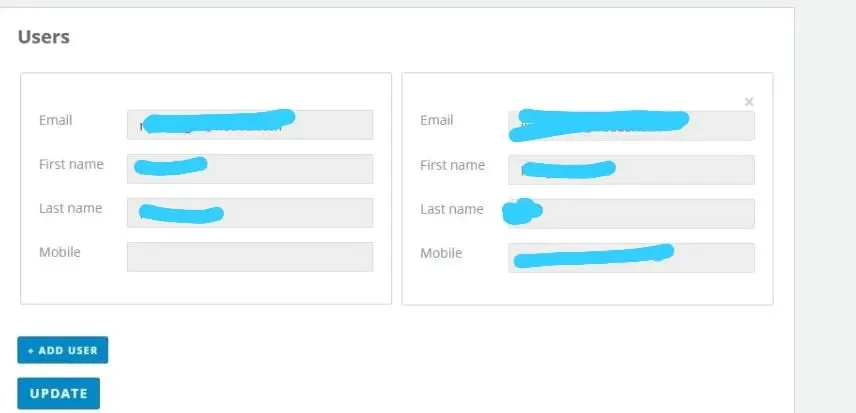
The screenshot shows the user account overview, with the user's own editable details alongside the admin's details, which the interface only allows viewing.
Exploitation
Step 1: Inspect the update request
The researcher used the user account to update its own details and inspected the request. The admin's details were also being passed in the request body, even though the interface does not let a user edit them.
Step 2: Modify the admin fields
With the admin fields present in the request, the researcher changed them from the user session. The server accepted the change: there was no back-end check tying the update to the authenticated user's own record, so the admin's details were modified.
The fields that could be changed were the admin's first name, last name and mobile number.
Step 3: Confirm the change
The researcher opened the admin account in another browser and checked the profile. The details had in fact been changed, confirming the issue was server-side and not just a client-side artefact.
Step 4: Report and triage
The issue was reported immediately and triaged quickly. The team initially set the severity to P4. After the researcher explained the severity clearly, the team raised it to P2.
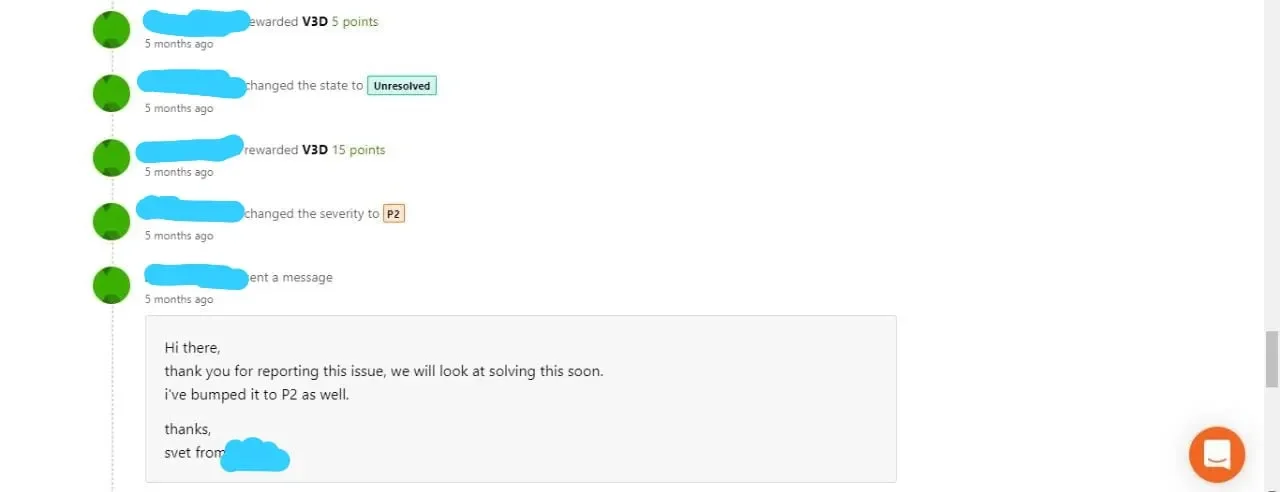
The screenshot relates to the reported issue and its severity discussion with the team.
Root cause
The update request carried the admin's details alongside the user's own, and the back end applied the submitted values without verifying that the authenticated user was authorised to modify that record. The update request included the admin's record data, and the back end applied the submitted values without verifying that the authenticated user was authorised to modify that record. The read-only presentation of the admin details was enforced only in the interface, so a user could change the values in the request and have them accepted. This is a classic case of client-side enforcement of a server-side security decision, combined with missing object-level authorisation (IDOR-style access control).
Impact
A low-privileged user, invited by an admin, could change the admin's first name, last name and mobile number. The change persisted and was visible from the admin's own session. The report does not describe any further escalation, such as account takeover, beyond editing those profile fields.
Fix
The report does not state what fix was applied. The appropriate fix is server-side: the update handler should derive the target record from the authenticated session rather than from client-supplied identifiers, and should explicitly authorise any record identifier submitted by the client against the caller's role and relationship to that record. Admin fields should not be accepted from a user session at all.
Variants to test
- Profile update endpoints where the response or form contains another user's fields: submit the request with those fields changed and check the other account. A positive result is the other account's details changing.
- Invitation flows with multiple roles: create a low-privileged account and look for identifiers of the inviter or other team members in requests, then try modifying them.
- Read-only fields in the UI: intercept the save request and check whether the read-only values are sent and accepted by the server.
- Object identifiers in update requests: swap the identifier for another account's identifier and observe whether the server applies the change or returns an authorisation error.
- Team management actions such as removal: attempt them from a user session and confirm whether the server enforces the role restriction that the UI implies.
What happened, in plain words
A security researcher found a bug in a private bug bounty program on a website he calls REDACTED.COM. The website had a team management feature: an admin could invite users, and both admins and ordinary users could invite others. An admin could also remove any user. A normal user could edit their own details but could only view the details of the admin who invited them, not edit them.
The bug was a broken access control issue: when a low-privileged user updated their own details, the request also carried the admin's details, and the server applied the changes to the admin record without checking whether the user was allowed to do that. So the user could change the admin's first name, last name and mobile number.
How the researcher found the program
The researcher used Google Dorks to search for private bug bounty programs. Google Dorks are special search queries that find pages with specific text or patterns. He used these two dorks:
“powered by bugcrowd” -site:bugcrowd.com
This searches for pages that contain the phrase “powered by bugcrowd” but are not on the bugcrowd.com site itself. The minus sign excludes results from that site. The idea is to find companies that use the Bugcrowd platform but host their own bug bounty pages elsewhere.
“powered by hackerone” “submit vulnerability report”
This searches for pages that contain both “powered by hackerone” and “submit vulnerability report”. That combination often appears on private program pages that are not listed on the main HackerOne site.
He then came across a program on REDACTED.COM and started looking for bugs.
Reconnaissance
He began with subdomain discovery. A subdomain is a part of a larger domain, like blog.example.com is a subdomain of example.com. He found nearly 30 subdomains. He then probed them with httpx, a tool that checks which subdomains are alive (responding to web requests). 20 were alive. Only two or three of those had meaningful functionality.
He first tested password reset, email verification and input sanitisation, but found no bugs there. Input sanitisation is the process of cleaning user input to prevent attacks like cross-site scripting (XSS) or SQL injection.
The idea
He had recently read a write-up by sunilyedla about bypassing an email update restriction to change the emails of team members, in a target where users can be invited in different roles. He decided to check for the same invitation functionality on this target, since it also had a feature where an admin can invite a user.
Setting up accounts
He created two accounts:
- An admin account.
- A user account, invited by that admin.
The roles and what they can do, as described in the report:
| Role | Capabilities |
|---|---|
| User | Invite other users; edit own details; view admin details |
| Admin | Invite other users; remove any user; edit own details |
In the account section, the user can see their own details and the details of the admin who invited them. The user can edit their own details, but the admin details are shown as read-only.
The screenshot shows the user account overview. The user's own details are editable, while the admin's details are visible but cannot be edited through the interface.
Exploitation
Step 1: Inspect the update request
The researcher used the user account to update its own details and looked at the request that was sent. A request is what your browser sends to a website when you do something, like clicking a save button. He saw that the admin's details were also included in the request body, even though the interface does not let a user edit them. The request body is the part of the request that carries data, like form fields.
Step 2: Modify the admin fields
Since the admin fields were present in the request, he changed them from the user session. A session is the period during which you are logged in; the server keeps track of who you are, often using a cookie. A cookie is a small piece of data stored in your browser that identifies your session. The server accepted the change: there was no back-end check to ensure the update only applied to the authenticated user's own record. So the admin's details were modified. The fields that could be changed were the admin's first name, last name and mobile number.
Step 3: Confirm the change
He opened the admin account in another browser and checked the profile. The details had indeed been changed, confirming the issue was server-side and not just something that appeared in the user's browser. Server-side means the change happened on the server, not just in the browser's display.
Step 4: Report and triage
He reported the issue immediately and it was triaged quickly. Triage is the process where the security team reviews the report and decides how serious it is. The team initially set the severity to P4. Severity is a rating of how serious a vulnerability is; P4 is low, P2 is higher. After the researcher explained the severity clearly, the team raised it to P2.
The screenshot relates to the reported issue and the severity discussion with the team.
Root cause
The update request carried the admin's details alongside the user's own, and the back end applied the submitted values without verifying that the authenticated user was authorised to modify that record. An endpoint is a specific URL where an API (a way for programs to talk to each other) receives requests. Object identifiers are values that identify a specific record, like a user ID. The update request included the admin's record data, and the back end applied the submitted values without verifying that the authenticated user was authorised to modify that record. The read-only presentation of the admin details was enforced only in the interface, so a user could change the values in the request and have them accepted. This is a classic case of client-side enforcement of a server-side security decision, combined with missing object-level authorisation (IDOR-style access control). IDOR stands for Insecure Direct Object Reference: when a program uses a user-supplied identifier to access a record without checking if the user is allowed to access it.
Impact
A low-privileged user, invited by an admin, could change the admin's first name, last name and mobile number. The change persisted and was visible from the admin's own session. The report does not describe any further escalation, such as account takeover, beyond editing those profile fields.
Fix
The report does not state what fix was applied. The appropriate fix is server-side: the update handler should derive the target record from the authenticated session rather than from client-supplied identifiers, and should explicitly authorise any record identifier submitted by the client against the caller's role and relationship to that record. Admin fields should not be accepted from a user session at all.
Variants to test
- Profile update endpoints where the response or form contains another user's fields: submit the request with those fields changed and check the other account. A positive result is the other account's details changing.
- Invitation flows with multiple roles: create a low-privileged account and look for identifiers of the inviter or other team members in requests, then try modifying them.
- Read-only fields in the UI: intercept the save request and check whether the read-only values are sent and accepted by the server.
- Object identifiers in update requests: swap the identifier for another account's identifier and observe whether the server applies the change or returns an authorisation error.
- Team management actions such as removal: attempt them from a user session and confirm whether the server enforces the role restriction that the UI implies.
Glossary
- API: A set of rules that lets one program talk to another, like a waiter taking your order to the kitchen.
- Broken access control: A vulnerability where a program does not properly check if a user is allowed to perform an action or access a resource.
- Client-side: Something that happens in the user's browser, not on the server.
- Cookie: A small piece of data stored in your browser that helps a website remember who you are.
- Endpoint: A specific URL where an API receives requests.
- Google Dorks: Special search queries that find pages with specific text or patterns.
- httpx: A tool that checks which subdomains are alive by sending web requests.
- IDOR (Insecure Direct Object Reference): A type of access control bug where a program uses a user-supplied identifier to access a record without checking if the user is allowed to access it.
- Input sanitisation: The process of cleaning user input to prevent attacks.
- Object identifier: A value that identifies a specific record, like a user ID.
- P4/P2: Severity ratings; P4 is low, P2 is higher.
- Request: What your browser sends to a website when you do something.
- Request body: The part of a request that carries data, like form fields.
- Server-side: Something that happens on the server, not in the user's browser.
- Session: The period during which you are logged in; the server keeps track of who you are.
- Severity: A rating of how serious a vulnerability is.
- Subdomain: A part of a larger domain, like
blog.example.comis a subdomain ofexample.com. - Triage: The process where a security team reviews a report and decides how serious it is.
- XSS (Cross-site scripting): A type of attack where malicious scripts are injected into web pages.
- SQL injection: A type of attack where malicious SQL code is inserted into input fields to manipulate a database.

