Broken Access Control via Direct URL Navigation: Bypassing Premium Feature Restrictions
The application did not enforce subscription-based access controls on the server side for the Personal Avatar creation workflow. A free-tier user could bypass frontend restrictions by directly navigating to a specific route and create more than the advertised limit of five avatars.

Pentesting
The full write-up lives on its author's site
It belongs to its author, so we link to it rather than copy it. The other two tabs are our own rewrites, checked against it.
Context
The target was a web-based AI video creation platform that sells premium functionality through subscription plans. One of the paid features is Personal Avatars: a workflow in which a user records themselves and the platform processes that recording with AI video and GPU resources. The feature is advertised as part of the Pro plan, and the application advertises a limit of five Personal Avatars.
Like many single-page applications, the frontend decides what to show based on a subscription value returned by the backend. Free-tier users who try to reach the Personal Avatars feature through the normal interface are shown an upgrade prompt. The researcher's question was whether that prompt was the only thing standing between a free account and the paid workflow.
Setup
The testing used:
- A normal free-tier account on the platform.
- Burp Suite as an intercepting proxy, in particular its Match and Replace feature for rewriting response bodies, and its HTTP history for reviewing the traffic the application had already generated.
- A second, separate free-tier account opened in a different browser, used later to confirm the result without any proxy modifications.
No special role or privilege was needed: the whole exercise starts from an ordinary free account.
Finding it
Through the normal interface, the Personal Avatars feature looked properly gated. A free-tier user was presented with an upgrade prompt, which is the expected behaviour for a subscription-restricted feature.
What made the restriction look weak was where the decision appeared to be made. The subscription state arrived in a response body and the UI reacted to it, which suggested the gate might be a client-side one. The researcher tested that hypothesis by rewriting the subscription value in the response and watching what the interface did.
Exploitation
Step 1: Rewrite the subscription value
With Burp Suite's Match and Replace feature, the researcher changed the subscription value in the response body:
- Original:
freemium - Modified:
creator_v2_annual
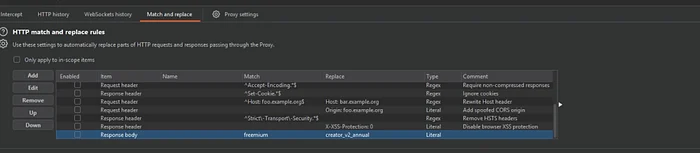
After the substitution, the Pro features, including Personal Avatars, appeared in the UI. This confirmed that the interface renders premium options based on the subscription string it receives, but it did not yet give access: attempting to use the feature at that point still did not work. The modification only affected the frontend interface.
Step 2: Find the creation route in the proxy history
Since the UI now exposed the feature but the feature itself refused to work, the researcher went through the Burp Suite HTTP history to see what the application actually called. That review surfaced the direct creation route:
/#/avatars/record/
The route is a client-side fragment path, which is consistent with a single-page application: the server serves the same shell, and the frontend router decides which view to render for that fragment.
Step 3: Navigate to the route directly
Instead of going through the interface, the researcher typed the route into the browser's address bar and navigated to it manually. The Personal Avatar creation interface became accessible, bypassing the frontend restriction that had hidden it.
Step 4: Exceed the avatar limit
Continuing through the creation workflow, the researcher found that the advertised limit of five Personal Avatars could be exceeded. The advertised limit of five Personal Avatars could be exceeded.
Step 5: Reproduce without any proxy modification
To rule out Match and Replace as a precondition, the researcher opened a completely separate browser, logged in with another free-tier account, and applied no response modifications at all. Navigating directly to the same route:
/#/avatars/record/
gave that free-tier account access to the Personal Avatar creation workflow as well, and it was able to create more than five Personal Avatars without holding a Pro subscription.
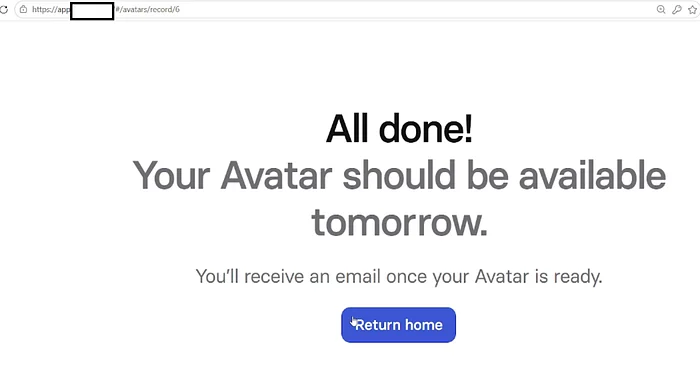
This second reproduction is the important one: it shows the bypass does not depend on tampering with the response, only on reaching the route.
Root cause
The report attributes the issue to a lack of consistent server-side authorization and subscription entitlement validation. In practice, two separate checks were being made in the wrong place:
- Feature visibility was driven by the subscription value in the response body, so changing
freemiumtocreator_v2_annualmade the UI offer Pro features. That is a presentation decision, not an access control decision. - Feature reachability depended on frontend navigation. The creation view was hidden behind the normal interface, but the route itself was not protected, so direct navigation reached it.
The backend, in turn, did not independently verify the subscription tier, the feature permission or the usage limit when the creation workflow was used. The backend did not independently verify the subscription tier, feature permission or usage limit, so free-tier accounts could use the workflow. The report does not include the server-side code, so the exact location of the missing check is not shown; the described behaviour is consistent with the backend trusting the client's view of the subscription rather than validating it per request.
Impact
The report lists the following consequences:
- Premium feature bypass: free-tier users can access functionality intended for paid subscribers.
- Subscription limit bypass: users may exceed the advertised limit of five Personal Avatars.
- Resource abuse: unauthorised use of AI video processing, biometric recording, GPU resources and storage may increase infrastructure costs.
- Business logic violation: the subscription enforcement mechanism does not consistently protect premium functionality.
- Financial impact: unauthorised consumption of paid features may undermine the subscription-based monetisation model.
The conditions are modest: an ordinary free-tier account and direct navigation to the route, with no interception tooling required. The report does not state how the issue was remediated or whether a bounty was awarded.
Fix
The report does not describe a fix that was applied. Its recommendation is that subscription tiers, feature permissions and usage limits be verified independently by the backend, rather than relying on client-side response values or frontend navigation restrictions. Concretely, that means subscription tiers, feature permissions and usage limits should be verified independently by the backend rather than relying on client-side response values or frontend navigation restrictions.
Variants to test
- Other premium routes in the same SPA. Enumerate fragment routes from the proxy history and request them directly with a free account. A positive result is a premium view rendering and its backing API calls succeeding without an upgrade prompt.
- Subscription string substitution. Replace the plan value in responses with a paid plan identifier and observe which features appear. A positive result is premium UI appearing, which tells you the gate is client-side; follow up by calling the feature's API directly to see whether the server agrees.
- Direct API calls behind gated views. Take the endpoints the premium view calls and replay them with a free-tier session, skipping the UI entirely. A positive result is a successful response rather than an authorisation error.
- Usage limits on creation endpoints. Create objects past the advertised quota with a free account. A positive result is the server accepting creations beyond the documented limit.
- Cross-account confirmation. Repeat any promising finding from a clean browser with a second free account and no proxy. A positive result is the same access without any tampering, which removes client-side modification as an explanation.
What happened, in plain words
A security researcher tested a website that uses artificial intelligence (AI) to make videos. The site sells extra features through paid subscriptions, a bit like a gym that lets anyone walk in but charges for the weights room. One paid feature is called Personal Avatars: you record yourself, and the site uses AI and powerful computers (called GPUs) to turn that recording into an avatar video. The site advertises a limit of five Personal Avatars.
The researcher signed up with a normal free account and asked a simple question: is the upgrade prompt the only thing stopping a free user from reaching the paid feature? The answer was no, the paid feature could be reached anyway. The researcher found two separate problems:
- The page decided what to show based on a subscription value sent by the server, and that value could be changed in transit. Changing
freemiumtocreator_v2_annualmade the paid options appear on screen. - Even without changing anything, typing a hidden address directly into the browser's address bar opened the avatar creation screen, and the site let the free account create more than the advertised five avatars.
This kind of flaw is called Broken Access Control: the site knows who you are but does not properly check what you are allowed to do. The researcher confirmed the second problem in a completely separate browser with a second free account and no tools at all, which shows the bypass does not depend on tampering with the traffic.
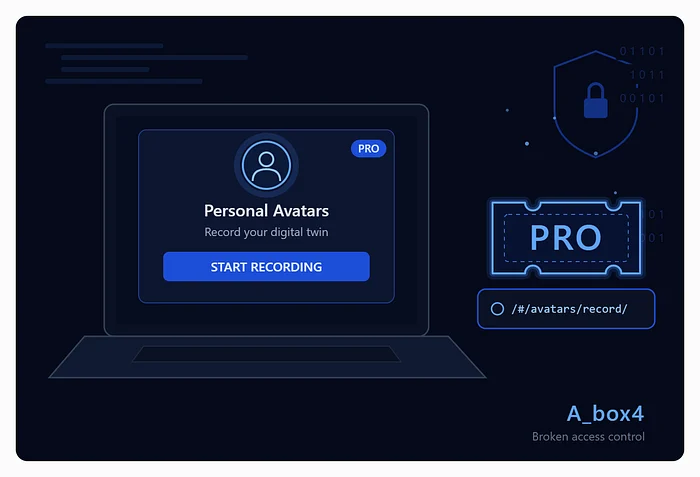
The image above is the header of the published write-up, showing the title and the author's name.
The target and the feature
The target was a web-based AI video creation platform. It sells premium functionality through subscription plans. One paid feature is Personal Avatars, a workflow where a user records themselves and the platform processes that recording using AI video and GPU resources. The feature is advertised as part of the Pro plan, and the application advertises a limit of five Personal Avatars.
A few terms from that paragraph, from zero:
- Web-based platform: software you use through a browser, with no program to install.
- Subscription plan: a recurring payment that unlocks certain features, like a monthly pass.
- GPU: a graphics processing unit, a chip that is very good at the heavy maths AI video work needs. GPU time costs the company real money.
- Workflow: the series of screens and steps a user goes through to complete a task.
Like many modern sites, this one is a single-page application (SPA). In an SPA the browser loads one page shell once, and a piece of JavaScript called the router swaps the content as you move around. The address bar often shows a # followed by a path, for example /#/avatars/record/. Everything after the # is called the fragment. The browser does not send the fragment to the server; the JavaScript in the page reads it and decides which screen to draw. That detail matters later.
The frontend (the part running in your browser) decides what to show based on a subscription value returned by the backend (the part running on the company's servers). Free-tier users who try to reach the Personal Avatars feature through the normal interface are shown an upgrade prompt. The researcher's question was whether that prompt was the only thing standing between a free account and the paid workflow.
The setup
The testing used:
- A normal free-tier account on the platform.
- Burp Suite as an intercepting proxy. A proxy sits between your browser and the website and can show, pause and change the messages going each way, like a postal worker who opens every letter. Two of its features were used: Match and Replace, which automatically rewrites parts of messages as they pass, and HTTP history, a log of every request and response the browser has already made.
- A second, separate free-tier account opened in a different browser, used later to confirm the result without any proxy modifications.
No special role or privilege was needed. The whole exercise starts from an ordinary free account.
Two more terms worth knowing before we go on:
- Request and response: your browser sends a request ("give me this page" or "create this avatar") and the server sends back a response (the page, or data, or an error).
- Response body: the actual content of the response, as opposed to its headers, which are the labels and metadata around it.
Finding it
Through the normal interface, the Personal Avatars feature looked properly gated. A free-tier user was presented with an upgrade prompt, which is the expected behaviour for a subscription-restricted feature.
What made the restriction look weak was where the decision appeared to be made. The subscription state arrived in a response body and the UI reacted to it. In other words, the server told the browser "this user is on the freemium plan", and the browser's JavaScript decided whether to draw the paid buttons. That suggested the gate might be a client-side one, meaning the check happens in your browser rather than on the server. A client-side check is like a shop that puts the expensive goods behind a curtain: anyone who walks around the curtain is in.
The researcher tested that hypothesis by rewriting the subscription value in the response and watching what the interface did.
Exploitation
Step 1: Rewrite the subscription value
With Burp Suite's Match and Replace feature, the researcher changed the subscription value in the response body:
- Original:
freemium - Modified:
creator_v2_annual
The image shows the Match and Replace rule in Burp Suite, with the original subscription value and the modified one.
Line by line, in plain words:
- Original
freemium: this is the plan name the server sends for a free account. The word is a blend of "free" and "premium". - Modified
creator_v2_annual: this is the plan name the researcher substituted, which looks like the identifier for a paid annual creator plan. - Match and Replace: a Burp Suite feature that watches traffic and swaps one piece of text for another automatically, so the researcher does not have to edit every response by hand.
After the substitution, the Pro features, including Personal Avatars, appeared in the UI. This confirmed that the interface renders premium options based on the subscription string it receives, but it did not yet give access: attempting to use the feature at that point still did not work. The modification only affected the frontend interface. The screen showed the door, but the door was still locked.
Step 2: Find the creation route in the proxy history
Since the UI now exposed the feature but the feature itself refused to work, the researcher went through the Burp Suite HTTP history to see what the application actually called. The history is a record of every request the browser made, including ones triggered silently by JavaScript that you never see on screen. That review surfaced the direct creation route:
/#/avatars/record/
Line by line:
/: the root of the site.#: the fragment marker. Everything after it is handled by the page's JavaScript, not sent to the server./avatars/record/: the path the router uses to decide which screen to draw, here the avatar recording screen.
Because this is a fragment path, the server serves the same page shell for it as for any other route. The frontend router then decides which view to render. That is why the route is interesting: if the router does not check the subscription before drawing the view, the view appears.
Step 3: Navigate to the route directly
Instead of going through the interface, the researcher typed the route into the browser's address bar and navigated to it manually. The Personal Avatar creation interface became accessible, bypassing the frontend restriction that had hidden it. The normal interface simply never offered a link to this screen for free users; the screen itself was not protected.
Step 4: Exceed the avatar limit
Continuing through the creation workflow, the researcher found that the advertised limit of five Personal Avatars could be exceeded. The advertised limit of five Personal Avatars could be exceeded.
Step 5: Reproduce without any proxy modification
To rule out Match and Replace as a precondition, the researcher opened a completely separate browser, logged in with another free-tier account, and applied no response modifications at all. Navigating directly to the same route:
/#/avatars/record/
Line by line:
/#/avatars/record/: the same fragment route as before, typed straight into the address bar of a clean browser.- No proxy, no Match and Replace: nothing was altered in transit, so any access obtained here comes from the site itself, not from the researcher's tools.
That free-tier account got access to the Personal Avatar creation workflow as well, and it was able to create more than five Personal Avatars without holding a Pro subscription.
The image shows the result of the second reproduction: more than five Personal Avatars created from a free-tier account.
This second reproduction is the important one: it shows the bypass does not depend on tampering with the response, only on reaching the route.
Root cause
The report attributes the issue to a lack of consistent server-side authorization and subscription entitlement validation. Two terms there:
- Authorization: deciding what a known user is allowed to do. Authentication is proving who you are; authorization is what you may then do.
- Entitlement: the specific rights a plan grants, such as "may use Personal Avatars" or "may create five of them".
In practice, two separate checks were being made in the wrong place:
- Feature visibility was driven by the subscription value in the response body, so changing
freemiumtocreator_v2_annualmade the UI offer Pro features. That is a presentation decision, not an access control decision. Hiding a button is not the same as locking a door. - Feature reachability depended on frontend navigation. The creation view was hidden behind the normal interface, but the route itself was not protected, so direct navigation reached it.
The backend, in turn, did not independently verify the subscription tier, the feature permission or the usage limit when the creation workflow was used. The backend did not independently verify the subscription tier, feature permission or usage limit, so free-tier accounts could use the workflow. The report does not include the server-side code, so the exact location of the missing check is not shown; the described behaviour is consistent with the backend trusting the client's view of the subscription rather than validating it per request.
Impact
The report lists the following consequences:
- Premium feature bypass: free-tier users can access functionality intended for paid subscribers.
- Subscription limit bypass: users may exceed the advertised limit of five Personal Avatars.
- Resource abuse: unauthorised use of AI video processing, biometric recording, GPU resources and storage may increase infrastructure costs. Biometric recording here means recording a person's face or body for the avatar.
- Business logic violation: the subscription enforcement mechanism does not consistently protect premium functionality.
- Financial impact: unauthorised consumption of paid features may undermine the subscription-based monetisation model.
The conditions are modest: an ordinary free-tier account and direct navigation to the route, with no interception tooling required. The report does not state how the issue was remediated or whether a bounty was awarded.
Fix
The report does not describe a fix that was applied. Its recommendation is that subscription tiers, feature permissions and usage limits be verified independently by the backend, rather than relying on client-side response values or frontend navigation restrictions. Concretely, that means subscription tiers, feature permissions and usage limits should be verified independently by the backend rather than relying on client-side response values or frontend navigation restrictions.
Variants to test
If you want to look for the same class of problem elsewhere, these are directions worth trying:
- Other premium routes in the same SPA. Enumerate fragment routes from the proxy history and request them directly with a free account. A positive result is a premium view rendering and its backing API calls succeeding without an upgrade prompt. An API (application programming interface) is the set of addresses and rules a site's own pages use to fetch and send data; the visible page is one layer, the API calls underneath are another.
- Subscription string substitution. Replace the plan value in responses with a paid plan identifier and observe which features appear. A positive result is premium UI appearing, which tells you the gate is client-side; follow up by calling the feature's API directly to see whether the server agrees.
- Direct API calls behind gated views. Take the endpoints the premium view calls and replay them with a free-tier session, skipping the UI entirely. An endpoint is a specific address on the server that accepts a particular kind of request. A positive result is a successful response rather than an authorisation error.
- Usage limits on creation endpoints. Create objects past the advertised quota with a free account. A positive result is the server accepting creations beyond the documented limit.
- Cross-account confirmation. Repeat any promising finding from a clean browser with a second free account and no proxy. A positive result is the same access without any tampering, which removes client-side modification as an explanation.
Glossary
- Access control: the rules that decide which users may use which features or data.
- API: the set of addresses and rules a site's own pages use to fetch and send data behind the scenes.
- Authentication: proving who you are, usually by logging in.
- Backend: the software running on the company's servers, which the browser talks to.
- Biometric recording: recording a person's face or body for use in an avatar.
- Broken Access Control: a flaw where the site does not properly check what a user is allowed to do, so they can reach things they should not.
- Burp Suite: a tool that sits between your browser and a website so you can inspect and change the traffic.
- Client-side: happening in your browser, on your machine.
- Endpoint: a specific address on a server that accepts a particular kind of request.
- Entitlement: the specific rights a subscription plan grants.
- Fragment: the part of a web address after the
#, handled by the page's JavaScript rather than sent to the server. - Frontend: the part of a site that runs in your browser.
- GPU: a graphics processing unit, a chip suited to heavy maths such as AI video processing.
- HTTP history: Burp Suite's log of every request and response the browser has made.
- Match and Replace: a Burp Suite feature that automatically swaps one piece of text for another in passing traffic.
- Proxy: a middleman between your browser and a website that can show, pause and change messages.
- Request and response: the message your browser sends and the message the server sends back.
- Response body: the actual content of a response, as opposed to its headers.
- Router: the JavaScript in a single-page application that decides which screen to draw for a given address.
- Server-side: happening on the company's servers, where checks cannot be edited by the user.
- Single-page application (SPA): a site that loads one page shell and swaps content with JavaScript as you navigate.
- Subscription plan: a recurring payment that unlocks certain features.

