Bug Bounty: Broken API Authorization
The API server did not verify whether the authorization bearer token belonged to a regular user or a power user, so any authenticated user could call privileged endpoints. An attacker could escalate their account to power user, delete or take over other accounts, and leak limited user information.
 Published on medium.com
API
The full write-up lives on its author's site
It belongs to its author, so we link to it rather than copy it. The other two tabs are our own rewrites, checked against it.
Context
This is a write-up of a broken API authorization bug found in a private bug bounty program. The researcher refers to the site as "target.com" and notes that some information is redacted because the program is private. The affected asset was a sub-domain, academy.target.com, and the researcher says the issue affected thousands of sub-domains.
The feature at the centre of the report is an API documentation page at academy.target.com/api/docs. Pages like this are valuable during reconnaissance because they describe the structure of requests and responses. The documentation listed endpoints that appeared to be intended for internal or power users only:
/poweruser/add
/poweruser/delete
/user/delete
/user/create
/user/user_logged_in
/user/profile
Setup
The researcher had a dirsearch scan running in the background while browsing academy.target.com to get an overview of the site's functionality. The researcher noticed the /api/docs endpoint while a dirsearch scan was running in the background.
No special tooling beyond dirsearch and a browser is described. The researcher created a second account to test whether one user could act on another. The precondition for the attack was a valid session on the site: the researcher used the bearer token seen in ordinary requests.
Finding it
Browsing to academy.target.com/api/docs showed a page that was extremely similar to Swagger UI, although the site did not use Swagger. The page had a button called "Authenticate". Clicking it navigated to a login page, but logging in there returned an "Account not authorized" message.
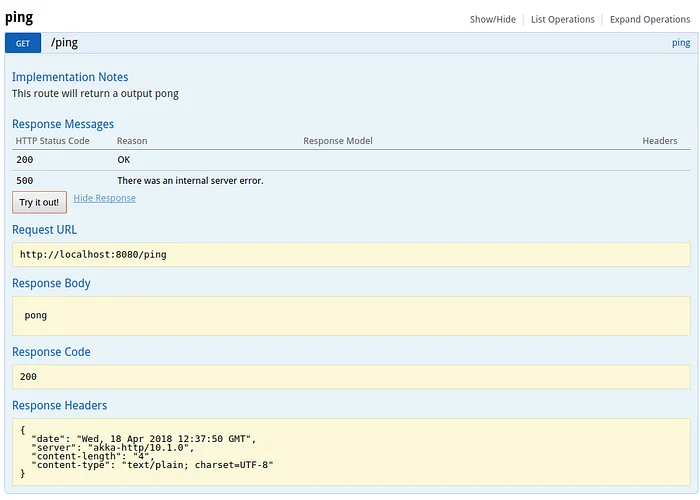
The documentation page, which the researcher says looked roughly like the screenshot.
The endpoint list caught the researcher off guard because the endpoints looked like they should be reserved for internal or power-user use. Calling the endpoints directly, without any API token or authorization header, produced an error response.
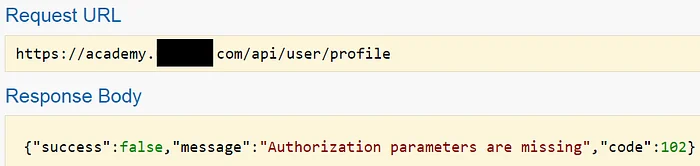
The response returned when the endpoints were called with no token and no authorization header.
The site did not appear to offer any public API, and the researcher could not find a way to generate an API token, so the issue was set aside for later. After searching the site extensively, no API token turned up in requests or responses. However, many requests carried an authorization bearer token.
Exploitation
Step 1: Reuse the bearer token from normal traffic
The researcher copied the authorization bearer token seen in ordinary requests and included it in calls to the API endpoints found in the documentation. The token was copied from ordinary requests seen on the site.
Step 2: Change another user's password
With a second account created for the test, the researcher sent a POST request to api/user/edit to change that account's password, this time with the bearer token attached.
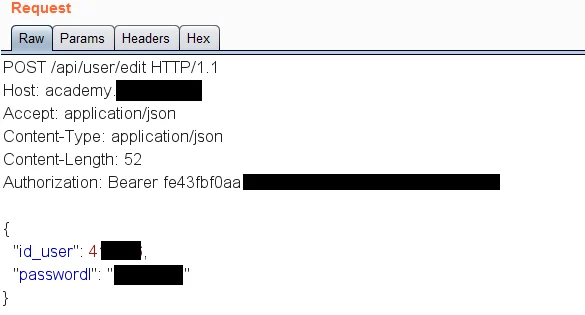
The HTTP request that changes another user's password, sent with the bearer token.
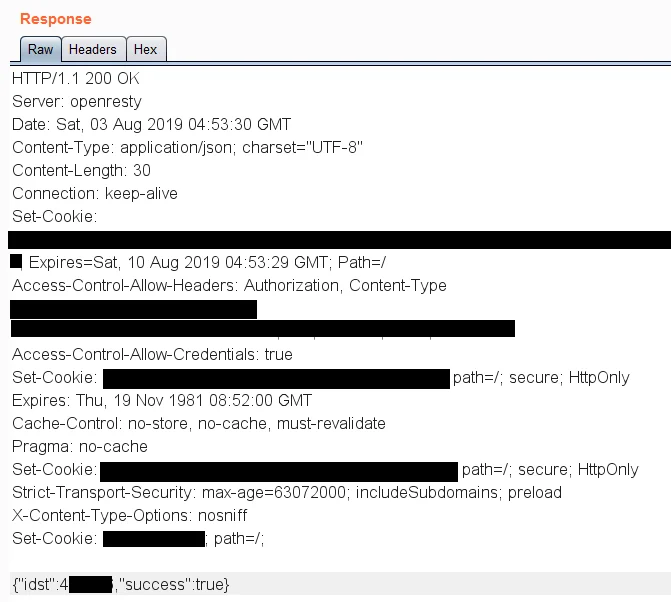
The successful response to that request.
The request succeeded. The server accepted the token and performed the action.
Step 3: Reach the rest of the documented functionality
Beyond escalating the account to a power user, the researcher could invoke almost all of the other API endpoints. The documentation described the parameters needed to delete accounts, take over accounts, create new accounts and perform other actions.
Root cause
The server was not checking whether the authorization bearer token belonged to a regular user or a power user. The Tl;dr in the report states this directly: the authorization decision was missing, so any valid token was treated as sufficient for endpoints that should have required elevated privileges.
The documentation page itself was not the weakness. The "Authenticate" button led to a login page that rejected the account with "Account not authorized". Calling the endpoints with no token and no authorization header produced an error response.
Impact
A regular authenticated user could invoke functionality intended for internal or power users, without user interaction. According to the report this included:
- escalating the attacker's own account to a power user;
- deleting accounts;
- taking over accounts, including changing another user's password;
- creating new accounts;
- leaking limited information: full name, email addresses and employer.
The researcher states the issue affected thousands of sub-domains. The program was private and awarded a $440 bounty.
Fix
The report does not describe what the vendor changed. The fix implied by the root cause is to check, on every endpoint, that the bearer token belongs to a user with the privilege the endpoint requires, rather than only checking that a token is present. The API endpoints needed the privilege check enforced server-side.
Variants to test
- Documentation endpoints on other sub-domains. Look for paths such as
/api/docs,/swagger,/swagger-uior similar pages that describe internal endpoints. A positive result is a page listing privileged routes such as user creation, deletion or role changes. - Token reuse across privilege levels. Take a bearer token from a normal user's traffic and replay it against every documented endpoint. A positive result is a successful response where the endpoint should require a power user.
- Missing token versus wrong role. Compare the response with no token at all against the response with a low-privilege token. If the first is rejected and the second succeeds, authentication is enforced but authorization is not.
- Cross-account object changes. With two accounts, send requests that modify the second account (password change, profile edit, deletion) using the first account's token. A positive result is a successful response affecting the other account.
- Role fields in requests. Where the documentation describes parameters for user creation or editing, try supplying role or privilege values. A positive result is a created or modified account with elevated privileges.
What happened, in plain words
A security researcher was looking around a website that belonged to a private bug bounty program. A bug bounty program is a deal between a company and independent researchers: the company says "if you find a security problem in our systems, tell us, and we will pay you a reward instead of getting angry". Because this particular program was private, the researcher hid the real name of the site and called it "target.com".
The researcher found a page on one of the site's sub-domains, academy.target.com, that listed a set of special web addresses (called endpoints) used by the site's internal programming interface. That interface, an API, is the part of a website that programs talk to, rather than people clicking buttons. The listed endpoints looked like they were meant only for staff or for very privileged accounts, things like adding a "power user", deleting users, creating users and reading profiles.
The mistake the site made was simple to describe: the server was not checking whether the authorization bearer token belonged to a regular user or a power user. So an ordinary user could do things that only a power user should be able to do. The researcher proved it by taking the token from their own normal browsing session and using it to change the password of a second account they had created. It worked. The researcher reported it to the company, which ran a private bug bounty program and paid a reward of $440.
This article walks through the same story step by step, explaining every technical idea as it appears, so that someone who has only ever used a browser can follow along.
Some words you will need first
Before the story, a few ideas come up again and again. It is worth getting them straight now.
A server and a browser. When you visit a website, your browser (Chrome, Firefox, Safari) asks a computer somewhere else, called a server, for a page. The server sends the page back. Everything you see in the browser was produced by that server.
A sub-domain. A website like target.com can have many smaller sites hanging off it, such as academy.target.com or shop.target.com. These are called sub-domains. They often run different software from the main site, which is why researchers like to look at them: a company may protect its main site carefully and forget about a sub-domain.
An API. Think of a restaurant. The dining room is the website you see; the kitchen is the server where the real work happens. The API is the waiter: a fixed set of requests you can make ("bring me the menu", "cancel my order") and fixed replies you get back. Programs use APIs to talk to each other, and websites often use them behind the scenes too. Each request goes to an address called an endpoint, for example /user/create or /user/delete.
Authentication and authorization. These two sound alike but mean different things. Authentication is proving who you are, like showing your passport at the airport. Authorization is deciding what you are allowed to do, like the passport check also telling the staff whether you may enter the first-class lounge. A site can get authentication right and still get authorization wrong, and that is exactly what happened here.
A token. When you log in to a website, the server needs a way to recognise you on your next request, because the web itself does not remember anything between requests. One common method is a token: a long string of characters the server gives you after login, which your browser sends back with every request. It works like a cloakroom ticket: you hand in your coat, get a ticket, and later the ticket proves the coat is yours. A particular style of token is called a bearer token, meaning "whoever bears (carries) this token is treated as the owner". If someone else gets your bearer token, they can act as you, which is why tokens are secret.
An authorization header. When your browser sends a request, it can attach small labelled pieces of information called headers. One of them, the authorization header, is where the bearer token travels. You can think of it as the envelope in which the cloakroom ticket is carried.
Broken authorization. This is the name of the whole class of bug in this report. The system knows who you are but fails to check whether you are allowed to do what you are asking. It is like a hotel where the lift asks for your room card but accepts any card from any room for the penthouse floor.
Reconnaissance. Before attacking anything, researchers map out what a site contains: which pages exist, which sub-domains exist, which endpoints respond. This mapping phase is called reconnaissance, or recon. It is the digital equivalent of walking around a building and noting every door before trying any handles.
dirsearch. This is a small program that runs on a computer and tries a long list of common file and folder names against a website, one after another, to see which ones exist. It is like trying every key on a big bunch in a lock, quickly, to find the ones that turn. The researcher had dirsearch running in the background while browsing the site.
Swagger UI. Swagger is a popular tool that produces a web page listing all the endpoints of an API, with descriptions of what each one expects and returns. Developers use it as living documentation. The page the researcher found looked very much like a Swagger page, although the site did not actually use Swagger.
A POST request. When your browser loads a page, it usually sends a GET request, meaning "give me this". When it submits a form, it usually sends a POST request, meaning "here is some data, do something with it". Changing a password is a POST: you are sending new data to the server.
The setup
The researcher was exploring academy.target.com to get an overview of what the site could do. While browsing, a dirsearch scan was running in the background, trying common paths. The scan turned up an interesting address: academy.target.com/api/docs.
Why does that matter? Because a path ending in /api/docs is very likely to be the documentation page for the site's API. Documentation pages are a gift during reconnaissance: they tell you the exact shape of every request and response, so you do not have to guess. It is like finding the restaurant's full menu, including the dishes that are not offered to ordinary customers.
No special tools beyond dirsearch and a normal browser are described. The researcher also created a second account on the site, purely for testing: to check whether one user could act on another user's account, you need two accounts, one to attack from and one to attack.
The only precondition for the attack was a valid login on the site, since ordinary requests carried an authorization bearer token.
Finding it
Browsing to academy.target.com/api/docs showed a page that looked extremely similar to Swagger UI, even though the site did not use Swagger. The page had a button simply labelled "Authenticate". Clicking it took the researcher to a login page, but trying to log in there produced an "Account not authorized" message.
The documentation page, which the researcher says looked roughly like the screenshot.
That "Account not authorized" message came from the login page the "Authenticate" button led to. Keep that in mind, because the rest of the story is about the same decision not being made one level deeper.
The documentation listed endpoints that looked like they were meant for internal or power users only:
/poweruser/add
/poweruser/delete
/user/delete
/user/create
/user/user_logged_in
/user/profile
Line by line, in plain words:
/poweruser/addis an address that, judging by its name, adds a new power user, that is, an account with elevated privileges./poweruser/deletepresumably removes a power user./user/deletepresumably deletes an ordinary user account./user/createpresumably creates a new account./user/user_logged_inpresumably reports whether a user is currently logged in./user/profilepresumably returns a user's profile information.
None of these are things an ordinary visitor should be able to do to other people. Seeing them listed on a page reachable from the open internet caught the researcher off guard, because they looked like they should be reserved for internal staff or power users.
So the researcher tried calling the endpoints directly, without any API token and without an authorization header at all. In other words: no cloakroom ticket, no envelope. The result was an error response.
The response returned when the endpoints were called with no token and no authorization header.
That error shows the endpoints did not simply accept requests with no token and no authorization header. This is authentication working. The question that remained was whether they checked anything beyond that.
At this point the researcher hit a wall. The site did not appear to offer any public API, and there was no obvious way to generate an API token. So the issue was set aside for later. After searching the site extensively, no API token turned up in any request or response. But the researcher did notice something else: many ordinary requests carried an authorization bearer token.
That observation is the turning point: many ordinary requests carried an authorization bearer token.
Exploitation
Step 1: Reuse the bearer token from normal traffic
The researcher copied the authorization bearer token seen in ordinary requests and included it in calls to the API endpoints found in the documentation. The token was copied from ordinary requests seen on the site.
Why do it this way? Because the earlier test had shown that no token meant an error. The natural next question is: what if I supply a token that is real but belongs to the lowest possible privilege level? If the endpoint only checks that a token exists, a regular user's token will be accepted. If it checks the role properly, it will be refused. Either answer is informative, and one of them is a vulnerability.
Step 2: Change another user's password
With the second account created for the test, the researcher sent a POST request to api/user/edit to change that account's password, this time with the bearer token attached.
The HTTP request that changes another user's password, sent with the bearer token.
The successful response to that request.
The request succeeded. The server accepted the token and performed the action. In plain terms: account A, an ordinary user, was able to change the password of account B. Whoever controls an account's password controls the account, so this is effectively a takeover of account B by account A.
Step 3: Reach the rest of the documented functionality
Beyond escalating the account to a power user, the researcher could invoke almost all of the other API endpoints. The documentation described the parameters needed to delete accounts, take over accounts, create new accounts and perform other actions.
A parameter here simply means one of the pieces of information a request must carry, for example which user to act on or what the new password should be. Because the documentation spelled these out, the researcher did not have to guess them: the menu told them exactly what to order.
Root cause
The server was not checking whether the authorization bearer token belonged to a regular user or a power user. The report's own summary says it directly: the authorization decision was missing, so any valid token was treated as sufficient for endpoints that should have required elevated privileges.
The documentation page itself was not the weakness. The "Authenticate" button led to a login page that rejected the account with "Account not authorized". Calling the endpoints with no token and no authorization header produced an error response.
Put in everyday terms: the building had a receptionist who checked your badge at the front desk, and a lift that checked you had a badge, but never checked which floors that badge was for. Anyone with any badge could press the penthouse button.
Impact
A regular authenticated user could invoke functionality intended for internal or power users, without any interaction from the victim. According to the report this included:
- escalating the attacker's own account to a power user;
- deleting accounts;
- taking over accounts, including changing another user's password;
- creating new accounts;
- leaking limited information: full name, email addresses and employer.
The researcher states the issue affected thousands of sub-domains. The program was private and awarded a $440 bounty.
"Without user interaction" matters: the victim did not have to click a link or open a file. The attacker simply sent requests to the server, and the server complied.
Fix
The report does not describe what the vendor changed. The fix implied by the root cause is to check, on every endpoint, that the bearer token belongs to a user with the privilege the endpoint requires, rather than only checking that a token is present. The API endpoints needed the privilege check enforced server-side.
"Server-side" is the key phrase. A check that happens in the browser can be bypassed, because the attacker controls the browser. A check that happens on the server, before the action is carried out, cannot.
Variants to test
If you ever find yourself in a similar situation, these are the follow-up checks the same story suggests. Each one is a question you can ask of a site, and each has a clear "yes, that is a problem" answer.
- Documentation endpoints on other sub-domains. Look for paths such as
/api/docs,/swagger,/swagger-uior similar pages that describe internal endpoints. A positive result is a page listing privileged routes such as user creation, deletion or role changes. - Token reuse across privilege levels. Take a bearer token from a normal user's traffic and replay it against every documented endpoint. A positive result is a successful response where the endpoint should require a power user.
- Missing token versus wrong role. Compare the response with no token at all against the response with a low-privilege token. If the first is rejected and the second succeeds, authentication is enforced but authorization is not.
- Cross-account object changes. With two accounts, send requests that modify the second account (password change, profile edit, deletion) using the first account's token. A positive result is a successful response affecting the other account.
- Role fields in requests. Where the documentation describes parameters for user creation or editing, try supplying role or privilege values. A positive result is a created or modified account with elevated privileges.
Glossary
- API: the fixed set of requests a program can send to a server, and the replies it gets back; the waiter between your browser and the kitchen.
- API documentation page: a web page listing an API's endpoints and the shape of their requests and responses, often generated by tools such as Swagger.
- Authentication: proving who you are, for example by logging in.
- Authorization: deciding what you are allowed to do once you are known.
- Authorization header: the labelled part of a web request that carries the bearer token.
- Bearer token: a token where possession alone grants access; anyone holding it is treated as its owner.
- Broken authorization: a bug where the system knows who you are but fails to check whether you may perform the action you asked for.
- Bug bounty program: an arrangement where a company pays researchers who report security problems to it.
- dirsearch: a program that tries many common file and folder names against a website to discover which exist.
- Endpoint: a specific web address that accepts requests, such as
/user/create. - GET request: a request that asks the server to return something, typically a page.
- Header: a small labelled piece of information attached to a web request or response.
- Parameter: a piece of data a request must carry, such as which user to act on.
- POST request: a request that sends data to the server and asks it to do something, such as changing a password.
- Power user: an account with elevated privileges beyond an ordinary user.
- Private program: a bug bounty program that is not open to the public and whose details are kept confidential.
- Reconnaissance (recon): mapping out what a site contains before testing it.
- Server: the remote computer that produces the pages and answers requests.
- Server-side: happening on the server, where the attacker cannot tamper with it, as opposed to in the browser.
- Sub-domain: a smaller site hanging off a main domain, such as
academy.target.comundertarget.com. - Swagger UI: a popular tool that generates a browsable web page documenting an API.
- Token: a string of characters issued after login that the browser sends back with later requests to prove who you are.
- User interaction: anything the victim would have to do, such as clicking a link; an attack that needs none is more dangerous.

