Bug hunting: Open access to S3 bucket
 Published on engrinside.medium.com
This blog post explains how I discovered a bug in a well-known ride-sharing platform that allowed me to access the firm’s assets stored in AWS S3 buckets without the required ACL configuration.
The full write-up lives on its author's site
It belongs to its author, so we link to it rather than copy it. The other two tabs are our own rewrites, checked against it.
Context
This write-up describes a bug found in a well-known ride-sharing platform. The issue was that assets belonging to the firm, stored in AWS S3 buckets, could be accessed without the required ACL configuration. The author does not name the company because, at the time of writing, the bug had not yet been fixed, and refers to it throughout as example.com.
Amazon Simple Storage Service (Amazon S3) is an object storage service offering scalability, data availability, security and performance. An S3 bucket is an open distributed storage resource in Amazon Web Services. The target feature here is the platform's image hosting: images served from a subdomain that turned out to be backed by an S3 bucket.
Setup
The researcher used the following tools and preconditions:
- Subdomain enumeration to find development, staging and UAT variations of the site.
- Burp Suite to intercept image URLs.
- A Python web scraper, which the author notes could have been used to scrape the images.
- Google dorking to locate the actual S3 bucket link.
- An AWS account and the AWS CLI to list bucket contents.
The report references three tools: assetfinder, subfinder and a 403 bypass script (403bypass).
Finding it
The approach started with reconnaissance:
- Find all potential subdomains for the site and look for development, staging or other variations of the same site, for example staging.example.com, test.example.com, uat.example.com and so forth.
- Browse the few subdomain pages looking for hidden configurations. Because these are non-production sites, the reasoning was that developers might have included passwords and API tokens in the source code.
- In the source code, every image had a unique source of the form assets.example.com/<folder-id>/images/random-id>.
That per-image, folder-based URL pattern is what made the storage layout worth probing.
Exploitation
Step 1: Intercept the image URL
The researcher used Burp Suite to intercept the image URL and discovered that the images were stored in an S3 bucket.
Step 2: Guess endpoints
Guessing was tried against the asset host:
- assets.example.com/random-folder-name
- assets.example.com/users/images
- assets.example.com/<folder-id>/users
All these resulted in 403 forbidden.
Step 3: Backtrack the original path
Instead of bypassing the 403, the researcher backtracked the original path:
assets.example.com/<id>/images/<img-id> to assets.example.com/<id>/images/
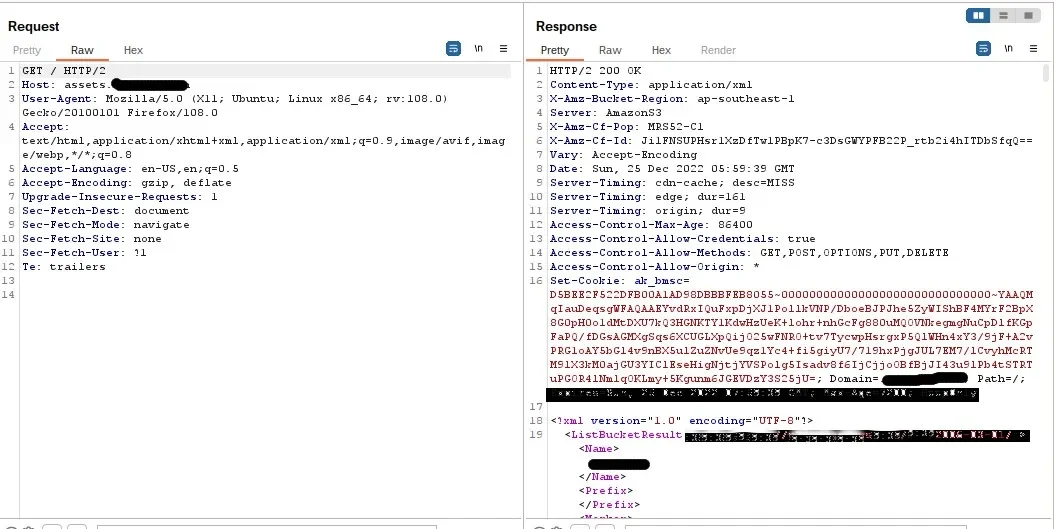
The screenshot shows the intercepted URL in Burp Suite. Truncating the path to the folder level returned an XML file containing all image IDs. The author notes that all these images could also have been scraped using a simple Python web scraper, so the XML listing was not the only route to the data.
Step 4: Find the bucket itself
After a few Google dorking tricks, the researcher found the actual link to the S3 bucket.
Step 5: List the bucket with the AWS CLI
Logging into an AWS account, the researcher used the AWS CLI to get a list of all documents, images and CSV files stored in the bucket:
aws s3 ls s3://<bucket-name>/ > files.txt

The screenshot is captioned as an AWS Cloud Shell session.
The vulnerability was reported to the respective team, and the author was awaiting their response.
Root cause
The bucket did not have the required ACL configuration, so its contents could be read without authorisation. The guessed paths returned 403 forbidden, while backtracking the original path returned an XML file containing all image IDs. The report does not describe the bucket policy or ACL itself, so the exact misconfiguration is not stated;
Impact
An attacker could access the firm's assets stored in S3 without the required ACL configuration. In this case that meant enumerating all image IDs via the XML listing, potentially scraping all images with a simple Python scraper, and, once the bucket link was found through Google dorking, listing all documents, images and CSV files in the bucket with the AWS CLI. The report does not state what those documents or CSV files contained, nor how many objects were exposed. The author notes the bug had not been fixed at the time of writing.
Fix
Based on the finding, the bucket's ACL and policy should be corrected so that listing and object reads require authorisation, and the exposure should be verified after the change.
Variants to test
- Enumerate development, staging and UAT subdomains and review their source code for asset URLs that point at storage hosts.
- For any asset URL of the form host/<folder-id>/images/<img-id>, truncate to host/<folder-id>/images/ and check whether an XML listing is returned instead of 403.
- Try sibling paths such as host/random-folder-name, host/users/images and host/<folder-id>/users, and note which return 403 versus a listing.
- Run Google dorks against the asset host to find the underlying bucket link, then list it with the AWS CLI. A positive result is a directory listing of objects you should not be able to see.
- Use assetfinder and subfinder to widen the subdomain set before repeating the above.
What happened, in plain words
A security researcher was looking at a well-known ride-sharing platform (a company whose app you use to book a car ride). While poking around the company's websites, he found that some of the company's files, stored in an Amazon cloud storage service called S3, could be read by anyone. No password, no login, nothing. He could list the files stored in the bucket.
He does not name the company because, when he wrote the post, the problem had not been fixed yet. Instead he calls the company example.com throughout. That is a common habit: example.com is a placeholder domain reserved for examples.
To understand the story you need three ideas first.
What is a subdomain? A domain is the main address of a site, like example.com. A subdomain is a prefix in front of it, like staging.example.com or test.example.com. Companies use subdomains to run separate copies of their site: one for the public (www), one for testing new code before it goes live (staging), one for internal testing (uat, short for User Acceptance Testing), and so on. Think of a building: example.com is the main entrance, and subdomains are side doors with different labels.
What is an S3 bucket? Amazon S3 (Simple Storage Service) is a service for storing files in the cloud. A bucket is like a folder in that service, except it lives on Amazon's servers and can be reached over the internet. Companies put images, documents, spreadsheets and backups in buckets. Each bucket has rules, called permissions or ACLs (Access Control Lists), that say who may read or list what is inside. If those rules are set too loosely, anyone on the internet can read the contents.
What is an API token? An API (Application Programming Interface) is a way for one program to talk to another, like a waiter taking your order to the kitchen. A token is a short secret string that proves the program is allowed to ask. If a token leaks, someone else can pretend to be that program. That is why the researcher was looking for them in test sites: test sites are often sloppier than the live one.
The target feature in this story is the platform's image hosting. The images shown on the site were served from a subdomain, and that subdomain turned out to be backed by an S3 bucket.
The tools he used, and why
Before the steps, here is what was in his toolbox. You do not need to install any of this to follow the story; it just helps to know what each thing does.
- Subdomain enumeration: a way of discovering subdomains that are not linked from the main site. Tools such as assetfinder and subfinder do this by collecting names from public sources. Why: forgotten test sites are a classic place to find mistakes.
- Burp Suite: a program that sits between your browser and a website and lets you see and edit every request and response. Think of it as a transparent mail intercepting service for web traffic. Why: it lets you see the exact address an image is loaded from, and change it before it is sent.
- A Python web scraper: a small program that visits pages and downloads things automatically. Why: once you know the pattern of image addresses, a scraper can collect all of them without clicking.
- Google dorking: using special search terms in Google to find pages or files that were not meant to be found. Why: it can reveal the direct link to a storage bucket.
- An AWS account and the AWS CLI: the AWS CLI is a command-line tool for talking to Amazon's cloud. Why: with it you can ask a bucket to list its contents.
The report also references three tools by name: assetfinder, subfinder and a 403 bypass script called 403bypass. A 403 is the web's way of saying "forbidden": the server understood your request and refused it.
How he found it
Step 1: Look for test versions of the site
He started with reconnaissance, which just means gathering information before attacking anything.
- Find all potential subdomains for the site and look for development, staging or other variations of the same site, for example staging.example.com, test.example.com, uat.example.com and so forth.
- Browse the few subdomain pages looking for hidden configurations. Because these are non-production sites, the reasoning was that developers might have included passwords and API tokens in the source code.
- In the source code, every image had a unique source of the form assets.example.com/<folder-id>/images/random-id>.
Why each step:
- Test sites are often reachable from the internet even though nobody advertises them. If one is weaker than the live site, it is an easier way in.
- "Source code" here means the HTML a browser receives, which you can view with right-click and "View Page Source". Developers sometimes leave comments or configuration values in it by accident. A password or token there would be a serious find.
- This is the key observation. The images were not all at one flat address. Each one had a folder-like part (
<folder-id>) and a random-looking file name (random-id). That structure tells you the storage is organised in folders, and folders can sometimes be listed.
Exploitation
Step 1: Intercept the image URL
He used Burp Suite to intercept the image URL and discovered that the images were stored in an S3 bucket.
Why: the address in the page source tells you where the browser asks for the image. By watching that request in Burp, you can see the full address and the server's reply, and you learn which service is really behind the subdomain. Here it was S3.
Step 2: Guess endpoints
An endpoint is simply a specific address on a server that does something. He tried guessing some against the asset host:
- assets.example.com/random-folder-name
- assets.example.com/users/images
- assets.example.com/<folder-id>/users
All these resulted in 403 forbidden.
Why: if the storage is organised in folders, maybe the folder names are guessable, and maybe some of them are open. A 403 means the server said no. That is useful information too: it tells you access control exists, and it tells you these particular guesses were wrong or protected.
Step 3: Backtrack the original path
Instead of trying to get around the 403, he went back to the address he already knew worked and shortened it. He removed the file name and kept the folder:
assets.example.com/<id>/images/<img-id> to assets.example.com/<id>/images/
Line by line: the left side is the address of one specific image, made of a folder id, the word images, and an image id. The right side is the same address with the last part removed, so it points at the folder itself rather than a file inside it. The idea is that asking for a folder sometimes gives you a list of what is in it, the way opening a drawer shows you everything inside instead of one item.
The screenshot shows the intercepted URL in Burp Suite. Shortening the path to the folder level returned an XML file containing all image IDs. XML is a text format for structured data; here it was effectively a table of contents for the folder. The author notes that all these images could also have been scraped using a simple Python web scraper, so the XML listing was not the only route to the data: once you know the naming pattern, you can just fetch them one by one.
Step 4: Find the bucket itself
After a few Google dorking tricks, he found the actual link to the S3 bucket.
Why: the subdomain was a friendly front door. The bucket has its own address, and finding it means you can talk to the storage directly rather than through the website's setup. Google dorking works because search engines index things that were never meant to be indexed.
Step 5: List the bucket with the AWS CLI
He logged into an AWS account and used the AWS CLI to get a list of all documents, images and CSV files stored in the bucket:
aws s3 ls s3://<bucket-name>/ > files.txt
Line by line:
awsis the command-line program for Amazon Web Services.s3says which AWS service you want to talk to.lsmeans list, the same as listing files in a folder on your own computer.s3://<bucket-name>/is the address of the bucket, with the real name replaced by a placeholder here.>means "send the output into a file instead of showing it on screen".files.txtis the name of that file.
So the whole line says: ask this bucket for a list of everything at its top level, and save the answer in a text file called files.txt. The author presents this listing as the exposure: the bucket contents were reachable without the required ACL configuration.
The screenshot is captioned as an AWS Cloud Shell session, a browser-based terminal provided by AWS.
He reported the vulnerability to the respective team and was awaiting their response.
Why it worked
The bucket did not have the required ACL configuration, so its contents could be read without authorisation. In plain terms: the lock on the storage was missing or set too loosely.
The guessed paths returned 403 forbidden, but backtracking the original path returned an XML file containing all image IDs. The report does not describe the bucket policy or ACL itself, so the exact misconfiguration is not stated;
What the impact was
An attacker could access the firm's assets stored in S3 without the required ACL configuration. Concretely, in this case that meant:
- enumerating all image IDs via the XML listing, meaning collecting the names of every image in the folder;
- potentially scraping all images with a simple Python scraper;
- and, once the bucket link was found through Google dorking, listing all documents, images and CSV files in the bucket with the AWS CLI.
The report does not state what those documents or CSV files contained, nor how many objects were exposed. The author notes the bug had not been fixed at the time of writing.
How it should be fixed
Based on the finding, the bucket's ACL and policy should be corrected so that listing and object reads require authorisation, and the exposure should be verified after the change. In everyday terms: put the lock back on, and then try the door yourself to make sure it is really locked.
Things worth trying elsewhere
These are the same ideas generalised, so you can look for similar mistakes on systems you are allowed to test:
- Enumerate development, staging and UAT subdomains and review their source code for asset URLs that point at storage hosts.
- For any asset URL of the form host/<folder-id>/images/<img-id>, truncate to host/<folder-id>/images/ and check whether an XML listing is returned instead of 403.
- Try sibling paths such as host/random-folder-name, host/users/images and host/<folder-id>/users, and note which return 403 versus a listing.
- Run Google dorks against the asset host to find the underlying bucket link, then list it with the AWS CLI. A positive result is a directory listing of objects you should not be able to see.
- Use assetfinder and subfinder to widen the subdomain set before repeating the above.
Glossary
- 403 Forbidden: the HTTP status code a server returns when it understands your request but refuses to fulfil it.
- ACL (Access Control List): a set of rules attached to a resource saying who may read, write or list it.
- API (Application Programming Interface): a defined way for one program to ask another program to do something.
- API token: a secret string that proves a program is allowed to make API requests.
- Asset: any file or resource a company serves, such as images, documents or scripts.
- AWS (Amazon Web Services): Amazon's cloud platform, a collection of rented computing and storage services.
- AWS CLI: the command-line program used to talk to AWS services from a terminal.
- AWS Cloud Shell: a terminal that runs inside your browser and is provided by AWS.
- Bucket: a container for files in Amazon S3, similar to a folder in the cloud.
- Burp Suite: a tool that intercepts and lets you inspect or modify traffic between your browser and a website.
- CSV: a plain-text file format for tables, where values are separated by commas.
- Endpoint: a specific address on a server that performs a particular action.
- Enumeration: systematically listing things, such as subdomains or file names, to map out what exists.
- Google dorking: using advanced search operators to find pages or files that were not meant to be public.
- HTTP status code: a number a server returns with every response to say how the request went, such as 200 for success or 403 for forbidden.
- Object: a single stored item in S3, such as one image or one document.
- Prefix: the leading part of a storage path, effectively the folder part.
- Reconnaissance: the information-gathering phase before testing, such as finding subdomains and reading page source.
- S3 (Simple Storage Service): Amazon's service for storing files in the cloud.
- Scraper: a program that automatically visits pages or addresses and collects data from them.
- Source code (of a page): the HTML a browser receives, viewable with "View Page Source", which can contain comments and configuration values.
- Staging / UAT / development site: non-public copies of a site used for testing before or alongside the live version.
- Subdomain: a prefix on a domain, such as
staging.example.com, used to host a separate part of a site. - Token: see API token; a short secret used to prove identity or permission.
- XML: a text format for structured data, often used for listings and configuration.



