When You Log In
A non-admin user can place a crafted registry hive file named ntuser.man in their profile, which Windows loads at login instead of the normal user hive, allowing them to bypass or modify user group policy settings. An attacker could also achieve code execution via autostart keys, evade antivirus monitoring, or cause a denial of service by preventing login.

medium.com
Published on medium.com
I‘m going to share an (ab)use of a Windows feature which can result in bypassing User Group Policy (as well as a few other interesting things). Bypassing User Group Policy is not the end of the world, but it’s also not something that should be allowed and depending on User Group Policy setup, could result in…
The full write-up lives on its author's site
It belongs to its author, so we link to it rather than copy it. The other two tabs are our own rewrites, checked against it.
Context
Windows loads a user's registry settings at logon from the user's registry hive, the file behind HKEY_CURRENT_USER in regedit. That hive lives on disk at %USERPROFILE%\ntuser.dat. When a user logs in, ProfSvc (the user profile service) locates this file and calls NtLoadKeyEx to load the hive. Any registry modification made during the logon session has to go through the proper Microsoft APIs, which check the permissions of the keys being modified, much like a miniature file system.
Group Policy is the Microsoft feature that lets Domain Administrators manage and enforce settings for users on their network. Policies can be configured at computer level or user level. User policies are pushed to a domain user's account at login and stored in the %USERPROFILE%\ntuser.dat hive. For Domain Users those policies are read-only, which is what stops them being changed.
The technique described here bypasses User Group Policy, and has a few other consequences, without requiring admin access. It was tested against Windows 7 and Windows 10 Enterprise x64 (10.18363 1909).
Setup
The technique needs a non-administrator user account on the target machine; the proof of concept uses a domain user whose User Group Policy applies restrictions. No admin access is needed on the target. The proof of concept does require a second Windows machine of the same version on which you do have Administrator access, plus a separate local Administrator account on the target machine to clean up afterwards. ProcMon with boot logging enabled is used to observe ProfSvc at logon, and regedit is used to craft the hive.
Finding it
With ProcMon boot logging enabled and a logon to the machine, ProfSvc shows an interesting behaviour: before it loads %USERPROFILE%\ntuser.dat, it checks whether %USERPROFILE%\ntuser.man exists.
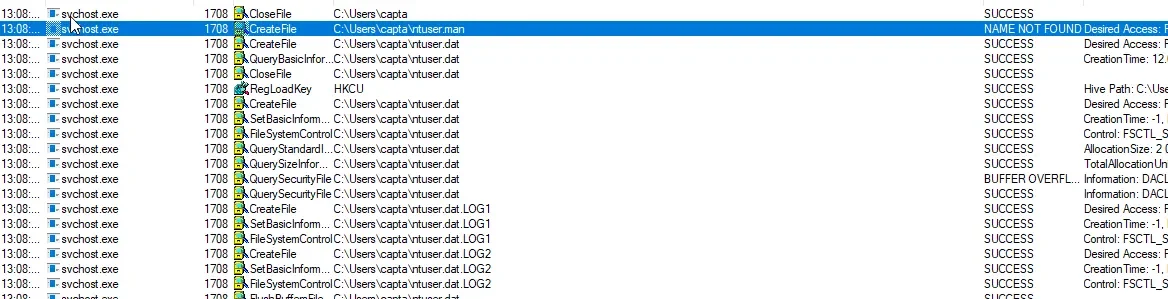
The ntuser.man file is exactly like ntuser.dat, a user profile registry hive, but it exists for the case where you want a Mandatory Profile. Since %USERPROFILE% is writable by a non-admin user, dropping a crafted ntuser.man there produces interesting results.
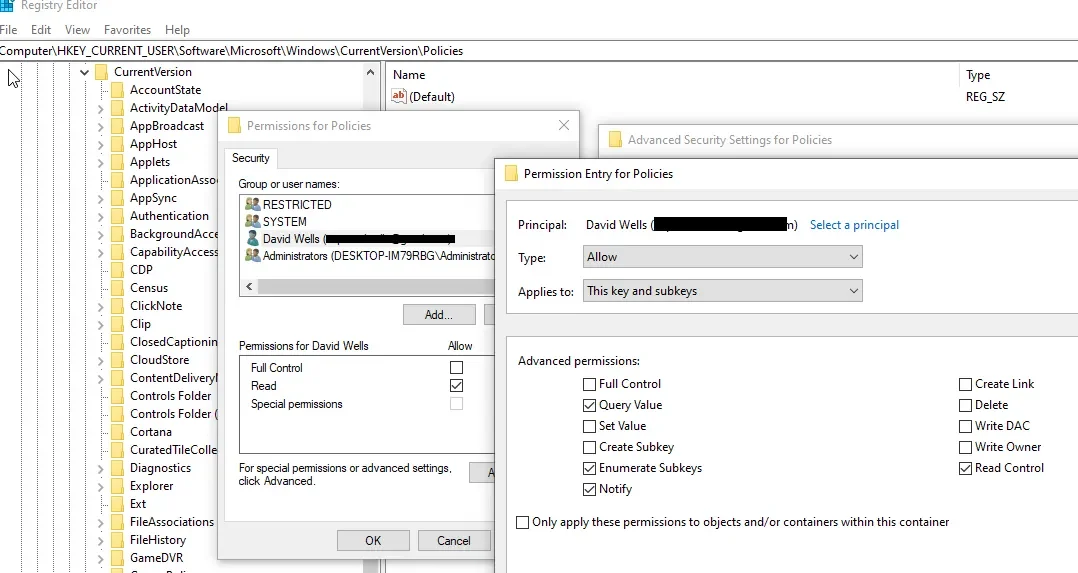
Because an entirely new hive can be swapped in, any of the protected user group policy enforcements can be bypassed or modified. The policies key is read-only to Domain Users in the normal hive, as the permissions on the Policies registry key show.
Exploitation
Step 1: craft the hive
- On an entirely separate Windows machine of the same version, where you have Administrator access, copy any user's registry hive from
%USERPROFILE%\ntuser.datto a different folder. The user must not be logged in so that the file can actually be copied. - Under the Administrator account, start
regedit.exe, select theHKEY_LOCAL_MACHINEkey, and use File -> Load Hive to load the copied hive. - Under the newly loaded hive, clear or add whatever policies you want under the appropriate policy registry path. Many user policies are stored under
\Software\Microsoft\Windows\CurrentVersion\Policies\. - At the root of the loaded hive, change permissions to allow
Everyonefull control (read/write/etc) and propagate those permissions to all subkeys. - Depending on the policy you want to override or add, find the corresponding subkey, because they are not all stored under one key in the user's registry. For the Remove Task Manager scenario, the value that defines it is in the
\Software\Microsoft\Windows\CurrentVersion\Policies\Systemkey, so theSystemsubkey is where aDENYrule is added, denying SYSTEMWrite/Createprivileges on that key. This ensures GpSvc cannot overwrite it.
Step 2: drop the file
- Before continuing, make sure there is a backup account on the machine with Administrator privileges, separate from the account being tested. If not, create one now, because it will be needed to delete the PoC file.
- Copy the crafted registry hive to the target machine as
%USERPROFILE%\ntuser.man. - Log off and log back on. A Windows welcoming screen may appear; let it finish. All User Group Policies are now overridden with what is in
ntuser.man.
Step 3: clean up
After testing, log out and log in with the Administrator account to remove the ntuser.man file from the user's profile path.
Why the resync does not undo it
User Group Policy resyncs and reapplies itself at login, and at regular intervals while logged on, which would normally override modified policies. Removing SYSTEM from the ACL of the crafted key does not help on its own: GpSvc, the Windows Group Policy Client, detects this and corrects the ACL at login to regain writable permissions, then rewrites the Group Policy settings.
The way around it comes from looking at how GpSvc performs that ACL modification. When GpSvc comes across the Policies subkey, it calls its internal function ForceRegCreateKeyEx, which tries to open one of the policy subkeys with writable permissions. If that fails, it calls AddPolicyPermissionOnKey to take ownership of the key and restore SYSTEM with writable permissions, then reopens the key and overwrites the Group Policy entries.
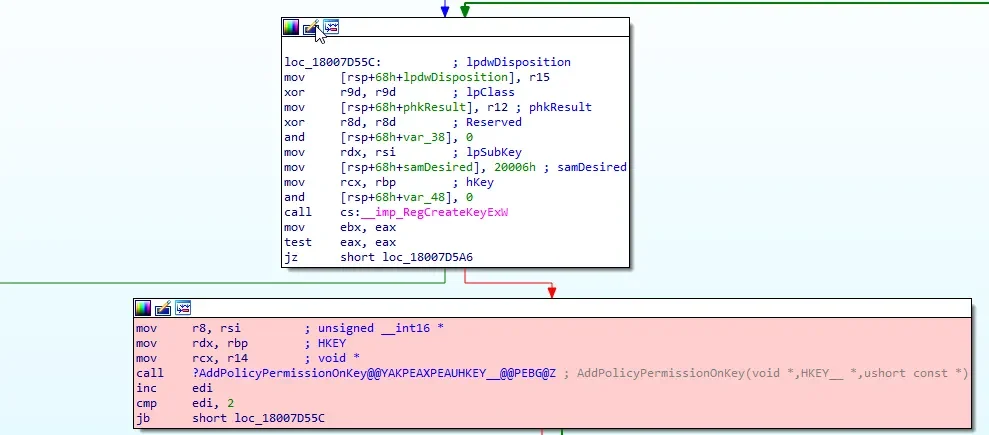
AddPolicyPermissionOnKey modifies the ACL of the subkey to add SYSTEM, but it does not remove any existing ACL entries. So an explicit DENY entry for SYSTEM writable permissions takes precedence over the ALLOW rule that GpSvc tries to add, and SYSTEM is effectively blocked from obtaining writable permissions.
With that additional trick the whole thing is straightforward. The demonstration shows a Domain Controller on the left and the connected machine on the right. On the Domain Controller the Remove Task Manager rule is set for User Group Policy, and it is applied on the domain user's machine, with Task Manager greyed out when right clicking the task bar. After dropping a specially crafted NTUSER.man file in %USERPROFILE% and logging out and back in, the Task Manager rule no longer applies.
Root cause
ProfSvc checks for a %USERPROFILE%\ntuser.man file before it loads ntuser.dat, and %USERPROFILE% is writable by the non-admin user, so the user can supply the hive that is loaded. The Group Policy client's repair path, AddPolicyPermissionOnKey, adds an ALLOW entry for SYSTEM without removing existing entries, so an explicit DENY for SYSTEM on the relevant policy subkey wins and the policy rewrite cannot happen. The existing defence, the read-only ACL on the Policies key in the normal hive, is bypassed entirely because the hive itself is replaced.
Impact
How much this matters depends largely on the policy configuration. It is more likely to be a threat from a rogue Domain User trying to break out of restrictions imposed by a Domain Admin than from malware. The report lists three further implications:
- Single file code execution. Some exploits may be able to drop a file somewhere on the Windows filesystem as non-admin. If such an exploit dropped a
%USERPROFILE%\ntuser.mancontaining an autostart registry key that executes a file from a remote SMB share, the exploit would gain reliable code execution by dropping a single non-executable file. - Antivirus/EDR bypass. Some Antivirus/EDR products may only monitor registry modifications by intercepting registry APIs or kernel callbacks. Replacing the entire hive could circumvent that monitoring and detection.
- Denial of service. Dropping an empty
ntuser.manin%USERPROFILE%makes ProfSvc fail to load the registry and prevents the user from logging in, requiring a Safe Mode boot or a backup Administrator account to remove the offending file.
Fix
There is no fix to describe: the issue was reported to Microsoft under a 90-day disclosure policy, Microsoft fully replicated it, and deemed it expected behaviour rather than a security issue. The author's position is that modifying protected policies this way crosses a security boundary regardless of how it is done.
Variants to test
What happened, in plain words
A security researcher found a way for an ordinary user on a Windows computer to get around rules that a company's IT administrators had set for them. On a work network, administrators use a feature called Group Policy to lock down settings: for example, they can stop people from opening Task Manager, the tool that shows running programs and lets you force them to close. The researcher discovered that Windows, when you log in, will happily load a settings file that the user themselves is allowed to write, if that file has a particular name. By preparing their own version of that file, a user can replace the administrator's rules with their own. No administrator rights are needed on the computer being attacked.
The researcher also found a second trick that stops Windows from putting the administrator's rules back. Normally, a Windows service called the Group Policy Client notices when its rules have been tampered with and repairs them at every login. The researcher read how that repair works and found a gap: the repair adds permission for the SYSTEM account (a very powerful built-in Windows account) but never removes permissions that are already there. So if the user explicitly says "SYSTEM is not allowed to write here", that refusal wins, and the repair cannot happen.
The researcher reported it to Microsoft. Microsoft reproduced it but said it was working as intended and not a security problem. The researcher disagreed, arguing that being able to change protected policies crosses a security boundary.
This article walks through the same material for someone who has never done security work before. Every term is explained the first time it appears, and there is a glossary at the end.
Background: what happens when you log in
The registry and the user hive
Windows keeps a huge amount of configuration in a database called the registry. You can look at it with a built-in program called regedit.exe (the Registry Editor). The registry is organised like a set of folders: each folder is called a key, and inside a key there are values (named settings with data in them).
When you are logged in, the part of the registry that holds your personal settings appears under the name HKEY_CURRENT_USER. That name is a kind of shortcut: the real data lives in a file on disk, at %USERPROFILE%\ntuser.dat. %USERPROFILE% is a Windows shorthand for your own user folder, for example C:\Users\Alice. The file ntuser.dat is called a registry hive: a single file that the operating system mounts into the registry tree so it looks like folders.
A useful comparison: think of the registry as a library, and a hive as one box of index cards that gets slotted into the library shelves when you arrive and taken out when you leave. The box is a real physical object sitting in your own locker (your user folder), and the library just reads it.
ProfSvc and NtLoadKeyEx
At login, a Windows service called ProfSvc (the user profile service) is responsible for setting up your profile. It finds %USERPROFILE%\ntuser.dat and asks the operating system to load it. The report says ProfSvc calls a function named NtLoadKeyEx to do this. A function here is just a named operation that one piece of software asks another to perform; NtLoadKeyEx is the operation "load this hive file into the registry".
Once the hive is loaded, any change you make to the registry during your session has to go through the proper Microsoft APIs. An API (Application Programming Interface) is the official set of operations a program is allowed to call. A comparison: at a bank, you cannot walk behind the counter and edit the ledger yourself; you fill in a form at the window, and the clerk checks whether you are allowed to make that change. The API is the window and the clerk. It checks the permissions of the key you want to modify, much like a miniature file system: each key has an access control list saying who may read it, who may write it, and so on.
Group Policy
Group Policy is the Microsoft feature that lets Domain Administrators manage and enforce settings for users on their network. A domain is a group of computers and accounts managed centrally by an organisation; a Domain Administrator is an administrator for that whole central directory, not just one machine. Group Policy settings can be configured at the computer level (applying to the machine) or at the user level (applying to the person).
User policies are pushed to a domain user's account at login and stored in the %USERPROFILE%\ntuser.dat hive. For Domain Users (ordinary accounts in the domain), those policies are read-only, which is what stops them being changed. Read-only means you can look but not alter: like a printed notice behind glass.
The technique described here bypasses User Group Policy, and has a few other consequences, without requiring admin access. It was tested against Windows 7 and Windows 10 Enterprise x64 (10.18363 1909).
Setup
The technique needs a non-administrator user account on the target machine; the proof of concept uses a domain user whose User Group Policy applies restrictions. No admin access is needed on the target. The proof of concept does require a second Windows machine of the same version on which you do have Administrator access, plus a separate local Administrator account on the target machine to clean up afterwards. ProcMon (Process Monitor, a free Microsoft tool that records what programs do on a machine) with boot logging enabled is used to observe ProfSvc at logon; boot logging means it starts recording very early, before you log in. regedit is used to craft the hive.
Why each piece is needed:
- A second machine with Administrator access, because the proof of concept prepares the hive there under an Administrator account.
- The same Windows version, as the proof of concept specifies.
- A separate local Administrator account on the target, because it will be needed to delete the dropped
ntuser.manfile afterwards. - ProcMon, because the whole discovery rests on noticing that ProfSvc looks for a file you did not expect it to look for.
Finding it
With ProcMon boot logging enabled and a logon to the machine, ProfSvc shows an interesting behaviour: before it loads %USERPROFILE%\ntuser.dat, it checks whether %USERPROFILE%\ntuser.man exists.
The screenshot shows the ProcMon output of ProfSvc when a user logs in: the check for ntuser.man appears before the load of ntuser.dat.
The ntuser.man file is exactly like ntuser.dat, a user profile registry hive, but it exists for the case where you want a Mandatory Profile. A mandatory profile is a profile that is meant to be fixed and shared: the user gets the same settings every time and is not supposed to keep changes.
Since %USERPROFILE% is writable by a non-admin user, dropping a crafted ntuser.man there produces interesting results. This is the heart of the finding: ProfSvc checks for a file that the user is allowed to write before it loads the file that carries the administrator's rules.
Because an entirely new hive can be swapped in, any of the protected user group policy enforcements can be bypassed or modified. The policies key is read-only to Domain Users in the normal hive, as the permissions on the Policies registry key show.
The screenshot shows that a Domain User has read-only access to the Policies registry key. That read-only access is the existing defence, and it only protects the normal hive; it does nothing once the whole hive is replaced.
Exploitation
Step 1: craft the hive
- On an entirely separate Windows machine of the same version, where you have Administrator access, copy any user's registry hive from
%USERPROFILE%\ntuser.datto a different folder. The user must not be logged in so that the file can actually be copied. - Under the Administrator account, start
regedit.exe, select theHKEY_LOCAL_MACHINEkey, and use File -> Load Hive to load the copied hive. - Under the newly loaded hive, clear or add whatever policies you want under the appropriate policy registry path. Many user policies are stored under
\Software\Microsoft\Windows\CurrentVersion\Policies\. - At the root of the loaded hive, change permissions to allow
Everyonefull control (read/write/etc) and propagate those permissions to all subkeys. - Depending on the policy you want to override or add, find the corresponding subkey, because they are not all stored under one key in the user's registry. For the Remove Task Manager scenario, the value that defines it is in the
\Software\Microsoft\Windows\CurrentVersion\Policies\Systemkey, so theSystemsubkey is where aDENYrule is added, denying SYSTEMWrite/Createprivileges on that key. This ensures GpSvc cannot overwrite it.
Why each step is taken:
- Copying a hive. You need a starting point that Windows will accept as a valid user hive. Rather than build one from nothing, you take a real one. The user must be logged out so that the file can actually be copied.
- Loading the hive.
HKEY_LOCAL_MACHINEis the part of the registry that holds machine-wide settings. "Load Hive" is a regedit menu option that mounts a hive file from disk under a temporary key so you can edit it with the normal regedit interface. A comparison: it is like opening a document from a USB stick in an editor so you can change it, rather than editing the copy that is currently open on someone's screen. - Editing policies. This is where you put your own rules in place of the administrator's. The path
\Software\Microsoft\Windows\CurrentVersion\Policies\is where many user policies live. Clearing a policy removes the restriction; adding one imposes your own. - Opening up permissions.
Everyoneis a Windows group that includes every account. Propagating to all subkeys means the permission applies throughout the hive, not only at the top. - The DENY rule. This is the second trick, and it deserves its own explanation below. In short: policies are scattered across several keys, so you must find the specific key that holds the policy you care about, and place your refusal there.
Why the resync does not undo it
User Group Policy resyncs and reapplies itself at login, and at regular intervals while logged on, which would normally override modified policies. "Resync" means the client checks the central policy store and copies the settings down again. Removing SYSTEM from the ACL of the crafted key does not help on its own. An ACL (Access Control List) is the list attached to a key or file that says which accounts may do what. SYSTEM is a built-in Windows account used by the operating system itself, more privileged than an administrator. GpSvc, the Windows Group Policy Client, detects the removal and corrects the ACL at login to regain writable permissions, then rewrites the Group Policy settings.
The way around it comes from looking at how GpSvc performs that ACL modification. When GpSvc comes across the Policies subkey, it calls its internal function ForceRegCreateKeyEx, which tries to open one of the policy subkeys with writable permissions. If that fails, it calls AddPolicyPermissionOnKey to take ownership of the key and restore SYSTEM with writable permissions, then reopens the key and overwrites the Group Policy entries.
The screenshot shows the ForceRegCreateKeyEx routine inside GpSvc.dll, the file that contains the Group Policy Client's code.
AddPolicyPermissionOnKey modifies the ACL of the subkey to add SYSTEM, but it does not remove any existing ACL entries. So an explicit DENY entry for SYSTEM writable permissions takes precedence over the ALLOW rule that GpSvc tries to add, and SYSTEM is effectively blocked from obtaining writable permissions.
A comparison: imagine a door with a sign saying "staff may enter". The repair process sticks another sign on the door saying "staff may enter". If you have already put up a sign saying "staff must not enter", the second sign does not cancel yours; the refusal is the stronger statement. In Windows ACLs, a DENY entry beats an ALLOW entry for the same account and permission.
With that additional trick the whole thing is straightforward. The demonstration shows a Domain Controller on the left and the connected machine on the right. A Domain Controller is the server that holds the domain's accounts and policies. On the Domain Controller the Remove Task Manager rule is set for User Group Policy, and it is applied on the domain user's machine, with Task Manager greyed out when right clicking the task bar. After dropping a specially crafted NTUSER.man file in %USERPROFILE% and logging out and back in, the Task Manager rule no longer applies.
The animation shows the Domain Controller on the left with the Remove Task Manager rule set, the domain user's machine on the right with Task Manager greyed out, and then the same machine after the crafted NTUSER.man is dropped and the user logs out and back in, with the rule no longer applying.
Step 2: drop the file
- Before continuing, make sure there is a backup account on the machine with Administrator privileges, separate from the account being tested. If not, create one now, because it will be needed to delete the PoC file.
- Copy the crafted registry hive to the target machine as
%USERPROFILE%\ntuser.man. - Log off and log back on. A Windows welcoming screen may appear; let it finish. All User Group Policies are now overridden with what is in
ntuser.man.
Why each step is taken:
- The backup account. The backup account is needed to delete the PoC file afterwards, as the report warns.
- The drop. This is the actual attack: placing a file with the magic name in a folder the user controls. No special tool is needed; a normal file copy does it.
- Log off and on. The file is only read at login, so the change takes effect on the next login.
Step 3: clean up
After testing, log out and log in with the Administrator account to remove the ntuser.man file from the user's profile path.
Root cause
Two separate weaknesses combine:
- ProfSvc checks for a
%USERPROFILE%\ntuser.manfile before it loadsntuser.dat, and%USERPROFILE%is writable by the non-admin user, so the user can supply the hive that is loaded. - The Group Policy client's repair path,
AddPolicyPermissionOnKey, adds anALLOWentry forSYSTEMwithout removing existing entries, so an explicitDENYfor SYSTEM on the relevant policy subkey wins and the policy rewrite cannot happen.
The existing defence, the read-only ACL on the Policies key in the normal hive, is bypassed entirely because the hive itself is replaced. A comparison: putting a lock on the front door does not help if someone can replace the whole house.
Impact
How much this matters depends largely on the policy configuration. It is more likely to be a threat from a rogue Domain User trying to break out of restrictions imposed by a Domain Admin than from malware. The report lists three further implications:
- Single file code execution. Some exploits may be able to drop a file somewhere on the Windows filesystem as non-admin. If such an exploit dropped a
%USERPROFILE%\ntuser.mancontaining an autostart registry key that executes a file from a remote SMB share, the exploit would gain reliable code execution by dropping a single non-executable file. An autostart registry key is a registry entry that tells Windows to run a program automatically, for example at login. SMB is the Windows file-sharing protocol; a remote SMB share is a folder on another machine reached over the network. Code execution means getting your own program to run on the target. The point is that the dropped file is not itself a program, so defences that look for executable files may not notice it. - Antivirus/EDR bypass. Some Antivirus/EDR products may only monitor registry modifications by intercepting registry APIs or kernel callbacks. EDR (Endpoint Detection and Response) is security software that watches a machine for suspicious behaviour. Kernel callbacks are hooks inside the operating system core that such software can register to be told about events. Replacing the entire hive could circumvent that monitoring and detection, because the change does not go through the APIs the software is watching.
- Denial of service. Dropping an empty
ntuser.manin%USERPROFILE%makes ProfSvc fail to load the registry and prevents the user from logging in, requiring a Safe Mode boot or a backup Administrator account to remove the offending file. A denial of service is any situation where something that should work is made to fail. Safe Mode is a minimal Windows boot mode used for repair.
Fix
There is no fix to describe: the issue was reported to Microsoft under a 90-day disclosure policy, Microsoft fully replicated it, and deemed it expected behaviour rather than a security issue. A disclosure policy is a researcher's stated rule for how long they will wait before publishing details. The author's position is that modifying protected policies this way crosses a security boundary regardless of how it is done.
Variants to test
Glossary
- ACL (Access Control List): the list attached to a file or registry key saying which accounts may do what with it.
- API (Application Programming Interface): the official set of operations one program may ask another to perform; the operating system checks permissions when these are used.
- Autostart registry key: a registry entry that tells Windows to run a program automatically, for example at login.
- Boot logging: a ProcMon option that starts recording events very early, before the user logs in.
- Code execution: getting your own program to run on a target machine.
- Denial of service: making something that should work fail, often to block legitimate use.
- Disclosure policy: a researcher's stated rule for how long they wait before publishing details of a reported issue.
- Domain: a group of computers and accounts managed centrally by an organisation.
- Domain Administrator: an administrator for the whole domain, not just one machine.
- Domain Controller: the server that holds a domain's accounts and policies.
- Domain User: an ordinary (non-administrator) account in a domain.
- EDR (Endpoint Detection and Response): security software that watches a machine for suspicious behaviour.
- Everyone: a Windows group that includes every account.
- Function: a named operation that one piece of software asks another to perform.
- Group Policy: the Microsoft feature that lets Domain Administrators manage and enforce settings for users and computers on a network.
- GpSvc: the Windows Group Policy Client, the service that applies and repairs Group Policy settings.
- Hive: a single file that the operating system mounts into the registry so it looks like a set of folders.
- Kernel callback: a hook inside the operating system core that security software can register to be told about events.
- Key: a folder-like container in the registry.
- Mandatory profile: a fixed, shared user profile that is meant to be the same every time and not keep changes.
- NtLoadKeyEx: the operation ProfSvc uses to load a hive file into the registry.
- Permission: a rule saying whether an account may read, write, or otherwise act on a key or file.
- ProcMon (Process Monitor): a free Microsoft tool that records what programs do on a machine.
- ProfSvc: the Windows user profile service, which sets up a user's profile at login.
- Read-only: you can look but not alter.
- Registry: the Windows configuration database, organised as keys and values.
- Registry hive: see hive.
- Resync: the Group Policy client checking the central policy store and copying settings down again.
- Safe Mode: a minimal Windows boot mode used for repair.
- SMB: the Windows file-sharing protocol; a remote SMB share is a folder on another machine reached over the network.
- SYSTEM: a built-in Windows account used by the operating system itself, more privileged than an administrator.
- Value: a named setting with data inside a registry key.

