Bypassed Cloudflare’s Web Application Firewall (WAF)
A search parameter reflected user input without sanitisation, allowing HTML injection, but a Cloudflare WAF blocked obvious script payloads. The author bypassed the WAF with an SVG onload payload using HTML entity encoding, achieving reflected XSS in Microsoft Edge.

Web Application Firewall (WAF) is a defensive measure taken by the service providers who have hosted any website in public domain. It’s a firewall, therefore, it will be having the mechanisms to filter, monitor and provide logs to the CISO or SOC based on the severity of attack.
The full write-up lives on its author's site
It belongs to its author, so we link to it rather than copy it. The other two tabs are our own rewrites, checked against it.
Context
A public website with a search feature was the target. The author does not name it and asks the reader to assume the domain is wedexs.com. The search box sends whatever the user types as a GET parameter called searchQuery, so a normal search produces a URL of the form:
https://www.wedexs.com/search?searchQuery=<searchString>
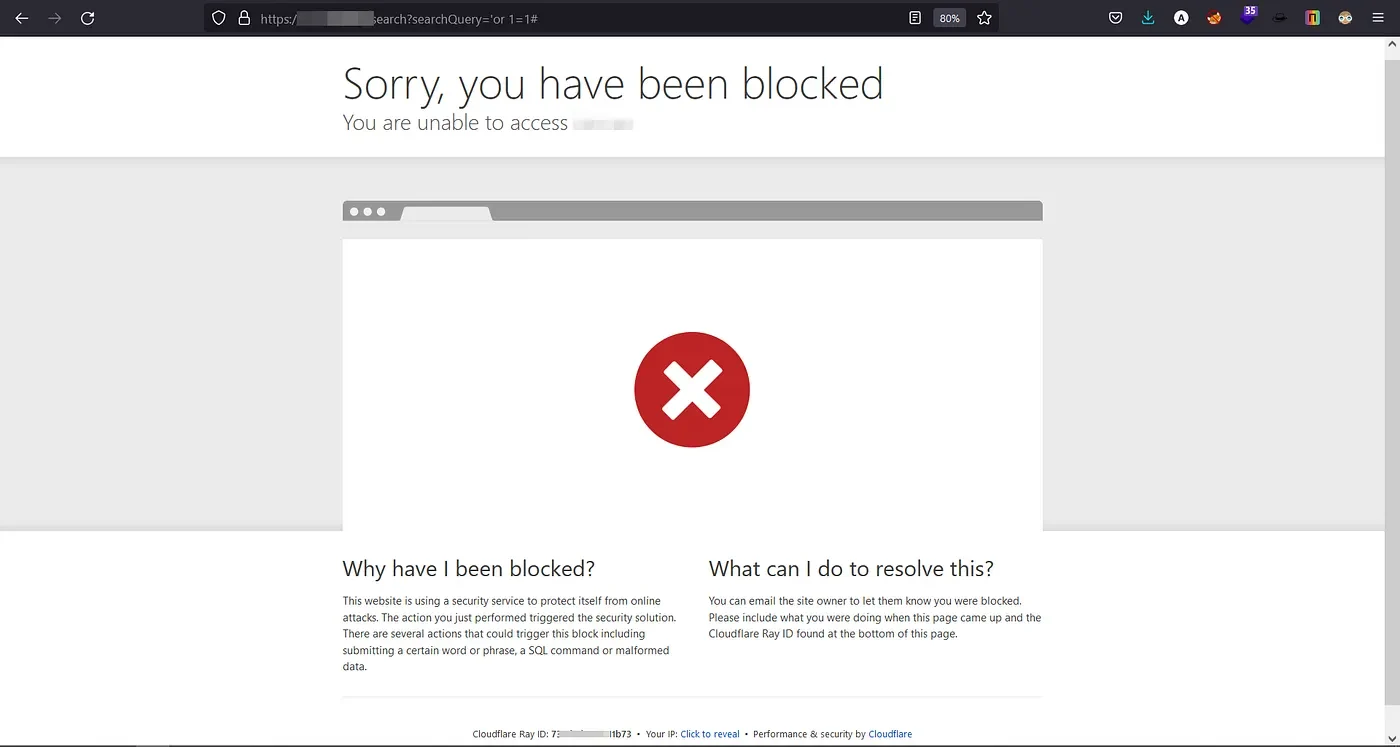
A request containing an SQL injection payload was blocked by a Cloudflare block page, indicating a WAF in front of the application. The author's stated motive is to show that an IPS, IDS or WAF is of little use against an attacker if it is misconfigured or outdated, and to walk beginners through detecting a WAF and then bypassing it. He also warns against hammering a live service and against starting with automated tools, because the traffic they generate gets you blocked.
Setup
No accounts, roles or special access were needed: the search feature is reachable by anyone. The tools used were a browser (Firefox first, later Microsoft Edge), Burp Suite for replaying and brute-forcing payloads, and a small personal wordlist of roughly 10 to 20 XSS payloads that had worked on other targets in the past. The only precondition is that the target reflects the searchQuery value somewhere in the response.
Finding it
The first question was whether special characters are reflected or processed on the back end. The author sent a string containing ', /, \, " and #:
https://www.wedexs.com/search?searchQuery=’/\\”#abc
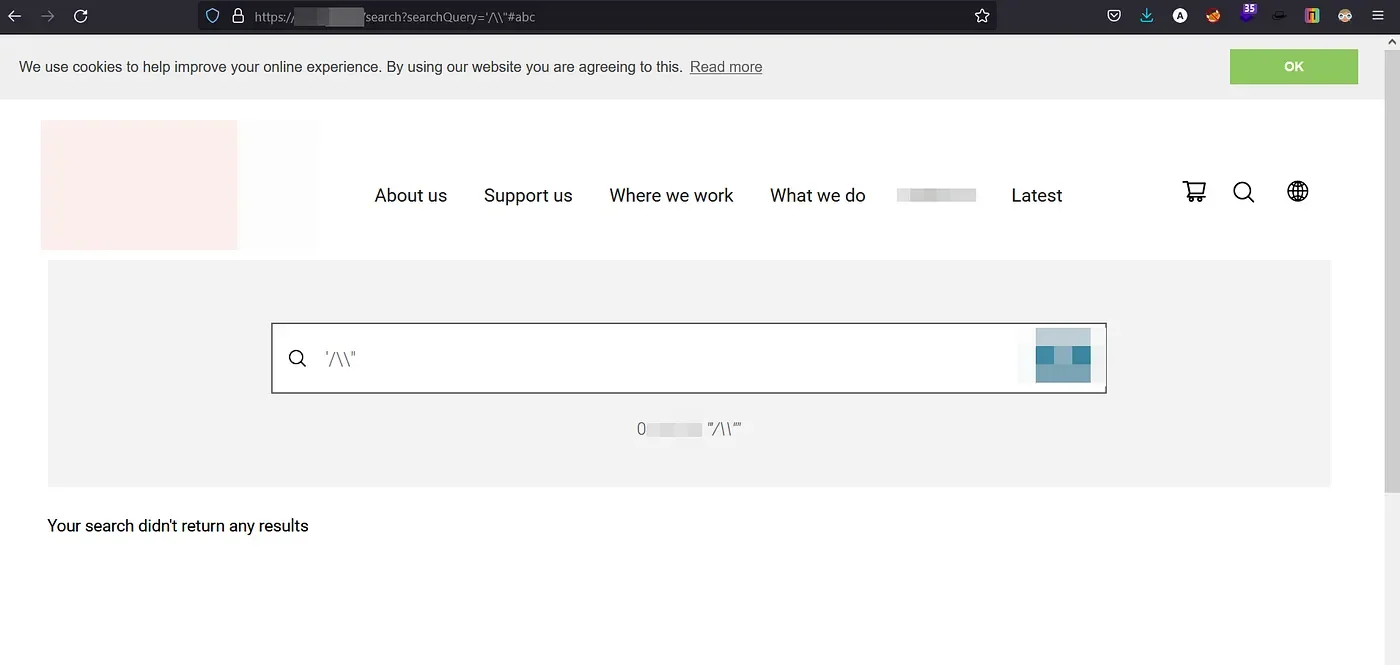
Only ‘/\\” came back in the output; the # and everything after it were gone. That suggests the # character is filtered on the back end and the rest of the string is truncated. A # in a URL normally starts the fragment, which browsers do not send to the server, so a truncation here is consistent with the value being cut at that character somewhere in the request path or in the application.
Next he tried a simple SQL injection payload:
https://www.wedexs.com/search?searchQuery=’or 1=1 —
Instead of a search result, Cloudflare returned its block page.
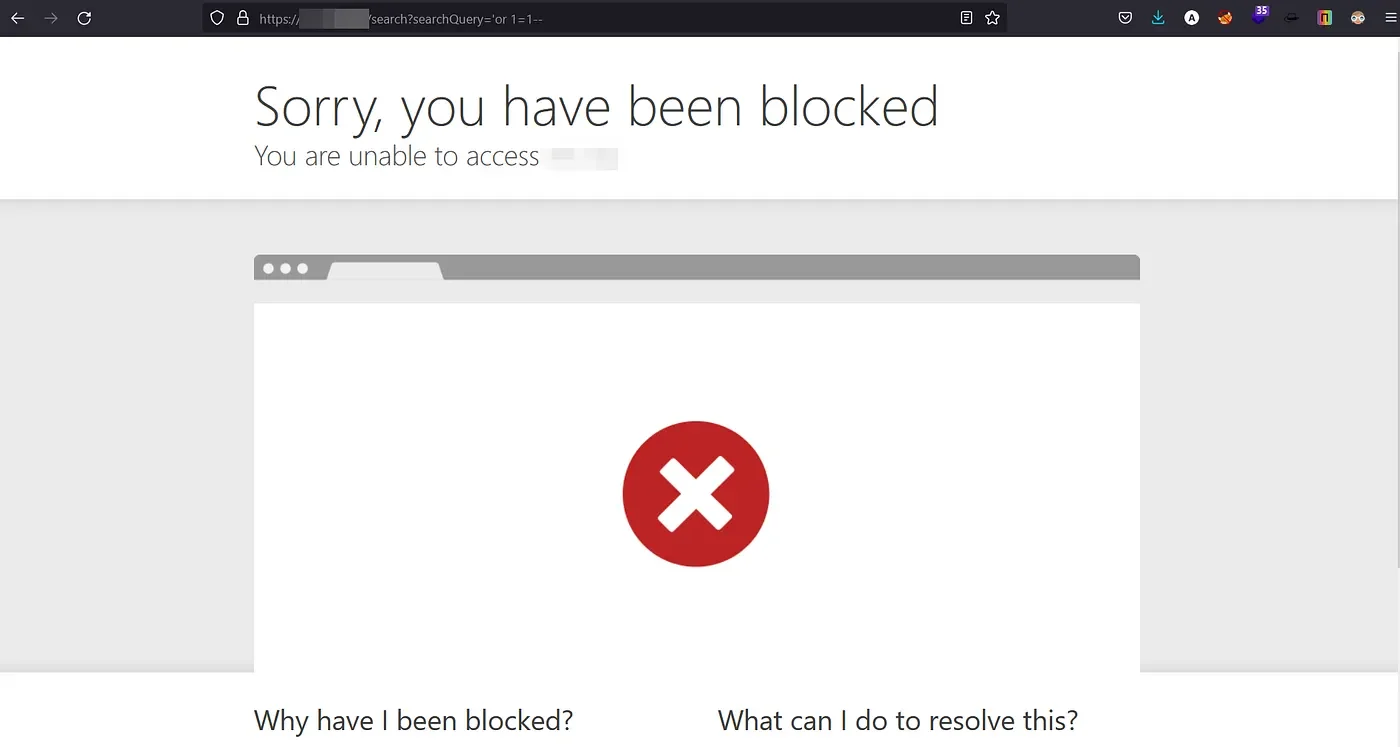
That confirmed a WAF was in front of the application. The next test was whether HTML tags are sanitised. A basic HTML injection payload was sent:
https://www.wedexs.com/search?searchQuery=<h1>Hello+World<%2Fh1>
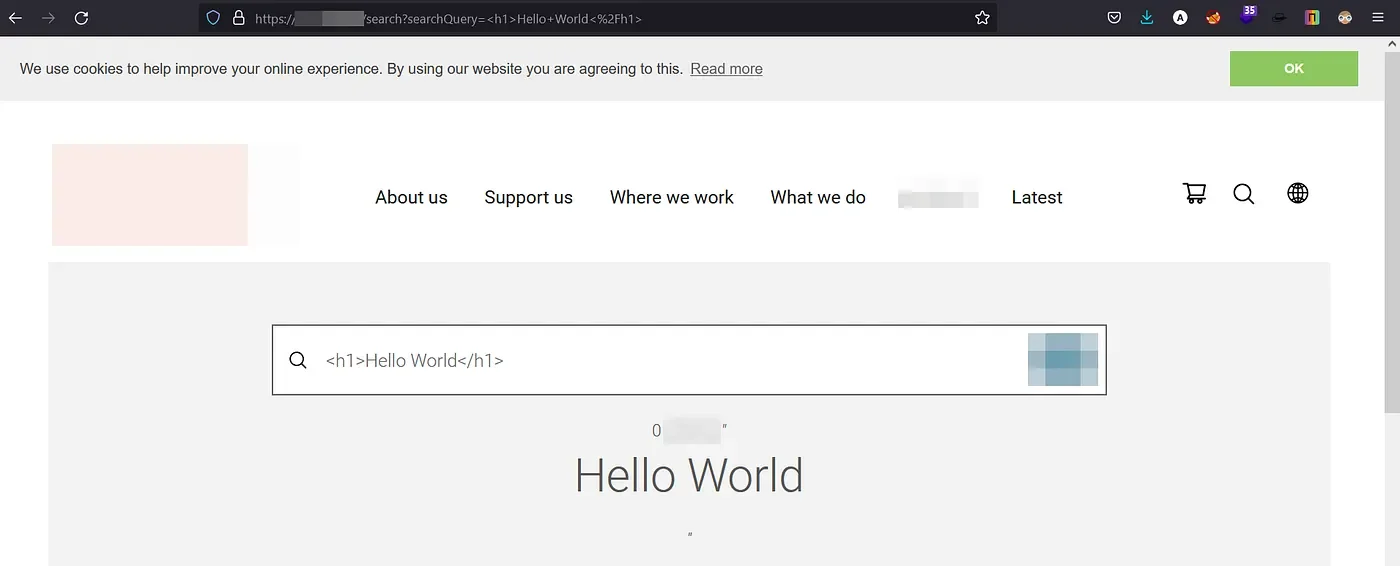
The <h1> element was rendered in the response, so the site is vulnerable to reflected HTML injection. Since reflected HTML injection is present, the obvious next step is reflected XSS with the classic payload:
<script>alert(document.domain)</script>
That request was blocked by the WAF before it reached the application, so the page kept showing the previous payload's output rather than the new one.
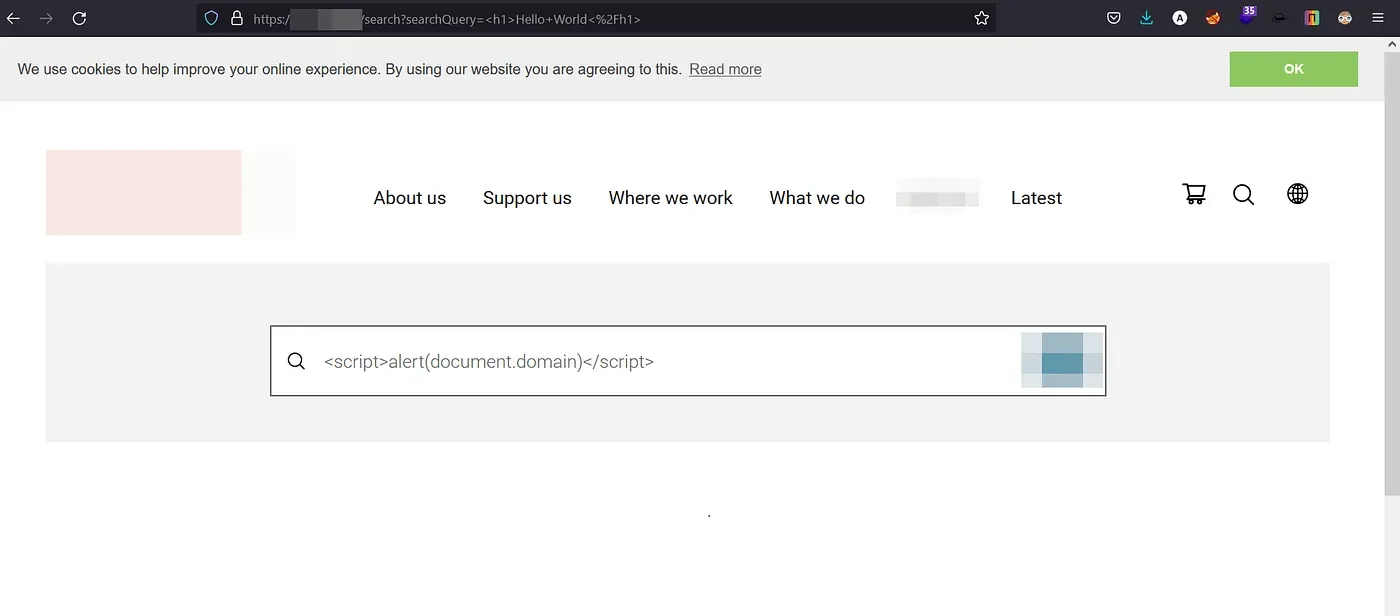
A senior colleague had told the author that XSS payloads sometimes fail in Firefox, so he switched to Microsoft Edge. The WAF still detected and filtered the payload there.
He then tried an XSS payload built from an HTML tag with an event handler:
<img src=x onerror=alert(document.domain)>
This also failed in both Firefox and Microsoft Edge, again blocked by the WAF, and again the response showed the older payload rather than the new one.
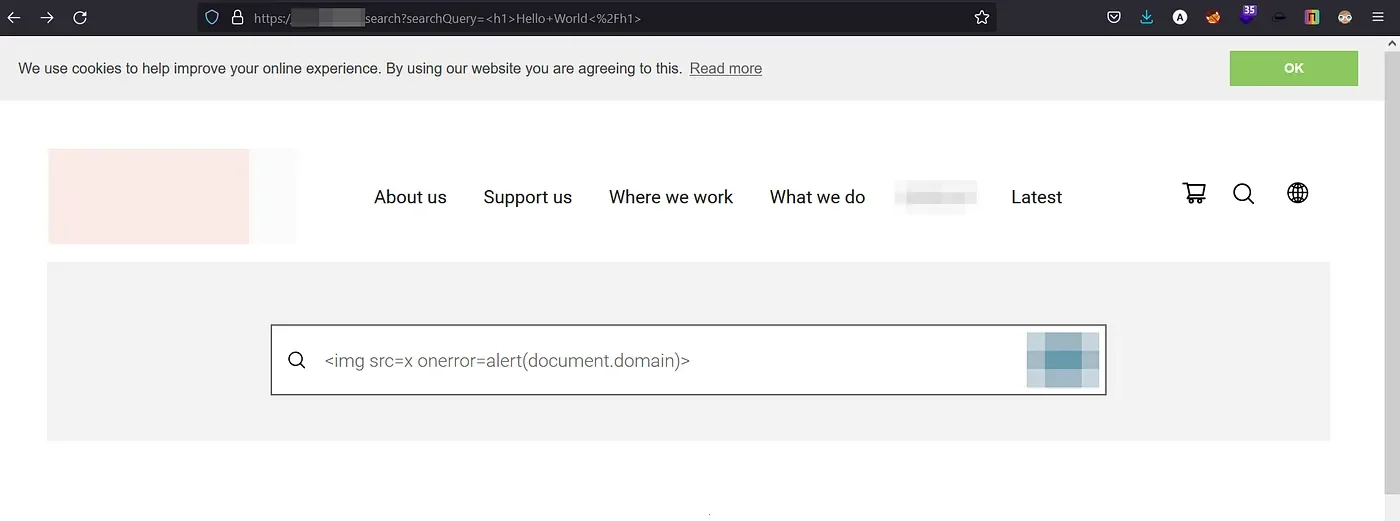
However, the same tag without the handler was accepted:
https://www.wedexs.com/search?searchQuery=<img+src%3Dx>
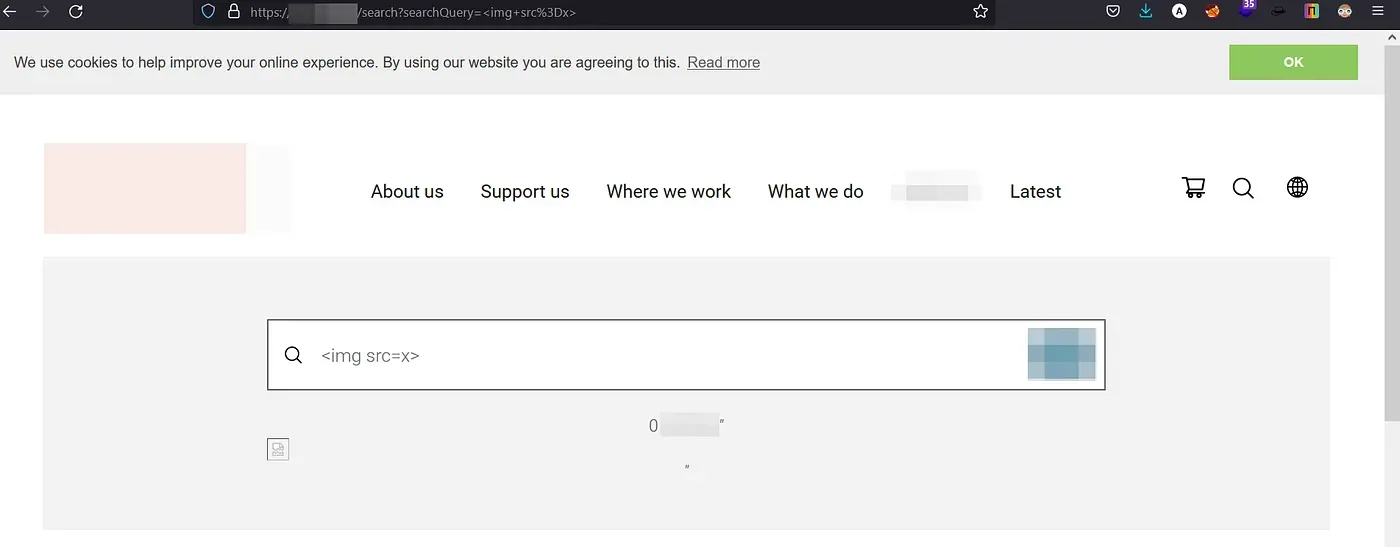
So HTML tags and attributes pass through the WAF, but anything that can invoke JavaScript is blocked. From this the author infers that the WAF is matching on regular expressions or a blacklist of words, and that if the inference is right there should be a way around it.
Exploitation
Step 1: search for known bypasses
The first attempt was to look up published Cloudflare WAF bypass techniques. None of them worked on this target.
Step 2: brute-force the personal wordlist
The author loaded his own list of 10 to 20 historical XSS payloads into Burp Suite and brute-forced the searchQuery parameter, capturing the HTTP status code for each attempt. Every payload returned 404 except one, which returned 300. That payload was:
<svg onload=prompt(document.domain)>
with the hex form:
<svg onload=prompt(document.domain)>
The author says the hex-encoded payload was able to bypass the WAF's regex.
On its own the payload did not fire: the response came back but no alert box appeared.
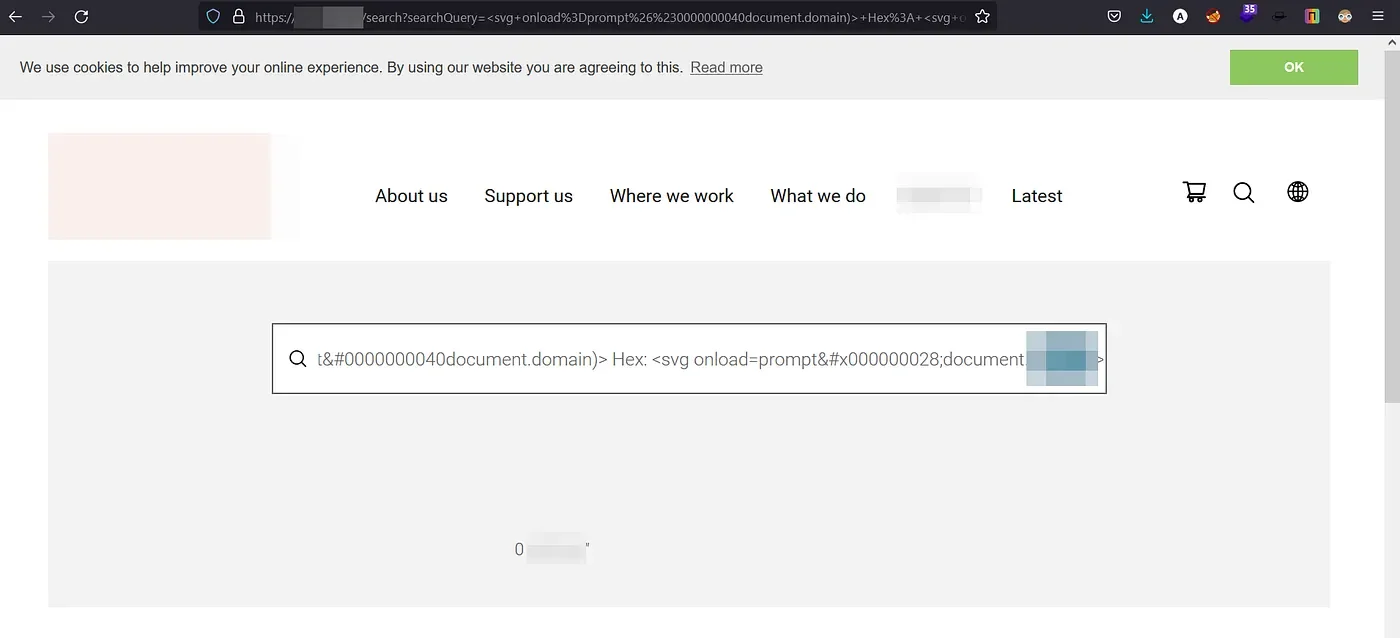
Step 3: change the browser
The payload works in the combination only, and the thing that went wrong was the browser. He switched to Microsoft Edge, loaded the page again, and the WAF was bypassed: the page rendered and the alert box appeared.
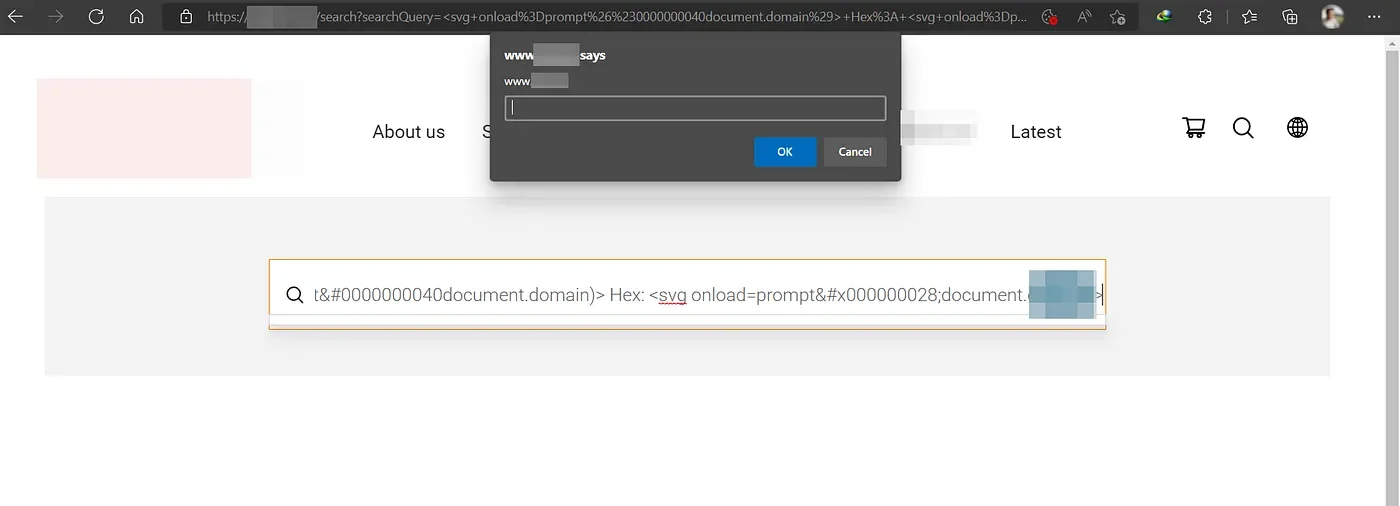
The author attributes the result to the combination of the payload and the browser change. The author credits his seniors' advice about switching browsers for finding this, saying he would otherwise have skipped the vulnerability.
Root cause
The application reflects the searchQuery value into the response without encoding it, which is what allows both the <h1> HTML injection and, once a payload gets past the WAF, script execution. The WAF in front of it appears to work from regexes or a blacklist: it blocks <script>, onerror and similar JavaScript-invoking constructs, and it blocks the SQL injection string, but it lets plain tags and attributes through. A blacklist of that kind can be evaded by writing the same construct in a different encoding, which is what the numeric character reference for ( did. The # truncation observed at the start is a separate filtering behaviour on the back end. The report does not say how the WAF rule was written, so the exact regex is not known.
Impact
A payload that gets past the WAF and executes runs JavaScript in the context of the site's origin. That would allow reading and modifying what the page shows, though the report demonstrates only an alert box. The report does not demonstrate any of this beyond an alert box, and it does not describe the site's authentication or what data a logged-in user could reach. The attack requires the victim to click a link or be redirected to the crafted URL, and it depends on the payload surviving the WAF and executing in the victim's browser, which in this case was browser-dependent.
Fix
The measures it implies are: encode or otherwise sanitise the searchQuery value on output so that reflected input cannot become markup, and treat the WAF as a secondary layer rather than the control that stops injection. A WAF rule set based on blacklists should be reviewed and kept current, since the author's point is that an outdated or badly configured WAF provides no real protection.
Variants to test
- Character truncation probe. Send a string mixing quotes, slashes and
#and see which characters come back. A positive result is a reflected value that is cut at a specific character, which tells you where filtering happens. - Tag versus handler. Send a harmless tag such as
<h1>Hello World</h1>, then the same tag with an event handler. If the tag renders but the handler is blocked, the WAF is matching on JavaScript keywords and a blacklist bypass is worth trying. - Numeric character references. Replace characters in a blocked keyword or handler with decimal or hex references, as in
(or(for(. A positive result is a response that is no longer blocked and, in the browser, a handler that executes. - Status-code brute force. Replay a wordlist of payloads through a proxy and record status codes. A payload that returns a different code from the rest is worth inspecting by hand.
- Browser comparison. Load the same accepted payload in more than one browser. A payload that is accepted by the server but does not execute in one browser may execute in another, which is exactly the gap the author found.
Be careful with any of these on systems you do not own, and keep the request volume low enough that you do not get blocked or disrupt the service.
What happened, in plain words
A security researcher found a public website with a search box. Whatever you typed into the search box was put straight back into the page you saw. That is a common and dangerous mistake, because it means the website is willing to display text that a visitor controls as if it were part of the page itself.
A Cloudflare block page appeared when an attack payload was sent, indicating a filter in front of the site. This filter is called a Web Application Firewall, or WAF. The researcher wanted to show that a WAF is not magic: if it is set up badly or relies on a simple list of banned words, someone can write the same attack in a slightly different way and slip past it.
The researcher did exactly that. He first confirmed the WAF was there by sending an obvious attack and watching Cloudflare block it. He then found that harmless HTML tags were allowed through, which told him the WAF was probably matching on specific words rather than understanding the request. Finally, one payload from his wordlist returned a different status code, and after switching browsers it bypassed the WAF. When he loaded the page in Microsoft Edge, the browser ran the script and showed an alert box.
What a WAF is, and why it matters
A Web Application Firewall is a filter that sits between visitors and a website. When you type an address into your browser, your request does not go straight to the computer that hosts the site. It first passes through the WAF, which looks at the request and decides whether to forward it or block it. Think of it like a bouncer at a door: everyone who wants to come in has to pass the bouncer first, and the bouncer has a list of things that are not allowed inside.
The WAF is there to catch attacks such as Cross Site Scripting (XSS) and SQL Injection (SQLi). Both of these work by getting a website to treat user input as code rather than as plain text. A WAF tries to spot the patterns those attacks usually contain and stop them before they reach the application.
Most WAFs are installed on a proxy server, which is a machine that stands in front of the real web server. The WAF inspects each request, and if it looks fine, passes it on. Cloudflare and AWS are two well-known companies that offer this service. The author links to Cloudflare's own explanation of WAFs and to a Cloudflare community page about the "Sorry, you have been blocked" message, which is the page you see when the WAF rejects your request.
The author's point is that an IPS, IDS or WAF that is misconfigured or outdated is of no use against attackers. If the rules are outdated or written badly, the protection is mostly cosmetic. He also asks readers to be careful: do not hammer a live website, and do not start with automated tools, because they generate a lot of traffic and get you blocked quickly.
The target and the search box
The author does not name the website. He asks us to pretend the domain is wedexs.com. The site had a search feature. When you typed something into the search box and pressed enter, the browser sent your text to the server as part of the URL, using a method called GET and a parameter called searchQuery.
A parameter is just a named slot in a URL. The part after the question mark is a list of name=value pairs, and the server reads them to know what you asked for. So a normal search produced a URL like this:
https://www.wedexs.com/search?searchQuery=<searchString>
Here searchString is a placeholder for whatever you typed. If you searched for cats, the URL would end in searchQuery=cats. The important thing is that the server takes that value and puts it into the page it sends back. That is called reflection: your input is echoed back to you.
Step 1: checking what the site does with special characters
Before attacking anything, the author wanted to understand how the site handles unusual characters. Characters like ', /, \, " and # are interesting because they have special meanings in URLs, in HTML or in database queries. If the site reflects them unchanged, that tells you it is not cleaning its input. If it removes or changes them, that tells you some filtering is happening.
He sent this URL:
https://www.wedexs.com/search?searchQuery=’/\\”#abc
In plain words: the search value is a single quote, a forward slash, a backslash, a double quote, a hash and then the letters abc. The # character has a special role in a URL: everything after it is called the fragment, and browsers normally do not send the fragment to the server at all. It is used for jumping to a section of a page. So if the # and everything after it disappeared, that could be the browser's doing, the server's doing, or both.
The output showed only ‘/\\” and nothing after it. The # and the abc were gone. The author concluded that the # is filtered on the back end and the rest of the string is truncated, meaning cut off. Either way, the practical lesson is the same: the site is doing something with the input, and the researcher now knows where the edge of the behaviour is.
Step 2: confirming the WAF with a SQL injection payload
SQL is the language databases speak. A website that searches a database builds a query from your input. SQL injection means crafting input that changes the meaning of that query. The classic test is a string that turns a condition into something always true, so the database returns everything instead of nothing.
The author sent this:
https://www.wedexs.com/search?searchQuery=’or 1=1 —
In plain words: a single quote, then or 1=1, then a dash-like character. The idea is that if the site builds a query like WHERE name = '<input>', the quote closes the string and or 1=1 makes the condition true for every row. The trailing dash is meant to comment out the rest of the query so it does not cause a syntax error.
Instead of a search result, Cloudflare returned its block page. That is the confirmation the author wanted: a WAF is sitting in front of the application and it recognises attack patterns. Cloudflare returned its block page instead of a search result.
Step 3: testing whether HTML tags are allowed
HTML is the language of web pages. Tags like <h1> mark up text so the browser knows how to display it. <h1> means a top-level heading. If a site reflects your input and the browser renders your tags as tags, that is HTML injection: you can change the structure and appearance of the page.
The author sent:
https://www.wedexs.com/search?searchQuery=<h1>Hello+World<%2Fh1>
In plain words: the search value is <h1>Hello World</h1>. The + signs are how a URL encodes spaces, and %2F is how a URL encodes a forward slash, so the server receives the closing </h1> tag correctly. This is a harmless test: it only asks the browser to show "Hello World" as a big heading.
The heading appeared on the page. That is the first vulnerability: reflected HTML injection. The site takes what you type and puts it into the page without encoding it. Encoding means turning < into < so the browser shows it as text instead of treating it as the start of a tag. Without encoding, your input becomes part of the page's structure.
Step 4: trying XSS and getting blocked
If HTML injection works, the natural next question is whether JavaScript works too. JavaScript is the programming language browsers run. If a site lets you inject JavaScript, that is Cross Site Scripting (XSS): your script runs in the context of the site, in the browser of anyone who opens your crafted link.
The classic test payload is:
<script>alert(document.domain)</script>
In plain words: a script tag containing alert(document.domain). alert opens a pop-up box, and document.domain is the current site's domain name. If the box appears showing the domain, the script ran, and you have proven XSS.
The author sent this payload through the same searchQuery parameter. The WAF detected the payload and did not forward the request. The page kept showing the previous payload's output rather than the new one, which is a useful clue: the server never processed the new request at all.
A senior colleague had told the author that XSS payloads sometimes fail in Firefox, so he switched to Microsoft Edge. The WAF still detected and filtered the payload there. This is worth noting: changing browsers is a legitimate troubleshooting step, but it does not help if the request is blocked before it reaches the server.
Step 5: trying an image tag with an event handler
Another common XSS technique uses an HTML tag that loads something, plus an event handler. An event handler is an attribute that tells the browser what to do when something happens, such as when an image fails to load. The author sent:
<img src=x onerror=alert(document.domain)>
In plain words: an image tag whose source is x, which is not a real image, so the browser will fail to load it. The onerror attribute says: when that failure happens, run alert(document.domain). This is a standard way to get JavaScript to run without a <script> tag.
This also failed in both Firefox and Microsoft Edge. The WAF blocked it, and again the response showed the older payload rather than the new one.
Step 6: the same tag without the handler
To narrow down what the WAF was actually blocking, the author sent the same image tag but without the event handler:
https://www.wedexs.com/search?searchQuery=<img+src%3Dx>
In plain words: an image tag with source x and nothing else. The + is an encoded space and %3D is an encoded equals sign, so the server receives <img src=x>.
This was accepted. The tag appeared in the page. So the WAF lets HTML tags and attributes through, but blocks anything that can invoke JavaScript, such as <script> or onerror. From this the author inferred that the WAF is matching on regular expressions or a blacklist of words. A regular expression is a pattern-matching rule: for example, "block anything containing onerror". A blacklist is a list of banned words. Both work by looking for known bad strings, and both can be fooled by writing the same thing in a different way.
Step 7: looking for a way around the WAF
The first thing the author did was search online for published Cloudflare WAF bypass techniques. None of them worked on this target. That is normal: WAF rules change, and a bypass that works on one site may not work on another.
He then loaded his own small wordlist into Burp Suite. Burp Suite is a tool that sits between your browser and the server, letting you capture requests, change them and replay them. A wordlist is just a file with one payload per line. His list had only 10 to 20 XSS payloads that had worked somewhere in the past. He brute-forced the searchQuery parameter, meaning he sent each payload in turn and recorded the HTTP status code that came back.
A status code is a three-digit number the server sends with every response. 200 means OK, 404 means not found, 300 means multiple choices. The author says every payload returned 404 except one, which returned 300. That one was:
<svg onload=prompt(document.domain)>
with the hex form:
<svg onload=prompt(document.domain)>
In plain words: an <svg> tag, which is used for drawing graphics, with an onload event handler that runs when the graphic loads. The handler calls prompt(document.domain), which opens a prompt box showing the domain. The interesting part is the (. Instead of writing a literal opening bracket, the payload uses a numeric character reference: ( in decimal, or ( in hexadecimal. Both are ways of writing the same character, the opening bracket, using a code number. The author says the hex-encoded payload was able to bypass the WAF's regex.
On its own the payload did not fire. The response came back, but no alert box appeared.
Step 8: changing the browser
The author says the payload only works in combination, and that the thing that went wrong was the browser. He switched to Microsoft Edge, loaded the page again, and the WAF was bypassed: the page rendered and the alert box appeared.
The author attributes the result to the combination of the payload and the browser change. The author credits his seniors' advice about switching browsers for finding this, saying he would otherwise have skipped the vulnerability. The lesson is not that Edge is magically better than Firefox; it is that browsers differ in how they parse and execute markup, and a payload that is accepted by the server may behave differently in different browsers.
Why this worked
The application reflects the searchQuery value into the response without encoding it. That is what allows both the <h1> HTML injection and, once a payload gets past the WAF, script execution. The WAF in front of it appears to work from regexes or a blacklist: it blocks <script>, onerror and similar JavaScript-invoking constructs, and it blocks the SQL injection string, but it lets plain tags and attributes through. A blacklist of that kind can be evaded by writing the same construct in a different encoding, which is what the numeric character reference for ( did. The # truncation observed at the start is a separate filtering behaviour on the back end. The report does not say how the WAF rule was written, so the exact regex is not known.
What an attacker could do with this
A payload that gets past the WAF and executes runs JavaScript in the context of the site's origin. The origin is the combination of scheme, host and port, such as https://www.wedexs.com. JavaScript running in that origin can read and modify what the page shows, and can act as the victim within the application. A session is how a website remembers that you are logged in, usually via a cookie, which is a small piece of data the browser stores and sends back with each request.
The report does not demonstrate any of this beyond an alert box, and it does not describe the site's authentication or what data a logged-in user could reach. The attack requires the victim to click a link or be redirected to the crafted URL, and it depends on the payload surviving the WAF and executing in the victim's browser, which in this case was browser-dependent.
How to fix it
The measures it implies are: encode or otherwise sanitise the searchQuery value on output so that reflected input cannot become markup, and treat the WAF as a secondary layer rather than the control that stops injection. A WAF rule set based on blacklists should be reviewed and kept current, since the author's point is that an outdated or badly configured WAF provides no real protection.
Things you can try on your own
- Character truncation probe. Send a string mixing quotes, slashes and
#and see which characters come back. A positive result is a reflected value that is cut at a specific character, which tells you where filtering happens. - Tag versus handler. Send a harmless tag such as
<h1>Hello World</h1>, then the same tag with an event handler. If the tag renders but the handler is blocked, the WAF is matching on JavaScript keywords and a blacklist bypass is worth trying. - Numeric character references. Replace characters in a blocked keyword or handler with decimal or hex references, as in
(or(for(. A positive result is a response that is no longer blocked and, in the browser, a handler that executes. - Status-code brute force. Replay a wordlist of payloads through a proxy and record status codes. A payload that returns a different code from the rest is worth inspecting by hand.
- Browser comparison. Load the same accepted payload in more than one browser. A payload that is accepted by the server but does not execute in one browser may execute in another, which is exactly the gap the author found.
Be careful with any of these on systems you do not own, and keep the request volume low enough that you do not get blocked or disrupt the service.
Glossary
- WAF (Web Application Firewall): a filter that sits in front of a website and blocks requests that look like attacks.
- IDS (Intrusion Detection System): a system that watches traffic and reports suspicious activity, without necessarily blocking it.
- IPS (Intrusion Prevention System): a system that watches traffic and actively blocks suspicious activity.
- Proxy server: a machine that stands between clients and a server and forwards requests.
- Reverse proxy: a proxy that sits in front of a web server and forwards requests to it.
- GET: an HTTP method used to request data, with parameters sent in the URL.
- Parameter: a named value in a URL, written as
name=valueafter the question mark. - Reflection: when a server puts user input back into the response.
- HTML: the markup language used to structure web pages.
- HTML injection: when user input is rendered as HTML markup instead of text.
- XSS (Cross Site Scripting): when an attacker gets JavaScript to run in another user's browser in the context of a website.
- SQL: the language used to query databases.
- SQL injection (SQLi): when user input changes the meaning of a database query.
- JavaScript: the programming language browsers run.
- Event handler: an HTML attribute that runs code when something happens, such as
onerrororonload. - Regular expression (regex): a pattern used to match text.
- Blacklist: a list of banned words or patterns.
- Numeric character reference: a way of writing a character by its code number, such as
(for(. - Hex: base-16 notation, used in references like
(. - Status code: a three-digit number a server sends with each response, such as 200, 300 or 404.
- Burp Suite: a tool for capturing, modifying and replaying HTTP requests.
- Wordlist: a file containing one payload or guess per line.
- Brute force: trying many inputs in turn and recording the results.
- Origin: the combination of scheme, host and port that defines a security boundary in the browser.
- Session: how a website remembers that you are logged in.
- Cookie: a small piece of data the browser stores and sends back with requests.
- Fragment: the part of a URL after
#, which browsers normally do not send to the server. - Encoding: converting characters into a safe representation, such as
<for<or%2Ffor/. - Truncation: cutting a string short at a certain point.




