Bypassing 403
A web server trusted the X-Forwarded-For header and treated requests claiming to come from localhost as internal, so a 403-blocked admin console became accessible. The same flaw affected over 800 subdomains of the organisation, exposing normally blocked applications and APIs.
 Published on observationsinsecurity.com
A few weeks ago I came across this cool “accidental” exploit vector which was documented about 8 years ago by IRCmaxwell and describes a way to trick servers (behind a reverse proxy or load balancer) into thinking a HTTP request which is ordinarily unauthorised, is actually authorised.
The full write-up lives on its author's site
It belongs to its author, so we link to it rather than copy it. The other two tabs are our own rewrites, checked against it.
Context
This write-up is about a technique for bypassing 403 responses on web applications that sit behind a reverse proxy or load balancer. The vector is not new: the author credits a post by IRCmaxwell from 2012, which described how a misconfigured X-Forwarded-For header could make a server treat an unauthorised request as authorised. The author came across that post while researching the X-Forwarded-For header and recognised it as a useful pattern to apply to bug bounty targets.
The header itself is a de-facto standard for identifying the originating IP address of a client connecting to a web server through an HTTP proxy or load balancer. When traffic is intercepted between clients and servers, server access logs contain the IP address of the proxy or load balancer only; the X-Forwarded-For request header is used to see the original client IP address.
Because the header is implemented in many different ways, it can also be abused in many different ways. Researchers commonly use it to inject SQL payloads, perform proxy enumeration, spoof client IPs, and attempt SSRF. The use-case that caught the author's attention was a variation of IP spoofing that causes the target web server to reveal information it should not.
Setup
The author wrote a tool that sends numerous requests to a target address with different variations of the X-Forwarded-For header carrying localhost addressing. The variations exist to accommodate cases where a WAF blocks requests based on localhost signatures. The tool uses heuristics to learn variations in the HTTP response that could indicate additional sensitive information being disclosed.
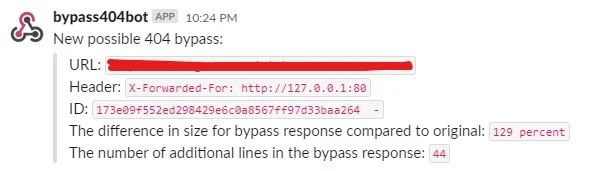
No specific target, program, account or role is named in the report. The work was carried out against bug bounty targets in general, scanning across hundreds of them.
Finding it
The starting point was IRCmaxwell's accidental discovery. He had unintentionally configured all of his outgoing HTTP requests to include the X-Forwarded-For header set to [redacted], the local host. As a result, StackOverflow revealed parts of an administrative console that should not have been available for public viewing or access.
The mechanism was that the StackOverflow server interpreted X-Forwarded-For: [redacted] to mean that the web server itself had initiated the request, and by implication that the requester was authorised to see all the content available at that endpoint. IRCmaxwell was effectively masquerading as the web server itself as far as the web server was concerned.
The author saw this as a good fit for bug bounty targets and built the scanning tool described above. As the tool was developed and run across hundreds of targets, the author found that web applications handle and respond to X-Forwarded-For input very differently, which produced unexpected leads.
Exploitation
Step 1: Scan with localhost variants of X-Forwarded-For
The tool sends requests to a target address with different variations of the X-Forwarded-For header carrying localhost addressing, and uses heuristics to learn variations in the HTTP response that could indicate additional sensitive information being disclosed. The variations are there to work around WAFs that block requests based on localhost signatures.
Step 2: The admin console on a blocked subdomain
The biggest win came early in the scanning. The tool discovered an admin console on a subdomain that is blocked to the public, returning response code 403. When a request was sent with the X-Forwarded-For header set to [redacted]:80, the admin console became accessible.
The report does not include the raw request or response for this step; the essential detail is the header value [redacted]:80.
Step 3: Write up the impact
After writing up the report and demonstrating the impact, it occurred to the author that the same issue might occur on other subdomains of the parent domains.
Step 4: Search the parent domain's other subdomains
After some searching, the author found that not one subdomain, but two, no wait, over 800 subdomains for this particular organisation were impacted by the same issue. Each of these subdomains contained web applications, APIs or other services that were normally blocked to public access but were bypassable using this technique.
Root cause
In the StackOverflow case, the server treated a value of [redacted] as meaning the request came from the web server itself. Requests that appear to originate locally are then treated as authorised, so access controls that should apply to the public are skipped. The report does not describe the application code or the proxy configuration, so the exact implementation is not shown; the behaviour is inferred from the observed change from 403 to accessible.
Existing defences did not stop it. The tool sends multiple localhost variations to accommodate cases where a WAF blocks requests based on localhost signatures.
Impact
An attacker could reach web applications, APIs and other services that are normally blocked to public access on the affected subdomains using this technique. In this case over 800 subdomains of a single organisation were affected. The report does not state what data or functionality those services exposed once reached, nor whether any bounty was paid.
Fix
The implied fix is to stop trusting client-supplied X-Forwarded-For values for authorisation decisions, and to have the proxy or load balancer strip or overwrite the header before it reaches the application.
Variants to test
- Send
X-Forwarded-For: [redacted]to endpoints that return 403. A positive result is a response that changes to 200 or otherwise reveals content that was previously blocked. - Send
X-Forwarded-For: [redacted]:80, the value that worked here. A positive result is the same 403 to accessible transition. - Try other localhost representations to get past WAF signatures. A positive result is any variation that changes the response body or status compared with the baseline.
- Run the same checks against every subdomain of the parent domain, not just the one where the issue was first found. A positive result is any other subdomain whose normally blocked services become reachable.
- Use the same heuristic approach as the tool to spot responses that disclose additional sensitive information.
What happened, in plain words
A security researcher found a way to get past a "403 Forbidden" page on a company's website. A 403 page is the message a website shows when it refuses to let you in, a bit like a locked door with a sign saying "staff only". The trick was to add a small piece of extra information to each request, a line called X-Forwarded-For, and to set that line to say the request came from the website's own computer rather than from the researcher's computer. When the website believed the request came from itself, it stopped refusing and let the researcher see an admin console, which is a private control panel normally hidden from the public.
The researcher did not invent the trick. He read about it in a blog post from 2012 by someone called IRCmaxwell, who had stumbled on it by accident. The researcher then built a small program to try the trick automatically against many bug bounty targets, which are companies that invite people to test their systems and report problems. The program found one blocked admin console, and after reporting it the researcher checked the company's other subdomains and found that over 800 of them had the same weakness.

The rest of this article walks through the same story step by step, explaining every term along the way.
The background: what a proxy is and why the header exists
Most large websites do not put their computers directly on the internet. Instead they put a middleman in front. That middleman is called a reverse proxy or a load balancer. Think of a restaurant with a host at the door: customers never walk straight into the kitchen, they talk to the host, and the host passes the order on. The host is the proxy, the kitchen is the actual web server.
Because the host stands at the door, the kitchen only ever sees the host. If the kitchen keeps a log of who ordered what, every entry says "the host", not the name of the actual customer. That is a problem when you want to know who really made a request.
To solve it, the host can write a note on each order saying who the original customer was. On the web, that note is an HTTP header called X-Forwarded-For. A header is a small labelled line that travels with every web request or response, carrying extra information alongside the main content. The X-Forwarded-For header is described as a de-facto standard, meaning it is not an official rule but everyone treats it as one. It identifies the originating IP address of a client connecting to a web server through an HTTP proxy or load balancer. An IP address is the number that identifies a computer on a network, like a postal address for machines.
The header exists because when traffic is intercepted between clients and servers, server access logs contain the IP address of the proxy or load balancer only. To see the original IP address of the client, the X-Forwarded-For request header is used.
Here is the header in its simplest form, as it would appear in a request:
X-Forwarded-For: [redacted]
Line by line:
X-Forwarded-Foris the name of the header. TheX-prefix is a convention for headers that were not part of the original web standards.[redacted]is the value. This particular number is special: it always means "this same computer", also called localhost or the loopback address. If a computer sends a message to[redacted], it is talking to itself.
So the line above is a note saying "this request originally came from the same machine that is now handling it".
Why the header is dangerous
The header is just text that the client sends. Nothing forces the client to tell the truth. Because the header is implemented in many different ways by different software, it can also be abused in many different ways. Researchers commonly use it to inject SQL payloads, perform proxy enumeration, spoof client IPs, and attempt SSRF. In plain terms:
- SQL injection means slipping database commands into input so the database runs them.
- Proxy enumeration means using the header to discover which proxies and internal machines exist.
- IP spoofing means pretending to be a different computer than you are.
- SSRF, or server-side request forgery, means tricking a server into making requests on your behalf, often to places you cannot reach yourself.
The use-case that caught the author's attention was a variation of IP spoofing that causes the target web server to reveal information it should not. In other words: lie about where you are coming from, and the server may hand you things it keeps for itself.
The accidental discovery that started it
The starting point was IRCmaxwell's accident. He had unintentionally configured all of his outgoing HTTP requests to include the X-Forwarded-For header set to [redacted], the local host. In other words, every request his computer sent carried a note saying "I am the same machine you are".
As a result, StackOverflow, a well-known question-and-answer website, revealed parts of an administrative console that should not have been available for public viewing or access. An administrative console is a private page where the people who run a site manage it: they can change settings, read private data, and control other users. It is the equivalent of the back office of a shop, not the shop floor.
The mechanism was that the StackOverflow server interpreted X-Forwarded-For: [redacted] to mean that the web server itself had initiated the request, and by implication that the requester was authorised to see all the content available at that endpoint. An endpoint is one specific address on a website that does one specific job, such as a page, a form submission, or a data feed. IRCmaxwell was effectively masquerading as the web server itself as far as the web server was concerned.
That is the whole idea in one sentence: the server has a rule that says "requests from myself are trusted", and the header lets any visitor claim to be the server.
Building a tool to look for it
The author saw this as a good fit for bug bounty targets and built a scanning tool. A scanner is a program that sends many requests automatically and looks for patterns in the replies, instead of a person clicking around by hand.
The tool sends numerous requests to a target address with different variations of the X-Forwarded-For header carrying localhost addressing. Why different variations? Because many sites sit behind a WAF, a web application firewall. A WAF is a filter that inspects incoming requests and blocks ones that look suspicious, a bit like a bouncer at the door who checks a list. If the WAF has been told to block the exact text [redacted], then sending only that value would get you stopped at the door. Sending several different spellings of "I am local" gives you a chance that one of them slips past the bouncer.
The tool uses heuristics to learn variations in the HTTP response that could indicate additional sensitive information being disclosed. Heuristics here means a practical rule of thumb rather than a guarantee: the tool does not know in advance what the secret page looks like, so it compares responses and flags the ones that differ in interesting ways, such as being longer, containing new words, or having a different status code. A status code is the three-digit number a server sends back to say how the request went, such as 200 for success or 403 for forbidden.
No specific target, program, account or role is named in the report. The work was carried out against bug bounty targets in general, scanning across hundreds of them.
Finding it
As the tool was developed and run across hundreds of targets, the author found that web applications handle and respond to X-Forwarded-For input very differently, which produced unexpected leads. That is not surprising: each company builds its own setup, so the same lie is believed by some servers and ignored by others.
Step 1: Scan with localhost variants of X-Forwarded-For
The tool sends requests to a target address with different variations of the X-Forwarded-For header carrying localhost addressing, and uses heuristics to learn variations in the HTTP response that could indicate additional sensitive information being disclosed. The variations are there to work around WAFs that block requests based on localhost signatures. A signature in this context is a known pattern a filter looks for, like a fingerprint on a wanted poster.
Why do this at all? Because a page that refuses you with a 403 might still contain the private content behind the refusal, and the only thing standing between you and it may be the server's belief about where you came from. If you can change that belief, the refusal may disappear.
Step 2: The admin console on a blocked subdomain
The biggest win came early in the scanning. The tool discovered an admin console on a subdomain that is blocked to the public, returning response code 403. A subdomain is a smaller address under a company's main address: if the main site is example.com, then admin.example.com or shop.example.com are subdomains. Companies often put internal tools on subdomains and rely on the fact that outsiders do not know or cannot reach them.
When a request was sent with the X-Forwarded-For header set to [redacted]:80, the admin console became accessible. The header value looks like this:
Line by line:
X-Forwarded-Foris again the header name.[redacted]is the localhost address, meaning "this same computer".:80is a port number attached to the address. A port is like a numbered door on a single building: one computer can run many services, and each listens on its own door number. Port 80 is the standard door for ordinary unencrypted web traffic.
The server believed it, and the admin console became accessible. The report does not include the raw request or response for this step; the essential detail is the header value [redacted]:80, which makes the server believe the request originated from itself on port 80.
Step 3: Write up the impact
After writing up the report and demonstrating the impact, it occurred to the author that the same issue might occur on other subdomains of the parent domains. A parent domain is the main address that subdomains hang off, the way branches hang off a company name. Writing up the impact means showing, in the report, what an attacker could actually reach and why it matters, not just that a strange response appeared.
Step 4: Search the parent domain's other subdomains
After some searching, the author found that not one subdomain, but two, no wait, over 800 subdomains for this particular organisation were impacted by the same issue. Each of these subdomains contained web applications, APIs or other services that were normally blocked to public access but were bypassable using this technique.
A web application is a website that does things rather than just showing text: it lets you log in, submit forms, manage data. An API is a way for programs to talk to each other over the web, like a service counter where one program places an order and another fulfils it, without any human clicking. If those counters were meant to be staff-only and the trick opened them to anyone, the exposure is large.
Root cause
In the StackOverflow case, the server treated a value of [redacted] as meaning the request came from the web server itself. Requests that appear to originate locally are then treated as authorised, so access controls that should apply to the public are skipped. In everyday terms: the server has a rule "family members get in without a ticket", and it accepts a handwritten name badge as proof of being family.
The report does not describe the application code or the proxy configuration, so the exact implementation is not shown; the behaviour is inferred from the observed change from 403 to accessible.
The tool sends multiple localhost variations to accommodate cases where a WAF blocks requests based on localhost signatures.
Impact
An attacker could reach web applications, APIs and other services that are normally blocked to public access on the affected subdomains using this technique. In this case over 800 subdomains of a single organisation were affected. The report does not state what data or functionality those services exposed once reached, nor whether any bounty was paid.
Fix
The implied fix is to stop trusting client-supplied X-Forwarded-For values for authorisation decisions, and to have the proxy or load balancer strip or overwrite the header before it reaches the application. In plain words: the host at the door should throw away any note the customer wrote about themselves, and write its own note instead. Authorisation is the process of deciding whether someone is allowed to do something, as opposed to authentication, which is deciding who they are.
Variants to test
If you want to try this on a target you are allowed to test, these are the checks the author describes. Each one lists what a positive result looks like.
- Send
X-Forwarded-For: [redacted]to endpoints that return 403. A positive result is a response that changes to 200 or otherwise reveals content that was previously blocked. - Send
X-Forwarded-For: [redacted]:80, the value that worked here. A positive result is the same 403 to accessible transition. - Try other localhost representations to get past WAF signatures. A positive result is any variation that changes the response body or status compared with the baseline. The baseline is the ordinary response you get without the header, kept for comparison.
- Run the same checks against every subdomain of the parent domain, not just the one where the issue was first found. A positive result is any other subdomain whose normally blocked services become reachable.
- Use the same heuristic approach as the tool to spot responses that disclose additional sensitive information. The response body is the actual content of the reply, the page or data itself, as opposed to the status code and headers around it.
Glossary
- 403 Forbidden: the status code a server returns when it refuses to serve a request, even if the request was understood.
- 200 OK: the status code a server returns when a request succeeds and content is returned.
- Admin console: a private control panel used by the people who run a site to manage it.
- API: a way for programs to exchange requests and data over the web without a human using a browser.
- Authentication: the process of establishing who someone is.
- Authorisation: the process of deciding whether someone is allowed to do a particular thing.
- Baseline: the normal response recorded for comparison before trying variations.
- Bug bounty: a programme in which an organisation invites outside researchers to test its systems and report problems, sometimes for a reward.
- Endpoint: one specific address on a website that performs one specific job.
- Header: a small labelled line of extra information sent with a web request or response.
- Heuristics: practical rules of thumb used to spot likely interesting results without guaranteeing them.
- HTTP: the language browsers and servers use to exchange requests and responses.
- IP address: the number identifying a computer on a network.
- IP spoofing: pretending to be a different computer than the one you really are.
- Load balancer: a middleman that spreads incoming traffic across several servers.
- Localhost / loopback: the special address
[redacted], which always refers to the same computer that is sending the message. - Parent domain: the main address that subdomains belong to.
- Port: a numbered channel on a computer, so several services can listen on one machine; port 80 is the standard web port.
- Proxy enumeration: using requests to discover which proxies and internal machines exist.
- Response body: the actual content of a server's reply, as opposed to its status code and headers.
- Reverse proxy: a middleman that sits in front of web servers and forwards requests to them.
- Scanner: a program that sends many requests automatically and looks for patterns in the replies.
- Signature: a known pattern that a filter such as a WAF looks for.
- SQL injection: slipping database commands into input so the database executes them.
- SSRF (server-side request forgery): tricking a server into making requests on your behalf, often to places you cannot reach directly.
- Status code: the three-digit number in a response saying how the request went.
- Subdomain: a smaller address under a main domain, such as
admin.example.comunderexample.com. - WAF (web application firewall): a filter that inspects incoming requests and blocks ones that look suspicious.
- Web application: a website that performs actions such as logging in, submitting forms or managing data.
- X-Forwarded-For (XFF): a de-facto standard header used to tell a server the original IP address of a client that arrived through a proxy or load balancer.

