Bypassing 403 Protection To Get Pagespeed Admin Access
The PageSpeed admin panel was protected by a 403 response, but adding an extra slash to the URL path bypassed the restriction. An attacker could then access the admin panel and potentially view or change PageSpeed configuration.
 Published on sapt.medium.com
Hello guys👋👋 ,Prajit here from the BUG XS Team, it’s been a long time since my last story, sorry for the delay was held back in exams and viva� . So anyway, in this story I will talk about one of my finding “Bypassing 403 Restrictions and gaining access to Global Pagespeed Admin Panel”
The full write-up lives on its author's site
It belongs to its author, so we link to it rather than copy it. The other two tabs are our own rewrites, checked against it.
Context
This write-up covers a 403 bypass that exposed the PageSpeed admin panel on a target host. The researcher refers to the panel as the "Global Pagespeed Admin Panel" and links to the mod_pagespeed admin documentation as the description of the feature. That admin interface is the management console for the PageSpeed module, and the researcher's point is that a 403 should not be accepted as final.
The report does not name the target domain; the URL is written as http://target.com/pagespeed_admin/. The finding was rated P2-High severity and paid 200 Eur, which the researcher notes is low relative to the severity because of the program's reward ranges.
Setup
The only tooling described is a bash script that automates 403 bypass methods, bypass-403, used to find the working variant, after which the researcher confirmed it manually in a browser.
Finding it
The starting observation is the ordinary one: a restricted resource answers with 403 Forbidden.
The researcher's position is that a 403 is not a stopping point, and that you should always try to break into these restrictions to get sensitive data or access to a restricted resource. The report first lays out the general techniques for getting past a 403, then applies them to the PageSpeed panel.
General bypass techniques
The report groups the methods into three families.
-
Adding to URL paths. These fragments are appended to the path of the URL and file that is forbidden:
-
Adding headers to the request. Sending these headers with the value
[redacted]can also get past the restriction:
X-Custom-IP-Authorization
X-Forwarded-For
X-Forward-For
X-Remote-IP
X-Originating-IP
X-Remote-Addr
X-Client-IP
X-Real-IP
The report cites 403bypasser for this family.
- Changing the request method. Switching from GET to POST, or to another method, can also lead to a bypass. The report cites a 403 bypass write-up for this one.
Exploitation
Step 1: Locate the panel and confirm the block
The researcher went to the PageSpeed admin panel location and found it forbidden:
http://target.com/pagespeed_admin/
The response was 403 Forbidden.
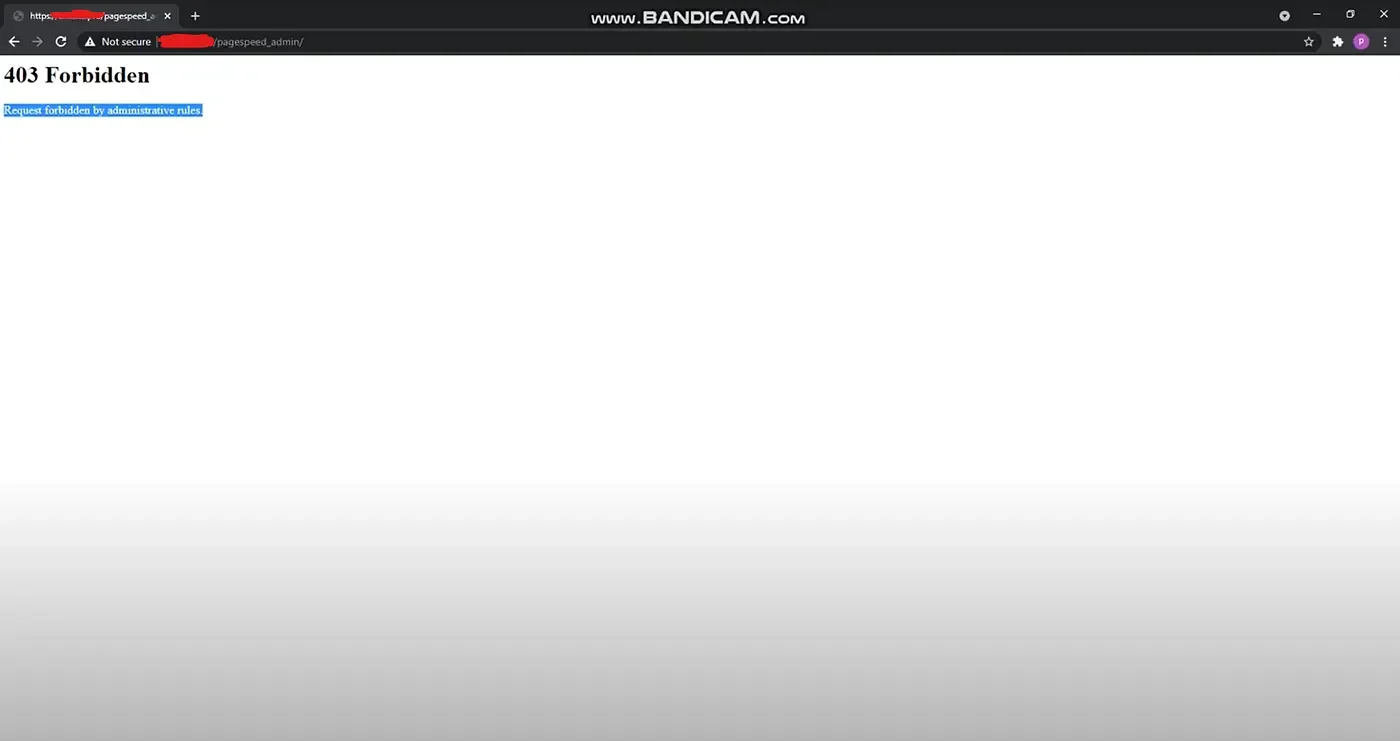
Step 2: Run the automated bypass script
The methods above were run through the bypass-403 bash script. Among the cases tested, one changed the response code from 403 to 200. The report does not say which other cases were tried or what they returned, only that this one stood out.
Step 3: Confirm manually in the browser
The researcher then tested the same case by hand in a browser and it bypassed the restriction. The working URL was:
http://target.com//pagespeed_admin/
The only change is a single extra slash before pagespeed_admin/. With that, the 403 disappeared and the PageSpeed admin panel loaded in full.
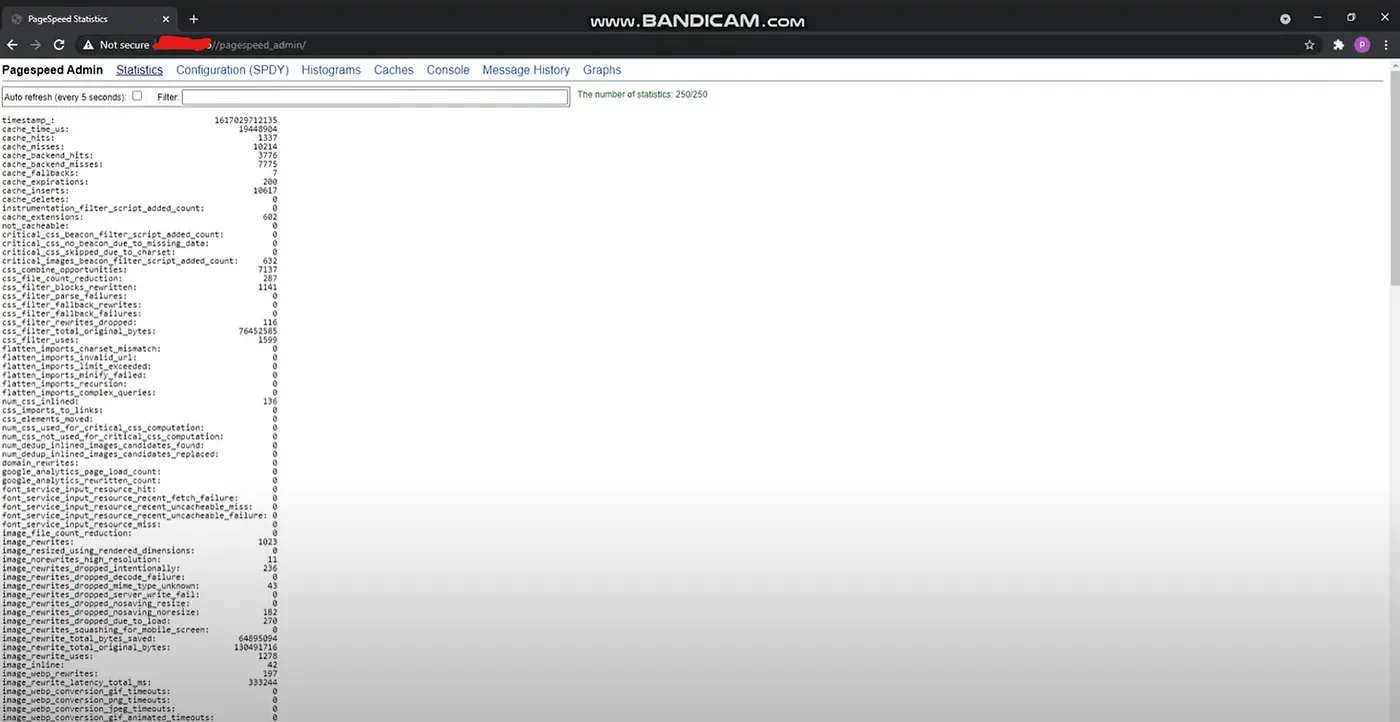
Root cause
The report does not analyse the server configuration, so the mechanism is not stated. Which layer held the rule, and how it normalised the path, is not described.
Impact
With the bypass, an unauthenticated visitor reached the complete PageSpeed admin panel. The report does not enumerate what actions the panel allows or what data it exposes; it treats full access to the admin interface as the impact, and the program rated it P2-High. The condition is simply that the panel is deployed and protected only by the path rule that the doubled slash defeats.
Fix
Variants to test
On other targets, the same families of technique are worth trying against any path that returns 403, especially administrative interfaces:
- Path fragments. Append
/*,/%2f/,/./,/or/*/to the forbidden path, and also try a doubled slash as in this report. A positive result is a change from 403 to 200, or to a redirect that leads to the protected content. - Loopback headers. Send each of
X-Custom-IP-Authorization,X-Forwarded-For,X-Forward-For,X-Remote-IP,X-Originating-IP,X-Remote-Addr,X-Client-IPandX-Real-IPwith the value[redacted]. A positive result is the 403 being replaced by the protected response. - Method change. Repeat the request as POST and as other methods instead of GET. A positive result is content or a status that the GET request was denied.
- Automate the sweep. Run the same cases with a script such as bypass-403 and then confirm any hit manually in a browser, as was done here, so that a single anomalous status code is not mistaken for a real bypass.

What happened, in plain words
A security researcher found that a web server was hiding a management page behind a "403 Forbidden" error. That error is the standard message a website sends when it refuses to show you something. The researcher tried writing the same address in slightly different ways, and one of those ways, a single extra slash in the address, made the error disappear. The management page then loaded in full. The page in question was the admin panel for PageSpeed, a piece of software that optimises websites. The company running the site treated the problem as serious (they called it P2-High) and paid the researcher 200 Eur. The researcher notes that this amount is low for the severity, because the company's reward ranges are small.
The report does not name the real website. The address is written as http://target.com/pagespeed_admin/, where target.com stands in for the real domain.
Before going further, a few ideas from zero, because the rest of the article depends on them.
- A web address (URL) is like a postal address for a page.
http://target.com/pagespeed_admin/says: use thehttpprotocol, go to the computer calledtarget.com, and ask for the thing at the path/pagespeed_admin/. - A path is the part after the domain name. It is like the folder and file name inside a building: the building is the domain, the path tells the receptionist which room you want.
- An HTTP status code is the short number a server sends back with every answer.
200means "here is the page, all good".403means "I understood you, but you are not allowed".404means "no such page". - An admin panel is a private control room for a website or a piece of software. It is where the people who run the site change settings. It is not meant for ordinary visitors, in the same way the fuse box of a building is not meant for guests.
- PageSpeed (specifically the mod_pagespeed module) is software that sits in front of a website and automatically makes pages load faster, for example by shrinking files. Its admin panel is the console where those speed settings are managed. The researcher links to the official mod_pagespeed admin documentation as the description of that feature.
- Authentication means proving who you are, usually by logging in. A page that is reachable without authentication is reachable by anyone on the internet who knows the address.
- A 403 bypass is the name for the whole class of tricks in this article: finding a way to make a server show you something it just told you that you cannot see.
Why a 403 is not the end of the story
The article opens with the everyday situation: when you visit a restricted resource, you normally get a 403 Forbidden message.
The image shows that ordinary 403 Forbidden page, the kind of refusal most people simply accept and walk away from.
The researcher's point is that you should not stop there: always try to break into these restrictions to get sensitive data or access to a restricted resource. The goal of trying is to reach sensitive data or a restricted area.
The three general families of 403 bypass
The article first explains the general techniques, then applies them to the PageSpeed panel. There are three families.
1. Changing the URL path
You add small fragments to the path of the URL, and to the file name, that is forbidden. The fragments listed are:
Line by line, in plain words:
/*adds a slash and a star to the end of the path. The star is a wildcard character in many systems, meaning "anything"./%2f/adds an encoded slash.%2fis how a slash is written when it has to be carried inside a URL without being treated as a real separator. Some servers decode it back into a slash, some do not, and that difference is exactly what a bypass exploits././adds a dot between two slashes. In file systems, a single dot means "the current folder", so/./is normally the same place as/. A guard that compares text literally may not see it that way./adds just a slash, which can produce a doubled slash such as//pagespeed_admin/. This is the one that worked in this report./*/adds a slash, a star and another slash, combining the wildcard idea with an extra separator.
The idea behind all five is the same: write the same destination in a shape the guard does not expect, and see whether the guard and the page delivery disagree.
2. Adding special headers to the request
A request is the message your browser sends to a server. Besides the address, it carries extra lines called headers, which are small labelled pieces of information, like the notes attached to a parcel. Some servers trust certain headers to say where the request really came from. If you send these headers with the value [redacted], the restriction can sometimes be bypassed:
X-Custom-IP-Authorization
X-Forwarded-For
X-Forward-For
X-Remote-IP
X-Originating-IP
X-Remote-Addr
X-Client-IP
X-Real-IP
Line by line:
X-Custom-IP-Authorizationis a made-up, site-specific header some setups use to carry a client address.X-Forwarded-Foris a standard header used when a request passes through a proxy or load balancer, to record the original client address.X-Forward-Foris a common misspelling of the same idea, which some servers still accept.X-Remote-IP,X-Originating-IP,X-Remote-Addr,X-Client-IPandX-Real-IPare further variants used by different products to mean "the address this request came from".
The value [redacted] is the special address a computer uses to refer to itself (the "loopback" address). The trick is that if a server believes the request came from the machine itself, it may treat it as an internal, trusted request and skip the restriction. The report cites the 403bypasser project for this family.
3. Changing the request method
Every request has a method, a verb that says what you want to do. GET means "give me this page". POST means "here is some data, act on it". Switching from GET to POST, or to another method, can also lead to a bypass, because a rule written for one verb may not cover the others. The report cites a 403 bypass write-up for this one.
What the researcher actually did
Step 1: Find the panel and confirm it is blocked
The researcher went to the PageSpeed admin panel location and found it forbidden:
http://target.com/pagespeed_admin/
Line by line:
http://is the protocol, the language used to fetch the page.target.comis the placeholder for the real website's domain./pagespeed_admin/is the path of the admin panel, the control room for the PageSpeed software.
The answer was 403 Forbidden. This step matters because you need a baseline: you must see the refusal with your own eyes before you can tell whether a later attempt has changed anything.
The image shows the restricted PageSpeed admin panel, that is, the 403 Forbidden response at that address.
Step 2: Run the automated bypass script
The researcher took the methods above and ran them through an automated tool, a bash script for 403 bypass methods called bypass-403. A bash script is a small program written for the command line, a text file full of commands that the computer runs one after another. Instead of typing every variant by hand, the script tries them all and shows the results.
Among the cases tested, one changed the response code from 403 to 200. The report does not say which other cases were tried or what they returned, only that this one stood out. The reason for using a script here is simple: there are many variants, and a machine can try them faster and more consistently than a person.
Step 3: Confirm it by hand in the browser
A single odd status code from a script is not proof. Scripts can misread, and a 200 can sometimes be an error page that happens to carry that code. So the researcher tested the same case manually in a browser, and it bypassed the restriction. The working address was:
http://target.com//pagespeed_admin/
Line by line:
http://is the same protocol as before.target.comis the same domain.//pagespeed_admin/is the path, now with a doubled slash at the start: one slash that normally separates the domain from the path, plus one extra slash beforepagespeed_admin/.
The only change from the blocked address is that single extra slash. With it, the 403 disappeared and the PageSpeed admin panel loaded in full. This is the heart of the finding: adding a single slash bypassed the 403 and gave complete access to the admin panel.
The image shows the bypassed PageSpeed admin panel, the full admin interface loading at the doubled-slash address.
Why it worked
The report does not analyse the server configuration, so the exact mechanism is not stated. Which layer held the rule, and how it normalised the path, is not described.
What the impact was
With the bypass, the researcher reached the complete PageSpeed admin panel. The report does not enumerate what actions the panel allows or what data it exposes. It treats full access to the admin interface as the impact, and the company rated it P2-High. The condition is simply that the panel is deployed and protected only by the path rule that the doubled slash defeats.
This was taken as a P2-High severity, but because of the company's low reward ranges the researcher was rewarded 200 Eur.
The image shows the reward notice for the finding.
How to fix it
Variants worth trying on other sites
On other targets, the same families of technique are worth trying against any path that returns 403, especially administrative interfaces:
- Path fragments. Append
/*,/%2f/,/./,/or/*/to the forbidden path, and also try a doubled slash as in this report. A positive result is a change from 403 to 200, or to a redirect that leads to the protected content. - Loopback headers. Send each of
X-Custom-IP-Authorization,X-Forwarded-For,X-Forward-For,X-Remote-IP,X-Originating-IP,X-Remote-Addr,X-Client-IPandX-Real-IPwith the value[redacted]. A positive result is the 403 being replaced by the protected response. - Method change. Repeat the request as POST and as other methods instead of GET. A positive result is content or a status that the GET request was denied.
- Automate the sweep. Run the same cases with a script such as bypass-403 and then confirm any hit manually in a browser, as was done here, so that a single anomalous status code is not mistaken for a real bypass.
Glossary
- 403 Forbidden: the HTTP status code a server sends when it understands your request but refuses to let you have the resource.
- 200 OK: the HTTP status code meaning the request succeeded and the page is being returned.
- 404 Not Found: the HTTP status code meaning there is no such page at that address.
- Admin panel: a private control interface for managing a website or a piece of software.
- Authentication: the process of proving who you are, usually by logging in.
- Unauthenticated: not logged in, not identified, open to anyone.
- URL: the full address of a resource on the web, including protocol, domain and path.
- Path: the part of a URL after the domain that points to a specific resource.
- HTTP: the protocol browsers and servers use to exchange requests and responses.
- HTTP method: the verb in a request, such as GET (fetch) or POST (submit data).
- Header: an extra labelled line in an HTTP request or response carrying information such as the client address.
- Request: the message a browser sends to a server asking for something.
- Response: the message a server sends back, including a status code and the content.
- Status code: the three-digit number in a response that summarises the outcome.
- 403 bypass: a technique for getting past a 403 refusal by changing how the request is written.
- Path normalisation: the process of tidying a path into a standard form, for example resolving
//or/./into a single clean path. - Proxy / load balancer: an intermediary computer that forwards requests to a server, often adding headers about where the request came from.
- Loopback address:
[redacted], the address a computer uses to refer to itself. %2f: the URL-encoded form of a slash character.- Wildcard: a character such as
*that stands for "anything". - Bash script: a text file of command-line commands that a computer runs in sequence.
- PageSpeed / mod_pagespeed: software that automatically speeds up websites, with an admin panel for its settings.
- P2-High: a severity rating used by bug bounty programmes, indicating a significant issue.
- Bug bounty programme: a scheme where companies pay researchers for reporting security problems.
- Severity: how serious a security issue is judged to be.
- Reward / bounty: the money a programme pays for a valid report.

