Bypassing Amazon WAF to pop an alert()

Hey everyone, its been a while since I published anything. This time, I’ll be sharing how I bypassed Amazon WAF to get XSS on the target.
The full write-up lives on its author's site
It belongs to its author, so we link to it rather than copy it. The other two tabs are our own rewrites, checked against it.
Context
This is a write-up about bypassing Amazon WAF to achieve reflected cross-site scripting. The target website was running on WordPress, and its functionality was limited, so the researcher found nothing useful in the main application surface. The interesting part was a disallowed endpoint discovered in robots.txt, /index.aspx ., which was odd because .aspx pages are not typical on a WordPress site. The page itself was blank, but its source contained some HTML and JavaScript. The reflection point was inside a <script> tag, in a JavaScript string, which is the feature that ultimately allowed script injection.
A WAF (Web Application Firewall) is a firewall used to protect web applications from common attacks such as SQL injection and cross-site scripting by filtering out malicious traffic. The goal here was to get past that filtering and execute alert().
Setup
The researcher used Burpsuite Proxy in the background with passive scanning extensions enabled during content discovery, and analysed the sitemap Burpsuite generated to inspect endpoints manually. For parameter discovery, the tool Arjun was used:
https://github.com/s0md3v/Arjun
Arjun can query a huge list of parameter names with minimal requests to the server. For identifying which special characters were reflected without sanitisation or encoding, the researcher used kxss. For fuzzing payloads in the JavaScript string context, Burpsuite Intruder was used.
No accounts, roles or versions are described in the report.
Finding it
During content discovery, the researcher gathered as many endpoints as possible. The target website itself was quite limited in functionality, and nothing of use was found there. Moving to the robots.txt file, a disallowed endpoint was found:
/index.aspx .
This was strange because the website was running on WordPress, and .aspx endpoints are not something you would expect on a WordPress website. The page was blank, but checking the source code revealed some HTML and some JavaScript. The purpose of the page was unclear, and something felt missing from the puzzle.
Remembering that parameter discovery was possible, the researcher ran Arjun against the page.
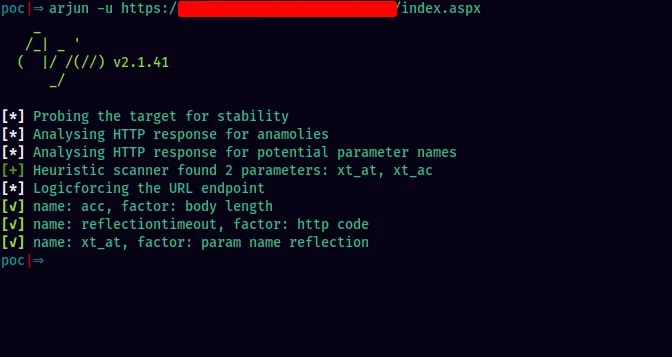
Out of the three parameters Arjun found, the parameter acc was reflected on the webpage inside a <script> tag. The JavaScript looked like this:
xt_multc ='&x1=0&x2=REFLECTION_POINT';
REFLECTION_POINT is the area where the parameter value is reflected. To inject JavaScript into the page, the single quote needs to be escaped.
To check which special characters were not sanitised or encoded and were reflected as is, kxss was run on the page with this parameter.

Plenty of special characters were not filtered, and the single quote character was among them. That put the researcher one step closer to the goal.
Exploitation
Step 1: A simple payload is blocked
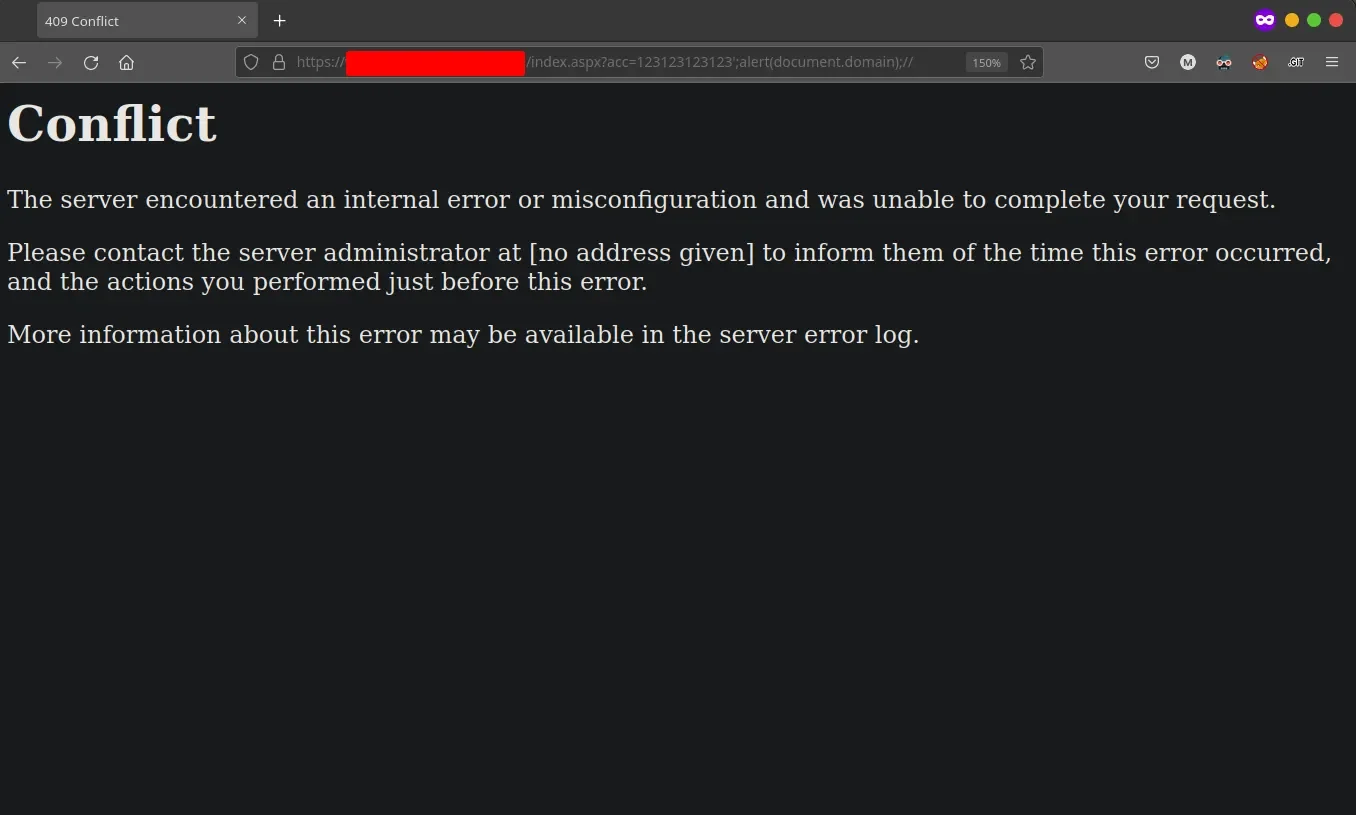
With the single quote usable, a simple payload was tried:
';alert(document.domain);//
The WAF kicked in and the attempt failed.
Step 2: Working out what the WAF blocks
By playing with different payloads, the researcher concluded that payloads containing valid JavaScript function names such as alert( are blocked. The opening bracket after alert is what triggers the block: without the opening bracket, it does not get blocked. Inserting a comment between alert and the opening bracket was also blocked.
Fuzzing payloads based on this context, a reflection inside a JavaScript string, with Burpsuite Intruder was unfruitful.
Step 3: Trying other functions
Fuzzing with functions other than alert() showed that some functions, such as fetch() and print(), are allowed. These could have been used to demonstrate the proof of concept in the report, but the researcher took it as a challenge to defeat the WAF and execute the alert() function.
Step 4: Calling alert through the window object
Instead of writing alert(document.domain), the window object can be used to call the alert function:
window["alert"](document.domain)
This payload was also blocked.
Step 5: Splitting the string and adding comments
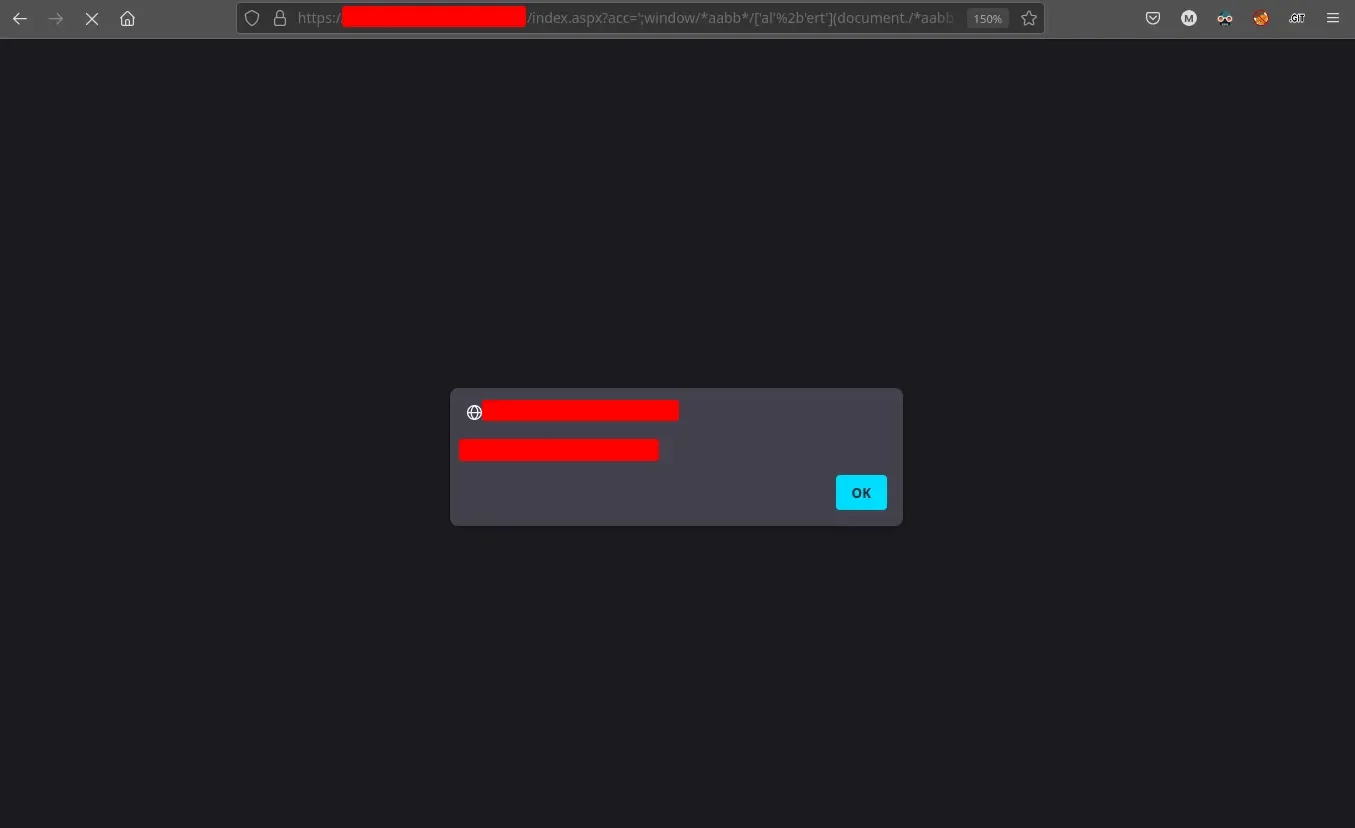
The researcher then remembered that multi-line comment syntax in JavaScript can be used in between parts of the payload to fool a WAF, which usually runs based on a set of rules and regular expressions. The final payload is:
';window/*aabb*/['al'%2b'ert'](document./*aabb*/location);//
The alert string is split into two parts, al and ert, which are then added together. The plus symbol needs to be URL encoded; otherwise it would be interpreted as the space symbol. The multi-line comments are placed between window and the bracket expression, and inside document.location.
Root cause
The reflection point sits inside a JavaScript string in a <script> tag, and the single quote character is reflected without being sanitised or encoded. That lets an attacker close the string and inject arbitrary JavaScript. The WAF, which filters based on rules and regular expressions, blocked the obvious alert( pattern but did not block the same call split into concatenated string parts with comments inserted. The single quote in the acc parameter was reflected without being sanitised or encoded for this context.
Impact
An attacker who can get a victim to load a crafted URL can execute JavaScript in the victim's browser in the context of the target site. The report demonstrates this with an alert, which shows the script runs in the target site's context. The report does not describe any further actions taken with the execution, such as session theft or account takeover, and does not state which users or data would be affected.
Fix
The report does not say what was changed. The appropriate fix is to encode the acc parameter for the JavaScript string context on the server side, so that characters such as the single quote cannot break out of the string, rather than relying on the WAF to block payloads.
Variants to test
- Look for disallowed or unusual endpoints in
robots.txt, especially extensions that do not match the underlying platform, such as.aspxon a WordPress site. A positive result is a page that looks blank but contains HTML or JavaScript in its source. - Run parameter discovery such as Arjun against such pages. A positive result is a parameter that is reflected in the response.
- Run
kxsson reflected parameters to find characters that are not sanitised or encoded. A positive result is a reflected single quote or angle bracket. - When a WAF blocks a function name followed by an opening bracket, try calling the function through the
windowobject with a string key, and split the function name into concatenated string parts. A positive result is that the payload is no longer blocked and the function executes. - Insert multi-line comments between tokens that the WAF's regular expressions might match, and URL encode the plus sign so it is not interpreted as a space. A positive result is a payload that reaches the reflection point intact and executes.
What happened, in plain words
A security researcher found a way to make a website run malicious JavaScript code in a visitor's browser, even though the site was protected by a firewall designed to block exactly that kind of attack. The site was built on WordPress, a popular tool for creating websites, and it had a hidden page that looked blank but contained some code. By guessing the right extra piece to add to the web address, the researcher made the page echo back text that he controlled. He then crafted a special piece of text that slipped past the firewall and made the browser show a pop-up box (an alert). This kind of attack is called cross-site scripting, or XSS for short. The firewall was Amazon WAF (Web Application Firewall). The report explains each step so that others can learn the mindset for getting around such filters.
Background: what a WAF is and why it matters
A WAF (Web Application Firewall) is a piece of software that sits in front of a website and inspects incoming requests. It looks for patterns that match known attacks, such as SQL injection (where an attacker tries to sneak database commands into a form) or cross-site scripting (where an attacker tries to sneak JavaScript into a page). If a request looks malicious, the WAF blocks it before it reaches the website. Think of it as a security guard at the door of a building who checks everyone's bags for weapons. The guard has a list of things to look for, and if something matches, you are not allowed in.
The goal of this research was to get past that guard and still execute a simple JavaScript function, alert(), which shows a pop-up box. That might seem harmless, but if an attacker can run any JavaScript on a site, they can also steal cookies (small pieces of data that websites store in your browser to remember who you are), redirect you to phishing pages, or perform actions on your behalf. So demonstrating alert() is a standard way to prove that the vulnerability exists.
The tools used
During the discovery phase, the researcher used Burpsuite Proxy in the background with passive scanning extensions enabled. Burpsuite is a toolkit for testing web applications; its Proxy sits between your browser and the website, recording every request and response. Passive scanning extensions automatically analyse the traffic for potential issues without sending extra requests. The researcher also looked at the sitemap that Burpsuite generated, which is a map of all the pages and endpoints the tool has seen.
For finding hidden parameters, the tool Arjun was used:
https://github.com/s0md3v/Arjun
Arjun is a command-line tool that tries many possible parameter names (like ?name=value in a URL) with a small number of requests, looking for ones that the server reacts to. A parameter is simply an extra piece of information you can add to a web address, usually after a question mark, to tell the page what to show or do. For example, ?search=cats tells a search page to look for cats. Many pages accept parameters that are not linked from anywhere, and finding them can reveal hidden functionality.
To check which special characters were reflected without being sanitised or encoded, the researcher used kxss. kxss is a tool that takes a URL with a parameter and tests a set of special characters (like quotes, angle brackets, etc.) to see which ones appear unchanged in the response. If a character is reflected as-is, it might be usable for an injection attack.
For trying many payload variations automatically, Burpsuite Intruder was used. Intruder lets you mark parts of a request as placeholders and then substitutes a list of values into those placeholders, sending many requests quickly. This is called fuzzing.
No accounts, roles, or software versions are described in the report.
Finding the hidden page
During content discovery, the researcher tried to gather as many endpoints as possible. An endpoint is simply a URL path that the server responds to, like /login or /api/data. The main website had limited functionality, and nothing useful turned up there. So the researcher checked the robots.txt file. robots.txt is a file that websites use to tell search engines which pages they should not crawl or index. It is publicly accessible, and it often lists pages that the site owner wants to keep out of search results, which can include administrative or hidden pages.
In robots.txt, the researcher found a disallowed endpoint:
/index.aspx .
This was strange because the website was running on WordPress, and .aspx files are typical of Microsoft's ASP.NET technology, not WordPress. WordPress normally uses .php files. So seeing an .aspx page on a WordPress site was a clue that something unusual was there. The page itself appeared blank when viewed in a browser, but when the researcher looked at the source code (the HTML and JavaScript that the browser receives), there was some HTML and JavaScript. The purpose of the page was unclear, and it felt like a piece of the puzzle was missing.
Remembering that parameter discovery could reveal hidden inputs, the researcher ran Arjun against the page.
Arjun found three parameters. One of them, acc, was reflected on the webpage inside a <script> tag. A <script> tag is an HTML element that tells the browser to run JavaScript code. The JavaScript looked like this:
xt_multc ='&x1=0&x2=REFLECTION_POINT';
Let's break this line down:
xt_multcis a variable name (a container for a value).=assigns the value on the right to that variable.'&x1=0&x2=REFLECTION_POINT'is a string (text) enclosed in single quotes. The text contains&x1=0&x2=followed byREFLECTION_POINT.REFLECTION_POINTis a placeholder that stands for the place where the value of theaccparameter is inserted. In other words, whatever you put inaccends up inside that string.
Because the value is placed inside a string that is delimited by single quotes, if the attacker can insert a single quote character, they can close the string early and then add their own JavaScript code. For example, if the parameter value is ';alert(1);//, the resulting line becomes xt_multc ='&x1=0&x2=';alert(1);//';. The first ' closes the string, then ; ends the statement, then alert(1) runs, and // comments out the rest so the leftover quote does not cause an error. So the single quote is the key to escaping the string context.
To check which special characters were not sanitised or encoded and were reflected as-is, the researcher ran kxss on the page with the acc parameter.
kxss showed that many special characters were not filtered, and the single quote was among them. That meant the researcher could break out of the string. This was good news: one step closer to the goal.
Trying a simple payload
With the single quote usable, the researcher tried a simple payload:
';alert(document.domain);//
Here is what each part does:
'closes the string that was opened in the JavaScript.;ends the current statement.alert(document.domain)calls thealertfunction with the argumentdocument.domain.document.domainis a property that holds the domain name of the current page (likeexample.com). Showing it in an alert proves that the code is running in the context of the target site.//starts a single-line comment, so the rest of the original line (including the leftover quote and semicolon) is ignored.
The WAF blocked this attempt.
Working out what the WAF blocks
By trying different payloads, the researcher concluded that payloads containing valid JavaScript function names such as alert( are blocked. The opening bracket after alert is what triggers the block: without the opening bracket, it does not get blocked. Inserting a comment between alert and the opening bracket was also blocked.
The researcher then tried fuzzing payloads based on this context (a reflection inside a JavaScript string) with Burpsuite Intruder, but it was unfruitful. Fuzzing means automatically sending many variations to see which ones get through.
Trying other functions
Fuzzing with functions other than alert() showed that some functions, such as fetch() and print(), are allowed. fetch() is a JavaScript function that makes network requests, and print() opens the browser's print dialog. These could have been used to demonstrate the proof of concept in the report, but the researcher took it as a challenge to defeat the WAF and execute the alert() function specifically. This is common in security research: proving you can execute a specific function that is blocked is more convincing.
Calling alert through the window object
Instead of writing alert(document.domain) directly, the researcher tried using the window object to call the alert function:
window["alert"](document.domain)
In JavaScript, window is the global object that represents the browser window. All global functions like alert are properties of window. You can access a property using dot notation (window.alert) or bracket notation with a string (window["alert"]). The bracket notation is equivalent but might look different to a WAF's pattern matching. However, this payload was also blocked. However, this payload was also blocked.
Splitting the string and adding comments
The researcher then remembered that multi-line comment syntax in JavaScript can be used in between parts of the payload to fool a WAF, which usually runs based on a set of rules and regular expressions. A multi-line comment starts with /* and ends with */, and everything in between is ignored by the JavaScript engine. Regular expressions are patterns used to match text; WAFs often use them to detect malicious payloads. By inserting comments, you can break up the text that the regular expression is looking for, while the JavaScript engine still executes the same logic.
The final payload is:
';window/*aabb*/['al'%2b'ert'](document./*aabb*/location);//
Let's break it down:
'closes the string.;ends the statement.windowrefers to the global object./*aabb*/is a multi-line comment. It is ignored by JavaScript but breaks the pattern that the WAF might be looking for (likewindow[).['al'%2b'ert']is bracket notation with a string expression.'al'and'ert'are two strings that are concatenated using the+operator. However, the+is URL-encoded as%2b. In a URL,+is often interpreted as a space, so to send a literal plus sign, you must encode it as%2b. The+is URL-encoded as%2b; otherwise it would be interpreted as the space symbol. So the JavaScript that ends up in the page iswindow['al'+'ert'](document.location). The string'al'+'ert'evaluates to'alert', so this is equivalent towindow['alert'](document.location).(document./*aabb*/location)calls the function withdocument.location, which is the URL of the current page. The comment/*aabb*/is inserted betweendocument.andlocationto break up the patterndocument.locationthat the WAF might block.//comments out the rest.
So the final JavaScript executed is window['alert'](document.location), which shows an alert with the current URL. The WAF did not block this payload.
Root cause
The reflection point sits inside a JavaScript string in a <script> tag, and the single quote character is reflected without being sanitised or encoded. That lets an attacker close the string and inject arbitrary JavaScript. The WAF, which filters based on rules and regular expressions, blocked the obvious alert( pattern but did not block the same call split into concatenated string parts with comments inserted. The single quote in the acc parameter was reflected without being sanitised or encoded for this context.
Impact
An attacker who can get a victim to load a crafted URL can execute JavaScript in the victim's browser in the context of the target site. The report demonstrates this with an alert, which shows the script runs in the target site's context. The report does not describe any further actions taken with the execution, such as session theft or account takeover, and does not state which users or data would be affected.
Fix
The report does not say what was changed. The appropriate fix is to encode the acc parameter for the JavaScript string context on the server side, so that characters such as the single quote cannot break out of the string, rather than relying on the WAF to block payloads.
Variants to test
- Look for disallowed or unusual endpoints in
robots.txt, especially extensions that do not match the underlying platform, such as.aspxon a WordPress site. A positive result is a page that looks blank but contains HTML or JavaScript in its source. - Run parameter discovery such as Arjun against such pages. A positive result is a parameter that is reflected in the response.
- Run
kxsson reflected parameters to find characters that are not sanitised or encoded. A positive result is a reflected single quote or angle bracket. - When a WAF blocks a function name followed by an opening bracket, try calling the function through the
windowobject with a string key, and split the function name into concatenated string parts. A positive result is that the payload is no longer blocked and the function executes. - Insert multi-line comments between tokens that the WAF's regular expressions might match, and URL encode the plus sign so it is not interpreted as a space. A positive result is a payload that reaches the reflection point intact and executes.
Glossary
- WAF (Web Application Firewall): A security system that filters incoming web traffic to block attacks like SQL injection and cross-site scripting.
- Cross-site scripting (XSS): A vulnerability where an attacker injects malicious JavaScript into a web page viewed by other users.
- SQL injection: A technique where an attacker inserts SQL commands into input fields to manipulate a database.
- Endpoint: A specific URL path that a web server responds to.
- robots.txt: A file that tells search engines which pages not to crawl; it can reveal hidden endpoints.
- Parameter: A key-value pair added to a URL (after
?) that passes data to the server. - Reflection: When user-supplied input is echoed back in the server's response without proper handling.
- Sanitisation: The process of cleaning user input to remove or neutralise dangerous characters.
- Encoding: Converting characters into a safe format (like
%2bfor+) to prevent them from being interpreted as code. - Payload: The malicious input designed to exploit a vulnerability.
- Fuzzing: Automatically sending many variations of input to find one that works.
- Burpsuite: A toolkit for web security testing, including a proxy and intruder.
- Proxy: An intermediary that sits between your browser and the server, allowing you to inspect and modify traffic.
- Sitemap: A map of all URLs discovered by a tool.
- Arjun: A tool for discovering hidden URL parameters.
- kxss: A tool for checking which special characters are reflected unfiltered.
- Burpsuite Intruder: A tool for automating customized attacks by substituting payloads into requests.
- JavaScript: The programming language that runs in web browsers to make pages interactive.
<script>tag: An HTML element that contains or references JavaScript code.- String: A sequence of characters in programming, enclosed in quotes.
- Variable: A named container for storing data.
alert(): A JavaScript function that displays a pop-up dialog with a message.document.domain: A property that returns the domain name of the current page.windowobject: The global object in a browser that represents the window and contains global functions likealert.- Bracket notation: A way to access object properties using a string in square brackets, e.g.
window['alert']. - Multi-line comment: In JavaScript, text between
/*and*/that is ignored by the interpreter. - Regular expression: A pattern used to match text, often used by WAFs to detect attacks.
- URL encoding: Representing special characters in a URL using percent-encoding, e.g.
%2bfor+. fetch(): A JavaScript function for making network requests.print(): A JavaScript function that opens the browser's print dialog.document.location: A property that holds the current URL of the page.




