Bypassing Cloudflare WAF: XSS via SQL Injection
A SQL injection in the 'perpage' parameter caused an error message that reflected unsanitised input, allowing reflected XSS. The attacker bypassed Cloudflare WAF using an SVG onload payload to execute JavaScript.
 Published on ukusormus.com
October 2022 – while surfing the web, for some divine reason, I tried to play with the search query parameters on a pretty .well-knownEstonian site that sells computer parts and IT accessories.
The full write-up lives on its author's site
It belongs to its author, so we link to it rather than copy it. The other two tabs are our own rewrites, checked against it.
Context
In October 2022 the researcher was browsing a well-known Estonian site that sells computer parts and IT accessories. The feature in question is a perpage URL parameter controlling how many products are shown per page. Normally that parameter is expected to take one of a limited set of values.
The write-up covers two chained issues on that parameter: a SQL injection that surfaced as a database error message, and a reflected XSS that was used to get past the Cloudflare WAF that blocked the SQL attempts. The site was later rebuilt on a new tech stack, and the old version stayed reachable on a few other country domains, one of which was used for the screenshots.
Setup
No accounts, roles or special tooling are described. The testing was manual: editing the perpage query parameter in the browser and reading what came back. The only external resource used was Google Search, to look for a known Cloudflare WAF bypass for XSS. The database behind the application is MariaDB, which the error message itself revealed.
Finding it
The starting point was simply changing perpage to a value outside the intended selection, for example 1. The page honoured it and rendered a single product per page.
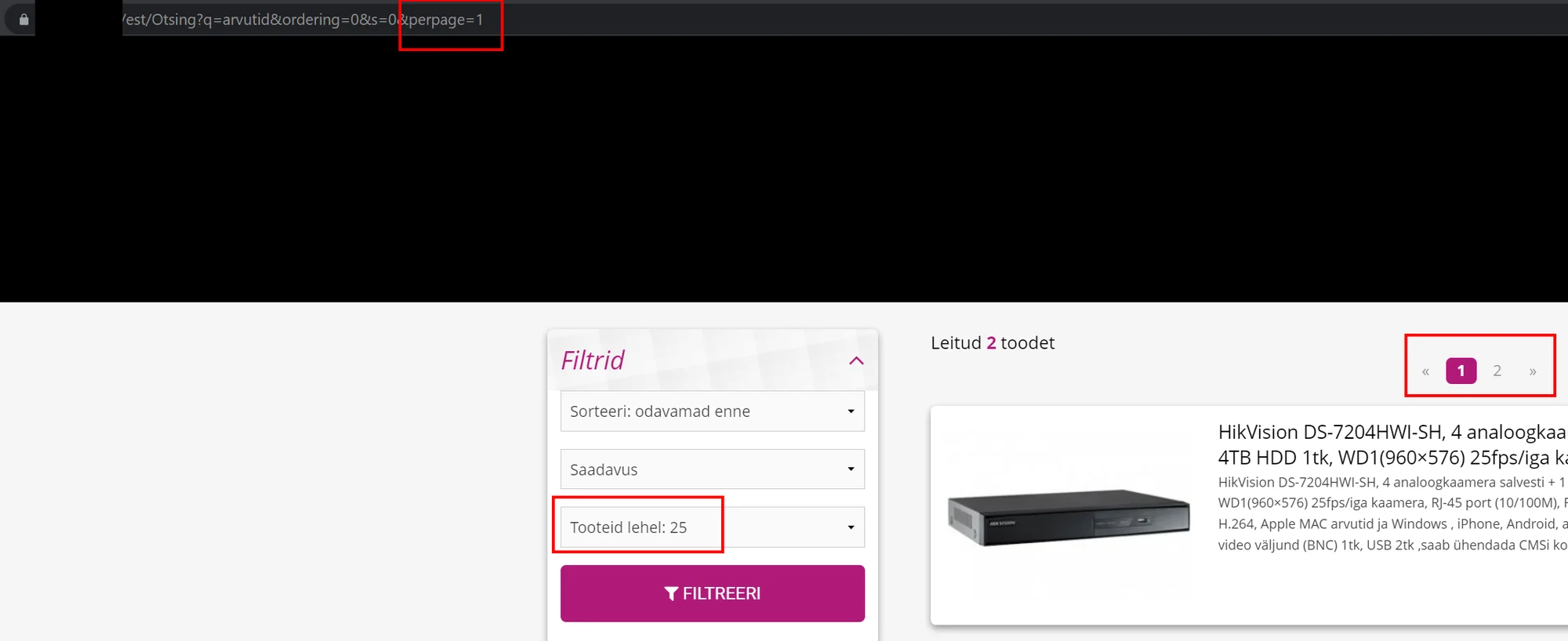
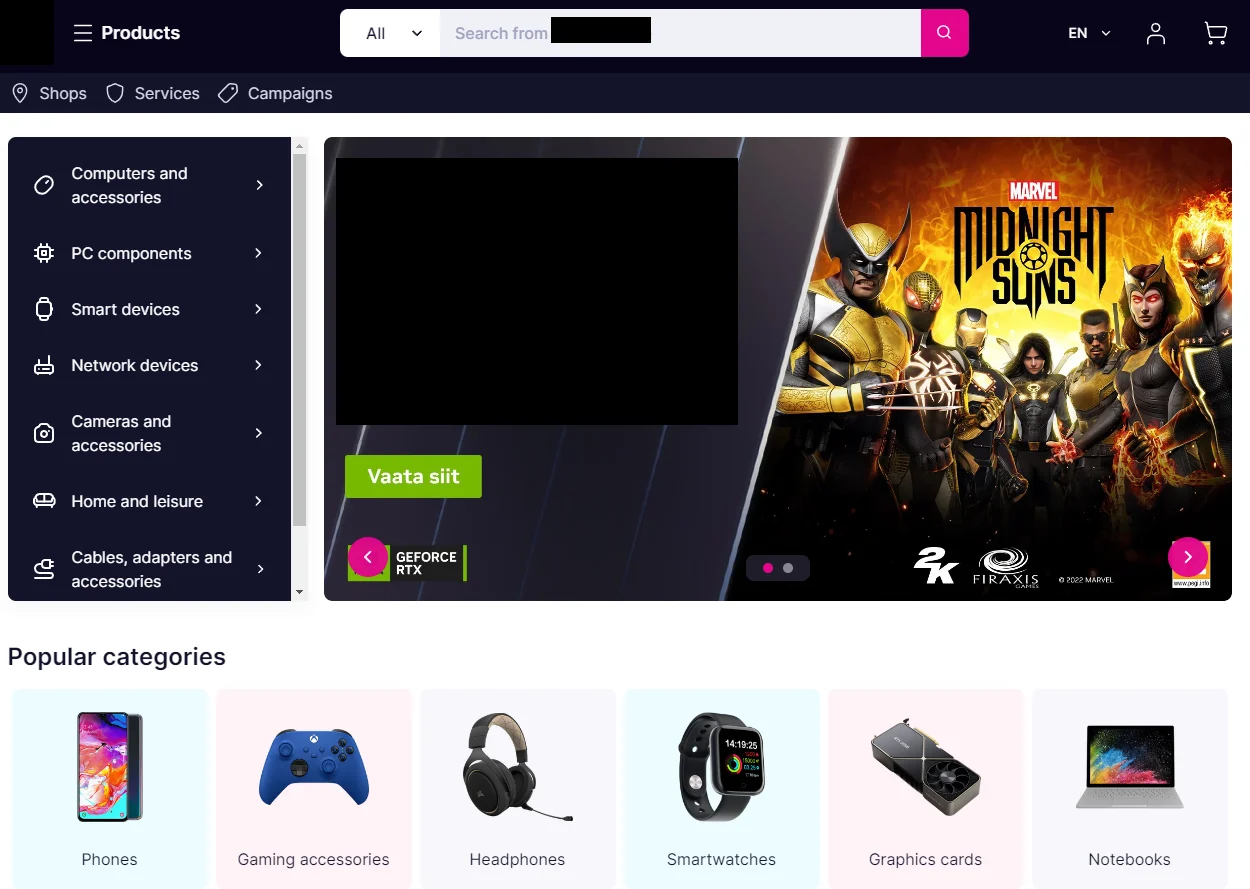
With perpage=1 there is now only one product per page, showing the page honoured a value outside the intended selection.
A double quote " was then appended to the perpage value. The response came back with broken styling and the message You have an error in your SQL syntax, which points to the value being concatenated into a query, possibly in a LIMIT clause. The error also told the researcher which database management system was in use: MariaDB.
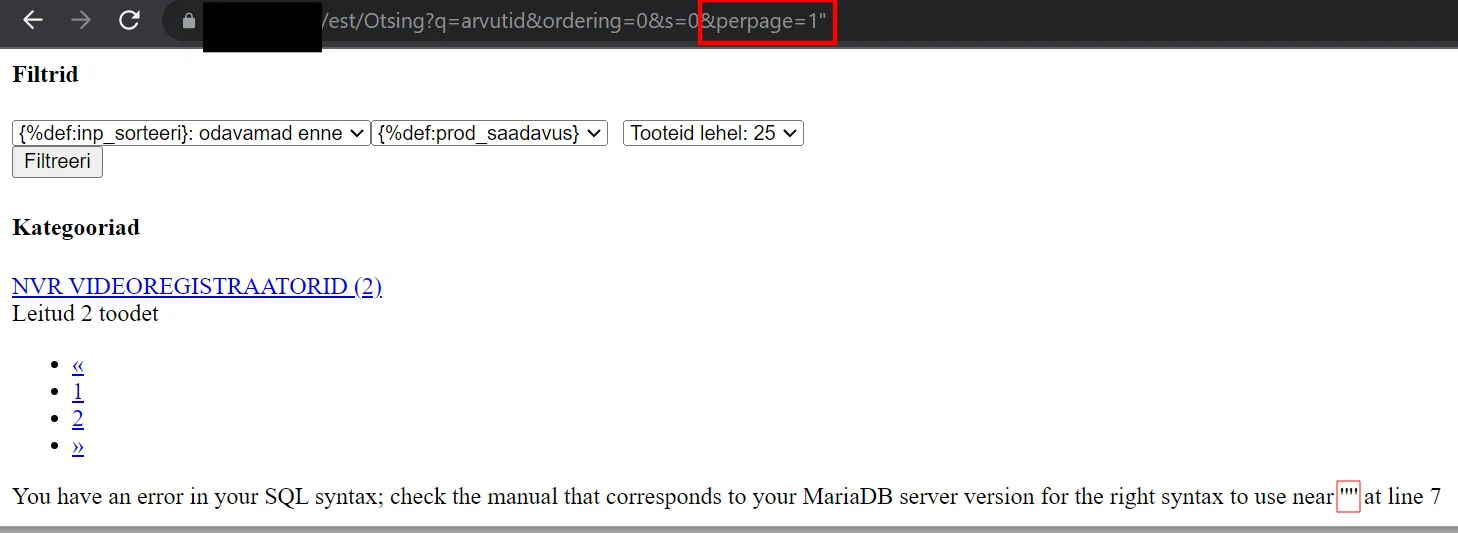
Exploitation
Step 1: Confirm the injection point
Appending a double quote to the parameter produced the SQL syntax error above. The important property is not just that the query broke, but that the error message displays the input back to the user.
Step 2: Hit the WAF
While manually trying to retrieve light information such as the database version, Cloudflare's WAF block page appeared instead of a result.
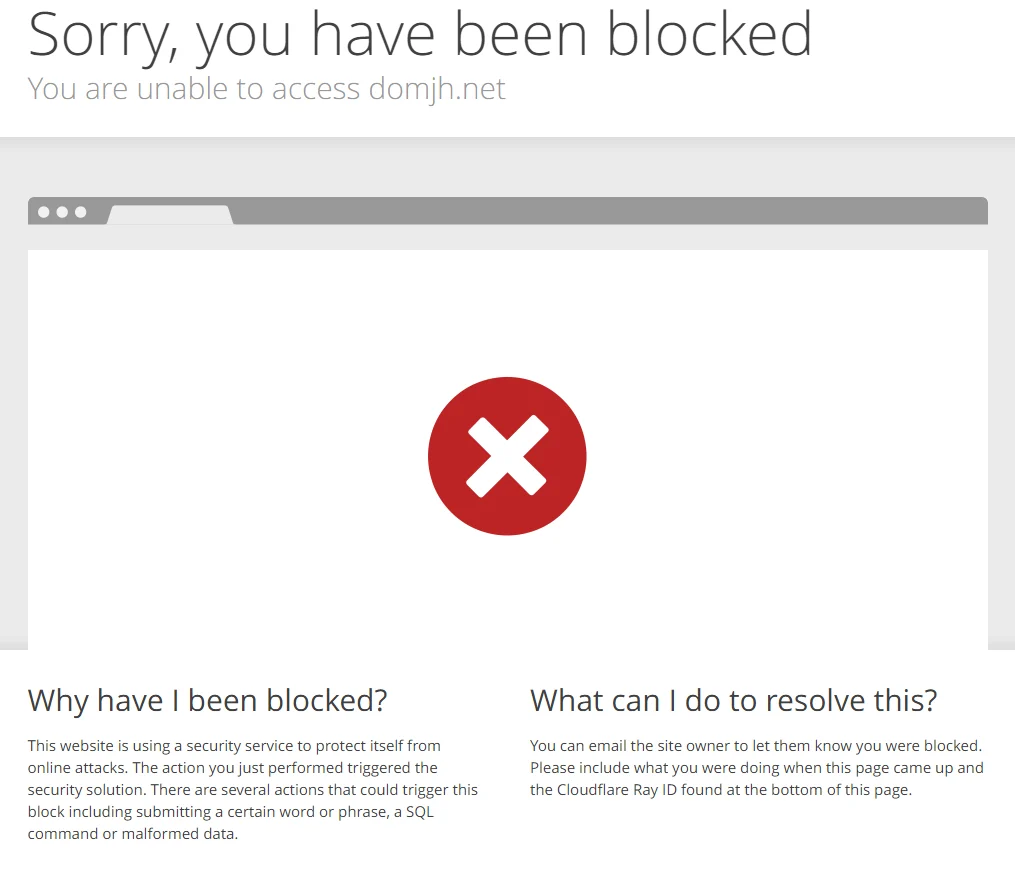
The researcher notes not knowing whether the WAF was there because the operators were already aware of the risk or just as a precaution, and asks whether the firewall means a dead end.
Step 3: Reframe the problem
Two facts were combined:
- The error message displays the input.
- SQL commands are filtered out by the Cloudflare WAF.
Concentrating on the first fact, the researcher inserted arbitrary non-SQL text such as 1"lalala test <div/> 123 into perpage, which also lands in the error message. The error message was not escaped, so almost any HTML could be injected. That turns the parameter into a reflected XSS vector even though SQL keywords are blocked.
Step 4: Find a WAF bypass
Cloudflare still rejected the <script> tag and other attempts such as the <img> tag. A Google search for a known bypass was the next step.

The query used was:
cloudflare xss bypass after:2022-10-01
The after: operator restricts results to pages published after that date. The payload found was:
<Svg Only=1 OnLoad=confirm(1)>
Step 5: Deliver the final payload
The final payload was:
perpage=1"><Svg Only=1 OnLoad=confirm(document.domain)>
confirm(document.domain) proves execution in the context of the target origin. The confirm dialog appeared.
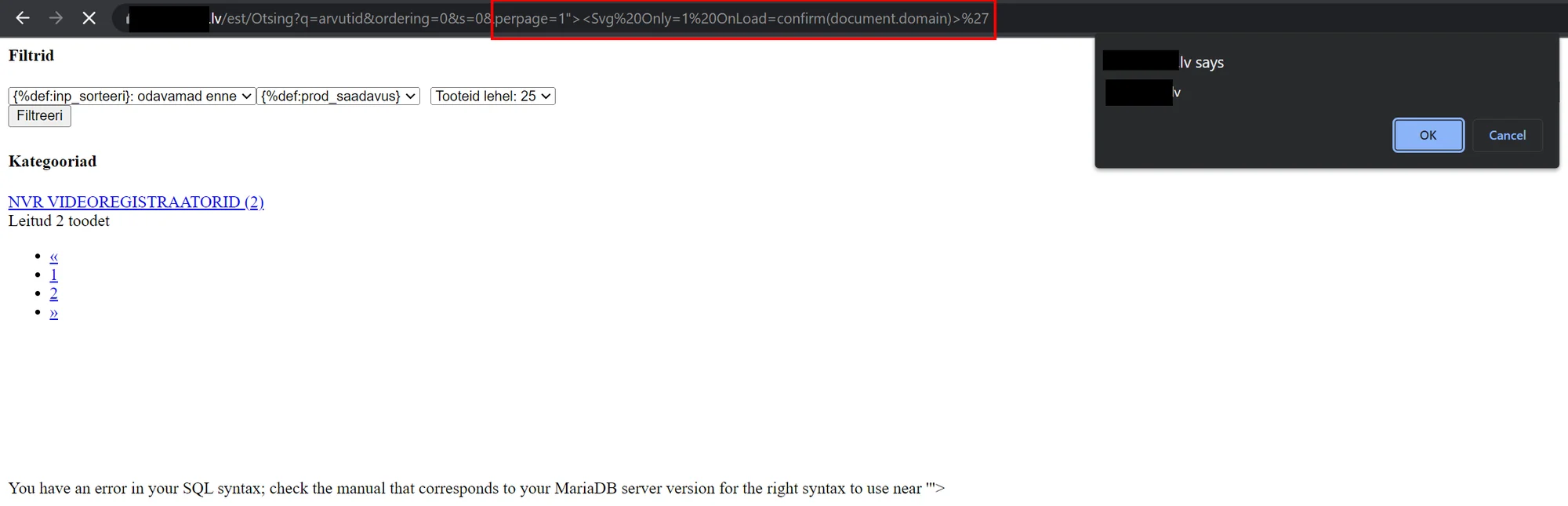
Step 6: Probe what JavaScript can do
The researcher got a redirect to google.com and the fetch API working, then stopped. The redirect example given is:
perpage=1"><Svg Only=1 OnLoad=document.location.assign(`//google.com`)>'
Root cause
The perpage value appears to reach a SQL query, possibly in a LIMIT clause, and a double quote broke its syntax. The resulting database error is rendered back to the user without escaping, so the same parameter becomes an HTML injection point. The WAF filtered the SQL attempts and blocked <script> and <img>, but not the SVG payload.
Impact
The XSS runs in the origin of the shop, so an attacker can do anything JavaScript allows in that context. The write-up lists:
- Stealing credentials by redirecting the victim to a fake duplicate of the site's user or admin login, a Facebook login, or an Estonian banking site login.
- Stealing money by redirecting to a fake duplicate of a shop or by injecting rogue JavaScript into the real site to gain illicit benefit from users placing orders.
- Plain adware or malware.
There is also the possibility of a WAF-bypassing SQL payload that drops database tables or otherwise damages the business, its people and its customers.
Fix
The report does not describe a fix applied to the vulnerable code. What happened instead is that the site was rebuilt on a new tech stack in January 2023, and the vulnerability was no longer present on the new site. The old version remained reachable on other country domains such as the one used for the screenshots.
Variants to test
- Numeric parameters used in
LIMITorOFFSET. Change a value outside the offered options and append a double quote. A positive result is a database error message that echoes the input. - Error messages that reflect input. Insert harmless markup such as
1"lalala test <div/> 123into any parameter whose value appears in an error. A positive result is the markup rendered rather than escaped. - WAF-filtered XSS. When
<script>and<img>are blocked, try event-handler payloads on less common elements, starting with the SVG form shown here. A positive result is a dialog or other observable execution. - Recent bypass research. Search with a date restriction, for example
cloudflare xss bypass after:2022-10-01, to find payloads that postdate the WAF rules in place. A positive result is a payload that executes where older ones were blocked. - Post-exploitation reach. Once execution is confirmed, test
document.location.assignandfetchto see how far the context allows an attacker to go.
Lessons from the write-up
- Google it; the
after:YYYY-MM-DDsearch operator was useful here. - Take screenshots and save logs while testing, because pages change and evidence disappears.
- Perseverance and combining attacks can lead to a nice pwn.
- Do not always expect a positive reaction or any answer at all.
- Do not insert a random double quote into a query parameter on a page you do not have permission to test, meaning one without a responsible vulnerability disclosure programme or a bug bounty programme.
The researcher emailed the company twice in October 2022 asking for the right person to talk to about the site's security. The second attempt got a reply saying the message had been forwarded to the correct department, and nothing further. The implied reason for being ignored became apparent in January 2023 when the site was rebuilt. No screenshots were taken during the original testing, so the screenshots were later taken on an old copy of the site still hosted on another country domain.
What happened, in plain words
In October 2022 a security researcher was browsing a well-known Estonian online shop that sells computer parts and IT accessories. It has a way to choose how many products appear on one page. That choice is sent to the server as a small piece of information in the web address, called a URL parameter. The parameter here was called perpage.
Normally the shop's page only offers you a few fixed choices for that number. The researcher typed a different number by hand, and the page obeyed. That was the first clue that the number was not being checked against the allowed choices.
Then the researcher added a single double quote character (") to the number. The page broke: the styling fell apart and an error message appeared saying You have an error in your SQL syntax. That message is a big hint. It means the number was being pasted directly into a database command, and the stray quote confused the database. The error also revealed which database software the shop uses: MariaDB.
When the researcher tried to ask the database a little more about itself, a Cloudflare block page appeared instead. Cloudflare is a company that sits in front of many websites and filters out suspicious traffic; its Web Application Firewall (WAF) had spotted the database-style requests and stopped them.
So the database attack was blocked. But the researcher noticed something else: the error message printed back whatever had been typed into perpage. That means the parameter could also be used to inject HTML, the language web pages are written in, not just database commands. The error message did not escape the input, so almost any HTML could be slipped in. That is a vulnerability called reflected XSS (cross-site scripting).
Cloudflare still blocked the obvious HTML tags such as <script> and <img>. A quick Google search for a recent Cloudflare bypass turned up a payload using an SVG element with an OnLoad handler. The final payload was:
perpage=1"><Svg Only=1 OnLoad=confirm(document.domain)>
It worked: a confirm dialog popped up showing the site's domain, proving that JavaScript was running in the context of the shop.
The researcher then checked what else JavaScript could do, got a redirect to google.com and the fetch feature working, and stopped there. The write-up lists the possible consequences: stealing credentials by redirecting victims to fake login pages, stealing money through fake shop pages or rogue JavaScript, and plain adware or malware. There is also the possibility of a database attack that gets past the WAF and damages the business.
The researcher emailed the company twice in October 2022 asking for the right person to talk to about the site's security. The second email got a reply saying it had been forwarded to the correct department, and nothing more. In January 2023 the reason became apparent: the shop had been rebuilt on a new tech stack, and the vulnerability was gone. The old version was still reachable on a few other country domains, which is where the screenshots were eventually taken, because no screenshots had been taken during the original testing.
The starting point: a number in the address bar
When you use a website, the address bar often carries extra information after a question mark. For example, a shop's search page might have an address ending in ?perpage=20. Everything after the ? is a set of URL parameters: little name-and-value pairs that the browser sends to the server. The server reads them and decides what to show.
The perpage parameter controls how many products appear on one page. The shop's interface offers a limited selection of values. But a dropdown is only a convenience for the user. The real decision is made on the server, and the server should check that the number it receives is one of the allowed values.
The researcher changed perpage to 1, an arbitrary number outside the intended selection. The page honoured it and showed a single product per page.
That screenshot shows the shop with only one product on the page, showing the page honoured a value outside the intended selection. This is the first small crack: if the server trusts a number it was never meant to receive, it may also trust other things it was never meant to receive.
The double quote that broke the page
A double quote (") is a special character in SQL, the language used to talk to databases. In SQL, text values are wrapped in quotes, so a quote inside a value can end the text early and let whatever follows be treated as part of the command. This is the classic shape of a SQL injection: user input is pasted into a database command without being treated as plain data.
The researcher appended a double quote to the perpage value. The response came back with broken styling and the message You have an error in your SQL syntax. That message points to the value being concatenated into a query, possibly in a LIMIT clause. A LIMIT clause is the part of a database query that says how many rows to return, which fits a parameter that controls products per page. The error also told the researcher which database management system was in use: MariaDB.
Seeing a database error is useful for two reasons. First, it proves the input reaches the database. Second, the error text itself is information leaking out of the server, which is never a good sign. But the researcher did not get far: the next attempts ran into a wall.
The wall: Cloudflare's WAF
A Web Application Firewall, or WAF, is a filter that sits between visitors and a website. It inspects incoming requests and blocks ones that look like known attacks, a bit like a bouncer at a door who checks a list before letting anyone in. Cloudflare is a large provider of this kind of protection.
While manually trying to get light information such as the database version, the researcher got Cloudflare's block page instead of a result.
The researcher notes not knowing whether the WAF was there because the operators were already aware of the risk or just as a precaution, and asks whether the firewall means a dead end. For a moment it looked like one: the database path was closed.
Changing the question: from database to browser
Two facts were now on the table:
- The error message displays the input back to the user.
- SQL commands are filtered out by the Cloudflare WAF.
The second fact blocks the database route. The first fact opens a different one. If the error message prints back whatever was typed, then the parameter is not only a database input, it is also a place where text appears on the page. And if that text is not escaped, the browser will treat it as HTML rather than as plain text.
Escaping means converting special characters into harmless versions so the browser shows them as text instead of acting on them. When a site fails to escape user input, an attacker can inject HTML, and with HTML comes JavaScript, the programming language that runs in the browser. When the injected content comes back in the response to the same request, the vulnerability is called reflected XSS: the malicious input is reflected off the server back to the victim's browser.
The researcher tested this by inserting arbitrary non-SQL text such as 1"lalala test <div/> 123 into perpage. That text also lands in the error message. Because the error message was not escaped, almost any HTML could be injected. The parameter had become a reflected XSS vector even though SQL keywords were blocked.
This is the key move of the whole story: when one door is locked, look for another door that the same input opens.
Finding a way past the WAF
Cloudflare still rejected the <script> tag and other attempts such as the <img> tag. A <script> tag is the most obvious way to run JavaScript on a page, and <img> is a common alternative because images can carry event handlers too. The WAF knew both.
The next step was a Google search for a known bypass.
The query used was:
cloudflare xss bypass after:2022-10-01
Line by line: cloudflare xss bypass describes what is being looked for, a way around Cloudflare's filtering for cross-site scripting. The after:2022-10-01 part is a search operator that restricts results to pages published after that date. That matters because WAF rules change over time: a bypass published years ago may already be blocked, while a recent one is more likely to still work. The payload found was:
<Svg Only=1 OnLoad=confirm(1)>
Line by line: <Svg starts an SVG element. SVG is a format for drawing graphics on a web page, and browsers treat it as HTML when it appears in a page. Only=1 is an attribute with a value; it is not a standard SVG attribute, but the browser tolerates unknown attributes. OnLoad=confirm(1) is an event handler: a piece of JavaScript that the browser runs when the element finishes loading. confirm(1) opens a small dialog box showing the number 1. The closing > ends the tag. The trick is that this uses an element and an event the WAF was not filtering, while still running JavaScript.
Delivering the final payload
The final payload was:
perpage=1"><Svg Only=1 OnLoad=confirm(document.domain)>
Line by line: perpage= is the parameter name. 1" is the value that closes the number and the string literal in the SQL context, which is what produced the error message in the first place. > closes the surrounding HTML tag so that what follows is parsed as markup rather than as text. <Svg Only=1 OnLoad=confirm(document.domain)> is the bypass payload, with confirm(document.domain) replacing confirm(1). document.domain is a JavaScript expression that returns the domain of the current page, so the dialog proves the code is running in the context of the target origin, not somewhere harmless.
The confirm dialog appeared.
That dialog is the proof of concept: JavaScript supplied through the URL parameter executed in the shop's own origin. An origin is the combination of scheme, host and port that browsers use to decide what a page is allowed to touch; code running in the shop's origin can read and act on the shop's pages.
How far JavaScript can go
The researcher got changing location to google.com and using fetch to work, then stopped. fetch is a browser feature for making network requests from JavaScript, so it is the building block for sending data elsewhere. The redirect example given is:
perpage=1"><Svg Only=1 OnLoad=document.location.assign(`//google.com`)>'
Line by line: the structure is the same as before. document.location.assign(...) tells the browser to navigate to a new address. The address is written inside backticks, which in JavaScript delimit a template string. //google.com is a protocol-relative address: the browser reuses the current page's scheme, so on an HTTPS page it means https://google.com. The trailing ' is a stray single quote left at the end of the value.
Why it worked: the root cause
The perpage value appears to reach a SQL query, possibly in a LIMIT clause, and a double quote broke its syntax. The resulting database error is rendered back to the user without escaping, so the same parameter becomes an HTML injection point. The WAF filtered the SQL attempts and blocked <script> and <img>, but not the SVG payload.
In everyday terms: the shop trusted a number from the address bar, pasted it into a database command, and then printed the database's complaint back onto the page without cleaning it. A filter stood in front of the door, but it only recognised one style of attack.
What an attacker could do with it
The XSS runs in the origin of the shop, so an attacker can do anything JavaScript allows in that context. The write-up lists:
- Stealing credentials by redirecting the victim to a fake duplicate of the site's user or admin login, a Facebook login, or an Estonian banking site login.
- Stealing money by redirecting to a fake duplicate of a shop or by injecting rogue JavaScript into the real site to gain illicit benefit from users placing orders.
- Plain adware or malware.
There is also the possibility of a WAF-bypassing SQL payload that drops database tables or otherwise damages the business, its people and its customers.
A fake login page is the simplest of these to picture: the victim clicks a link, lands on a page that looks exactly like the shop, types their username and password, and those details go to the attacker instead of the shop.
What fixed it
The report does not describe a fix applied to the vulnerable code. What happened instead is that the site was rebuilt on a new tech stack in January 2023, and the vulnerability was no longer present on the new site. The old version remained reachable on other country domains such as the one used for the screenshots.
The underlying lessons, validating input and escaping output, still apply to whatever replaces it.
Things worth testing on other sites
These are patterns to look for, not instructions to attack sites you do not have permission to test.
- Numeric parameters used in
LIMITorOFFSET. Change a value outside the offered options and append a double quote. A positive result is a database error message that echoes the input. - Error messages that reflect input. Insert harmless markup such as
1"lalala test <div/> 123into any parameter whose value appears in an error. A positive result is the markup rendered rather than escaped. - WAF-filtered XSS. When
<script>and<img>are blocked, try event-handler payloads on less common elements, starting with the SVG form shown here. A positive result is a dialog or other observable execution. - Recent bypass research. Search with a date restriction, for example
cloudflare xss bypass after:2022-10-01, to find payloads that postdate the WAF rules in place. A positive result is a payload that executes where older ones were blocked. - Post-exploitation reach. Once execution is confirmed, test
document.location.assignandfetchto see how far the context allows an attacker to go.
Lessons from the write-up
- Google it; the
after:YYYY-MM-DDsearch operator was useful here. - Take screenshots and save logs while testing, because pages change and evidence disappears.
- Perseverance and combining attacks can lead to a nice pwn.
- Do not always expect a positive reaction or any answer at all.
- Do not insert a random double quote into a query parameter on a page you do not have permission to test, meaning one without a responsible vulnerability disclosure programme or a bug bounty programme.
The second attempt got a reply saying the message had been forwarded to the correct department, and nothing further. The implied reason for being ignored became apparent in January 2023 when the site was rebuilt. No screenshots were taken during the original testing, so the screenshots were later taken on an old copy of the site still hosted on another country domain.
Glossary
- URL parameter: a name-and-value pair after the
?in a web address, sent to the server so it can adjust what it returns. - Server: the computer that stores a website and answers requests from browsers.
- Database: software that stores and retrieves structured data, such as a shop's product list.
- SQL: the language used to ask a database questions and give it instructions.
- SQL injection: a vulnerability where user input is pasted into a database command without being treated as plain data, letting the input change the command.
LIMITclause: the part of a SQL query that says how many rows to return.- MariaDB: a popular open-source database management system.
- Error message: text a server returns when something goes wrong; useful to attackers when it reveals internals or echoes input.
- WAF (Web Application Firewall): a filter in front of a website that inspects requests and blocks ones that look like attacks.
- Cloudflare: a company that provides WAF and other protection in front of websites.
- HTML: the language web pages are written in, made of tags such as
<div>and<img>. - Tag: a piece of HTML markup, usually written between angle brackets, that tells the browser what to render.
- Attribute: a name-and-value setting inside an HTML tag, such as
Only=1. - Event handler: JavaScript attached to an element that runs when something happens, such as the element loading.
- JavaScript: the programming language that runs in the browser and makes pages interactive.
- XSS (cross-site scripting): a vulnerability where an attacker gets their own JavaScript to run in another site's pages.
- Reflected XSS: XSS where the malicious input is sent in a request and comes straight back in the response, rather than being stored on the server.
- Escaping: converting special characters into harmless versions so they are shown as text instead of being acted on.
- Input validation: checking that data received from a user is one of the allowed values or shapes before using it.
- Payload: the piece of input an attacker sends to trigger a vulnerability.
- SVG: a format for drawing graphics on a web page; browsers treat SVG elements as HTML when they appear in a page.
confirm(): a JavaScript function that opens a small dialog box with a message and an OK button.document.domain: a JavaScript expression that returns the domain of the current page.- Origin: the combination of scheme, host and port that browsers use to decide what a page is allowed to access.
fetch: a browser feature for making network requests from JavaScript.document.location.assign(): a JavaScript call that navigates the browser to a new address.- Template string: a JavaScript string written inside backticks, which can contain expressions.
- Protocol-relative address: an address starting with
//that reuses the current page's scheme. - Google dorking: using advanced search operators to find specific pages or information.
after:operator: a Google search operator that restricts results to pages published after a given date.- Proof of concept (PoC): a demonstration that a vulnerability is real, usually a screenshot or a minimal working example.
- Responsible vulnerability disclosure programme (RVDP): a formal way for a company to receive security reports from outsiders.
- Bug bounty programme: a programme that pays researchers for reporting vulnerabilities.
- Pwn: informal security slang for successfully taking control of or exploiting a system.
- Tech stack: the set of technologies a website is built on.




