Bypassing CORS configurations to produce an Account Takeover for Fun and Profit
A server returned sensitive session tokens in responses and set a wildcard CORS origin together with credentials, which normally blocks cross-origin reads. Because responses lacked a no-store cache header, an attacker could force the browser to serve a cached copy of a page to a malicious script and steal the authentication token, leading to account takeover.

The bug that is being written about here is from an previous bug bounty engagement for a major telecommunication company. This bug consists of a CORS misconfiguration that isn’t commonly a misconfiguration unless certain conditions are met.
The full write-up lives on its author's site
It belongs to its author, so we link to it rather than copy it. The other two tabs are our own rewrites, checked against it.
Context
This write-up covers a finding from a previous bug bounty engagement against a major telecommunication company. The bug is a CORS misconfiguration, but not one that is exploitable in the usual way: it only becomes a problem when a particular set of conditions line up. The result was a full account takeover of a logged-in user.
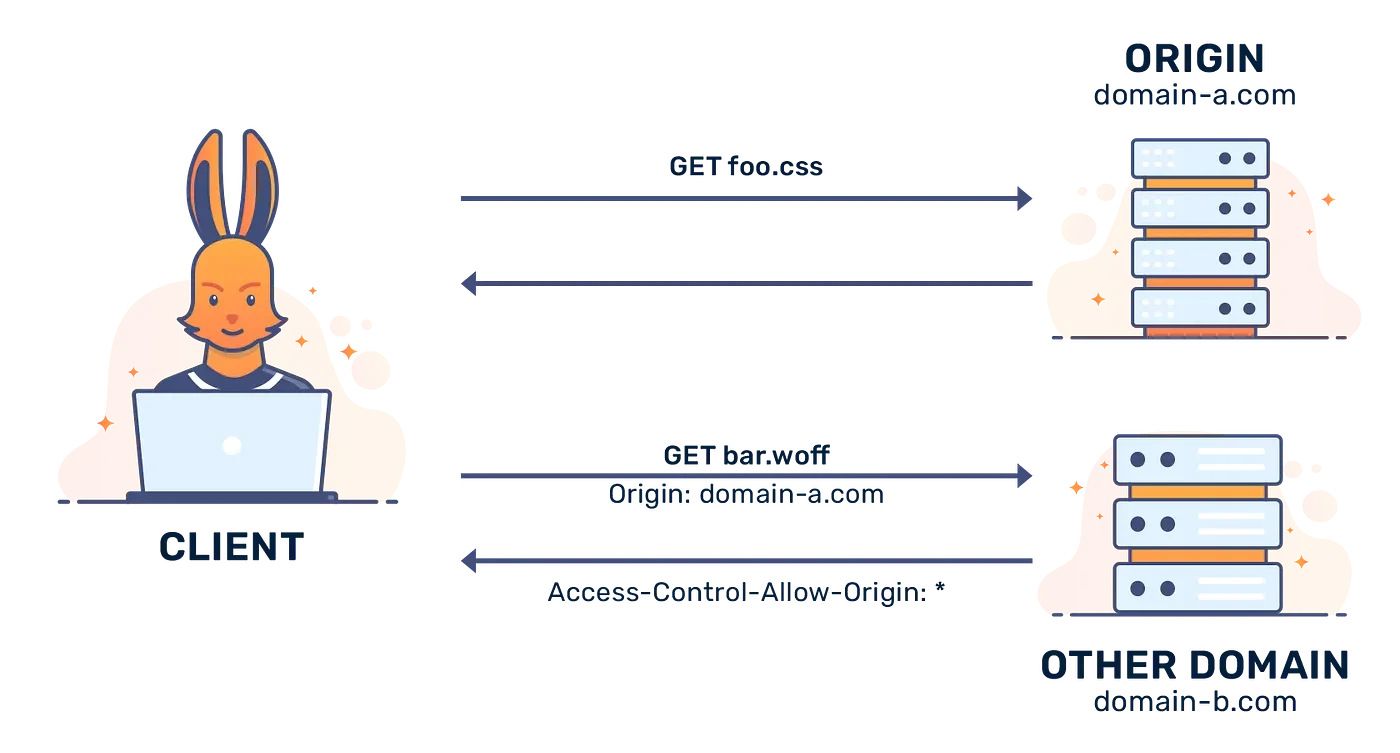
CORS stands for Cross Origin Resource Sharing. It is the common mechanism developers use to bypass the Same Origin Policy so that a page on one domain can retrieve information from another. It works through headers exchanged between the request and the response. The request carries an Origin header declaring the site making the request. On the server side the relevant headers are Access-Control-Allow-Origin and Access-Control-Allow-Credentials. Access-Control-Allow-Origin is supposed to echo the value from the request's Origin header, and only if that origin is allowed to make requests to the server. Access-Control-Allow-Credentials states that the request includes cookie values belonging to the server in question.
A CORS vulnerability needs two conditions:
- The attacker can choose the value of the
Originheader, and the server accepts it and reflects it inAccess-Control-Allow-Origin. Access-Control-Allow-Credentialsis set toTrue, so cookies in the request are used by the server.
When both hold, an attacker can get a user of the server to visit the attacker's site and leak sensitive information from that user's session on the server in question.

Setup
The report does not describe the accounts, roles or tooling used during testing. The only precondition that matters for exploitation is that a logged-in user has already visited the vulnerable endpoint, so that its response sits in the browser cache.
Finding it
While looking for this class of bug, the researcher noticed that a server was returning sensitive information in the response for a logged-in user. The data included the id token, the refresh token and the server authentication token. The server authentication token was the value used to authenticate the user to the server. The response also carried an Access-Control-Allow-Origin header and an Access-Control-Allow-Credentials header set to True. This information was returned on every response from the server.
In this scenario the second condition was met but the first was not. Access-Control-Allow-Origin was not set to the value of the request's Origin; it was permanently set to a wildcard. A wildcard means any site can request information from the server cross domain, but when Access-Control-Allow-Origin is a wildcard the Access-Control-Allow-Credentials header is not included in the response. That is a deliberate security boundary against the overly permissive wildcard value. The reason it matters is that the impact of a CORS bug is normally disclosure of sensitive information from a session; without Access-Control-Allow-Credentials it is the same as logging into an application without a session.
Exploitation
There is a small caveat to that rule, and it lets the boundary be bypassed. If the HTTP response contains Access-Control-Allow-Origin with a wildcard as its value and does not contain a Cache-Control header with a value of no-store, it is possible to send a request to the endpoint in question and retrieve the response from the cache instead of from the website directly, provided a logged-in user has already visited that endpoint.
On this site every page contained the sensitive data in the HTTP response together with the required headers. The researcher picked a page that was part of the login flow, to guarantee that if the user was logged in previously, that page had to be cached in the browser.
Step 1: Serve a script that forces a cached read
The client-side bug is exploited with the fetch JavaScript library, changing the cache option to force-cache, with the script hosted on a malicious server.
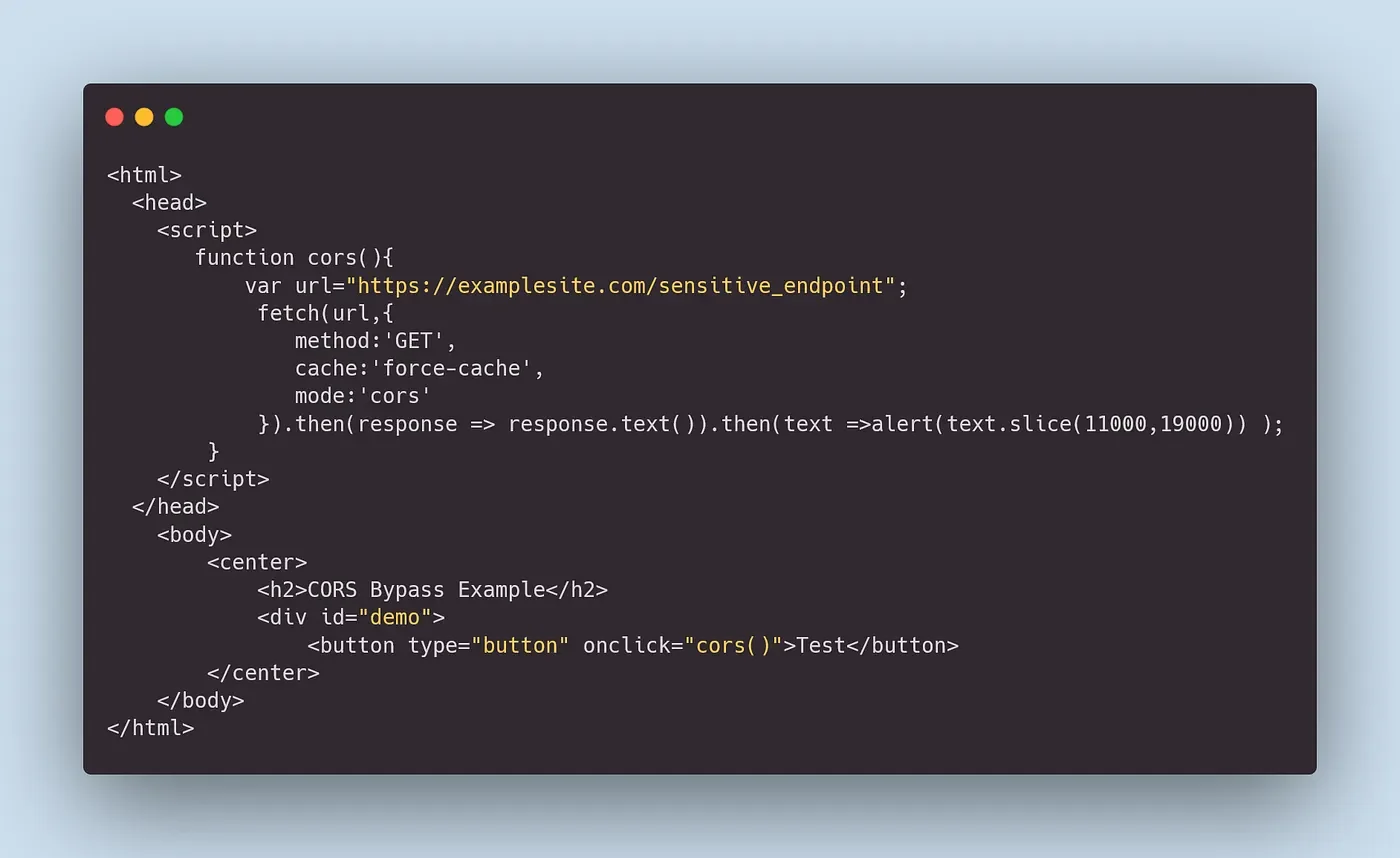
Example POC for this bug
Step 2: Read the cached response
After a logged-in user of the vulnerable site visits the site, the script fetches the response of the page from the browser cache, together with the sensitive data in the response. In this case that was the server authentication token, which allowed a full account takeover of the logged-in user.
Root cause
The server returned sensitive session material (id token, refresh token and server authentication token) in the body of every response, with Access-Control-Allow-Origin set to a wildcard and Access-Control-Allow-Credentials set to True. The wildcard normally prevents credentialed cross-origin reads because the Access-Control-Allow-Credentials header is not included in the response when the allowed origin is *. The missing piece of the defence was caching: because the response did not carry Cache-Control: no-store, the browser stored it, and a later cross-origin fetch with cache: "force-cache" could read the stored copy.
Impact
An attacker who can get a logged-in user to load a malicious page can read the cached response of the login-flow page and obtain the server authentication token, leading to a full account takeover of that user. The attack requires that the victim was logged in and had previously visited the affected page so that it was cached. The report does not describe any further impact beyond the takeover of the logged-in user.
Fix
Based on the root cause, the response should not include sensitive tokens such as the id token, refresh token and server authentication token in every page response, and responses carrying such data should be sent with Cache-Control: no-store so they are never written to the browser cache.
Variants to test
- Look for responses that reflect session tokens or other secrets and carry
Access-Control-Allow-Origin: *withAccess-Control-Allow-Credentials: True. A positive result is a response body containing tokens, paired with a wildcard origin and nono-storecaching. - Check whether those responses omit
Cache-Control: no-store. A positive result is a response that the browser stores, which can then be read with afetchusingcache: "force-cache"from an attacker-controlled origin. - Target pages in the login flow, since a logged-in user is guaranteed to have visited them. A positive result is a cached copy containing the authentication token.
- Test other cacheable authenticated endpoints that return personal or session data with permissive CORS headers, to see whether the same cached-read technique discloses them.
What happened, in plain words
A security researcher was testing a website run by a large telecommunications company. The site had a mistake in how it let other websites talk to it, and that mistake let an attacker steal a logged-in user's session and take over the account completely.
The mistake is in a feature called CORS. To understand why it matters, you first need to know a rule that every browser follows.
When you are on one website, the browser normally refuses to let that website read data from a different website. This rule is called the Same Origin Policy. It exists so that a page you visit cannot quietly reach into your bank, your email or any other site you are logged into and read your data. An "origin" here just means the combination of protocol, host and port, for example https://example.com. Two pages with the same origin are allowed to read each other's data; two pages with different origins are not.
Sometimes a developer genuinely needs one site to read data from another. For example, a shop's front page might need to fetch your order history from a separate orders service. To allow this on purpose, browsers support CORS, which stands for Cross Origin Resource Sharing. It is a way for the server to say "yes, this particular other site is allowed to read my responses".
CORS works through small pieces of information attached to requests and responses, called headers. A header is just a labelled line of text that travels with the request or the response, like the label on a parcel telling the postal service where it came from and what is inside. When a browser makes a request to another site, it adds an Origin header saying which site is asking. The server can answer with two headers that matter here:
Access-Control-Allow-Origin: which origin is allowed to read the response.Access-Control-Allow-Credentials: whether the request is allowed to carry the user's cookies for that server.
A cookie is a small piece of data the browser stores for a website and sends back on every request to that site. It is how a site remembers that you are logged in. A token is similar in spirit: a long random string that proves who you are. If someone else gets your cookie or your token, they can act as you without knowing your password.
A CORS vulnerability needs two things to be true at once:
- The attacker can choose the value of the
Originheader, and the server accepts it and copies it back inAccess-Control-Allow-Origin. Access-Control-Allow-Credentialsis set toTrue, so the cookies in the request are actually used by the server.
When both hold, an attacker can get a user of the server to visit the attacker's site, and that site can then read sensitive information from the user's session on the server in question.
In this case the second condition was true but the first was not. The server did not copy back whatever origin asked; it always answered with a wildcard, written as *. A wildcard means "any site at all". That sounds even more permissive, but when the allowed origin is * the server does not include the Access-Control-Allow-Credentials header in the response. That refusal is a deliberate safety boundary, because otherwise any website could read any logged-in user's data.
So on the face of it, the site was safe. But there was a gap in that boundary, and it involved the browser's cache. A cache is a storage area where the browser keeps copies of pages and responses it has already downloaded, so it does not have to download them again. If a response is allowed to be cached, a copy sits on your computer. The researcher found that a script on an attacker's site could ask the browser for that stored copy instead of asking the website, and the browser would hand it over. The copy contained the user's authentication token, and with that token the attacker could take over the account.
Background: what the site was doing
The report does not describe the accounts, roles or tooling used during testing. The only precondition that matters for the attack is that a logged-in user has already visited the vulnerable page, so that its response sits in the browser cache.
Finding it
While looking for this class of bug, the researcher noticed that a server was returning sensitive information in the response for a logged-in user. The data included three things:
- the id token,
- the refresh token,
- the server authentication token.
The server authentication token was the value used to authenticate the user to the server. In everyday terms, it was the badge that proved who the user was; anyone holding it could walk in as that user.
The response also carried an Access-Control-Allow-Origin header and an Access-Control-Allow-Credentials header set to True. This information was returned on every response from the server, not just on one special page.
In this scenario the second condition was met but the first was not. Access-Control-Allow-Origin was not set to the value of the request's Origin; it was permanently set to a wildcard. A wildcard means any site can request information from the server cross domain, but when Access-Control-Allow-Origin is a wildcard the Access-Control-Allow-Credentials header is not included in the response. That is a deliberate security boundary against the overly permissive wildcard value. The reason it matters is that the impact of a CORS bug is normally disclosure of sensitive information from a session; without Access-Control-Allow-Credentials it is the same as logging into an application without a session.
Exploitation
There is a small caveat to that rule, and it lets the boundary be bypassed. If the HTTP response contains Access-Control-Allow-Origin with a wildcard as its value and does not contain a Cache-Control header with a value of no-store, it is possible to send a request to the endpoint in question and retrieve the response from the cache instead of from the website directly, provided a logged-in user has already visited that endpoint.
Two terms in that paragraph need unpacking. An endpoint is simply a specific address on a server that does one job, like a particular counter in a large office. Cache-Control is a header a server uses to tell the browser whether it may keep a copy of the response. The value no-store means "do not keep a copy at all". If a response does not say no-store, the browser is free to store it, and that stored copy is what the attack reads.
On this site every page contained the sensitive data in the HTTP response together with the required headers. The researcher picked a page that was part of the login flow, to guarantee that if the user was logged in previously, that page had to be cached in the browser. The login flow is the sequence of pages a user goes through to sign in, so a logged-in user has certainly passed through it, which makes it a reliable place to find a stored copy.
Step 1: Serve a script that forces a cached read
The client-side bug is exploited with the fetch JavaScript library, changing the cache option to force-cache, with the script hosted on a malicious server.
Example POC for this bug
A POC, or proof of concept, is a small demonstration that shows a bug is real. Here it is a short script placed on a server the attacker controls. When a victim loads the attacker's page, the browser runs that script.
The fetch function is the browser's built-in way for a script to ask for a resource over the network. By default it may go to the network or use a fresh copy. Setting the cache option to force-cache tells the browser: do not go to the network, use whatever copy you already have stored, even if it is old. That is the trick. It is reading a file that is already on the victim's own computer.
Step 2: Read the cached response
After a logged-in user of the vulnerable site visits the site, the script fetches the response of the page from the browser cache, together with the sensitive data in the response. In this case that was the server authentication token, which allowed a full account takeover of the logged-in user.
An account takeover means the attacker can use the victim's account as if it were their own: read what the victim can read and do what the victim can do, without ever knowing the password. The token was the key that made this possible.
Why it worked
The server returned sensitive session material (id token, refresh token and server authentication token) in the body of every response, with Access-Control-Allow-Origin set to a wildcard and Access-Control-Allow-Credentials set to True. The wildcard normally prevents credentialed cross-origin reads because the Access-Control-Allow-Credentials header is not included in the response when the allowed origin is *. The missing piece of the defence was caching: because the response did not carry Cache-Control: no-store, the browser stored it, and a later cross-origin fetch with cache: "force-cache" could read the stored copy.
A useful comparison: a locked drawer is only safe if the key is not also lying on the desk. The wildcard rule locks the drawer against live requests, but the browser had already made a copy of the contents and left it where any script on the machine could pick it up.
Impact
An attacker who can get a logged-in user to load a malicious page can read the cached response of the login-flow page and obtain the server authentication token, leading to a full account takeover of that user. The attack requires that the victim was logged in and had previously visited the affected page so that it was cached. The report does not describe any further impact beyond the takeover of the logged-in user.
Fix
Based on the root cause, the response should not include sensitive tokens such as the id token, refresh token and server authentication token in every page response, and responses carrying such data should be sent with Cache-Control: no-store so they are never written to the browser cache.
In plain terms, two habits prevent this: do not put secrets in every page you send, and when a response does contain something sensitive, tell the browser never to keep a copy.
Variants to test
If you want to look for the same pattern yourself, these are the checks to run, in order:
- Look for responses that reflect session tokens or other secrets and carry
Access-Control-Allow-Origin: *withAccess-Control-Allow-Credentials: True. A positive result is a response body containing tokens, paired with a wildcard origin and nono-storecaching. - Check whether those responses omit
Cache-Control: no-store. A positive result is a response that the browser stores, which can then be read with afetchusingcache: "force-cache"from an attacker-controlled origin. - Target pages in the login flow, since a logged-in user is guaranteed to have visited them. A positive result is a cached copy containing the authentication token.
- Test other cacheable authenticated endpoints that return personal or session data with permissive CORS headers, to see whether the same cached-read technique discloses them.
Glossary
- Account takeover: an attack in which someone else gains control of a user's account and can act as that user.
- API: a defined way for one piece of software to ask another for data or actions, like a service counter with specific requests it accepts.
- Authentication token: a long random string that proves who a user is, so the server can recognise them without a password on every request.
- Browser cache: storage on the user's computer where the browser keeps copies of responses it has already downloaded.
- Cache-Control: a response header that tells the browser whether and how it may store a copy;
no-storemeans never store it. - Client-side: happening in the user's browser rather than on the server.
- Cookie: a small piece of data a site stores in the browser and receives back on later requests, commonly used to keep a user logged in.
- CORS (Cross Origin Resource Sharing): a set of headers that lets a server deliberately permit a page from another origin to read its responses.
- Cross-origin: belonging to a different origin (protocol, host and port) from the page making the request.
- Endpoint: a specific address on a server that performs one particular job.
- fetch: the browser's built-in JavaScript function for requesting resources over the network.
- force-cache: a
fetchoption that tells the browser to use its stored copy instead of going to the network. - Header: a labelled line of text sent with a request or response, carrying metadata such as origin or caching rules.
- HTTP response: the message a server sends back after a request, containing headers and usually a body.
- id token: a token that identifies the user, mentioned in the report as one of the values returned in the response.
- Login flow: the sequence of pages a user goes through to sign in.
- Origin: the combination of protocol, host and port that identifies where a page came from, for example
https://example.com. - POC (proof of concept): a small demonstration showing that a bug is real and exploitable.
- Refresh token: a token used to obtain new access tokens without asking the user to log in again, mentioned in the report as one of the returned values.
- Same Origin Policy: the browser rule that stops a page on one origin from reading data from another origin.
- Server authentication token: in this report, the value used to authenticate the user to the server.
- Session: the period during which a site remembers a logged-in user, backed by cookies or tokens.
- Wildcard (
*): a value meaning "any"; inAccess-Control-Allow-Originit means any origin is allowed, which browsers treat as incompatible with credentialed reads.