How I was able to Turn a XSS into a Account Takeover
A web cache poisoning vulnerability using unkeyed headers allowed XSS on every page, and an OAuth flow flaw that used a cookie-controlled redirect URL enabled an attacker to steal the OAuth code and take over accounts.

To begin,this is a vulnerability that I found during a bug bounty engagement.I would split this into two parts, or two separate vulnerabilities. The First part was a web cache poisoning via X Headers.This part allowed me to achieve XSS on every endpoint with a combination of two Headers.The next part was a OAuth flow…
The full write-up lives on its author's site
It belongs to its author, so we link to it rather than copy it. The other two tabs are our own rewrites, checked against it.
Context
This is a chain of two separate issues found during a bug bounty engagement on a private program, so the site itself cannot be named. The first issue is a web cache poisoning attack using two unkeyed HTTP request headers, which gave reflected XSS on every endpoint of the site. The second is a flaw in the site's OAuth authorisation flow that, combined with the XSS, allowed an account takeover through a technique the author calls cookie overriding.
The OAuth flow in question is the authorisation grant. There are four entities: the application (the OAuth client), the user, the authorisation server and the resource provider. The user requests access to a resource, the application redirects them to the authorisation server, the user validates their credentials there and, if approved, receives an access code. The user is redirected back to the application, which takes the code, validates it with the authorisation server and receives an access token. That token is then used to retrieve data from the resource provider on behalf of the user.
Setup
No accounts, roles, tools or versions are described beyond the fact that the testing was done against a private bug bounty program. The only precondition that matters is that the target supported both the X-Forwarded-Host and X-Rewrite-Url request headers, and had a page that reflected X-Forwarded-Host into a JavaScript variable.
Finding it
The starting point was a site that supported both headers and reflected X-Forwarded-Host inside a JavaScript variable on one of its pages. That reflection is what turns an unkeyed header into script execution in the browser.
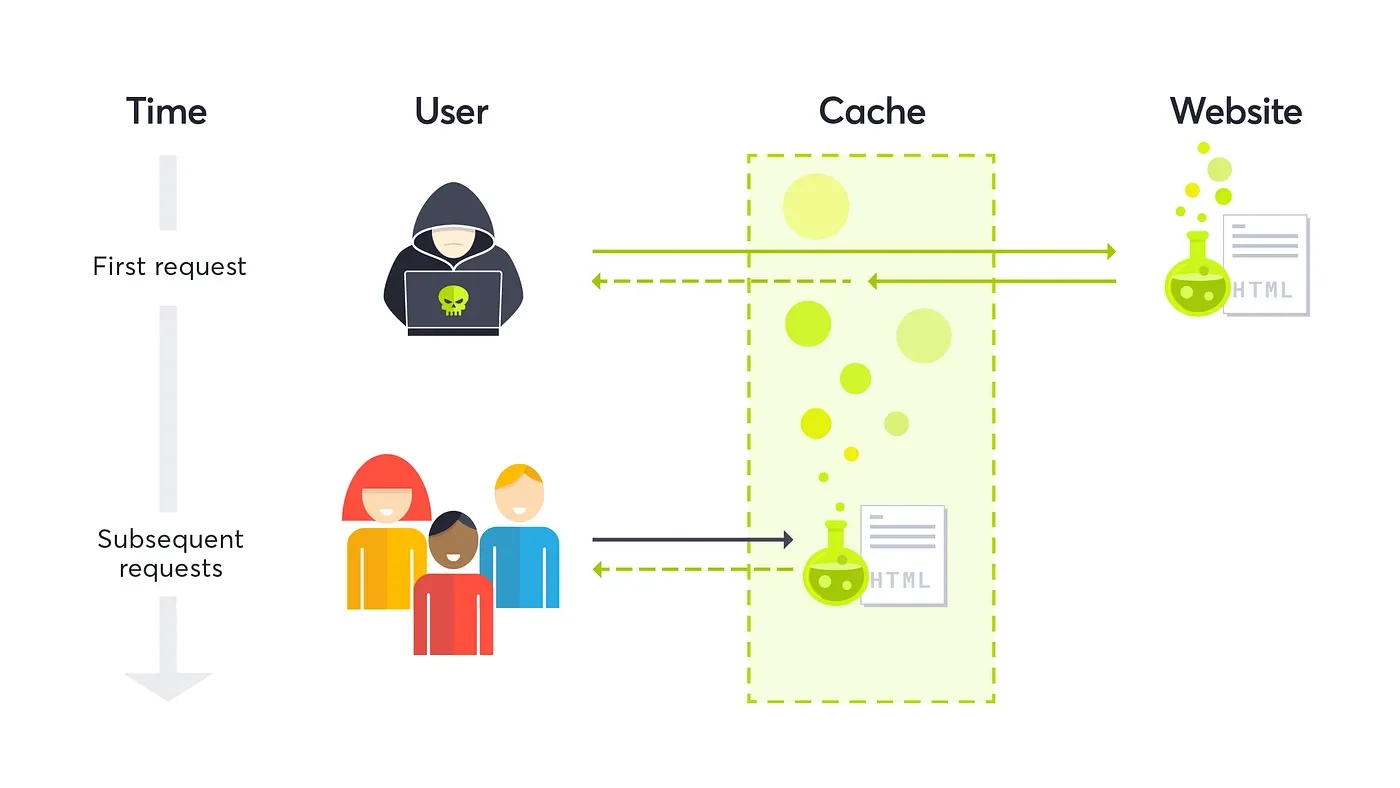
Cache poisoning in general works because a cache stores a response keyed on some subset of the request, and replays it to later users whose requests match those keys. The keys can be anything from the URI to the Accept header. Headers that are not part of the key but still influence the response are the problem: if the response is cached without them, the injected content is served to everyone who requests the same key. X-Forwarded-Host is a common example, and it is the one used here.
X-Rewrite-Url extends the reach of the attack. It rewrites the URN that is being cached. If the URN in a request is /home, the cache believes it is saving the response for /home, but with the header present the response actually loaded is the one for /evil. Because the header is usually unkeyed, the poisoned response is then served to any user who requests /home.
Exploitation
Step 1: poisoning every page
Using the combination of X-Forwarded-Host and X-Rewrite-Url, the author obtained XSS on every page of the site without user interaction. The poisoned response was only cached for about three minutes, so a script was written to automate the poisoning, re-poisoning the home page endpoint every three minutes to infect every user who visited the site.
The team that received the report wanted to keep it at medium severity, so the author looked for another way to raise the impact. That search led to the OAuth flaw.
Step 2: the OAuth callback flaw
After the authorisation code was sent back, it was processed by a URL that took a value from a cookie. That cookie held another trusted OAuth callback URL. The code was appended to the end of that URL after a hash fragment, and the browser was redirected to the resulting location. Anyone who can change the cookie value can therefore redirect the code to an arbitrary location. The attacker can then submit the code to the authorisation server and obtain an access token on behalf of the targeted user.
Step 3: cookie overriding
Two factors would normally prevent this. The cookie was HTTPOnly, and the URL stored in it was whitelisted to trusted sites only. The whitelist was already satisfied because the cache poisoning XSS was on a trusted subdomain.
The HTTPOnly flag was the remaining obstacle: XSS cannot read or modify an HTTPOnly cookie. The solution is not to modify it but to create a second cookie with the same name and a more specific path. When a browser holds two cookies with the same name and one has a more specific path, a request to that path gives precedence to the more specific one. The XSS on the poisoned subdomain could therefore write a cookie that works for all subdomains below the root domain, with its path set to the path that initiates the URL in the cookie value.
Step 4: putting the chain together
With the global poisoned XSS, the cookie overriding and the OAuth flaw in place, the chain works as follows, taking the three-minute cache window into account.
- Poison two endpoints. The first is on the main page of the site. Its payload writes the malicious cookie to the user's browser and then redirects the browser into the OAuth flow.
- The second poisoned endpoint is a nonexistent endpoint whose 404 response is overridden with the poisoned response. This endpoint handles the callback from the redirected URL that was inserted into the cookie.
- That callback URL contains the code from the OAuth flow. On receiving the code, the payload uses another
document.locationto send the code to the attacker's site in a query string. - On the attacker's site, a further
document.locationruns after the URL and code are logged, sending the user's browser back to one of the site's regular pages.
The whole process took about five seconds to execute, which kept it inside the cache window.
Root cause
The cache did not include X-Forwarded-Host or X-Rewrite-Url in its key, so responses influenced by those headers were stored and replayed to other users. The application also reflected X-Forwarded-Host into a JavaScript variable, turning the header into script execution.
The OAuth callback handler trusted a cookie to supply the redirect target and appended the authorisation code to it after a hash fragment. The whitelist of trusted callback URLs did not help because the XSS was hosted on a trusted subdomain, and HTTPOnly did not help because the attack did not need to read the original cookie, only to shadow it with a same-named cookie on a more specific path.
Impact
An attacker could execute script on every page of the site for any user who visited a poisoned endpoint, without user interaction, for as long as the poisoned response stayed cached. Combined with the OAuth flaw, the attacker could redirect a victim's authorisation code to a site they control, exchange it for an access token and take over the victim's account. The attack required the victim to visit the site during the cache window and to complete the OAuth flow; the whole process took about five seconds to execute.
The report was submitted on HackerOne and the severity was raised to critical.
Fix
The report does not describe the fix that was applied.
Variants to test
- Send
X-Forwarded-Hostwith a payload and check whether it appears in the response body, especially inside a script block. A positive result is the value reflected unescaped into JavaScript. - Add
X-Rewrite-Urlalongside it and request a different path. A positive result is the poisoned response being served for the original path. - Request the same path from a fresh session after poisoning. A positive result is the malicious response being replayed without the headers.
- Look for OAuth callback handlers that read the redirect target from a cookie. A positive result is the authorisation code being appended to an attacker-chosen URL.
- Where the redirect cookie is
HTTPOnly, try writing a same-named cookie from a subdomain with a more specific path. A positive result is the shadow cookie taking precedence on the callback path.
References
- https://portswigger.net/research/practical-web-cache-poisoning
- Twitter: @Pullerze
What happened, in plain words
A security researcher found two separate weaknesses on the same website during a bug bounty engagement. A bug bounty is a scheme where companies invite outside people to look for security problems in their systems and pay them for reporting what they find. This particular program was private, which means the researcher was invited and the site cannot be named publicly.
The first weakness let him make the website serve his own JavaScript code to every visitor, on every page, without the visitor doing anything. JavaScript is the programming language that runs inside your browser and makes pages interactive; if an attacker can run their own JavaScript on a site you trust, they can do things in your browser as if they were you. The second weakness was in the way the site handled login through a system called OAuth, which is the mechanism behind buttons like "Sign in with Google". Put together, the two weaknesses let him take over other people's accounts.
He describes the chain in two parts. Part one is the trick that puts his code on every page. Part two is the login flaw plus a technique he calls cookie overriding, which lets his code steer the login process. The report was submitted on HackerOne, a well-known bug bounty platform, and the severity was raised to critical.
Background: what a cache is, and why it can be poisoned
Before the attack makes sense, you need to know what a web cache does. When you open a page, your browser asks a server for it. Big websites get enormous numbers of requests, so they put a cache in front of the server. A cache is a storage layer that keeps a copy of a response it has already produced and hands that copy to the next visitors instead of asking the server again. Think of a restaurant that keeps a few plates of a popular dish ready: most customers get one instantly instead of waiting for the kitchen.
To decide whether it already has a copy, the cache looks at parts of your request, called keys. A key can be the address you asked for (the URI, the path part of the URL, such as /home), or something like the Accept header, which tells the server what kind of content your browser can handle. If a new request matches the keys of a stored copy, the cache replays that copy.
The problem is that some request headers are not part of the key but still influence what the server puts in the response. A header is a small line of extra information your browser sends along with a request, such as what language you prefer. If a header is not keyed, the cache does not distinguish between a request that carried it and one that did not. So if an attacker sends a request with a nasty value in such a header, and the server copies that value into the response, the cache stores the nasty response and serves it to everyone else who asks for the same key. That is web cache poisoning: you poison the stored copy, and other people get served the poison.
The researcher credits PortSwigger and James Kettle's article on practical web cache poisoning as where he first learned about it; the reference is at the end.
The two headers that made it possible
The first header is X-Forwarded-Host. Websites often sit behind proxies and load balancers, which are intermediate machines that pass requests on to the real server. X-Forwarded-Host is a header a proxy can add to tell the server which host name the visitor originally asked for. If the application takes that value and writes it into the page, for example into a JavaScript variable, then whoever controls the header controls a piece of the page's code. That is the reflection the researcher needed.
The second header is X-Rewrite-Url. It rewrites the URN that is being cached, where the URN is the path the cache thinks it is storing. Suppose the request path is /home: the cache believes it is saving the response for /home. But if you add the X-Rewrite-Url header, the response that actually gets loaded is the one for /evil, and the cache still files it under /home. Because the header is usually unkeyed, the poisoned response is then served to any user who requests /home.
The exploit chain, part 1: code on every page
The researcher found a site that supported both headers and had a page that reflected X-Forwarded-Host inside a JavaScript variable. By combining X-Forwarded-Host and X-Rewrite-Url, he got XSS on every page of the site, with no interaction from the victim. XSS, short for cross-site scripting, means getting your own JavaScript to run inside someone else's page in a victim's browser.
There was a catch: the poisoned copy was only cached for about three minutes. So he wrote a script to automate the poisoning, re-poisoning the home page endpoint every three minutes, which would infect every user who visited the site. An endpoint is simply one address on a server that answers a particular kind of request, like a counter you can walk up to.
The team that received the report wanted to keep it at medium severity. Severity is the rating of how bad a bug is. Rather than accept that, he went looking for another way to raise the impact, and that search led him to the login flaw.
Background: how OAuth login works
The flaw was in the site's OAuth flow, specifically the authorisation grant. OAuth is a way for one application to get limited access to your data on another service without ever seeing your password. The everyday comparison is a hotel: you do not hand your house keys to a guest, you ask the front desk for a temporary key card that opens only the room and only for the stay.
There are four entities in this flow:
- The application, also called the OAuth client: the site you are trying to use.
- The user: you.
- The authorisation server: the service that checks who you are and issues the temporary key.
- The resource provider: the service that holds the data the application wants to read.
The steps are:
- The user asks the application for access to a resource.
- The application redirects the user's browser to the authorisation server.
- The user validates their credentials with the authorisation server and, if approved, receives an access code.
- The user is redirected back to the application, which takes the code.
- The application validates the code with the authorisation server and receives an access token.
- The token is used to retrieve data from the resource provider on behalf of the user.
Two words matter here. The access code is a short-lived string handed to the application after you log in; it is exchanged for a token. The access token is the actual key that lets the application read your data. Anyone who steals a valid code can exchange it for a token, which is why the code must be delivered only to the legitimate application.
The OAuth callback flaw
On this site, after the code was sent back, it was processed by a URL that took a value from a cookie. A cookie is a small piece of data a website stores in your browser and that your browser sends back with later requests to that site; it is how a site remembers who you are between page loads. The cookie in question held another trusted OAuth callback URL, meaning an address the site was willing to send users back to after login. The code was appended to the end of that URL after a hash fragment, and the browser was redirected to the resulting location. A hash fragment is the part of a URL after a # sign; browsers treat it as a marker inside the page rather than as part of the request sent to the server.
Because the redirect target came from a cookie, anyone who can change the cookie value can redirect the code to an arbitrary location. The attacker can then submit the code to the authorisation server and obtain an access token on behalf of the targeted user. In hotel terms: the front desk hands your temporary key card to whoever changed the room number on the form.
Cookie overriding: getting past HTTPOnly
Normally two things would stop this. First, the cookie was HTTPOnly. That is a flag a site can set on a cookie which tells the browser that JavaScript is not allowed to read it. It exists precisely so that a script injected into a page cannot steal session cookies. Second, the URL stored in the cookie was whitelisted to trusted sites only, meaning only addresses on an approved list were accepted.
The whitelist problem was already solved, because the cache poisoning XSS was running on a trusted subdomain. A subdomain is a site under the main domain, like shop.example.com under example.com. So the malicious script was, from the site's point of view, coming from somewhere trusted.
The HTTPOnly flag was the remaining obstacle. You cannot use XSS to read or change an HTTPOnly cookie. The answer is not to change it but to create a second cookie with the same name and a more specific path. When a browser holds two cookies with the same name and one has a more specific path, a request to that path gives precedence to the more specific one. Think of two people with the same name in a building: the receptionist uses the room number to tell them apart, and the one assigned to the exact room you are calling gets the call.
With this, the XSS on the poisoned subdomain could write a cookie that works for all subdomains below the root domain, with its path set to the path that initiates the URL in the cookie value. The original HTTPOnly cookie was never read or modified; it was simply shadowed by a same-named cookie that the browser preferred for that path.
Exploit chain, part 2: putting it together
With the global poisoned XSS, the cookie overriding and the OAuth flaw in place, the chain works as follows, keeping the three-minute cache window in mind.
- Poison two endpoints. The first is on the main page of the site. Its payload writes the malicious cookie to the user's browser and then redirects the browser into the OAuth flow. A payload here means the JavaScript the attacker wants the victim's browser to run.
- The second poisoned endpoint is a nonexistent endpoint whose 404 response is overridden with the poisoned response. A 404 is the status code a server returns when the address does not exist. This endpoint handles the callback from the redirected URL that was inserted into the cookie.
- That callback URL contains the code from the OAuth flow. On receiving the code, the payload uses another
document.locationto send the code to the attacker's site in a query string.document.locationis the browser property that holds the current address; assigning to it makes the browser navigate. A query string is the part of a URL after a?, used to carry values. - On the attacker's site, a further
document.locationruns after the URL and code are logged, sending the user's browser back to one of the site's regular pages. Logging means recording the incoming request so the attacker can read the code later.
The whole process took about five seconds to execute, which kept it inside the cache window.
Why it worked
The cache did not include X-Forwarded-Host or X-Rewrite-Url in its key, so responses influenced by those headers were stored and replayed to other users. The application also reflected X-Forwarded-Host into a JavaScript variable, turning the header into script execution.
The OAuth callback handler trusted a cookie to supply the redirect target and appended the authorisation code to it after a hash fragment. The whitelist of trusted callback URLs did not help because the XSS was hosted on a trusted subdomain, and HTTPOnly did not help because the attack did not need to read the original cookie, only to shadow it with a same-named cookie on a more specific path.
What an attacker could do
An attacker could execute script on every page of the site for any user who visited a poisoned endpoint, without user interaction, for as long as the poisoned response stayed cached. Combined with the OAuth flaw, the attacker could redirect a victim's authorisation code to a site they control, exchange it for an access token and take over the victim's account. The attack required the victim to visit the site during the cache window and to complete the OAuth flow; the whole process took about five seconds to execute.
The report was submitted on HackerOne and the severity was raised to critical.
How it would be fixed
The report does not describe the fix that was applied.
Things to try on your own targets
- Send
X-Forwarded-Hostwith a payload and check whether it appears in the response body, especially inside a script block. A positive result is the value reflected unescaped into JavaScript. - Add
X-Rewrite-Urlalongside it and request a different path. A positive result is the poisoned response being served for the original path. - Request the same path from a fresh session after poisoning. A positive result is the malicious response being replayed without the headers.
- Look for OAuth callback handlers that read the redirect target from a cookie. A positive result is the authorisation code being appended to an attacker-chosen URL.
- Where the redirect cookie is
HTTPOnly, try writing a same-named cookie from a subdomain with a more specific path. A positive result is the shadow cookie taking precedence on the callback path.
References
- https://portswigger.net/research/practical-web-cache-poisoning
- Twitter: @Pullerze
Glossary
- Bug bounty: a program where a company invites outside researchers to find security problems and pays them for valid reports.
- Private program: a bug bounty program that only invited researchers can see and test.
- JavaScript: the programming language browsers run to make web pages interactive.
- XSS (cross-site scripting): getting an attacker's JavaScript to run inside another site's page in a victim's browser.
- Web cache: a storage layer in front of a server that keeps copies of responses and replays them to later visitors.
- Cache key: the parts of a request a cache uses to decide whether it already has a matching stored response.
- Unkeyed header: a request header that is not part of the cache key but can still change the response.
- Web cache poisoning: making a cache store a malicious response and serve it to other users.
- Header: a line of extra information sent with an HTTP request or response.
X-Forwarded-Host: a header a proxy can add to tell the server which host name the visitor originally requested.X-Rewrite-Url: a header that changes which path the cache believes it is storing the response under.- URI / URN / path: the address part of a URL that identifies a resource, such as
/home. - Endpoint: one address on a server that answers a particular kind of request.
- Proxy / load balancer: an intermediate machine that passes requests on to the real server.
- Reflection: when a server copies a value from the request into the response.
- Payload: the code or value an attacker wants the victim's browser or the server to execute.
- Severity: a rating of how serious a vulnerability is.
- OAuth: a system that lets one application access your data on another service without seeing your password.
- Authorisation grant: the OAuth flow in which a user approves an application and the application receives a code and then a token.
- OAuth client / application: the site that wants access to your data.
- Authorisation server: the service that checks your credentials and issues the code and token.
- Resource provider: the service that holds the data the application wants to read.
- Access code: a short-lived string given to the application after login, exchanged for a token.
- Access token: the key that lets an application read your data on another service.
- Cookie: a small piece of data a site stores in your browser and that the browser sends back with later requests.
HTTPOnly: a cookie flag that stops JavaScript from reading the cookie.- Whitelist: a list of values that are explicitly allowed.
- Subdomain: a site under a main domain, such as
shop.example.comunderexample.com. - Cookie overriding: creating a same-named cookie with a more specific path so the browser prefers it for that path.
- Hash fragment: the part of a URL after
#, treated by the browser as a marker inside the page. - Query string: the part of a URL after
?, used to carry values. document.location: the browser property holding the current address; assigning to it navigates the browser.- 404: the status code a server returns when the requested address does not exist.
- Logging: recording incoming requests so they can be read later.
- HackerOne: a bug bounty platform where reports are submitted and triaged.