Bypassing Keyword and Character Filters to Achieve Reflected XSS
A search endpoint reflected user input into an HTML attribute without encoding the double quote, allowing attribute breakout. The application tried to block exploitation by stripping the literal word 'alert' and the plus character, but both filters were bypassed, so an attacker could craft a link that runs arbitrary JavaScript in the victim's browser.

medium.com
Published on medium.com
Cybersecurity
The full write-up lives on its author's site
It belongs to its author, so we link to it rather than copy it. The other two tabs are our own rewrites, checked against it.
Context
The target was a public HackerOne program. The vulnerable feature was a search endpoint that takes a query through the q parameter and reflects it back into the HTML of the response. The researcher gives the endpoint as:
The vulnerability class is reflected Cross-Site Scripting, and the injection context is an HTML attribute value. What makes the case worth reading is not the reflection itself, which was easy to find, but the two filters the application used to block exploitation: it stripped the literal word alert and the literal + character from the input.
Setup
No accounts, roles, tool versions or other preconditions are described. The testing was done against the public program's endpoint, and the only external reference the author points to is the PortSwigger XSS cheat sheet for context-specific payloads.
Finding it
The first step was to check whether input was reflected at all, and whether any characters were encoded or filtered on the way back. The author injected a simple marker string, "insertTEST, into the q parameter, looking for two things: that the value appeared in the response, and that the double quote survived unescaped.
The response reflected the value directly inside the value attribute of an input tag, and the double quote was not encoded. That meant the attribute context could potentially be broken out of.

The screenshot shows the reflection in the response, with the injected value sitting inside the input tag's value attribute.
Exploitation
Step 1: Confirming the reflection
The marker "insertTEST was sent in q. The unencoded double quote in the reflected output established that the injection point was an HTML attribute value and that a quote could terminate it.
Step 2: Trying standard payloads
With the attribute breakout confirmed, the author moved to payloads suited to an attribute-context injection:
"><svg onload=confirm(document.cookie)>"tabindex="1" onfocus="alert(document.cookie)" id="a1"#a1" onfocus="alert(document.cookie)" autofocus="
These payloads were reflected in the response but none of them executed in the browser. That pointed to filtering rather than a failure of injection.
Step 3: Identifying the keyword filter
Looking more closely at the reflected response showed that the application was removing the word alert from the payload before returning it.

The response shows the payload with the word alert stripped out.
To check whether this was a simple case-sensitive keyword match rather than a more robust sanitiser, the author tried mixed-case variants such as Alert, aLeRt and similar combinations. Those variants were no longer stripped and appeared intact in the response.

The mixed-case keyword survives in the reflected response.
Even with the keyword passing through, nothing executed in the browser, which suggested a second, independent filter was also in play.
Step 4: Identifying the character filter
The next payload avoided the word alert entirely by building it through string concatenation:
"+autofocus+Onfocus="window['al'+'ert'](document.cookie)"+y="
This also failed to execute. Inspecting the response showed why: the plus (+) character was being stripped out entirely.

The response shows the plus characters removed from the payload.
Because the plus sign is required for the concatenation trick and was being removed server-side, the payload broke and never reached valid JavaScript syntax.
Step 5: Bypassing the character filter
To get around the stripped plus, the author URL-encoded it as %2b instead of sending a literal + in the request:
"+autofocus+Onfocus="window['al'%2b'ert'](document.cookie)"+y="
URL-decoding happens before the filtering logic inspects the raw parameter, so the encoded character passed the filter and was decoded back into a literal + in the reflected output. The response confirmed the plus was now present and the concatenation expression was intact.

The response now shows the plus character correctly in the reflected output.
Step 6: Confirming execution
With both filters bypassed, the concatenation payload triggered a JavaScript popup displaying document.domain when rendered in the browser, confirming that the injected script executed.
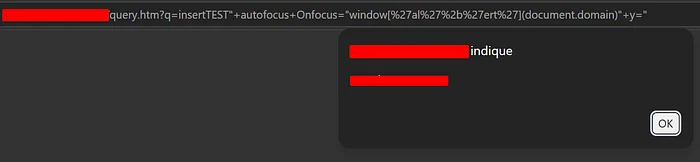
The proof of concept shows the popup with document.domain.
As a cleaner secondary proof of concept, the author also used String.fromCharCode() to build the word alert dynamically, avoiding both the keyword and character filters without relying on encoded plus signs:
" Onfocus="self[String.fromCharCode(97,108,101,114,116)](document.domain)" autofocus="
This payload also executed successfully.
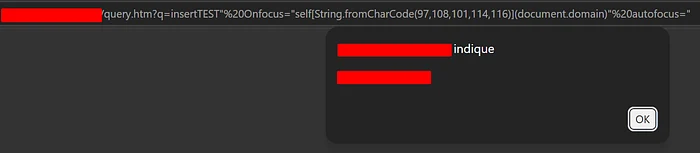
The second proof of concept, using String.fromCharCode.
Final payloads
The author lists the working payloads together:
"+autofocus+Onfocus="window['al'%2b'ert'](document.cookie)"+y=""+Onfocus="self[String.fromCharCode(97,108,101,114,116)](document.domain)"+autofocus="
Root cause
The application tried to stop XSS by blacklisting the literal string alert and the literal + character in the q parameter. Both protections were pattern-based and applied to the raw, decoded input, without accounting for encoding variations or for other ways of expressing the same JavaScript logic. That allowed three bypasses:
- Case variation to get past the keyword filter (
alertversusAlertversusaLeRt). - URL-encoding of
+as%2bto get past the character filter, since decoding happened before the filter inspected the value. String.fromCharCode()as a filter-agnostic way of constructing blocked keywords.
The report's conclusion is that a blacklist of specific strings and characters is not a sanitisation strategy: it only blocks the exact spellings the author of the filter thought of.
Impact
An attacker could craft a malicious link that, once a victim clicks it, runs arbitrary JavaScript in the context of the vulnerable domain. Depending on the application's session handling and cookie attributes, that could be used to steal session cookies, perform actions on behalf of the victim, or redirect them to a phishing page.
Fix
The report does not say what the program changed, if anything. The report does not say what the program changed, if anything, and gives no remediation guidance.
Variants to test
- Mixed-case keywords. Send
Alert,aLeRtand similar variants where a keyword appears to be stripped. A positive result is the variant surviving in the response where the lowercase form did not. - URL-encoded metacharacters. Send
%2bin place of+, and try encoding other characters the filter appears to remove. A positive result is the decoded character appearing in the reflected output. String.fromCharCode()construction. Build a blocked keyword from character codes, as in the second proof of concept. A positive result is execution without any encoded characters.- Context mismatch. Try payloads designed for a different context, such as
;alert(1);//for a<script>block, against an attribute injection point and vice versa. A positive result is execution only once the payload matches the actual reflection context. - Encoding layers. Test HTML-encoding and Unicode escapes on any filtered keyword or character. A positive result is the filter passing the value through while the browser still interprets it as the intended character.
What happened, in plain words
A security researcher was testing a website that belonged to a public bug bounty program on HackerOne. A bug bounty program is a scheme where a company invites independent testers to look for security problems in its systems and pays them for reporting what they find, instead of the company being attacked by someone with bad intentions first.
The researcher found a search feature on the site. You type something into a search box, the site sends it to its server, and the server sends back a page showing what you searched for. The problem was that the site took whatever you typed and pasted it straight into the page it sent back, without cleaning it up first. That kind of flaw is called reflected Cross-Site Scripting, or reflected XSS for short. "Reflected" means your input bounces straight back to you in the response. "Scripting" means an attacker can get their own JavaScript code to run inside the page, as if the site itself had written that code.
What makes this particular case worth reading is not the flaw itself, which was easy to spot. It is what the site did to try to stop people from exploiting it. The site removed the word alert and the + character from anything you typed, because both are common ingredients in XSS attack code. The researcher found ways around both blocks, one at a time, and got code to run in the browser. This article walks through that process from the beginning, assuming you have never done any security testing before.
The target and the vocabulary you need first
The researcher gives the address of the vulnerable feature like this:
Let us take that apart piece by piece, because every part matters later.
https://is the protocol, the set of rules a browser and a server use to talk to each other. Thesstands for secure: the conversation is encrypted, so nobody in between can read it.redacted.comis the name of the website. In the published report the real name has been replaced withredacted.comto protect the company, which is normal practice in bug bounty write-ups./query.htmis the path, the address of a particular page on that server. The.htmending suggests it is a plain HTML page.?q=xis the interesting part. Everything after the question mark is called the query string, and it is a way of passing information to the server as part of the address itself.qis the name of a parameter, which is just a labelled slot for a value, andxis the value being put into that slot. The site's search feature reads whatever is inqand searches for it.
So the whole address means: "on the site redacted.com, open the page query.htm, and tell it that the search term is x". If you changed the x to cats, the page would presumably show results for cats. The researcher's plan was to put something other than a normal search word into that slot and see what came back.
The report describes the vulnerability class as reflected Cross-Site Scripting, and the injection context as an HTML attribute value. Those two phrases need explaining.
What HTML is. Every web page you see is, underneath, a text document written in HTML. HTML is made of tags, which are instructions in angle brackets that tell the browser what to display. For example, <input> is a tag that tells the browser to draw a text box or similar control on the page. Tags can carry extra information called attributes, written inside the tag as name="value". A typical example is <input value="hello">, which draws a text box already containing the word hello. The browser reads the tag, sees the value attribute, and puts its contents into the box.
What the injection context means. When a site pastes your input into a page, the place where it lands matters enormously. If your text lands between two tags, in the visible body of the page, the browser treats it as ordinary text or as new tags. If it lands inside an attribute value, between the opening and closing double quotes, the browser treats it as part of that attribute's value, and nothing more. The context is the surrounding situation your input is dropped into, and it decides which characters are dangerous. The researcher's input landed inside an attribute value, so that was the context to work with.
What a cookie is. A cookie is a small piece of text that a website asks your browser to store and to send back on every later request to that site. It is how a site remembers who you are between page loads, because the web itself has no memory. The most important cookie is usually the session cookie: a long random string that acts like a temporary ID card. If someone else gets hold of your session cookie, they can often pretend to be you on that site without ever learning your password. That is why XSS payloads so often try to read document.cookie, which is the browser's built-in way for JavaScript to see the cookies of the current page.
What JavaScript is. JavaScript is the programming language that runs inside your browser and makes pages interactive: menus that open, forms that check your typing, buttons that do something. A web page can include JavaScript, and the browser will run it. That is the whole danger of XSS: if an attacker can get their JavaScript into a page that other people view, the browser cannot tell the difference between the site's own code and the attacker's code. It runs both with the same trust, in the context of that domain.
What alert and confirm are. These are two very simple JavaScript functions, meaning built-in actions you can ask the browser to perform. alert(...) shows a small popup box with a message. confirm(...) shows a popup with a message and OK and Cancel buttons. They are the classic way for a tester to prove that their code ran: if a popup appears, the browser executed the script. In a real attack the code would do something harmful, like sending the cookie to a server the attacker controls, but a popup is harmless and unmistakable proof.
What document.domain is. document is the browser's internal representation of the current page, and document.domain is the site's own name, such as redacted.com. Showing it in a popup proves the code is running in the context of the vulnerable site, not somewhere else.
Setup
The report does not describe any accounts, user roles, tool versions or other preconditions. The testing was done against the public program's endpoint with a browser and manual requests, and the only outside reference the author points to is the PortSwigger XSS cheat sheet, a free catalogue of ready-made payloads organised by context:
https://portswigger.net/web-security/cross-site-scripting/cheat-sheet
A payload, by the way, is simply the piece of text an attacker sends in the hope that it will be interpreted as code rather than as harmless data. The cheat sheet exists because the right payload depends entirely on where your input lands, which is the context we just discussed.
Finding it
The first step was to answer two questions at once: does my input come back in the response at all, and does it come back unchanged, or does the site alter some characters on the way? The researcher sent a simple marker string, "insertTEST, in the q parameter. A marker is a deliberately odd, easy-to-spot piece of text, so you can find it in the returned page and see exactly what happened to it.
The marker contains a double quote character followed by the word insertTEST. The double quote was the real test. In HTML, double quotes are what mark the beginning and end of an attribute value. If the site lets a double quote through untouched, then an attacker who types one can close the attribute early and start writing new HTML of their own. If the site converts the quote into a harmless code such as ", the browser will display a quote but will never treat it as the end of the attribute, and this breakout path is closed.
The response showed the value reflected directly inside an input tag's value attribute, and the double quote character was not encoded. In other words, the page came back with the researcher's quote sitting inside the attribute as a real quote. That meant the attribute context could potentially be broken out of: the quote could end the value, and whatever came after it would be read by the browser as new HTML.
The screenshot shows the reflection in the response, with the injected value sitting inside the input tag's value attribute.
Why this step first? Because everything else depends on it. If the input had not been reflected at all, there would be nothing to attack. If the quote had been encoded, the attribute could not be escaped and the whole approach would have to change. One small test answered both questions cheaply.
Exploitation
Step 1: Confirming the reflection
The marker "insertTEST was sent in q. The unencoded double quote in the reflected output established that the injection point was an HTML attribute value and that a quote could terminate it. This is the same observation as above, now treated as a confirmed fact to build on: the quote is the key that opens the door, and it was not being taken away.
Step 2: Trying standard payloads
With the attribute breakout confirmed, the author moved to payloads suited to an attribute-context injection:
"><svg onload=confirm(document.cookie)>"tabindex="1" onfocus="alert(document.cookie)" id="a1"#a1" onfocus="alert(document.cookie)" autofocus="
This block is several payloads run together, so let us walk through it in pieces.
">is the breakout itself. The double quote closes the attribute the site opened, and the>closes theinputtag. Everything after this point is no longer inside the site's tag; it is new HTML written by the attacker.<svg onload=confirm(document.cookie)>starts a new tag,svg, which is normally used for drawing graphics. Theonloadattribute is an event handler: a piece of JavaScript the browser runs automatically when the element finishes loading. So the moment the browser creates this element, it runsconfirm(document.cookie), which pops up a box showing the page's cookies. This is the classic proof that script execution is possible."tabindex="1" onfocus="alert(document.cookie)" id="a1"is a different technique.tabindexmakes an element focusable, meaning it can receive keyboard focus.onfocusis an event handler that runs when the element receives that focus.id="a1"gives the element a name so it can be referred to. The idea is that if the element gets focused, thealertfires.#a1" onfocus="alert(document.cookie)" autofocus="uses the#a1fragment, the part of a web address after a#, which tells the browser to jump to the element with that id. Combined withautofocus, which asks the browser to focus the element automatically, this is another way to trigger theonfocushandler without the victim clicking anything.
These payloads were reflected in the response, but none of them executed in the browser. That is an important distinction. The text came back in the page, so the injection point was real. But no popup appeared, so the browser never ran the code. When input arrives but does not work, the usual explanation is that something in the middle is altering it: a filter. That pointed to filtering rather than a failure of injection.
Step 3: Identifying the keyword filter
Looking more closely at the reflected response showed that the application was removing the word alert from the payload before returning it.
The response shows the payload with the word alert stripped out.
A filter, in this context, is a piece of code on the server that inspects incoming input and removes or blocks things it does not like. This one was a keyword filter: it looked for a particular word, alert, and deleted it. The effect is easy to underestimate. If the site removes the word alert from onfocus="alert(document.cookie)", what is left is onfocus="(document.cookie)", which is not valid JavaScript and does nothing. The payload is broken, not because the injection failed, but because its most important word was taken away.
To check whether this was a simple case-sensitive keyword match rather than a more robust sanitiser, the author tried mixed-case variants such as Alert, aLeRt and similar combinations. Those variants were no longer stripped and appeared intact in the response.
The mixed-case keyword survives in the reflected response.
Case-sensitive means the filter treats capital and lowercase letters as different characters, so it recognises alert but not Alert. This is a very common weakness. To a computer, alert and Alert are two different strings of characters. To JavaScript, alert and Alert are different names, but the filter only removed the exact lowercase spelling, so the mixed-case form still reached the browser. So the filter and the browser disagree about what counts as the same word, and the attacker can exploit that disagreement. A more robust sanitiser would normalise the input first, meaning it would convert it to a standard form, such as all lowercase, before checking it, so that case tricks achieve nothing.
Even with the keyword passing through, nothing executed in the browser, which suggested a second, independent filter was also in play. This is a pattern worth remembering: filters often come in layers, and getting past one tells you nothing about the others until you test again.
Step 4: Identifying the character filter
The next payload avoided the word alert entirely by building it through string concatenation:
"+autofocus+Onfocus="window['al'+'ert'](document.cookie)"+y="
Let us go through it.
"closes the attribute value the site opened, just as before.+autofocus+Onfocus=is a trick for getting new attributes into the tag. The+characters sit between the attribute names in the injected tag. The result is that the tag gains anautofocusattribute and anOnfocusattribute.window['al'+'ert'](document.cookie)is the heart of the payload.windowis the browser's global object, the container that holds all the built-in functions.window['al'+'ert']means "look up the property named by the result of'al'+'ert'". The+between two strings joins them together, an operation called string concatenation, so'al'+'ert'produces the textalert. The browser then looks upwindow['alert'], which is the alert function, and the parentheses after it call that function withdocument.cookieas its argument. The wordalertnever appears in the payload as a single piece, so a filter searching for that exact word finds nothing."+y="closes the attribute and adds a harmlessyattribute, so the HTML that follows stays well formed and the page does not break in a way that might stop the script running.
This also failed to execute. Inspecting the response showed why: the plus (+) character was being stripped out entirely.
The response shows the plus characters removed from the payload.
Because the plus sign is required for the concatenation trick and was being removed server-side, the payload broke and never reached valid JavaScript syntax. Server-side means the removal happened on the server, before the page was sent, so the browser never even saw the plus signs. Without them, 'al'+'ert' becomes 'al''ert', which is not valid JavaScript, and the whole expression collapses.
Step 5: Bypassing the character filter
To get around the stripped plus, the author URL-encoded it as %2b instead of sending a literal + in the request:
"+autofocus+Onfocus="window['al'%2b'ert'](document.cookie)"+y="
URL encoding, also called percent encoding, is a way of writing characters in a web address using a percent sign and two hexadecimal digits, so that characters which would otherwise be ambiguous or unsafe can travel inside a URL. A space becomes %20, for example, and a plus sign can be written as %2b. The browser and the server both understand this notation and translate it back to the real character at the appropriate moment, a process called decoding.
The crucial detail is the order of operations. URL-decoding happens before the filtering logic inspects the raw parameter, so the encoded character passed the filter and was decoded back into a literal + in the reflected output. In plain terms: the filter looked at the text %2b and did not recognise it as a plus sign, so it let it through. Later, the normal decoding step turned %2b into +, and by then the filter had already finished. The filter and the decoder were looking at the input at different stages, and the attacker slipped between them.
The response confirmed the plus was now present and the concatenation expression was intact.
The response now shows the plus character correctly in the reflected output.
Step 6: Confirming execution
With both filters bypassed, the concatenation payload triggered a JavaScript popup displaying document.domain when rendered in the browser, confirming that the injected script executed. Rendered means the browser took the HTML it received and turned it into the page you see, running any scripts along the way. The popup is the proof: it could only appear if the browser had run the attacker's code in the context of the vulnerable site.
The proof of concept shows the popup with document.domain.
A proof of concept, often shortened to PoC, is a minimal demonstration that a vulnerability is real and exploitable, as opposed to a theoretical claim. It is what turns a suspicion into a reportable finding.
As a cleaner secondary proof of concept, the author also used String.fromCharCode() to build the word alert dynamically, avoiding both the keyword and character filters without relying on encoded plus signs:
" Onfocus="self[String.fromCharCode(97,108,101,114,116)](document.domain)" autofocus="
Line by line:
"closes the attribute value, as before.Onfocus=adds an event handler attribute.self[String.fromCharCode(97,108,101,114,116)]is the clever part.String.fromCharCodeis a built-in JavaScript function that takes numbers and returns the text made of the characters with those codes. Every character a computer handles has a number, called its character code, and in the standard encoding used here, 97 isa, 108 isl, 101 ise, 114 isrand 116 ist. Put together, those five numbers spellalert.selfis another name for the global object, the same idea aswindow. So the browser builds the wordalertat runtime, from numbers, and then calls it withdocument.domainas the argument.(document.domain)calls the function that was just looked up, showing the site's domain in a popup.autofocus="asks the browser to focus the element automatically, which triggers theonfocushandler without any user interaction, and closes the attribute cleanly.
This payload also executed successfully.
The second proof of concept, using String.fromCharCode.
Why is this one considered cleaner? Because it contains no plus signs at all and no literal alert, so it sidesteps both filters by design rather than by encoding tricks. It shows that the filters were not just incomplete but fundamentally the wrong approach: there are many ways to express the same piece of JavaScript, and blocking one spelling blocks almost nothing.
Final payloads
The author lists the working payloads together:
"+autofocus+Onfocus="window['al'%2b'ert'](document.cookie)"+y=""+Onfocus="self[String.fromCharCode(97,108,101,114,116)](document.domain)"+autofocus="
This block is the two successful payloads placed one after the other. The first is the concatenation payload with the URL-encoded plus, which reads the cookies. The second is the character-code payload, which shows the domain. Both are listed together as the set of things that worked, so a reader can copy them and understand what each one demonstrates.
Root cause
The application tried to stop XSS by blacklisting the literal string alert and the literal + character in the q parameter. A blacklist is a list of things that are forbidden: the filter checks whether the input contains one of those exact items and removes it if so. The opposite approach, a whitelist, allows only things on an approved list and rejects everything else, and it is generally far safer, because you only have to think of what is allowed rather than everything that is forbidden.
Both protections were pattern-based and applied to the raw, decoded input, without accounting for encoding variations or for other ways of expressing the same JavaScript logic. That allowed three bypasses:
- Case variation to get past the keyword filter (
alertversusAlertversusaLeRt). The filter compared exact spellings, but JavaScript does not care about case in function names. - URL-encoding of
+as%2bto get past the character filter, since decoding happened before the filter inspected the value. The filter and the decoder saw different versions of the same input. String.fromCharCode()as a filter-agnostic way of constructing blocked keywords. The wordalertnever appears in the payload, so no search for that word can find it.
The underlying design mistake is that a blacklist of specific strings and characters is not a sanitisation strategy: it only blocks the exact spellings the author of the filter thought of. Sanitisation means properly neutralising input so that it can never be interpreted as code, regardless of how it is written. A blacklist, by contrast, is a guess about what an attacker will type, and the attacker gets to make a different guess.
Impact
An attacker could craft a malicious link that, once a victim clicks it, runs arbitrary JavaScript in the context of the vulnerable domain. Arbitrary means whatever the attacker wants, not just a popup. In the context of the vulnerable domain means the browser treats that code as coming from the site itself, so it can do anything the site's own code could do: read the page, read cookies the site has set, and make requests to the site as the logged-in user.
Depending on the application's session handling and cookie attributes, that could be used to steal session cookies, perform actions on behalf of the victim, or redirect them to a phishing page. Session handling is how the site decides who you are on each request, and cookie attributes are settings on a cookie that control things like whether JavaScript is allowed to read it. Phishing means tricking someone into entering their details on a fake page that looks real. The key point for a beginner is that the victim only has to click a crafted link that looks like it belongs to the site, and the attack runs in their browser.
Fix
The report does not say what the program changed, if anything.
Context-aware output encoding means: when the site is about to place a value into a page, it converts any character that has special meaning in that particular place into a safe equivalent. In an attribute value, a double quote would become ", which the browser displays as a quote but never treats as the end of the attribute. Metacharacters are characters that carry special meaning to a parser, like quotes and angle brackets in HTML. Normalising and decoding before validation means the filter should look at the input in the same form the browser will eventually see, so that %2b and + cannot mean different things to different parts of the system.
Variants to test
These are the general lessons turned into things you can try yourself on a site you are authorised to test. Each one states what a positive result looks like, so you know when you have found something.
- Mixed-case keywords. Send
Alert,aLeRtand similar variants where a keyword appears to be stripped. A positive result is the variant surviving in the response where the lowercase form did not. - URL-encoded metacharacters. Send
%2bin place of+, and try encoding other characters the filter appears to remove. A positive result is the decoded character appearing in the reflected output. String.fromCharCode()construction. Build a blocked keyword from character codes, as in the second proof of concept. A positive result is execution without any encoded characters.- Context mismatch. Try payloads designed for a different context, such as
;alert(1);//for a<script>block, against an attribute injection point and vice versa. A positive result is execution only once the payload matches the actual reflection context. - Encoding layers. Test HTML-encoding and Unicode escapes on any filtered keyword or character. A positive result is the filter passing the value through while the browser still interprets it as the intended character.
Glossary
- Attribute: extra information written inside an HTML tag, in the form
name="value", such as thevalueof an input box. - Blacklist: a list of forbidden items that a filter removes or blocks; it only catches what its author thought of.
- Bug bounty program: a scheme where a company invites independent testers to find and report security problems, usually in exchange for a reward.
- Case-sensitive: treating capital and lowercase letters as different characters, so
alertandAlertare not the same. - Character code: the number a computer uses to represent a particular character, such as 97 for
a. - Concatenation: joining two pieces of text end to end to make one longer piece, done with
+in JavaScript. - Context (injection context): the surrounding place in the page where your input lands, such as an attribute value or a script block, which decides which characters are dangerous.
- Cookie: a small piece of text a site asks your browser to store and send back on later requests, often used to remember who you are.
- Cross-Site Scripting (XSS): a flaw where an attacker gets their own JavaScript to run inside a page viewed by someone else, in the context of the vulnerable site.
- Decoding: translating an encoded form, such as
%2b, back into the real character, such as+. - Event handler: an attribute such as
onfocusoronloadwhose value is JavaScript the browser runs when that event happens. - Filter: code on the server that inspects incoming input and removes or blocks things it does not like.
- HTML: the text language web pages are written in, made of tags in angle brackets.
- Impact: the harm a vulnerability could cause if someone exploited it.
- JavaScript: the programming language that runs inside browsers and makes pages interactive.
- Keyword filter: a filter that looks for a particular word and removes or blocks it.
- Metacharacter: a character with special meaning to a parser, such as a quote or angle bracket in HTML.
- Normalise: convert input to a standard form, such as all lowercase, before checking it.
- Parameter: a labelled slot for a value in a web address, such as
qin?q=x. - Payload: the piece of text an attacker sends hoping it will be treated as code.
- Percent encoding (URL encoding): writing characters in a web address as a percent sign plus two hexadecimal digits, such as
%2bfor+. - Phishing: tricking someone into entering their details on a fake page that looks real.
- Proof of concept (PoC): a minimal demonstration that a vulnerability is real and exploitable.
- Query string: the part of a web address after the question mark, used to pass values to the server.
- Reflected XSS: XSS where the attacker's input bounces straight back in the response to the same request, usually via a crafted link.
- Rendered: turned from HTML text into the visible page by the browser, running any scripts along the way.
- Root cause: the underlying design mistake that makes a vulnerability possible.
- Sanitisation: properly neutralising input so it can never be interpreted as code, however it is written.
- Server-side: happening on the server, before the page reaches the browser.
- Session cookie: the cookie that identifies you to a site after you log in; stealing it can let someone act as you.
- String: a piece of text in programming.
- Tag: an instruction in angle brackets in HTML, such as
<input>, that tells the browser what to display. - URL: the address of a resource on the web, such as
https://redacted.com/query.htm?q=x. - Whitelist: a list of approved items, where everything not on the list is rejected; generally safer than a blacklist.
alert/confirm: built-in JavaScript functions that show a popup box, commonly used to prove that code ran.document.cookie: the browser's way for JavaScript to read the cookies of the current page.document.domain: the site's own domain name, as seen by JavaScript on the page.String.fromCharCode(): a built-in JavaScript function that turns character codes into text, such as 97,108,101,114,116 intoalert.window/self: names for the browser's global object, the container that holds built-in functions.




