Bypassing LFI (Local File Inclusion)
A page parameter on the target site accepted a file path and returned the contents of the referenced file, so directory traversal let the author read a system password file. The author could not escalate the read into remote code execution.

Curated list of Bug bounty programs — https://bugbountydirectory.com
The full write-up lives on its author's site
It belongs to its author, so we link to it rather than copy it. The other two tabs are our own rewrites, checked against it.
Context
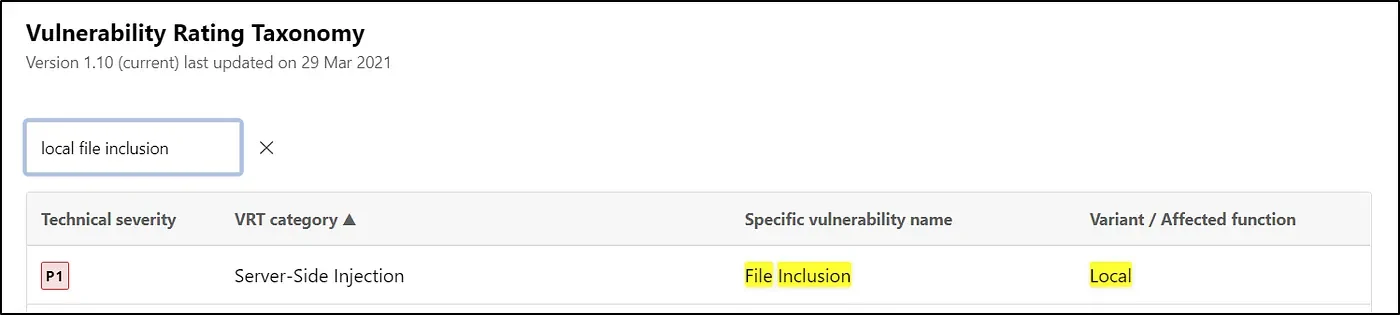
Local File Inclusion (LFI) lets an attacker expose a file on the target server. Combined with directory traversal (../), it allows reading files that should not be accessible to a user. The researcher rates it as a serious issue, P1, and notes it could lead to RCE through various methods.
The example given is a page parameter that loads a file:
https://example.com/redirect.php?page=/home/index.html
This returns index.html. Changing the parameter to traverse upwards returns the password file:
https://example.com/redirect.php?page=../../../etc/passwd
The researcher maps the weakness to the Bugcrowd VRT entry for LFI.
Setup
No accounts, roles or tool versions are described. The only precondition is a parameter that takes a file path, in this case page on the endpoint /rd. The target is referred to only as www.target.com.
Finding it
The URL under test was:
www.target.com/rd?page=/change/lmtstats.html
The page parameter clearly names a file, so the researcher tried directory traversal in it. A large payload list is referenced (emadshanab's LFI payload list). The researcher notes that ../../../etc/passwd works most of the time, but the number of ../ sequences needed can be large, and even with around 20 of them the etc/passwd part may be blocked. Finding the right combination is a matter of trial and error.
Exploitation
Step 1: Traversal depth with an appended extension
In this case seven ../ sequences were needed, and the final command had .html appended:
../../../../../../../etc/passwd.html
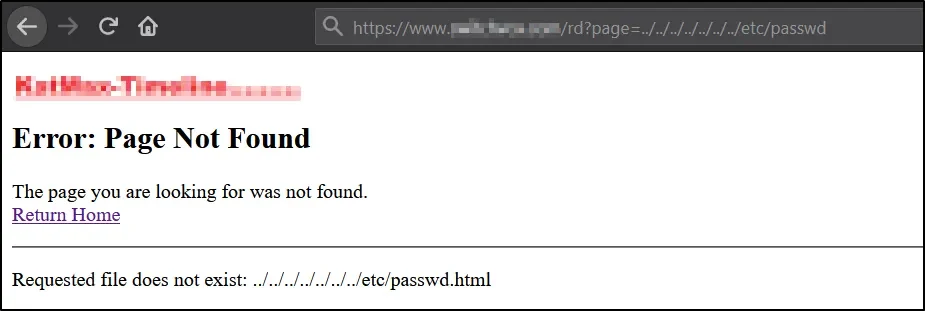
The researcher notes the final command had .html at the end.
Step 2: Changing the file type
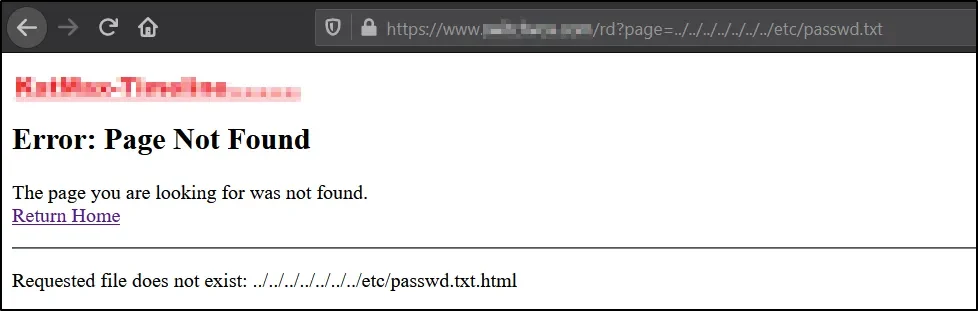
Changing the file type to txt, png and similar gave no result.
Step 3: Null byte
The next technique tried was a null byte, %00.
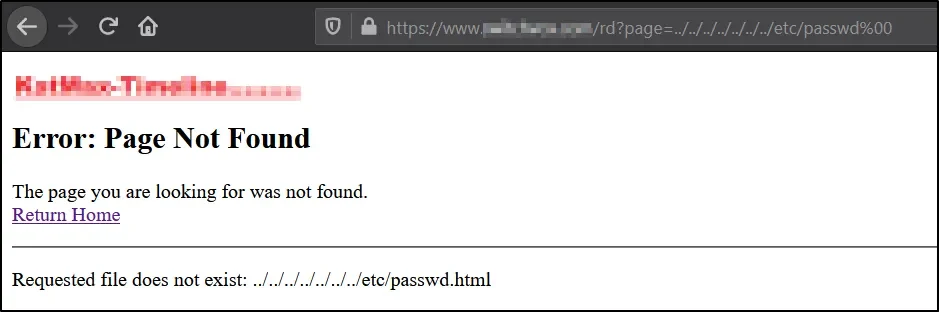
Step 4: Base64 encoding
After trying various techniques and encodings, the final payload was:
www.target.com/rd?page=[redacted]
That value is the following payload encoded in base64:
..%2F..%2F..%2F..%2F..%2F..%2F..%2Fetc..%2Fpasswd..%2F00.txt//.%00
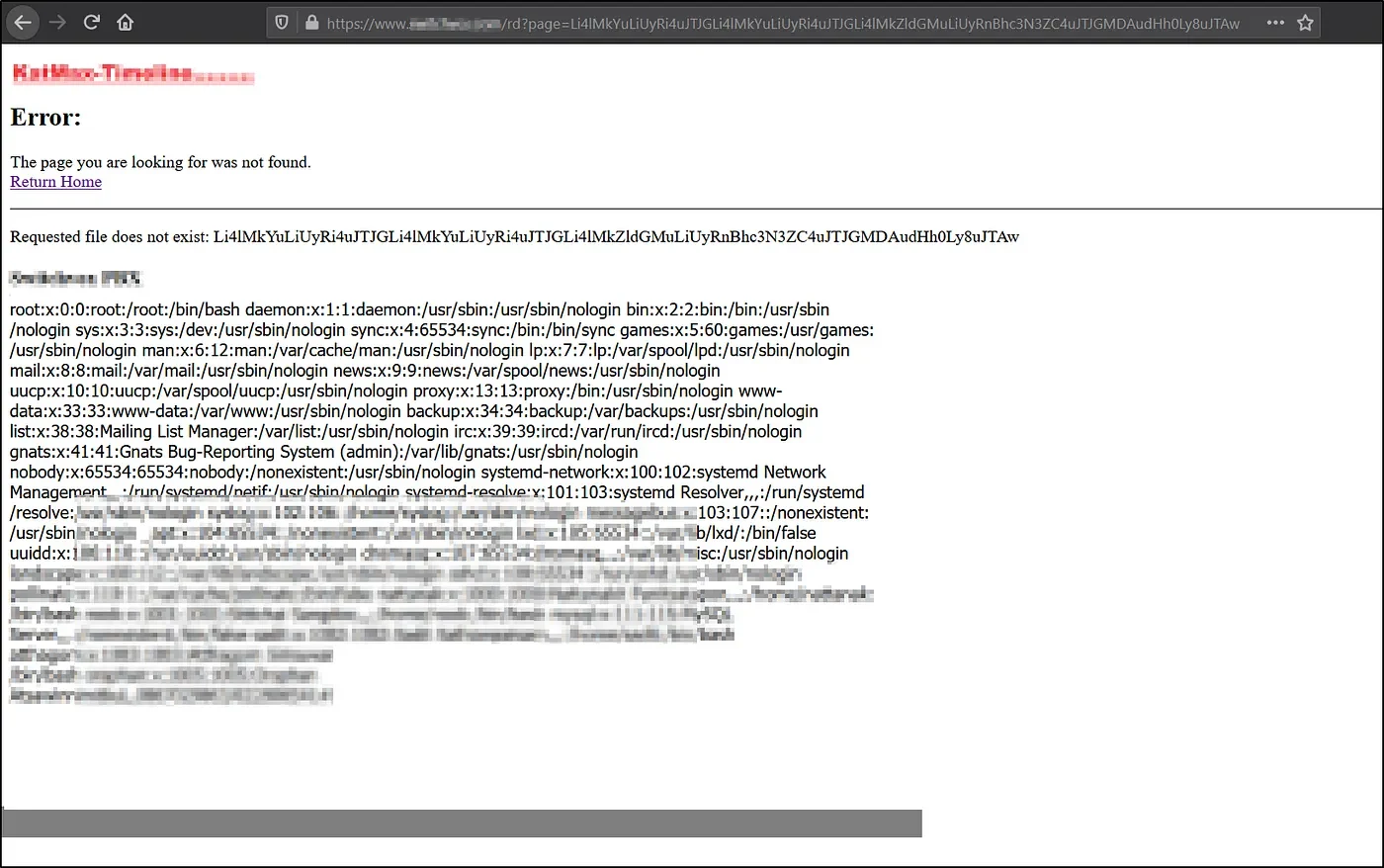
After a lot of trial and error and repeated blocking, this returned the password file.
Step 5: Attempted escalation to RCE
The researcher could not escalate to RCE because only a few files could be read, and RCE requires access to specific files. Two references are given for escalation paths when LFI is found: the PayloadsAllTheThings File Inclusion page (LFI to RCE via /proc/fd) and the HackTricks File Inclusion page (LFI to RCE). The researcher adds that many blogs explain RCE methods and that they are a search away.
Root cause
The report does not describe the server-side code. The report does not describe the server-side code or any filtering logic. The exact filter logic is not shown.
Impact
An attacker can read files on the target server that should not be accessible, such as /etc/passwd. The researcher rates this P1 and notes it could lead to RCE, but in this case only a few files could be read, which prevented escalation.
Fix
The general remediation implied by the issue is to stop building file paths directly from user input and to validate the page parameter against an allowlist of permitted files.
Variants to test
- Traverse with increasing depth of
../until the response changes; a positive result is the contents of a known file such as/etc/passwd. - Append the extension the application expects (for example
.html) to the traversed path; a positive result is the same file contents despite the suffix. - Try a null byte (
%00) at the end of the path; a positive result is truncation of the appended extension and disclosure of the target file. - URL-encode the slashes (
%2F) and base64-encode the whole payload; a positive result is the file contents returned from an encoded parameter value. - Change the requested file type (
txt,png); in this report it gave no result, so treat it as a check rather than a reliable bypass.
What happened, in plain words
A security researcher found a way to make a website hand over a file from its own server that visitors are not supposed to see. The researcher aimed at a well known system file called passwd, which on Unix-like systems lists the user accounts on the machine. The website had a page that took a file name from the address bar and then loaded that file. By putting a carefully crafted file name into the address, the researcher made the site walk up out of the folder it was meant to serve from and read a file from somewhere else entirely.
The trick is called Local File Inclusion, or LFI for short. "Local" means the file lives on the same machine as the website. "Inclusion" means the website takes a file and pulls it into the page it is building, the way a cook follows a recipe that says "now add the sauce from the jar in the fridge". If the recipe lets a stranger write the name of the jar, the stranger can ask for any jar in the kitchen, including ones the cook never meant to open.
The researcher rates this as a serious issue, P1, and notes that with the right follow-up steps it can sometimes be turned into RCE, which stands for Remote Code Execution: the attacker gets the server to run commands of their choosing. In this particular case the researcher could not go that far, but did manage to access the passwd file.
The idea behind it, from zero
Every website is a program running on a computer somewhere, called the server. When you visit a page, your browser sends a request over the internet and the server sends back a response, usually a web page. Some pages are not fixed: they build themselves on the fly, for example by taking a value out of the address bar and using it to decide what to show.
The part of the address after the question mark is called the query string. In https://example.com/redirect.php?page=/home/index.html, the part page=/home/index.html tells the page which file to load. The name page here is a parameter: a named slot that the page reads a value from. The value /home/index.html is a path, a location on the server's disk, much like the address of a house.
A server's disk is organised into folders, and folders can sit inside other folders. The notation .. means "the folder one level up". So if you are in /home/website/pages/ and you write ../, you are now looking at /home/website/. Write ../../ and you are at /home/. This stepping upwards is called directory traversal, or path traversal. It is a normal feature of file systems, and it becomes a security problem when a website lets a visitor use it to escape the folder it intended to serve from.
The file /etc/passwd is a classic target for demonstrating this. On Unix-like systems it sits in a system folder called /etc and lists the accounts on the machine. It is readable by everyone by design, which is exactly why researchers use it as proof: if you can read it, you have proven you can read files outside the website's own folder, without touching anything sensitive or destructive.
The example that shows the problem
The researcher starts with a simple illustration. A page takes a page parameter and loads whatever file it names:
https://example.com/redirect.php?page=/home/index.html
Read this line by line. https:// is the protocol, the language the browser and server speak. example.com is the name of the server. /redirect.php is the script on that server that handles the request; the .php ending tells us it is written in the PHP programming language. The ? marks the start of the query string, and page=/home/index.html is the one parameter being passed, with the value /home/index.html, a path to a normal web page file. The server reads that value, opens that file, and sends its contents back. The result is the contents of index.html, which is exactly what the page is supposed to do.
Now the same page, with a different value:
https://example.com/redirect.php?page=../../../etc/passwd
Everything is the same except the value of page. Instead of a path inside the website's folder, the value starts with ../../../. Each ../ climbs one folder up. Three of them climb three levels. Then /etc/passwd names the system file. If the page simply takes the value and opens the file it points to, the server will open /etc/passwd and send its contents back to the visitor. That is the whole vulnerability in one line: the page trusted a file name supplied by the visitor.
The researcher calls this a serious issue, P1, and notes it could lead to RCE through various methods. P1 is a priority label meaning the most urgent category in a bug bounty programme's scale. RCE, remote code execution, is the step beyond reading files: instead of just reading, the attacker gets the server to run their own commands. Reading a file is bad; running commands is worse, because the attacker can then do almost anything the server's user is allowed to do.
The researcher also maps the weakness to the Bugcrowd VRT entry for LFI. Bugcrowd is a platform where companies list their bug bounty programmes, and the VRT, the Vulnerability Rating Taxonomy, is its shared catalogue of vulnerability types with suggested severity. Mapping a finding to a VRT entry is a way of saying "this is a known category, here is how the industry classifies it", which helps the receiving team triage it quickly.
The real target
The researcher then describes an actual site, referred to only as www.target.com, with this URL:
www.target.com/rd?page=/change/lmtstats.html
Line by line: www.target.com is the site. /rd is the endpoint, the specific address on the server that handles this request. The ? starts the query string, and page=/change/lmtstats.html passes a parameter named page whose value is a path to an HTML file. The name page and the fact that the value is a file path are the clues. A parameter that names a file is a candidate for LFI, because the server is likely opening whatever file the value points to.
No accounts, roles or tool versions are described. The only precondition is a parameter that takes a file path, which in this case is page on the endpoint /rd.
Finding it
Because page clearly names a file, the researcher tried directory traversal in it. A large list of ready-made payloads is referenced, emadshanab's LFI payload list. A payload is simply the crafted value you send to try to trigger the behaviour; a payload list is a collection of such values that people have found useful over the years, so you do not have to invent each one from scratch.
The researcher notes that ../../../etc/passwd works most of the time, but the number of ../ sequences needed can be large. That is because you do not know in advance how deep the website's folder sits on the disk. If the page is loaded from a folder five levels down, three ../ will not reach the top; you need enough of them to climb past every level. The researcher adds that even with around 20 of them, the etc/passwd part may be blocked, meaning the site may have a filter that recognises the tell-tale text and refuses the request. Finding the right combination is a matter of trial and error: try a value, look at the response, adjust, try again.
Exploitation
Step 1: Traversal depth with an appended extension
In this case seven ../ sequences were needed, and the final command had .html appended:
../../../../../../../etc/passwd.html
Line by line: seven copies of ../, each climbing one folder up, followed by etc/passwd, the target file, and then .html stuck on the end. The appended .html suggests the application adds or expects an extension. Many sites are built so that the file name you supply is completed with a fixed ending, for example the code might take your value and append .html before opening it. If you send etc/passwd, the server might look for etc/passwd.html, which does not exist. The researcher notes the final command had .html at the end.
Step 2: Changing the file type
Changing the file type to txt, png and similar gave no result. The idea here is to see whether the site's filter is only suspicious of certain endings, so you try other ones to slip past it. In this case it made no difference, so the researcher moved on.
Step 3: Null byte
The next technique tried was a null byte, %00. A null byte is a single byte whose value is zero. In some programming languages, strings are stored with a null byte at the end to mark where the text stops, and older code that passes such strings to the operating system can be fooled: everything after the null byte is ignored. The %00 is how you write that byte in a URL, because a URL cannot contain a raw zero byte. The hope is that a filter checks the whole string, sees a harmless ending, and lets it through, while the file-opening function stops reading at the null byte and opens the file named before it. The researcher tried it as one more technique in the sequence.
Step 4: Base64 encoding
After trying various techniques and encodings, the final payload was:
www.target.com/rd?page=[redacted]
Line by line: the site and endpoint are the same as before, /rd?page=. The value after page= is a long string of letters and digits. That string is not a path; it is base64. Base64 is a way of writing arbitrary bytes using only ordinary readable characters, so that data can travel safely inside a URL or an email without being mangled. It is not encryption: anyone can decode it, and it hides nothing from someone who knows the trick. Its use here is to get past filters that look for familiar patterns such as ../ or etc/passwd in the raw text.
That value is the following payload encoded in base64:
..%2F..%2F..%2F..%2F..%2F..%2F..%2Fetc..%2Fpasswd..%2F00.txt//.%00
Line by line: ..%2F repeated seven times. %2F is the URL encoding of the forward slash /, so each ..%2F is a ../ written in a form that a filter looking for a literal slash might not recognise. Then etc, then ..%2F again, then passwd, then ..%2F00.txt, then //, then .%00. The %00 at the very end is the null byte again.
After a lot of trial and error and repeated blocking, this returned the password file.
Step 5: Attempted escalation to RCE
The researcher could not escalate to RCE because only a few files could be read, and RCE requires access to specific files. Reading a file is one capability; turning it into command execution usually needs a particular file that the server will act on, such as a log the server writes to, or a file descriptor under /proc. If those files are not reachable, the chain stops at reading.
Two references are given for escalation paths when LFI is found: the PayloadsAllTheThings File Inclusion page, which covers LFI to RCE via /proc/fd, and the HackTricks File Inclusion page, which covers LFI to RCE. The researcher adds that many blogs explain RCE methods and that they are a search away. In other words, the reading step is the hard part to find; the escalation step is well documented once you have it.
Root cause
The report does not describe the server-side code. The report does not describe the server-side code or any filtering logic. The exact filter logic is not shown. In plain terms: the site asked the visitor for a file name and then trusted the answer, and the checks it did add were not enough to stop a determined combination.
Impact
An attacker can read files on the target server that should not be accessible, such as /etc/passwd. The researcher rates this P1 and notes it could lead to RCE, but in this case only a few files could be read, which prevented escalation. Even without RCE, reading arbitrary files can expose configuration, credentials or other material that helps an attacker plan the next step.
Fix
The general remediation implied by the issue is to stop building file paths directly from user input and to validate the page parameter against an allowlist of permitted files. An allowlist is the opposite of a blocklist: instead of trying to guess every bad value and reject it, you write down the short list of good values and accept only those. If the page is only ever meant to load one of five known files, the code should check that the requested name is one of those five and refuse everything else.
Variants to test
- Traverse with increasing depth of
../until the response changes; a positive result is the contents of a known file such as/etc/passwd. - Append the extension the application expects, for example
.html, to the traversed path; a positive result is the same file contents despite the suffix. - Try a null byte,
%00, at the end of the path; a positive result is truncation of the appended extension and disclosure of the target file. - URL-encode the slashes as
%2Fand base64-encode the whole payload; a positive result is the file contents returned from an encoded parameter value. - Change the requested file type,
txt,png; in this report it gave no result, so treat it as a check rather than a reliable bypass.
Glossary
- LFI (Local File Inclusion): a vulnerability where a website loads a file from its own server based on input from the visitor, letting the visitor read files they should not see.
- RCE (Remote Code Execution): a vulnerability where an attacker gets the server to run commands of their choosing.
- P1: the highest priority label in a bug bounty programme's severity scale, meaning the issue should be fixed urgently.
- Server: the computer that stores a website and answers requests for it.
- Request: the message a browser sends to a server asking for a page or data.
- Response: the message a server sends back, such as a web page or file contents.
- Query string: the part of a URL after the
?, carrying named values to the page. - Parameter: a named slot in a request, such as
page, whose value the page reads. - Path: the location of a file or folder on a disk, such as
/home/index.html. - Directory traversal (path traversal): using
../to climb out of the folder a program intended to stay in. ../: notation meaning "the folder one level up"./etc/passwd: a standard Unix system file listing user accounts, often used to prove file read access.- Endpoint: the specific address on a server that handles a particular request, such as
/rd. - Payload: the crafted value sent to a target to try to trigger a vulnerability.
- Payload list: a collection of known payloads for a vulnerability type, used as a starting point.
- Filter: code on the server that inspects input and blocks values it considers dangerous.
- Extension: the ending of a file name, such as
.htmlor.txt, that hints at the file's type. - Null byte (
%00): a byte with value zero, written as%00in a URL, sometimes used to cut a string short in older code. - URL encoding: writing special characters in a URL as
%followed by two hex digits, for example%2Ffor/. - Base64: a way of writing arbitrary bytes using readable characters so they can travel in a URL or email; it is encoding, not encryption.
- Encoding: converting data into a different representation, reversible by anyone who knows the scheme.
- Bugcrowd: a platform hosting bug bounty programmes.
- VRT (Vulnerability Rating Taxonomy): Bugcrowd's shared catalogue of vulnerability types with suggested severity.
- Bug bounty programme: a scheme where a company rewards researchers for reporting security issues in its systems.
- Allowlist: a list of permitted values, where everything not on the list is refused.
- Blocklist: a list of forbidden values, where everything not on the list is allowed.
/proc/fd: a special folder on Linux systems exposing open file handles, sometimes used to escalate LFI to RCE.



