Bypassing Login Page in 2 Mins
The login page's response included a status parameter that was 'true' for correct OTP and 'false' for incorrect OTP. By changing 'false' to 'true' in the response, the attacker bypassed the login.

aravind07.medium.com
Published on aravind07.medium.com
Infosec
The full write-up lives on its author's site
It belongs to its author, so we link to it rather than copy it. The other two tabs are our own rewrites, checked against it.
Context
This write-up describes a login bypass found on an eCommerce site that authenticated users with a mobile number and a one-time password (OTP). The author had visited the site to order a product, noticed the mobile number plus OTP login flow, and decided to test it. The feature under test is the request the client sends after the user submits the OTP, and the response the server returns for that request.
Setup
The report does not describe any accounts, roles, tools or versions. The only precondition is the ability to intercept HTTP traffic between the browser and the site, which the author did while testing the login page. Both a positive login (correct OTP) and a negative login (wrong OTP) are needed to compare the two responses.
Finding it
After some recon and a number of failed attempts elsewhere, the author reached the login page and started testing there. While intercepting the requests, the request sent after the OTP was submitted looked like this:
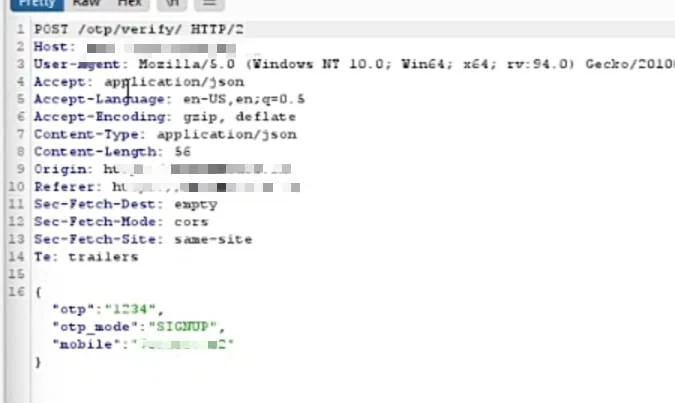
Request Sent After OTP
The author notes that the request carries three parameters: otp, the mobile number and the OTP mode. Seeing a set of client-supplied parameters in the authentication request, the next step was parameter tampering.
The response to that request looked like this:
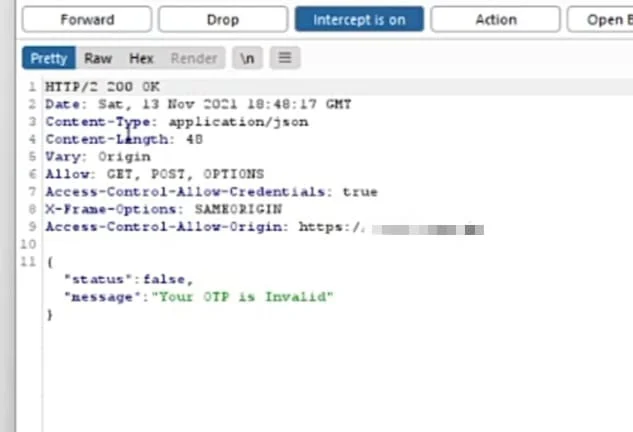
Response For The Above Request
The response contains two parameters, status and message. The author observed that for a positive login (correct OTP) the status parameter was "true", and for a negative login (wrong OTP) it was "false". The server was therefore returning a status field indicating whether authentication had succeeded.
Exploitation
Step 1: capture a positive login
Visit the login page, log in successfully with the correct OTP, and capture both the request and the response. This gives the reference values: status set to "true" in the response.
Step 2: capture a negative login
Log in again with a wrong OTP and capture the request and response. The response now carries status set to "false".
Step 3: tamper with the response
For the negative login, change the status parameter from "false" to "true" in the intercepted response. The author reports that the login was then bypassed: the application treated the failed authentication as a success.
The report's own reproduction steps are:
- Visit the login page and make a positive login and capture the request and response.
- Now make a negative login with false credentials and try to change the available parameters to positive one as I did.
- Refer Hackerone reports to get some parameters to bypass if you have no idea about positive/negative parameters.
Root cause
The author reports that flipping "false" to "true" in the response was enough to bypass the login. The report does not show the server-side code, so the exact mechanism is not established.
Impact
The demonstrated effect is that the login was bypassed by editing the response for a wrong OTP.
Fix
The fix implied by the finding is to stop relying on a client-side status value: the server should decide the outcome of OTP verification and only establish an authenticated session when the OTP is correct, so that editing the response has no effect.
Variants to test
- Look for boolean or string flags in authentication responses (
status,success,verified,isValid) and flip them on a failed login. A positive result is the application moving to the authenticated state without a valid OTP. - Compare positive and negative responses for the same endpoint and note every field that differs; each differing field is a candidate for tampering.
- Try the same manipulation on other OTP-gated flows, such as password reset or mobile number change. A positive result is the action completing with an OTP that was never valid.
- Check whether the tampered response is enough on its own or whether a follow-up request also has to be altered. A positive result is a follow-up request succeeding with no server-side session behind it.
What happened, in plain words
A security researcher was shopping on an eCommerce site and noticed that the site let people log in using only a mobile number and a one-time password (OTP) sent by SMS. He decided to test how the login worked. By intercepting the traffic between his browser and the site, he found that after you submit the OTP, the site sends a request containing the OTP, the mobile number and an OTP mode. The site replies with a response that includes a status field and a message field. When the OTP was correct, status was "true"; when it was wrong, status was "false". He then changed "false" to "true" in the response for a wrong OTP, and the login was bypassed. In this beginner-friendly version, we will walk through exactly what he did, explain every term, and show you how to understand and test for the same kind of flaw.
Background: what is an OTP login?
Many websites use your mobile number to identify you. Instead of a password, they send a short numeric code by SMS: that code is the one-time password (OTP). You type it into the site, and if it matches what the server expects, you are logged in. The OTP is meant to prove you possess the phone. The whole security of this method relies on the server checking the OTP correctly and only letting you in when it is right.
Intercepting traffic: what it means
Normally your browser talks to a website and you see only the final page. To see the raw messages, you use a proxy tool that sits between your browser and the site. It lets you pause each request before it leaves your computer and each response before it reaches the browser. You can then read and even modify them. The author used such a tool while testing the login page. The report does not name the tool or any versions; the only requirement is the ability to intercept HTTP traffic.
The request after OTP
After you submit the OTP, your browser sends a request to the server. The author captured that request and it looked like this:
Request Sent After OTP
The image shows the captured request. The author notes that it carries three parameters: otp, the mobile number and the OTP mode. In plain terms, a request is like a letter you send to the server: it has an address (the URL), a method (like GET or POST), headers (extra information such as the type of content), and a body (the actual data). The body here contains the three pieces of information the server needs to verify your OTP. Parameters are simply named values, like otp=123456. The server uses them to decide what to do.
Why did the author look at this request? Because any value that your browser sends can potentially be changed by you before it reaches the server. If the server trusts those values blindly, you might be able to trick it. That idea is called parameter tampering: manipulating the parameters exchanged between client and server. The author linked to an OWASP article about it, which explains the concept in more depth.
The response
The server replied to that request, and the author captured the response. It looked like this:
Response For The Above Request
The response contains two parameters: status and message. The author observed that for a positive login (correct OTP) the status parameter was "true", and for a negative login (wrong OTP) it was "false". In other words, the server was returning a status field indicating whether authentication succeeded. The message field probably contains a human-readable message, but the report does not show its contents.
Why is this interesting?
Exploitation: step by step
The author's own reproduction steps are:
- Visit the login page and make a positive login and capture the request and response.
- Now make a negative login with false credentials and try to change the available parameters to positive one as I did.
- Refer Hackerone reports to get some parameters to bypass if you have no idea about positive/negative parameters.
Let us expand each step for a complete beginner.
Step 1: capture a positive login
Visit the login page, enter your mobile number, request an OTP, and enter the correct OTP that arrives on your phone. Before you click submit, make sure your proxy is intercepting. Capture both the request that your browser sends and the response that comes back. This gives you a reference: you see exactly what a successful login looks like. In particular, note that the response has status set to "true". You might want to save these for comparison.
Why do this? Because you need to know what "success" looks like in the raw messages. Without a baseline, you cannot recognise what to change.
Step 2: capture a negative login
Now log out (or start a new session) and try to log in again, but this time enter a wrong OTP. Capture the request and response. The response now carries status set to "false". Compare it with the positive response. The message might also differ, but the report focuses on status.
Why do this? To confirm that the server uses status to indicate failure, and to have a failed response that you can tamper with.
Step 3: tamper with the response
For the negative login, you have intercepted the response before it reaches your browser. In your proxy, find the status parameter and change its value from "false" to "true". Then let the response continue to the browser. The author reports that the login was then bypassed: the application treated the failed authentication as a success. In his words: "THE LOGIN GOT BYPASSED, AS SIMPLE AS THATT".
The server, however, might still consider you unauthenticated. In many cases, the client then makes further requests to load the authenticated pages, and those requests might fail if the server does not have a valid session. But the author's report stops at the bypass itself.
Root cause
The report does not establish the root cause; it shows that changing status from "false" to "true" bypassed the login. In a secure design, the server should decide the outcome of OTP verification and only establish an authenticated session (for example, by setting a session cookie) when the OTP is correct. The client should not be the one making the final call.
Impact
The demonstrated effect is that the login was bypassed by editing the response for a wrong OTP. The condition is that the attacker can intercept and modify their own traffic, which is normal for anyone using a proxy.
Fix
The fix implied by the finding is to stop relying on a client-side status value: the server should decide the outcome of OTP verification and only establish an authenticated session when the OTP is correct, so that editing the response has no effect. In practice, this means the server should set a session cookie or token only after successful verification, and the client should not be able to bypass authentication by changing a value in the response.
Variants to test
- Look for boolean or string flags in authentication responses (
status,success,verified,isValid) and flip them on a failed login. A positive result is the application moving to the authenticated state without a valid OTP. - Compare positive and negative responses for the same endpoint and note every field that differs; each differing field is a candidate for tampering.
- Try the same manipulation on other OTP-gated flows, such as password reset or mobile number change. A positive result is the action completing with an OTP that was never valid.
- Check whether the tampered response is enough on its own or whether a follow-up request also has to be altered. A positive result is a follow-up request succeeding with no server-side session behind it.
Glossary
- API: Application Programming Interface; a set of rules that lets one piece of software talk to another. In web terms, it is the way your browser communicates with the server behind the scenes.
- Authentication: The process of proving who you are, usually by logging in.
- Bypass: Avoiding a security control, such as logging in without the correct credentials.
- Client: The software you use, like your browser, that sends requests to a server.
- Cookie: A small piece of data that a website stores in your browser to remember you between requests, often used to keep you logged in.
- eCommerce: Buying and selling goods online.
- HTTP: The protocol used for communication between browsers and web servers.
- Intercept: To pause and capture network traffic between your browser and a server, often using a proxy tool.
- OTP (One-Time Password): A code that is valid for only one login attempt, often sent by SMS.
- Parameter: A named value in a request or response, like
otp=123456. - Parameter tampering: Changing parameters in a request or response to alter the behaviour of the application.
- Positive login: A login attempt with correct credentials (here, the correct OTP).
- Negative login: A login attempt with incorrect credentials (here, a wrong OTP).
- Proxy: A tool that sits between your browser and the internet, allowing you to inspect and modify traffic.
- Recon: Reconnaissance; the phase of gathering information about a target before attacking.
- Request: A message sent from the client to the server asking for something.
- Response: A message sent from the server back to the client.
- Root cause: The underlying reason a vulnerability exists.
- Session: A period of interaction between a user and a website, often maintained by a cookie or token.
- Token: A piece of data, often random, used to authenticate a user or a request, similar to a temporary password.
- Vulnerability: A weakness in a system that can be exploited to cause harm.

