Bypassing SameSite=lax cookie restrictions to preform CSRF resulting to a horizontal privilege escalation via poor email verification mechanism
The email and phone verification endpoints accepted a user-supplied email or phone number and overwrote the logged-in account's contact details without a CSRF token. An attacker could change a victim's email to their own, then request a password reset to take over the account.
 Published on medium.com
The original lives on medium.com
We do not hold its text, so we link to it rather than copy it. The other two tabs are our own rewrites, checked against it.
Context
The target is one of the most popular websites in the researcher's country for selling items such as cars, technical equipment and much more. Users can register an account, search for items, and upload their own items so other people can get in contact with them. The feature in scope is the email and phone number verification flow: forms that tell the server that someone is requesting a verification link.
Setup
The researcher created an account with the email [redacted]. On first login, Chrome automatically assigned Same-Site=lax to the session cookie, and the session cookie was also HttpOnly. The researcher's plan was to hunt for client-side security issues, so these two properties were noted as obstacles from the start.
Finding it
Every form on the application used a CSRF token, and all XSS attempts failed because everything was encoded and escaped properly. The email and phone number verification forms, however, were not protected with CSRF tokens. The reasoning was that these forms do not have any sensitive action apart from telling the server that someone is requesting a verification link, so a token might seem unnecessary.

The request to the email verification endpoint looked like this:
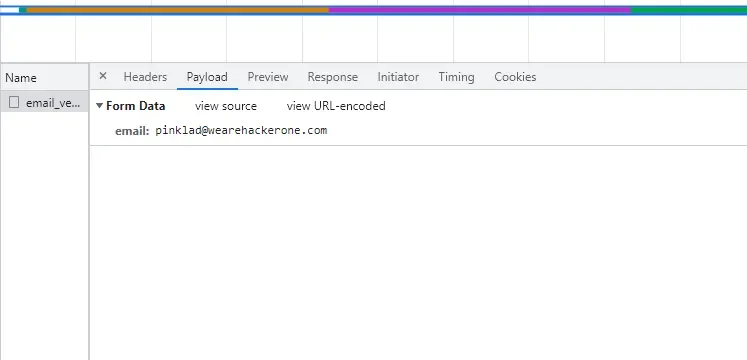
This was a POST request to the /email_verify endpoint and it included the email that was used to create the account.
The researcher asked what would happen if the email address in that request were changed to another email. When that was done, the email verification link arrived at the supplied email address. The email associated with the account was [redacted], but the verification email was received at [redacted] just because the email parameter in the /email_verify POST request was changed. That was odd behaviour by the web app.
When the profile was visited again, the email had been changed: the account email was now [redacted]. Manipulating the email parameter in the /email_verify request had changed the email address of the account.
The researcher was still far from exploiting this for horizontal privilege escalation. Because the website used Same-Site=lax, sending the POST request to /email_verify from another origin would result in a redirect to login. In the meantime, the researcher realised that phone number verification would also result in a phone number overwrite on the currently logged-in account if the number parameter was manipulated in the /tel_verify POST request.
Exploitation
Step 1: Change the email parameter in the POST request
The POST request to /email_verify included the account email. Changing the email parameter to another address caused the verification email to be sent to that address, and the account email was overwritten with the supplied address. The account email changed from [redacted] to [redacted].
Step 2: Try a GET request with a query parameter
After two days of trying to find something to link with this bug, the researcher tried sending a GET request to /email_verify with a query parameter email=[redacted]. It worked: the email address of the account was changed from [redacted] to [redacted] just by opening a link.
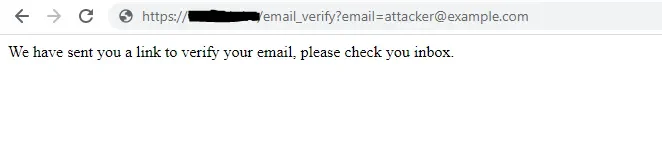
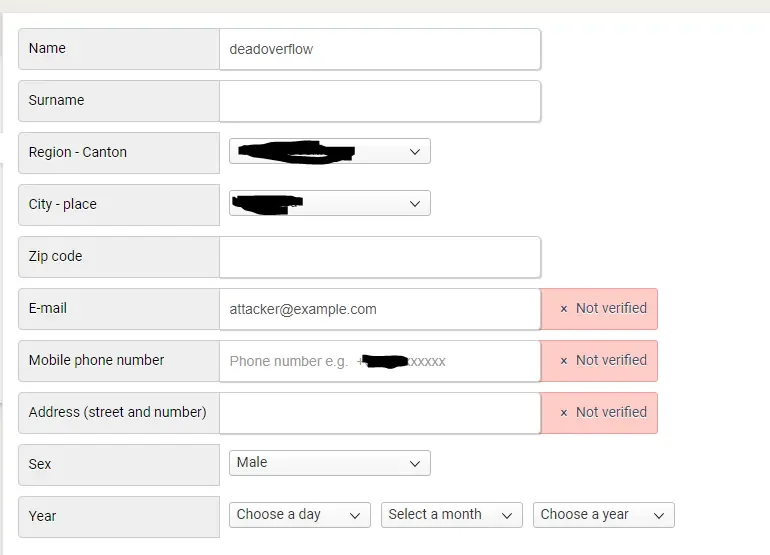
This allowed overwriting the email of a victim's account just by opening the link. Only users whose email or phone number is not verified can fall for this bug. Normal users who are just looking to sell something or buy are not going to pay attention to the fact that their email is not verified.
Step 3: Craft the exploit
A simple exploit was crafted:
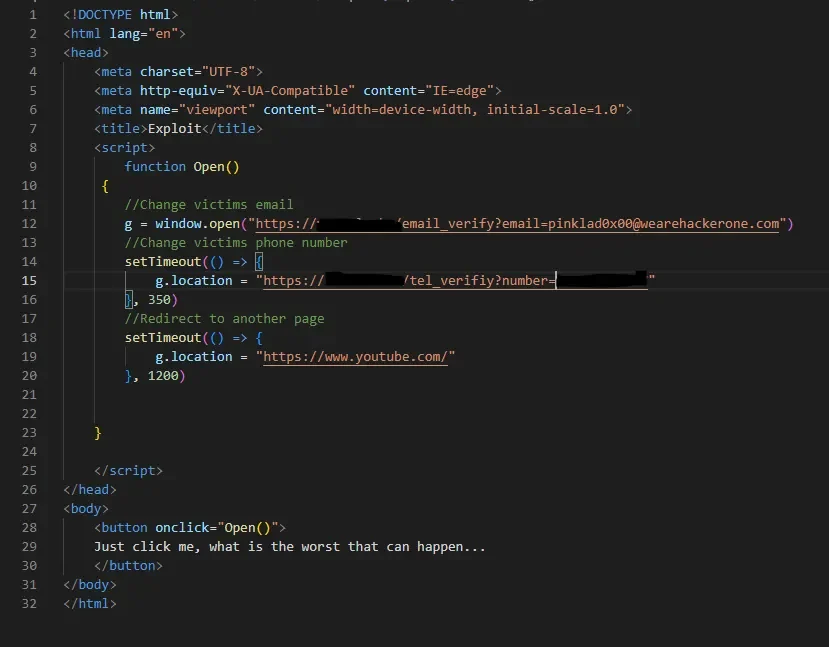
Once the victim opens the link, they are greeted with a button. Upon clicking it, a few things happen: a new window opens, the email address is overwritten first, then the phone number, and finally the user is redirected to youtube.com. The researcher notes that the email could have been updated without the button interaction, but both email and phone number were changed.
Once the victim opens the link:
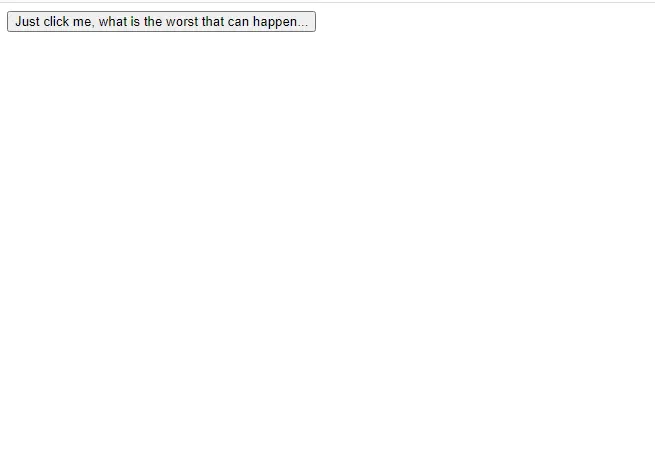

What has actually happened:

Step 4: Take over the account
The attacker can now request a password reset for the email [redacted], get the password and log into the victim's account. In this way the attacker stole the victim's account.
Root cause
The email and phone number verification forms were not protected with CSRF tokens. The server accepted a GET request to /email_verify with an email query parameter and changed the account email to the supplied value. The GET request to /email_verify with an email query parameter changed the account email, even though the POST from another origin had been blocked. The other forms used CSRF tokens, but the verification forms were not protected with them.
Impact
An attacker could overwrite the email address and phone number of a victim's account by getting the victim to open a link. Only users whose email or phone number is not verified are vulnerable. After the overwrite, the attacker can request a password reset for the new email address, obtain the password and log into the victim's account, resulting in horizontal privilege escalation and account takeover.
Fix
The report does not state what was changed.
Variants to test
- Test other verification or profile update endpoints that accept GET requests with parameters such as
emailornumber, and check whether the account data changes. A positive result is a change in the account email or phone number after opening a link. - A positive result is a state change without a token.
- A positive result is receiving the verification email at the attacker-controlled address and seeing the account email changed.
What happened, in plain words
A security researcher found a way to take over other people's accounts on a popular online marketplace in his country, a site where people register, search for things like cars and technical equipment, and upload their own items so buyers can contact them. The trick did not need any clever software: the attacker only had to get the victim to open a link. Opening that link silently replaced the email address on the victim's account with one the attacker controlled. With the email address changed, the attacker could then ask the site to reset the password, receive the reset message at his own inbox, set a new password, and log in as the victim.
The interesting part is that the site looked well protected. Every ordinary form carried a security token, and every attempt to inject script into the pages failed because the site cleaned up the input properly. The session cookie, the little piece of data that keeps you logged in, was marked in a way that is supposed to block this exact kind of attack. The researcher still got through, because one small feature, the email and phone verification form, was built differently from all the others.
This article walks through the whole story from zero. You only need to know how to use a browser. Every technical word is explained the first time it appears, and there is a glossary at the end.
The target and the feature
The website is one of the most popular in the researcher's country for selling items: cars, technical equipment and much more. Anyone can register an account, search for what they want, and upload their own items so that other people can get in contact with them about what they have uploaded.
The feature the researcher focused on is the email and phone number verification flow. When you register somewhere, the site often wants to check that the email address you typed really belongs to you. It does this by sending a message to that address containing a special link. You click the link, and the site marks your address as verified. The same idea applies to a phone number: the site sends a code by text message and you type it back in. The forms behind this flow are the ones that tell the server, the computer that runs the website, that someone is requesting a verification link.
A quick word on what a server is, since it comes up constantly. When you visit a website, your browser asks a computer somewhere else for a page, and that computer sends it back. That computer is the server. Everything you type into a form is sent to the server, and the server decides what to do with it.
Setting up
The researcher created an account with the email address [redacted]. On the first login, two things about the session cookie stood out.
A cookie is a small piece of text that a website asks your browser to store and to send back with every later request to that site. The session cookie is the one that identifies you: it is like the wristband you get at an event, which tells the staff you already paid and are allowed in. Without it, the site would forget who you are on every page.
Two settings on that cookie matter here:
SameSite=laxis a rule about when the browser is allowed to attach the cookie to a request. In simple terms, if you are on site A and something on site A makes your browser request a page from site B, the browser will not send site B's cookies along with that request, unless the request is a normal top-level navigation, meaning you actually navigate to site B by clicking a link or typing the address. This setting exists to make cross-site attacks harder.HttpOnlymeans the cookie cannot be read by JavaScript running in the page. It is still sent to the server with every request, but scripts cannot peek at its contents. This protects the cookie if an attacker manages to inject a script into the page.
Chrome assigned SameSite=lax automatically. The researcher's plan was to hunt for client-side security issues, meaning problems that live in the browser and the page rather than in the server's own logic, so these two cookie properties were noted as obstacles from the very start.
Finding it
Every form on the application used a CSRF token. A CSRF token is a random value that the server puts into a form and expects to receive back when the form is submitted. Because an attacker on another website cannot know that random value, they cannot build a working form submission that the server will accept. It is like a cloakroom ticket: the attendant only hands your coat back if you present the matching ticket, and someone who was not there when you checked in cannot guess it.
CSRF itself stands for Cross-Site Request Forgery. The idea is that your browser is already logged in to a site, and an attacker's page quietly makes your browser send a request to that site. The site sees a request coming from your browser with your session cookie attached and treats it as if you had done it yourself. You never intended it, but the server cannot tell the difference.
All XSS attempts also failed. XSS, cross-site scripting, is when an attacker gets their own JavaScript to run inside someone else's page, for example by putting script code into a comment field that the site later displays without cleaning it. Here everything was encoded and escaped properly, so the injected code was shown as harmless text instead of running.
The email and phone number verification forms, however, were not protected with CSRF tokens. The reasoning behind that design choice is easy to follow: these forms do not have any sensitive action apart from telling the server that someone is requesting a verification link, so a token might seem unnecessary. Why guard a form that only asks for a message to be sent?
The request to the email verification endpoint looked like this:
Line by line:
POST /email_verify HTTP/1.1is the first line of an HTTP request. HTTP is the language browsers and servers use to talk.POSTis the method, the verb that says "I am sending data to you to be processed"./email_verifyis the endpoint, the specific address on the server that handles email verification.HTTP/1.1is the version of the protocol.Host: [redacted]names the website the request is addressed to. The actual hostname is not part of this write-up.Content-Type: application/x-www-form-urlencodedsays how the data is formatted. This is the classic format of an HTML form: field names and values joined with&, with special characters percent-encoded.- The empty line separates the headers from the body.
email=pinklad%40wearehackerone.comis the body: one field namedemailwhose value is the account's email address.%40is the percent-encoded form of the@sign, because@has a special meaning in URLs.
So this was a POST request to the /email_verify endpoint, and it included the email that was used to create the account.
The researcher asked a simple question: what would happen if the email address in that request were changed to another email? When that was done, the email verification link arrived at the supplied email address. The email associated with the account was [redacted], but the verification email was received at [redacted] just because the email parameter in the /email_verify POST request was changed. That was odd behaviour by the web app.
Think about what should happen. The server should look up the account belonging to the person making the request, and send a verification message to the address stored on that account. Instead it trusted the address in the request and sent the message there. The server was taking the visitor's word for which address to verify.
When the profile was visited again, the email had been changed: the account email was now [redacted]. Manipulating the email parameter in the /email_verify request had changed the email address of the account. This is the crucial difference between a harmless quirk and a serious bug. Sending a message to the wrong place is a nuisance. Silently rewriting the account's email address is a step towards losing the account entirely, because the email address is usually the thing that controls password resets.
The researcher was still far from exploiting this for horizontal privilege escalation. Horizontal privilege escalation means moving sideways from one account to another account of the same kind: you are an ordinary user, and you end up inside another ordinary user's account. It is different from vertical privilege escalation, where an ordinary user gains administrator powers.
Why was the researcher stuck? Because the website used SameSite=lax. Sending the POST request to /email_verify from another origin would result in a redirect to login. An origin is the combination of scheme, host and port, roughly "which site this page came from". A POST request triggered from a page on a different site is not a top-level navigation, so under SameSite=lax the browser would not attach the session cookie, the server would see an anonymous request, and the user would simply be sent to the login page. The protection was doing its job.
In the meantime, the researcher realised that phone number verification would also result in a phone number overwrite on the currently logged-in account if the number parameter was manipulated in the /tel_verify POST request. The same design mistake existed in a second place.
Exploitation
Step 1: Change the email parameter in the POST request
The POST request to /email_verify included the account email. Changing the email parameter to another address caused the verification email to be sent to that address, and the account email was overwritten with the supplied address. The account email changed from [redacted] to [redacted].
This step is the discovery: the server believes whatever address the request supplies. On its own it is not yet an attack, because the attacker is only changing their own account. The value comes from what it proves about how the server thinks.
Step 2: Try a GET request with a query parameter
After two days of trying to find something to link with this bug, the researcher tried sending a GET request to /email_verify with a query parameter email=[redacted]. It worked: the email address of the account was changed from [redacted] to [redacted] just by opening a link.
A GET request is the method browsers use when you simply ask for a page or click a link. Unlike POST, which is meant for sending data to be processed, GET is meant for retrieving something, and its data travels in the URL itself, after a question mark, in the form of query parameters. A query parameter is a name and value pair in the address bar, like ?email=[redacted].
The change from POST to GET is what made the attack work: opening a link changed the account email. The browser therefore attaches the cookie, the server recognises the logged-in user, and because the endpoint accepts GET and reads the email parameter from the URL, the account email is overwritten. The protection was never broken; it was routed around, because the rule it enforces has an exception and the endpoint was reachable through that exception.
This allowed overwriting the email of a victim's account just by opening the link. Only users whose email or phone number is not verified can fall for this bug. Normal users who are just looking to sell something or buy are not going to pay attention to the fact that their email is not verified. Many people register, skip the verification message, and get on with browsing, which leaves a large pool of potential victims.
Step 3: Craft the exploit
A simple exploit was crafted:
Line by line:
<a ...>is an anchor tag, the HTML element that creates a clickable link.href="..."is the attribute that holds the destination address.https://[redacted]/email_verify?email=[redacted]is the destination. The path/email_verifyis the same endpoint as before, and?email=[redacted]is the query parameter carrying the attacker's address. The hostname is not given in the write-up.Click here to view the itemis the visible text, chosen to look like an ordinary marketplace link so the victim clicks it.</a>closes the tag.
The whole attack is one link. The attacker sends it to the victim, for example by message or email, dressed up as something a buyer or seller would plausibly send. The victim clicks, the browser navigates to the endpoint, the session cookie goes along because this is a top-level navigation, and the server changes the account email.
Once the victim opens the link, they are greeted with a button. Upon clicking it, a few things happen: a new window opens, the email address is overwritten first, then the phone number, and finally the user is redirected to youtube.com. The researcher notes that the email could have been updated without the button interaction, but both email and phone number were changed.
Once the victim opens the link:
What has actually happened:
Step 4: Take over the account
The attacker can now request a password reset for the email [redacted], get the password and log into the victim's account. In this way the attacker stole the victim's account.
Here is why the email swap is so powerful. Almost every website's "forgot my password" feature works by sending a reset link or a temporary password to the email address on the account. Whoever controls that inbox controls the account. Once the attacker has replaced the victim's address with his own, he asks for a reset, the message arrives in his inbox, and he sets a new password. The victim's own password no longer works, and the attacker is inside.
Root cause
The email and phone number verification forms were not protected with CSRF tokens. The server accepted a GET request to /email_verify with an email query parameter and changed the account email to the supplied value. The GET request to /email_verify with an email query parameter changed the account email, even though the POST from another origin had been blocked. The other forms used CSRF tokens, but the verification forms were not protected with them.
In everyday terms: the site had a good lock on the front door and left the side window open. Each individual protection was reasonable, but they were applied unevenly, and the one place without a token also happened to accept a request type that the cookie rule lets through.
Impact
An attacker could overwrite the email address and phone number of a victim's account by getting the victim to open a link. Only users whose email or phone number is not verified are vulnerable. After the overwrite, the attacker can request a password reset for the new email address, obtain the password and log into the victim's account, resulting in horizontal privilege escalation and account takeover.
Fix
The report does not state what was changed.
Variants to test
If you want to look for similar bugs yourself, these are the directions the researcher's findings point to. Each one describes what to try and what a positive result looks like.
- Test other verification or profile update endpoints that accept GET requests with parameters such as
emailornumber, and check whether the account data changes. A positive result is a change in the account email or phone number after opening a link. - A positive result is a state change without a token.
- A positive result is receiving the verification email at the attacker-controlled address and seeing the account email changed.
Glossary
- API: a defined set of addresses and rules that one piece of software uses to ask another piece of software to do something, for example the endpoints a website's pages call to read or change data.
- Browser: the program you use to visit websites, such as Chrome, which stores cookies, sends requests and renders pages.
- Client-side: happening in the browser on the visitor's computer, as opposed to on the server.
- Cookie: a small piece of text a website asks the browser to store and send back with later requests to that site.
- CSRF (Cross-Site Request Forgery): an attack where a page on one site makes your browser send a request to another site where you are logged in, so the request looks like your own action.
- CSRF token: a random value placed in a form and checked by the server on submission, which an attacker on another site cannot guess.
- Endpoint: a specific address on a server that handles one particular action, such as
/email_verify. - GET request: an HTTP request used to retrieve something, with data carried in the URL as query parameters; used when you click a link.
- Horizontal privilege escalation: moving from one ordinary account to another ordinary account of the same level, rather than gaining administrator rights.
- HTML: the language web pages are written in, made of tags such as
<a>for links. - HTTP: the protocol browsers and servers use to exchange requests and responses.
- HttpOnly: a cookie setting that stops JavaScript in the page from reading the cookie, while the browser still sends it to the server.
- JavaScript: the programming language that runs in web pages and can interact with the page and the browser.
- Origin: the combination of scheme, host and port that identifies which site a page came from.
- Parameter: a named value sent with a request, either in the body of a POST or in the URL of a GET.
- POST request: an HTTP request used to send data to the server to be processed, typically from a form submission.
- Query parameter: a name and value pair in a URL after the question mark, such as
?email=[redacted]. - Redirect: a response from the server telling the browser to go to a different address instead.
- SameSite=lax: a cookie setting that withholds the cookie on cross-site requests except top-level navigations such as clicking a link.
- Server: the remote computer that stores a website and answers the browser's requests.
- Session cookie: the cookie that identifies a logged-in user to the server.
- Top-level navigation: when the browser itself moves to a new page, for example because you clicked a link or typed an address, as opposed to a background request made by a page.
- URL: the address of a resource on the web, such as
https://example.com/email_verify?email=.... - Verification flow: the steps a site uses to confirm that an email address or phone number really belongs to the person who entered it, usually by sending a link or a code.
- XSS (Cross-Site Scripting): an attack where an attacker gets their own JavaScript to run inside another site's page, often by injecting code into input the site displays without cleaning it.

