This is arguably the dumbest bug I’ve ever found.
The web application filtered the onerror attribute from messages on the server, but the client-side code later inserted the message into the page as HTML, so the attribute was restored and executed. An attacker could send a message containing an image tag with an onerror handler to run JavaScript in the recipient's browser.
 Published on medium.com
This is vulnerability I have found not so long ago and so far it is the dumbestissue I have ever discovered. Before I even start, if you are new here, I am deadoverflow and I put out educational content for free here on mediumas well as on youtube.
The full write-up lives on its author's site
It belongs to its author, so we link to it rather than copy it. The other two tabs are our own rewrites, checked against it.
Context
The target was a popular buying and selling website in the researcher's country. The researcher had previously reported an account takeover on the same site, and by the time of this research the site had been rebuilt: a new version, a fresh look, and what were described as some security improvements. The feature under test was the messaging functionality, the sending and receiving of messages between users. On a marketplace, a cross-site scripting flaw in messages would be serious, because messages are exchanged between buyers and sellers.
The researcher labels the finding the dumbest bug they have ever discovered, and the write-up is as much about understanding why an alert fired as about the alert itself.
Setup
The researcher created two test accounts on the new version of the site and went straight to the message sending and receiving functionality to test for XSS. The only tooling mentioned is the Chrome developer tools, used later to debug the execution. No versions, endpoints or parameter names are given in the report.
Finding it
The first probe was the payload the researcher usually pastes when hunting for XSS, entered into the message input field to see how the application would handle the data:
<><>”’<img src=xx onerror=alert(1)>
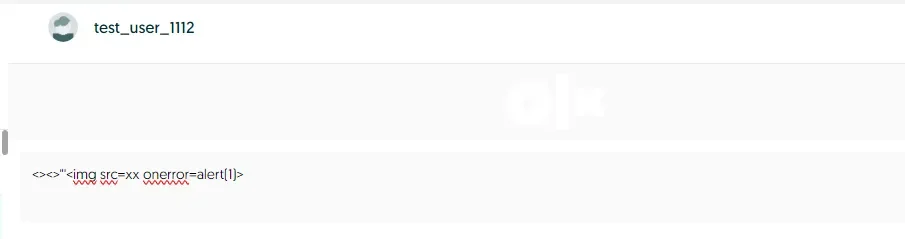
After hitting enter, an alert appeared. Less than a minute into the research, the researcher had an XSS on a popular national marketplace, and was in disbelief.
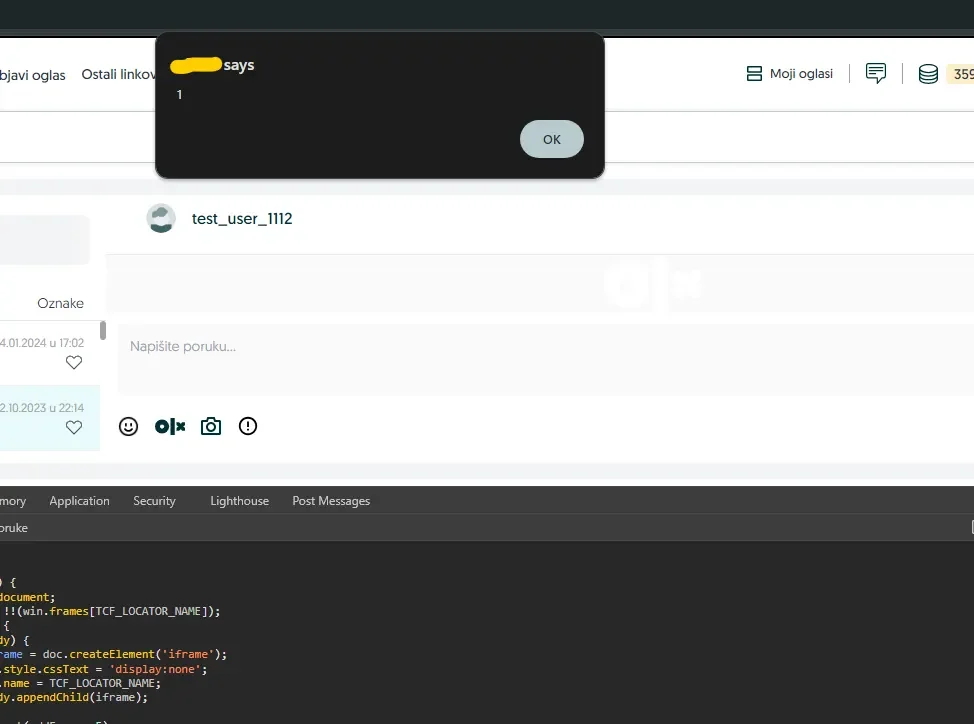
Exploitation
Step 1: send the first payload and inspect the traffic
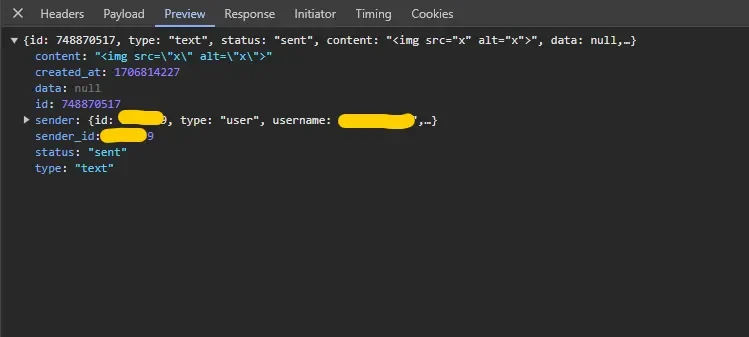
When the message was sent, an HTTP request went to the server carrying the payload.
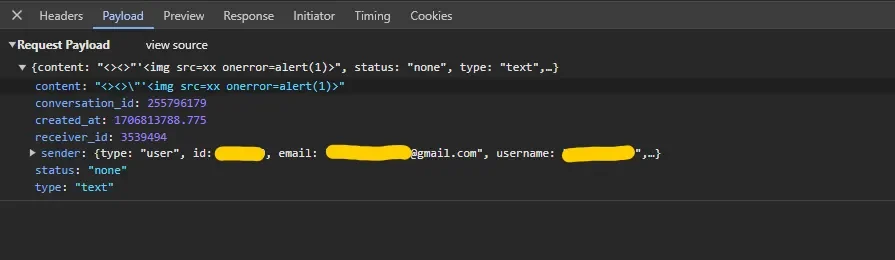
The response to that request is shown next.
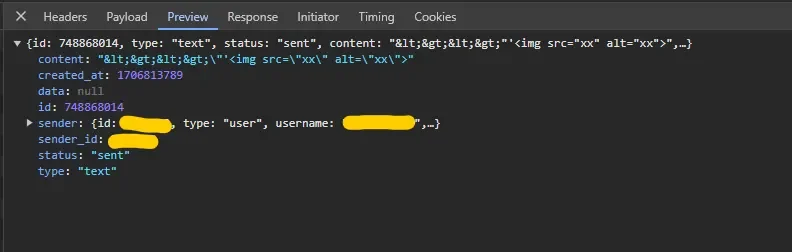
The message as sent was:
<><>\”’<img src=xx onerror=alert(1)>
but the filtered message that came back was:
<><>\”’<img src=\”xx\” alt=\”xx\”>
The backend had a filter that removed the onerror attribute. The filtered message that came back was entity-encoded angle brackets with the onerror attribute removed. Yet an alert had popped up. The researcher could not explain it, so the next step was to reproduce it with a cleaner payload.
Step 2: confirm with a second payload
The second attempt used:
<img src=x onerror=alert(document.domain)>
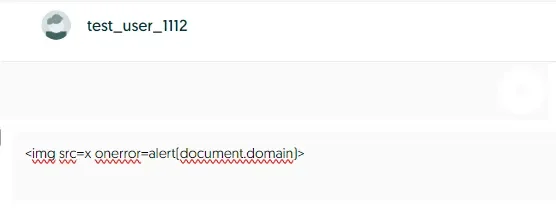
Sending this message produced the same result.
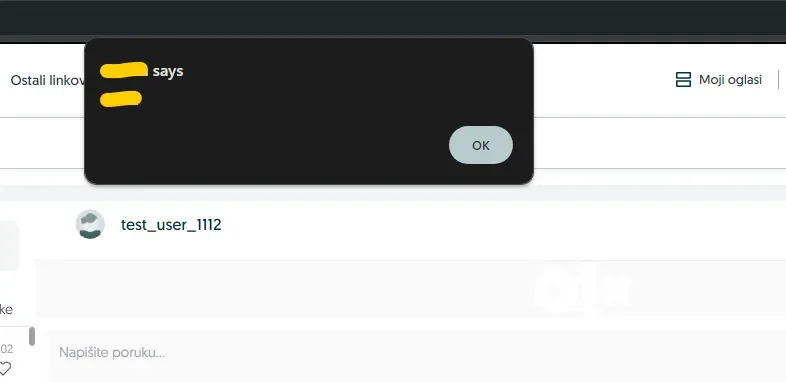
Again an alert fired, even though the backend was clearly filtering messages. The researcher describes this as making no sense: how can an alert appear when the server strips the handler?
Step 3: pause execution with the debugger
To find out what was actually executing, the researcher sent this as a message:
<img src onerror=debugger;>
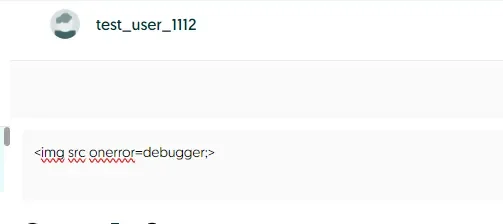
The debugger; statement makes the Chrome developer tools pause at the point where the handler runs, so the call stack at that moment can be inspected.
Once the message was sent, the website froze and the state at that instant could be inspected.
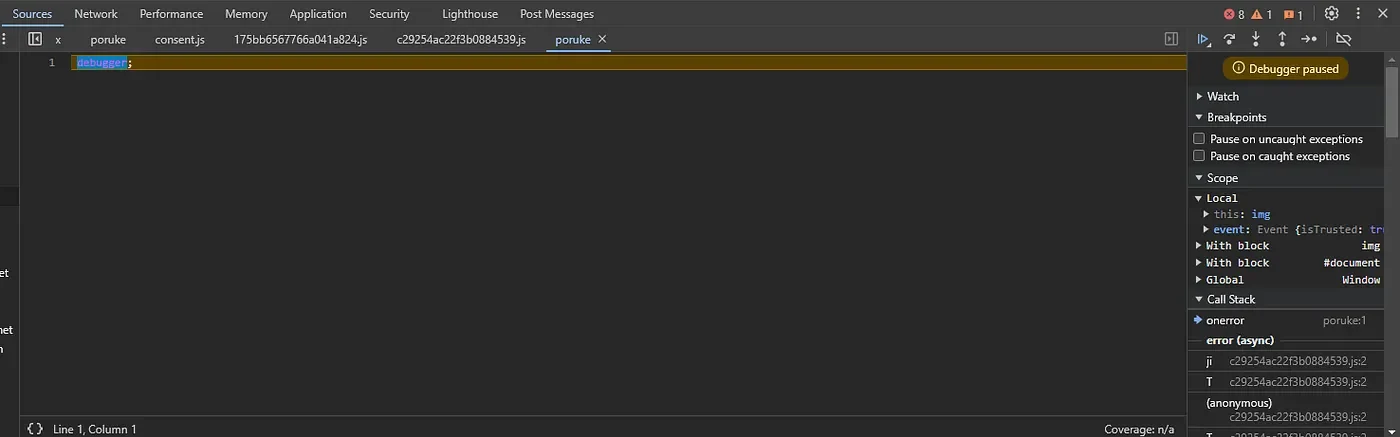
Step 4: walk the call stack
In the call stack, the researcher clicked the item directly below onerror, on the assumption that it was what caused the code execution.
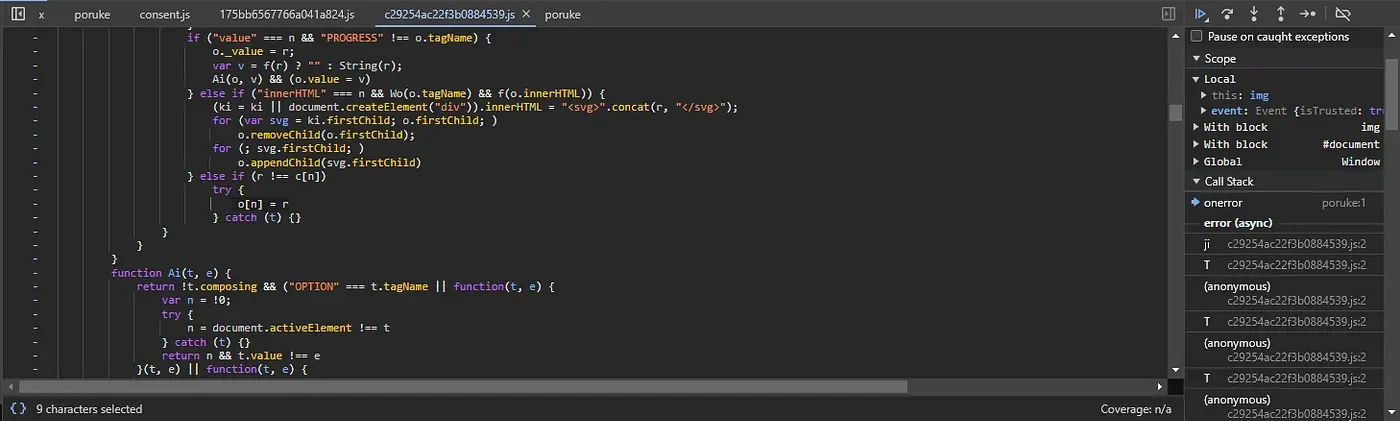
The developer tools highlighted the code responsible for execution, and the researcher clicked that line to add a breakpoint there and inspect further.
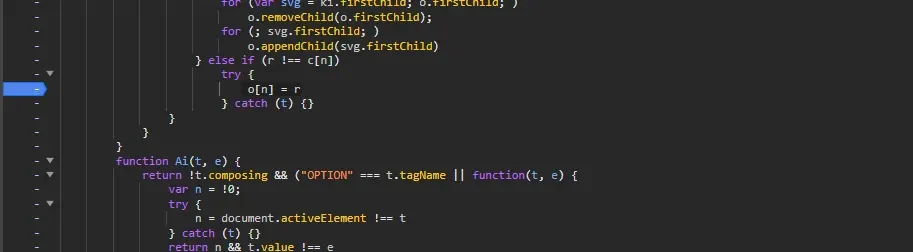
With the breakpoint in place, every message sent makes Chrome pause at that line, so the state can be examined.
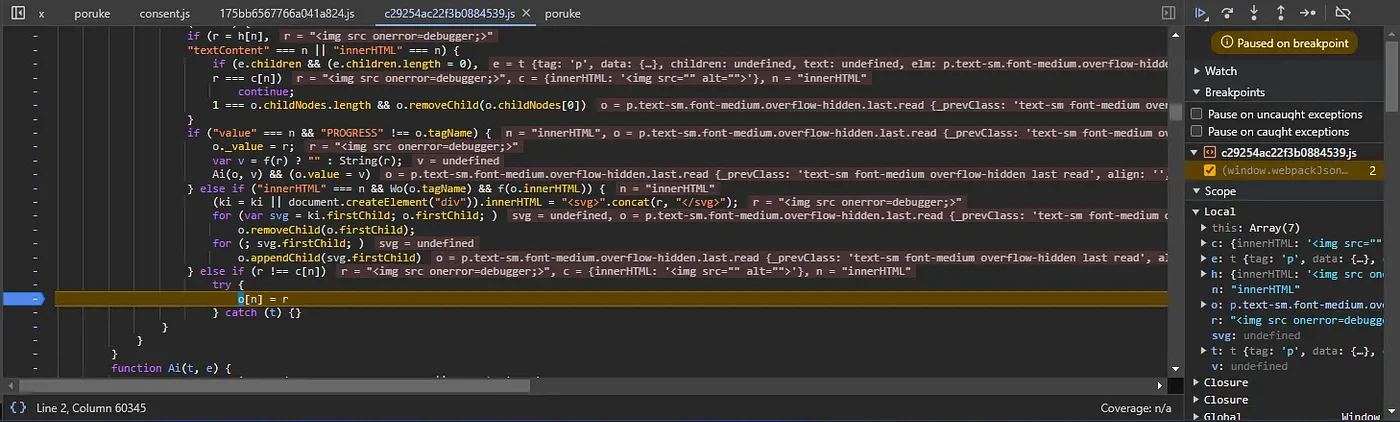
Step 5: read the assignment in the debugger and console
At the breakpoint, a lot is happening. The payload can be seen being assigned as the innerHTML of some element.
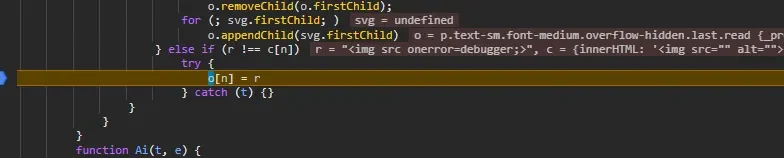
To confirm, the researcher moved to the Console tab and typed o, which shows the element the XSS payload is being added to as innerHTML.
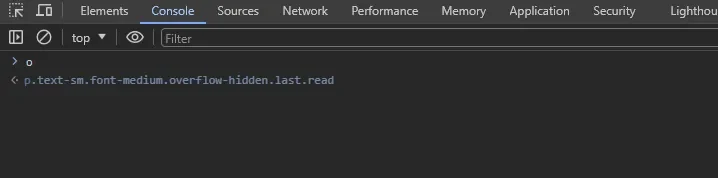
The value being added to that element is exactly the payload.
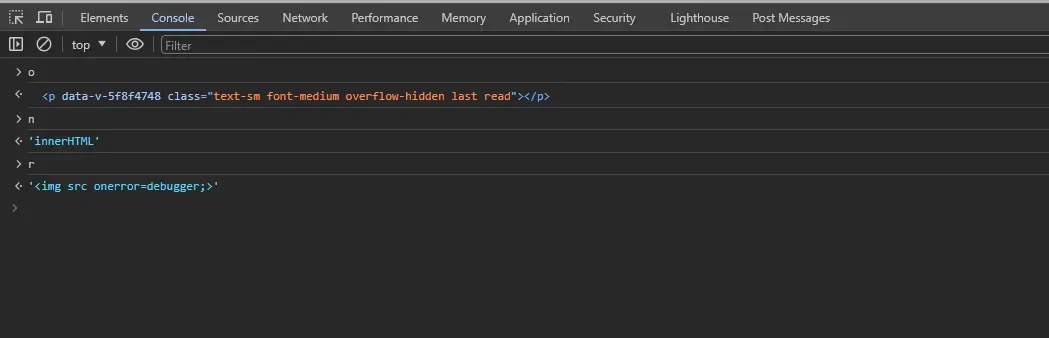
That solved the mystery: the payload was being written into the page as innerHTML on the client side, after the server had already sanitised the message.
Root cause
The server-side filter entity-encoded the angle brackets and removed the onerror attribute in the response. The execution happened elsewhere. The client-side code took the message and assigned it to the innerHTML of an element, and that assignment is what parsed and executed the payload. The report does not name the element or the script responsible, only that the assignment to innerHTML was observed in the debugger and the console.
The researcher calls the design stupid and notes that implementing a filter on the backend is a terrible idea because of mutation XSS. The report does not go further into how the client-side rendering interacts with the server-side encoding; the observed behaviour is that the sanitised message still ended up executing when written as innerHTML.
Impact
The researcher describes the site as a popular marketplace used for buying and selling products, and says XSS there would be really bad. The report does not demonstrate an attack against another user, does not show message delivery to a second account, and does not describe what an attacker could steal or do with the execution. The researcher labels the finding a self-XSS. Whether the same rendering path is reached when a message is received by another user is not established in the report.
Fix
The report does not say what was changed, if anything, after disclosure. The researcher's stated position is that filtering on the backend is the wrong approach because of mutation XSS, which points to fixing the client-side rendering rather than only the server-side filter.
Variants to test
- Send a benign marker such as
<b>test</b>in a message and inspect the DOM after it renders. A positive result is the marker appearing as an element rather than as text, which shows the message is written as HTML. - Send
<img src onerror=debugger;>and check whether the developer tools pause. A positive result is a pause with a call stack that leads to aninnerHTMLassignment. - Send a payload with an event handler that the server filter is known to strip, and watch the response and the rendered DOM separately. A positive result is the handler missing from the stored response but present in the DOM.
- Repeat the same probes from a second account receiving the message, to see whether the receiving view uses the same rendering path. A positive result is execution in the recipient's session, which would turn the self-XSS into a stored XSS.
- Try payloads that survive entity encoding and attribute stripping, since the server-side filter is the only defence observed here. A positive result is execution after the server has processed the message.
What happened, in plain words
A security researcher was testing a popular website in their country where people buy and sell things, a bit like a classifieds or marketplace site. The site had recently been rebuilt with a new look and what were described as security improvements. The researcher had reported a serious problem on the old version of the same site before, so they came back to look at the new one.
The feature they looked at was the site's messaging system: the part that lets one user send a message to another user. On a marketplace, messages go between buyers and sellers, so if a message could run code in someone's browser, that would be serious.
What they found is what security people call cross-site scripting, or XSS. In plain terms, XSS means getting a website to treat something you typed as if it were part of the website's own instructions, so your text gets run as code by the browser. The researcher calls this the dumbest bug they have ever found, and the story is less about the alert box that popped up and more about working out why it popped up when the server appeared to be cleaning the message.
The setup
The researcher made two test accounts on the new version of the site.
They then went straight to the message sending and receiving feature to test it for XSS. The only tool mentioned is the Chrome developer tools, which is a panel built into the Google Chrome browser. You open it with a keyboard shortcut or from the browser menu, and it lets you look at the code a page is running, pause it, and inspect what it is doing. Think of it as opening the bonnet of a car while the engine is running.
Finding it
The first thing the researcher did was paste a test string into the message input field. This is a string they routinely use when looking for XSS, to see how the application handles unusual characters:
<><>”’<img src=xx onerror=alert(1)>
Here is what each part of that string is doing:
<and>are angle brackets. In HTML, the language web pages are written in, angle brackets mark the start and end of a tag, which is an instruction to the browser such as "show an image here".<>and<>are empty tags, which do nothing useful but test whether the site lets angle brackets through.”’are curly quote characters. They are there to see whether the site handles unusual punctuation safely.<img src=xx onerror=alert(1)>is an image tag.src=xxtells the browser to load an image from a location calledxx, which does not exist.onerror=alert(1)is an event handler: a piece of code the browser runs when something happens, in this case when the image fails to load.alert(1)makes the browser show a pop-up box with the number 1 in it.
The logic is simple: if the site lets this string through as real HTML, the image will fail to load, the onerror code will run, and a pop-up will appear. A pop-up is harmless in itself, but it proves that code supplied by the person typing can run in the browser.
After hitting enter, an alert appeared. Less than a minute into the research, the researcher had an XSS on a popular national marketplace, and was in disbelief.
Working out what happened
Step 1: send the first payload and look at the traffic
When the message was sent, an HTTP request went to the server carrying the payload. An HTTP request is simply the message your browser sends to a website's server, the computer that stores and serves the site, asking it to do something, such as save a message. The server then sends back an HTTP response, which is the server's reply.
The response to that request is shown next.
The message as sent was:
<><>\”’<img src=xx onerror=alert(1)>
but the filtered message that came back was:
<><>\”’<img src=\”xx\” alt=\”xx\”>
Line by line, here is what changed:
<and>are HTML entities. They are a way of writing an angle bracket as text so the browser displays it as a character rather than treating it as the start of a tag. The server had turned the angle brackets into<and>. This is called entity encoding, and it is a standard defence: it neutralises angle brackets so they cannot form tags.- The
onerrorattribute is gone. The server had a filter that removed it. - The filtered message also showed the
srcvalue quoted and analtattribute present.altis the text shown when an image cannot load.
So the server had done real cleaning work. The angle brackets were encoded and the dangerous handler was stripped. Yet an alert had popped up. The researcher could not explain it, so the next step was to reproduce it with a cleaner payload.
Step 2: confirm with a second payload
The second attempt used:
<img src=x onerror=alert(document.domain)>
This is the same idea as before, with two differences. src=x points at an image location called x, which again does not exist, so the error handler fires. And instead of alert(1), the code is alert(document.domain). document.domain is a browser property that holds the address of the current website. Showing it in a pop-up proves which site the code is running on, which is why researchers use it as a slightly more convincing test than alert(1).
Sending this message produced the same result.
Again an alert fired, even though the backend was clearly filtering messages. The backend is the part of the site that runs on the server, as opposed to the frontend, which is what runs in your browser. The researcher describes this as making no sense: how can an alert appear when the server strips the handler?
Step 3: pause execution with the debugger
To find out what was actually executing, the researcher sent this as a message:
<img src onerror=debugger;>
Here src has no value at all, which still causes the image to fail and the handler to fire. The handler is now debugger; instead of an alert. debugger; is a special instruction that tells the Chrome developer tools to pause the page at that exact point, like a freeze-frame in a film. While paused, you can look at the call stack, which is the list of steps the browser took to get to that point, most recent first. It answers the question: what code led here?
Once the message was sent, the website froze and the state at that instant could be inspected.
Step 4: walk the call stack
In the call stack, the researcher clicked the item directly below onerror, on the assumption that it was what caused the code execution.
The developer tools highlighted the code responsible for execution, and the researcher clicked that line to add a breakpoint there and inspect further. A breakpoint is a marker you place on a line of code that tells the browser to pause whenever it reaches that line. It is like putting a bookmark in a book that stops you every time you turn to that page.
With the breakpoint in place, every message sent makes Chrome pause at that line, so the state can be examined.
Step 5: read the assignment in the debugger and console
At the breakpoint, a lot is happening. The payload can be seen being assigned as the innerHTML of some element.
innerHTML is a property of an element on a web page, meaning a piece of the page such as a box or a paragraph. Setting innerHTML tells the browser: take this text and treat it as HTML, building whatever tags it contains. That is the crucial point. If you set innerHTML to a string containing an image tag with an onerror handler, the browser will build that image and run that handler. The text is not shown as text; it is turned into live page structure.
To confirm, the researcher moved to the Console tab and typed o, which shows the element the XSS payload is being added to as innerHTML. The Console is a panel in the developer tools where you can type commands and see the page's internal state.
The value being added to that element is exactly the payload.
That solved the mystery: the payload was being written into the page as innerHTML on the client side, after the server had already sanitised the message. The client side is the browser, the code running on the visitor's own machine.
Why it happened
The server-side filter entity-encoded the angle brackets and removed the onerror attribute in the response. The execution happened elsewhere. The client-side code took the message and assigned it to the innerHTML of an element, and that assignment is what parsed and executed the payload. The report does not name the element or the script responsible, only that the assignment to innerHTML was observed in the debugger and the console.
The researcher calls the design stupid and notes that implementing a filter on the backend is a terrible idea because of mutation XSS. Mutation XSS is a class of problem where a string that looks safe after one round of cleaning becomes dangerous again when a browser parses it, because the browser's own rules for reading HTML can rearrange or reinterpret the text. The report does not go further into how the client-side rendering interacts with the server-side encoding; the observed behaviour is that the sanitised message still ended up executing when written as innerHTML.
How serious it is
The researcher describes the site as a popular marketplace used for buying and selling products, and says XSS there would be really bad. The report does not demonstrate an attack against another user, does not show message delivery to a second account, and does not describe what an attacker could steal or do with the execution. The researcher labels the finding a self-XSS. A session is the period you stay logged in, and it is what lets the site know who you are. Whether the same rendering path is reached when a message is received by another user is not established in the report.
What the fix would be
The report does not say what was changed, if anything, after disclosure. The researcher's stated position is that filtering on the backend is the wrong approach because of mutation XSS, which points to fixing the client-side rendering rather than only the server-side filter.
Things to try yourself
- Send a harmless marker such as
<b>test</b>in a message and inspect the page after it renders.<b>is a tag that makes text bold. If the marker appears as bold text rather than as the literal characters, the message is being written as HTML, which is the condition that makes XSS possible. - Send
<img src onerror=debugger;>and check whether the developer tools pause. If they do, look at the call stack and see whether it leads to aninnerHTMLassignment. - Send a payload with an event handler that the server filter is known to strip, and watch the response and the rendered page separately. If the handler is missing from the stored response but present in the page, the cleaning is happening in the wrong place.
- Repeat the same probes from a second account receiving the message, to see whether the receiving view uses the same rendering path. If it does, the self-XSS becomes a stored XSS, meaning the payload is saved on the server and runs for whoever views it.
- Try payloads that survive entity encoding and attribute stripping, since the server-side filter is the only defence observed here. If one executes after the server has processed the message, the filter is not enough.
Glossary
- XSS (cross-site scripting): a flaw where text supplied by a user is treated by the browser as code and run, instead of being shown as plain text.
- Self-XSS: an XSS that only runs in the session of the person who entered the payload, not in anyone else's.
- Stored XSS: an XSS where the payload is saved on the server and runs for other people who view it.
- Mutation XSS: a case where a string that looks safe after cleaning becomes dangerous again when a browser parses it.
- HTTP request: the message your browser sends to a server asking it to do something.
- HTTP response: the server's reply to a request.
- Server / backend: the computer and code that store and serve the site, away from your machine.
- Client side / frontend: the code running in your own browser.
- HTML: the language web pages are written in, using tags in angle brackets.
- Tag: an instruction in HTML, such as an image tag, marked by angle brackets.
- Attribute: a setting inside a tag, such as
srcoronerror. - Event handler: code that runs when something happens, such as an image failing to load.
alert(): a browser function that shows a pop-up box.document.domain: a browser property holding the address of the current website.debugger;: an instruction that makes the developer tools pause the page at that point.- Developer tools: a panel built into browsers such as Chrome for inspecting and pausing page code.
- Call stack: the list of steps the browser took to reach the current point in the code.
- Breakpoint: a marker on a line of code that makes the browser pause whenever it reaches it.
- Console: a developer tools panel where you can type commands and inspect the page's state.
innerHTML: a property that, when set, makes the browser treat the given text as HTML and build it into the page.- Entity encoding: writing characters such as angle brackets in a special form (
<,>) so they display as text rather than acting as tags. - Sanitise / filter: to clean user input by removing or neutralising dangerous parts.
- Session: the period you stay logged in, and what lets a site know who you are.
- DOM: the browser's live model of the page, the structure that
innerHTMLchanges.



