Bypassing The Client Side Encryption To Read Internal Windows Server Files
The application encrypted file paths on the client side using a hardcoded key and IV, and the server decrypted them without further validation. An attacker could encrypt a path to a sensitive Windows file and pass it to a file-viewing endpoint to read internal server files.
 Published on abhishekmorla.medium.com
This blog is about how one can break the client-side encryption with source code analysis and can able to read internal windows server files ie LFI, but after bypassing a layer of encryption. So, I came up with a program let's say sub.domain.com and the credentials are provided in the scope.
The full write-up lives on its author's site
It belongs to its author, so we link to it rather than copy it. The other two tabs are our own rewrites, checked against it.
Context
The target was a program whose host is referred to only as sub.domain.com, with credentials supplied in the scope. The feature in question is the login form: the application encrypts the username and password in the browser before sending them, and later decrypts the username to display it in the front end. A friend found an endpoint called ViewDocumentFile with a path parameter that takes an encrypted value.
The write-up covers two things joined together: breaking the client-side encryption by reading the JavaScript source, and using the recovered encryption routine to feed an arbitrary Windows path into that path parameter, which results in local file inclusion (LFI).
Setup
The researcher worked with the credentials provided in the scope and captured the login request in Burp. The approach was based on Sameer Bhatt's post on client-side encryption bypass. On the local machine the crypto-js npm package was installed so that the application's own encryption function could be rebuilt and run outside the browser. No other tooling, versions or account roles are described.
Finding it
During login the researcher noticed that the username and password were being encrypted before transmission, and that the username was decrypted again to be shown in the front end.
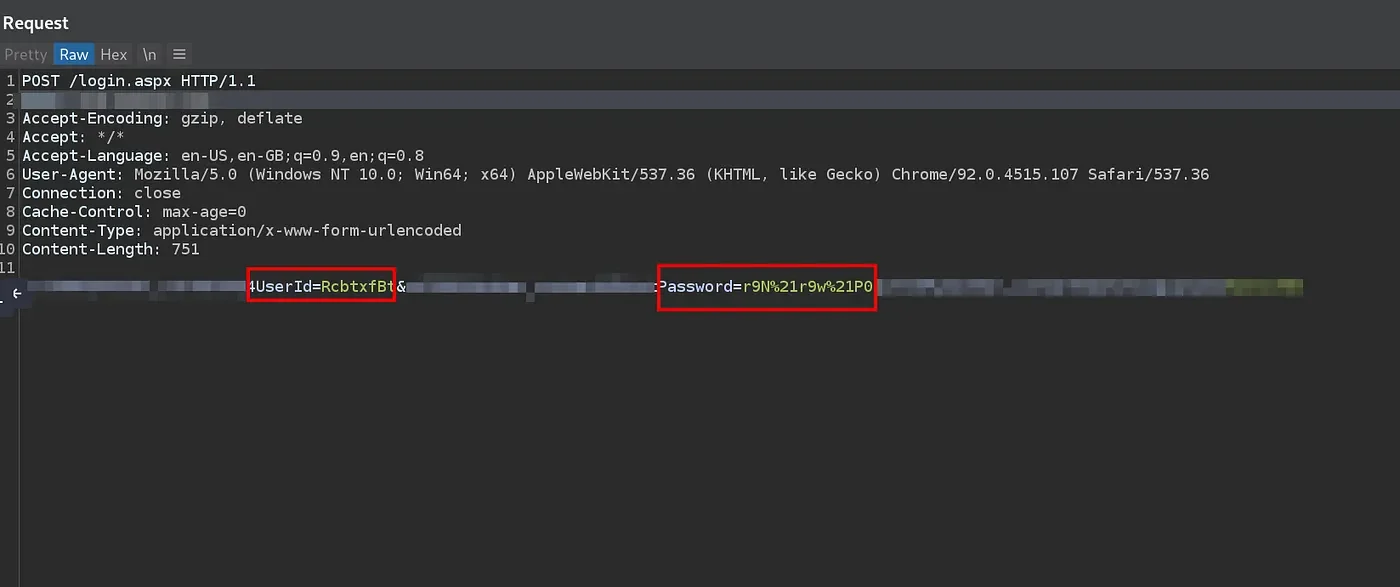
With the login request captured in Burp, the next step was to search the sources for the variables involved, looking for a client-side JavaScript function that performs the encryption. Searching for a few keywords led to a function called encryptData(), which uses CryptoJS.
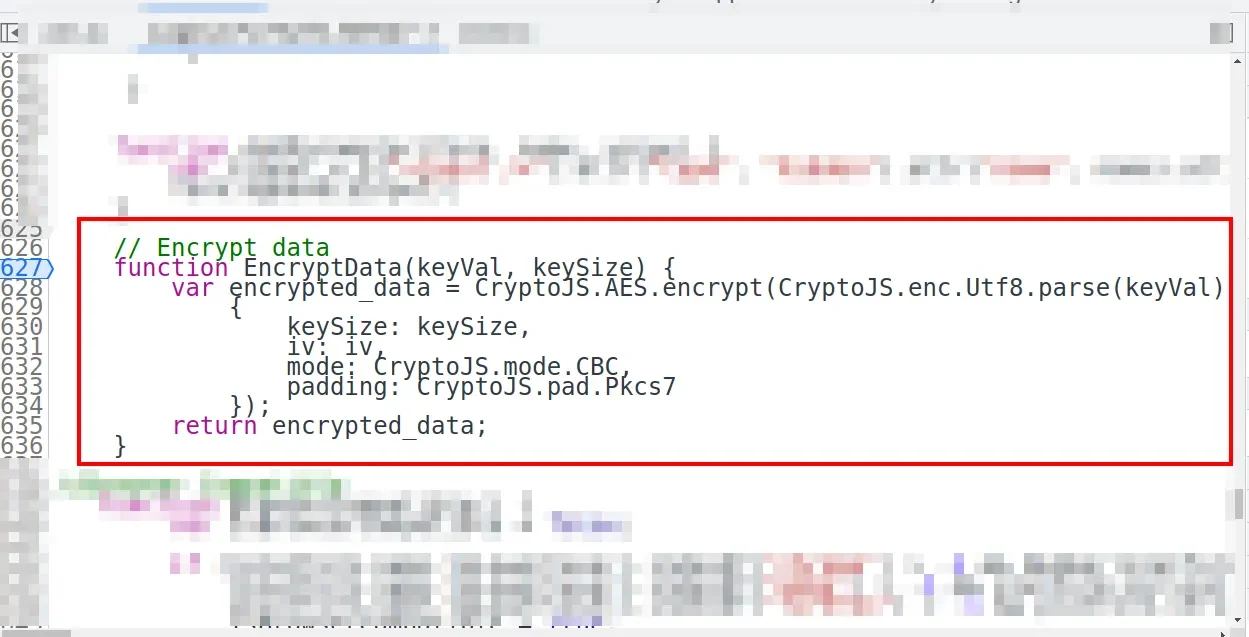
The application does not use plain encryption: a key, an IV, a mode and padding are all configured following the CryptoJS documentation. To encrypt or decrypt values successfully, both the key and the IV had to be recovered. Digging further into the sources revealed another variable called keyframe, used in the decryption part, which is the hardcoded secret key used for the key and IV values. Both values turned out to be CryptoJS.enc.Utf8.parse("secret_key").
Exploitation
Step 1: rebuild the encryption function locally
With the key and IV known, the same function as in the source code was rebuilt locally against the installed npm package:
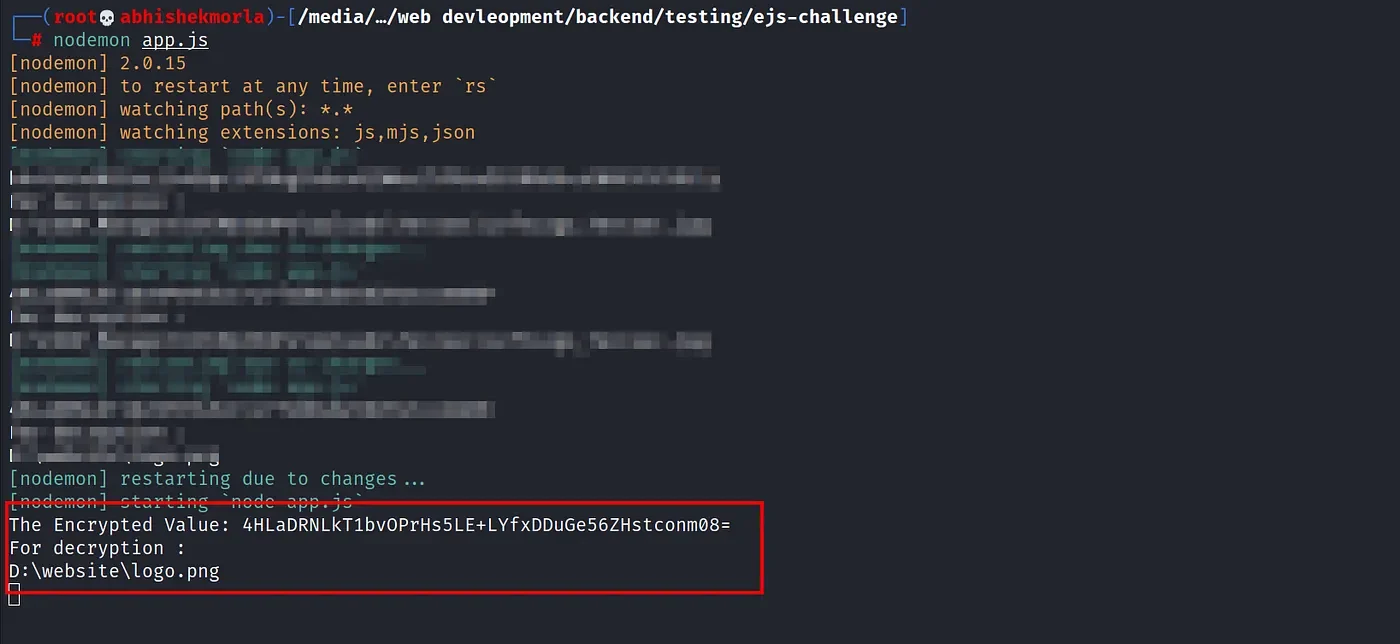
const key = CryptoJS.enc.Utf8.parse("secret_key"); const iv1 = CryptoJS.enc.Utf8.parse("secret_key"); const encrypted = CryptoJS.AES.encrypt("C://Windows//System32//drivers//etc//hosts", key, { keySize: 16, iv: iv1, mode: CryptoJS.mode.CBC, padding: CryptoJS.pad.Pkcs7});console.log(encrypted+""); // will give the encrypted value console.log("For decryption : "); var cipher = "KSxIfH6RWYGA=="; const plainText = CryptoJS.AES.decrypt(cipher, key, { keySize: 16, iv: iv1, mode: CryptoJS.mode.CBC, padding: CryptoJS.pad.Pkcs7 }); console.log(plainText.toString(CryptoJS.enc.Utf8)); // will give the decrypted value
The script parses the same secret into both the key and the IV, uses AES in CBC mode with PKCS7 padding and a key size of 16, prints the ciphertext for the chosen plaintext, and then decrypts a sample cipher value back to UTF-8. This gives the researcher the ability to encrypt and decrypt exactly the values the application handles.
Step 2: decrypt the path parameter
A friend the researcher was hunting with, Akinlabi Omoogun, found an endpoint called ViewDocumentFile with a path parameter that takes an encrypted value. Decrypting that value with the local script showed it to be the path of a PNG, D:\\website\\logo.png.
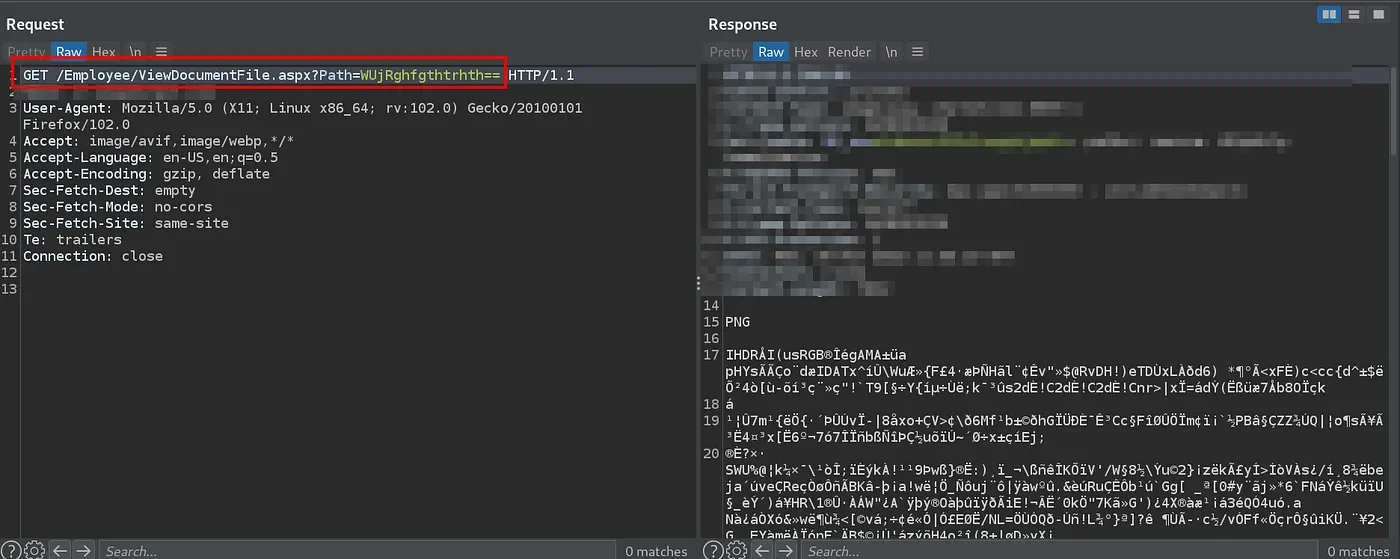
Step 3: encrypt a Windows LFI payload and pass it in
After searching for Windows-based LFI payloads, the researcher settled on C://Windows//System32//drivers//etc//hosts, encrypted it with the same routine and passed the result into the path parameter. The internal file was returned, so internal files could be read simply by breaking the encryption layer.
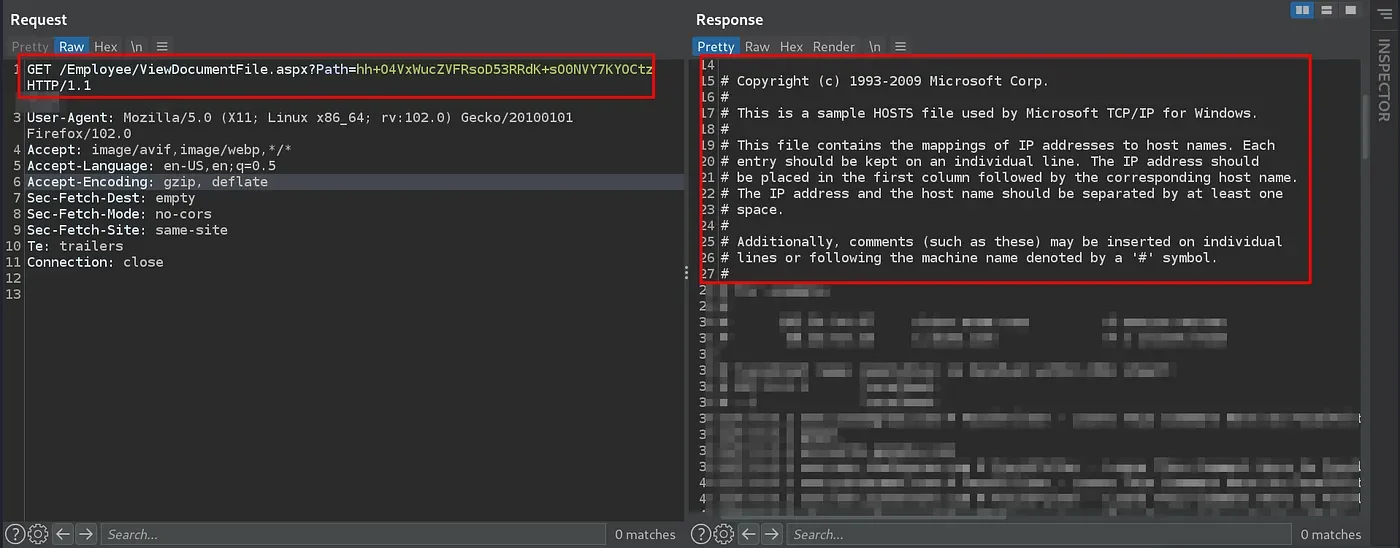
The researcher closes with the point that reading JavaScript files is an important part of testing, a lesson taken from a security conference.
Root cause
The encryption is performed entirely on the client, and the key material is shipped to the browser: the key and IV are hardcoded in the JavaScript as CryptoJS.enc.Utf8.parse("secret_key"), reachable through the keyframe variable used in the decryption path. Anyone who reads the sources can therefore encrypt and decrypt values at will, so the encryption provides no integrity or authorisation guarantee at all.
The path parameter accepted an encrypted Windows path, and the internal file was returned. Once the encryption was broken, the researcher could pass an encrypted path such as C://Windows//System32//drivers//etc//hosts and read the file. The report does not describe any server-side validation, allow-list or path canonicalisation that would have stopped this.
Impact
An attacker who can read the application's JavaScript can recover the hardcoded key and IV, encrypt arbitrary values and submit them to endpoints that trust the client-side encryption. On this target that allowed reading internal files on the Windows server through the path parameter of ViewDocumentFile. The report demonstrates reading the hosts file through the path parameter.
Fix
The report does not state what was changed. Based on the root cause, the encryption key and IV should not be present in client-side code, and any value that matters for security should be validated on the server rather than protected only by client-side encryption. The path parameter should be validated on the server so that values such as C://Windows//System32//drivers//etc//hosts cannot be read.
Variants to test
- Search the loaded JavaScript for encryption helpers such as
encryptData,CryptoJS,AES.encrypt, and for variables holding key material (key,iv,keyframe,secret). A positive result is a hardcoded key or IV that lets you reproduce the ciphertext for a known plaintext. - Capture a login request and decrypt the username and password fields with the recovered routine. A positive result is readable credentials, confirming the scheme is reversible by anyone with the source.
- Look for parameters that carry encrypted values, such as a
pathor file name on document, download or preview endpoints, and decrypt them. A positive result is a server-side path such asD:\\website\\logo.pngthat reveals the file system layout. - Re-encrypt Windows LFI payloads such as
C://Windows//System32//drivers//etc//hostsand submit them in those parameters. A positive result is the contents of the internal file in the response. - Try the same on other parameters protected by the same scheme, for example identifiers used in queries, to see whether the server trusts the decrypted value without further checks.
What happened, in plain words
Imagine a website that, before sending your username and password to its server, scrambles them in your own browser so that anyone watching the network cannot read them. That sounds safe. But the scrambling recipe, including the secret ingredient used to scramble and unscramble, was sitting right there in the website's own code, which every visitor's browser downloads. Anyone who opened that code could read the secret, scramble anything they liked, and unscramble anything the site produced.
The researcher did exactly that. Then a friend found a feature on the same site that takes an encrypted file path and sends back the file it points to. Because the researcher could now scramble any path, they scrambled the path of a sensitive file that lives on every Windows computer and got its contents back. That is called local file inclusion, or LFI: tricking a server into reading a file from its own disk that it was never meant to hand out.
This article walks through the whole thing from zero. You only need a browser and a computer to follow the ideas. Some steps used a tool called Burp, which is a program that sits between your browser and a website and lets you look at and change the requests going back and forth. You do not need to install anything to understand what happened.
The target and the feature
The target is a program whose address is written here only as sub.domain.com, and the researcher was given login credentials as part of the scope. Scope means the list of systems the researcher is allowed to test. The feature in question is the login form. When you type your username and password and press the login button, the application scrambles them in your browser before sending them, and later unscrambles the username so it can show it on the page after you log in.
A friend also found an endpoint called ViewDocumentFile with a path parameter that takes an encrypted value. An endpoint is a specific address on a server that does one job, like a counter in a shop: you go to that counter, hand over something, and get something back. A parameter is the piece of information you hand over, for example the name of the file you want.
The write-up joins two things together: breaking the browser-side scrambling by reading the website's JavaScript, and then using the recovered scrambling routine to feed an arbitrary Windows file path into that path parameter, which results in local file inclusion.
Setup
JavaScript is the programming language that runs inside web pages. When you open a site, your browser downloads its JavaScript files and runs them on your machine. That is what makes pages interactive, and it is also why anything written in those files is visible to anyone who looks.
The researcher worked with the credentials provided in the scope and captured the login request in Burp. Capturing a request means pausing it on its way out so you can read exactly what your browser is sending. The approach was based on Sameer Bhatt's blog post about bypassing client-side encryption. On the local machine the crypto-js npm package was installed. CryptoJS is a ready-made JavaScript library that does scrambling (encryption) for you, and npm is the usual place to download JavaScript libraries from. Installing it locally meant the application's own encryption function could be rebuilt and run outside the browser, on the researcher's own computer, where it could be experimented with freely.
Finding it
During login the researcher noticed that the username and password were being scrambled before transmission, and that the username was unscrambled again to be shown on the page afterwards.
The screenshot shows the login step where the credentials are encrypted before they leave the browser.
With the login request captured in Burp, the next step was to search the sources for the variables involved. Sources here means the JavaScript files the site sends to the browser. The goal was to find a client-side JavaScript function that performs the scrambling. A function is a named block of code that does one job, a bit like a recipe with a name: you call the name and it carries out the steps. Searching for a few keywords led to a function called encryptData(), which uses CryptoJS.
The screenshot shows the encryptData() function found in the site's JavaScript, the one that uses CryptoJS.
The application does not use plain encryption: a key, an IV, a mode and padding are all configured following the CryptoJS documentation. These four words deserve a plain explanation, because the rest of the story depends on them.
- The key is the secret ingredient. The same key both locks and unlocks the message, so whoever holds it can do both.
- The IV, short for initialisation vector, is a starting value mixed in so that scrambling the same message twice does not produce identical output. Think of it as a random pinch of salt added before cooking: same recipe, different result each time.
- The mode is the rule for how the scrambling is applied to the message. CBC is one such rule, and it chains the pieces of the message together so each piece depends on the previous one.
- Padding is what you do when the message does not fill the last block exactly. PKCS7 is a standard way of topping it up so the maths works.
To scramble or unscramble values successfully, both the key and the IV had to be recovered. Digging further into the sources revealed another variable called keyframe, used in the decryption part, which is the hardcoded secret key used for the key and IV values. Hardcoded means the value is typed directly into the code rather than being kept somewhere secret on the server. Both values turned out to be CryptoJS.enc.Utf8.parse("secret_key"). In plain words: the same short string, secret_key, was used as both the key and the IV, and it was written in the JavaScript for anyone to read.
Exploitation
Step 1: rebuild the encryption function locally
With the key and IV known, the same function as in the source code was rebuilt locally against the installed npm package. The point of this step is to have your own copy of the site's scrambling machine, so you can scramble and unscramble exactly the way the site does.
const key = CryptoJS.enc.Utf8.parse("secret_key"); const iv1 = CryptoJS.enc.Utf8.parse("secret_key"); const encrypted = CryptoJS.AES.encrypt("C://Windows//System32//drivers//etc//hosts", key, { keySize: 16, iv: iv1, mode: CryptoJS.mode.CBC, padding: CryptoJS.pad.Pkcs7});console.log(encrypted+""); // will give the encrypted value console.log("For decryption : "); var cipher = "KSxIfH6RWYGA=="; const plainText = CryptoJS.AES.decrypt(cipher, key, { keySize: 16, iv: iv1, mode: CryptoJS.mode.CBC, padding: CryptoJS.pad.Pkcs7 }); console.log(plainText.toString(CryptoJS.enc.Utf8)); // will give the decrypted value
Line by line, in plain words:
const key = CryptoJS.enc.Utf8.parse("secret_key");takes the stringsecret_keyand turns it into the form CryptoJS needs for a key. This is the secret recovered from the site's code.const iv1 = CryptoJS.enc.Utf8.parse("secret_key");does the same for the IV. Note that it is the very same string, which is one of the weaknesses here.const encrypted = CryptoJS.AES.encrypt("C://Windows//System32//drivers//etc//hosts", key, { ... });scrambles the chosen file path using AES, the scrambling algorithm, with the key, the IV, CBC mode and PKCS7 padding, and a key size of 16. The path chosen is the Windows hosts file, a small text file that maps names to addresses on a Windows machine.console.log(encrypted+"");prints the scrambled result, so it can be copied and pasted into a request.console.log("For decryption : ");just prints a label.var cipher = "KSxIfH6RWYGA==";holds a sample scrambled value to try unscrambling.const plainText = CryptoJS.AES.decrypt(cipher, key, { ... });unscrambles that sample with the same key, IV, mode and padding.console.log(plainText.toString(CryptoJS.enc.Utf8));prints the readable result.
Running this gives the researcher the ability to encrypt and decrypt exactly the values the application handles. In everyday terms: they now own a copy of the site's padlock and its key.
Step 2: decrypt the path parameter
A friend the researcher was hunting with, Akinlabi Omoogun, found an endpoint called ViewDocumentFile with a path parameter that takes an encrypted value. Decrypting that value with the local script showed it to be the path of a PNG, D:\\website\\logo.png. That showed the parameter is a file path after unscrambling, pointing to D:\\website\\logo.png.
The screenshot shows the ViewDocumentFile endpoint with its path parameter, and the decrypted value revealing the PNG path on the server.
Step 3: encrypt a Windows LFI payload and pass it in
After searching for Windows-based LFI payloads, the researcher settled on C://Windows//System32//drivers//etc//hosts, encrypted it with the same routine and passed the result into the path parameter. The internal file was returned, so internal files could be read simply by breaking the encryption layer.
The researcher closes with the point that reading JavaScript files is an important part of testing, a lesson taken from a security conference. The lesson is simple: the code your browser downloads is not hidden, and it often contains the very secrets meant to protect the site.
Why it worked
The scrambling is performed entirely on the client, meaning in your browser, and the key material is shipped to the browser along with the code. The key and IV are hardcoded in the JavaScript as CryptoJS.enc.Utf8.parse("secret_key"), reachable through the keyframe variable used in the decryption path. Anyone who reads the sources can therefore encrypt and decrypt values at will, so the encryption provides no integrity or authorisation guarantee at all. Integrity means you cannot tell whether a value was tampered with; authorisation means the server checks whether you are allowed to do something. Neither is achieved by a lock whose key is handed to every visitor.
The path parameter accepted an encrypted Windows path, and the internal file was returned. Once the encryption was broken, the researcher could pass an encrypted path such as C://Windows//System32//drivers//etc//hosts and read the file. The report does not describe any server-side validation, allow-list or path canonicalisation that would have stopped this. An allow-list is a list of permitted values; canonicalisation means tidying a path into one standard form before checking it, so tricks like .. cannot sneak past the check.
Impact
An attacker who can read the application's JavaScript can recover the hardcoded key and IV, encrypt arbitrary values and submit them to endpoints that trust the client-side encryption. On this target that allowed reading internal files on the Windows server through the path parameter of ViewDocumentFile. The report demonstrates reading the hosts file through the path parameter.
Fix
The report does not state what was changed. Based on the root cause, the encryption key and IV should not be present in client-side code, and any value that matters for security should be validated on the server rather than protected only by client-side encryption. The path parameter should be validated on the server so that values such as C://Windows//System32//drivers//etc//hosts cannot be read.
Variants to test
If you want to look for the same pattern on sites you are allowed to test, these are the checks in order:
- Search the loaded JavaScript for encryption helpers such as
encryptData,CryptoJS,AES.encrypt, and for variables holding key material (key,iv,keyframe,secret). A positive result is a hardcoded key or IV that lets you reproduce the ciphertext for a known plaintext. - Capture a login request and decrypt the username and password fields with the recovered routine. A positive result is readable credentials, confirming the scheme is reversible by anyone with the source.
- Look for parameters that carry encrypted values, such as a
pathor file name on document, download or preview endpoints, and decrypt them. A positive result is a server-side path such asD:\\website\\logo.pngthat reveals the file system layout. - Re-encrypt Windows LFI payloads such as
C://Windows//System32//drivers//etc//hostsand submit them in those parameters. A positive result is the contents of the internal file in the response. - Try the same on other parameters protected by the same scheme, for example identifiers used in queries, to see whether the server trusts the decrypted value without further checks.
Glossary
- API: a defined way for one piece of software to ask another for something, like a service counter with fixed rules about what you can request.
- Endpoint: a specific address on a server that performs one job, such as
ViewDocumentFile. - Parameter: a piece of information sent along with a request, such as a file path or a username.
- JavaScript: the programming language that runs inside web pages in your browser.
- Sources: the JavaScript files a website sends to your browser, which anyone can read.
- Function: a named block of code that performs one task when called.
- Client-side: happening in the user's browser rather than on the server.
- Server-side: happening on the machine that hosts the website.
- Encryption: scrambling data so that only someone with the right key can read it.
- Decryption: unscrambling encrypted data back into readable form.
- Key: the secret value used to lock and unlock encrypted data.
- IV (initialisation vector): a starting value mixed into encryption so identical messages do not produce identical output.
- Mode (CBC): the rule for applying encryption across a message; CBC chains blocks so each depends on the previous one.
- Padding (PKCS7): a standard way of filling the last block of a message so encryption works cleanly.
- AES: a widely used encryption algorithm.
- CryptoJS: a JavaScript library that provides encryption functions.
- npm: the usual package manager for downloading JavaScript libraries.
- Hardcoded: a value typed directly into the code instead of being kept secret elsewhere.
- Burp: a tool that sits between your browser and a website so you can inspect and modify requests.
- Request: the message your browser sends to a server asking for something.
- Response: the message the server sends back.
- LFI (local file inclusion): a flaw where a server is tricked into reading a file from its own disk that it should not hand out.
- Payload: the crafted value you send to trigger a flaw.
- Scope: the list of systems a researcher is authorised to test.
- Credentials: the username and password used to log in.
- Integrity: the guarantee that data has not been altered in transit or storage.
- Authorisation: the check that a user is allowed to perform an action.
- Allow-list: a list of permitted values, with everything else rejected.
- Canonicalisation: converting a path into one standard form before checking it, so tricks cannot bypass the check.
- Hosts file: a small text file on a computer that maps names to network addresses.



