Multiple HTTP Redirects to Bypass SSRF Protections
The application blocked SSRF by checking for keywords like 'localhost' and '[redacted]' in the user-supplied URL and only validated the first HTTP redirect. An attacker could bypass this by using a chain of two redirects, where the first redirect points to an attacker-controlled server that then redirects to an internal address, allowing access to internal hosts.

I needed to utilize many known SSRF techniques at once to successfully exploit many endpoints in the same company. After discovering away, I applied it to all functionalities that use attacker-controlled URLs and found 2 blind and 1 full read SSRFs.
The full write-up lives on its author's site
It belongs to its author, so we link to it rather than copy it. The other two tabs are our own rewrites, checked against it.
Context
The target was a company that provides marketing services to other businesses. Its application lets customers create and manage marketing campaigns. Many of the application's features take URLs as input, which is what drew the researcher to look for server-side request forgery (SSRF) rather than spend time on the rest of a slow, feature-heavy application.
The report is not publicly disclosed, so the author refers to the target as company.com and alters the URL structure. No screenshots of the application itself are shown.
The vulnerable feature is an API endpoint that checks a snippet at a URL supplied by the user. The endpoint returns the full URL as JSON when the outgoing request to the attacker-controlled URL succeeds. That behaviour turns an otherwise blind request into something observable: even without the response body, the caller learns whether the server made the request.
Setup
- An authenticated account on the application. The API requires authentication and uses cookies for it.
- An interactsh handler to receive out-of-band requests and capture HTTP headers and the source IP address.
- A Linux VPS with netcat, used to run HTTP servers that return redirects.
- The two payload collections the author routinely uses for SSRF bypasses:
https://github.com/swisskyrepo/PayloadsAllTheThings/tree/master/Server%20Side%20Request%20Forgeryhttps://github.com/cujanovic/SSRF-Testing
Finding it
The API call of interest looks like this:
https://www.company.com/api/campaign/v3/check-snippet?url=http://example.com/
The url parameter is the injection point. The first test was a request to the author's interactsh handler, to see the HTTP headers and the IP address of the incoming request.

The request arrived from an AWS EC2 IP address. No ports were open and no useful HTTP headers were leaked. The application makes outgoing requests to arbitrary destinations, so the goal became reaching internal hosts. The request itself is blind, because the response the server receives is not returned, but the endpoint still returns the full URL as JSON when the request to the attacker-controlled URL is made successfully, which gives a signal for success.
Both domain names and direct IP addresses were accepted. A request to a netcat HTTP server on the author's Linux VPS worked. Requests to [redacted] and to localhost did not.
Exploitation
Step 1: parser and encoding tricks
The author fuzzed the URL parser by injecting bytes 00 to FF in three positions:
http://[redacted]/$FUZZ
$FUZZhttp://[redacted]
http://local$FUZZhost
Nothing came out of it. The script that generates many SSRF payloads from the cujanovic repository was tried next, with the same result. Payloads such as 127.0000000.000000.000001 and 127.1 did not work either, and neither did a subdomain whose DNS A record returns [redacted].
Step 2: testing redirects
Since the application follows HTTP redirects, the next idea was to use a service that automatically issues a 302 redirect to the IP address given in the URL:
https://make302redirect.io/[redacted]
This did not work. The reason became clear: the application searched for keywords such as localhost and [redacted] in the URL supplied by the user and blocked the request if they were present.
Step 3: a redirector under the author's control
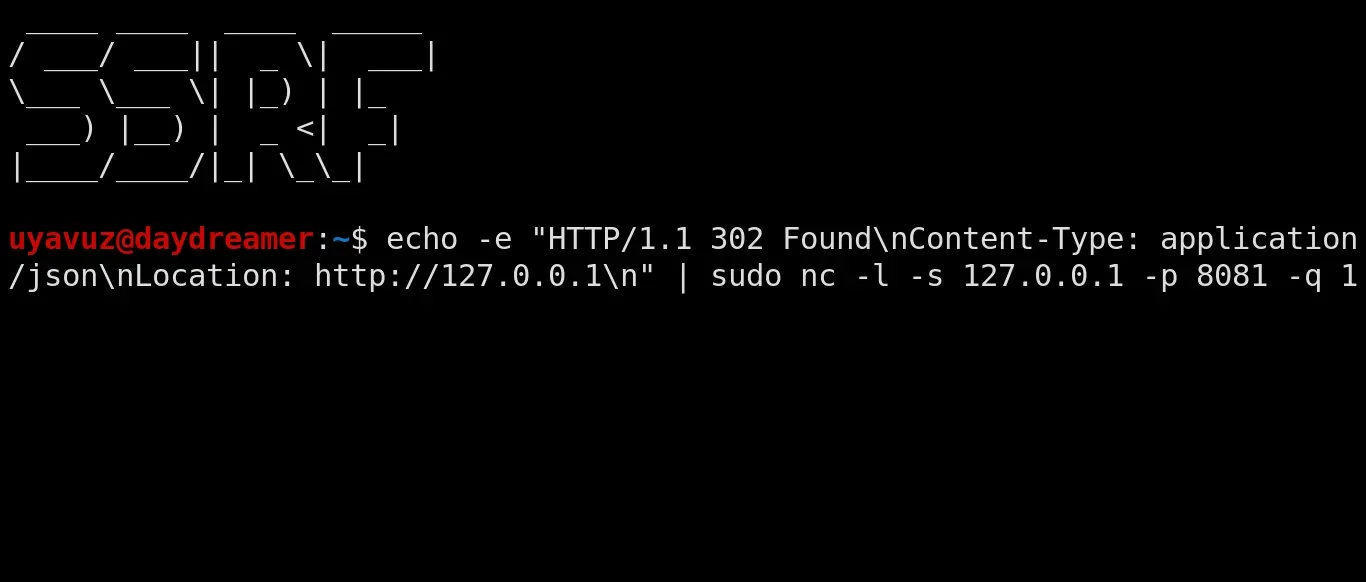
The author then ran a simple netcat HTTP server on the VPS that answers any request with a 302 redirect to [redacted]:
echo -e "HTTP/1.1 302 Found\nContent-Type: application/json\nLocation: http://[redacted]\n" | sudo nc -l -s [redacted] -p 8080 -q 1
The API was then called with the VPS as the destination:
https://www.company.com/api/campaign/v3/check-snippet?url=http://myIP/
This did not work either. This did not work either. The application follows redirects, and the first redirect's Location header was still being checked.
Step 4: chaining two redirectors
After trying further payloads with pleorqy, the author ran two netcat servers on different ports and made the first redirect to the second, and the second to localhost:
Vulnerable server ---> my server on port 8080 ---> my server on port 8081 ---> localhost
This time it worked.
Root cause
The application blocks requests whose user-supplied URL contains keywords such as localhost or [redacted], and it follows HTTP redirects. It also checks the value of the Location header in the first HTTP 302 redirect. It does not check the second one. A chain of two redirects therefore carries the request past the filter and into the internal network.
The author notes that using a service such as 127.0.0.1.nip.io would never have revealed the bug, since the application rejected anything containing [redacted].
Impact
The author applied the technique to every functionality that accepts attacker-controlled URLs and found two blind SSRFs and one full-read SSRF. In the bug bounty programme, the blind SSRFs were closed as duplicates and the other one was accepted. The full SSRF let the author discover internal assets. The report does not describe those internal assets or the data reachable through them.
Fix
Validate every hop of a redirect chain, not just the first Location header, and resolve and check the destination address at each hop rather than matching keywords in the URL string. The report does not state what the company changed.
Variants to test
- Two-hop redirect chain. Point the
urlparameter at a server you control that redirects to a second server you control, which redirects tohttp://[redacted]. A positive result is a request arriving at the internal target, or the endpoint returning the URL as JSON when the outgoing request succeeds. - Keyword filter with alternate representations. Submit
127.1,127.0000000.000000.000001, or a hostname whose A record is[redacted]. A positive result is a successful request to the loopback address despite the filter. - Redirect target validation depth. Redirect once to a blocked address and once to an allowed one, and compare. If the first hop is blocked but a second hop to the same address is not, the validation only covers the first redirect.
- Other URL-consuming features. Apply the same chain to every endpoint that fetches a user-supplied URL, such as snippet checkers, webhook testers and importers. A positive result is an out-of-band request from the server, or a response that reflects content fetched from an internal address.
What happened, in plain words
A security researcher was looking at a company's website. The company sells marketing services to other businesses, and its website lets customers build and manage marketing campaigns. Many parts of that website ask the user to type in a web address (a URL), for example to check something that lives at that address. Whenever a website takes a URL from a user and then fetches it, there is a chance of a bug called SSRF, short for server-side request forgery. In plain terms: the server (the computer that runs the website) is tricked into visiting an address of the attacker's choosing, including addresses that only the server itself can reach, such as internal machines that are not on the public internet.
The researcher found one such feature and worked out a way to sneak past the protection the company had put in place. The trick was to use two redirects in a row. A redirect is what happens when you ask a website for a page and it answers "not here, go look over there instead". The company checked the first "go look over there" but forgot to check the second one, so the request slipped through to an internal address.
After finding the trick, the researcher tried it on every feature that accepts a URL from the user and found three bugs in total: two where the attacker could not see the reply (called blind), and one where the attacker could read the reply (called full read). In the bug bounty programme, the two blind ones were closed as duplicates (someone else had reported the same thing first) and the other one was accepted.
The report itself is not public, so the author calls the target company.com and changes the URL structure. No screenshots of the application itself are shown.
The target, and why URLs mattered
The company provides marketing services to other businesses. Its application lets you create and manage marketing campaigns. There were many features to test, but the application was slow and the researcher did not enjoy testing bloated apps. So after learning the basics of the app, the researcher decided not to spend much time there and to move on after finding some vulnerabilities.
The application had a lot to do with URLs. That caught the researcher's attention, and the decision was to focus mainly on SSRF.
A quick word on the pieces involved, since they come up constantly below:
- API: an API is the part of a website that programs talk to, rather than people clicking buttons. Think of a restaurant: the dining room is the website you see, and the kitchen door where orders are passed through is the API. You send a request in a fixed format and get an answer back, usually as data rather than a pretty page.
- Endpoint: one specific address inside that API that does one specific job, like one particular order window at the kitchen door.
- Parameter: a named value you attach to a request, such as
url=.... It is like writing a note on the order slip: "this is the address I want you to check". - Cookie: a small piece of data the website stores in your browser after you log in, and which your browser sends back with every request so the site knows who you are. It works like a wristband at an event: show it at the door and you get in without proving who you are again.
- JSON: a simple text format for data, made of names and values in curly brackets. It is how many APIs answer.
The exploitation process, step by step
Step 1: you need to be logged in
The API needs the user to be authenticated to the app and uses cookies to do so. In other words, the endpoint only answers requests that carry a valid login cookie. Without logging in first, the request would simply be refused, so the researcher used an account on the application.
Step 2: the API call of interest
We have an API call such as
https://www.company.com/api/campaign/v3/check-snippet?url=http://example.com/
Line by line:
https://www.company.comis the company's website, over the secure version of HTTP (the protocol browsers use to fetch pages)./api/campaign/v3/check-snippetis the endpoint: a feature that checks a "snippet" found at some address. Thev3is just a version number in the path.?url=http://example.com/is the parameter. Everything after the?is data being handed to the endpoint, and here the name isurland the value ishttp://example.com/.
So the endpoint's job is: "take this URL, go and fetch it, and check the snippet there". That is exactly the shape of feature where SSRF lives, because the server is being told where to go by whoever sends the request.
Step 3: the first test, and what it told us
url parameter is our injection point. The first thing tried was to make a request to the researcher's interactsh handler to get HTTP headers and IP address of the request. The request below was made.
A few terms here:
- Injection point: the place in the request where the attacker's input ends up being used by the server. Here it is the value of
url. - interactsh: a free service that gives you a unique address and records any request that arrives at it. It is like putting a microphone in an empty room: if the server really goes where you told it to, you hear it arrive. The researcher used it to capture the HTTP headers and the IP address of the incoming request.
- HTTP headers: the extra lines of information sent along with a web request, such as which browser or program is asking and other metadata. They are like the envelope around a letter: not the message itself, but useful details about where it came from.
- IP address: the numeric address of a machine on a network, the equivalent of a postal address for computers.
Why do this? Because if the server fetches the researcher's address, the researcher learns two things: that the server makes outgoing requests at all, and what those requests look like from the outside.
Step 4: what came back
The request came from an AWS EC2 IP address and there weren't any open ports. There is also no useful HTTP headers leaking.
In plain words: the incoming request came from a machine rented in Amazon's cloud (EC2 is Amazon's virtual server product), not from the company's own office network. No open ports were found on that machine, and the headers did not reveal anything useful. So the out-of-band channel confirmed the server fetches URLs, but gave little else.
Step 5: the goal becomes internal hosts
The application makes any outgoing request. So the goal is to hit internal hosts. This was a blind request because it didn't leak the response it got. However, this functionality returns the full URL as JSON if the request to the attacker-controlled URL is successfully made.
- Internal host: a machine on the company's private network that is not meant to be reachable from the internet, such as a database server or an admin panel. Reaching one from the outside is the whole point of SSRF.
- Blind: the attacker cannot see what the server received back. The server went somewhere, but the reply is not shown to the attacker. It is like sending a letter and never getting the answer, only knowing it was delivered.
- Attacker-controlled URL: an address the attacker owns or runs, so anything sent to it lands with the attacker.
The important detail is the last sentence: even though the reply is hidden, the endpoint returns the full URL as JSON when the outgoing request succeeds. That is a signal. It is like a shop assistant saying "yes, I managed to open that door" without telling you what was behind it. The researcher can use that yes/no to tell whether a request worked.
Step 6: what was allowed and what was blocked
Both domain and direct IP was allowed. The researcher ran a netcat HTTP server on a Linux VPS and tried to make a request to that, and it worked. However, a request to "[redacted]" did not work. Then "localhost" was tried, but that also did not work.
- Domain: a human-friendly name like
example.com, which the network translates into an IP address. - Direct IP: putting the numeric address in the URL instead of a name.
- netcat: a small command-line tool that can listen on a network port and answer requests. Running it as an HTTP server means the researcher's own machine plays the role of a website.
- VPS: a virtual private server, a rented machine on the internet that the researcher controls.
- [redacted]: the special address that always means "this very machine". When a server fetches
http://[redacted], it is talking to itself, not to the internet. That is why it is the classic SSRF target: services listening only on the machine's own loopback interface become reachable. - localhost: the human-friendly name for the same idea,
[redacted].
So the server would happily fetch the researcher's own VPS, but refused to fetch itself. That refusal is the protection the researcher now had to get around.
Step 7: trying to confuse the URL parser
The researcher tried to abuse the URL parser by fuzzing 00 to FF in "http://[redacted]/$FUZZ", "$FUZZhttp://[redacted]" and "http://local$FUZZhost" but nothing came out of that. Then the script at this link that generates many payloads was tried. Again, nothing worked. The researcher has a tendency to fuzz all UTF-8 everywhere, having discovered many odd behaviours in web applications that way.
- URL parser: the piece of software that reads a URL and decides which part is the scheme, which is the host, which is the path. Different parsers can disagree about odd input, and that disagreement is often a way past a filter.
- Fuzzing: sending lots of slightly different inputs automatically and watching for one that behaves differently. Here the idea was to insert every byte from
00toFF(the full range of a single byte, written in hexadecimal) into the URL and see whether any variant slipped past the block. - UTF-8: the common way of encoding text characters as bytes. Odd characters can sometimes be read one way by the filter and another way by the code that actually makes the request.
The three patterns place the fuzzed byte in three different positions: at the end of the path, at the very start of the URL, and inside the word localhost. The hope was that one position would confuse the check while still resolving to the local machine. None did.
Step 8: numeric tricks
Payloads like "127.0000000.000000.000001" and "127.1" were tried. They did not work.
These are alternative ways of writing the same address. 127.1 is a short form that some systems expand to [redacted], and the long form with leading zeros is another way of writing the same number. The idea was that the filter might look for the exact text [redacted] and miss these spellings. It did not.
Step 9: a DNS trick
The researcher tried to use a subdomain that returns "[redacted]" in DNS A record queries. It did not work.
- DNS: the internet's phone book. It translates names like
example.cominto IP addresses. - A record: the specific entry in that phone book that says which IP address a name points to.
So the idea was to register or use a name that looks innocent but whose phone book entry says "this is [redacted]". The filter would see a harmless-looking name, and the network would then send the request to the local machine. It did not work here.
Step 10: the two reference collections
There are two GitHub repositories the researcher always uses when trying to bypass SSRF protections:
https://github.com/swisskyrepo/PayloadsAllTheThings/tree/master/Server%20Side%20Request%20Forgeryhttps://github.com/cujanovic/SSRF-Testing
These are public collections of known tricks for getting around SSRF filters, kept by the security community. The researcher uses them as a checklist: if a known trick works, there is no need to invent a new one. Note that the two links are printed together on one line in the report.
Step 11: does the API follow redirects?
The researcher wanted to see if the API follows HTTP redirects. So, as before, a site was used that automatically makes 302 redirects to the IP address set in the URL. It looked like this:
https://make302redirect.io/[redacted]
- HTTP redirect: when a server answers a request with "the thing you want is elsewhere, go to this other address". The browser (or, here, the server) then automatically makes a second request to the new address.
- 302: the numeric code for a temporary redirect. It comes with a
Locationheader that says where to go next.
Why try this? Because the filter was blocking the literal text [redacted] in the URL the user submits. If the submitted URL instead points at a harmless-looking redirect service, the filter sees no forbidden text. If the application then follows the redirect, the second request goes to [redacted], and the filter has been bypassed without ever writing the forbidden text.
Step 12: why that did not work
The payload was used to get a request, but it did not work. It turned out the application basically searched for keywords like "localhost" and "[redacted]" and, if that exists in the URL provided by the user, it is blocked.
So the protection is a keyword search on the URL string. It is like a bouncer with a list of banned words who reads the address on your envelope: if the banned word appears, you do not get in. The redirect service hid the word from the first check, but the request still did not work.
Step 13: a redirector under the researcher's control
So the researcher ran a simple netcat HTTP server on the VPS that makes 302 redirects to any request sent to it. The command looks like this:
echo -e "HTTP/1.1 302 Found\nContent-Type: application/json\nLocation: http://[redacted]\n" | sudo nc -l -s [redacted] -p 8080 -q 1
Line by line:
echo -eprints the text that follows, with-emeaning "interpret the backslash sequences", so\nbecomes a real line break."HTTP/1.1 302 Foundis the first line of an HTTP response: the protocol version, the status code 302, and the words "Found".Content-Type: application/jsonis a header saying the body is JSON. Here there is no real body, but the header is included.Location: http://[redacted]is the header that tells the client where to go next. This is the redirect target.| sudo nc -l -s [redacted] -p 8080 -q 1pipes that text into netcat.sudoruns it with administrator rights,ncis netcat,-lmeans listen for an incoming connection,-s [redacted]binds to that specific address on the machine,-p 8080listens on port 8080, and-q 1means quit one second after the input ends.
In plain words: the researcher's own server answers every request with "go to http://[redacted]". The report notes that this IP address is no longer in use and asks readers not to abuse the current user of it.
Step 14: calling the API with the researcher's server as the destination
The API request below was made:
https://www.company.com/api/campaign/v3/check-snippet?url=http://myIP/
Here myIP stands for the address of the researcher's own server. The submitted URL contains no forbidden keyword. The server would fetch the researcher's server, receive the 302 redirect, and follow it to [redacted].
Step 15: it did not work
It did not work. At this point the researcher was desperate. The application grepped keywords like "localhost, [redacted]" and followed HTTP redirects. So, after trying some other payloads with pleorqy, two of those netcat servers were run on different ports, and the first was redirected to the other, and the other to localhost. It looked like this:
Vulnerable server ---> my server on port 8080 ---> my server on port 8081 ---> localhost
Line by line:
Vulnerable serveris the company's application, the one making the outgoing request.my server on port 8080is the first redirector, which answers with a redirect to the second one.my server on port 8081is the second redirector, which answers with a redirect tolocalhost.localhostis the internal destination the researcher actually wants to reach.
Why two hops? Because the application checked the Location header of the first redirect. It did not check the second one. So the first hop points at something harmless (the researcher's second server), which passes the check, and only the second hop points at the forbidden destination, which is never inspected.
Step 16: this time it worked
This time it worked. The request travelled through both redirectors and reached the internal address.
Why it worked
If services like 127.0.0.1.nip.io had been used, this vulnerability would never have been discovered, because the application did not accept anything that has "[redacted]" in it.
The application checked the value of the Location header in the first HTTP 302 redirect. However, it did not check the second one. That leads to SSRF.
In plain words, there were two layers of protection:
- A keyword filter on the URL the user submits. It blocks any URL containing
localhostor[redacted]. - A check on the first redirect's
Locationheader.
The gap is that the check stops after the first hop. A chain of two redirects puts the forbidden address in the second Location, which is never checked, so the request still ends up at the internal destination.
How far it went
These methods were used on different API endpoints, and three of these bugs were found in total. One of them was a full SSRF that allowed internal assets to be discovered. In the bug bounty programme, the two blind SSRFs were closed as duplicates and the other one was accepted. The report does not describe the internal assets or the data reachable through them.
How to fix it
Check every hop of a redirect chain, not just the first Location header, and resolve and check the destination address at each hop rather than matching keywords in the URL string. The report does not state what the company changed.
Variants worth testing
- Two-hop redirect chain. Point the
urlparameter at a server you control that redirects to a second server you control, which redirects tohttp://[redacted]. A positive result is a request arriving at the internal target, or the endpoint returning the URL as JSON when the internal request succeeds. - Keyword filter with alternate representations. Submit
127.1,127.0000000.000000.000001, or a hostname whose A record is[redacted]. A positive result is a successful request to the loopback address despite the filter. - Redirect target validation depth. Redirect once to a blocked address and once to an allowed one, and compare. If the first hop is blocked but a second hop to the same address is not, the validation only covers the first redirect.
- Other URL-consuming features. Apply the same chain to every endpoint that fetches a user-supplied URL, such as snippet checkers, webhook testers and importers. A positive result is an out-of-band request from the server, or a response that reflects content fetched from an internal address.
Glossary
- API: the part of a website that programs talk to, sending structured requests and getting structured answers back.
- Endpoint: one specific address inside an API that performs one specific job.
- Parameter: a named value attached to a request, such as
url=.... - Cookie: a small piece of data stored in the browser after login and sent back with each request so the site knows who you are.
- SSRF (server-side request forgery): a bug where an attacker makes a server fetch an address of the attacker's choosing, including internal addresses.
- Injection point: the place in a request where the attacker's input is used by the server.
- interactsh: a service that gives you a unique address and records any request that arrives at it, used to detect out-of-band requests.
- HTTP headers: extra lines of information sent with a web request or response, such as content type or redirect target.
- IP address: the numeric address of a machine on a network.
- AWS EC2: Amazon's cloud service for renting virtual servers.
- Internal host: a machine on a private network that is not meant to be reachable from the internet.
- Blind SSRF: an SSRF where the attacker cannot see the response the server received.
- Full-read SSRF: an SSRF where the attacker can read the response the server received.
- Domain: a human-friendly name like
example.comthat the network translates into an IP address. - Direct IP: putting the numeric address in a URL instead of a name.
- netcat: a command-line tool that can listen on a network port and answer requests.
- VPS: a virtual private server, a rented machine on the internet that you control.
- localhost: the human-friendly name for
[redacted]. - URL parser: the software that reads a URL and decides which part is the scheme, host and path.
- DNS: the internet's phone book, translating names into IP addresses.
- A record: the DNS entry that says which IP address a name points to.
- HTTP redirect: a server answer saying "the thing you want is elsewhere, go to this other address".
- 302: the HTTP status code for a temporary redirect, sent with a
Locationheader. - Location header: the header in a redirect response that says where to go next.
- Loopback address: another name for
[redacted], the address a machine uses to talk to itself. - Duplicate (dup): a bug report closed because the same issue was already reported by someone else.
- Bug bounty programme: a scheme where companies pay researchers for reporting security bugs.



