Chaining Multiple Vulnerabilities Leads to Remote Code Execution (RCE) on One of the Payment Service Companies.
A publicly accessible Jenkins instance allowed self-registration, and many users had the same password as their username. After brute-forcing, the author found an admin account and used the Groovy script console to execute OS commands, achieving RCE.
 Published on rohit-soni.medium.com
Rohit Soni is back with another write-up and this time it’s about multiple security vulnerabilities I found and chained them together to achieve RCE on one of the payment service companies. Since I am not allowed to disclose the company name, let’s keep it example.in.
The full write-up lives on its author's site
It belongs to its author, so we link to it rather than copy it. The other two tabs are our own rewrites, checked against it.
Context
This write-up describes a chain of issues found on a Jenkins instance belonging to a payment service company. The company name is withheld, so the author refers to it as example.in. The affected host is a subdomain of that domain, written as subdomain.example.in throughout.
Jenkins is an open source automation server used to automate the parts of software development related to building, testing and deploying, supporting continuous integration and continuous delivery (CI/CD). In this deployment it was reachable from the internet and presented a login form. The features that mattered were the self-service signup form, the user directory exposed through the "people" menu, the login form, the plugin manager, the node list at /computer/ and the Groovy script console attached to each node.
The author had been hunting on the company's bug bounty programme for a while and had already reported a few vulnerabilities. A critical finding such as LFI, SQLi, SSRF or RCE was a personal goal.
Setup
No accounts, roles or versions are given in advance; the researcher started with nothing but the scope. All subdomains of example.in were in scope.
Reconnaissance was done with the following tools:
- subfinder, assetfinder and chaos to gather subdomains
- httpx to filter out live subdomains
- Burp Intruder for the password brute force
The output of the different enumeration tools was combined into a single file, and the live hosts were reviewed by hand. One of them turned out to run Jenkins.
Finding it
While going through the file of live subdomains, the researcher noticed that one subdomain was running a Jenkins instance. Opening it presented a login prompt, and, unexpectedly, a signup option was enabled.
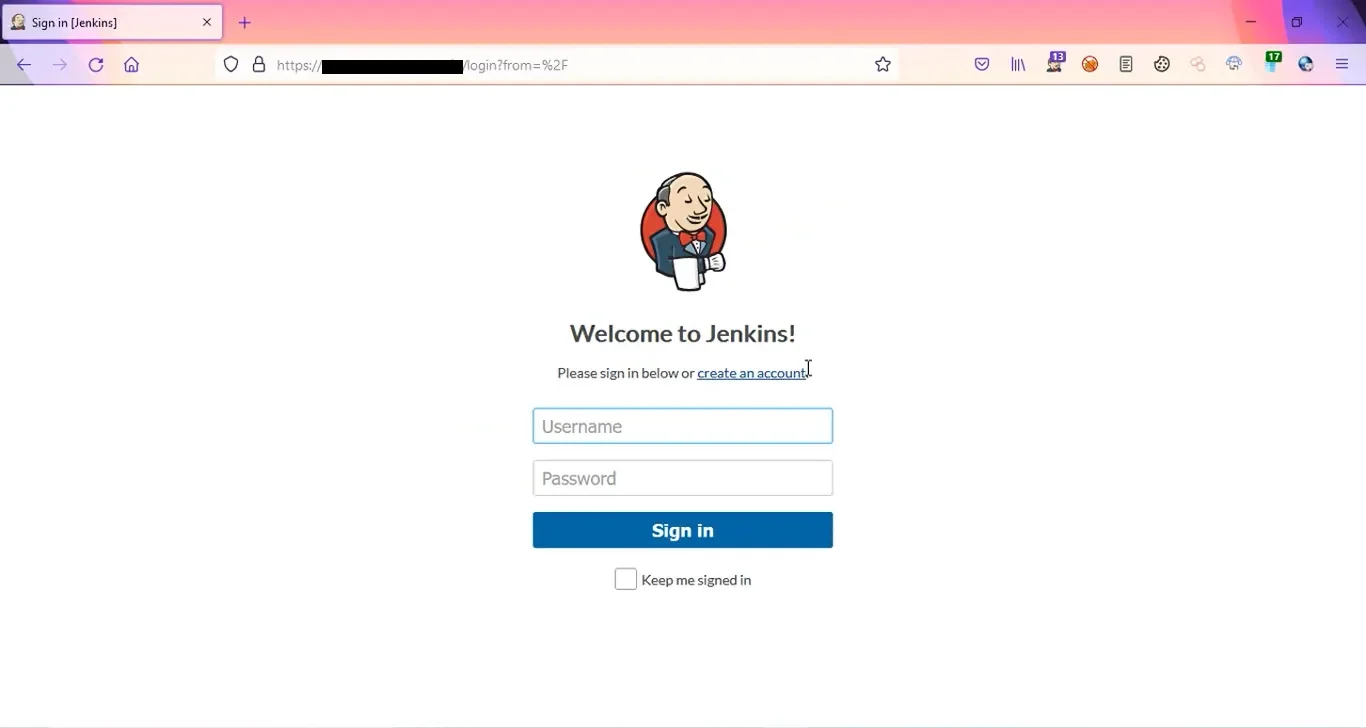
The screenshot shows the Jenkins instance reachable publicly, with the login form in front of it.
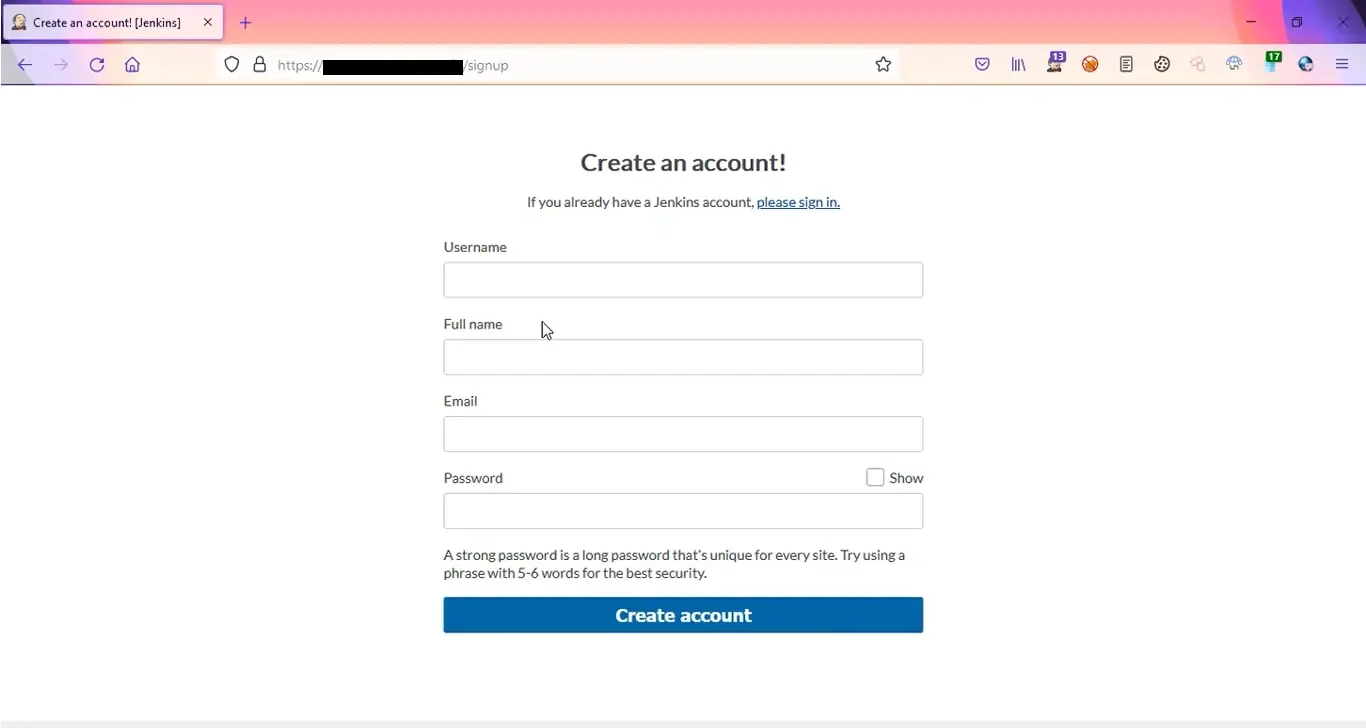
The second screenshot shows the signup option that was available on that login page.
A self-service registration form on an internet-facing CI server is already a design problem: it lets anyone obtain an authenticated session, and the permissions attached to a fresh account are whatever the administrator configured as default. The researcher created an account and logged in. The new user did not have administrator permissions.
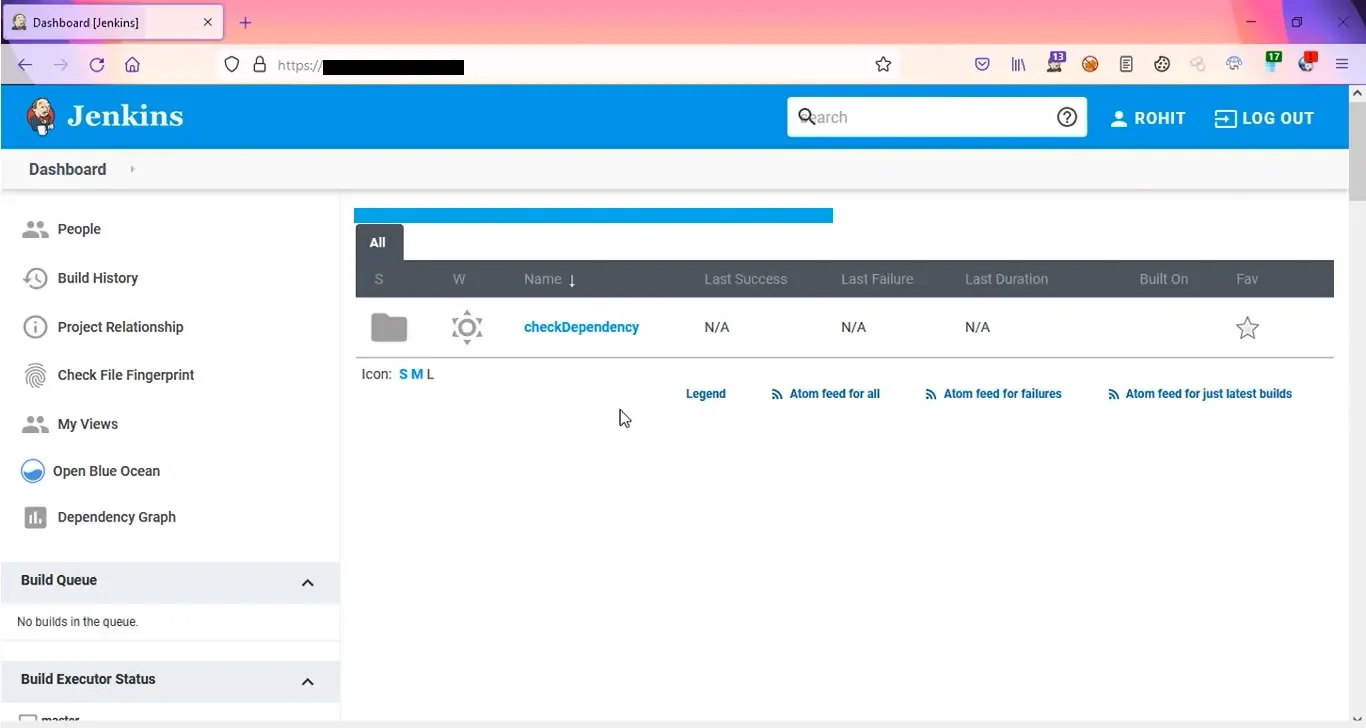
The account was effectively view-only. It could not create pipelines, run builds, manage plugins, manage users or execute OS level commands. Even so, some information was reachable, and one item stood out: the "people" menu.
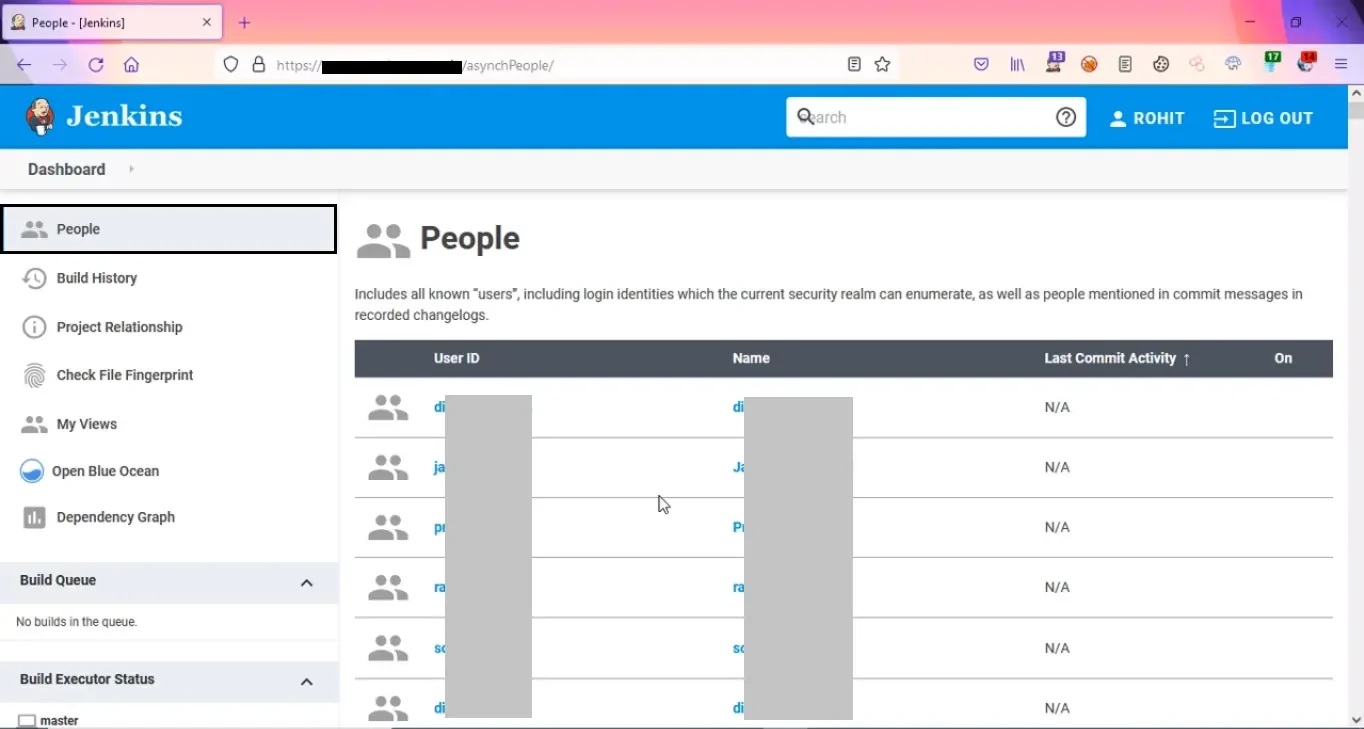
The people menu listed every username that existed on the Jenkins system. On its own this is a low-severity information leak, and the researcher was about to report it. Because Jenkins knowledge was limited, the researcher asked a colleague who had worked with Jenkins and CI/CD integration in a previous job. The colleague explained how Jenkins works but the two did not arrive at anything that would raise the impact of the finding. In the end the colleague suggested brute forcing the passwords, since all existing usernames were now known.
Exploitation
Step 1: Enumerate usernames through the people menu
With the low-privileged account, the people menu was used to dump all usernames. There were 1228 users in the system.
Step 2: Brute force username-as-password
Trying even 10000 common passwords against 1228 users would take a huge amount of time, so the researcher chose a cheaper hypothesis: the password equals the username. For a username xyz, the password tried is xyz. Burp Intruder was used for the attack.
The result was that 277 out of 1228 users had the same password as their username.
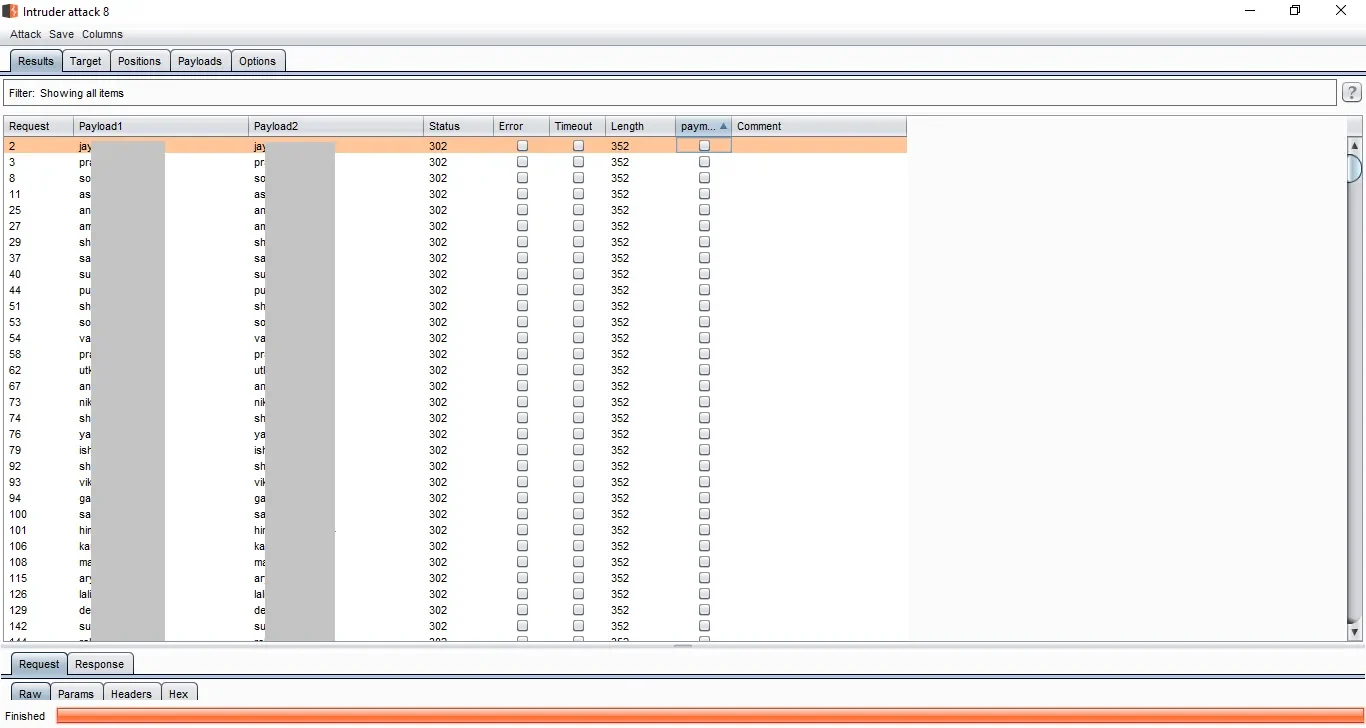
The screenshot shows the Intruder results, with the accounts whose password matched their username.
Step 3: Log in as an administrator
The researcher went back to the login form and entered the very first user shown in the results, using the same string as both username and password. The login worked, and the account happened to have administrative permission.
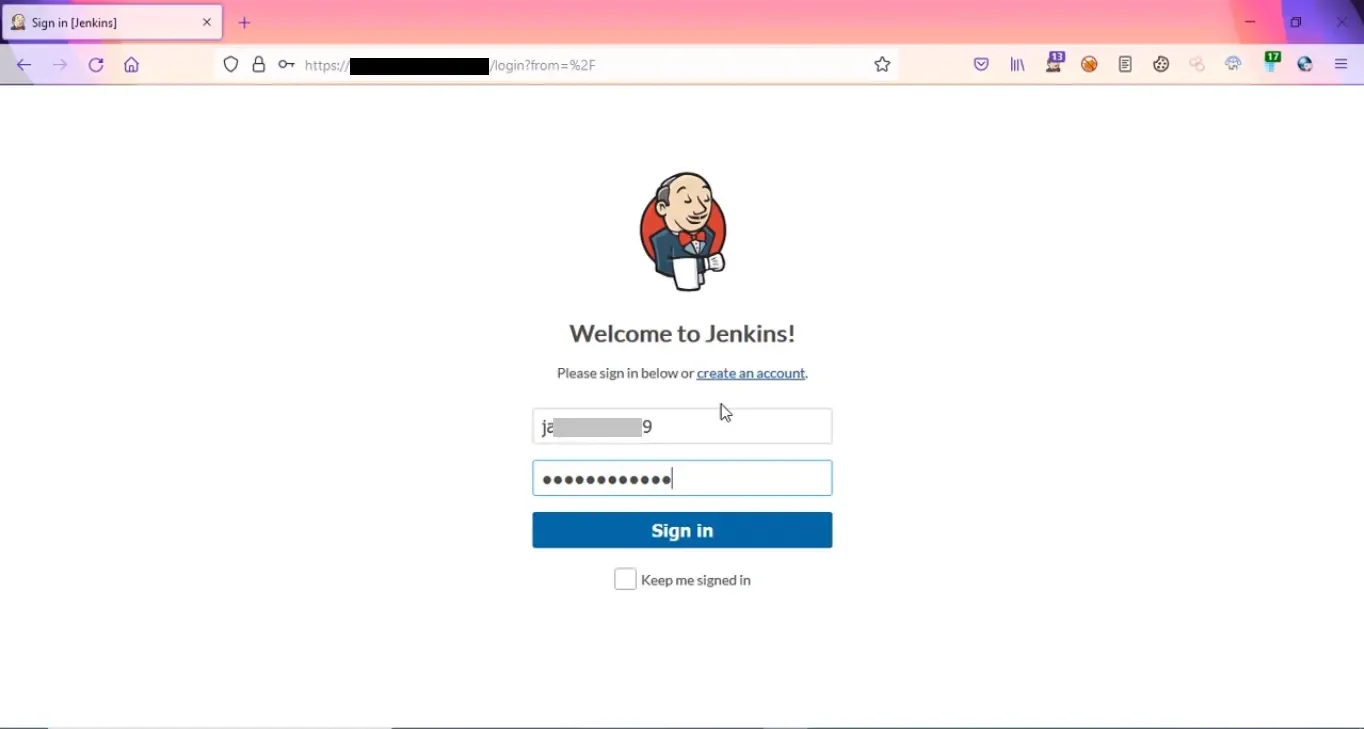
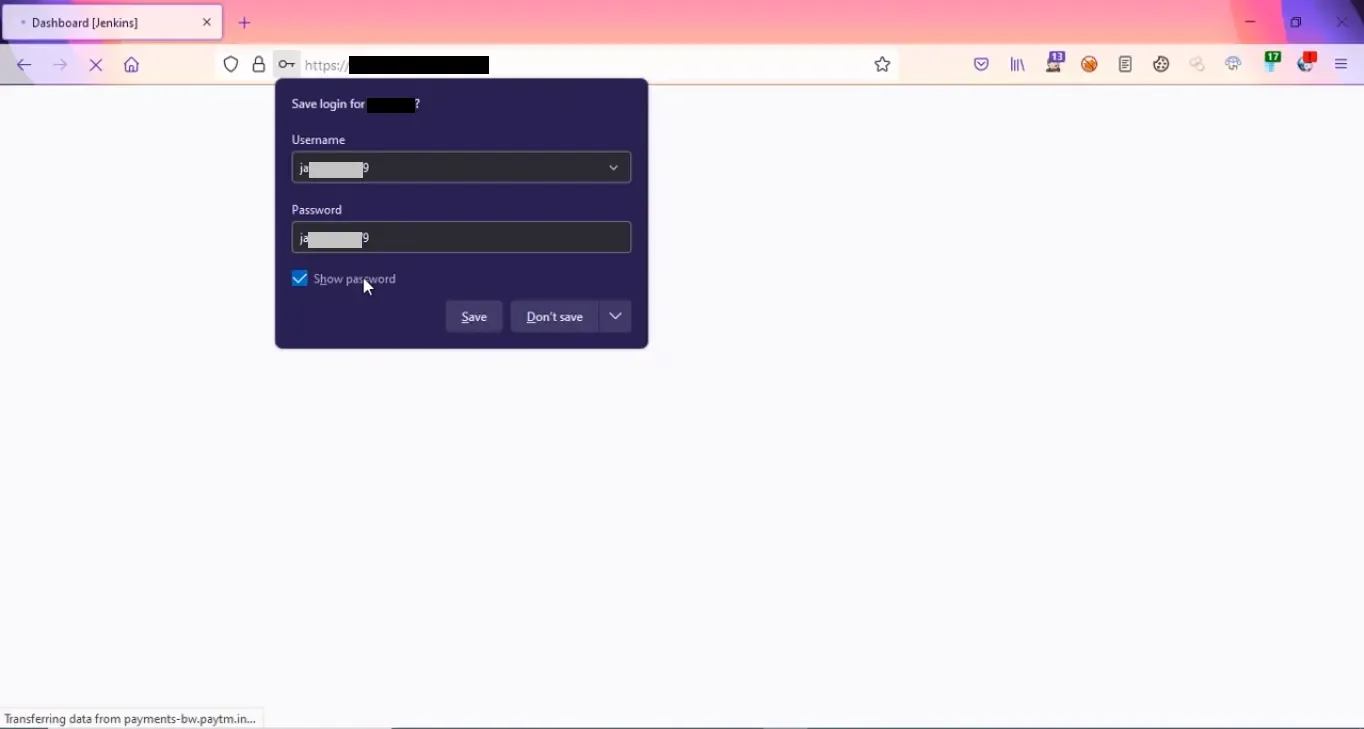
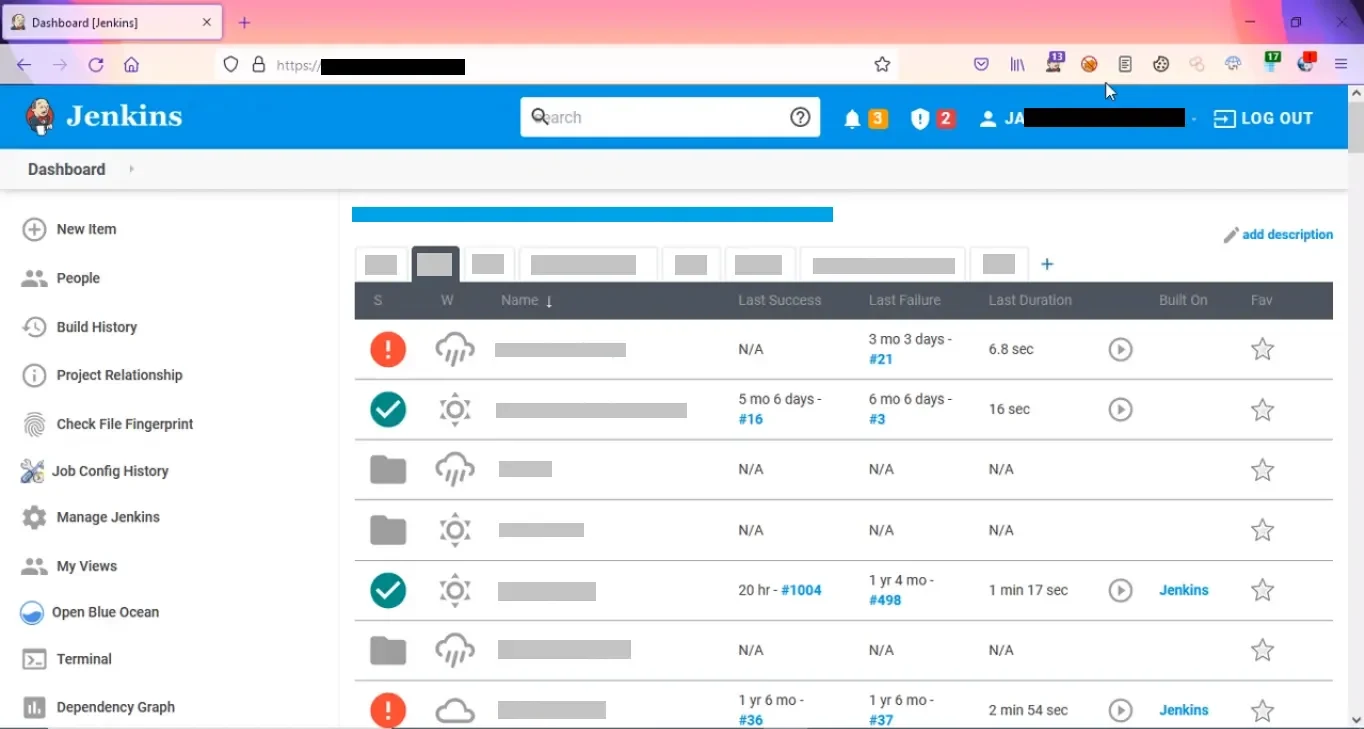
The screenshots show the session after login, with access to all pipelines, plugins and the script console, in short all the administrative functionality Jenkins provides.
Step 4: Try the terminal plugin, and hit a wall
With administrative access, the terminal plugin was installed through the plugin manager. That plugin allows a user to execute OS commands directly from the Jenkins instance. However, running any command, such as pwd or ls or any simple command, returned only 403 Forbidden. The researcher suspected Cloudflare WAF was responsible.
Step 5: Use the Groovy script console on a slave node
Instead of giving up, the researcher used an alternative: the Groovy script console. The node list was opened at:
https://subdomain.example.in/computer/
This page shows all slave nodes connected to the master node.
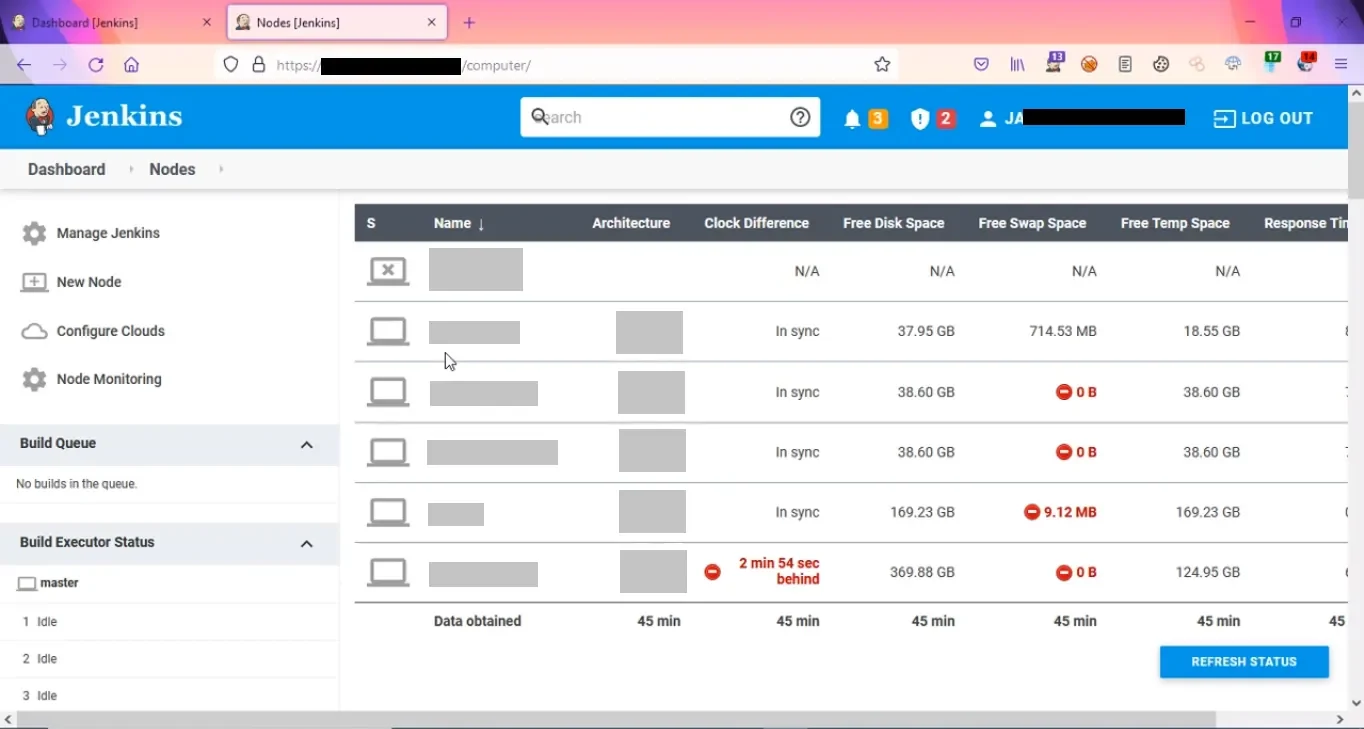
The screenshot shows the node list at /computer/.
One of the slave nodes was selected, and from the left side menu the script console was opened. The following script was entered and the RUN button was clicked:
println "id".execute().text
The script runs the id command through Groovy's String.execute() and prints its output. The id command was executed on the server, confirming remote code execution.
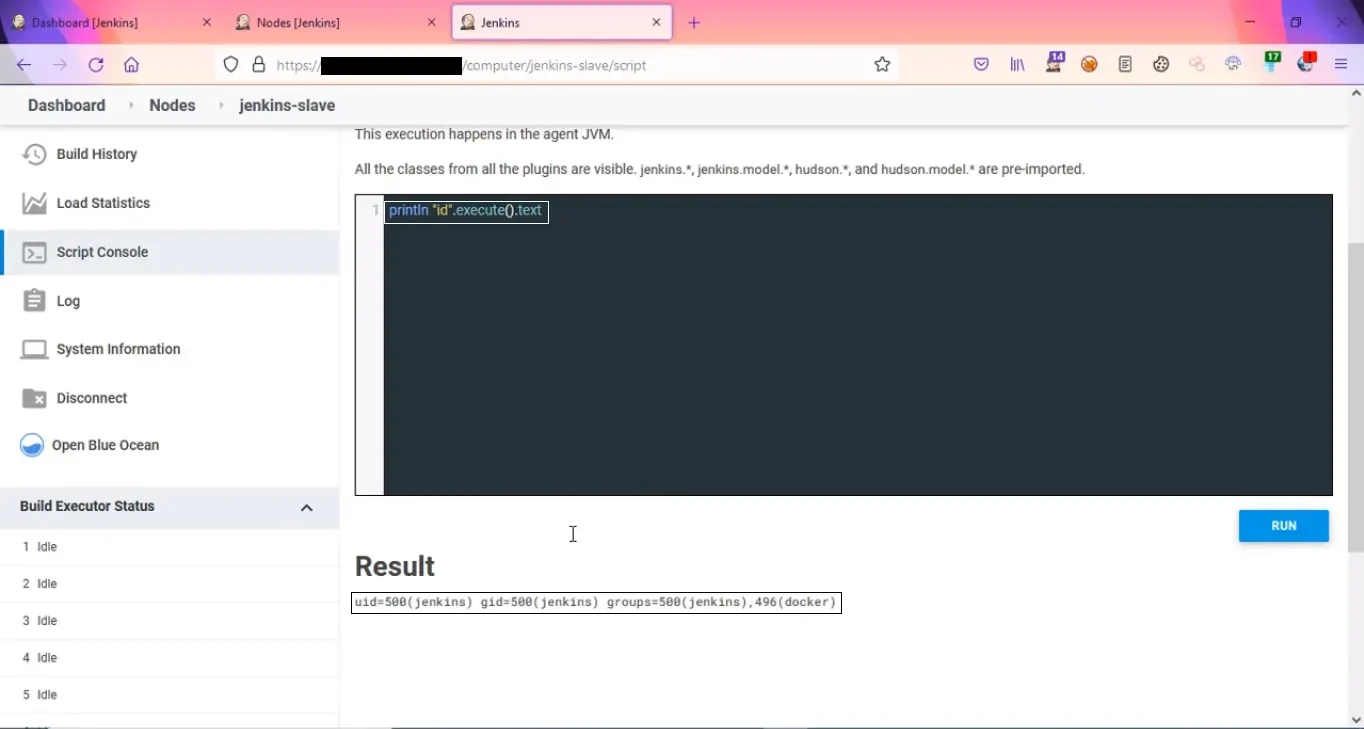
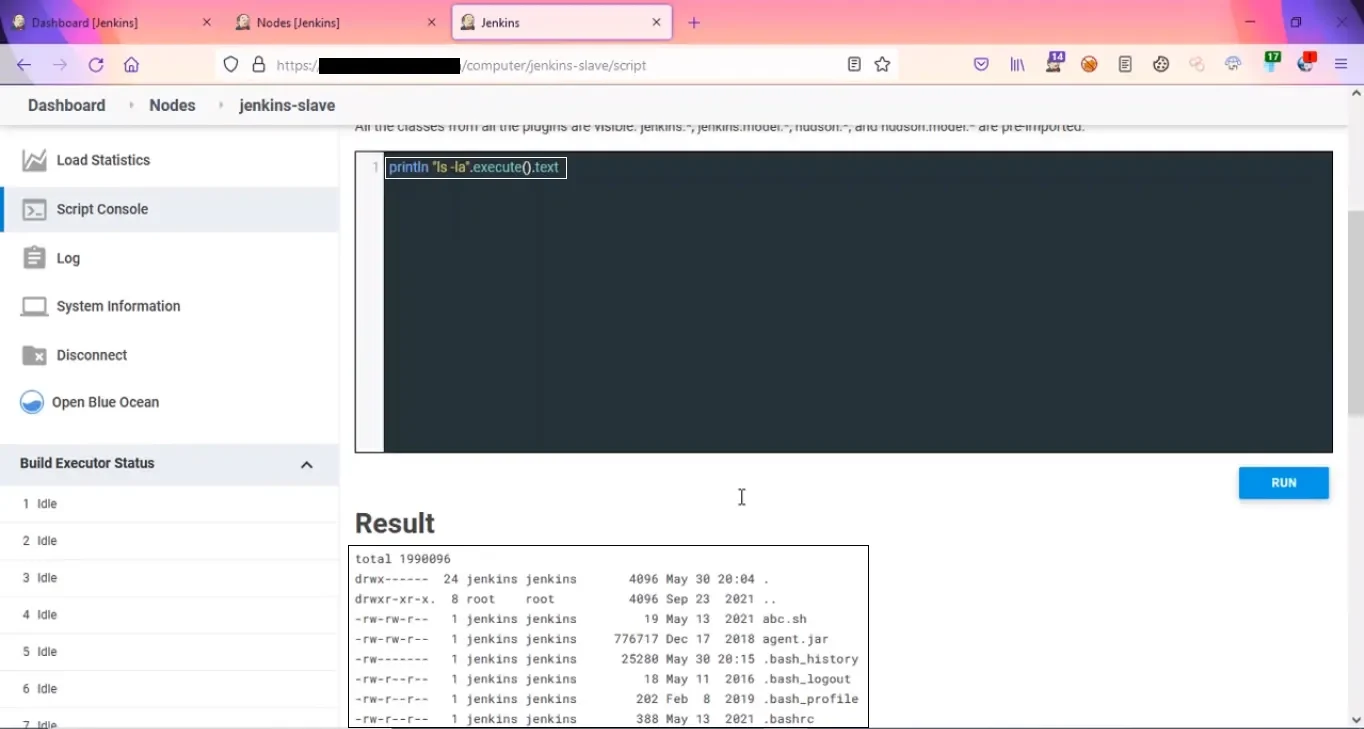
The screenshots show the script console and the output of the id command.
Step 6: Demonstrate impact
To show the impact in the report, scripts were prepared for all nodes to retrieve sensitive information, such as AWS secrets and SSH private keys.
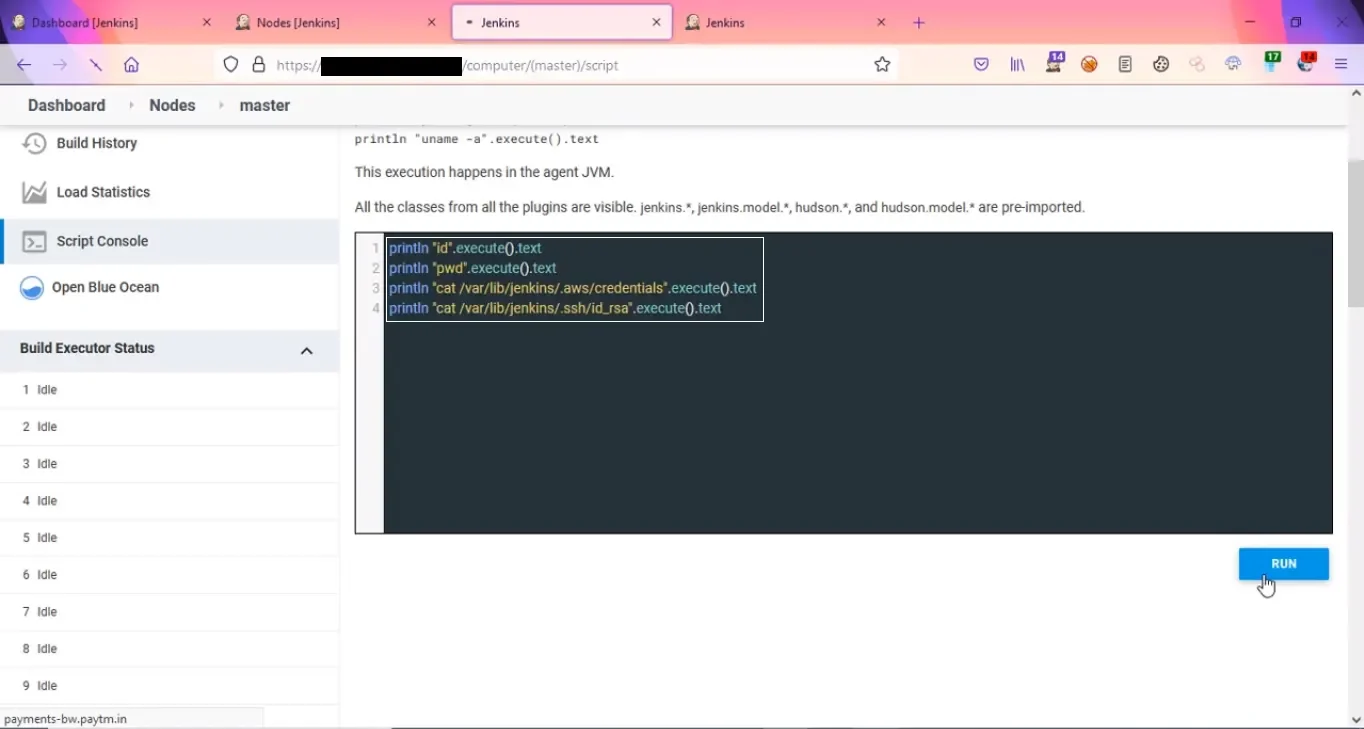
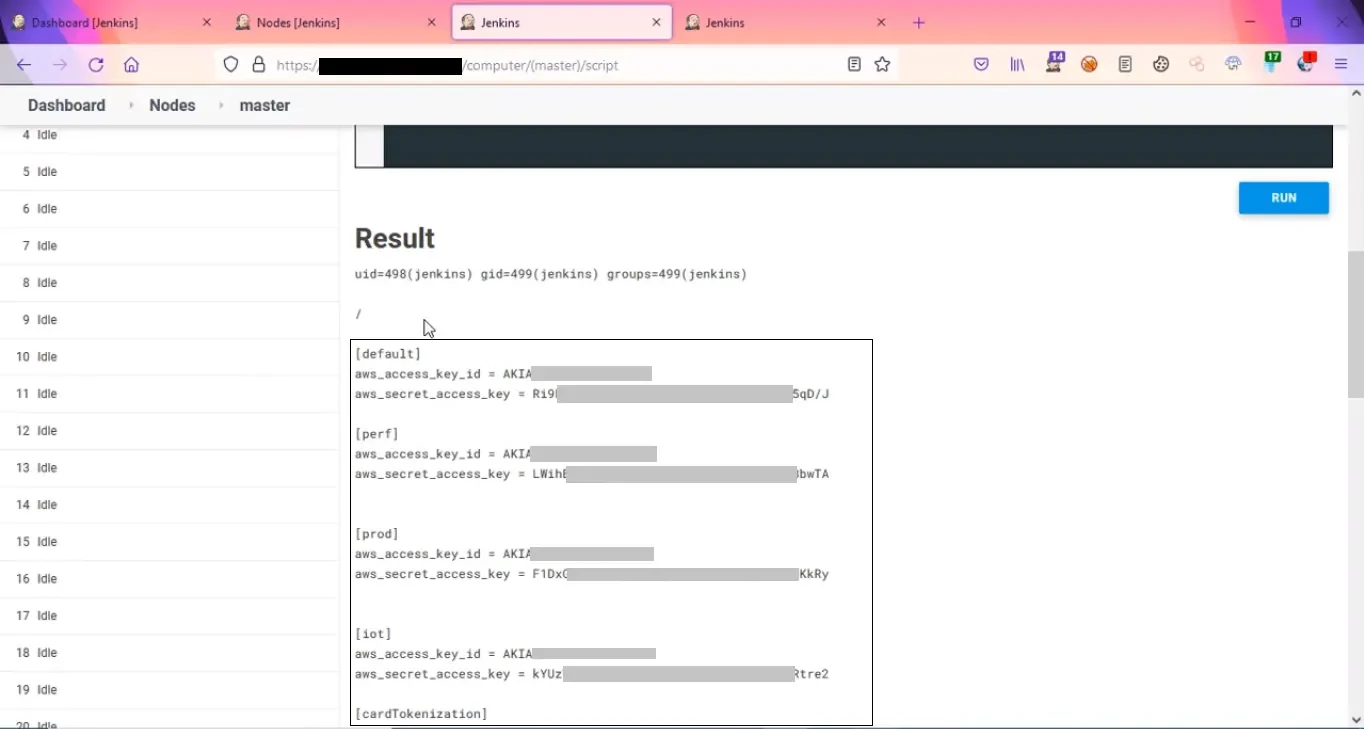
The screenshot shows AWS secrets retrieved from the nodes.
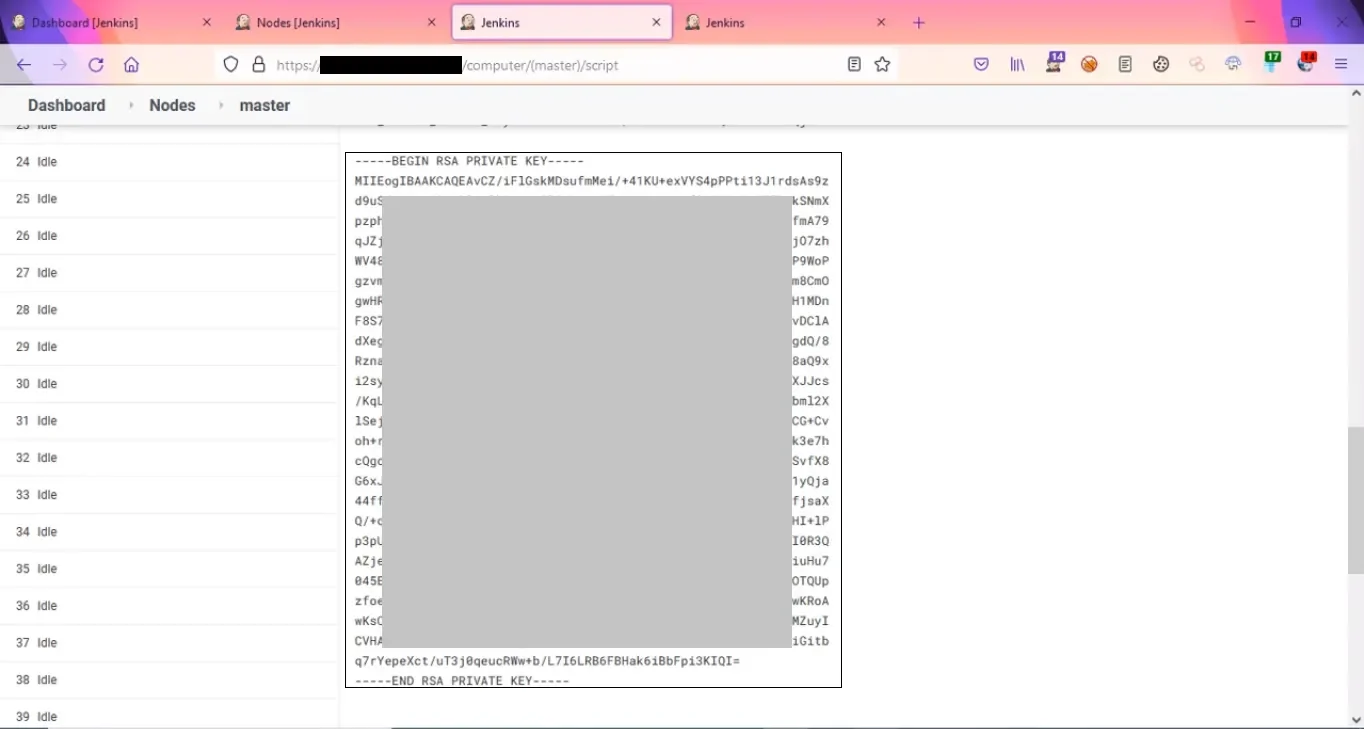
The screenshot shows an SSH private key retrieved from the nodes.
Root cause
The chain rests on several separate weaknesses, each of which enabled the next:
- Self-service signup was enabled on an internet-facing Jenkins instance, so anyone could obtain an authenticated, low-privileged account.
- The people menu was readable by that low-privileged account, exposing the full list of 1228 usernames.
- Password policy and account provisioning allowed 277 users to have a password identical to their username, so a cheap guessing strategy produced valid credentials, including one with administrative rights.
- Administrative access to Jenkins includes the Groovy script console, which by design executes arbitrary code on the node it is opened on. The terminal plugin was blocked, likely by Cloudflare WAF, but the script console provided the same capability through a different path.
In other words, the self-registered account was view-only, the people menu exposed the user directory, and weak credentials turned that foothold into full administrative control. The WAF only blocked one route to command execution, not the underlying capability.
Impact
An unauthenticated attacker could register an account, enumerate every username on the instance, and brute force the accounts whose password matched their username. In this case one of those accounts had administrative permission, which gave access to all pipelines, plugins and the script console. Through the script console, OS commands ran on the server, and the researcher prepared scripts for all nodes to retrieve AWS secrets and SSH private keys. The company fixed the vulnerability within a few days, restricted access to the subdomain and paid the researcher their highest bounty to date.
The final image closes the write-up after the fix and the bounty.
Fix
The company fixed the vulnerability within a few days and restricted access to the subdomain. The report does not describe the individual configuration changes. Based on the chain, the measures that address each link are: disable self-service signup on internet-facing Jenkins, restrict the people menu and user directory to authenticated users who need it, enforce a password policy that prevents username-as-password, and limit who can reach the script console and the nodes behind it.
Variants to test
- Check internet-facing Jenkins instances for an enabled signup form. A positive result is a working self-registered account.
- With any low-privileged account, open the people menu and see whether the full user list is returned. A positive result is a list of usernames you did not already know.
- Try username-as-password against the enumerated users with Burp Intruder. A positive result is one or more valid logins, especially one with administrative rights.
- After login, check whether the plugin manager and script console are reachable. A positive result is the ability to install plugins or open the script console.
- If a terminal plugin is blocked by a WAF, try the Groovy script console on a slave node at
/computer/withprintln "id".execute().text. A positive result is the output ofidfrom the server.
What happened, in plain words
A security researcher was looking for bugs in the websites of a payment service company. The company runs a bug bounty programme, which is a scheme where a company invites outside people to test its systems and pays them for reporting problems they find. The researcher is not allowed to name the company, so throughout the write-up it is called example.in, and the specific machine involved is written as subdomain.example.in.
On one of the company's subdomains, a program called Jenkins was running. Jenkins is a tool that software teams use to build, test and release their software automatically. It is a powerful program: whoever controls it can often run commands on the computers behind it. The researcher found that this Jenkins was reachable from the open internet, that anyone could create an account on it, that a newly created account could see the full list of usernames, that many of those users had chosen their own username as their password, and that one of those accounts had full administrator rights. With administrator rights came a built-in feature that runs code on the server. That last step is called remote code execution, or RCE: running your own commands on someone else's machine over the network.
Each of these problems on its own is not dramatic. Chained together, they let the researcher run commands on the company's servers and read secrets such as cloud access keys and private SSH keys. The company fixed the issue within a few days, closed off access to the subdomain, and paid the researcher their highest bounty to date.
This article walks through the same steps at a beginner's pace. Every technical word is explained the first time it appears, and there is a glossary at the end.
Background: what Jenkins is and why it matters
Jenkins is an open source automation server. "Open source" means the program's source code is public and anyone can use or modify it. "Automation server" means it runs jobs on a schedule or on demand, without a person clicking through each step. Software teams use it to automate the parts of development related to building (turning source code into a runnable program), testing (checking the program behaves correctly) and deploying (putting the program onto the servers that serve it to users). This way of working is called continuous integration and continuous delivery, usually shortened to CI/CD.
A useful everyday comparison: think of Jenkins as a workshop foreman. The foreman holds the keys to the workshop, knows which machines exist, and can tell any of them to start a job. If you can give instructions to the foreman, you can effectively give instructions to every machine in the shop. That is why a Jenkins server exposed to the internet is a serious thing: it is not just a website, it is a control panel for real computers.
In this particular deployment, several features of Jenkins mattered:
- a login form, which asks for a username and password;
- a self-service signup form, which lets a visitor create their own account;
- a "people" menu, which lists the users known to Jenkins;
- a plugin manager, which installs extra features into Jenkins;
- a node list at the path
/computer/, which shows the machines Jenkins can send work to; - a Groovy script console attached to each node, which runs code written in a programming language called Groovy.
A "node" in Jenkins is a machine that actually performs the work. The main Jenkins server is called the master (or controller), and the machines it sends work to are called slaves (or agents). The script console is a page where you type code and Jenkins runs it. That is a legitimate feature for administrators, and it is exactly why administrator access to Jenkins is so sensitive.
Setup: how the researcher started
The researcher had been hunting on this company's bug bounty programme for a while and had already reported a few vulnerabilities. A critical finding, such as LFI, SQLi, SSRF or RCE, was a personal goal. Those four abbreviations are common classes of serious bugs:
- LFI (local file inclusion): tricking a web application into reading files on its own server that it should not show you.
- SQLi (SQL injection): slipping database commands into input fields so the application runs them against its database.
- SSRF (server-side request forgery): making a server send requests on your behalf, often to internal systems you cannot reach directly.
- RCE (remote code execution): getting your own commands to run on someone else's machine.
No accounts, roles or software versions were given in advance. The researcher started with nothing but the scope, which is the list of systems the company allows testing. In this programme, all subdomains of example.in were in scope.
A subdomain is a prefix on a domain name. If the company owns example.in, then shop.example.in and mail.example.in are subdomains. Companies often have many, and forgotten ones are a classic place to find problems.
Reconnaissance, or recon, is the information-gathering phase before any testing. The researcher used these tools:
- subfinder, assetfinder and chaos to gather subdomains;
- httpx to filter out live subdomains;
- Burp Intruder for the password brute force later on.
Burp is short for Burp Suite, a tool that sits between your browser and a website so you can see and modify the requests going back and forth. Intruder is the part of Burp that sends the same request many times with different values filled in, which is how password guessing is automated.
The output of the different enumeration tools was combined into a single file, and the live hosts were reviewed by hand. One of them turned out to run Jenkins.
Finding it: an open door on a Jenkins server
While going through the file of live subdomains, the researcher noticed that one subdomain was running a Jenkins instance. Opening it presented a login prompt, and, unexpectedly, a signup option was enabled.
The screenshot shows the Jenkins instance reachable publicly, with the login form in front of it.
The second screenshot shows the signup option that was available on that login page.
A self-service registration form on an internet-facing CI server is already a design problem. It lets anyone obtain an authenticated session, meaning a logged-in state the server recognises. The permissions attached to a fresh account are whatever the administrator configured as the default.
A quick comparison: a self-service signup on a Jenkins server is like a factory that lets any visitor walk in and pick up a visitor badge. The badge may not open every door, but it gets you inside, and it tells you the layout of the building.
The researcher created an account and logged in. The new user did not have administrator permissions.
The account was effectively view-only. It could not create pipelines, run builds, manage plugins, manage users or execute OS level commands. A pipeline is a defined sequence of build and test steps. OS level commands are instructions to the operating system itself, such as listing files or showing which user you are. Even so, some information was reachable, and one item stood out: the "people" menu.
The people menu listed every username that existed on the Jenkins system. On its own this is a low-severity information leak: it does not let anyone in, but it hands them a list of names to aim at. The researcher was about to report it. Because Jenkins knowledge was limited, the researcher asked a colleague who had worked with Jenkins and CI/CD integration in a previous job. The colleague explained how Jenkins works, but the two did not arrive at anything that would raise the impact of the finding. In the end the colleague suggested brute forcing the passwords, since all existing usernames were now known.
Brute forcing means trying many candidate values until one works. It is the digital equivalent of trying every key on a keyring in a lock, one after another, very quickly.
Exploitation
Step 1: Enumerate usernames through the people menu
With the low-privileged account, the people menu was used to dump all usernames. There were 1228 users in the system.
Enumerating means listing things out systematically. Here it simply meant copying every name the menu displayed into a file.
Step 2: Brute force username-as-password
Trying even 10000 common passwords against 1228 users would take a huge amount of time, so the researcher chose a cheaper hypothesis: the password equals the username. For a username xyz, the password tried is xyz. Burp Intruder was used for the attack.
Why is this cheaper? A normal brute force multiplies the number of users by the number of passwords. 1228 users times 10000 passwords is over twelve million attempts. If instead you only try one guess per user, you make 1228 attempts, which is quick. The trade-off is that you only catch the users who made that specific mistake, but that mistake turns out to be common.
The result was that 277 out of 1228 users had the same password as their username.
The screenshot shows the Intruder results, with the accounts whose password matched their username.
Step 3: Log in as an administrator
The researcher went back to the login form and entered the very first user shown in the results, using the same string as both username and password. The login worked, and the account happened to have administrative permission.
The screenshots show the session after login, with access to all pipelines, plugins and the script console, in short all the administrative functionality Jenkins provides.
A session is the period during which the server remembers that you are logged in. It usually does this by giving your browser a cookie, which is a small piece of data the browser stores and sends back with every request. Think of it as a wristband you get at an event: you show it once at the door, and after that staff recognise you without asking for your ticket again.
Step 4: Try the terminal plugin, and hit a wall
With administrative access, the terminal plugin was installed through the plugin manager. A plugin is an add-on that extends what Jenkins can do. That plugin allows a user to execute OS commands directly from the Jenkins instance. However, running any command, such as pwd or ls or any simple command, returned only 403 Forbidden. The researcher suspected Cloudflare WAF was responsible.
pwd prints the current directory, and ls lists the files in it. Both are ordinary commands on Linux and similar systems. A 403 Forbidden is an HTTP status code, meaning the server understood the request but refused to carry it out. Cloudflare is a company that sits in front of websites and filters traffic; a WAF, or web application firewall, is the filtering component that blocks requests matching patterns it considers dangerous.
A comparison: the terminal plugin was like a door that the building's security guard (the WAF) had been told to keep shut. The researcher needed a different door to the same room.
Step 5: Use the Groovy script console on a slave node
Instead of giving up, the researcher used an alternative: the Groovy script console. Groovy is a programming language that runs on the Java platform, and Jenkins is written in Java, so Jenkins can run Groovy code directly. The node list was opened at:
https://subdomain.example.in/computer/
This page shows all slave nodes connected to the master node.
The screenshot shows the node list at /computer/.
One of the slave nodes was selected, and from the left side menu the script console was opened. The following script was entered and the RUN button was clicked:
println "id".execute().text
Line by line, in plain words:
"id"is a piece of text, the word id in quotes. It is the name of a standard command that reports which user the system is running as, and which groups that user belongs to..execute()tells Groovy to run that text as an operating system command. This is a built-in convenience method on strings in Groovy..textreads whatever the command printed.printlnprints that result to the screen, so the researcher can see it in the console output.
In short: the script asks the server to run the id command and show the answer. The id command was executed on the server, confirming remote code execution.
The screenshots show the script console and the output of the id command.
Why does this work? The script console is designed to run code, and code can do anything the Jenkins process is allowed to do, including starting other programs. The WAF had blocked one route to command execution, the terminal plugin, but not the underlying capability. Blocking one door does not remove the room behind it.
Step 6: Demonstrate impact
To show the impact in the report, scripts were prepared for all nodes to retrieve sensitive information, such as AWS secrets and SSH private keys.
AWS is Amazon Web Services, a cloud platform. AWS secrets are credentials, such as access keys, that let a program talk to AWS on the company's behalf. An SSH private key is the secret half of a key pair used to log in to servers securely without a password. Both are exactly the kind of thing an attacker wants, because they can be used to reach further systems.
The screenshot shows AWS secrets retrieved from the nodes.
The screenshot shows an SSH private key retrieved from the nodes.
Root cause
The chain rests on several separate weaknesses, each of which enabled the next:
- Self-service signup was enabled on an internet-facing Jenkins instance, so anyone could obtain an authenticated, low-privileged account.
- The people menu was readable by that low-privileged account, exposing the full list of 1228 usernames.
- Password policy and account provisioning allowed 277 users to have a password identical to their username, so a cheap guessing strategy produced valid credentials, including one with administrative rights.
- Administrative access to Jenkins includes the Groovy script console, which by design executes arbitrary code on the node it is opened on. The terminal plugin was blocked, likely by Cloudflare WAF, but the script console provided the same capability through a different path.
In other words, the self-registered account was view-only, the people menu exposed the user directory, and weak credentials turned that foothold into full administrative control. The WAF only blocked one route to command execution, not the underlying capability.
A foothold is a small amount of access you have gained and can build on. The view-only account was the foothold; the administrator account was the full control.
Impact
An unauthenticated attacker, meaning someone with no account at all, could register an account, enumerate every username on the instance, and brute force the accounts whose password matched their username. In this case one of those accounts had administrative permission, which gave access to all pipelines, plugins and the script console. Through the script console, OS commands ran on the server, and the researcher prepared scripts for all nodes to retrieve AWS secrets and SSH private keys. The company fixed the vulnerability within a few days, restricted access to the subdomain and paid the researcher their highest bounty to date.
The final image closes the write-up after the fix and the bounty.
Fix
The company fixed the vulnerability within a few days and restricted access to the subdomain. The report does not describe the individual configuration changes. Based on the chain, the measures that address each link are: disable self-service signup on internet-facing Jenkins, restrict the people menu and user directory to authenticated users who need it, enforce a password policy that prevents username-as-password, and limit who can reach the script console and the nodes behind it.
Variants to test
If you want to look for the same pattern on systems you are authorised to test:
- Check internet-facing Jenkins instances for an enabled signup form. A positive result is a working self-registered account.
- With any low-privileged account, open the people menu and see whether the full user list is returned. A positive result is a list of usernames you did not already know.
- Try username-as-password against the enumerated users with Burp Intruder. A positive result is one or more valid logins, especially one with administrative rights.
- After login, check whether the plugin manager and script console are reachable. A positive result is the ability to install plugins or open the script console.
- If a terminal plugin is blocked by a WAF, try the Groovy script console on a slave node at
/computer/withprintln "id".execute().text. A positive result is the output ofidfrom the server.
Glossary
- 403 Forbidden: an HTTP status code meaning the server understood the request but refused to carry it out.
- Administrator: a user account with full rights to change settings, manage other users and run anything the system allows.
- AWS: Amazon Web Services, a cloud platform for running servers and services.
- AWS secrets: credentials, such as access keys, that let a program use AWS on an organisation's behalf.
- Brute force: trying many candidate values, such as passwords, until one works.
- Bug bounty programme: a scheme where an organisation invites outside people to test its systems and pays them for reporting problems.
- Burp Intruder: the part of Burp Suite that sends the same request many times with different values filled in, used to automate guessing.
- Burp Suite: a tool that sits between a browser and a website so requests can be seen and modified.
- CI/CD: continuous integration and continuous delivery, the practice of building, testing and releasing software automatically.
- Cloudflare: a company that sits in front of websites and filters their traffic.
- Cookie: a small piece of data a browser stores for a site and sends back with each request, often used to remember a login.
- Enumeration: listing things out systematically, such as every username a system knows.
- Foothold: a small amount of access gained on a system that can be built on.
- Groovy: a programming language that runs on the Java platform; Jenkins can run Groovy code directly.
- Groovy script console: a Jenkins page where an administrator can type Groovy code and have it run on a node.
- HTTP status code: a number a web server returns to describe the outcome of a request, such as 403 for forbidden.
id: a standard operating system command that reports which user the system is running as and which groups that user belongs to.- Information leak: a flaw that reveals data, such as a list of usernames, without granting access.
- Jenkins: an open source automation server used to build, test and deploy software.
- LFI: local file inclusion, tricking an application into reading files on its own server that it should not show.
ls: a standard operating system command that lists files in a directory.- Master and slave nodes: in Jenkins, the main server is the master (or controller) and the machines it sends work to are slaves (or agents).
- Node: a machine that performs work for Jenkins.
- OS level command: an instruction to the operating system itself, such as listing files or showing the current user.
- Pipeline: a defined sequence of build and test steps in Jenkins.
- Plugin: an add-on that extends what a program such as Jenkins can do.
- Plugin manager: the Jenkins feature for installing and managing plugins.
pwd: a standard operating system command that prints the current directory.- RCE: remote code execution, getting your own commands to run on someone else's machine over the network.
- Reconnaissance (recon): the information-gathering phase before testing, such as finding subdomains.
- Scope: the list of systems an organisation allows to be tested.
- Self-service signup: a form that lets a visitor create their own account without an administrator's involvement.
- Session: the period during which a server remembers that you are logged in.
- SSH private key: the secret half of a key pair used to log in to servers securely without a password.
- SSRF: server-side request forgery, making a server send requests on your behalf, often to internal systems.
- Subdomain: a prefix on a domain name, such as shop in shop.example.in.
- Terminal plugin: a Jenkins add-on that lets a user run operating system commands from within Jenkins.
- WAF: web application firewall, a filter that blocks requests matching patterns it considers dangerous.



