Exploiting File Upload Functionality in Unique Way.
The careers page file upload accepted any file type and stored files in the same CloudFront root folder as user profile pictures and product images, without renaming them. An attacker could upload a file with the same name as a victim's profile picture or a product image, overwriting it and changing the displayed image.
 Published on rohit-soni.medium.com
Observe the behavior of your target. You may end up with a unique and cool findings.
The full write-up lives on its author's site
It belongs to its author, so we link to it rather than copy it. The other two tabs are our own rewrites, checked against it.
Context
This write-up describes a bug found during an internal pentesting project on an application the author is not allowed to name, so it is referred to throughout as target.com. The application has two features that matter here:
- A careers page with an upload functionality where a user is supposed to submit a CV in PDF or DOC format.
- A logged-in area with user profiles, each with a profile picture, and a shop where products have pictures.
Both the CVs uploaded through the careers page and the profile and product pictures are stored in the same Amazon CloudFront distribution. The author includes a short primer on CloudFront: it is a web service that speeds up distribution of static and dynamic web content such as .html, .css, .js and image files, delivering content through a worldwide network of data centres called edge locations, routing each request to the edge location with the lowest latency. In short, a content distribution system used to give high performance when sharing web content.
The bug allows an attacker to change any user's profile picture, and, as the author later shows, the picture of any product in the shop.
Setup
- The tester had an account on the application and could log in and browse user profiles and the shop.
- No special tooling is described. The work was done with a browser: copying image locations, opening URLs in new tabs, and using incognito mode to bypass browser caching.
- The only precondition described is access to the careers page upload form.
Finding it
While roaming around the application, the author found the upload functionality on the careers page, where a user can upload a CV in PDF or DOC format.
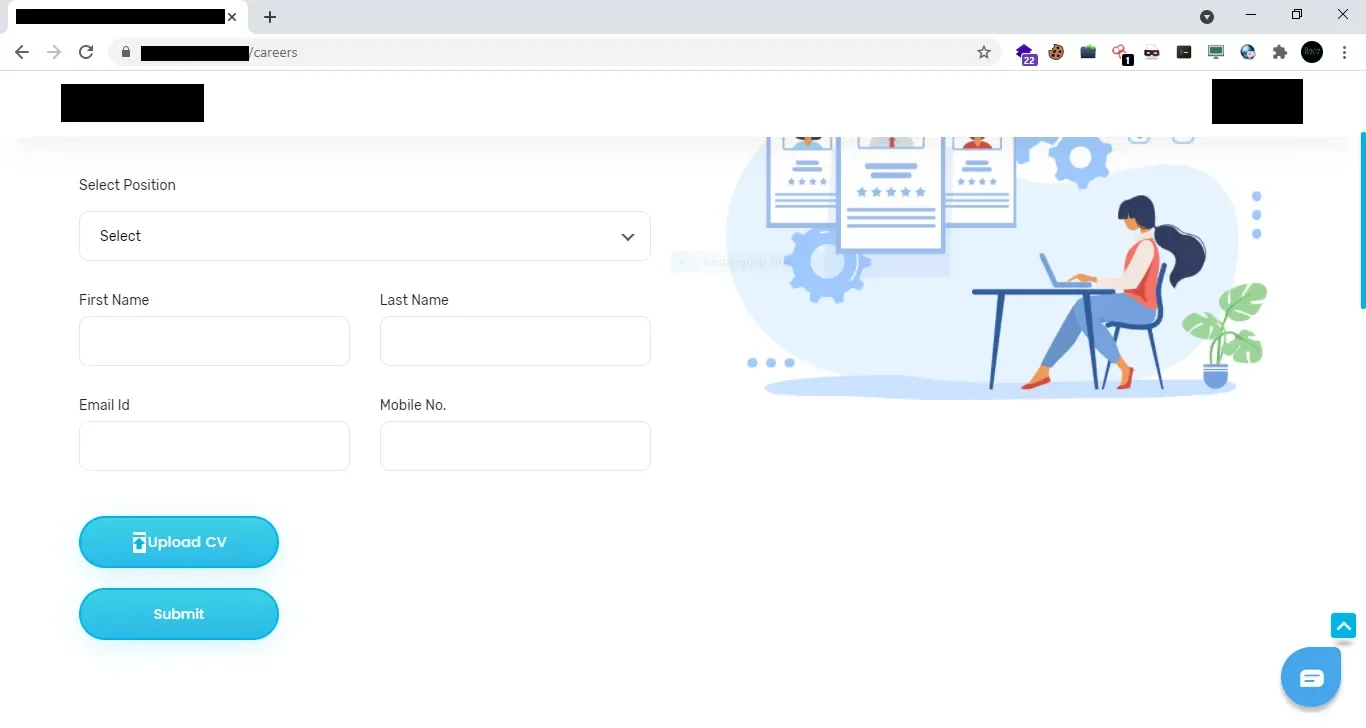
The careers page with the CV upload form.
The first test was a file-type bypass. The author uploaded a file with an .html extension containing a simple XSS payload:
<script>alert(1)</script>
The file was accepted. The author then located the URL where it had been stored and visited it. Instead of executing the payload, the browser downloaded the HTML file. The author also noticed that files uploaded through the careers page are stored in CloudFront.
The uploaded payload ended up at a URL of this shape:
https://something.cloudfront.net/payload.html
After several failed attempts to get the XSS payload to execute, the author left the upload functionality alone.
Later, logged in, the author visited a random user's profile with the intention of looking for directory listing, described as a low-hanging fruit that can sometimes expose juicy information. To do that, the author right-clicked the profile picture, copied the image location and opened it in a new tab. The copied location looked like this:
https://something.cloudfront.net/randomnumber_IMG_randomnumber.jpeg
This is the key observation: profile pictures of users are stored in the root folder of the same CloudFront storage that receives the careers page uploads.
The author's summary of observations at this point:
- The upload functionality on the careers page should accept only PDF and DOC files, but it accepts any type of file.
- Profile pictures of users and CVs uploaded through the careers page are stored in the root folder of the same CloudFront storage.
- The file name of a file uploaded through the careers page is not renamed before upload, and the name stays the same.
Exploitation
Step 1: Copy the target image name
Visit any user's profile and copy the profile picture location. Paste it into any text editor and copy the image file name. In the author's case this was randomnumber_IMG_randomnumber.jpeg.
Step 2: Prepare a replacement file with the same name
The author downloaded a random picture from Google and renamed it to randomnumber_IMG_randomnumber.jpeg, matching the name of the chosen user's profile picture.
Step 3: Upload it through the careers page
The renamed picture was uploaded using the upload functionality available on the careers page.
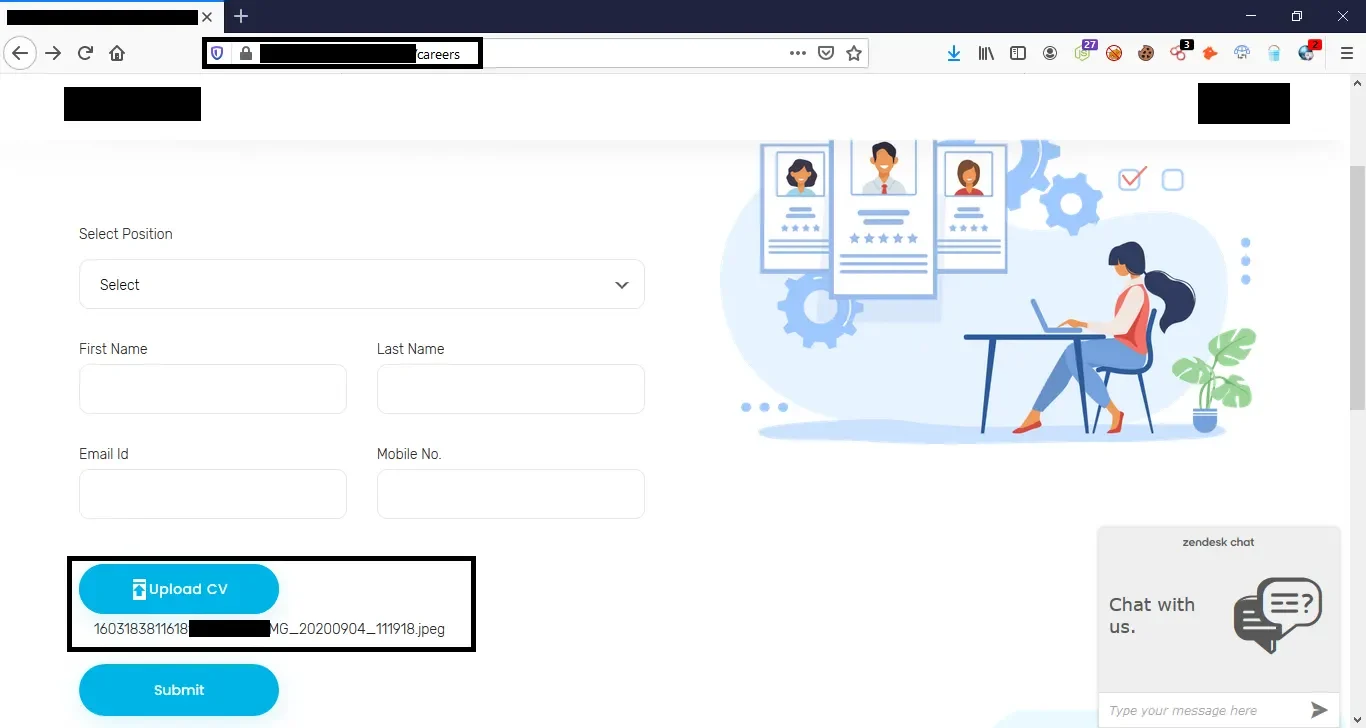
The uploaded picture, carrying the same name as the target user's profile picture.
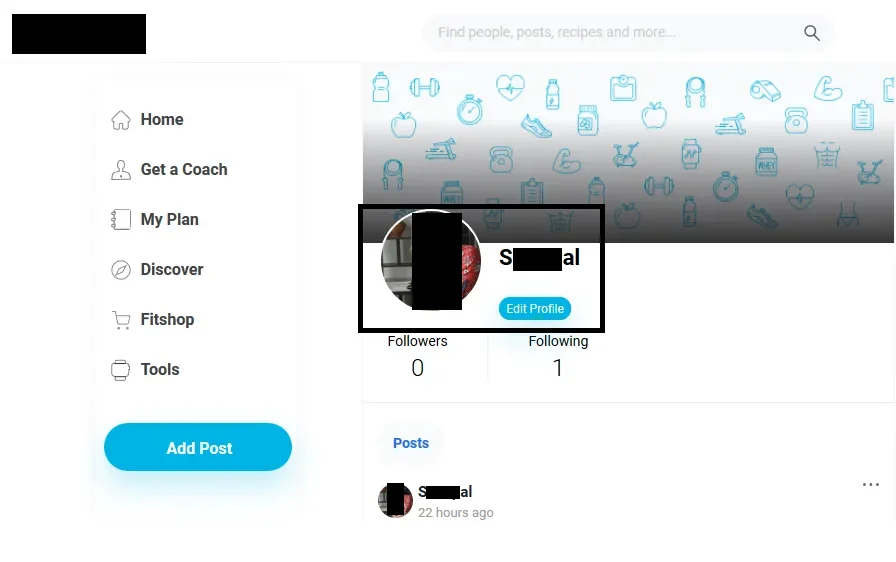
The profile of the random user before the upload.
Step 4: Check the result, accounting for caching
On first visit, the profile picture of the target user had not changed. The author realised the web page was cached in the browser, opened the site in incognito mode and visited the same user's profile again. The profile picture had been replaced with the uploaded picture.
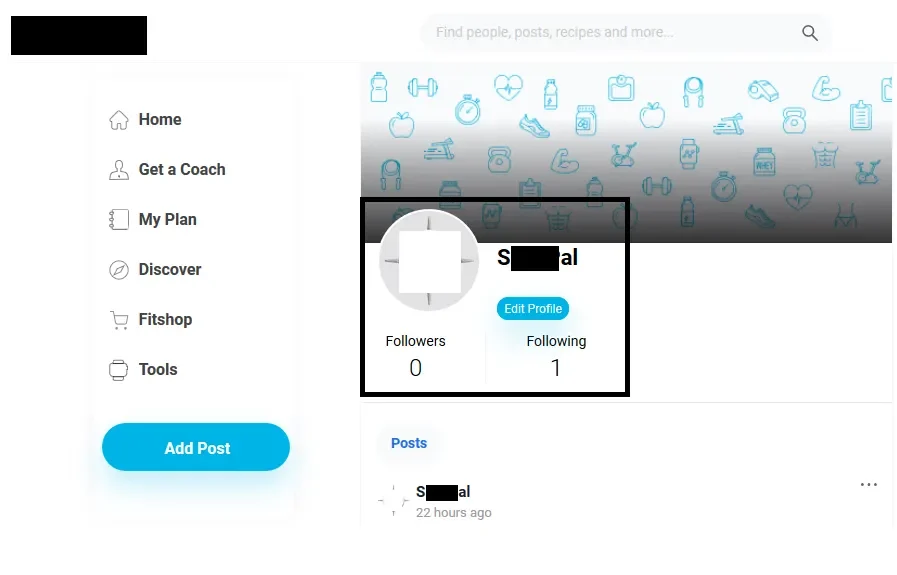
The same user's profile after the upload, showing the attacker's picture in place of the original.
Step 5: Repeat against product pictures
The application also has a shop. Pictures of all products were stored in the root folder of the same CloudFront distribution. By repeating the same steps, the author was able to change the picture of any product available in the shop.
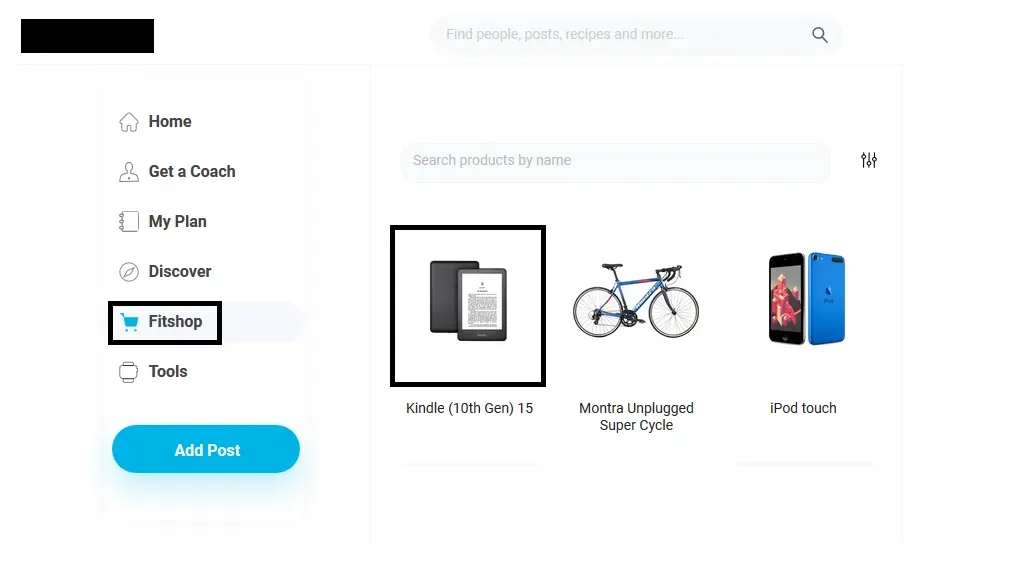
A product picture before the change.
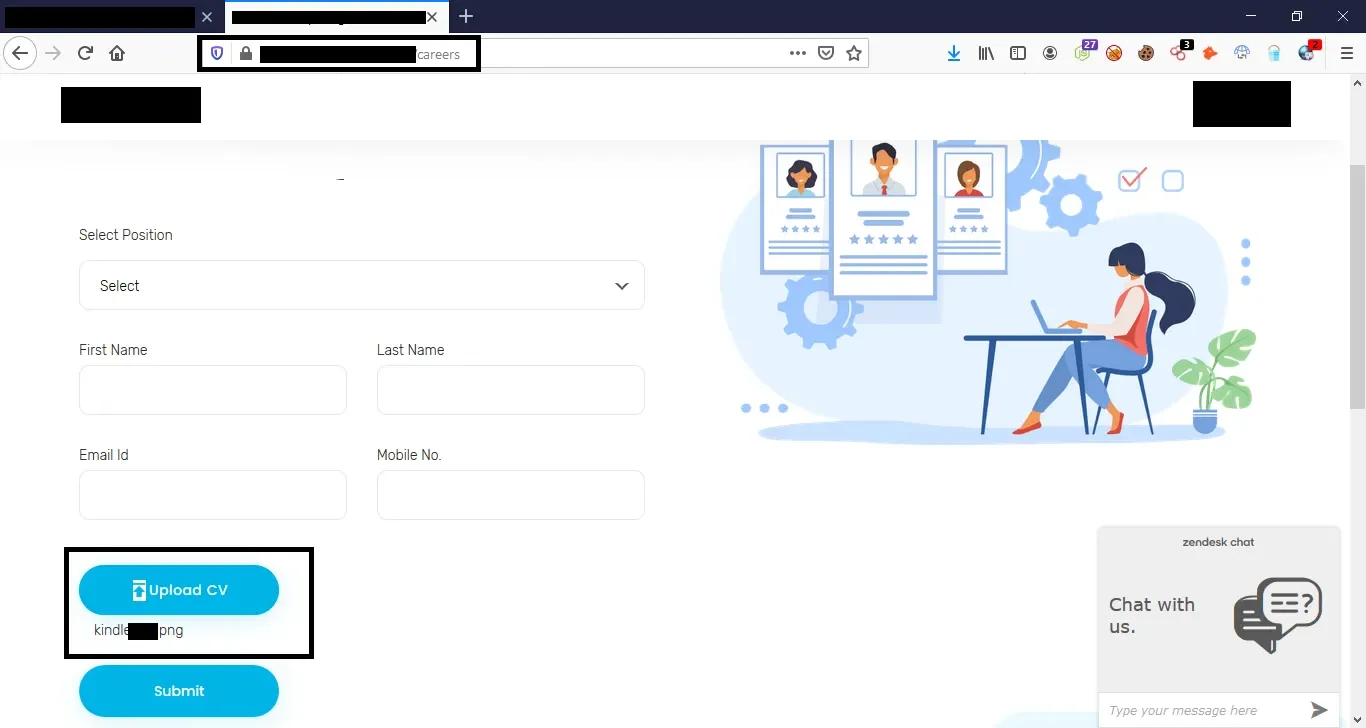
Uploading a picture with the same name as the product image name.
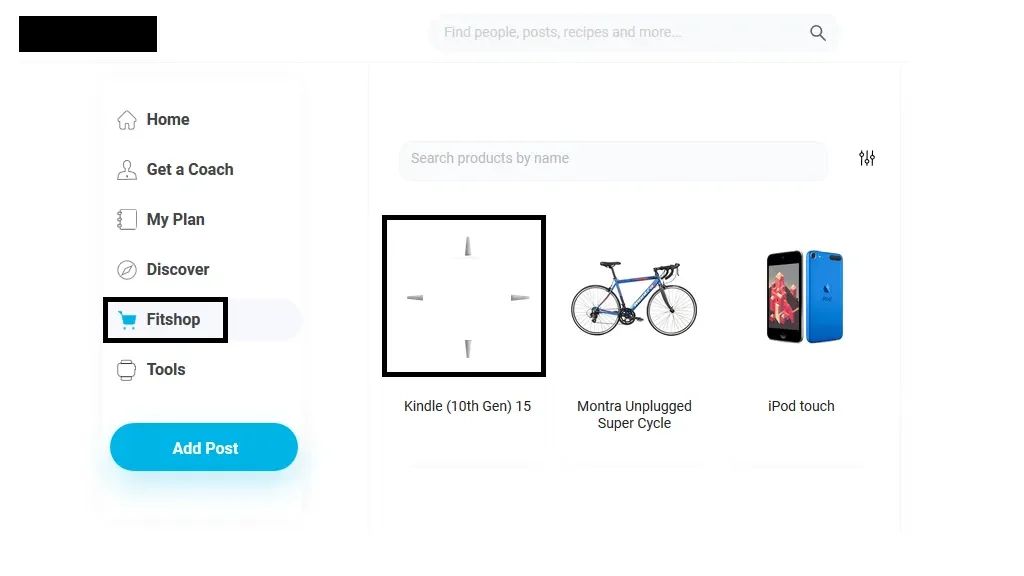
The product picture after the change.
Steps to reproduce, as given in the report
- Paste it into any text editor and copy the image name.
- Rename the picture you want to use to the copied image name.
- Go to
https://target.com/careersand upload the picture. - Refresh the target user's profile, or open it in incognito mode, and observe that the profile picture has been changed to the picture of your choosing.
Root cause
The application does not check for a valid file type, and it does not check whether a file with the same name already exists in CloudFront storage. It simply overwrites it. Because the careers upload form writes into the same root folder as the profile and product pictures, and because the uploaded file keeps its original name, an attacker can choose a name that collides with an existing image and replace it.
The XSS attempt failed because the stored HTML was served as a download rather than rendered, so the file-type bypass alone did not give script execution. The overwrite behaviour is what turned the missing validation into a real impact.
Impact
An attacker with access to the careers page upload form can replace the profile picture of any user whose image name they know, and the picture of any product in the shop. The image name is disclosed simply by viewing a profile and copying the image location. The change is visible once the victim's browser cache is bypassed, for example in incognito mode. The author does not describe any further impact beyond image replacement.
Fix
The report does not state what was changed. Based on the root cause, the fixes would be to enforce the intended file types on the server side, to rename uploaded files to server-generated names so they cannot collide with existing objects, and to store careers uploads in a separate location from profile and product images so that one upload path cannot overwrite the other's objects.
Variants to test
- Upload forms that accept any extension: try an
.htmlfile with a script payload and check whether the stored URL renders it or forces a download. Rendering means stored XSS; a download means the type check is missing but not directly exploitable. - Shared storage between features: compare the host and path of an uploaded CV with the host and path of a profile picture. If both resolve to the same bucket or distribution root, name collisions are possible.
- Predictable or preserved file names: upload a file and check whether the stored name matches the original. If it does, try uploading a file named after an existing image and see whether the original is replaced.
- Object overwrite on other asset types: product images, banners, avatars and documents. A positive result is the original asset being served with the attacker's content after a cache bypass such as incognito mode.
- Cache behaviour: if the first check shows no change, retry in a private window or with a cache-busting query string before concluding the overwrite failed.
What happened, in plain words
A website had a form on its careers page where people could upload their CV, normally a PDF or a Word document. The same website also stored the pictures that users put on their profiles, and the pictures of products in its online shop. All of these files ended up in the same online storage space, and the site kept whatever file name the uploader gave it.
The author of this write-up worked out that if you upload a file through the careers form and give it exactly the same name as somebody's profile picture, the new file replaces the old one. The same trick worked on product pictures in the shop. So anyone who could use the careers form could change the picture shown on a user's profile, or on a product, without logging in as that user or as an administrator.
The author was doing an internal pentesting project, which means they were paid to test a company's own systems from the inside, and they are not allowed to name the company. Throughout the write-up the site is called target.com.
Two features of the site matter here:
- A careers page with an upload form where a visitor is supposed to send a CV in PDF or DOC format.
- A logged-in area with user profiles, each with a profile picture, and a shop where products have pictures.
Both the CVs from the careers page and the profile and product pictures are stored in the same Amazon CloudFront distribution. CloudFront, as the author explains, is a web service that speeds up the delivery of static and dynamic web content such as .html, .css, .js and image files. It hands content out through a worldwide network of data centres called edge locations, and each request is routed to the edge location with the lowest latency, meaning the shortest delay. In short, it is a content distribution system used to give high performance when sharing web content.

The lesson the author opens with: watch how your target behaves, and you may end up with a unique finding.
Setting up
- The tester had an account on the application and could log in, browse user profiles and visit the shop.
- No special tools are described. Everything was done in a browser: copying image locations, opening URLs in new tabs, and using incognito mode to get around the browser's cache.
- The only thing described as needed to carry out the attack is access to the careers page upload form.
Finding it
While roaming around the application, the author found the upload functionality on the careers page, where a user can upload a CV in PDF or DOC format.
The careers page with the CV upload form.
The first test was to see whether the form really enforced the file types it claimed to accept. The author uploaded a file with an .html extension containing a simple XSS payload:
<script>alert(1)</script>
Line by line: <script> is the HTML tag that tells a browser "here comes a piece of JavaScript, run it". alert(1) is a JavaScript instruction that makes the browser pop up a small box containing the number 1. </script> closes the tag. If a browser ever displays a page containing this, it runs the code and shows the pop-up. That is what XSS, cross-site scripting, means: getting your own code to run inside somebody else's web page, in the browser of whoever views it. The pop-up is the harmless demonstration version; a real attacker would use the same trick to steal data or act as the logged-in user.
The file was accepted. The author then found the URL where it had been stored and visited it. Instead of running the payload, the browser downloaded the HTML file. The author also noticed that files uploaded through the careers page are stored in CloudFront.
The uploaded payload ended up at a URL of this shape:
https://something.cloudfront.net/payload.html
Reading this address: https:// is the secure web protocol, something.cloudfront.net is the CloudFront storage location, and payload.html is the name of the uploaded file. The file kept its original name. After several failed attempts to get the XSS payload to run, the author left the upload functionality alone.
Later, logged in, the author visited a random user's profile with the intention of looking for directory listing. Directory listing is what happens when a web server, asked for a folder rather than a specific file, shows you a list of everything in that folder instead of refusing. It is described here as a low-hanging fruit, meaning an easy thing to check, that can sometimes expose juicy information. To look for it, the author right-clicked the profile picture, copied the image location and opened it in a new tab. The copied location looked like this:
https://something.cloudfront.net/randomnumber_IMG_randomnumber.jpeg
Again: the same CloudFront host, and a file name made of a random number, IMG, another random number, and the .jpeg image extension. This is the key observation. Profile pictures of users are stored in the root folder, the top-level folder, of the same CloudFront storage that receives the careers page uploads. Two different features of the site are writing into one shared space.
The author's summary of observations at this point:
- The upload functionality on the careers page should accept only PDF and DOC files, but it accepts any type of file.
- Profile pictures of users and CVs uploaded through the careers page are stored in the root folder of the same CloudFront storage.
- The file name of a file uploaded through the careers page is not renamed before upload, and the name stays the same.
Exploitation
Step 1: Copy the target image name
Visit any user's profile and copy the profile picture location. Paste it into any text editor and copy the image file name. In the author's case this was randomnumber_IMG_randomnumber.jpeg. The reason for this step is simple: to overwrite a file you need to know its exact name, and the site hands that name to anyone who looks at the picture.
Step 2: Prepare a replacement file with the same name
The author downloaded a random picture from Google and renamed it to randomnumber_IMG_randomnumber.jpeg, matching the name of the chosen user's profile picture. Renaming a file on your own computer is just changing its label; the content stays whatever picture you chose.
Step 3: Upload it through the careers page
The renamed picture was uploaded using the upload functionality available on the careers page.
The uploaded picture, carrying the same name as the target user's profile picture.
The profile of the random user before the upload.
Step 4: Check the result, accounting for caching
On the first visit, the profile picture of the target user had not changed. The author realised the web page was cached in the browser. A cache is a local copy: the browser keeps a copy of images and pages it has already seen so it does not have to download them again, which makes browsing faster but means you can be looking at an old copy. The author opened the site in incognito mode, a private browsing window that starts with an empty cache, and visited the same user's profile again. The profile picture had been replaced with the uploaded picture.
The same user's profile after the upload, showing the attacker's picture in place of the original.
Step 5: Repeat against product pictures
The application also has a shop. Pictures of all products were stored in the root folder of the same CloudFront distribution. By repeating the same steps, the author was able to change the picture of any product available in the shop.
A product picture before the change.
Uploading a picture with the same name as the product image name.
The product picture after the change.
Steps to reproduce, as given in the report
- Paste it into any text editor and copy the image name.
- Rename the picture you want to use to the copied image name.
- Go to
https://target.com/careersand upload the picture. - Refresh the target user's profile, or open it in incognito mode, and observe that the profile picture has been changed to the picture of your choosing.
Root cause
The application does not check for a valid file type, and it does not check whether a file with the same name already exists in CloudFront storage. It simply overwrites it. Because the careers upload form writes into the same root folder as the profile and product pictures, and because the uploaded file keeps its original name, an attacker can choose a name that collides with an existing image and replace it.
The XSS attempt failed because the stored HTML was served as a download rather than displayed as a page, so the file-type bypass alone did not give script execution. The overwrite behaviour is what turned the missing validation into a real impact.
Impact
An attacker with access to the careers page upload form can replace the profile picture of any user whose image name they know, and the picture of any product in the shop. The image name is disclosed simply by viewing a profile or product page and copying the image location. The change is visible once the victim's browser cache is bypassed, for example in incognito mode. The author does not describe any further impact beyond image replacement.
Fix
The report does not state what was changed. Based on the root cause, the fixes would be to enforce the intended file types on the server side, to rename uploaded files to server-generated names so they cannot collide with existing objects, and to store careers uploads in a separate location from profile and product images so that one upload path cannot overwrite the other's objects.
Variants to test
- Upload forms that accept any extension: try an
.htmlfile with a script payload and check whether the stored URL displays it or forces a download. Displaying means stored XSS; a download means the type check is missing but not directly exploitable. - Shared storage between features: compare the host and path of an uploaded CV with the host and path of a profile picture. If both resolve to the same bucket or distribution root, name collisions are possible.
- Predictable or preserved file names: upload a file and check whether the stored name matches the original. If it does, try uploading a file named after an existing image and see whether the original is replaced.
- Object overwrite on other asset types: product images, banners, avatars and documents. A positive result is the original asset being served with the attacker's content after a cache bypass such as incognito mode.
- Cache behaviour: if the first check shows no change, retry in a private window or with a cache-busting query string before concluding the overwrite failed.
Glossary
- Pentesting: short for penetration testing, authorised testing of a company's own systems to find security weaknesses before criminals do.
- CloudFront: Amazon's content delivery service, which stores and serves files from many locations worldwide so they load quickly for users.
- Edge location: one of the many data centres in CloudFront's network, placed close to users to reduce delay.
- Latency: the time delay between asking for something and receiving it.
- Static content: files that are served as they are, without being generated per visitor, such as images, stylesheets and scripts.
- XSS (cross-site scripting): getting your own code to run inside another website's page, in the browser of whoever views it.
- Payload: the piece of code or content an attacker wants to get executed or stored.
.htmlextension: the part of a file name that tells the computer and browser the file is a web page.- Directory listing: a web server showing a list of the files in a folder when asked for the folder itself.
- Root folder: the top-level folder of a storage space, with no subfolder above it.
- Cache: a local copy of files a browser keeps so it does not have to download them again.
- Incognito mode: a private browser window that starts with an empty cache and does not keep history.
- Overwrite: replacing an existing file with a new one that has the same name.
- File-type validation: checking that an uploaded file really is the kind the form is meant to accept.
- Root cause: the underlying reason a vulnerability exists, as opposed to its visible symptom.




