Story Behind Sweet SSRF.
The PDF export feature accepted HTML input and rendered it server-side, allowing an attacker to embed an iframe that caused the server to make requests to arbitrary URLs. By targeting the AWS instance metadata endpoint, the attacker retrieved temporary AWS security credentials.
 Published on systemweakness.com
Bug Bounty
The full write-up lives on its author's site
It belongs to its author, so we link to it rather than copy it. The other two tabs are our own rewrites, checked against it.
Context
The target is a website the author is not allowed to name, so throughout the write-up it is called target.com. The author found it through a LinkedIn post in which someone reported a hall of fame on the same site, and started hunting on it while not enrolled in any other programme. The PDF export includes a Custom cover page content field, which is where the interesting behaviour appears.
Setup
No special roles or paid tooling were needed. The author created a normal account on target.com and explored the functionality as a regular user. The tools used were:
- A browser, to register and to submit the PDF export form.
- Burp Suite, to intercept the registration request and to host a Burp Collaborator client for out-of-band callbacks.
- Shodan, to look up the IP address that appeared in the Collaborator logs.
A Burp Collaborator client is the only precondition for the SSRF confirmation step: the target server must be able to make outbound DNS or HTTP requests to the Collaborator domain for the callback to be observed.
Finding it
After registering, the author spent a couple of hours going through the functionality. The first observation was that the email address supplied at registration was reflected in the response inside a script tag.

The immediate thought was XSS. The author first tried to put a payload directly into the email field:
[redacted]*'*-alert(“h4ck3d!!”)-*'
This failed because the value is not a valid email address. The client-side validation rejected it. The next step was to intercept the registration request in Burp, change the email address in the intercepted request, and forward it. The payload was stored and executed.
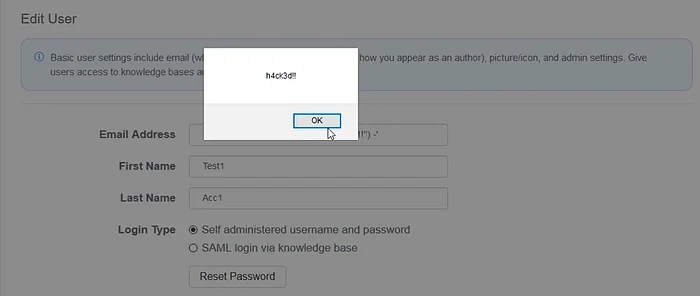

The payload was reflected without filtering, encoding or sanitising of special characters. The root cause of this stored XSS was the absence of server-side input validation: the email address was validated only on the client, so the browser refused to submit the payload through the normal form, but the server neither filtered nor encoded the special characters, so the value was stored and later rendered inside the script tag.
Exploitation
The idea came from the title of a write-up about SSRF through a PDF generator, which the author had not read at the time but looked up and applied.
Step 1: confirm that HTML is rendered in the PDF
The Custom cover page content field was the suspected input.
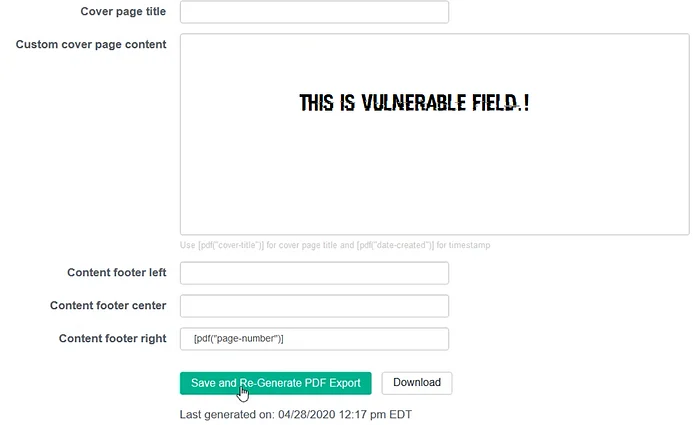
The author supplied the following HTML in that field and exported the document as a PDF:
<center><u>hello there</u></center>
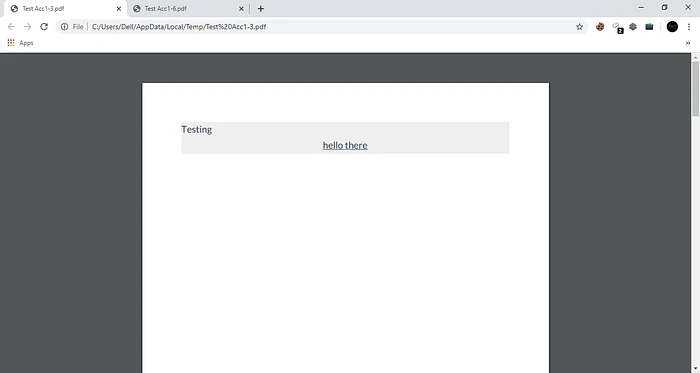
The resulting PDF contained the text formatted according to the supplied tags, which showed that the HTML was parsed and rendered rather than escaped.
Step 2: confirm SSRF with an iframe and Collaborator
The next step was to check whether the renderer would fetch remote resources. The author used an <iframe> tag pointing at a Burp Collaborator domain:
<iframe src=“http://something.burpcollaborator.net”></iframe>
A request from the target server arrived in the Collaborator client window, which confirmed the SSRF.
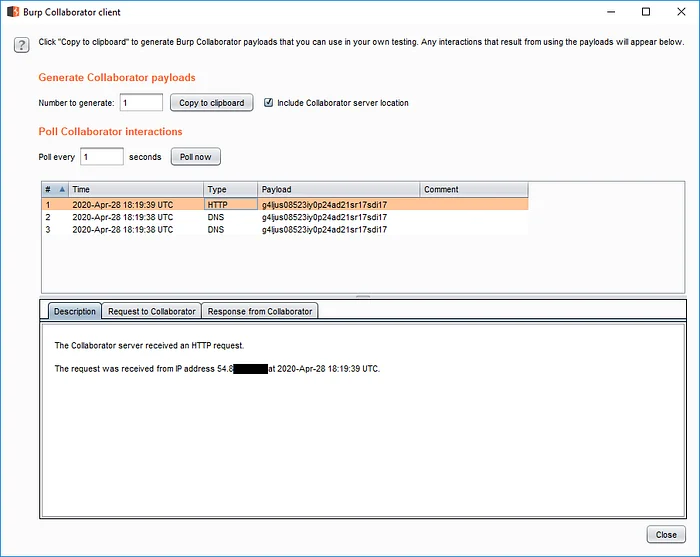
The root cause of this behaviour is that the <iframe> tag is used to embed or load one site inside another. While generating the PDF, the target server fetched the URL in the src attribute in order to load it into the iframe, and that fetch was logged in the Collaborator client. At this point the SSRF had little impact on its own, so the author moved on to exploitation.
Step 3: try to reach localhost
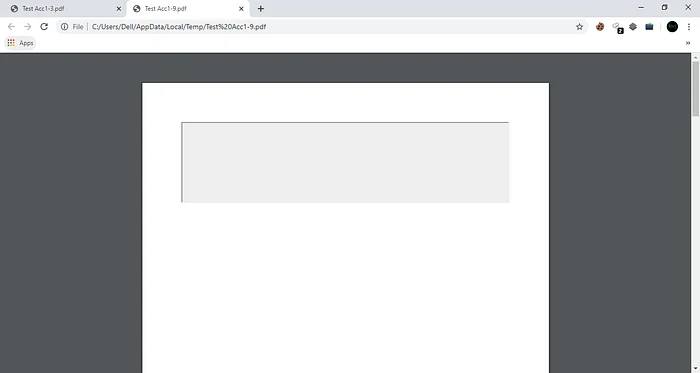
The first exploitation attempt pointed the iframe at localhost:
<iframe src=“http://localhost”></iframe>
This did not work: the export produced a blank PDF.
Step 4: try to read local files
The next idea was to load files stored on the server, for example /etc/passwd:
<iframe src=“file://etc/passwd”></iframe>
This also produced a blank PDF. Several other payloads were tried with the same result:
<iframe src=“file://etc/shadow”></iframe>
<iframe src=“http:localhost”></iframe>
<iframe src=“//[redacted]”></iframe>
<iframe src=“http://[redacted]”></iframe>
None of these worked for the author.
Step 5: identify the hosting environment
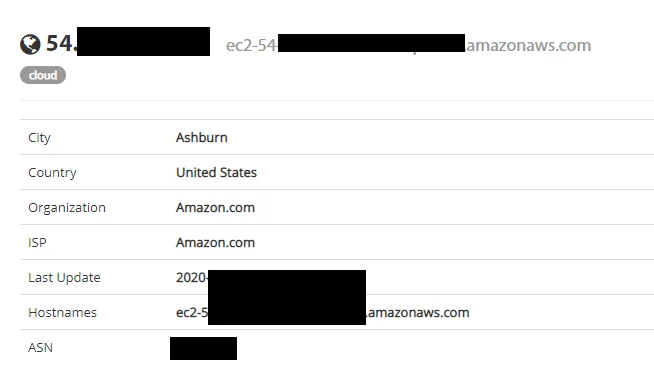
The author took the IP address that had appeared in the Burp Collaborator client and looked it up on Shodan. The result showed that the website was running on an Amazon EC2 instance.
Step 6: reach the instance metadata service
After the failed attempts the author took a break and called a friend, Ritik Sahni, described in the write-up as a 15-year-old hacker, and explained the whole scenario. The suggestion was to load the following URL as the iframe source:
http://[redacted]/latest/meta-data/
When the author did this, the internal directories and files were listed inside the iframe.
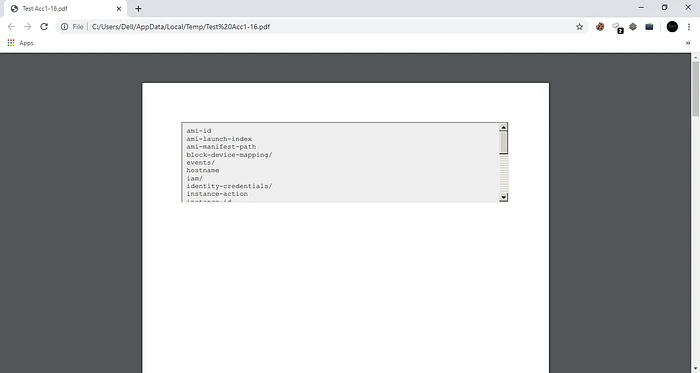
The write-up explains the address: [redacted] is a link-local address that is valid only from the instance itself, effectively the localhost address for an EC2 instance. Requesting http://[redacted]/latest/meta-data/ retrieves the instance metadata.
Step 7: read the IAM credentials
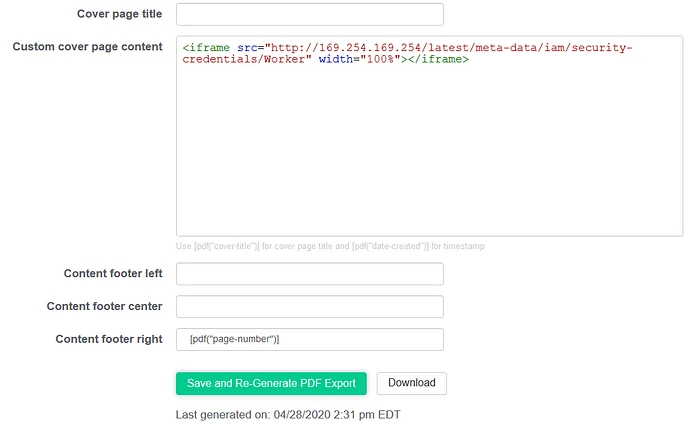
Ritik then suggested checking the iam/ directory. The author was able to retrieve AWS security credentials from it. The final payload was:
<iframe src=“http://[redacted]/latest/meta-data/iam/security-credentials/Worker” width=“100%”></iframe>
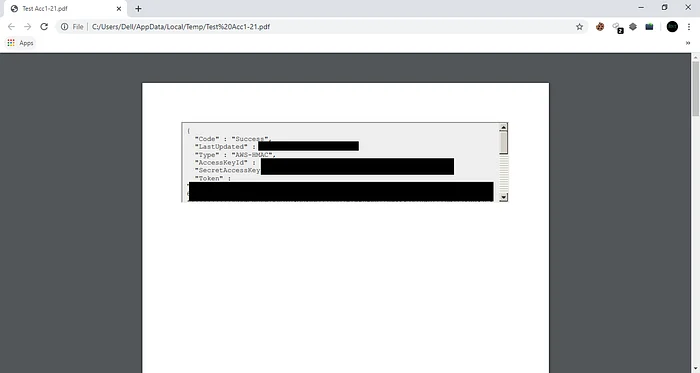
The whole process, from identifying to exploiting the SSRF, took the author around 4 hours.
Root cause
The PDF generator accepted user-supplied HTML in the Custom cover page content field and rendered it without sanitising the tags. Because <iframe> was among the accepted tags, the server-side renderer fetched whatever URL was placed in the src attribute. That fetch is made from the target server, so the attacker controls a request originating from inside the target's network. The client-side validation of the email field did not apply here, and the PDF field accepted HTML tags. The earlier stored XSS in the email field was caused by the absence of server-side input validation.
Impact
The SSRF gave the attacker the ability to make the target server request arbitrary URLs. In this environment the server ran on Amazon EC2, so the attacker could reach the instance metadata endpoint at [redacted] and read the metadata tree, including the iam/security-credentials/Worker path, which returned AWS security credentials. The credentials retrieved were AWS security credentials for the Worker role. The impact depends on the privileges attached to the role whose credentials were exposed. The author does not describe what was done with the credentials after retrieval.
Fix
The report does not describe any fix applied by the target. The measures that would address the issue are: sanitise or restrict the HTML accepted by the PDF generator so that tags such as <iframe> cannot be used, and enforce input validation on the server rather than only in the client, which would also have prevented the stored XSS in the email field. On the infrastructure side, requiring IMDSv2 (session-token-based access to the metadata service) and restricting the instance role's permissions limit what credentials obtained this way can do.
Variants to test
- Submit HTML into any field that is later rendered into a PDF, an image or an email, and check whether tags are parsed. A positive result is formatted output, as with the
<center><u>hello there</u></center>test. - Put an
<iframe>,<img>,<link>or<script>tag pointing at a Burp Collaborator domain into the same field. A positive result is a DNS or HTTP interaction from the target server in the Collaborator client. - If a callback arrives, request
http://[redacted]/latest/meta-data/through the same injection point. A positive result is a listing of metadata paths in the rendered output. - Walk the metadata tree, for example
iam/security-credentials/, and look for role names and credentials. A positive result is credential material in the output. - Try other internal addresses through the same renderer, such as
http://[redacted]or internal hostnames, and compare responses. A positive result is any content that differs from the blank output the author saw for unreachable targets. - Test the same client-side-only validation pattern on other forms, such as registration or profile fields, by intercepting the request and submitting values the browser would reject. A positive result is the value being stored and later reflected unencoded.
What happened, in plain words
A security researcher spent a few hours on a website he was not allowed to name, so he calls it target.com throughout. He found two problems. The first was a stored cross-site scripting (XSS) bug in the email field of the registration form: the site checked the email address only in the browser, so by intercepting the request and changing the value before it reached the server, he could store a small script that ran whenever the page was loaded. The second, and the main story, was a server-side request forgery (SSRF) bug in a feature that turns text into a PDF file. That feature accepted HTML, including an <iframe> tag, and the server fetched whatever URL was inside it. By pointing the iframe at the special address [redacted], which is the internal metadata service of an Amazon EC2 machine, he could read the machine's metadata and finally its AWS security credentials. The whole SSRF part took him around four hours, with a tip from a friend, Ritik Sahni.
The setup
No special access was needed. The author created a normal account on target.com and used it like any other user. He found the site through a LinkedIn post where someone mentioned getting a hall of fame on it, and since he was not hunting on any other programme at the time, he started there.
The tools he used were:
- A browser, to register and to use the PDF export form.
- Burp Suite, a tool that sits between your browser and the website and lets you see and change every request before it is sent. He used it to intercept the registration request, and he used its Burp Collaborator feature, which gives you a unique domain name and tells you whenever anything on the internet tries to contact it.
- Shodan, a search engine for internet-connected devices, to look up an IP address that appeared in the Collaborator logs.
The only precondition for the SSRF confirmation step is that the target server can make outbound requests to the Collaborator domain. If the server cannot reach the internet, no callback will arrive.
Finding the XSS
After registering, the author spent a couple of hours clicking through the site. The first thing he noticed was that the email address he had given at registration appeared again in the page response, inside a <script> tag.
A <script> tag is where a web page puts JavaScript code, the code that runs in your browser. If a value you control ends up inside a script tag without being cleaned, you can often break out of the surrounding code and run your own. That is XSS: cross-site scripting, where an attacker gets their own JavaScript to run in another user's browser.
His first attempt was to type the payload straight into the email field:
[redacted]*'*-alert(“h4ck3d!!”)-*'
Line by line: [redacted] is a normal-looking email address, and the rest is an attempt to close the surrounding JavaScript string and call alert, a browser function that shows a pop-up box. The text h4ck3d!! is just the message that would appear in the box.
This failed because the browser's own email validation rejected it: the value is not a valid email address, so the form would not submit. That is client-side validation, meaning the check happens in your browser before anything is sent.
The next step was to intercept the registration request in Burp, change the email address in the intercepted request, and forward it. The server accepted it, stored it, and the payload ran.
The payload was reflected without filtering, encoding or sanitising special characters. The root cause of this stored XSS was the absence of server-side input validation: the email address was checked only in the browser, so the browser refused to submit the payload through the normal form, but the server neither filtered nor encoded the special characters, so the value was stored and later rendered inside the script tag. Stored means the malicious value is saved on the server and rendered when the page is loaded later.
Moving to the PDF feature
The XSS was a finding, but the author kept hunting. He came across a feature that exports text the user types into a PDF file. He remembered the title of a write-up about SSRF through a PDF generator. He had not read it at the time, but he searched for the title, found it, read it, and applied the same idea.
SSRF, server-side request forgery, is when you can make the server itself send a request to a URL you choose. Your browser is not making the request; the server is. That matters because the server can often reach addresses your browser cannot, such as internal machines and private services.
Step 1: check whether HTML is rendered in the PDF
The suspected input was the Custom cover page content field.
He put the following HTML into that field and exported the document as a PDF:
<center><u>hello there</u></center>
Line by line: <center> tells the renderer to centre the content, <u> tells it to underline, hello there is the text, and </u> and </center> close the two tags. If the PDF came out with centred, underlined text, the tags were understood; if it came out with the literal angle brackets, they were escaped.
The resulting PDF contained the text formatted according to the supplied tags, which showed that the HTML was parsed and rendered rather than escaped.
Step 2: confirm SSRF with an iframe and Collaborator
The next step was to check whether the renderer would fetch remote resources. He used an <iframe> tag pointing at a Burp Collaborator domain:
<iframe src=“http://something.burpcollaborator.net”></iframe>
Line by line: <iframe> is a tag that embeds one web page inside another, like a small window inside the page. The src attribute is the address of the page to load. Here it points at a domain that only the author controls, so any request to it can be seen in his Collaborator client.
A request from the target server arrived in the Collaborator client window, which confirmed the SSRF.
The root cause is that the <iframe> tag is used to embed or load one site inside another. While generating the PDF, the target server fetched the URL in the src attribute in order to load it into the iframe, and that fetch was logged in the Collaborator client. At this point the SSRF had little impact on its own, so the author moved on to exploitation.
Step 3: try to reach localhost
The first exploitation attempt pointed the iframe at localhost:
<iframe src=“http://localhost”></iframe>
Line by line: localhost is a name that always means "this same machine". If the server fetches it, it is talking to itself, which is often where internal services live.
This did not work: the export produced a blank PDF.
Step 4: try to read local files
The next idea was to load files stored on the server, for example /etc/passwd:
<iframe src=“file://etc/passwd”></iframe>
Line by line: file:// is a scheme for reading files from the local disk rather than over the network, and /etc/passwd is a standard file on Linux systems that lists user accounts.
This also produced a blank PDF. Several other payloads were tried with the same result:
<iframe src=“file://etc/shadow”></iframe>
<iframe src=“http:localhost”></iframe>
<iframe src=“//[redacted]”></iframe>
<iframe src=“http://[redacted]”></iframe>
Line by line: /etc/shadow is the file on Linux that holds password hashes. http:localhost is a malformed URL. //[redacted] is a protocol-relative address for a private network address. [redacted] is the numeric form of localhost. None of these worked for the author.
Step 5: identify the hosting environment
He took the IP address that had appeared in the Burp Collaborator client and looked it up on Shodan. The result showed that the website was running on an Amazon EC2 instance.
EC2 is Amazon's service for renting virtual machines in the cloud. Knowing that matters because cloud machines have a special internal address that only they can reach.
Step 6: reach the instance metadata service
After the failed attempts the author took a break and called a friend, Ritik Sahni, described in the write-up as a 15-year-old hacker, and explained the whole scenario. The suggestion was to load the following URL as the iframe source:
http://[redacted]/latest/meta-data/
Line by line: [redacted] is a fixed address that cloud providers use for a service running on the machine itself, and /latest/meta-data/ is the path where that service lists information about the machine.
When the author did this, the internal directories and files were listed inside the iframe.
The write-up explains the address: [redacted] is a link-local address that is valid only from the instance itself, effectively the localhost address for an EC2 instance. Requesting http://[redacted]/latest/meta-data/ retrieves the instance metadata. Metadata is information the machine knows about itself, such as its name, network settings and, importantly, the permissions it has been given.
Step 7: read the IAM credentials
Ritik then suggested checking the iam/ directory. IAM is Amazon's system for managing who is allowed to do what. The author was able to retrieve AWS security credentials from it. The final payload was:
<iframe src=“http://[redacted]/latest/meta-data/iam/security-credentials/Worker” width=“100%”></iframe>
Line by line: the path goes into the iam/security-credentials/ folder and asks for the role named Worker. The width=“100%” attribute just makes the iframe fill the page width, so the output is easier to read.
The whole process, from identifying to exploiting the SSRF, took the author around 4 hours.
Root cause
The PDF generator accepted user-supplied HTML in the Custom cover page content field and rendered it without sanitising the tags. Because <iframe> was among the accepted tags, the server-side renderer fetched whatever URL was placed in the src attribute. That fetch is made from the target server, so the attacker controls a request originating from inside the target's network. The client-side validation of the email field did not apply here, and the PDF field accepted HTML tags. The earlier stored XSS in the email field was caused by the absence of server-side input validation.
Impact
The SSRF gave the attacker the ability to make the target server request arbitrary URLs. In this environment the server ran on Amazon EC2, so the attacker could reach the instance metadata endpoint at [redacted] and read the metadata tree, including the iam/security-credentials/Worker path, which returned AWS security credentials. The credentials retrieved were AWS security credentials for the Worker role. The impact depends on the privileges attached to the role whose credentials were exposed. The author does not describe what was done with the credentials after retrieval.
Fix
The report does not describe any fix applied by the target. The measures that would address the issue are: sanitise or restrict the HTML accepted by the PDF generator so that tags such as <iframe> cannot be used, and enforce input validation on the server rather than only in the client, which would also have prevented the stored XSS in the email field. On the infrastructure side, requiring IMDSv2 (session-token-based access to the metadata service) and restricting the instance role's permissions limit what credentials obtained this way can do.
Variants to test
- Submit HTML into any field that is later rendered into a PDF, an image or an email, and check whether tags are parsed. A positive result is formatted output, as with the
<center><u>hello there</u></center>test. - Put an
<iframe>,<img>,<link>or<script>tag pointing at a Burp Collaborator domain into the same field. A positive result is a DNS or HTTP interaction from the target server in the Collaborator client. - If a callback arrives, request
http://[redacted]/latest/meta-data/through the same injection point. A positive result is a listing of metadata paths in the rendered output. - Walk the metadata tree, for example
iam/security-credentials/, and look for role names and credentials. A positive result is credential material in the output. - Try other internal addresses through the same renderer, such as
http://[redacted]or internal hostnames, and compare responses. A positive result is any content that differs from the blank output the author saw for unreachable targets. - Test the same client-side-only validation pattern on other forms, such as registration or profile fields, by intercepting the request and submitting values the browser would reject. A positive result is the value being stored and later reflected unencoded.
Glossary
- XSS (cross-site scripting): a bug where an attacker gets their own JavaScript to run in another user's browser, usually because user input is shown on a page without being cleaned.
- Stored XSS: an XSS where the malicious value is saved on the server and shown to everyone who loads the page later.
- Client-side validation: a check that happens in your browser before a form is sent, which can be bypassed by changing the request.
- Server-side validation: a check that happens on the server, which the user cannot bypass from the browser.
- Sanitising / encoding: cleaning or escaping special characters in user input so they are shown as text rather than treated as code.
- SSRF (server-side request forgery): a bug where an attacker can make the server send a request to a URL of the attacker's choosing.
- Burp Suite: a tool that sits between your browser and a website so you can see and change requests.
- Intercept: to pause a request in Burp before it reaches the server, so you can edit it.
- Burp Collaborator: a Burp feature that gives you a unique domain and reports any request made to it, useful for spotting requests made by a server rather than your browser.
- Out-of-band callback: a request that arrives at a server you control, proving that something else made the request.
- Shodan: a search engine for internet-connected devices and services.
- IP address: the numeric address of a machine on a network.
- localhost: the name a machine uses for itself.
- [redacted]: the numeric form of localhost.
- Link-local address: an address that is only valid on the local network segment, not routable from the wider internet.
- EC2: Amazon's service for renting virtual machines in the cloud.
- Instance metadata: information a cloud machine can read about itself, including its network settings and permissions.
- [redacted]: the fixed address cloud providers use for the metadata service on the machine itself.
- IAM: Amazon's system for managing who is allowed to do what in an AWS account.
- IAM role: a set of permissions that a machine or service can be given.
- AWS security credentials: the keys or tokens that prove an identity to Amazon and allow actions under a role's permissions.
- IMDSv2: a newer version of the metadata service that requires a session token, making it harder to abuse.
- iframe: an HTML tag that embeds one web page inside another.
- HTML tag: a piece of markup such as
<center>or<u>that tells a renderer how to display content. - PDF generator: a feature that turns text or HTML into a PDF file.
- Root cause: the underlying reason a bug exists, as opposed to its visible symptom.