Changing “false” to “true”: How I Discovered an Email Verification Bypass Through Mass Assignment
 Published on medium.com
When you sign up on most shopping websites, they ask you to click a link in your email before you can edit your profile or track orders. It’s a basic security check to prove the email actually belongs to you.
The full write-up lives on its author's site
It belongs to its author, so we link to it rather than copy it. The other two tabs are our own rewrites, checked against it.
Context
Most shopping sites require you to click a link in your email before you can edit your profile or track orders. It is a basic check that the email address really belongs to you. This write-up covers a bug bounty target referred to throughout as redacted.com, where a simple Mass Assignment flaw allowed the email verification step to be skipped entirely, without ever opening the inbox.
The account details endpoint returns a JSON object that includes the flag c_isCustomerVerified. The profile update endpoint accepts a JSON body, and that is where the problem sat.
Setup
The only precondition was a fresh account on redacted.com, created with a temporary email address. No special role or privilege was needed. The tooling was Burp Suite, running in the background with its HTTP history capturing traffic while the researcher clicked around the profile page. No versions are given in the report.
Finding it
After signing up, the site redirected to an activation page with the message:
“To access your account, please verify your email by clicking on the link sent to tes***@example.com.”
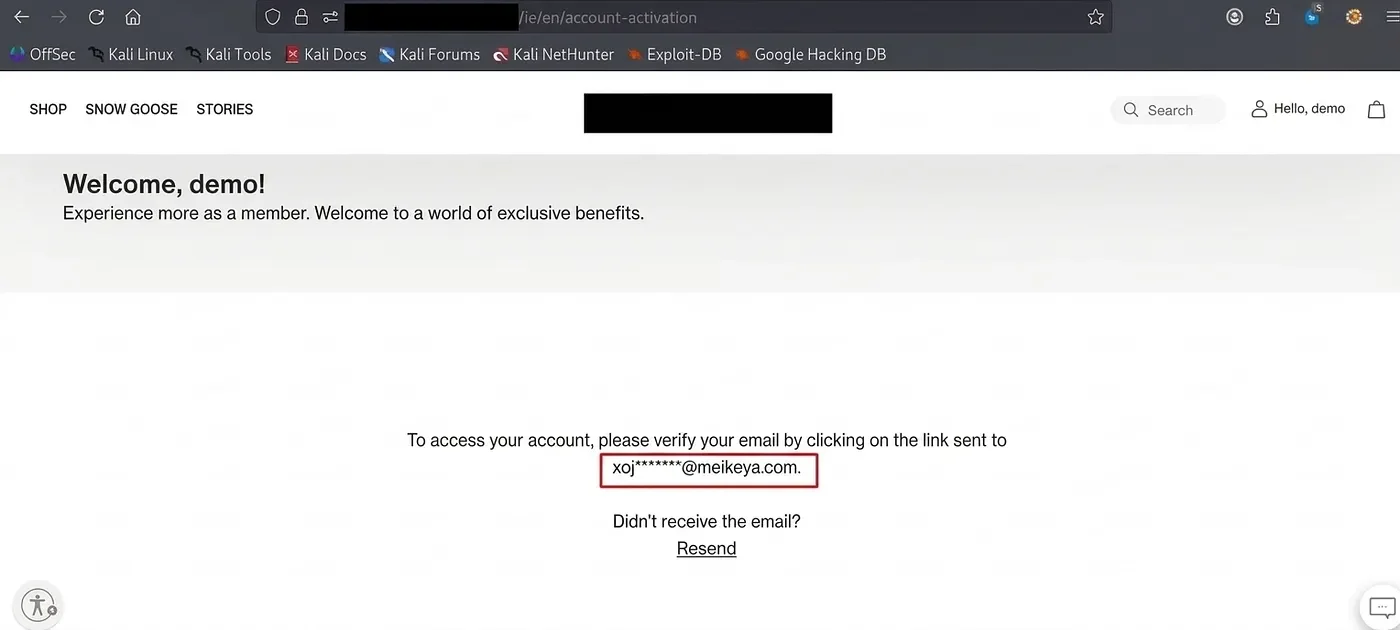
The account was locked down at that point: trying to change the name or check order history was blocked until the email link was clicked.
Looking through the Burp HTTP history, one request stood out: a GET that fetched the account details.
GET /mobify/proxy/api/customer/.../customers/{customerId}?siteId=redacted HTTP/1.1Host: redacted.com
In the JSON response, one line immediately drew attention:
{ "customerId": "12345", "email": "[redacted]", "c_isCustomerVerified": "false"}
The flag is a string, not a boolean, and it is sent to the browser in the profile response. That is the signal: whenever an API sends a status flag such as isVerified or isAdmin back to the client, it is worth testing whether the server lets the client overwrite it.
Exploitation
Step 1: Turn the read into a write
The GET request was sent to Burp Repeater, the method was changed from GET to PATCH, and this JSON body was sent:
{ "c_isCustomerVerified": "true"}
The request targets the shopper-customers resource for the organisation, scoped by siteId, and sets the verification flag to the string "true". The server replied with 200 OK.
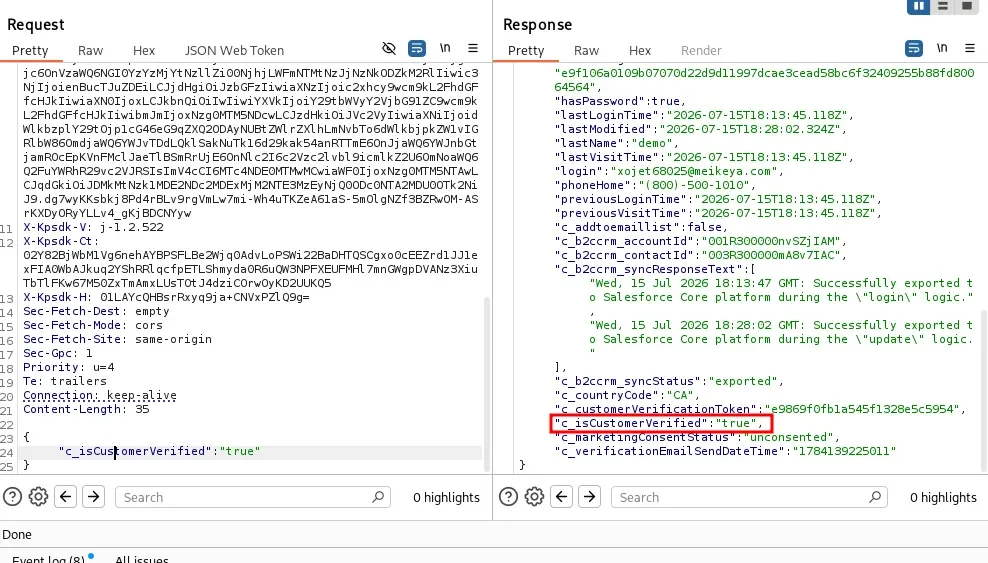
Step 2: Confirm the change persisted
A 200 OK on a PATCH does not prove the value was stored, so a second GET was sent to the customer profile endpoint. The response now showed:
{ "c_isCustomerVerified": "true"}
Step 3: Check the effect in the browser
Back in the browser, a refresh removed the “please verify your email” screen. Profile editing and order tracking were now accessible, even though the link in the email was never clicked.
Root cause
This is a Mass Assignment vulnerability. The API accepted c_isCustomerVerified as a writable field on the profile update endpoint, so the client could set a value that should only ever be controlled by the backend as the result of the email verification process. The flag should only be controlled by the backend through the email verification process, but the API accepted it as a writable field. The report does not describe any server-side allowlist or field filtering on that endpoint.
Impact
This bug does not leak other users' data. What it breaks is a trust boundary:
- Email ownership verification can be bypassed.
- Verification-gated functionality becomes accessible.
- An attacker can modify their own account's verification status.
The bug does not leak other users' data, but it breaks the email ownership verification trust boundary.
Fix
The fix is straightforward: the backend should never trust the user to set their own verification status.
- Use an allowlist on the profile update endpoint so users can only update safe fields such as first and last name.
- Keep
c_isCustomerVerifiedlocked on the server side, and only flip it totruewhen the user clicks the actual verification link sent to their email.
The report does not say whether the fix was applied.
Variants to test
- Other boolean-like flags in profile responses. Look for fields such as
isVerified,isAdmin,emailVerifiedoraccountStatusin JSON returned to the client, then replay them in aPATCHorPUT. - String versus boolean coercion. Here the flag was a string (
"false"/"true"). - Nested objects and arrays.
- Method switching.
- Verification-gated actions.
What happened, in plain words
Most shopping websites ask you to prove that an email address is really yours before they let you do anything useful with your account. They do this by sending a message to that address with a link inside it. You click the link, the site learns that you can open the inbox, and only then does it unlock your profile page, your order history and so on. It is a simple but important check: it stops someone from signing up with an address they do not own.
On a bug bounty target that the report calls redacted.com, a researcher found a way to skip that check completely, without ever opening the inbox. The trick was to notice a small piece of information the website was sending to the browser, and then to send it back with a different value. The site believed the new value and unlocked the account.
This kind of bug is called Mass Assignment. The name sounds complicated, but the idea is simple. When a website lets you update your profile, it should only accept the fields you are supposed to change, such as your first name or your last name. If it also accepts fields it never meant to expose, such as "has this person verified their email?", then you can change things that should be off limits. It is a bit like a form at a hotel reception that asks for your name and room number, but also has a hidden box labelled "paid in full" that the receptionist will happily tick if you write in it.
Below I walk through exactly what the researcher did, step by step, explaining each idea as it comes up. You only need to be comfortable using a browser to follow along.
The setup
The only thing needed to start was a brand-new account on redacted.com, created with a temporary email address. A temporary email address is an inbox you can use for a few minutes without giving away your real one; many websites offer this for free. No special role or permission was required: any ordinary visitor could do this.
The tool used was Burp Suite. Burp Suite is a program that sits between your browser and the website and records every request and response that passes between them. Think of it as a notebook that writes down every conversation you have with a website, so you can read it later, or change a message before it is sent. The researcher had Burp running in the background while clicking around the profile page, so all the traffic was captured in its HTTP history. The report does not give any version numbers for the tools or the site.
Step 1: Getting stuck on the verification screen
The researcher started by creating a brand-new account on redacted.com using a temporary email address.
As soon as the sign-up finished, the site redirected to an activation page with this message:
“To access your account, please verify your email by clicking on the link sent to tes***@example.com.”
The activation page tells the new user to verify their email by clicking the link sent to them.
At that point the account was locked down. Trying to change the name or check order history was blocked until the email link was clicked. This is the normal, intended behaviour: the site is deliberately holding the account hostage until the email address is proven.
Step 2: Checking the traffic in Burp Suite
With Burp Suite recording in the background, the researcher clicked around the profile page. Looking through the HTTP history, one request stood out: a GET request that fetched the account details.
Before reading the request, two words are worth explaining.
- HTTP is the language browsers and websites use to talk to each other. Every time you load a page or click a button, your browser sends an HTTP request and the server sends back an HTTP response.
- GET is one of the verbs in that language. A
GETrequest means "please give me this thing". It is the verb used when you simply load a page or fetch some data. It is not supposed to change anything on the server.
Here is the request as it appeared in the report:
GET /mobify/proxy/api/customer/.../customers/{customerId}?siteId=redacted HTTP/1.1Host: redacted.com
Line by line:
GETis the verb: the browser is asking to read something, not to change it./mobify/proxy/api/customer/.../customers/{customerId}?siteId=redactedis the address of the thing being asked for. The...stands for a part of the path the report does not spell out.{customerId}is a placeholder for the number that identifies this particular customer.?siteId=redactedis a small extra piece of information attached to the address, telling the server which site the request belongs to.HTTP/1.1is the version of the HTTP protocol being used.Host: redacted.comtells the server which website the request is for. One server can host many websites, so the request has to say which one it wants.
The word API appears in that address, and it is worth pausing on. An API is a way for one piece of software to ask another for data or to make it do something, without any human clicking. When you use a shopping site, your browser is constantly calling the site's API behind the scenes: one call fetches your profile, another fetches your orders, another saves a change. Think of the website as a restaurant and the API as the waiter: you do not walk into the kitchen yourself, you tell the waiter what you want, and the waiter brings it back. The address above is the researcher looking at one of those waiter conversations.
In the JSON response, one line immediately stood out:
{ "customerId": "12345", "email": "[redacted]", "c_isCustomerVerified": "false"}
Line by line:
- The whole thing is wrapped in curly braces
{ }. That is JSON, a simple text format for sending structured data. It is just a list of labels and values, a bit like a very tidy shopping list. "customerId": "12345"is a label (customerId) and its value (12345). It identifies which customer this data belongs to."email": "[redacted]"is the email address on the account."c_isCustomerVerified": "false"is the interesting one. The labelc_isCustomerVerifiedmeans "has this customer verified their email?". The value is the text"false", meaning no, they have not.
Two details matter here. First, the value is written as text in quotes ("false"), not as a true/false value. That is a small clue about how the server treats the field. Second, and more importantly, this flag is being sent to the browser at all. The website's frontend, the part you see and click, uses it to decide what to show: the verification screen, or the normal account pages.
That is the signal the researcher was looking for. Whenever an API sends a status flag such as isVerified or isAdmin back to the browser, it is worth testing whether the server lets the browser send it back with a different value. The reasoning is: if the frontend is trusted with this information, maybe the backend is careless about accepting it back.
Step 3: Changing “false” to “true”
Step 1: Turn the read into a write
The GET request was sent to Burp Repeater. Repeater is a part of Burp Suite that lets you take a captured request, edit it, and send it again as many times as you like, seeing the response each time. It is the difference between reading a letter and being able to rewrite it before posting it.
The method was changed from GET to PATCH, and this JSON body was sent:
Line by line:
PATCHis the verb now. WhereGETmeans "give me this",PATCHmeans "change part of this". It is the verb a website uses when you edit one field of your profile and save it. Changing the verb is the whole trick of this step: the same address that was used to read data is now being used to write data./mobify/proxy/api/customer/shopper-customers/v1/organizations/redacted_org/customers/{customerId}?siteId=redactedis the address. It is longer than the read address: it names an organisation (redacted_org) and a version (v1), and it points at the customer record inside that organisation.{customerId}is again the placeholder for this customer's number, and?siteId=redactedagain says which site the request belongs to.Host: redacted.comsays which website the request is for, as before.Content-Type: application/jsontells the server what format the body of the request is in. Here it is saying: the data I am sending you is JSON. Without this line, the server might not know how to read the body.
The body itself was:
{ "c_isCustomerVerified": "true"}
Line by line:
- The curly braces again mean JSON.
"c_isCustomerVerified": "true"is the same label seen in the response, now being sent back to the server, with the value changed from"false"to"true".
That is the entire attack. The researcher took a field the server had handed to the browser, and sent it back saying "actually, this customer is verified". The question was whether the server would believe it.
The server replied with 200 OK.
200 OK is an HTTP status code. Status codes are short numbers the server sends back to say how the request went. 200 means "success, I did what you asked". It is the same code you get, invisibly, every time a page loads normally.
Step 2: Confirm the change persisted
A 200 OK on a PATCH does not prove the value was stored. A server can say "success" and still quietly ignore the field, or apply it only for that one request. So the researcher sent a second GET request to the customer profile endpoint, the same kind of read as in Step 2.
The response now showed:
{ "c_isCustomerVerified": "true"}
This is the confirmation. The server is now reporting, on a fresh read, that the customer is verified. The change was saved, not just acknowledged.
Why bother with this second request? Because in security testing, a success message is not evidence. Evidence is seeing the change survive a separate request. This is the difference between a shop assistant saying "I've noted your new address" and you checking the account later to see the new address actually there.
Step 3: Check the effect in the browser
Back in the browser, a refresh removed the “please verify your email” screen. Profile editing and order tracking were now accessible, even though the link in the email was never clicked.
This last step matters because it connects the technical change to the real-world effect. The website was genuinely using the flag to gate access to the account. Once it said "true", the lock was gone.
What was the actual vulnerability?
This is a Mass Assignment vulnerability. The API accepted c_isCustomerVerified as a writable field on the profile update endpoint, so the browser could set a value that should only ever be controlled by the backend as the result of the email verification process.
The word backend means the part of the website that runs on the server, out of sight, where the real decisions are made and the data is stored. The frontend is the part in your browser that you see and click. The flag should only be controlled by the backend through the email verification process, but the API accepted it as a writable field.
A useful comparison is a form at a doctor's reception. The form asks for your name and date of birth. If you scribble an extra line at the bottom saying "test results: all clear", a well-run reception will ignore it, because that line is not yours to fill in. A badly run reception will type it into the system. Mass Assignment is the website equivalent of the badly run reception: it takes whatever fields arrive and saves them, instead of checking that each field is one the user is allowed to set.
The report does not describe any server-side allowlist or field filtering on that endpoint. An allowlist is a list of things that are permitted, and anything not on the list is refused. It is the opposite of a blocklist, which lists things that are forbidden and lets everything else through.
Why does this matter?
This bug does not leak other users' data. What it breaks is a trust boundary.
A trust boundary is a line between two parties where one is allowed to decide something and the other is not. Here the line is between the server, which is supposed to decide whether an email is verified, and the user, who is not. Crossing that line does not hand over anyone else's information, but it removes a guarantee the site was making.
The effects are:
- Email ownership verification can be bypassed.
- Verification-gated functionality becomes accessible.
- An attacker can modify their own account's verification status.
The bug does not leak other users' data, but it breaks the email ownership verification trust boundary. That assurance is what the whole verification step exists to provide.
How to fix it
The fix is straightforward: the backend should never trust the user to set their own verification status.
- Use an allowlist on the profile update endpoint so users can only update safe fields such as first and last name.
- Keep
c_isCustomerVerifiedlocked on the server side, and only flip it totruewhen the user clicks the actual verification link sent to their email.
Other places to look for the same bug
- Other boolean-like flags in profile responses.
- String versus boolean coercion. Here the flag was a string (
"false"/"true"). - Nested objects and arrays.
- Method switching.
- Verification-gated actions.
Quick tip
Always pay close attention to the JSON responses when loading your user profile. Developers often send internal flags to the frontend to decide what to show on the screen, and sometimes they forget to block users from sending those exact same flags back in a PATCH or PUT request.
In other words: read what the website tells your browser about you. Every field in that response is a question worth asking. Can I send this back? What happens if I change it? The answer is sometimes a bug.
Glossary
- API: a way for one piece of software to ask another for data or to make it do something, without a human clicking. The website's waiter.
- Backend: the part of a website that runs on the server, out of sight, where data is stored and decisions are made.
- Burp Suite: a program that sits between your browser and a website, recording every request and response so you can read and edit them.
- Burp Repeater: the part of Burp Suite that lets you take a captured request, edit it, and send it again to see the response.
- Content-Type: an HTTP header that tells the server what format the body of a request is in, for example JSON.
- Flag: a field in data that records a yes/no state, such as whether an email is verified.
- Frontend: the part of a website that runs in your browser, the part you see and click.
- GET: an HTTP verb meaning "give me this". It is used to read data and is not supposed to change anything.
- Host: an HTTP header that tells the server which website the request is for.
- HTTP: the language browsers and websites use to talk to each other, made of requests and responses.
- HTTP history: Burp Suite's log of every request and response it has seen.
- JSON: a simple text format for structured data, made of labels and values inside curly braces.
- Mass Assignment: a bug where a website accepts fields from the user that the user should not be allowed to set, because it saves whatever arrives instead of checking each field.
- PATCH: an HTTP verb meaning "change part of this". It is used to update a field of an existing record.
- PUT: an HTTP verb meaning "replace this". It is used to update or create a record.
- POST: an HTTP verb meaning "create this" or "send this data". It is used when submitting forms and creating records.
- Status code: a short number a server sends back to say how a request went, such as
200 OKfor success. - Trust boundary: a line between two parties where one is allowed to decide something and the other is not.
- Allowlist: a list of things that are permitted, where anything not on the list is refused.
- Blocklist: a list of things that are forbidden, where everything not on the list is allowed.
- Boolean: a value that is either true or false.
- String: a piece of text, written in quotes in JSON, such as
"true". - Coercion: the automatic conversion of one type of value into another, for example a server treating the text
"true"as the boolean true. - Temporary email address: an inbox you can use for a short time without giving away your real address.
- Verification link: a link sent to an email address that, when clicked, proves the person can open that inbox.
- Endpoint: a specific address on a server that does a specific job, such as fetching a profile or updating it.
- Request: a message a browser sends to a server asking for something or telling it something.
- Response: the message a server sends back after a request.
- Header: extra information attached to a request or response, such as
HostorContent-Type. - Body: the main content of a request or response, such as the JSON data being sent.
- Method: the verb of an HTTP request, such as
GET,PATCH,PUTorPOST. - Parameter: a piece of information attached to an address, such as
?siteId=redacted. - Placeholder: a stand-in in an address, such as
{customerId}, that is replaced with a real value when the request is sent. - Bug bounty: a programme where organisations pay researchers for finding and reporting security bugs in their systems.
- Target: the website or system a researcher is testing.
- Vulnerability: a weakness in a system that allows someone to do something they should not be able to do.
- Impact: the real-world effect of a vulnerability, what an attacker could actually achieve.
- Root cause: the underlying reason a vulnerability exists, as opposed to its visible symptom.
- Exploitation: the act of using a vulnerability to achieve an effect.
- Persistence: whether a change is actually saved on the server and survives later requests, rather than being acknowledged and forgotten.


