ไล่ล่า ClickFix: บันทึกการสืบสวนเว็บ WordPress ที่ถูกฝังสคริปต์หลอกผู้ใช้รันมัลแวร์
A WordPress site was compromised by a fake plugin named 'library' that injected scripts into every page, displaying a fake Cloudflare 'Verify you are human' prompt that tricked some visitors into copying and running malware on their own machines. The attacker also left backdoors at three levels: a hosting control panel account, the fake plugin, and a hidden WordPress admin account.
 Published on medium.com
community ภาษาไทยยังไม่ค่อยมีการแชร์ประสบการณ์แบบละเอียดเท่าไร เจอแต่คำแนะนำกว้าง ๆ ว่า “ให้สแกนมัลแวร์” ซึ่งไม่ช่วยอะไรเลยตอนที่สแกนแล้วไม่เจอ แต่ผู้ใช้ยังรายงานว่าเจอหน้าแปลกอยู่
The full write-up lives on its author's site
It belongs to its author, so we link to it rather than copy it. The other two tabs are our own rewrites, checked against it.
Context
This is a post-mortem of a real incident on a WordPress site running on shared hosting, written so that other small teams can reuse the investigation steps. The site itself is not the target of the attack: the visitors' machines are. A fake plugin named library was planted on the site and injected a script into every page. Some visitors, not all of them, saw a fake "Verify you are human" window that imitates Cloudflare, complete with logo, Ray ID and a countdown. The window instructs the visitor to open Terminal (or Run on Windows) and paste a command, a technique known as ClickFix. The goal is to steal browser passwords, session cookies and cryptocurrency wallet data from the visitor's computer.
The author's stated motivation is that the Thai-speaking community rarely shares detailed incident write-ups, only generic advice such as "scan for malware", which is useless when a scan comes back clean while users still report seeing something odd. The article is framed as a blameless post-mortem: describe the event without blaming people, focus on systems and process.
Setup
The investigation uses only tools that are already available for free: the browser's DevTools and the hosting control panel.
- A browser, with an incognito window used for testing because the malicious page is easier to trigger there.
- DevTools: Network tab with Preserve log enabled and the JS filter, plus the Initiator tab.
- phpMyAdmin for querying the WordPress database.
- The File Manager in the hosting control panel, with content search across all files (not filename search).
- Access to the hosting control panel itself, where an unknown user account was found.
No plugin versions, WordPress version or hosting provider are given.
Finding it
The symptom
Opening the site produced a verification window that looked exactly like Cloudflare: logo, Ray ID, countdown.
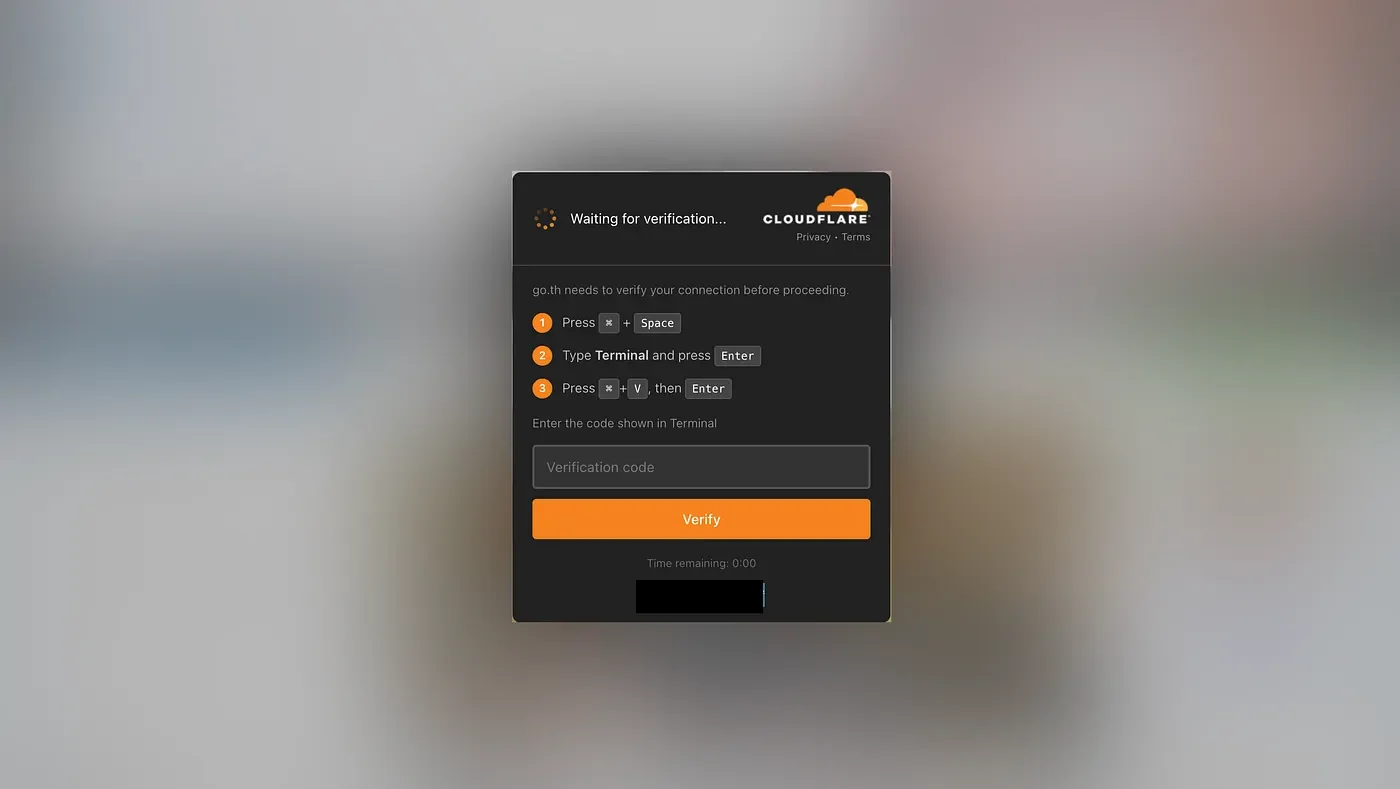
The caption points at steps 1 to 3 of the fake flow: press ⌘+Space, type Terminal, press ⌘+V and then Enter (on Windows it is Win+R).
The key point to internalise: real Cloudflare never asks you to open Terminal or Run and paste a command. The real interstitial is a single checkbox or an automatic wait. Behind the fake window, the page silently copies a malicious command into the clipboard, and the ⌘+V step makes the victim run the malware by hand. That bypasses protection neatly because there is no file for antivirus to catch.
On macOS the payload that follows is usually the Atomic Stealer (AMOS) family; on Windows it is usually Lumma Stealer. Both steal passwords, cookies and cryptocurrency wallet data.
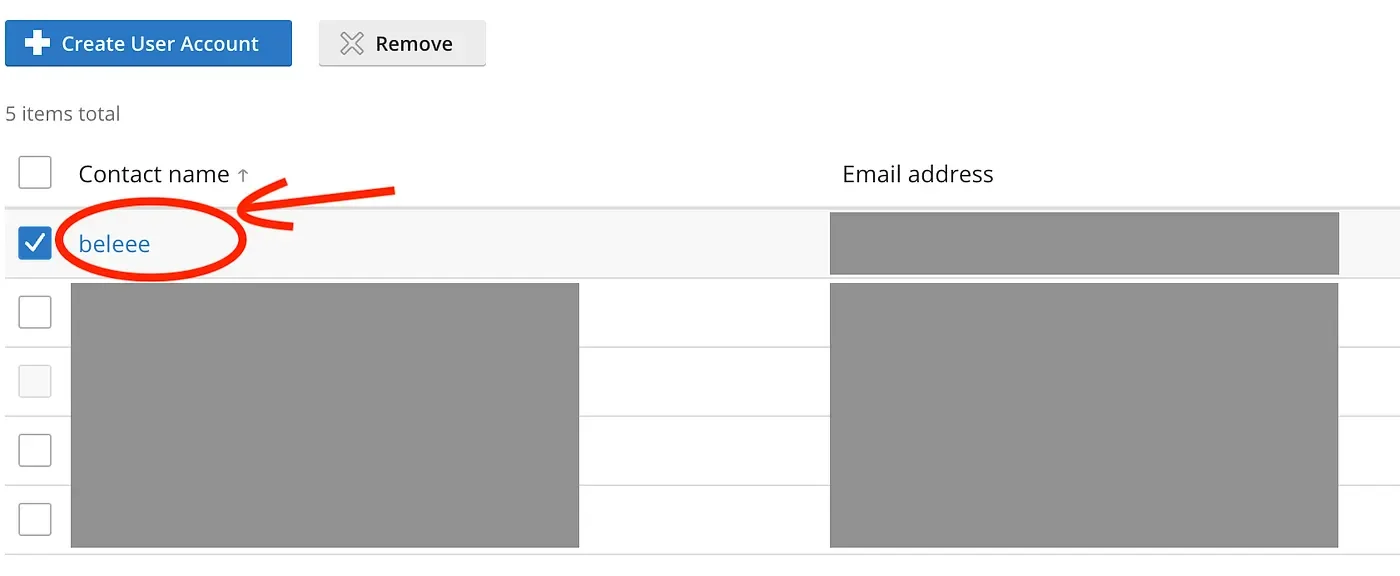
An earlier signal the author had found was an unknown user account in the hosting control panel that nobody on the team had created. The account name and email address did not correspond to each other at all, a classic backdoor account pattern.
Three traps
Trap 1: "the scan found nothing, so we are clean". This malware family uses cloaking: it shows the payload only to selected visitors, based on operating system, browser, country or cookies (once per person). The consequences:
- The admin opens the site and sees a normal page.
- Automated scanners that do not run through a browser see a normal page.
- A normal visitor arriving for the first time sees the fake window.
If a user reports the problem and you cannot reproduce it, believe the user instead of concluding that their machine is at fault.
Trap 2: restoring a backup brings the malware back. The admin team reported restoring twice, and the malware survived both times. The reason is that the backup used for the restore had been created after the date the malware was planted, so the restore reintroduced it. Before restoring, establish the exact intrusion date and pick a backup older than that, not the latest one that "still looks normal". A successful restore that makes the symptom disappear does not mean you are safe; the next job is to close the entry points.
Trap 3: deleting the strange account and calling it done. Removing the account from the control panel does not remove the files the intruder planted, the data injected into the database, the second hidden admin account on a different layer (found later), or the credentials that were already stolen (FTP, database, email). The strange account is a trace left by the vulnerability, not the root cause.
Exploitation
The investigation is described as a sequence of steps. Each one narrows the source of the injected script.
Step 1: catch the script with DevTools Network
Open the affected page in an incognito window, press F12 or ⌥⌘I, open the Network tab, tick Preserve log, filter with the JS button, then refresh the page once. Go through the domain column entry by entry. The domains you should see are your own site and services you actually installed (YouTube, Google Fonts and so on). Anything you do not recognise is suspicious.
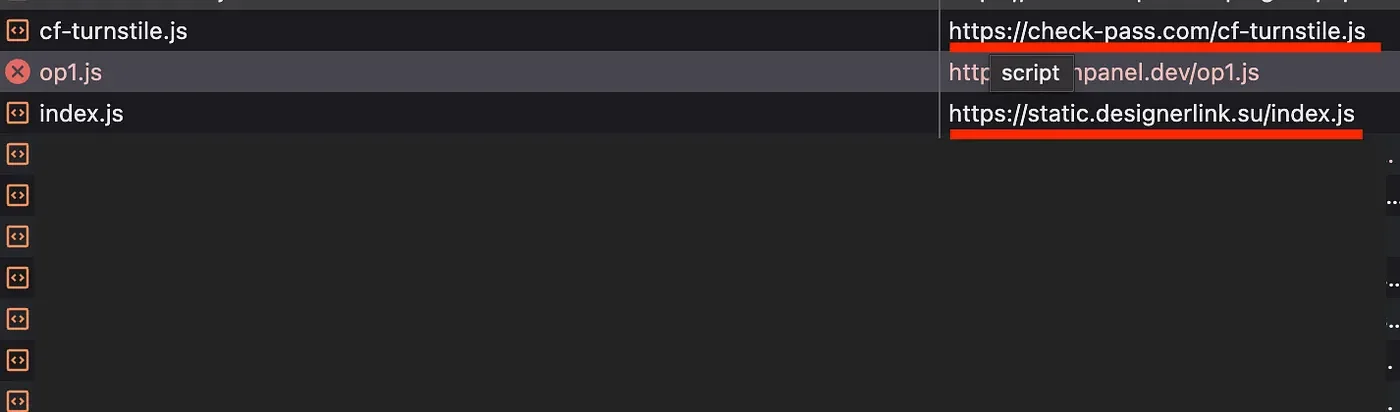
In this case three suspicious entries appeared, and the file names are worth noting: the attacker named them after real services.
| Domain | File | Role |
|---|---|---|
static.designerlink.su |
index.js |
main loader |
check-pass.com |
cf-turnstile.js |
the fake window (name imitates Cloudflare Turnstile) |
openpanel.dev |
op1.js |
the attacker's analytics tool |
Step 2: use Initiator to find who calls it
Click the suspicious entry from step 1, open the Initiator tab and look at the Request initiator chain.
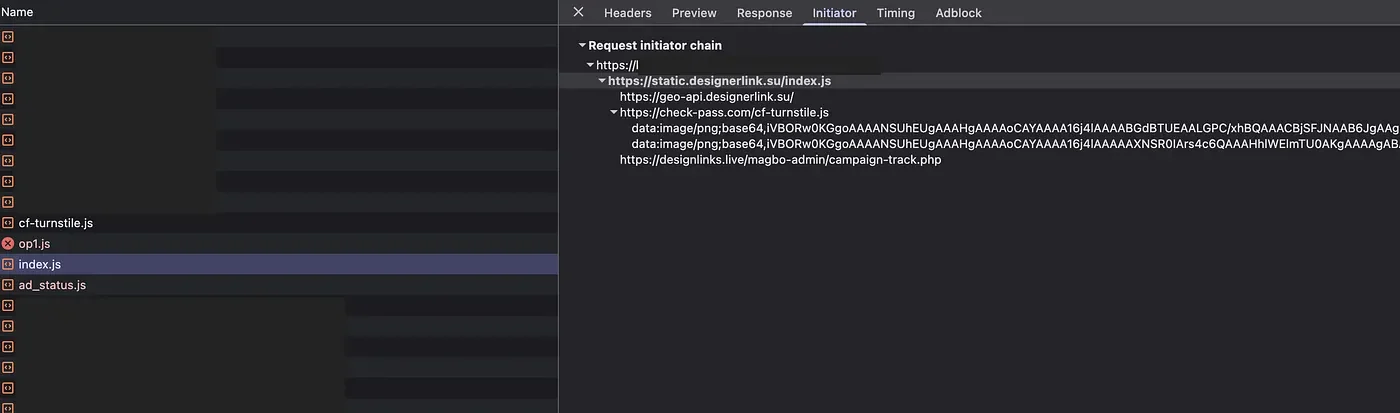
The chain reads:
หน้าเว็บของเรา
└── static.designerlink.su/index.js        ← โหลดเดอร์
     ├── geo-api.designerlink.su           ← เช็คข้อมูลผู้ใช้ (กลไก cloaking)
     ├── check-pass.com/cf-turnstile.js    ← หน้าต่างปลอม
     └── designlinks.live/magbo-admin/campaign-track.php   ← เก็บสถิติแคมเปญ
Three conclusions follow from this chain:
- Our own page calls the first script, which means the code is embedded in HTML that our site generates, not served by a compromised third-party service. That narrows the source to the database or the PHP files of WordPress.
- A geo API is called first, which confirms that cloaking is really in place.
- The path contains
magbo-admin. MagBo is the name of a dark-market place that trades "access to hacked sites", so the site was probably sold on as a product rather than attacked specifically.
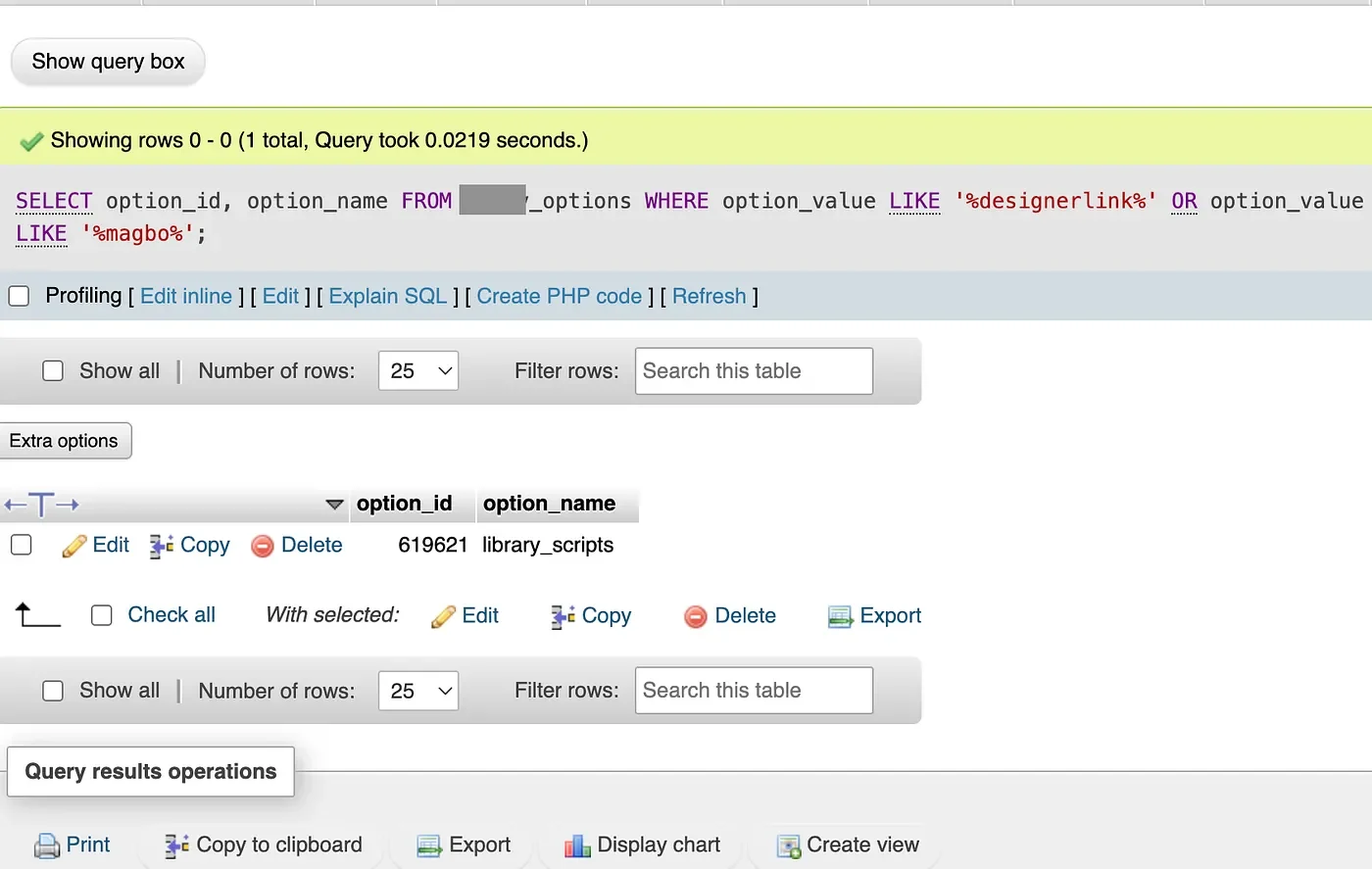
Step 3: search the database with phpMyAdmin
Before running the queries, check the table prefix of the site. Many WordPress sites do not use wp_ but a random name; replace wp_ and the domain or script strings in the commands below with the real values.
SELECT option_id, option_name FROM wp_options
WHERE option_value LIKE '%designerlink%'
   OR option_value LIKE '%check-pass%'
   OR option_value LIKE '%magbo%';
SELECT ID, post_title, post_modified FROM wp_posts
WHERE post_content LIKE '%designerlink%'
   OR post_content LIKE '%check-pass%';
In case the code is encoded:
SELECT option_id, option_name FROM wp_options
WHERE option_value LIKE '%atob(%' OR option_value LIKE '%fromCharCode%';
The result in this case contained a row named library_scripts, which is not a standard WordPress option and does not match any installed plugin.
Step 4: read the malicious script
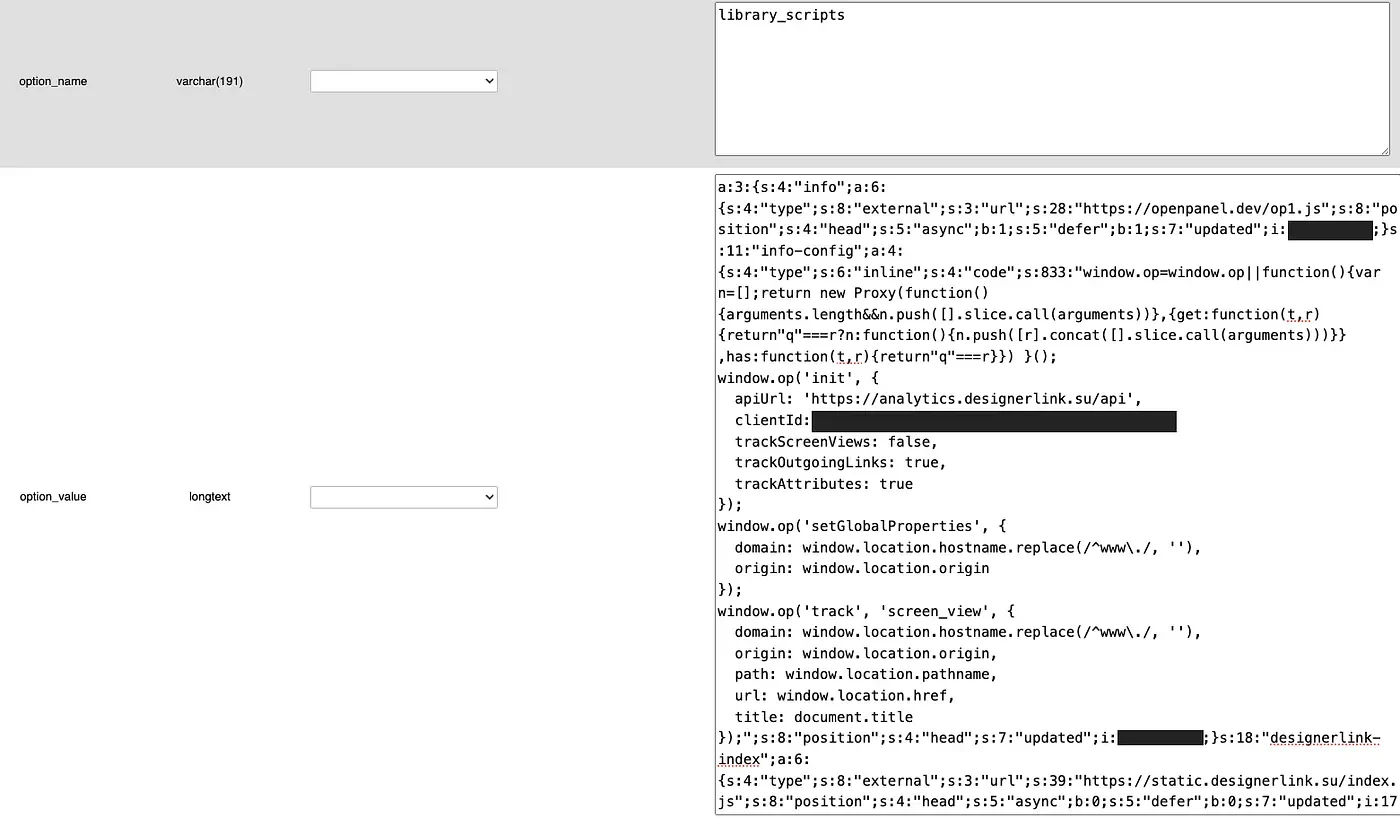
The value in the row is serialised PHP and can be decoded. It contained three script blocks embedded in the <head> of every page, plus an updated field holding a Unix timestamp that says when each block was added or modified. Converting those timestamps to dates gives a timeline.
The second block is interesting: it is OpenPanel configuration code, an open-source analytics tool (not an illegal attack tool), which the attacker used to measure their own campaign. It points at analytics.designerlink.su/api with a campaign-specific client ID. The operation runs like a real business, measuring conversion per site: how many visitors of this site followed the instructions, as a percentage of all visitors.
Step 5: find the source file
Take the option name found (library_scripts) and search all files through the control panel's File Manager. The search must look inside file contents across every file, not just at file names.
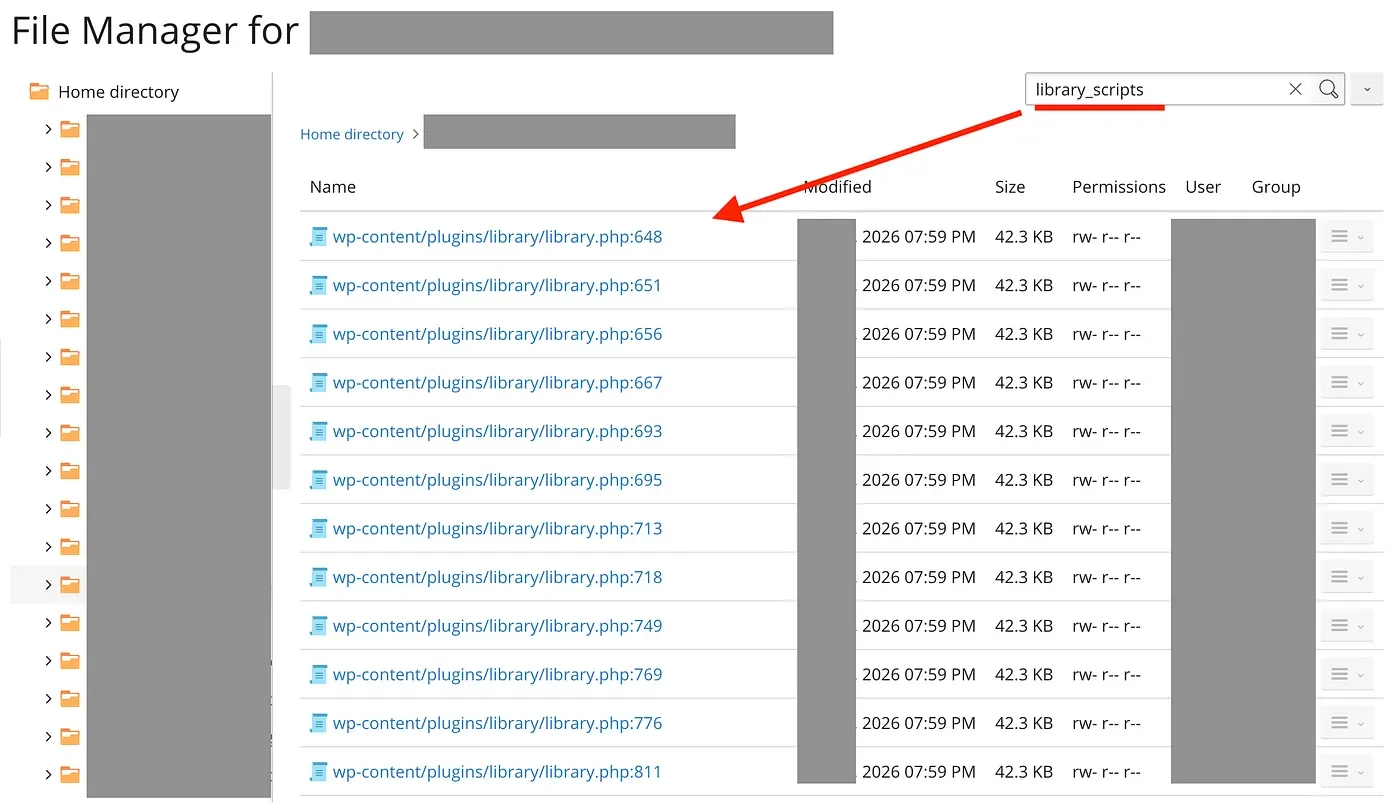
The search found wp-content/plugins/library/library.php, 42 KB in size, referencing the option name in dozens of places.
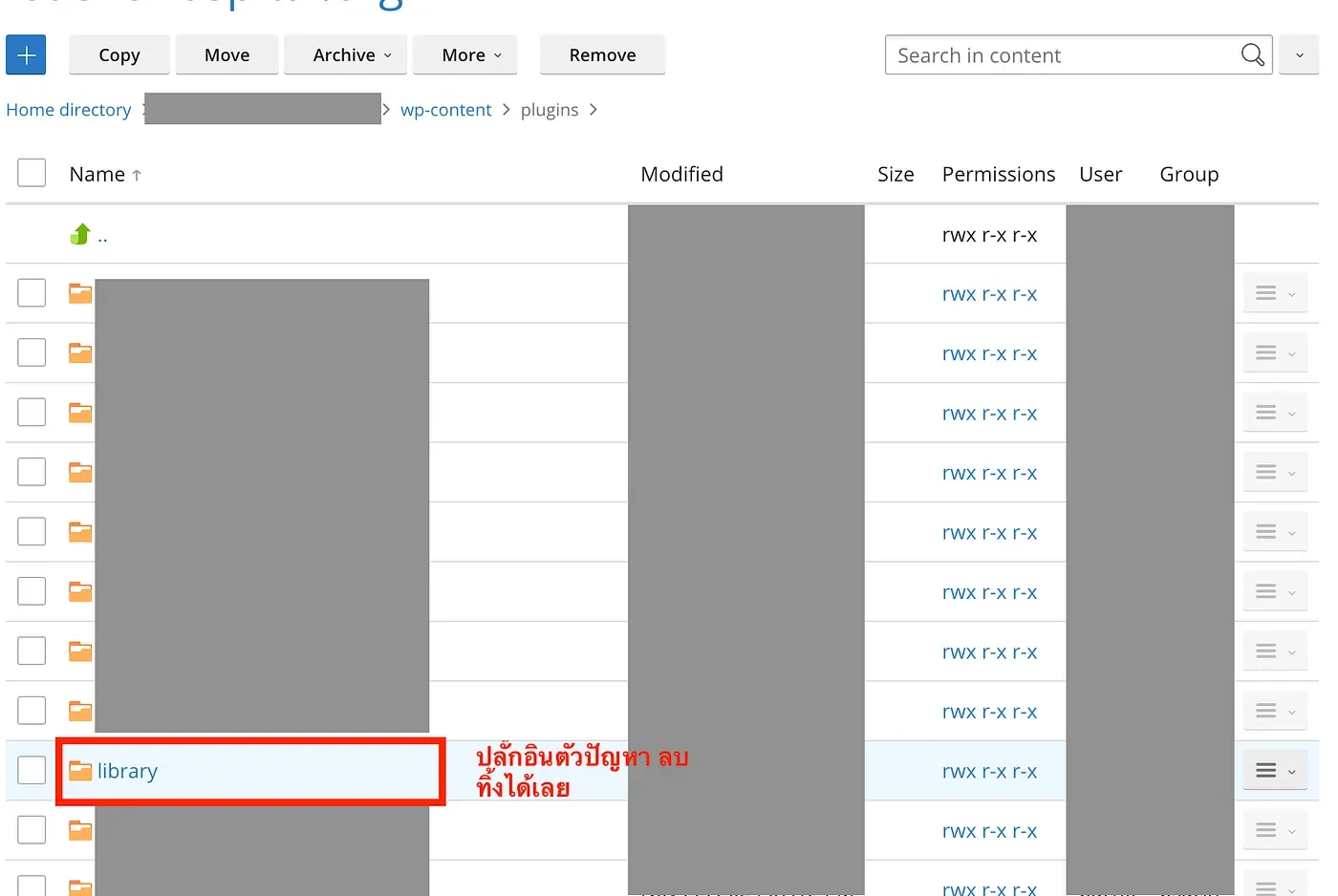
The culprit is a plugin called library: an ordinary name nobody would question, absent from WordPress.org, and never installed by anyone on the team. The file modification date is the date it was planted, several days older than the timestamp in the database, which means the plugin was the entry point and was planted in advance.
Step 6: check the user accounts
SELECT ID, user_login, user_email, user_registered FROM wp_users;
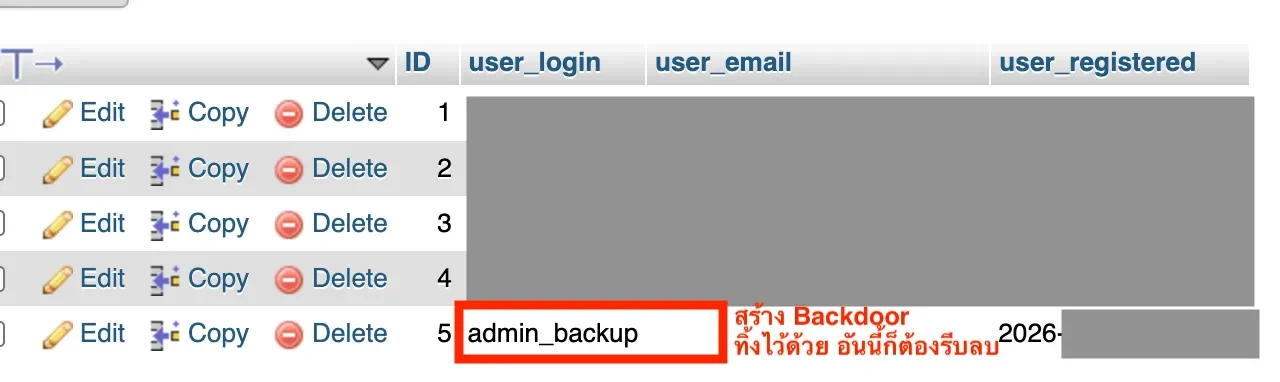
Accounts with IDs 1 to 4 belong to the real team and were registered long ago when the site was launched. ID 5 is named admin_backup, has an empty email address, and was registered on the same day the fake plugin was planted. The name is designed to make an admin think "ah, a backup account someone created", and it nearly worked.
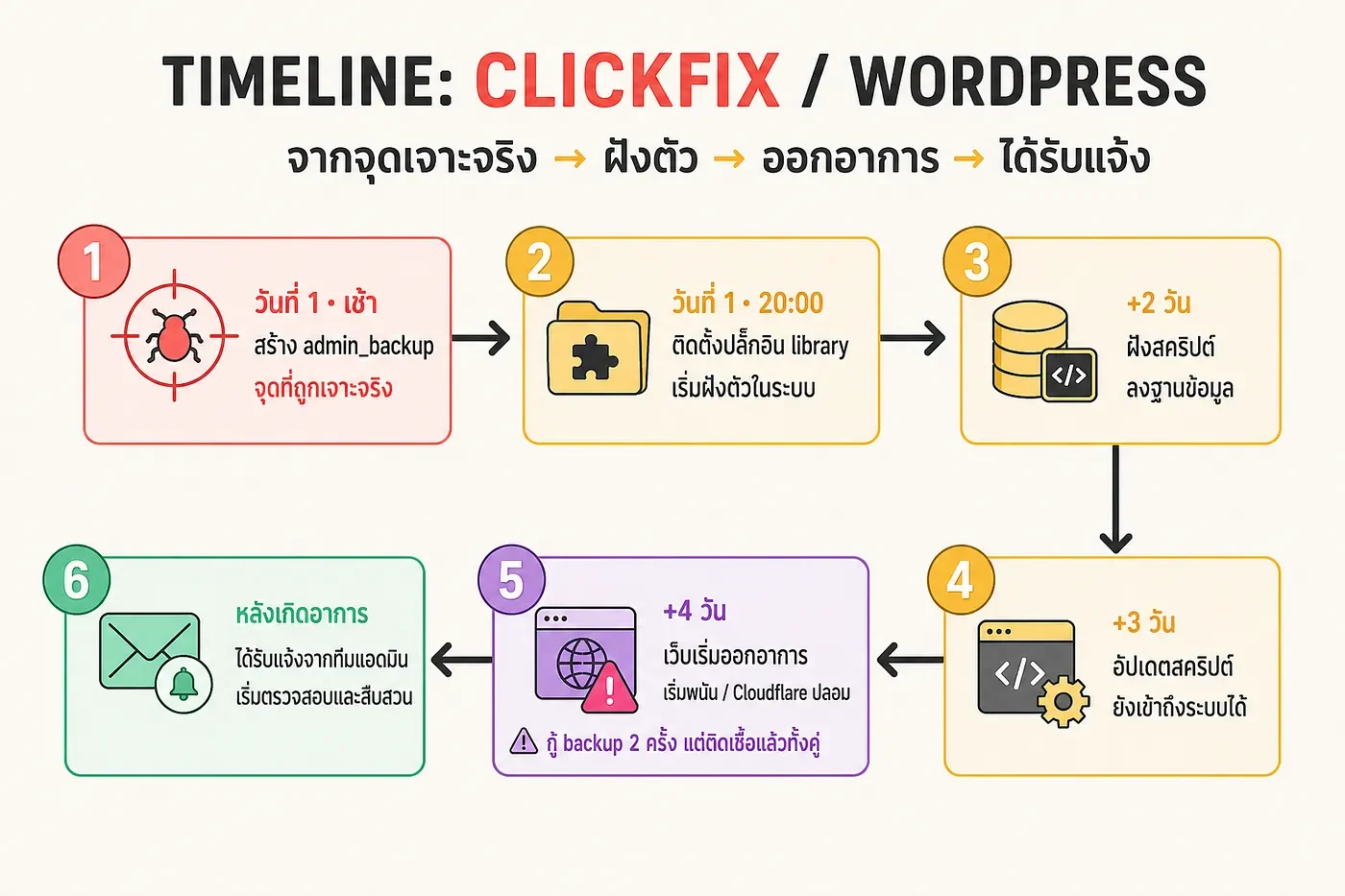
Timestamps matter here. If the account was created in the morning and the plugin was planted in the evening of the same day, the real compromise happened in the morning, not in the evening as first assumed, and that is the window to request logs for from the provider.
Step 7: surgical removal and verification
The point of this step is to clean exactly the affected places without touching anything unrelated, unlike a full backup restore that can wipe weeks or months of content. This approach is only valid if you already know everything that was planted and where, from steps 1 to 6. If you cannot yet say how many places are affected, go back and finish the search before deleting anything.
- Preserve evidence first: archive the fake plugin folder and take screenshots of everything.
- Delete the fake plugin folder.
- Delete the
library_scriptsrow from the database. - Delete the fake admin account, preferably through the WordPress admin so that usermeta is removed too.
- Clear all caches (cache plugin and browser).
- Open the site in an incognito window, DevTools, Network, and confirm that no request goes to the strange domains any more.
- Check again the next day. If the database row comes back, another backdoor is still present.
Root cause
The report does not identify the vulnerability that let the attacker in. What it establishes is the chain of artefacts: a fake plugin library whose library.php writes three script blocks into the <head> of every page through the non-standard library_scripts option, a loader on static.designerlink.su/index.js, a geo lookup for cloaking, a fake Cloudflare window served from check-pass.com/cf-turnstile.js, and campaign tracking through openpanel.dev/op1.js and designlinks.live/magbo-admin/campaign-track.php. The plugin's modification date predates the database timestamp by several days, so the plugin was planted first and waited.
Why the existing defences did not stop it: the fake plugin is not in WordPress.org; the cloaking means the admin and automated scanners see a normal page; and the backup strategy restored a snapshot taken after the compromise. The magbo-admin path suggests the site was swept up by an automated system and resold, not targeted.
Impact
The victims are the site's visitors, not the server. A visitor who follows the instructions runs the stealer on their own machine: Atomic Stealer (AMOS) on macOS, Lumma Stealer on Windows, both stealing passwords, cookies and cryptocurrency wallet data. Because the visitor executes the payload themselves, antivirus has no file to catch. Only some visitors are shown the payload, selected by operating system, browser, country or cookie, once per person.
On the server side, the attacker held three separate backdoors on three layers:
- A hosting control panel account, at the hosting panel level, which allows replacing any file.
- The fake plugin, at the file level, which can re-inject data into the database.
- A WordPress admin account (
admin_backup), at the database level, which can log in and install new plugins.
This is why the author chose the surgical fix: a backup restore does not remove the first layer, because the hosting panel account is not in the site files, and deleting the plugin does not remove the third layer.
Fix
The report sets out the surgical steps: archive the fake plugin folder as evidence, delete it, remove the library_scripts row, delete the fake admin account through the WordPress admin, clear all caches, confirm in the Network tab that no requests to the strange domains remain, and re-check the next day.
What should also be done, from the checklist in the report:
- Change passwords everywhere: hosting control panel, WordPress admin for every user (not just the suspected one), database (update
wp-config.phptoo), FTP/SFTP, email. - Delete the strange accounts both in the control panel and in the WordPress users table.
- Check whether the email address of any existing account was changed; an attacker with admin rights may modify an existing account instead of creating a new one.
- Update WordPress core, themes and all plugins. This is the most important item for preventing a second round.
- Check
wp-content/mu-plugins/; plugins in this folder run automatically and do not appear in the plugin list. - Check scheduled tasks / cron, newly created email accounts, DNS records and
.htaccessfiles. - Check "Additional nginx/Apache directives" in the control panel; this is untouched by a restore.
- Sort all files in the subscription by modification date and review everything touched since the intrusion date.
- Enable 2FA and restrict IP access to the control panel where possible.
- If several sites share one subscription, scan all of them, because they share the file system and user. An old site that is no longer used is a door left open.
When notifying the hosting provider, send something they can act on rather than "the site was hacked":
ขอความอนุเคราะห์ตรวจสอบ access log ของโดเมน [โดเมน] ช่วงวันที่ [วันที่บัญชีปลอมถูกสร้าง] เวลา [เวลา ±15 นาที] โดยเฉพาะ POST request ที่เกี่ยวกับการสร้างผู้ใช้และการติดตั้งปลั๊กอิน เพื่อระบุ IP ต้นทางและช่องทางที่ผู้บุกรุกใช้ พร้อมขอให้สแกนมัลแวร์ทั้ง subscription และแจ้งรายชื่อไฟล์ PHP ที่ถูกแก้ไขตั้งแต่วันที่ [วันที่] เป็นต้นมา
The log answer tells you the entry path:
- POST to
/wp-admin/user-new.phporplugin-install.phpmeans the intruder already had an admin password, possibly stolen or guessed because it was weak. - POST to some other strange PHP file means entry through a plugin vulnerability.
That answer determines what to fix first.
Warn people inside the organisation, because the real target is their machines:
หากเคยเห็นหน้าต่าง "ยืนยันว่าคุณเป็นมนุษย์" ที่ให้กด ⌘+Space หรือ Win+R แล้ววางคำสั่งและได้ทำตามให้ถือว่าเครื่องถูกบุกรุกแล้ว กรุณาถอดสายและตัดการเชื่อมต่อเครื่องนั้นทันที แจ้งฝ่าย IT และเปลี่ยนรหัสผ่านทุกบัญชีจากเครื่องอื่น เพราะเราไม่รู้ว่ามัลแวร์มันทำอะไรบ้าง
If someone saw the window and closed it without following the steps, they are safe, but the clipboard still holds the malicious command, so copy something else over it. Also notify the CERT for your sector with the timeline and IOCs, and report the malicious domains to Google Safe Browsing so other users' browsers warn them.
Variants to test
- Fake Cloudflare interstitial on any site. Load pages in an incognito window with DevTools Network, JS filter and Preserve log. A positive result is a request to a domain you do not recognise, especially one whose file name imitates a real service such as
cf-turnstile.js. - Cloaking check. Compare what the admin sees, what a headless scanner sees and what a first-time visitor sees. A positive result is the payload appearing only for one of them, or only once per cookie.
- Initiator chain tracing. For any suspicious script, open the Initiator tab. A positive result is a chain whose first hop is your own page, which points at the database or PHP files rather than a third-party service.
- Option table sweep. Run the
LIKEqueries againstwp_optionsandwp_postswith your own domain and script strings, plus theatob(andfromCharCodepatterns for encoded payloads. A positive result is a non-standard option name that matches no installed plugin. - Content search in files. Search file contents, not names, for the option name found in the database. A positive result is a plugin file referencing it in many places, especially one absent from WordPress.org.
- User table review. Query
wp_usersand compare registration dates with file modification dates. A positive result is an account with an empty or unrelated email, a plausible-sounding backup name, and a registration date matching the intrusion. - Timestamp correlation. Compare the
updatedUnix timestamps in the injected option, the plugin file modification date and the account registration date. A positive result is a consistent timeline that tells you which backup is old enough and which log window to request. - Persistence re-check. After cleaning, revisit the next day. A positive result is the database row or the account reappearing, which means another backdoor layer remains.
What happened, in plain words
A small website built with WordPress (a popular free system for making websites, used by a huge share of the web) was broken into. The attacker did not care much about the server itself. The real target was the computer of anyone who visited the site.
The attacker planted a fake plugin called library on the site. A plugin is an add-on that gives a WordPress site extra features, like a browser extension gives a browser extra features. This fake one quietly added a script to every page of the site. A script is a small program that runs inside your browser when a page loads.
Some visitors, not all of them, then saw a window saying "Verify you are human" that looked exactly like the real Cloudflare check. Cloudflare is a large service that many sites put in front of themselves to filter out bots and attacks; its verification page is something most people have seen. The fake one had the logo, a Ray ID (a reference number Cloudflare shows on its checks) and a countdown, so it looked genuine.
The window told the visitor to open Terminal (on a Mac) or Run (on Windows) and paste a command. Terminal and Run are built-in ways to give your computer instructions directly. Pasting a command there and pressing Enter means the computer obeys it. This trick has a name: ClickFix. The visitor is talked into installing malware on their own machine, by hand.
What the malware goes after is not the website. It is the visitor's saved browser passwords, their session cookies and their cryptocurrency wallet data. A cookie is a small piece of data a site stores in your browser so it can remember you are logged in; stealing it can let someone act as you without knowing your password.
The author wrote this as a post-mortem: a write-up made after an incident, describing what happened and what was learned. The stated reason is that the Thai-speaking community rarely shares detailed accounts, only vague advice like "scan for malware", which is no help when a scan comes back clean while users still report something odd. The article is deliberately blameless: it describes the event without pointing at people, and looks at systems and process instead.
What you need to follow along
Everything used here is free and already on your computer or in your hosting account:
- A browser. Testing is done in an incognito window (a private window that starts with no saved cookies or logins), because the malicious page is easier to trigger there.
- DevTools. These are the built-in tools inside every browser, opened with F12 or ⌥⌘I. Two parts matter: the Network tab, which lists every request the page makes, and the Initiator tab, which says what caused a request.
- phpMyAdmin. A web page, usually provided by your hosting company, for looking inside and querying your site's database. A database is where WordPress keeps its content, settings and user accounts.
- File Manager. Also in the hosting control panel: a web page for browsing the files on the server, with a search that can look inside file contents.
- The hosting control panel itself, where the unknown account was spotted.
The report gives no plugin versions, no WordPress version and no hosting provider.
The symptom
Opening the site produced a verification window that looked exactly like Cloudflare: logo, Ray ID, countdown.
The caption points at steps 1 to 3 of the fake flow: press ⌘+Space, type Terminal, press ⌘+V and then Enter (on Windows it is Win+R). In plain terms: open the command tool, paste, run.
The one thing to remember above all: real Cloudflare never asks you to open Terminal or Run and paste a command. The real check is a single checkbox or an automatic wait. Behind the fake window, the page silently copies a malicious command into the clipboard (the temporary storage that copy and paste use), and the ⌘+V step makes the victim run the malware by hand. That gets around protection neatly, because there is no file for antivirus to catch: the visitor is the one typing the command.
On macOS the payload that follows is usually the Atomic Stealer (AMOS) family; on Windows it is usually Lumma Stealer. A stealer is malware whose job is to collect and send away credentials and wallet data. Both steal passwords, cookies and cryptocurrency wallet data.
An earlier signal the author had found was an unknown user account in the hosting control panel that nobody on the team had created. The account name and email address did not correspond to each other at all, a classic backdoor account pattern. A backdoor account is a login the attacker creates so they can come back later, like a spare key hidden under a stone.
Three traps
Trap 1: "the scan found nothing, so we are clean"
This malware family uses cloaking: it shows the payload only to selected visitors, chosen by operating system, browser, country or cookies, and only once per person. Cloaking is the same idea as a shop that only shows certain goods to certain customers. The consequences:
- The admin opens the site and sees a normal page.
- Automated scanners that do not run through a browser see a normal page.
- A normal visitor arriving for the first time sees the fake window.
If a user reports the problem and you cannot reproduce it, believe the user instead of concluding that their machine is at fault.
Trap 2: restoring a backup brings the malware back
A backup is a saved copy of the site taken at some point in time; restoring it means putting that copy back. The admin team reported restoring twice, and the malware survived both times. The reason is that the backup used for the restore had been created after the date the malware was planted, so the restore put the malware back too. It is like restoring an old photo of your house and finding the burglar in it.
Before restoring, establish the exact intrusion date and pick a backup older than that, not the latest one that "still looks normal". A successful restore that makes the symptom disappear does not mean you are safe; the next job is to close the entry points.
Trap 3: deleting the strange account and calling it done
Removing the account from the control panel does not remove the files the intruder planted, the data injected into the database, the second hidden admin account on a different layer (found later), or the credentials that were already stolen (FTP, database, email). FTP is the old protocol for copying files to and from a server; a stolen FTP password lets someone upload files directly.
The strange account is a trace left by the vulnerability, not the root cause. A vulnerability is a weakness in software that lets someone do something they should not be able to do.
The investigation, step by step
Each step narrows down where the injected script comes from.
Step 1: catch the script with DevTools Network
Open the affected page in an incognito window, press F12 or ⌥⌘I, open the Network tab, tick Preserve log (so the list is not wiped when the page reloads), filter with the JS button (JS means JavaScript, the language of scripts in the browser), then refresh the page once.
Go through the domain column entry by entry. A domain is the part of a web address after the https://, like example.com. The domains you should see are your own site and services you actually installed (YouTube, Google Fonts and so on). Anything you do not recognise is suspicious.
In this case three suspicious entries appeared, and the file names are worth noting: the attacker named them after real services, the way a fake shop might use a name close to a famous brand.
| Domain | File | Role |
|---|---|---|
static.designerlink.su |
index.js |
main loader |
check-pass.com |
cf-turnstile.js |
the fake window (name imitates Cloudflare Turnstile) |
openpanel.dev |
op1.js |
the attacker's analytics tool |
A loader is a small script whose only job is to fetch and start the rest. An analytics tool counts visitors and actions, normally for marketing.
Step 2: use Initiator to find who calls it
Click the suspicious entry from step 1, open the Initiator tab and look at the Request initiator chain. This is the most useful feature in the whole investigation: it tells you, link by link, what caused a request to happen.
The chain reads:
หน้าเว็บของเรา
└── static.designerlink.su/index.js        ← โหลดเดอร์
     ├── geo-api.designerlink.su           ← เช็คข้อมูลผู้ใช้ (กลไก cloaking)
     ├── check-pass.com/cf-turnstile.js    ← หน้าต่างปลอม
     └── designlinks.live/magbo-admin/campaign-track.php   ← เก็บสถิติแคมเปญ
Read it from the top: our own page is the first thing in the chain. It calls index.js on static.designerlink.su, which is the loader. The loader then calls three things: geo-api.designerlink.su, which checks information about the user (the cloaking mechanism); check-pass.com/cf-turnstile.js, which is the fake window; and designlinks.live/magbo-admin/campaign-track.php, which records campaign statistics. An API is a way for one program to ask another for data or an action; here the geo API is asked about the visitor.
Three conclusions follow from this chain:
- Our own page calls the first script, which means the code is embedded in HTML that our site generates, not served by a compromised third-party service. HTML is the language pages are written in. That narrows the source to the database or the PHP files of WordPress. PHP is the programming language WordPress is built in.
- A geo API is called first, which confirms that cloaking is really in place.
- The path contains
magbo-admin. MagBo is the name of a dark-market place that trades "access to hacked sites", so the site was probably sold on as a product rather than attacked specifically. A dark market here means an online marketplace for criminal goods.
Step 3: search the database with phpMyAdmin
Before running the queries, check the table prefix of the site. WordPress stores its data in tables, and by default their names start with wp_, but many sites use a random prefix instead. Replace wp_ and the domain or script strings in the commands below with the real values. A query is a question written in SQL, the language databases understand.
SELECT option_id, option_name FROM wp_options
WHERE option_value LIKE '%designerlink%'
   OR option_value LIKE '%check-pass%'
   OR option_value LIKE '%magbo%';
Line by line: SELECT option_id, option_name asks for two columns, the ID and the name of each setting. FROM wp_options says which table to look in; wp_options holds site-wide settings. WHERE option_value LIKE '%designerlink%' keeps only rows whose value contains the text designerlink; the % signs mean "anything before or after". OR adds two more patterns to match: check-pass and magbo. In short: find every setting that mentions any of the attacker's names.
SELECT ID, post_title, post_modified FROM wp_posts
WHERE post_content LIKE '%designerlink%'
   OR post_content LIKE '%check-pass%';
This one looks in wp_posts, the table holding pages and articles, and asks for the ID, title and last-modified date of any post whose content mentions the attacker's domains. It catches code hidden inside an article rather than in a setting.
In case the code is encoded:
SELECT option_id, option_name FROM wp_options
WHERE option_value LIKE '%atob(%' OR option_value LIKE '%fromCharCode%';
Encoded means scrambled so it does not look like code. atob( and fromCharCode are JavaScript functions commonly used to unscramble text at runtime, so this query finds settings that contain scrambled code.
The result in this case contained a row named library_scripts, which is not a standard WordPress option and does not match any installed plugin. An option is a named setting in the database.
Step 4: read the malicious script
The value in the row is serialised PHP and can be decoded. Serialised means data packed into a single text string in a structured way, which a person can unpack and read. It contained three script blocks embedded in the <head> of every page, plus an updated field holding a Unix timestamp that says when each block was added or modified. The <head> is the part of a page that loads before anything visible. A Unix timestamp is time written as a single number: the count of seconds since 1 January 1970. Converting those timestamps to dates gives a timeline.
The second block is interesting: it is OpenPanel configuration code, an open-source analytics tool (not an illegal attack tool), which the attacker used to measure their own campaign. Open source means the code is public and free to use. It points at analytics.designerlink.su/api with a campaign-specific client ID. A client ID is a label that identifies one user or one campaign. The operation runs like a real business, measuring conversion per site: how many visitors of this site followed the instructions, as a percentage of all visitors. Conversion is the marketing term for visitors who do the thing you wanted them to do.
Step 5: find the source file
Take the option name found (library_scripts) and search all files through the control panel's File Manager. The search must look inside file contents across every file, not just at file names, because the name of a file tells you nothing about what is written inside it.
The search found wp-content/plugins/library/library.php, 42 KB in size, referencing the option name in dozens of places. KB means kilobytes, a measure of file size.
The culprit is a plugin called library: an ordinary name nobody would question, absent from WordPress.org (the official public directory of WordPress plugins), and never installed by anyone on the team. The file modification date is the date it was planted, several days older than the timestamp in the database, which means the plugin was the entry point and was planted in advance, waiting.
Step 6: check the user accounts
SELECT ID, user_login, user_email, user_registered FROM wp_users;
This asks the wp_users table for four columns: the numeric ID, the login name, the email address and the registration date of every account. It is the quickest way to see who can log in to the site.
Accounts with IDs 1 to 4 belong to the real team and were registered long ago when the site was launched. ID 5 is named admin_backup, has an empty email address, and was registered on the same day the fake plugin was planted. The name is designed to make an admin think "ah, a backup account someone created", and it nearly worked.
Timestamps matter here. If the account was created in the morning and the plugin was planted in the evening of the same day, the real compromise happened in the morning, not in the evening as first assumed, and that is the window to request logs for from the provider. A log is the record a server keeps of what happened and when.
Step 7: surgical removal and verification
Surgical here means cleaning exactly the affected places without touching anything unrelated, unlike a full backup restore that can wipe weeks or months of content. This approach is only valid if you already know everything that was planted and where, from steps 1 to 6. If you cannot yet say how many places are affected, go back and finish the search before deleting anything.
- Preserve evidence first: archive the fake plugin folder and take screenshots of everything. Evidence matters if you later report the incident or need to prove what happened.
- Delete the fake plugin folder.
- Delete the
library_scriptsrow from the database. - Delete the fake admin account, preferably through the WordPress admin so that usermeta is removed too. Usermeta is the extra per-user data WordPress keeps alongside the account.
- Clear all caches (cache plugin and browser). A cache is a stored copy kept to make pages load faster; if you do not clear it, visitors may keep getting the old, infected copy.
- Open the site in an incognito window, DevTools, Network, and confirm that no request goes to the strange domains any more.
- Check again the next day. If the database row comes back, another backdoor is still present.
Root cause
The report does not identify the vulnerability that let the attacker in. What it establishes is the chain of artefacts: a fake plugin library whose library.php writes three script blocks into the <head> of every page through the non-standard library_scripts option, a loader on static.designerlink.su/index.js, a geo lookup for cloaking, a fake Cloudflare window served from check-pass.com/cf-turnstile.js, and campaign tracking through openpanel.dev/op1.js and designlinks.live/magbo-admin/campaign-track.php. The plugin's modification date predates the database timestamp by several days, so the plugin was planted first and waited.
Why the existing defences did not stop it: the fake plugin is not in WordPress.org; the cloaking means the admin and automated scanners see a normal page; and the backup strategy restored a snapshot taken after the compromise. The magbo-admin path suggests the site was swept up by an automated system and resold, not targeted.
Who was hurt
The victims are the site's visitors, not the server. A visitor who follows the instructions runs the stealer on their own machine: Atomic Stealer (AMOS) on macOS, Lumma Stealer on Windows, both stealing passwords, cookies and cryptocurrency wallet data. Because the visitor executes the payload themselves, antivirus has no file to catch. Only some visitors are shown the payload, selected by operating system, browser, country or cookie, once per person.
On the server side, the attacker held three separate backdoors on three layers:
- A hosting control panel account, at the hosting panel level, which allows replacing any file.
- The fake plugin, at the file level, which can re-inject data into the database.
- A WordPress admin account (
admin_backup), at the database level, which can log in and install new plugins.
This is why the author chose the surgical fix: a backup restore does not remove the first layer, because the hosting panel account is not in the site files, and deleting the plugin does not remove the third layer.
The fix
The report sets out the surgical steps: archive the fake plugin folder as evidence, delete it, remove the library_scripts row, delete the fake admin account through the WordPress admin, clear all caches, confirm in the Network tab that no requests to the strange domains remain, and re-check the next day.
What should also be done, from the checklist in the report:
- Change passwords everywhere: hosting control panel, WordPress admin for every user (not just the suspected one), database (update
wp-config.phptoo), FTP/SFTP, email.wp-config.phpis the file that holds the database password, so it has to be edited when that password changes. - Delete the strange accounts both in the control panel and in the WordPress users table.
- Check whether the email address of any existing account was changed; an attacker with admin rights may modify an existing account instead of creating a new one.
- Update WordPress core, themes and all plugins. This is the most important item for preventing a second round.
- Check
wp-content/mu-plugins/; plugins in this folder run automatically and do not appear in the plugin list. - Check scheduled tasks / cron, newly created email accounts, DNS records and
.htaccessfiles. Cron is the system's list of tasks it runs on a schedule. DNS records are the entries that tell the internet which server belongs to your domain..htaccessis a small configuration file that can change how the web server behaves. - Check "Additional nginx/Apache directives" in the control panel; this is untouched by a restore. Nginx and Apache are the two most common web server programs, and directives are their settings.
- Sort all files in the subscription by modification date and review everything touched since the intrusion date. A subscription is the hosting package that can hold several sites.
- Enable 2FA and restrict IP access to the control panel where possible. 2FA means two-factor authentication: a password plus a second code, so a stolen password alone is not enough. An IP address is the numeric address of a computer on the internet.
- If several sites share one subscription, scan all of them, because they share the file system and user. An old site that is no longer used is a door left open.
When notifying the hosting provider, send something they can act on rather than "the site was hacked":
ขอความอนุเคราะห์ตรวจสอบ access log ของโดเมน [โดเมน] ช่วงวันที่ [วันที่บัญชีปลอมถูกสร้าง] เวลา [เวลา ±15 นาที] โดยเฉพาะ POST request ที่เกี่ยวกับการสร้างผู้ใช้และการติดตั้งปลั๊กอิน เพื่อระบุ IP ต้นทางและช่องทางที่ผู้บุกรุกใช้ พร้อมขอให้สแกนมัลแวร์ทั้ง subscription และแจ้งรายชื่อไฟล์ PHP ที่ถูกแก้ไขตั้งแต่วันที่ [วันที่] เป็นต้นมา
In plain words, that message asks the provider to check the access log for the domain on the date the fake account was created, around the time it was created, especially POST requests about creating users and installing plugins, to identify the source IP and the route the intruder used, and to scan the whole subscription for malware and list the PHP files modified since that date. A POST request is one of the ways a browser sends data to a server, used when you submit a form.
The log answer tells you the entry path:
- POST to
/wp-admin/user-new.phporplugin-install.phpmeans the intruder already had an admin password, possibly stolen or guessed because it was weak. - POST to some other strange PHP file means entry through a plugin vulnerability.
That answer determines what to fix first.
Warn people inside the organisation, because the real target is their machines:
หากเคยเห็นหน้าต่าง "ยืนยันว่าคุณเป็นมนุษย์" ที่ให้กด ⌘+Space หรือ Win+R แล้ววางคำสั่งและได้ทำตามให้ถือว่าเครื่องถูกบุกรุกแล้ว กรุณาถอดสายและตัดการเชื่อมต่อเครื่องนั้นทันที แจ้งฝ่าย IT และเปลี่ยนรหัสผ่านทุกบัญชีจากเครื่องอื่น เพราะเราไม่รู้ว่ามัลแวร์มันทำอะไรบ้าง
That message says: if you have seen a "verify you are human" window asking you to press ⌘+Space or Win+R and paste a command, and you did it, treat the machine as compromised, unplug it and disconnect it immediately, tell IT and change every password from another machine, because we do not know what the malware did.
If someone saw the window and closed it without following the steps, they are safe, but the clipboard still holds the malicious command, so copy something else over it. Also notify the CERT for your sector with the timeline and IOCs, and report the malicious domains to Google Safe Browsing so other users' browsers warn them. CERT is a national or sector team that handles computer security incidents. An IOC, indicator of compromise, is a clue such as a domain or file name that shows an intrusion happened.
Variants to test
These are the same checks, written so you can repeat them on any site:
- Fake Cloudflare interstitial on any site. Load pages in an incognito window with DevTools Network, JS filter and Preserve log. A positive result is a request to a domain you do not recognise, especially one whose file name imitates a real service such as
cf-turnstile.js. - Cloaking check. Compare what the admin sees, what a headless scanner sees and what a first-time visitor sees. A headless scanner is an automated browser with no visible window. A positive result is the payload appearing only for one of them, or only once per cookie.
- Initiator chain tracing. For any suspicious script, open the Initiator tab. A positive result is a chain whose first hop is your own page, which points at the database or PHP files rather than a third-party service.
- Option table sweep. Run the
LIKEqueries againstwp_optionsandwp_postswith your own domain and script strings, plus theatob(andfromCharCodepatterns for encoded payloads. A positive result is a non-standard option name that matches no installed plugin. - Content search in files. Search file contents, not names, for the option name found in the database. A positive result is a plugin file referencing it in many places, especially one absent from WordPress.org.
- User table review. Query
wp_usersand compare registration dates with file modification dates. A positive result is an account with an empty or unrelated email, a plausible-sounding backup name, and a registration date matching the intrusion. - Timestamp correlation. Compare the
updatedUnix timestamps in the injected option, the plugin file modification date and the account registration date. A positive result is a consistent timeline that tells you which backup is old enough and which log window to request. - Persistence re-check. After cleaning, revisit the next day. Persistence means the attacker's ability to stay on the system. A positive result is the database row or the account reappearing, which means another backdoor layer remains.
Glossary
- Analytics tool: software that counts visitors and actions on a site, normally for marketing.
- API: a way for one program to ask another program for data or to perform an action.
- Backdoor: a login or hidden route an attacker creates so they can return later.
- Backup: a saved copy of a site taken at a point in time, used to restore it.
- Cache: a stored copy of a page or file kept to make loading faster; it must be cleared after a fix.
- CERT: a team that handles computer security incidents, usually for a country or a sector.
- ClickFix: an attack that tricks a visitor into pasting and running a malicious command themselves.
- Client ID: a label that identifies one user or one campaign.
- Cloaking: showing different content to different visitors so that only chosen ones see the malicious part.
- Conversion: the share of visitors who do the action the operator wanted.
- Cookie: a small piece of data a site stores in your browser, for example to keep you logged in.
- Cron: the system's list of tasks it runs automatically on a schedule.
- Database: the organised store where WordPress keeps content, settings and user accounts.
- DevTools: the built-in tools in a browser for inspecting pages and network traffic.
- DNS record: an entry that tells the internet which server belongs to a domain.
- Domain: the part of a web address after
https://, such asexample.com. - Encoding: scrambling data so it does not look like code, undone at runtime.
- FTP/SFTP: protocols for copying files to and from a server.
- Headless scanner: an automated browser with no visible window, used for testing.
- HTML: the language web pages are written in.
- Initiator chain: DevTools view showing, link by link, what caused a request.
- IOC (indicator of compromise): a clue such as a domain or file name that shows an intrusion happened.
- IP address: the numeric address of a computer on the internet.
- JavaScript (JS): the programming language scripts in the browser are written in.
- Loader: a small script whose job is to fetch and start the rest of the malicious code.
- Log: the record a server keeps of what happened and when.
- Malware: software written to do harm, such as stealing data.
- Open source: software whose code is public and free to use.
- Option: a named setting stored in the WordPress database.
- PHP: the programming language WordPress is built in.
- phpMyAdmin: a web tool for looking inside and querying a database.
- Plugin: an add-on that gives a WordPress site extra features.
- POST request: a way a browser sends data to a server, used when submitting a form.
- Post-mortem: a write-up made after an incident describing what happened and what was learned.
- Query: a question written in SQL, the language databases understand.
- Ray ID: a reference number Cloudflare shows on its verification checks.
- Script: a small program that runs inside your browser when a page loads.
- Serialised: data packed into a single structured text string that can be unpacked.
- Session cookie: a cookie that proves you are logged in; stealing it can let someone act as you.
- SQL: the language used to ask questions of a database.
- Stealer: malware whose job is to collect and send away passwords, cookies and wallet data.
- Subscription: a hosting package that can hold several sites.
- Terminal / Run: built-in tools for giving your computer instructions directly.
- Timestamp (Unix): time written as a single number, the seconds since 1 January 1970.
- Two-factor authentication (2FA): a password plus a second code, so a stolen password alone is not enough.
- Usermeta: the extra per-user data WordPress keeps alongside an account.
- Vulnerability: a weakness in software that lets someone do something they should not be able to do.
- WordPress: a free, widely used system for building websites.
- WordPress.org: the official public directory of WordPress plugins and themes.



