Cloud Based Storage Misconfigurations -> Critical Bounties
Many cloud storage buckets (such as AWS S3) were misconfigured to allow public directory listing, exposing sensitive files like SQL database backups that often contained account data, passwords and PII. An attacker could also write files to some of these buckets, potentially hosting malicious content or running up the owner's cloud bill.

I started looking into cloud-based storage around about a year and a half ago with a friend. I was instantly fascinated with the process behind setting up these storage containers, whether it be AWS S3 Buckets, Azure Blobs or Google Storage Buckets.
The full write-up lives on its author's site
It belongs to its author, so we link to it rather than copy it. The other two tabs are our own rewrites, checked against it.
Context
Cloud object storage, whether AWS S3 buckets, Azure Blobs or Google Storage buckets, is configured through a series of check boxes that control who can read and write the container. The author started looking into this area about a year and a half before writing, together with a friend, because that setup process makes it very easy to make a mistake, especially when the person configuring the bucket does not understand what each option means and what the consequences of a misconfiguration are.
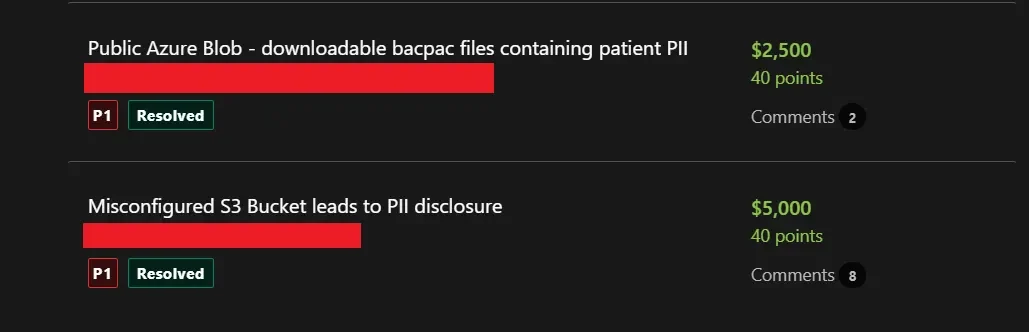
The research described here is not about a single target. It is a methodology for finding publicly exposed storage containers that hold sensitive files, and the results it produced: two critical bounties on Bugcrowd plus private cash payments from around 15 companies.
Setup
The tooling described is custom Python, a public search service and the AWS CLI:
- A simple Python tool that enumerates subdomains of
*.s3.amazonaws.comand iterates through the enumerated domains looking for enabled directory listing. - A keyword and extension list used to parse the listings:
sql,sql.gz,backup.zip,backup.gz,backup.tar,backup.tar.gzand many more. - The AWS CLI, used to test whether a bucket is writable.
- https://buckets.grayhatwarfare.com/, a web application and API that indexes public buckets, used later to widen the attack surface.
No accounts, roles or versions are given beyond this.
Finding it
The starting observation is that the setup of a storage container is a sequence of check boxes, and that a wrong choice leaves the container readable. The screenshot below shows part of the setup process for an AWS S3 bucket.
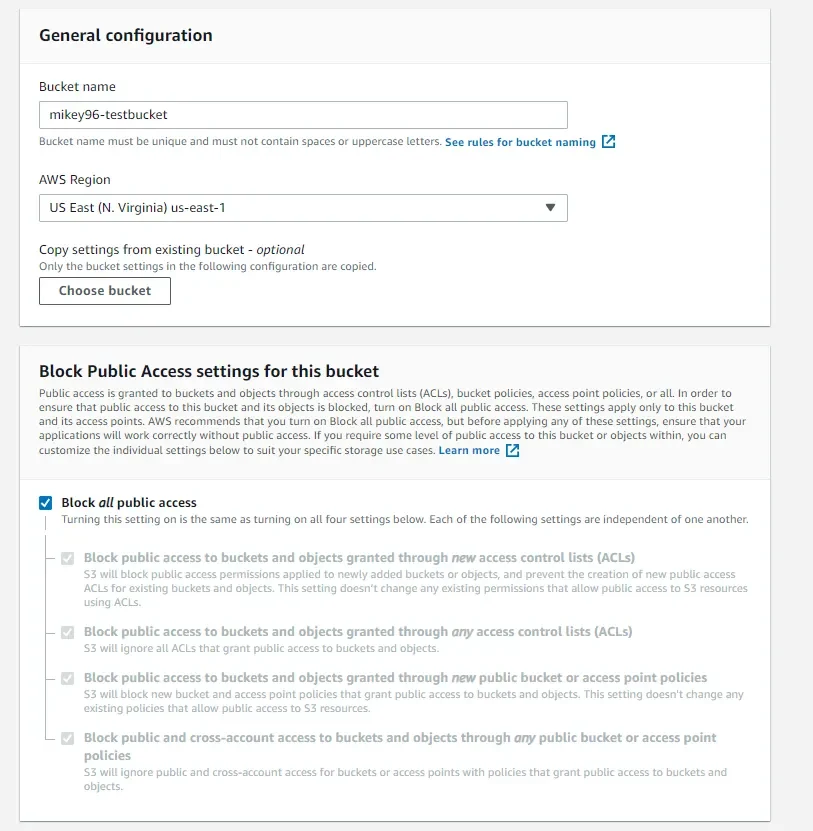
Part of the setup process for an AWS S3 Bucket.
The detection signal chosen was directory listing. When listing is enabled on a bucket, the bucket returns an index of its objects, which makes both identification and parsing trivial. The author notes that directory listing was enabled on the majority of the misconfigured buckets found, which is why parsing for interesting extensions and keywords worked so well.
The difference between a correct and an incorrect configuration is visible directly in the browser. A correctly configured private bucket shows nothing:
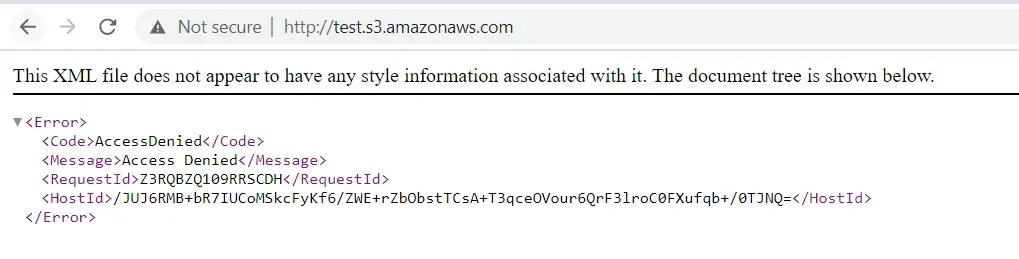
Correctly configured private bucket.
An incorrectly configured bucket exposes its contents, and in this real positive hit the listing contains an sql.gz file that was a backup of a SQL database:
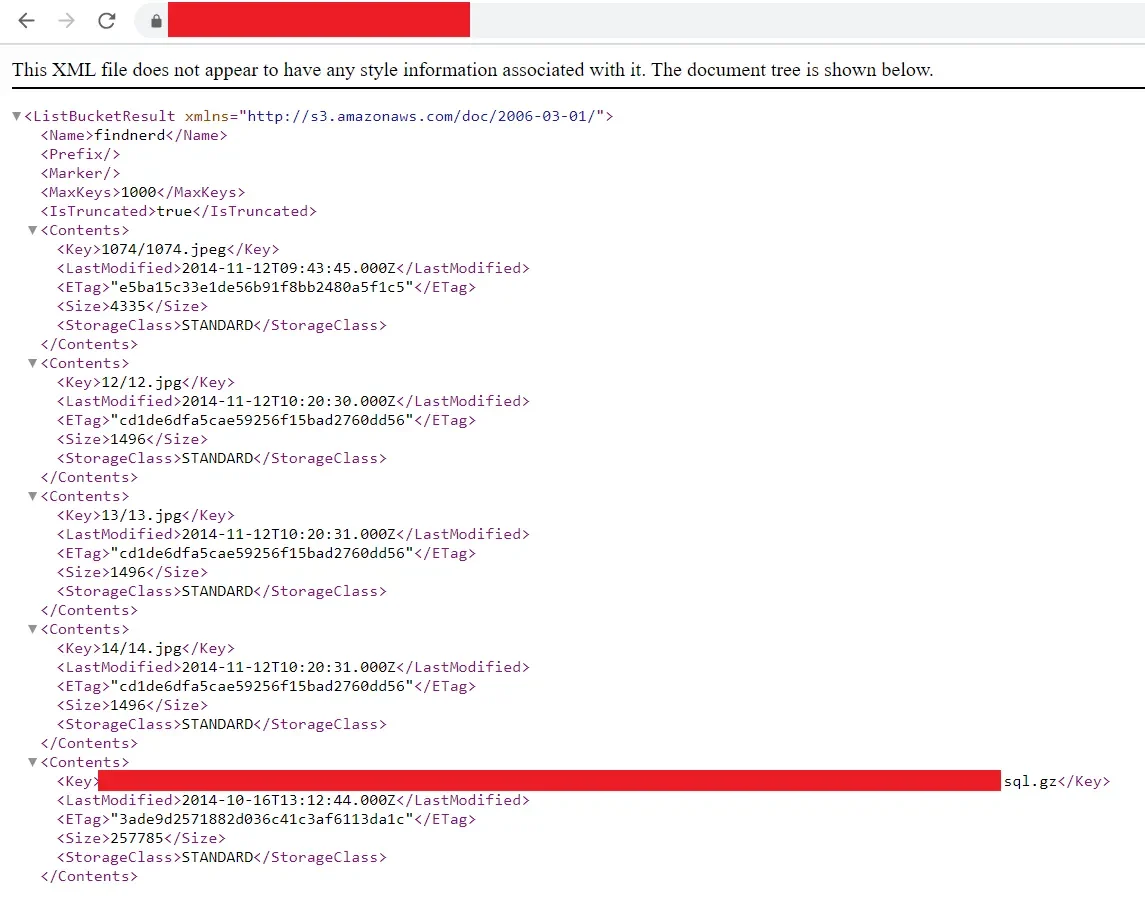
Incorrectly configured private bucket containing SQL backup.
Files like this often contain sensitive information ranging from account data and passwords to PII.
Exploitation
Step 1: enumerate and scan S3 buckets
The first tool enumerates *.s3.amazonaws.com subdomains and iterates through them, checking each for enabled directory listing. Because listing is on, the response can be parsed for the extensions and keywords listed above. Any hit is a candidate bucket holding a file of interest.
Step 2: widen the attack surface with Grayhat
After the first few scans the author looked for more buckets to scan and found https://buckets.grayhatwarfare.com/, which had essentially done the enumeration job already. At the time of writing the site had 347683 S3 buckets scanned and indexed, alongside 24444 Azure Blobs. It lets you search the indexed data by keyword and by extension, and it also offers an API.
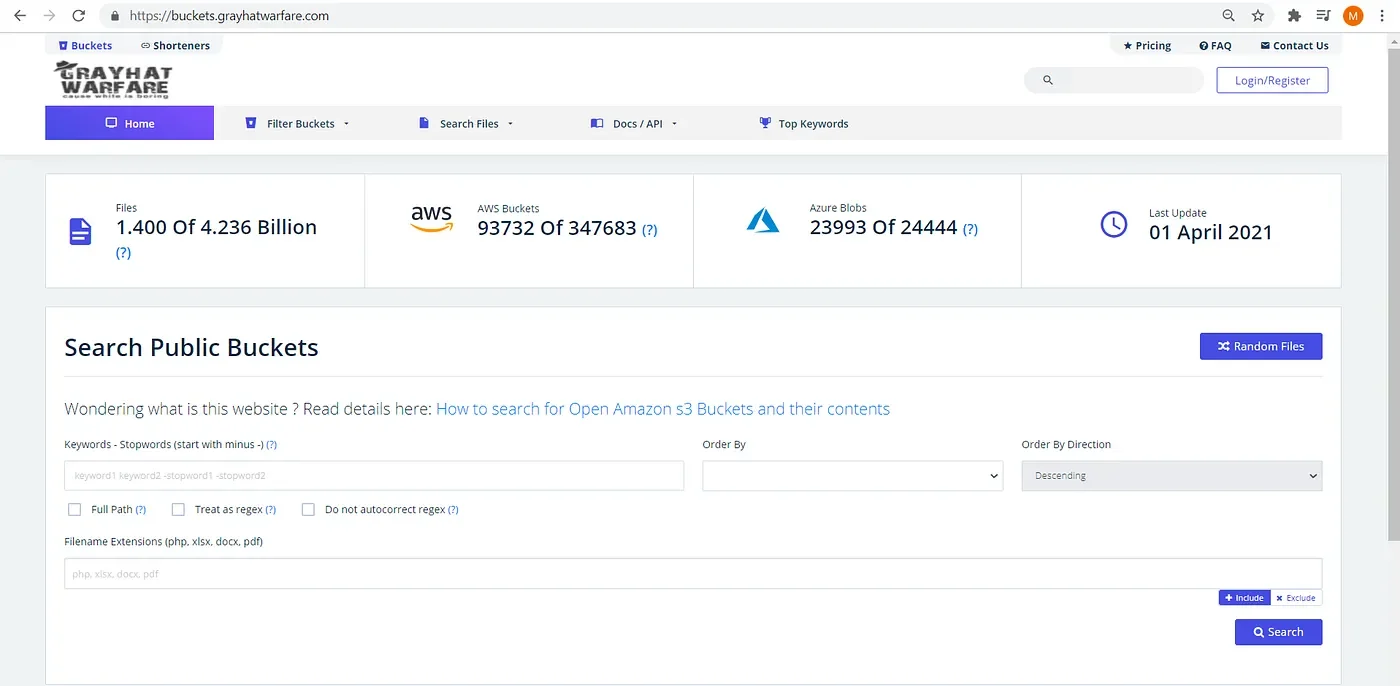
https://buckets.grayhatwarfare.com/
Step 3: automate through the API
The approach changed to a Python tool that uses the Grayhat API to make a large number of requests and exfiltrate buckets and blobs containing interesting files.
Step 4: test whether the bucket is writable
For each bucket being reported, the author checked writability with the AWS CLI:
aws s3 cp proof.txt s3://[BUCKET_NAME] — no-sign-request
This attempts to upload a local file proof.txt into the bucket without credentials, as a test of whether the bucket is writable. The author notes this often further increases the impact, because an attacker could host malicious files on the company's storage or simply run up a pricey AWS bill. It is explicitly recommended as a check to try on any bucket that has a bounty programme.
Root cause
The mistake is in the configuration of the container, not in application code: access control options chosen during setup leave the bucket publicly listable and, in the writable cases, publicly writable. The author's explanation for why this happens so often is that the options are check boxes whose meaning and consequences are not obvious to the person setting them up. The report does not describe any specific configuration screen beyond the setup screenshot, so the exact option that was wrong in each case is not stated.
Impact
On the read side, a misconfigured bucket exposes the files inside it. Where those files are database backups, the contents can include account data, passwords and PII. On the write side, an anonymously writable bucket lets an attacker host malicious files on the company's storage or inflate the AWS bill. The author hedges the contents point with "often": not every backup necessarily contains such data.
The results reported are two critical bounties on Bugcrowd and private cash payments from around 15 companies that were appreciative of responsible disclosure. The author is still in touch with a small number of them and runs routine tests on new features they add.
Fix
The advice given is aimed at the people setting the buckets up: test the access control yourself before uploading any sensitive files. No specific remediation performed by the affected companies is described.
Variants to test
- Enumerate
*.s3.amazonaws.comand request each host, looking for a directory index. A positive result is a visible list of the files in the bucket. - Parse any listing for backup-style extensions such as
sql,sql.gz,backup.zip,backup.gz,backup.tarandbackup.tar.gz. A positive result is a listing containing a file with one of those extensions. - Search an index such as Grayhat by keyword and extension, including its API, to find buckets and blobs across providers. A positive result is a bucket or blob that contains a matching file.
- Run the anonymous upload check against every bucket found:
aws s3 cp proof.txt s3://[BUCKET_NAME] — no-sign-request
A positive result is a completed upload with no credentials.
- Apply the same listing and keyword checks to Azure Blobs and Google Storage buckets, since the author's premise is that the same class of setup mistake exists across providers. The report only gives index counts for S3 and Azure Blobs.
Critical Bounties from Storage Misconfigurations!
The author closes by noting that many public buckets with SQL database backups are still out there, and offers to share the tools developed for this work with anyone who reaches out.
What happened, in plain words
A security researcher spent about a year and a half looking at cloud storage: the online lockers that companies use to keep files. The three big names in this space are AWS S3 buckets, Azure Blobs and Google Storage buckets. Each of them is set up through a screen full of tick boxes, and each tick box decides who is allowed to look inside the locker and who is allowed to put things into it.
The researcher and a friend noticed that it is very easy to tick the wrong box, especially if you do not know what each option means or what happens when you get it wrong. When the wrong box is ticked, the locker can end up readable by anyone, and in some cases writable by anyone.
The researcher built a small program to hunt for these open lockers, then found a public website that had already indexed a large number of buckets, and used that website's API (a way for programs to talk to a website without a browser) to search at scale. The result was two critical bug bounty payouts on Bugcrowd, plus private cash payments from around 15 companies that were grateful the problem was reported responsibly rather than abused.
This is not the story of one company. It is a method anyone can follow, and the point of it is that the same simple mistake keeps appearing across many companies.
The idea behind it
Think of a cloud storage bucket as a filing cabinet in a building. The setup screen is the moment someone decides whether the cabinet sits in a locked room, in a public corridor, or out on the pavement. The tick boxes are the locks. If the person setting it up does not understand a lock, they may leave the cabinet open without ever realising it.
The researcher's starting observation is exactly this: the setup is a sequence of check boxes, and a wrong choice leaves the container readable by anyone. The screenshot below shows part of the setup process for an AWS S3 bucket, which is the screen where those choices are made.
Part of the setup process for an AWS S3 Bucket.
How the open lockers were found
The signal the researcher looked for is called directory listing. A correctly configured private bucket shows nothing when you visit its address. But if directory listing is switched on, the bucket behaves like an open folder on your own computer: it shows you a list of every file inside it, with names and links.
That single behaviour makes the whole job easy. You can tell at a glance whether a bucket is misconfigured, and you can read the file names to decide whether anything inside is worth caring about. The researcher notes that directory listing was switched on for the majority of the misconfigured buckets found, which is why searching the file names worked so well.
The difference is visible in an ordinary browser. A correctly configured private bucket shows nothing:
Correctly configured private bucket.
An incorrectly configured bucket shows its contents. In the real example below, the list includes a file ending in sql.gz, which was a backup of a SQL database:
Incorrectly configured private bucket containing SQL backup.
A database backup is a copy of everything a database held at a moment in time. Files like this often contain sensitive information, ranging from account data and passwords to PII, which stands for personally identifiable information: names, addresses, and anything else that identifies a real person.
The tools used
The researcher used four things, and nothing more exotic than that:
- A simple program written in Python (a popular programming language) that looks for subdomains of
*.s3.amazonaws.comand checks each one for directory listing. - A list of file extensions and keywords to search the listings for:
sql,sql.gz,backup.zip,backup.gz,backup.tar,backup.tar.gzand many more. - The AWS CLI, which is Amazon's command line tool: a program you run by typing commands instead of clicking, used here to test whether a bucket accepts uploads.
- https://buckets.grayhatwarfare.com/, a website and API that indexes public buckets, used later to widen the search.
Step by step
Step 1: find and scan S3 buckets
Every S3 bucket on AWS has a web address of the form something.s3.amazonaws.com. The something part is the bucket's name, and it sits in front of the shared domain s3.amazonaws.com just like a subdomain such as mail in mail.example.com. So finding buckets means finding these names.
The first tool enumerates *.s3.amazonaws.com subdomains, meaning it tries to discover which names exist, and then iterates through them, meaning it visits each one in turn. For each one it checks whether directory listing is switched on. Because the listing is on, the reply can be searched for the extensions and keywords above. Any hit is a candidate bucket holding a file of interest.
Why do it this way? Because it is cheap and automatic. A person cannot visit thousands of addresses by hand, but a short program can, and the signal (a visible file list) is unmistakable.
Step 2: widen the search with Grayhat
After the first few scans the researcher went looking for more buckets and found https://buckets.grayhatwarfare.com/, which had essentially done the discovery job already. At the time of writing the site had 347683 S3 buckets scanned and indexed, alongside 24444 Azure Blobs. It lets you search the indexed data by keyword and by extension, and it also offers an API.
An API, in plain terms, is a way for one program to ask a website questions and get answers in a machine-readable form, instead of a person clicking around in a browser. It is the difference between phoning a restaurant and asking the waiter questions, and having a direct line to the kitchen that returns a printed list.
https://buckets.grayhatwarfare.com/
Step 3: automate through the API
With the discovery problem solved, the approach changed to a Python tool that uses the Grayhat API to make a large number of requests and exfiltrate buckets and blobs containing interesting files. Exfiltrate here simply means pulling out the list of matching buckets and blobs so they can be examined, not stealing their contents.
Why automate? Because the value is in volume. One search finds one bucket; thousands of searches find the pattern across many companies, and the pattern is what makes the research worth doing.
Step 4: test whether the bucket is writable
Reading files is bad enough. Being able to write into someone's bucket is worse, so for each bucket being reported the researcher checked writability with the AWS CLI:
aws s3 cp proof.txt s3://[BUCKET_NAME] — no-sign-request
Line by line:
awsis the name of the AWS command line program.s3tells it which AWS service to talk to, here the S3 storage service.cpmeans copy, the same idea as the copy command on a computer.proof.txtis a small local file the researcher created, used purely as evidence that an upload works.s3://[BUCKET_NAME]is the destination: the bucket being tested, with its name replaced by a placeholder here.— no-sign-requestis the flag that tells the tool not to sign the request, meaning it sends the upload with no credentials at all, as an anonymous stranger would.
So the command tries to drop a file into someone else's bucket while pretending to be nobody, as a test of whether the bucket is writable. The researcher notes this often further increases the impact, because an attacker could host malicious files on the company's storage, or simply run up a pricey AWS bill by filling it with data. It is explicitly recommended as a check to try on any bucket that has a bounty programme.
Why this happens
The mistake is in the configuration of the container, not in the company's own website code. The access control options chosen during setup leave the bucket publicly listable and, in the writable cases, publicly writable. The researcher's explanation for why it happens so often is simply that the options are check boxes whose meaning and consequences are not obvious to the person ticking them. The report does not describe any specific configuration screen beyond the setup screenshot, so the exact option that was wrong in each case is not stated.
What the impact is
On the read side, a misconfigured bucket exposes the files inside it. Where those files are database backups, the contents can include account data, passwords and PII. On the write side, an anonymously writable bucket lets an attacker host malicious files on the company's storage or inflate the AWS bill. The researcher hedges the contents point with "often": not every backup necessarily contains such data.
The results reported are two critical bounties on Bugcrowd and private cash payments from around 15 companies that were appreciative of responsible disclosure. Responsible disclosure means telling the owner privately and giving them time to fix it, rather than publishing or exploiting it. The researcher is still in touch with a small number of them and runs routine tests on new features they add.
How to fix it
The advice given is aimed at the people setting the buckets up: test the access control yourself before uploading any sensitive files. In other words, open the bucket's address in a browser as a stranger would, and see what you can see, before anything private goes in. No specific remediation performed by the affected companies is described.
Variants to test
If you want to try this yourself, these are the checks, in order:
- Enumerate
*.s3.amazonaws.comand request each host, looking for a directory index. A positive result is a visible list of file names. - Parse any listing for backup-style extensions such as
sql,sql.gz,backup.zip,backup.gz,backup.tarandbackup.tar.gz. A positive result is a listing containing a file with one of those extensions. - Search an index such as Grayhat by keyword and extension, including its API, to find buckets and blobs across providers. A positive result is a bucket or blob that contains a matching file.
- Run the anonymous upload check against every bucket found:
aws s3 cp proof.txt s3://[BUCKET_NAME] — no-sign-request
A positive result is a completed upload with no credentials. 5. Apply the same listing and keyword checks to Azure Blobs and Google Storage buckets, since the researcher's premise is that the same class of setup mistake exists across providers. The report only gives index counts for S3 and Azure Blobs.
Critical Bounties from Storage Misconfigurations!
The researcher closes by noting that many public buckets with SQL database backups are still out there, and offers to share the tools developed for this work with anyone who reaches out.
Glossary
- API: a way for one program to ask a website or service questions and get answers back in a machine-readable form, without a person clicking in a browser.
- AWS: Amazon Web Services, Amazon's cloud platform where companies rent storage and computers over the internet.
- AWS CLI: Amazon's command line tool, a program you run by typing commands instead of clicking.
- AWS S3 bucket: a storage container on Amazon's cloud, holding files and reachable at an address like
name.s3.amazonaws.com. - Access control: the rules that decide who is allowed to read, write or delete something.
- Anonymous write: the ability to upload files to a storage container without any credentials, as a stranger would.
- Azure Blob: Microsoft's equivalent of a storage container in its Azure cloud.
- Bug bounty: a programme where a company pays researchers for reporting security problems to them.
- Bugcrowd: a platform that runs bug bounty programmes for companies.
- Cloud storage: files kept on someone else's servers over the internet instead of on your own computer.
- Credentials: the proof of identity a program sends, such as a key or password, so the server knows who is asking.
- Critical: the highest severity rating for a security problem, meaning it can cause serious harm.
- Directory listing: a setting that makes a storage container show a list of every file inside it, like an open folder.
- Enumerate: to discover and list things, such as which bucket names exist.
- Exfiltrate: to pull data out of a system; here, to collect the list of matching buckets and blobs.
- Extension: the ending of a file name, such as
.zipor.sql, that hints at what kind of file it is. - Google Storage bucket: Google's equivalent of a storage container in its cloud.
- Grayhat Warfare: a public website and API that indexes publicly reachable storage buckets so they can be searched.
- Index: a searchable catalogue of things that have been found and recorded.
- Iterate: to go through a list one item at a time.
- Keyword: a word searched for inside file names or listings, such as
backup. - Misconfiguration: a setting chosen wrongly, leaving something less protected than intended.
- PII: personally identifiable information, data that identifies a real person, such as names or addresses.
- Private bucket: a storage container configured so that only authorised people can see its contents.
- Python: a popular programming language, often used for small automation scripts.
- Responsible disclosure: reporting a security problem privately to the owner and giving them time to fix it before anyone else learns of it.
- Root cause: the underlying reason a problem exists, as opposed to its visible symptom.
- SQL: the language used to query databases; a
.sqlor.sql.gzfile is often a database backup. - Subdomain: the part in front of a shared domain, such as
mailinmail.example.com. - Writable: accepting uploads, so that files can be added to it.



