Cloudflareのcdnjsにおける任意コード実行

blog.ryotak.net
Published on blog.ryotak.net
2021-07-16 5427 字 cdnjs 脆弱性 Go Supply Chain RCE
The full write-up lives on its author's site
It belongs to its author, so we link to it rather than copy it. The other two tabs are our own rewrites, checked against it.
Context
cdnjs is a free CDN for JavaScript and CSS libraries operated by Cloudflare. At the time the article was published it was used by 12.7% of websites on the internet, making it the second most widely used library CDN after Google Hosted Libraries at 12.8%. Given the trend in usage, the author expected it to become the most used JavaScript library CDN in the near future.
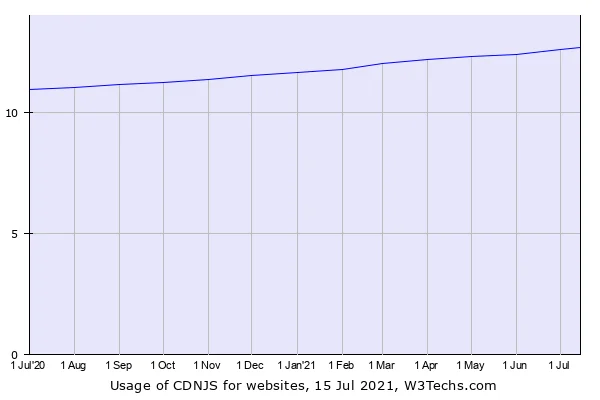
The graph above shows cdnjs usage according to W3Techs as of 15 July 2021.
The feature at the centre of the report is cdnjs's automatic library update system. The infrastructure is largely concentrated in a single GitHub organisation, with repositories such as cdnjs/packages (library metadata), cdnjs/cdnjs (the actual library files), cdnjs/logs (update logs), cdnjs/SRIs (Subresource Integrity hashes), cdnjs/static-website (the cdnjs.com source), cdnjs/origin-worker (the Cloudflare Worker serving cdnjs.cloudflare.com), cdnjs/tools (management tooling) and cdnjs/bot-ansible (Ansible for the automatic update system).
cdnjs/bot-ansible periodically runs the autoupdate command from cdnjs/tools on the library update server. That command reads the Git repository or npm package specified in cdnjs/packages and checks for updates. The update process downloads a user-controlled Git repository or npm package and copies the target files to update the library.
Setup
The research was carried out under Cloudflare's vulnerability disclosure programme on HackerOne, which authorises security testing. The report was published with permission from the Cloudflare security team.
The author had been investigating supply chain attacks, and a few weeks later worked on a separate Homebrew issue. The selection criteria were systems that many applications depend on and that permit vulnerability research; cdnjs met both.
No special accounts or tooling are described beyond reading the public repositories and publishing a package or Git repository that cdnjs would process.
Finding it
While browsing the cdnjs website, the author found this text:
Couldn’t find the library you’re looking for? You can make a request to have it added on our GitHub repository.
That pointed to library metadata being managed on GitHub. Reading cdnjs/bot-ansible and cdnjs/tools showed that the autoupdate command downloads user-managed Git repositories and npm packages and copies files from them to update libraries.
npm distributes each package as a compressed .tgz file. Because the update tool is written in Go, the author suspected it decompressed archives with compress/gzip and archive/tar. Go's archive/tar returns file paths from the archive without sanitising them, so if the tool wrote files to disk using the names returned by archive/tar, a .tgz containing a file named something like ../../../../../../../../../tmp/test would overwrite an arbitrary file. Such archives can be produced with tools such as evilarc.
From cdnjs/bot-ansible the author also knew that several scripts run periodically and that the update process had write permission on them, so overwriting files through path traversal became the main line of enquiry.
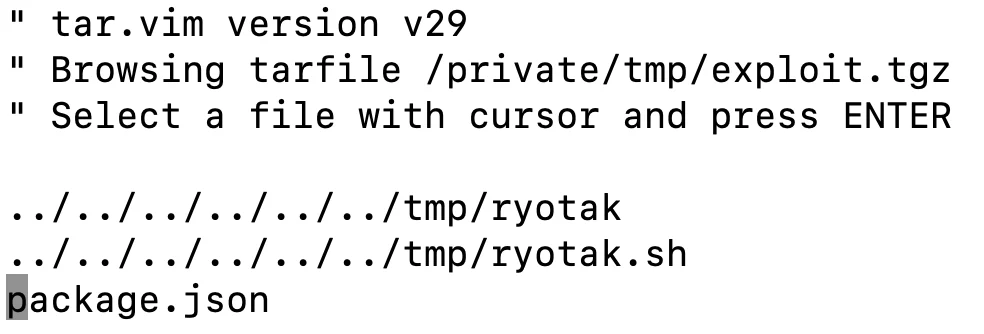
The image shows a .tgz file crafted for path traversal.
Exploitation
Step 1: trace the npm update path
The author started at the main function of the autoupdate command:
func main() {
        [...]
		switch *pckg.Autoupdate.Source {
		case "npm":
			{
				util.Debugf(ctx, "running npm update")
				newVersionsToCommit, allVersions = updateNpm(ctx, pckg)
			}
		case "git":
			{
				util.Debugf(ctx, "running git update")
				newVersionsToCommit, allVersions = updateGit(ctx, pckg)
			}
		[...]
}
When the package is configured with an npm source, the package information is passed to updateNpm:
func updateNpm(ctx context.Context, pckg *packages.Package) ([]newVersionToCommit, []version) {
		[...]
		newVersionsToCommit = doUpdateNpm(ctx, pckg, newNpmVersions)
        [...]
}
doUpdateNpm is then called with the new version information:
func doUpdateNpm(ctx context.Context, pckg *packages.Package, versions []npm.Version) []newVersionToCommit {
    [...]
	for _, version := range versions {
        [...]
		tarballDir := npm.DownloadTar(ctx, version.Tarball)
		filesToCopy := pckg.NpmFilesFrom(tarballDir)
        [...]
}
The URL of the new version's .tgz file is passed to npm.DownloadTar:
func DownloadTar(ctx context.Context, url string) string {
	dest, err := ioutil.TempDir("", "npmtarball")
	util.Check(err)

	util.Debugf(ctx, "download %s in %s", url, dest)

	resp, err := http.Get(url)
	util.Check(err)

	defer resp.Body.Close()

	util.Check(Untar(dest, resp.Body))
	return dest
}
Finally the downloaded .tgz is handed to Untar:
func Untar(dst string, r io.Reader) error {
	gzr, err := gzip.NewReader(r)
	if err != nil {
		return err
	}
	defer gzr.Close()
	tr := tar.NewReader(gzr)
	for {
		header, err := tr.Next()
        [...]

		target := filepath.Join(dst, removePackageDir(header.Name))
        [...]

		switch header.Typeflag {
        [...]

		case tar.TypeReg:
			{
                [...]
				f, err := os.OpenFile(target, os.O_CREATE|os.O_RDWR, os.FileMode(header.Mode))
                [...]

				if _, err := io.Copy(f, tr); err != nil {
					return err
				}
			}
		}
	}
}
As suspected, Untar decompresses with compress/gzip and archive/tar. The author initially assumed removePackageDir sanitised the path, but on reading it, the function simply strips the string package/ from the path. That allows overwriting a script that runs periodically on the server, and therefore executing arbitrary code.
Step 2: plan the demonstration
Cloudflare's disclosure programme runs on HackerOne, and without proof that the vulnerability is actually exploitable the HackerOne triage team would likely not forward the report to Cloudflare. The author therefore planned a demonstration with these steps:
- Publish a
.tgzfile containing a crafted file name on npm. - Wait for the cdnjs automatic update server to process the file.
- Have the contents of the crafted
.tgzwritten into a periodically executed script file, resulting in arbitrary code execution.
Step 3: switch to the Git path
Before running that demonstration, the author looked at the Git-based update path and noticed that copying files from a Git repository did not appear to account for symbolic links:
func MoveFile(sourcePath, destPath string) error {
	inputFile, err := os.Open(sourcePath)
	if err != nil {
		return fmt.Errorf("Couldn't open source file: %s", err)
	}
	outputFile, err := os.Create(destPath)
	if err != nil {
		inputFile.Close()
		return fmt.Errorf("Couldn't open dest file: %s", err)
	}
	defer outputFile.Close()
	_, err = io.Copy(outputFile, inputFile)
	inputFile.Close()
	if err != nil {
		return fmt.Errorf("Writing to output file failed: %s", err)
	}

	err = os.Remove(sourcePath)
	if err != nil {
		return fmt.Errorf("Failed removing original file: %s", err)
	}
	return nil
}
Git can store symbolic links, so including one in a Git repository and having cdnjs process it could allow reading arbitrary files on the cdnjs system. Overwriting files to achieve code execution risked breaking the automatic update feature, so the author decided to verify and report the symbolic link file read first, and to confirm the path traversal demonstration with the Cloudflare security team inside that report.
The attack steps were changed to:
- Add a symbolic link pointing to a harmless file (here
/proc/self/mapswas intended) to a Git repository registered with cdnjs. - Publish a new version on that Git repository.
- Have the specified file read and published.
It was around 20:00 at that point, and since creating a symbolic link seemed quick, the author created and pushed it before going to dinner:
ln -s /proc/self/maps test.js
Step 4: the accidental read of the environment
After dinner the author confirmed that cdnjs had published a version containing the symbolic link. Checking the file contents to write the report revealed GITHUB_REPO_API_KEY and WORKERS_KV_API_TOKEN, clearly sensitive values. The command log showed that the link had been created to /proc/self/environ rather than /proc/self/maps.
Because compromising the cdnjs GitHub organisation would mean compromising most of cdnjs, the author sent a report immediately, containing only a link showing the current situation and a request to revoke all the tokens.
Unknown at the time, the tokens had in fact been invalidated before the report was sent. The presence of GITHUB_REPO_API_KEY (a GitHub API key) had triggered an automatic notification from GitHub, and Cloudflare had started incident response on receiving it. Credentials were invalidated within minutes of cdnjs processing the crafted package.
Root cause
The npm path trusts archive entry names. archive/tar returns the name stored in the archive without sanitising it, removePackageDir only removes the literal package/ prefix, and the result is joined to the destination directory and opened for writing. A name containing ../ sequences therefore escapes the temporary directory. The Git path copies files with os.Open and io.Copy without checking whether the source is a symbolic link, so a link committed to a repository is followed and its target's contents are copied into the published library. The update process runs with write access to periodically executed scripts, which turns a file write into code execution.
Impact
An attacker who controls a library source processed by cdnjs could execute arbitrary code on the library update server. With the credentials exposed through the symbolic link, the author could have written to every cdnjs repository through the robocdnjs account's access token, tampering with any library hosted on cdnjs and with the website. WORKERS_KV_API_TOKEN allowed writing to the Cloudflare Workers KV used by cdnjs, so cached library information could be altered. Combined, these permissions would have allowed compromising the core of cdnjs, from origin data through the KV cache to the website.
At the level of the CDN itself, this could have allowed tampering with 12.7% of websites on the internet, though SRI and caching meant fewer sites were immediately affected. The author notes that, because of SRI and caching, the number of sites that could have been tampered with immediately was lower than that figure.
Fix
The report does not describe the specific code changes made. The timeline records that secondary remediation was completed from 7 April 2021 and that full remediation was completed on 3 June 2021.
Variants to test
- Archive extraction in other Go tools. Look for
archive/tarcombined withfilepath.Joinandos.OpenFileoros.Create, and check whether any path cleaning happens beyond stripping a fixed prefix. A positive result is a file written outside the extraction directory when a.tgzwith../in an entry name is processed. - Symbolic links in Git-based importers. Check whether a repository containing a link to a sensitive path is copied by content rather than as a link. A positive result is the target file's contents appearing in the published output.
- Write access of update jobs. Enumerate scripts executed periodically by the update user. A positive result is a writable script that runs on a schedule, which converts a file write into code execution.
- Credential exposure through file reads. When a file read primitive exists, check
/proc/self/environand similar paths for tokens. A positive result is any credential visible in the published output.
Timeline
| Date (Japan time) | Event |
|---|---|
| 2021/04/06 around 19:00 | Vulnerability discovered, verification begins |
| 2021/04/06 around 20:00 | Demonstration file published |
| 2021/04/06 around 20:30 | cdnjs processes the file |
| Same time | GitHub sends an alert to Cloudflare |
| Same time | Incident response begins inside Cloudflare |
| Within minutes | Credential revocation completed |
| 2021/04/06 around 20:40 | Initial report sent |
| 2021/04/06 around 21:00 | Detailed report sent |
| 2021/04/07 onwards | Secondary remediation completed |
| 2021/06/03 | Full remediation completed |
| 2021/07/16 | Article published |
What happened, in plain words
A security researcher found a way to run their own code on the servers that update cdnjs, a free service that delivers JavaScript and CSS libraries to websites. Because cdnjs is used by a large share of the web, this could have let an attacker change the code that many sites load. The researcher reported it, Cloudflare remediated it, and the report was published with permission.
This article walks through the whole story for someone who has never done security work: what cdnjs is, how the update system worked, how the flaw was found, what went wrong during the demonstration, and what the impact could have been.
What cdnjs is
A CDN (content delivery network) is a set of servers around the world that hand out files to browsers quickly. cdnjs is a free CDN for JavaScript and CSS libraries, run by Cloudflare. A library is a bundle of ready-made code that a website can include instead of writing everything itself.
At the time the article was published, cdnjs was used by 12.7% of websites on the internet. That made it the second most widely used library CDN, after Google Hosted Libraries at 12.8%. Given how usage was trending, the author expected cdnjs to become the most used JavaScript library CDN soon.
The graph shows cdnjs usage according to W3Techs as of 15 July 2021.
The feature at the centre: automatic updates
Libraries change often. To keep its copies current, cdnjs has an automatic update system. Most of its infrastructure lives in one GitHub organisation, with repositories such as:
cdnjs/packages: information about the libraries cdnjs listscdnjs/cdnjs: the actual library filescdnjs/logs: update logscdnjs/SRIs: Subresource Integrity hashes (fingerprints that let browsers check a file has not been altered)cdnjs/static-website: the source of cdnjs.comcdnjs/origin-worker: the Cloudflare Worker that serves cdnjs.cloudflare.comcdnjs/tools: management toolingcdnjs/bot-ansible: Ansible configuration for the automatic update system
A GitHub repository is a project folder hosted on GitHub, with a history of changes. Ansible is a tool for automating server setup and tasks.
cdnjs/bot-ansible periodically runs the autoupdate command from cdnjs/tools on the library update server. That command reads the Git repository or npm package named in cdnjs/packages and checks for updates. npm is a public registry of JavaScript packages; a package is a bundle of code published there. The update process downloads a Git repository or npm package that a user controls, then copies the target files to update the library.
How the research started
The work was done under Cloudflare's vulnerability disclosure programme on HackerOne. A vulnerability disclosure programme is a formal channel where a company says: if you find a security problem, tell us here, and we will not treat you as an attacker. HackerOne is a platform that hosts such programmes. The report was published with permission from the Cloudflare security team.
The author had been investigating supply chain attacks, and a few weeks later worked on a separate Homebrew issue. A supply chain attack targets a piece of software that many other products rely on, so that compromising one component compromises everything downstream. The selection criteria were systems that many applications depend on and that permit vulnerability research. cdnjs met both.
No special accounts or tooling are described beyond reading the public repositories and publishing a package or Git repository that cdnjs would process.
Finding the weak spot
While browsing the cdnjs website, the author found this text:
Couldn’t find the library you’re looking for? You can make a request to have it added on our GitHub repository.
That pointed to library information being managed on GitHub. Reading cdnjs/bot-ansible and cdnjs/tools showed that the autoupdate command downloads user-managed Git repositories and npm packages and copies files from them to update libraries.
npm distributes each package as a compressed .tgz file. A .tgz file is an archive: one file that contains many files, compressed. Because the update tool is written in Go (a programming language), the author suspected it unpacked archives with two standard Go components, compress/gzip and archive/tar. gzip is the compression; tar is the format that stores many files, with their names, inside one archive.
Go's archive/tar returns file paths from the archive without sanitising them. Sanitising means cleaning a name so it cannot point outside the intended folder. So if the tool wrote files to disk using the names returned by archive/tar, a .tgz containing a file named something like ../../../../../../../../../tmp/test would overwrite an arbitrary file. The ../ sequence means "go up one folder"; enough of them climb out of any folder. Such archives can be produced with tools such as evilarc.
From cdnjs/bot-ansible the author also knew that several scripts run periodically and that the update process had write permission on them. Write permission means the process is allowed to change those files. So overwriting files through path traversal became the main line of enquiry. Path traversal is the trick of using ../ in a file name to reach files outside the folder you are supposed to be limited to.
The image shows a .tgz file crafted for path traversal.
Exploitation
Step 1: trace the npm update path
The author started at the main function of the autoupdate command. A function is a named block of code; main is where a Go program begins.
func main() {
        [...]
		switch *pckg.Autoupdate.Source {
		case "npm":
			{
				util.Debugf(ctx, "running npm update")
				newVersionsToCommit, allVersions = updateNpm(ctx, pckg)
			}
		case "git":
			{
				util.Debugf(ctx, "running git update")
				newVersionsToCommit, allVersions = updateGit(ctx, pckg)
			}
		[...]
}
Line by line:
func main() {starts the program's entry function.[...]marks code left out of the article.switch *pckg.Autoupdate.Sourcelooks at the configured source of updates for this package.case "npm":handles the case where the source is npm. It logs a debug message and callsupdateNpm, storing the results.case "git":handles the case where the source is a Git repository, callingupdateGitinstead.
So the program has two paths, one for npm packages and one for Git repositories. The author followed the npm path first.
When the package is configured with an npm source, the package information is passed to updateNpm:
func updateNpm(ctx context.Context, pckg *packages.Package) ([]newVersionToCommit, []version) {
		[...]
		newVersionsToCommit = doUpdateNpm(ctx, pckg, newNpmVersions)
        [...]
}
func updateNpm(...)defines a function that takes a context (a way to carry cancellation and deadlines) and a package description.- The omitted lines presumably work out which versions are new.
doUpdateNpm(ctx, pckg, newNpmVersions)does the actual update work for those new versions.
doUpdateNpm is then called with the new version information:
func doUpdateNpm(ctx context.Context, pckg *packages.Package, versions []npm.Version) []newVersionToCommit {
    [...]
	for _, version := range versions {
        [...]
		tarballDir := npm.DownloadTar(ctx, version.Tarball)
		filesToCopy := pckg.NpmFilesFrom(tarballDir)
        [...]
}
- The function loops over each new version.
npm.DownloadTar(ctx, version.Tarball)downloads the version's.tgzfile and returns the folder where it was unpacked.pckg.NpmFilesFrom(tarballDir)works out which files from that folder should be copied into cdnjs.
The URL of the new version's .tgz file is passed to npm.DownloadTar:
func DownloadTar(ctx context.Context, url string) string {
	dest, err := ioutil.TempDir("", "npmtarball")
	util.Check(err)

	util.Debugf(ctx, "download %s in %s", url, dest)

	resp, err := http.Get(url)
	util.Check(err)

	defer resp.Body.Close()

	util.Check(Untar(dest, resp.Body))
	return dest
}
ioutil.TempDir("", "npmtarball")creates a temporary folder on disk to hold the download.util.Check(err)stops the program if something went wrong.util.Debugf(...)writes a debug line saying what is downloaded and where.http.Get(url)fetches the.tgzover HTTP. This is the download of a file the author controls.defer resp.Body.Close()makes sure the network response is closed when the function ends.Untar(dest, resp.Body)unpacks the downloaded archive into the temporary folder.return desthands back the folder path.
Finally the downloaded .tgz is handed to Untar:
func Untar(dst string, r io.Reader) error {
	gzr, err := gzip.NewReader(r)
	if err != nil {
		return err
	}
	defer gzr.Close()
	tr := tar.NewReader(gzr)
	for {
		header, err := tr.Next()
        [...]

		target := filepath.Join(dst, removePackageDir(header.Name))
        [...]

		switch header.Typeflag {
        [...]

		case tar.TypeReg:
			{
                [...]
				f, err := os.OpenFile(target, os.O_CREATE|os.O_RDWR, os.FileMode(header.Mode))
                [...]

				if _, err := io.Copy(f, tr); err != nil {
					return err
				}
			}
		}
	}
}
gzip.NewReader(r)starts decompressing the gzip layer.tar.NewReader(gzr)reads the tar layer, which lists each file inside.tr.Next()moves to the next file entry and gives its header, which includes the file name and mode.target := filepath.Join(dst, removePackageDir(header.Name))builds the destination path: the temporary folder plus the entry's name, afterremovePackageDirhas processed it.switch header.Typeflagchecks what kind of entry it is.tar.TypeRegmeans a normal file.os.OpenFile(target, os.O_CREATE|os.O_RDWR, ...)creates or opens that path for writing.io.Copy(f, tr)copies the file's contents from the archive into the opened file.
As suspected, Untar decompresses with compress/gzip and archive/tar. The author initially assumed removePackageDir sanitised the path, but on reading it, the function simply strips the string package/ from the path. The target path is built with filepath.Join(dst, removePackageDir(header.Name)) and opened with os.OpenFile, so a crafted name in a .tgz published to npm traverses out of the temporary directory. That allows overwriting a script that runs periodically on the server, and therefore executing arbitrary code.
Step 2: plan the demonstration
Cloudflare's disclosure programme runs on HackerOne, and without proof that the vulnerability is actually exploitable the HackerOne triage team would likely not forward the report to Cloudflare. Triage is the first check a report gets: is it real, is it in scope, does it need to go to the company. The author therefore planned a demonstration with these steps:
- Publish a
.tgzfile containing a crafted file name on npm. - Wait for the cdnjs automatic update server to process the file.
- Have the contents of the crafted
.tgzwritten into a periodically executed script file, resulting in arbitrary code execution.
Step 3: switch to the Git path
Before running that demonstration, the author looked at the Git-based update path and noticed that copying files from a Git repository did not appear to account for symbolic links. A symbolic link (symlink) is a special file that points to another file, like a shortcut. If a program copies a symlink as if it were a normal file, it may end up copying the contents of whatever the link points to.
func MoveFile(sourcePath, destPath string) error {
	inputFile, err := os.Open(sourcePath)
	if err != nil {
		return fmt.Errorf("Couldn't open source file: %s", err)
	}
	outputFile, err := os.Create(destPath)
	if err != nil {
		inputFile.Close()
		return fmt.Errorf("Couldn't open dest file: %s", err)
	}
	defer outputFile.Close()
	_, err = io.Copy(outputFile, inputFile)
	inputFile.Close()
	if err != nil {
		return fmt.Errorf("Writing to output file failed: %s", err)
	}

	err = os.Remove(sourcePath)
	if err != nil {
		return fmt.Errorf("Failed removing original file: %s", err)
	}
	return nil
}
os.Open(sourcePath)opens the source file. If the source is a symlink, this follows the link and opens the target.os.Create(destPath)creates the destination file.io.Copy(outputFile, inputFile)copies the contents from source to destination. Because the source was opened by following the link, the contents copied are those of the link's target.- The
fmt.Errorflines return errors with messages if any step fails.
Git can store symbolic links, so including one in a Git repository and having cdnjs process it could allow reading arbitrary files on the cdnjs system. Overwriting files to achieve code execution risked breaking the automatic update feature, so the author decided to verify and report the symbolic link file read first, and to confirm the path traversal demonstration with the Cloudflare security team inside that report.
The attack steps were changed to:
- Add a symbolic link pointing to a harmless file (here
/proc/self/mapswas intended) to a Git repository registered with cdnjs. - Publish a new version on that Git repository.
- Have the specified file read and published.
/proc/self/maps is a file on Linux that lists the memory regions of the current process. It is a common choice for a harmless test because it is not secret. It was around 20:00 at that point, and since creating a symbolic link seemed quick, the author created and pushed it before going to dinner:
ln -s /proc/self/maps test.js
ln -screates a symbolic link./proc/self/mapsis the target the link points to.test.jsis the name of the link that will be committed to the repository.
Step 4: the accidental read of the environment
After dinner the author confirmed that cdnjs had published a version containing the symbolic link. Checking the file contents to write the report revealed GITHUB_REPO_API_KEY and WORKERS_KV_API_TOKEN, clearly sensitive values. A token is a secret string that acts like a password for a program: whoever holds it can act as that program. The command log showed that the link had been created to /proc/self/environ rather than /proc/self/maps. /proc/self/environ is a file on Linux that contains the environment variables of the current process, which often include secrets such as tokens.
Because compromising the cdnjs GitHub organisation would mean compromising most of cdnjs, the author sent a report immediately, containing only a link showing the current situation and a request to revoke all the tokens. Revoking means making a token invalid so it can no longer be used.
Unknown at the time, the tokens had in fact been invalidated before the report was sent. The presence of GITHUB_REPO_API_KEY (a GitHub API key) had triggered an automatic notification from GitHub, and Cloudflare had started incident response on receiving it. An API key is a secret that lets a program call an online service on someone's behalf. Credentials were invalidated within minutes of cdnjs processing the crafted package.
Root cause
The npm path trusts archive entry names. archive/tar returns the name stored in the archive without sanitising it, removePackageDir only removes the literal package/ prefix, and the result is joined to the destination directory and opened for writing. A name containing ../ sequences therefore escapes the temporary directory. The Git path copies files with os.Open and io.Copy without checking whether the source is a symbolic link, so a link committed to a repository is followed and its target's contents are copied into the published library. The update process runs with write access to periodically executed scripts, which turns a file write into code execution.
Impact
An attacker who controls a library source processed by cdnjs could execute arbitrary code on the library update server. With the credentials exposed through the symbolic link, the author could have written to every cdnjs repository through the robocdnjs account's access token, tampering with any library hosted on cdnjs and with the website. WORKERS_KV_API_TOKEN allowed writing to the Cloudflare Workers KV used by cdnjs, so cached library information could be altered. KV here is a key-value store: a simple database that maps names to values, used as a cache. Combined, these permissions would have allowed compromising the core of cdnjs, from origin data through the KV cache to the website.
At the level of the CDN itself, this could have allowed tampering with 12.7% of websites on the internet, though SRI and caching meant fewer sites were immediately affected. The author notes that, because of SRI and caching, the number of sites that could have been tampered with immediately was lower than that figure. SRI lets a website tell the browser the expected fingerprint of a file, so a changed file is rejected.
Fix
The report does not describe the specific code changes made. The timeline records that secondary remediation was completed from 7 April 2021 and that full remediation was completed on 3 June 2021.
Variants to test
These are the patterns to look for in other systems, written for someone learning to review code.
- Archive extraction in other Go tools. Look for
archive/tarcombined withfilepath.Joinandos.OpenFileoros.Create, and check whether any path cleaning happens beyond stripping a fixed prefix. A positive result is a file written outside the extraction directory when a.tgzwith../in an entry name is processed. - Symbolic links in Git-based importers. Check whether a repository containing a link to a sensitive path is copied by content rather than as a link. A positive result is the target file's contents appearing in the published output.
- Write access of update jobs. Enumerate scripts executed periodically by the update user. A positive result is a writable script that runs on a schedule, which converts a file write into code execution.
- Credential exposure through file reads. When a file read primitive exists, check
/proc/self/environand similar paths for tokens. A positive result is any credential visible in the published output.
Timeline
| Date (Japan time) | Event |
|---|---|
| 2021/04/06 around 19:00 | Vulnerability discovered, verification begins |
| 2021/04/06 around 20:00 | Demonstration file published |
| 2021/04/06 around 20:30 | cdnjs processes the file |
| Same time | GitHub sends an alert to Cloudflare |
| Same time | Incident response begins inside Cloudflare |
| Within minutes | Credential revocation completed |
| 2021/04/06 around 20:40 | Initial report sent |
| 2021/04/06 around 21:00 | Detailed report sent |
| 2021/04/07 onwards | Secondary remediation completed |
| 2021/06/03 | Full remediation completed |
| 2021/07/16 | Article published |
Glossary
- API key: a secret string that lets a program call an online service on someone's behalf.
- Archive: a single file that contains many files, often compressed.
- CDN (content delivery network): servers around the world that deliver files to browsers quickly.
- Credential: a secret used to prove identity, such as a token or password.
- Environment variables: named values a process receives from its operating system, often including secrets.
- Function: a named block of code that performs a task.
- Git: a version control system that records changes to files; GitHub hosts Git repositories.
- GitHub organisation: a shared account on GitHub that groups repositories.
- gzip: a compression format for reducing file size.
- HackerOne: a platform that hosts vulnerability disclosure and bug bounty programmes.
- Incident response: the process a company follows to contain and fix a security incident.
- KV (key-value store): a simple database mapping names to values, often used as a cache.
- Library: a bundle of ready-made code a website can include.
- npm: a public registry of JavaScript packages.
- Package: a bundle of code published to a registry such as npm.
- Path traversal: using
../in a file name to reach files outside the intended folder. - Permission: the right to read or change something.
- Repository: a project folder tracked by Git, with its history.
- Revoke: make a token or credential invalid so it can no longer be used.
- Sanitise: clean input so it cannot be used to escape its intended purpose.
- SRI (Subresource Integrity): a fingerprint a website gives the browser so it can reject a changed file.
- Supply chain attack: an attack on a component many products rely on, so that compromising it compromises everything downstream.
- Symbolic link (symlink): a special file that points to another file, like a shortcut.
- tar: a format that stores many files, with their names, inside one archive.
- Token: a secret string that acts like a password for a program.
- Triage: the first check a security report gets, deciding whether it is real and where it should go.
- Vulnerability disclosure programme: a formal channel where a company invites security reports and promises not to treat reporters as attackers.
- Write permission: the right to change a file.



