Comment2Shell: WordPress’te Yorumlardan Sistemi Ele Geçirmeye
A stored cross-site scripting flaw existed in WordPress's wpautop() formatting function, where a crafted newline inside a blockquote cite attribute slipped past the KSES sanitiser and produced an autofocus/onfocus handler that ran as soon as the comment was viewed. If an authenticated administrator viewed the comment, the script could fetch a plugin-upload nonce, build a ZIP in the browser and upload it as a plugin, leading to a webshell on the server.
 Published on medium.com
WordPress
The full write-up lives on its author's site
It belongs to its author, so we link to it rather than copy it. The other two tabs are our own rewrites, checked against it.
Context
WordPress renders post and comment content through a formatting layer, and one of its central pieces is wpautop(), the function that turns submitted content into paragraphs and line breaks. A stored, unauthenticated XSS was found in that function and tracked as CVE-2026-93485. The WordPress team fixed it in 7.1.1 and asked site owners to update.
The flaw affects WordPress versions from 4.7 to 7.1.0 and was rated 7.1 (high) on CVSS 3.1. Patches for older branches were released back to 4.7.36.
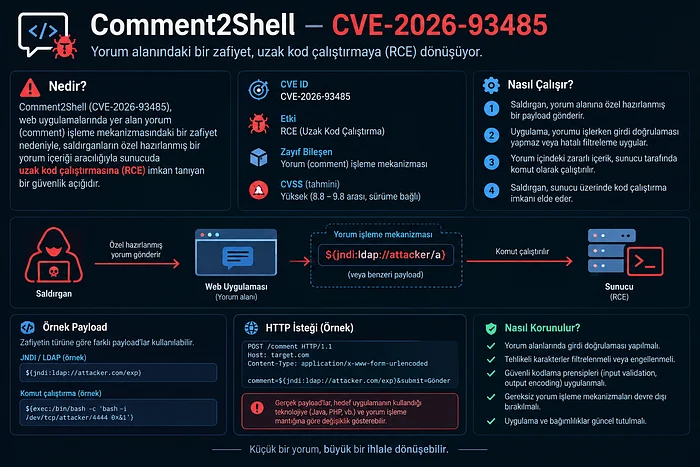
The chain is packaged under the name Comment2Shell: an ordinary blog comment becomes command execution on the server.
Setup
For the chain to work:
- Comments must be enabled on the site and anonymous submissions accepted.
- The malicious comment must become visible on the page.
- The chain depends on block theme rendering behaviour; classic themes may not trigger the same attribute transformation.
- A privileged administrator must view the affected post. No attacker account and no pre-obtained nonce are needed.
Comment moderation can reduce the risk but should not be treated as a security boundary on its own, because previously approved user identities and preview behaviour can still make crafted content visible.
Finding it
The root of the problem is a special line-break character hidden inside the cite attribute of an allowed blockquote tag. That line break gets past the KSES sanitisation performed when the comment is first saved.
When the comment is displayed, wpautop() converts that line break into an HTML comment placeholder. The regular expression it uses stops at the first closing > character, so a paragraph tag can be smuggled into the attribute value. The browser then interprets the attacker-controlled onfocus and autofocus attributes, and the JavaScript runs automatically as soon as the page loads.
Exploitation
Step 1: Plant the payload in a comment
An anonymous comment carries a blockquote with a cite attribute containing the special line break. KSES accepts the tag and attribute, and the line break survives storage.
Step 2: Trigger rendering
When the comment is displayed, wpautop() turns the line break into an HTML comment placeholder. Because the regex stops at the first >, the paragraph tag leaks into the attribute value.
Step 3: Automatic execution
The browser parses the injected onfocus and autofocus attributes and runs the JavaScript on page load, with no user interaction.
Step 4: Act with the viewer's privileges
The resulting XSS runs with the privileges of whoever views the page. If that person is a logged-in administrator, the script can:
- reach WordPress administrative functions;
- obtain the nonce required for plugin upload;
- build a ZIP archive inside the browser;
- present it as a plugin and upload a webshell to the server.
The public PoC deletes the PHP shell and the plugin directory after running the command, largely removing visible traces.
Root cause
The mistake sits in wpautop(): its regex terminates at the first > instead of respecting the attribute context, so a paragraph tag can be injected into an attribute value. KSES did not stop it because the line break inside the cite attribute passed sanitisation at save time.
Impact
An unauthenticated attacker can store an XSS that fires when an administrator views the post, and from there upload a plugin-shaped ZIP containing a webshell, leading to command execution on the server. The chain depends on the preconditions listed above: open anonymous comments, visible rendering, block theme behaviour, and an administrator viewing the post. The report notes that at disclosure time researchers had not detected active exploitation, but the public PoC makes similar attacks easier to repeat.
Fix
WordPress fixed the issue in 7.1.1, with backports to older branches down to 4.7.36. Site owners should update to 7.1.1 or the latest patched release of their maintained branch. The report also recommends:
- Searching
wp_commentsfor unusual combinations ofblockquote,cite,onfocusorautofocus. - Reviewing requests to
wp-comments-post.phpandwp-admin/update.php. - Looking for recently created, unknown PHP files under
wp-content/plugins. - Disabling comments as a temporary measure until patched.
- Starting incident response if an unexpected plugin upload is found, covering admin sessions, files, logs, credentials and possible persistence mechanisms.
The public PoC is at https://github.com/DeathShotXD/Comment2Shell.
What happened, in plain words
A flaw in WordPress's formatting function can turn an ordinary blog comment into full control of the server that runs the site. The bug is tracked as CVE-2026-93485, and the chain of steps that exploits it is called Comment2Shell.
WordPress is one of the most widely used systems for building websites and blogs. When someone writes a post or a comment, WordPress does not store the text exactly as typed. It passes the text through a formatting layer that turns blank lines into paragraphs and line breaks, so the page looks tidy. One of the central pieces of that layer is a function called wpautop(). The bug lives inside that function.
Before we go further, a few words that will come up constantly:
- Function: a named block of code inside a program that does one job. Think of it as a kitchen appliance: you give it ingredients, it gives you a result.
wpautop()takes raw text and returns text with paragraph tags added. - Vulnerability: a mistake in software that lets someone make it do something the author did not intend.
- Exploit: the set of steps that actually uses a vulnerability to achieve an effect.
- XSS (Cross-Site Scripting): a class of vulnerability where an attacker gets their own JavaScript code to run inside another person's browser, as if it were part of the trusted website. The everyday comparison: imagine someone slips a fake page into your favourite newspaper, and you read it believing the newspaper wrote it. Your browser cannot tell the difference between the site's own code and the injected code, so it runs both with the same trust.
- Stored XSS: the malicious content is saved on the server (for example, in a comment) and served to everyone who later views the page, rather than being reflected back once.
- Unauthenticated: the attacker does not need an account or a login. Anyone can try it.
- JavaScript: the programming language that browsers run to make pages interactive. It can read the page, talk to the site on your behalf, and change what you see.
- Server: the computer that hosts the website and sends pages to visitors.
- Command execution: running operating-system commands on the server itself, which is roughly the highest level of control an attacker can reach on a website.
The WordPress team fixed the flaw in version 7.1.1 and asked site owners to update. The flaw affects WordPress versions from 4.7 to 7.1.0 and was rated 7.1 (high) on CVSS 3.1. CVSS is a standard scoring system for how serious a vulnerability is; 7.1 out of 10 falls in the "high" band. Patches for older branches were released back to 4.7.36, so sites that cannot jump to the newest release still have a fixed version available in their own line.
Setup
For the chain to work:
- Comments must be enabled on the site and anonymous submissions accepted. If visitors must log in to comment, the attacker has no way in.
- The malicious comment must become visible on the page. A comment that is never displayed never reaches a browser, so the code inside it never runs.
- The chain depends on block theme rendering behaviour; classic themes may not trigger the same attribute transformation. A theme is the package that controls how a WordPress site looks. Block themes are the newer style, built from reusable blocks; classic themes are the older style. The difference matters here because the bug relies on how the newer style processes attributes.
- A privileged administrator must view the affected post. No attacker account and no pre-obtained nonce are needed. An administrator is the highest-level user on a WordPress site, able to install plugins and change settings. A nonce is a short one-time code that a site hands out to prove a request came from its own pages; normally an attacker would need one to perform sensitive actions, but here the script steals one from the administrator's own browser.
Comment moderation can reduce the risk but should not be treated as a security boundary on its own, because previously approved user identities and preview behaviour can still make crafted content visible. In plain terms: if a site holds comments for approval, that helps, but do not rely on it as the only defence. A commenter who was approved before, or a preview screen that shows a comment before approval, can still put the content in front of an administrator.
Finding it
The root of the problem is a special line-break character hidden inside the cite attribute of an allowed blockquote tag. Let us unpack that sentence, because it contains most of the mechanism.
- HTML tag: the building block of a web page, written in angle brackets, such as
<blockquote>. Tags tell the browser what a piece of content is. - Attribute: extra information attached to a tag, written inside the opening bracket, such as
cite="...". Theciteattribute of ablockquotenormally holds the address of the source being quoted. - KSES: WordPress's built-in filter that inspects submitted content and strips out tags and attributes it considers dangerous. Think of it as an airport security scanner for HTML: it has an allow-list of what may pass.
blockquoteandciteare on the list, so they pass. - Sanitisation: the general process of cleaning input so only safe parts remain. KSES is WordPress's sanitiser for post and comment content.
- Line-break character: an invisible character that marks the end of a line. It is not the same as the visible letters around it, and that is exactly why it can slip past checks that look at tags and attributes.
That line break gets past the KSES sanitisation performed when the comment is first saved. In other words, the scanner looks at the tag and the attribute, sees both are allowed, and lets the comment through, without noticing the hidden character inside the attribute value.
When the comment is displayed, wpautop() converts that line break into an HTML comment placeholder. An HTML comment is a piece of markup the browser ignores when drawing the page, written between <!-- and -->. wpautop() uses such placeholders internally as markers while it rearranges text into paragraphs.
The regular expression it uses stops at the first closing > character, so a paragraph tag can be smuggled into the attribute value. A regular expression (regex) is a pattern-matching tool: a compact way of saying "find text that looks like this". The comparison: a regex is like a search-and-replace rule in a word processor, but far more precise. The problem is that this particular rule assumes the first > it meets ends the tag, when in fact a > can legitimately appear inside an attribute value. Because the rule stops early, the text after that point is treated as if it were outside the attribute, and a paragraph tag ends up inside it.
The browser then interprets the attacker-controlled onfocus and autofocus attributes, and the JavaScript runs automatically as soon as the page loads. Two more terms:
- Event handler attribute: an attribute such as
onfocusthat tells the browser "when this event happens, run this code".onfocusfires when an element receives focus, for example when it is clicked or tabbed to. autofocus: an attribute that tells the browser to give an element focus automatically when the page loads. Combined withonfocus, it means the code runs without the visitor doing anything at all.
So the sequence is: a hidden character survives the scanner, the formatter misreads it, a tag is born inside an attribute, and the browser obeys the event handler the moment the page opens.
Exploitation
Step 1: Plant the payload in a comment
An anonymous comment carries a blockquote with a cite attribute containing the special line break. KSES accepts the tag and attribute, and the line break survives storage. The attacker's goal at this stage is simple: get the hidden character into the database in a place the site considers legitimate. Because blockquote and cite are allowed, nothing is stripped, and the comment is saved as-is.
Step 2: Trigger rendering
When the comment is displayed, wpautop() turns the line break into an HTML comment placeholder. Because the regex stops at the first >, the paragraph tag leaks into the attribute value. Rendering means the moment WordPress takes the stored text and builds the actual HTML that is sent to a browser. This is where the stored text is reinterpreted, and where the mistake in the regex turns harmless-looking content into something the browser will treat as structure.
Step 3: Automatic execution
The browser parses the injected onfocus and autofocus attributes and runs the JavaScript on page load, with no user interaction. Parsing means reading the HTML and working out what each piece is. Once the browser sees autofocus, it focuses the element; once it sees onfocus, it runs the attached code. No click, no hover, no keystroke: simply opening the page is enough.
Step 4: Act with the viewer's privileges
The resulting XSS runs with the privileges of whoever views the page. This is the key idea behind XSS: the injected code is not running as the attacker, it is running as the victim, inside the victim's logged-in browser session. A session is the state of being logged in; the browser holds a cookie that proves who you are. If that person is a logged-in administrator, the script can:
- reach WordPress administrative functions;
- obtain the nonce required for plugin upload;
- build a ZIP archive inside the browser;
- present it as a plugin and upload a webshell to the server.
A few of those need explaining:
- Administrative functions: the internal actions WordPress exposes to logged-in administrators, such as installing plugins or changing settings. Because the script runs in the administrator's browser, it can call them just as the administrator could.
- Plugin: an add-on package that extends WordPress. Installing one normally means uploading a ZIP file, which WordPress unpacks into a folder on the server.
- ZIP archive: a single file that bundles other files together, like a folder packed into one item for transport.
- Webshell: a small script placed on a server that lets an attacker run commands through the website. It is the doorway that turns a browser-side bug into control of the machine.
The public PoC deletes the PHP shell and the plugin directory after running the command, largely removing visible traces. A PoC (proof of concept) is published code that demonstrates the attack. PHP is the programming language WordPress is written in, so a PHP shell is a script the server will execute. Cleaning up afterwards makes the intrusion harder to spot for anyone who only glances at the plugins folder.
Root cause
The mistake sits in wpautop(): its regex terminates at the first > instead of respecting the attribute context, so a paragraph tag can be injected into an attribute value. KSES did not stop it because the line break inside the cite attribute passed sanitisation at save time.
In everyday terms: two guards were on duty. The first, KSES, checked the comment when it was saved and saw only allowed parts. The second, wpautop(), rearranged the text when the page was built, and its pattern-matching rule was too simple to notice that a > can sit inside an attribute. Each guard was reasonable on its own; together they left a gap.
Impact
An unauthenticated attacker can store an XSS that fires when an administrator views the post, and from there upload a plugin-shaped ZIP containing a webshell, leading to command execution on the server. The chain depends on the preconditions listed above: open anonymous comments, visible rendering, block theme behaviour, and an administrator viewing the post. The report notes that at disclosure time researchers had not detected active exploitation, but the public PoC makes similar attacks easier to repeat.
Put simply: no account is needed to plant the comment, but an administrator has to look at the page for the chain to complete. That combination is what makes the bug serious without making it trivially automatic on every site.
Fix
WordPress fixed the issue in 7.1.1, with backports to older branches down to 4.7.36. A backport is a fix applied to an older version line so that sites which cannot upgrade to the newest release still receive the correction. Site owners should update to 7.1.1 or the latest patched release of their maintained branch. The report also recommends:
- Searching
wp_commentsfor unusual combinations ofblockquote,cite,onfocusorautofocus.wp_commentsis the database table where WordPress stores comments. Looking for those words together helps find comments that were planted before the patch. - Reviewing requests to
wp-comments-post.phpandwp-admin/update.php. These are the addresses that handle comment submission and admin updates; unusual traffic to them may show an attempt in progress. - Looking for recently created, unknown PHP files under
wp-content/plugins. That folder holds installed plugins, so an unexpected file there may be a webshell. - Disabling comments as a temporary measure until patched. If comments cannot be posted, the first step of the chain cannot happen.
- Starting incident response if an unexpected plugin upload is found, covering admin sessions, files, logs, credentials and possible persistence mechanisms. Incident response is the organised process of investigating and cleaning up after a break-in. Persistence means the ways an attacker keeps access after the first intrusion, such as hidden accounts or extra files.
The public PoC is at https://github.com/DeathShotXD/Comment2Shell.
Glossary
- Administrator: the highest-level user on a WordPress site, able to install plugins and change settings.
- Attribute: extra information attached to an HTML tag, written inside the opening bracket.
autofocus: an HTML attribute that makes the browser focus an element automatically when the page loads.- Backport: a fix applied to an older version line so sites that cannot upgrade still receive it.
- Block theme: a newer style of WordPress theme built from reusable blocks.
- Classic theme: an older style of WordPress theme.
- CMS (content management system): software for building and managing websites, such as WordPress.
- Command execution: running operating-system commands on the server itself.
- Cookie: a small piece of data a browser stores for a site, often used to prove you are logged in.
- Cross-Site Scripting (XSS): a vulnerability where an attacker's JavaScript runs inside another person's browser as part of a trusted site.
- CVSS: a standard scoring system for the severity of a vulnerability, from 0 to 10.
- Event handler attribute: an HTML attribute such as
onfocusthat runs code when a particular event happens. - Exploit: the set of steps that uses a vulnerability to achieve an effect.
- Function: a named block of code that performs one job.
- HTML comment: markup between
<!--and-->that the browser ignores when drawing the page. - HTML tag: the building block of a web page, written in angle brackets.
- Incident response: the organised process of investigating and cleaning up after a break-in.
- JavaScript: the programming language browsers run to make pages interactive.
- KSES: WordPress's filter that strips tags and attributes it considers dangerous from submitted content.
- Line-break character: an invisible character marking the end of a line.
- Nonce: a short one-time code a site hands out to prove a request came from its own pages.
- Parsing: reading HTML and working out what each piece is.
- Persistence: the ways an attacker keeps access after the first intrusion.
- PHP: the programming language WordPress is written in.
- PoC (proof of concept): published code that demonstrates an attack.
- Regular expression (regex): a compact pattern used to find text that matches a rule.
- Rendering: the moment stored text is turned into the HTML sent to a browser.
- Sanitisation: cleaning input so only safe parts remain.
- Server: the computer that hosts a website and sends pages to visitors.
- Session: the state of being logged in, held in the browser via a cookie.
- Stored XSS: XSS where the malicious content is saved on the server and served to later visitors.
- Theme: the package that controls how a WordPress site looks.
- Unauthenticated: requiring no account or login.
- Vulnerability: a mistake in software that lets someone make it do something unintended.
- ZIP archive: a single file bundling other files together.



