Complete take-over of Cisco Unified Communications Manager due consecutively misconfigurations
Cisco VOIP phones exposed web portals that leaked call logs and configuration files, and the Cisco UCM configuration file was stored unencrypted, exposing SSH and LDAP credentials. An attacker could use these credentials to log in as administrator to the UCM and gain read-write access to Samba shares.
 Published on infosecwriteups.com
InfoSec Write-ups
The full write-up lives on its author's site
It belongs to its author, so we link to it rather than copy it. The other two tabs are our own rewrites, checked against it.
Context
This write-up walks through a chain of misconfigurations in Cisco VOIP Phones and Cisco Unified Communications Manager (CUCM, also called CallManager) that, taken together, allowed a complete take-over of the management control system. The target was an internal network range, and the entry point was the web interfaces of Cisco VOIP Phones exposed on that internal network.
CUCM is the call-management product that provisions phones and hands them their configuration. Phones normally fetch their configuration files from the call manager, and those files can contain credentials the phones use to talk to the rest of the system. The article shows what happens when the phone web portals are left at default values, the configuration files are not encrypted, and the credentials inside them are reused elsewhere.
Setup
The work was done during the internal recon stage in ranges identified on the internal network. The tools and preconditions described are:
- A host-discovery pass to get all hosts alive in the range.
- A look for web applications on ports 80 and 443.
- The
http-titlenmap NSE script, whose results were grepped to identify VOIP Phone devices exposed to the internal network. - A target list of VOIP phone addresses, one phone per line, in a file such as
voip-phone-addr.txt. - A custom Python script,
ciscophonecfg.py, written by the researcher to scrape the phones and parse their configuration files.
Simply entering the phone web portal allowed reading phone logs and downloading configuration files.
Finding it
The exposed web interfaces of the Cisco VOIP Phones look like the following:
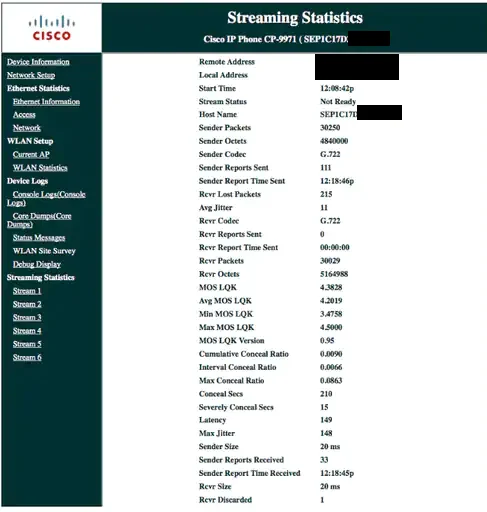
Some of the phone models were prone to publicly disclosed vulnerabilities with known exploits, but in this environment all of them were patched, so that route was closed. Instead, the researcher spent time reading the documentation of every reachable device and found that a phone whose configuration was left at default values, and not hardened, could leak interesting information.
Two leaks stood out. Simply entering the web portal allowed reading phone logs, and those logs contained phone calls with debug information, which could be parsed to add more targets to the list. The portal also allowed downloading the entire phone configuration file from the device, as well as the unencrypted configuration file of Cisco UCM.
While reading manufacturer documentation, the researcher found a Cisco article describing two ways to obtain a phone's configuration file from CUCM:
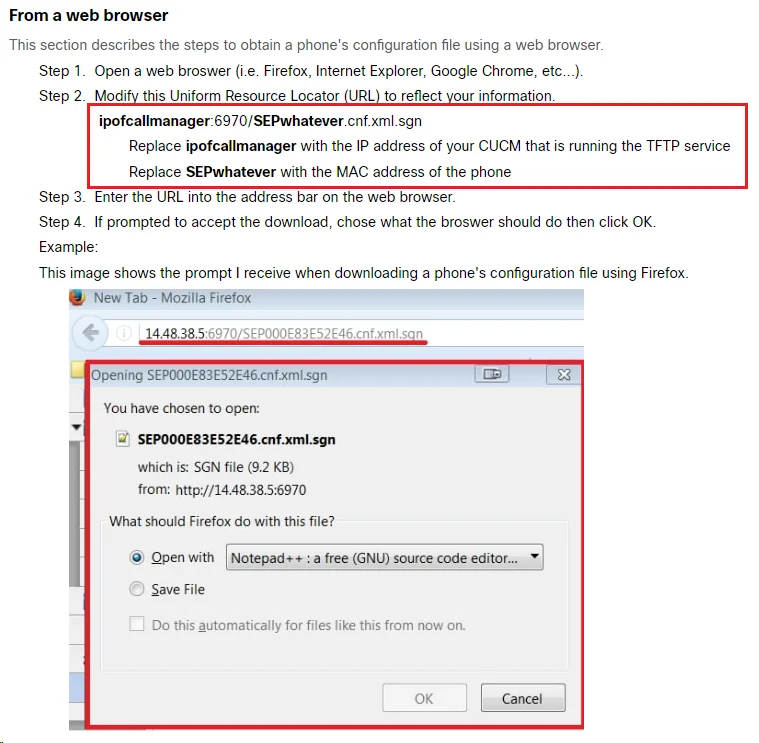
That documentation is what pointed to the call manager as the next target.
Exploitation
Step 1: Find the call manager address
The question was where to get the IP of the call manager. Inside the exposed web panels of the VOIP Phones, many IP addresses were disclosed. The researcher scraped all addresses from all devices in the target list and scanned those IPs for open port 6970, as the documentation says.
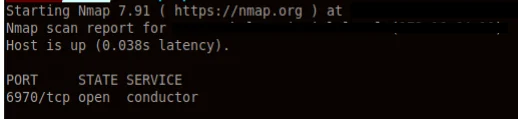
After a few tests, the API endpoint address that provides the configuration files was confirmed. Inside those files are SSH and LDAP credentials.
Step 2: Automate collection with a script
A script was built to print the collected data in a readable form. Its logic, as described:
- Spider all web VOIP Phone portals.
- Extract the MAC Address.
- Craft the links to get the configuration file.
- Download and parse the configuration files.
- Print important data in a nice way.
The script is run as:
python3 ciscophonecfg.py -iL voip-phone-addr.txt
It reads the target phones file (one phone per line), does a little scraping on the exposed portals, builds the links based on the information above, extracts the critical data from the config file, and shows a summary of each device.
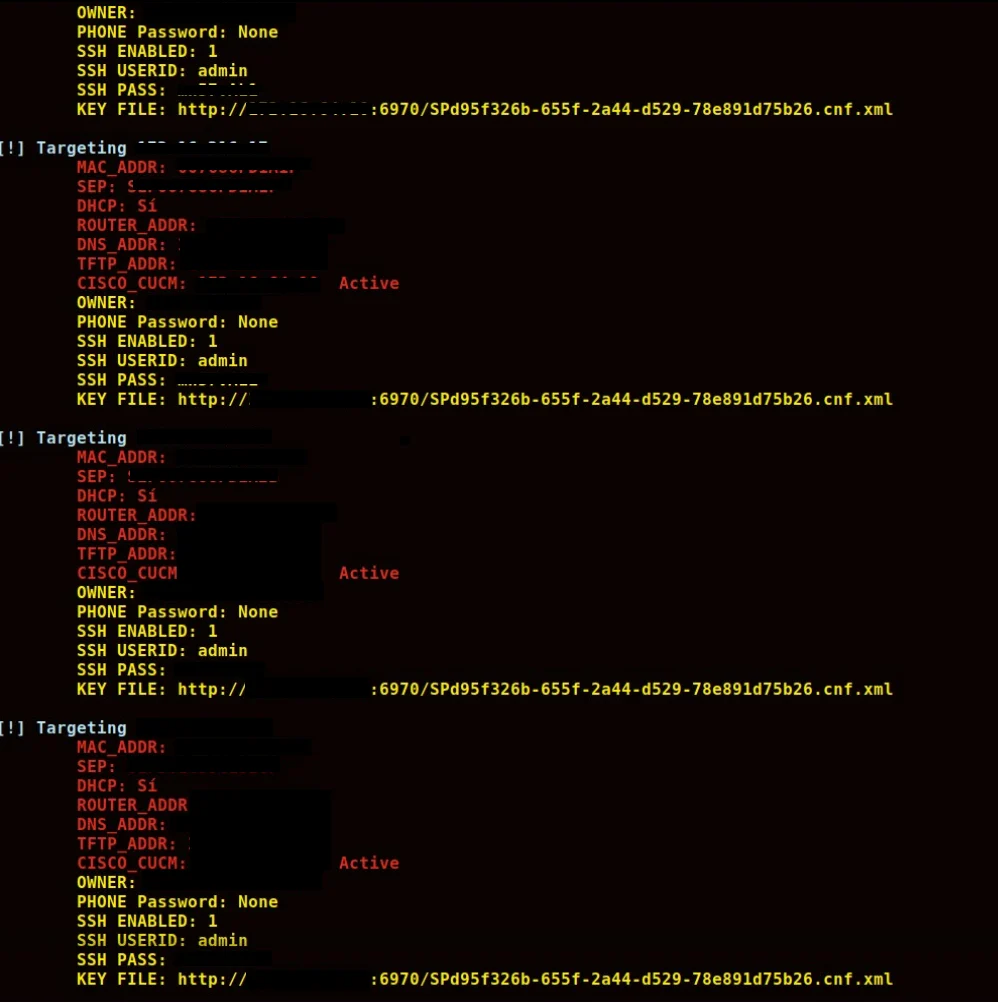
The output prints the full name of the owner of the phone, SSH credentials, and a "key file". The key file is the interesting part, because it is the same link on all devices: it is the configuration manager file.
Step 3: Read the key file in cleartext
That key file contains LDAP credentials of the Cisco UCM and other very interesting information. According to the official documentation, the file can be encrypted from the Cisco UCM configuration, but due to misconfigurations that option was not enabled, which allowed reading the file in cleartext. The syntax to obtain the configuration file is:
http://ip_callmanager:6970/@serviceProfileFile_value
Here @serviceProfileFile_Value is a filename like SPd95f326b-655f-2a44-d529–78e891d75b26.cnf.xml.
At this point the researcher had SSH and LDAP credentials used by the Cisco Phone and Management System.
Step 4: Log in to CUCM as administrator
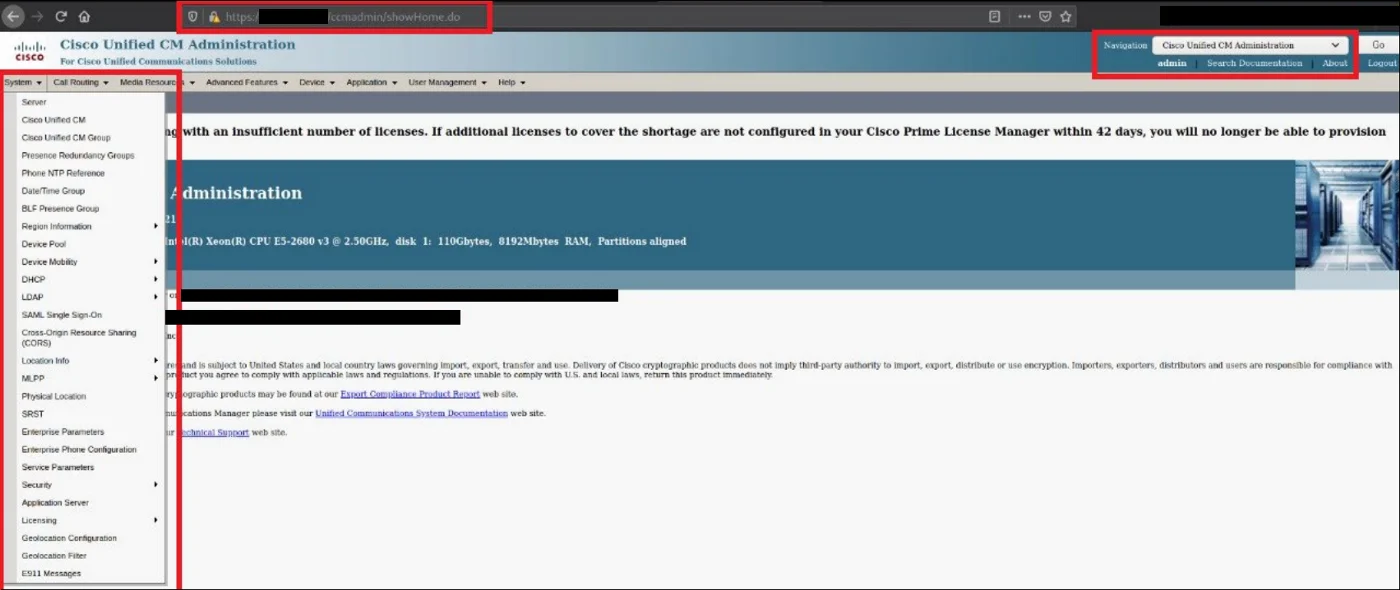
Just in case, the researcher tried to log in with the information scraped from the Cisco Unified Communications Manager portal, and was able to log in as administrator because the credentials were reused:
Step 5: Dump the telephone directory
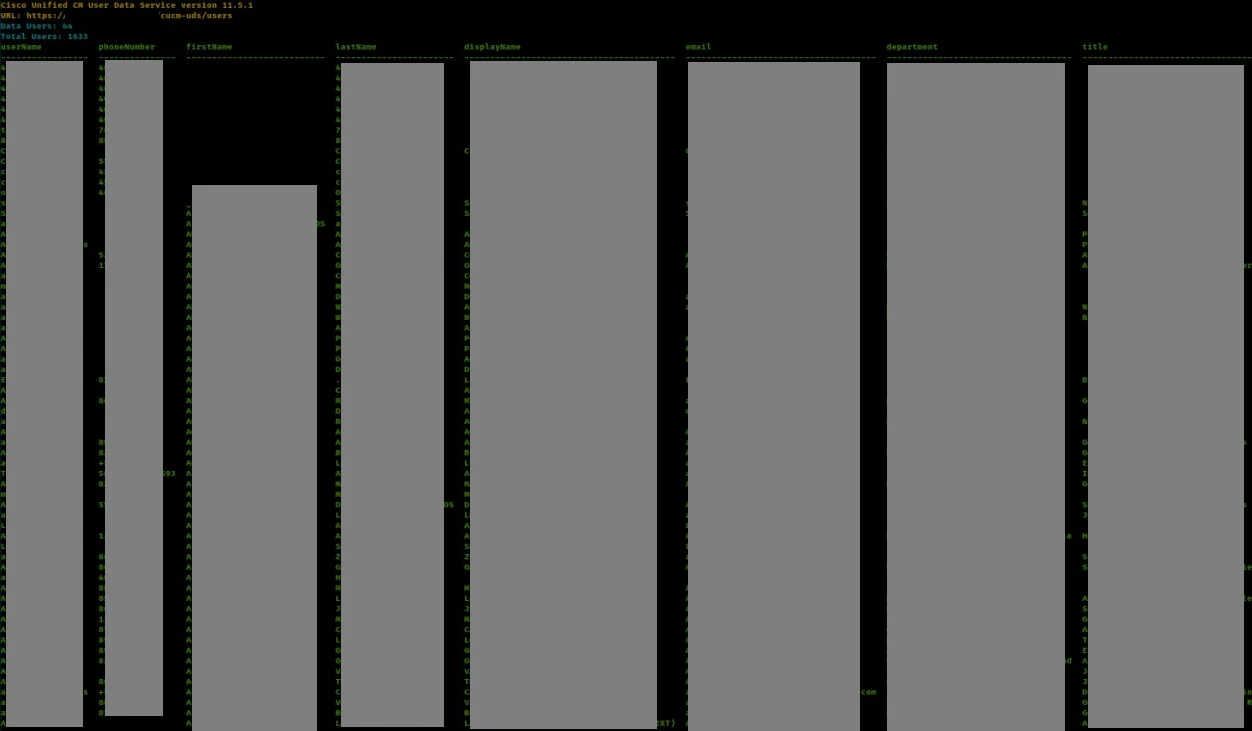
Other actions followed from the same misconfigurations, such as dumping the entire telephone directory with a custom script developed on the go:
Step 6: Reuse SSH credentials on other hosts
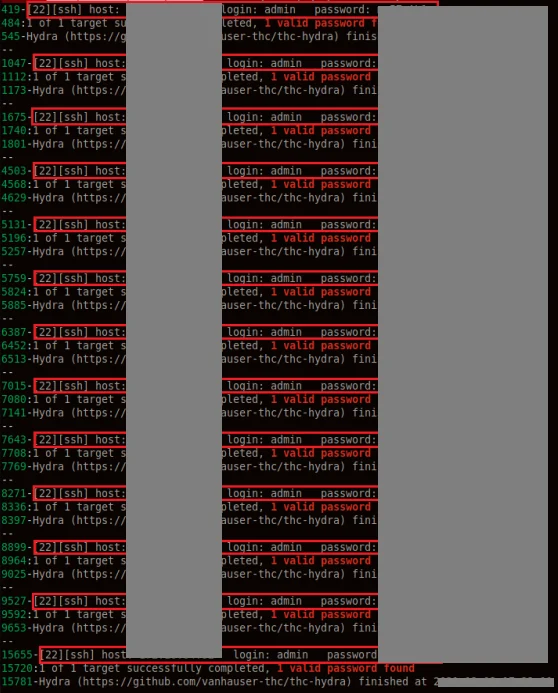
The SSH credentials were reused on other hosts:
Step 7: Read-write access to a Samba share
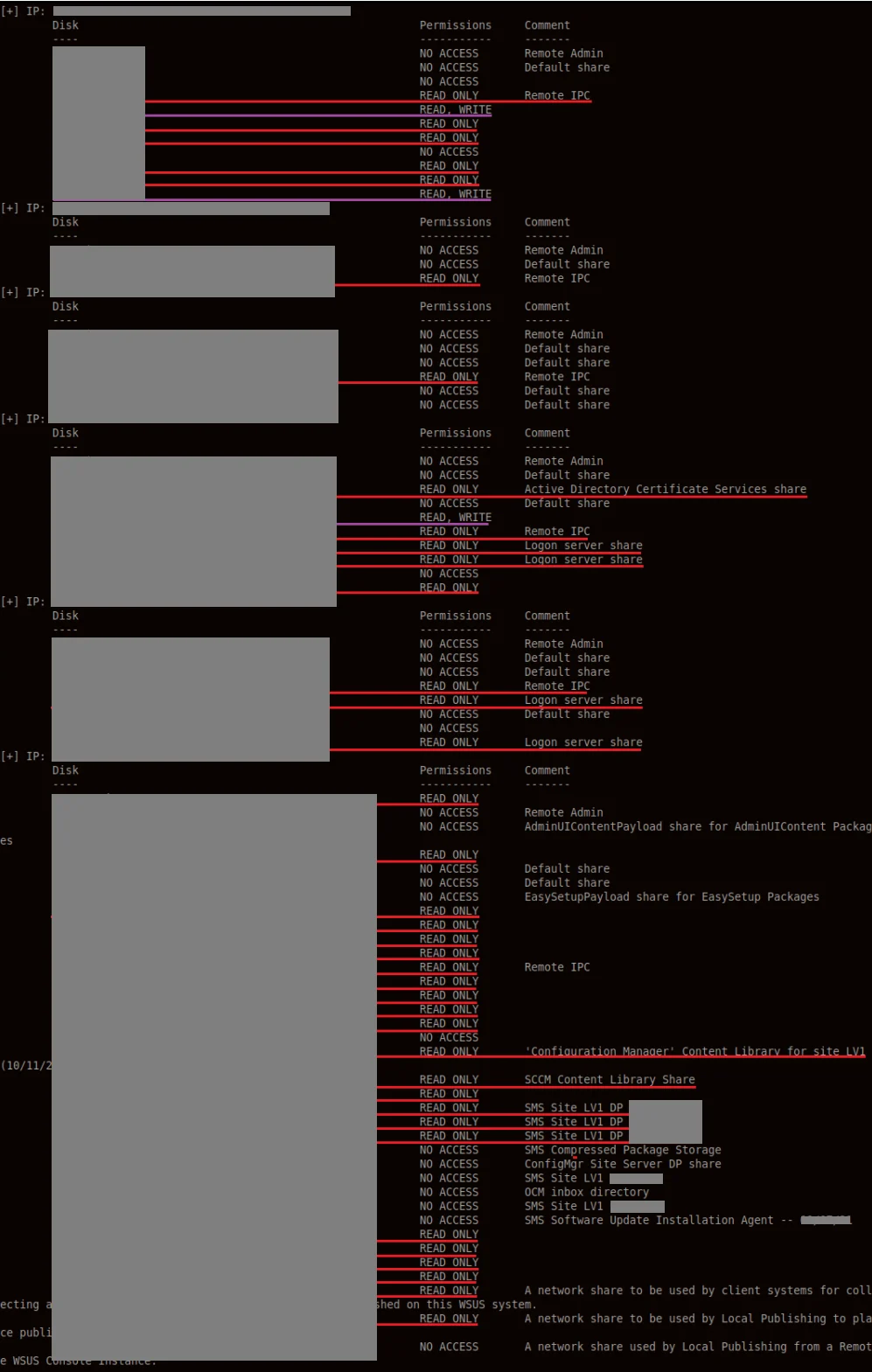
Finally, the LDAP credentials of Cisco UCM extracted from the unencrypted key file gave read-write access to a Samba share:
Root cause
The chain rests on several separate mistakes that compounded:
- Default, unhardened phone configuration. The VOIP Phone configuration was left at default values and not hardened, so the web portal exposed phone logs with call debug information and allowed downloading the phone configuration file.
- Unencrypted configuration files. CUCM can encrypt the configuration file, but that option was not enabled, so the key file containing LDAP credentials and other information was readable in cleartext.
- Credential reuse. The credentials scraped from the CUCM portal worked for administrator login on CUCM, the SSH credentials worked on other hosts, and the LDAP credentials gave read-write access to a Samba share.
The publicly known phone vulnerabilities were patched, but the misconfigurations described above were present, and the encryption feature that would have protected the key file was not turned on.
Impact
Under these conditions an attacker with access to the internal network could move from an exposed phone web portal to a complete take-over of the Cisco Unified Communications Manager management control system. Concretely, the researcher obtained administrator login to CUCM, dumped the entire telephone directory, reused SSH credentials on other hosts, and gained read-write access to a Samba share. The impact depends on the same preconditions: default phone configuration, unencrypted configuration files, and reused credentials.
Fix
- Harden the VOIP Phone configuration instead of leaving it at default values, so the web portal does not expose logs and configuration files.
- Enable the encrypted configuration feature on CUCM so the key file is not readable in cleartext.
- Stop reusing credentials across CUCM, SSH on other hosts, and LDAP/Samba, so a single leaked secret does not unlock the rest of the environment.
Variants to test
- Grep
http-titleresults for phone portals. A positive result is a set of VOIP Phone web interfaces reachable on ports 80 or 443 in the internal range. - Read the phone web portal without authentication. A positive result is readable phone logs containing call debug information, or a downloadable phone configuration file.
- Scrape IPs from phone web panels and scan port 6970. A positive result is a call manager API endpoint answering on 6970.
- Request the service profile file. A positive result is a cleartext configuration file at
http://ip_callmanager:6970/@serviceProfileFile_valuecontaining SSH and LDAP credentials. - Try the scraped credentials against the CUCM portal. A positive result is an administrator login due to reused credentials.
- Reuse the SSH credentials on other hosts. A positive result is a host that accepts the reused SSH credentials.
- Reuse the LDAP credentials against Samba shares. A positive result is read-write access to a share.
What happened, in plain words
This article describes how a security researcher took over a whole phone system inside a company's internal network, not by breaking any software, but by walking through a series of small configuration mistakes that added up. The system in question is Cisco Unified Communications Manager, usually shortened to CUCM or CallManager. It is the software that runs an office telephone system: it knows which desk phone belongs to which person, it hands each phone its settings, and it stores the directory of phone numbers.
Think of CUCM as the office manager of a building. Every desk phone is an employee who, when they arrive in the morning, asks the manager for their personal folder: which extension is mine, which server do I talk to, which username and password do I use. The manager keeps those folders in a cupboard. If the cupboard is unlocked and the folders are not sealed, anyone who can walk into the building can read them, and if the same passwords are written in every folder, one folder opens many doors.
That is essentially what happened here. The phones were reachable on the internal network through their little web pages, those web pages were left at their default settings, the configuration files the phones downloaded were not encrypted, and the passwords inside them were reused on other systems. The researcher moved step by step from a phone's web page to administrator access on the call manager itself, then to the full telephone directory, to other servers over SSH, and to a shared file folder (a Samba share) with read and write access.
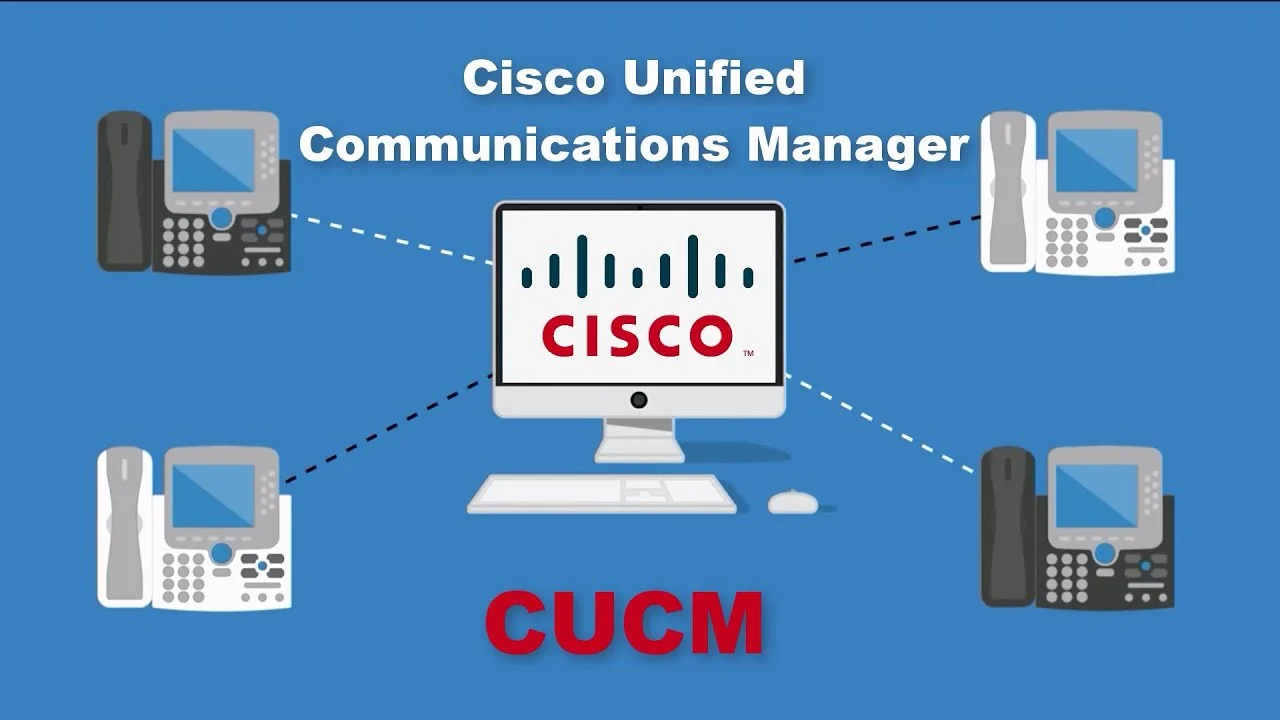
The article is written as a roadmap: it shows that misconfigurations alone, with no software vulnerability to exploit, can lead to a complete take-over of a management control system. The two products involved are Cisco VOIP Phones (the desk phones) and Cisco Unified Communications Manager (the server that manages them).
Some words you will meet, explained first
Before walking through the steps, here are the ideas the article relies on. Each one is explained from zero.
- Internal network: the private part of a company's network, the part you can only reach from inside the building or through a VPN. It is not the public internet. The researcher was already inside this network when the work started.
- IP address: the number that identifies a device on a network, like a postal address for a computer. Something like
[redacted]is an IP address. - Port: a numbered door on a device. One IP address can run many services, and each service listens on its own port number. Web pages usually listen on port 80 (plain) or 443 (encrypted). The article also mentions port 6970, which is the door the call manager uses to serve configuration files to phones.
- Web interface / web portal: a small website built into a device so you can manage it from a browser. Many office devices, printers, cameras and phones, have one.
- API: an interface meant for programs rather than people. Where a web page shows you buttons, an API lets a script ask for data directly. Here, the call manager offers an API that hands out configuration files.
- Configuration file: a text file that tells a device how to behave. For a phone, it says which server to contact, which extension to use, and which credentials to present. It is the phone's personal folder.
- Credentials: a username and password (or key) used to prove who you are. The article keeps finding credentials inside files and then trying them elsewhere.
- SSH: a way to open a text terminal on another computer over the network, usually to administer it. If you have the right username and password (or key), you get a command line on that machine.
- LDAP: a standard way to look up people and accounts in a directory, the kind of thing a company uses to keep usernames, groups and addresses in one place. LDAP credentials are the username and password used to query or modify that directory.
- Samba share: a shared folder on a network, the kind Windows and Linux machines use to exchange files. A share can be read-only or read-write; read-write means you can also change or delete files.
- MAC address: a hardware identifier burned into a network card, written as six pairs of hexadecimal digits. Phones use it to identify themselves when asking for their configuration.
- Nmap and NSE scripts: Nmap is a tool that scans a network to see which devices are alive and which ports are open. NSE scripts are small add-ons that do extra checks;
http-titlefetches the title of a web page so you can guess what kind of device is behind a port. - Grep: a command that searches text for a pattern and prints the matching lines. Grepping nmap output means filtering it down to the lines you care about.
- Scraping: automatically pulling information out of web pages or files with a script, instead of copying it by hand.
- Spidering: a script following links and pages automatically, the way a search engine crawler does, to collect everything it can reach.
- Cleartext: data stored or sent without encryption, so anyone who can read the file or the traffic can read the content directly.
- Credential reuse: using the same username and password on more than one system. Convenient for administrators, dangerous when one of those systems leaks.
- Misconfiguration: a setting left at a value that is convenient but unsafe. Nothing is broken; the software works exactly as configured, and that is the problem.
Setup: what was needed before starting
The work happened during the internal reconnaissance stage, in network ranges that had already been identified on the internal network. Reconnaissance means looking around before touching anything: finding out which machines exist, what they run, and which of them are interesting.
The tools and preconditions described are:
- A host-discovery pass to get all hosts alive in the range. In plain words: a scan that produces the list of machines that answer.
- A look for web applications on ports 80 and 443. In plain words: for each live machine, check whether it serves a web page.
- The
http-titlenmap NSE script, whose results were grepped to identify VOIP Phone devices exposed to the internal network. In plain words: the page title of a phone's web interface is recognisable, so filtering the scan output for those titles gives you the phones. - A target list of VOIP phone addresses, one phone per line, in a file such as
voip-phone-addr.txt. In plain words: a simple text file where each line is one phone's address, so a script can loop over them. - A custom Python script,
ciscophonecfg.py, written by the researcher to scrape the phones and parse their configuration files. In plain words: a small program that visits each phone's web page, collects the useful bits, downloads the configuration file, and prints a summary.
Simply entering the phone web portal allowed reading phone logs and downloading configuration files. That is the first important point. Normally you would expect a login prompt before a device shows you its logs or lets you download its settings. Here there was none.
Finding it: how the phones were spotted
The exposed web interfaces of the Cisco VOIP Phones look like the following:
The image shows the exposed web interface of a Cisco VOIP Phone. This is the same kind of page you would see for a printer or a home router: a small administration site served by the device itself. Because the page title is distinctive, the http-title script makes these devices easy to pick out of a large scan.
Some of the phone models were prone to publicly disclosed vulnerabilities with known exploits, but in this environment all of them were patched. A publicly disclosed vulnerability is a flaw that has been written about and for which someone has published a way to abuse it; a patch is the update that fixes it. So that route was closed: the researcher could not simply run a ready-made exploit against the phones.
Instead, the researcher spent time reading the documentation of every reachable device. Documentation is the manufacturer's manual, and it often describes features and defaults that nobody changed. The finding was that a phone whose configuration was left at default values, and not hardened, could leak interesting information. Hardening means deliberately tightening a system: turning off unused features, changing default passwords, restricting who can reach what. Leaving defaults in place is the opposite.
Two leaks stood out:
- Simply entering the web portal allowed reading phone logs. Logs are the device's diary of what it has been doing. These logs contained phone calls with debug information, which could be parsed to add more targets to the list. In other words, the diary mentioned other machines, and a script could extract their addresses.
- The portal also allowed downloading the entire phone configuration file from the device, as well as the unencrypted configuration file of Cisco UCM. The first is the phone's own settings; the second is the call manager's settings file, and it was not encrypted.
While reading manufacturer documentation, the researcher found a Cisco article describing two ways to obtain a phone's configuration file from CUCM:
That documentation is what pointed to the call manager as the next target. The reasoning is simple: if the phone gets its configuration from somewhere, that somewhere holds the configuration for every phone, and therefore the credentials for every phone.
Exploitation: step by step
Step 1: Find the call manager address
The question was where to get the IP of the call manager. The phones themselves knew the answer: inside the exposed web panels of the VOIP Phones, many IP addresses were disclosed. A phone has to know where its manager is in order to fetch its settings, so its page and logs mention that address.
The researcher scraped all addresses from all devices in the target list and scanned those IPs for open port 6970, as the documentation says. Port 6970 is the door the call manager uses to serve configuration files, so a machine with that port open is a strong candidate for the call manager.
The image relates to scanning the collected addresses for port 6970. After a few tests, the API endpoint address that provides the configuration files was confirmed. Inside those files are SSH and LDAP credentials. In plain words: the researcher now knew which machine hands out the settings, and knew that the settings contain usernames and passwords for logging into other systems.
Step 2: Automate collection with a script
Doing this by hand for every phone would be slow and error-prone, so a script was built to print the collected data in a readable form. Its logic, as described:
- Spider all web VOIP Phone portals. In plain words: visit each phone's web page and follow what it links to, collecting pages and files.
- Extract the MAC Address. In plain words: read the hardware identifier from the page, because the configuration file name is derived from it.
- Craft the links to get the configuration file. In plain words: build the exact address of the configuration file for that phone, using the MAC address and the call manager address.
- Download and parse the configuration files. In plain words: fetch each file and read out the fields that matter.
- Print important data in a nice way. In plain words: show a tidy summary per device instead of a wall of raw text.
The script is run as:
python3 ciscophonecfg.py -iL voip-phone-addr.txt
Line by line, in plain words:
python3runs the Python interpreter, version 3. Python is a programming language commonly used for small automation scripts like this one.ciscophonecfg.pyis the name of the script file. The.pyending is the usual sign of a Python file.-iLis an option the script accepts. Theistands for input and theLfor list, so together they mean "read a list of targets from a file".voip-phone-addr.txtis that file: one phone address per line.
It reads the target phones file (one phone per line), does a little scraping on the exposed portals, builds the links based on the information above, extracts the critical data from the config file, and shows a summary of each device.
The output prints the full name of the owner of the phone, SSH credentials, and a "key file". The key file is the interesting part, because it is the same link on all devices: it is the configuration manager file. In plain words: every phone points at the same shared file on the call manager, so one download gives you the settings that apply to the whole fleet.
The image relates to the script output showing the owner's name, SSH credentials and key file link. Seeing the same key file link repeated for every phone is the clue that this is the central configuration, not a per-phone detail.
Step 3: Read the key file in cleartext
That key file contains LDAP credentials of the Cisco UCM and other very interesting information. According to the official documentation, the file can be encrypted from the Cisco UCM configuration, but due to misconfigurations that option was not enabled, which allowed reading the file in cleartext. In plain words: the software has a lock built in, and nobody turned the key.
The syntax to obtain the configuration file is:
http://ip_callmanager:6970/@serviceProfileFile_value
Line by line, in plain words:
http://is the scheme: a plain, unencrypted web request. Thesinhttpswould mean encrypted; here there is none.ip_callmanageris a placeholder for the address of the call manager found in step 1.:6970is the port, the numbered door described earlier./@serviceProfileFile_valueis the path of the file on that server. The@is just part of the file name here, not an email sign.
Here @serviceProfileFile_Value is a filename like SPd95f326b-655f-2a44-d529–78e891d75b26.cnf.xml. That long name is a service profile identifier: a unique label the call manager gives to a group of settings. The .cnf.xml ending tells you it is an XML configuration file, XML being a text format that stores settings as labelled tags.
At this point the researcher had SSH and LDAP credentials used by the Cisco Phone and Management System. In plain words: two sets of keys, one for opening a terminal on servers, one for reading and changing the company directory.
Step 4: Log in to CUCM as administrator
Just in case, the researcher tried to log in with the information scraped from the Cisco Unified Communications Manager portal, and was able to log in as administrator because the credentials were reused:
The image relates to the administrator login on the CUCM portal. This is the moment the chain becomes a take-over: the same username and password that appeared in a configuration file also worked on the management interface of the call manager itself, with administrator rights. Credential reuse is the whole reason this worked. If the file had contained a password used only by phones, it would have been far less useful.
Step 5: Dump the telephone directory
Other actions followed from the same misconfigurations, such as dumping the entire telephone directory with a custom script developed on the go:
The image relates to dumping the telephone directory with the custom script. A telephone directory is the company's phone book, names, numbers and often departments. Dumping it means copying the whole thing out at once. "Developed on the go" simply means the script was written during the engagement, as the need appeared, rather than prepared in advance.
Step 6: Reuse SSH credentials on other hosts
The SSH credentials were reused on other hosts:
The image relates to reusing the SSH credentials on other hosts. The reasoning is the same as in step 4: a password found in one place was accepted somewhere else. Each additional host widens what an attacker can reach, and each one is a separate system that its own administrators believed was protected by its own password.
Step 7: Read-write access to a Samba share
Finally, the LDAP credentials of Cisco UCM extracted from the unencrypted key file gave read-write access to a Samba share:
The image relates to the read-write access obtained on the Samba share. Read-write access is more serious than read-only: it means files can be changed or deleted, not just viewed. The credentials came from the same unencrypted key file as before, so this is the third system opened by the same leak.
Root cause: why it worked
The chain rests on several separate mistakes that compounded:
- Default, unhardened phone configuration. The VOIP Phone configuration was left at default values and not hardened, so the web portal exposed phone logs with call debug information and allowed downloading the phone configuration file. In plain words: the front door was unlocked because nobody changed the factory setting.
- Unencrypted configuration files. CUCM can encrypt the configuration file, but that option was not enabled, so the key file containing LDAP credentials and other information was readable in cleartext. In plain words: the safe existed, but the contents were left on the desk.
- Credential reuse. The credentials scraped from the CUCM portal worked for administrator login on CUCM, the SSH credentials worked on other hosts, and the LDAP credentials gave read-write access to a Samba share. In plain words: one key opened several doors.
Existing defences did not stop the chain: the publicly known phone vulnerabilities were patched, but the misconfigurations were not addressed, and the encryption feature that would have protected the key file was simply not turned on. This is worth pausing on. The team had done the visible work of applying security updates, which is good practice, but had not reviewed the settings that decide what the devices reveal to anyone who can reach them.
Impact: what an attacker could do
Under these conditions an attacker with access to the internal network could move from an exposed phone web portal to a complete take-over of the Cisco Unified Communications Manager management control system. Concretely, the researcher obtained administrator login to CUCM, dumped the entire telephone directory, reused SSH credentials on other hosts, and gained read-write access to a Samba share.
The impact depends on the same preconditions: default phone configuration, unencrypted configuration files, and reused credentials. That is also why the fixes below are listed separately: each one closes a different link.
Fix: what to change
- Harden the VOIP Phone configuration instead of leaving it at default values, so the web portal does not expose logs and configuration files. In plain words: change the factory settings, restrict who can open the phone's web page, and turn off what you do not use.
- Enable the encrypted configuration feature on CUCM so the key file is not readable in cleartext. In plain words: use the lock the product already provides.
- Stop reusing credentials across CUCM, SSH on other hosts, and LDAP/Samba, so a single leaked secret does not unlock the rest of the environment. In plain words: give every system its own key.
Variants to test: how to check your own environment
If you administer a similar environment, these are the checks that follow the same path. Each one lists what a positive result looks like, so you know when you have found something.
- Grep
http-titleresults for phone portals. A positive result is a set of VOIP Phone web interfaces reachable on ports 80 or 443 in the internal range. - Read the phone web portal without authentication. A positive result is readable phone logs containing call debug information, or a downloadable phone configuration file.
- Scrape IPs from phone web panels and scan port 6970. A positive result is a call manager API endpoint answering on 6970.
- Request the service profile file. A positive result is a cleartext configuration file at
http://ip_callmanager:6970/@serviceProfileFile_valuecontaining SSH and LDAP credentials. - Try the scraped credentials against the CUCM portal. A positive result is an administrator login due to reused credentials.
- Reuse the SSH credentials on other hosts. A positive result is a host that accepts the reused SSH credentials.
- Reuse the LDAP credentials against Samba shares. A positive result is read-write access to a share.
Glossary
- API: an interface designed for programs to request data or actions directly, rather than for a person clicking in a browser.
- Call manager: the everyday name for Cisco Unified Communications Manager, the server that manages the phones.
- Cleartext: data stored or transmitted without encryption, readable by anyone who can access it.
- Configuration file: a text file holding a device's settings, such as which server to contact and which credentials to use.
- Credentials: a username and password, or a key, used to prove identity to a system.
- Credential reuse: using the same credentials on more than one system.
- CUCM: Cisco Unified Communications Manager, the call-management product that provisions phones and hands them their configuration.
- Debug information: extra detail written by a program to help diagnose problems, often more revealing than normal logs.
- Directory (telephone directory): the company phone book, the list of names, numbers and related details.
- Grep: a command that searches text for a pattern and prints matching lines.
- Hardening: deliberately tightening a system's settings, turning off unused features and restricting access.
- Host: a single machine on a network, identified by an IP address.
- HTTP / HTTPS: the protocol browsers use to fetch web pages; HTTPS is the encrypted version.
- Internal network: the private part of a company network, reachable only from inside or through a VPN.
- IP address: the numeric address that identifies a device on a network.
- Key file: here, the shared configuration file on the call manager that phones point to, containing LDAP credentials and other settings.
- LDAP: a standard protocol for looking up and managing accounts and other entries in a directory.
- Logs: a device's record of what it has been doing, kept for troubleshooting.
- MAC address: a hardware identifier burned into a network card, used by phones to identify themselves.
- Misconfiguration: a setting left at a convenient but unsafe value; nothing is broken, but the result is insecure.
- Nmap: a tool that scans a network to find live hosts and open ports.
- NSE script: a small add-on for Nmap that performs an extra check, such as fetching a web page title.
- Patch: an update that fixes a known flaw in software.
- Port: a numbered door on a device through which a particular service is reached; 80 and 443 for web, 6970 for the call manager's configuration service.
- Publicly disclosed vulnerability: a flaw that has been published, often together with a way to abuse it.
- Reconnaissance: the information-gathering phase before an attack or an audit.
- Samba share: a shared folder on a network, accessible read-only or read-write.
- Scraping: automatically extracting information from pages or files with a script.
- Service profile: a named group of settings that the call manager gives to phones; its file name looks like
SP...cnf.xml. - Spidering: automatically following links across pages to collect everything reachable.
- SSH: a protocol for opening a text terminal on another computer over the network.
- VOIP: Voice over IP, telephone calls carried over a computer network instead of traditional phone lines.
- XML: a text format that stores settings as labelled tags, used by the
.cnf.xmlconfiguration files.



