CVE-2020–5842 Stored XSS Vulnerability in Codoforum 4.8.3
Codoforum 4.8.3 stored a cross-site scripting payload entered in the user registration username field, and the payload executed when an administrator opened the manage users page. An attacker could run script in the admin's browser and steal the admin's cookie.

medium.com
Published on medium.com
Hall Of Fame
The full write-up lives on its author's site
It belongs to its author, so we link to it rather than copy it. The other two tabs are our own rewrites, checked against it.
Context
Codoforum is a free forum package. The author was looking for forum software for a community, installed Codoforum 4.8.3 (described as the latest version, last updated on 29 October 2019) and, together with Vyshnav Vizz, tried a few simple XSS payloads against it. That short session turned up multiple cross-site scripting issues affecting admin users; this write-up covers the stored XSS in the user registration flow, tracked as CVE-2020-5842 and listed on Exploit-DB (47876) and cve.mitre.org.
The affected component is the user registration page. Normally that page takes a username, password and email address, creates an account, and the new account then appears in the admin panel's user management list. The bug is that a crafted payload in the user field is stored and the account is created with it intact, so the value becomes script execution in the admin's browser when the user list is viewed.

Setup
No special tooling is described. The preconditions are:
- A local installation of Codoforum 4.8.3.
- The ability to register an ordinary user through the public registration page.
- An administrator who opens the manage users page in the admin panel, which is the trigger condition for the stored payload.
Finding it
The author does not describe a particular observation that prompted the test, only that a few simple XSS payloads were thrown at the freshly installed forum and the registration form turned out to be vulnerable. The interesting property is that the payload does not need to fire in the attacker's own session: it is persisted server-side and executes in the administrator's session when the user list is viewed.
Exploitation
Step 1: Install the target
Download and install Codoforum 4.8.3 on a local server.

Step 2: Register a user with a payload in the username
Browse to the registration page:
http://localhost/index.php?u=/user/register
and create a user with the values below.
Username : "><svg/onload=alert(1)>
Password : password
Email : [redacted]
The username contains the payload "><svg/onload=alert(1)>, an svg element whose onload handler runs alert(1). The password and email are ordinary values; the payload lives entirely in the username field, which is the field the application later echoes into the admin page.
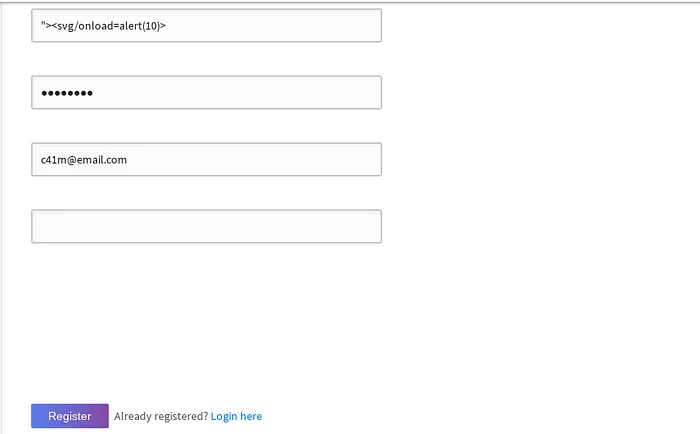
Step 3: Trigger the payload as an administrator
Browse to the manage users page in the admin panel:
http://localhost/admin/index.php?page=users/manage
The stored username is rendered into that page and the XSS fires.
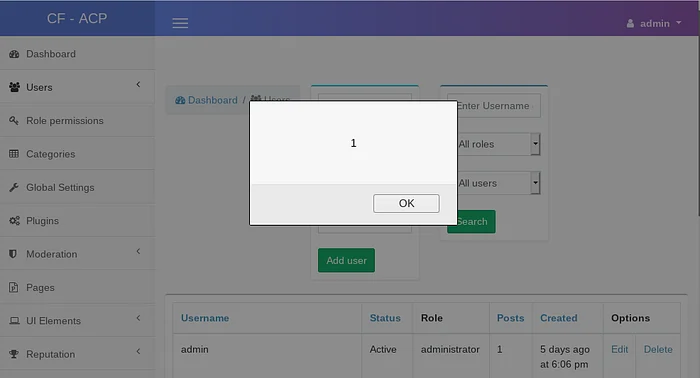
Because the payload is stored on the server, it triggers every time an administrator visits the manage users section, not just once.
Root cause
The registration mechanism accepts a crafted XSS payload in the user field and creates the account with that value intact. The stored value is then shown on the admin user management page, where the XSS triggers. The report frames the fix as input validation plus output sanitisation and escaping; the exact code path is not shown, so which of the two was missing at which layer is likely a matter of the username being echoed unencoded into the admin template.
Impact
The attacker needs only the ability to register an account. The victim is an administrator who opens the manage users section of the admin dashboard. Each such visit re-triggers the payload, and with a crafted payload the attacker can steal the administrator's cookie, which lets the attacker steal the administrator's cookie.. The author describes the issue as critical and notes that multiple cross-site scripting vulnerabilities affecting admin users were found in the same testing session.
Fix
The report's mitigation is input validation and output sanitisation and escaping. No patch, commit or vendor change is described; the timeline records that the issue was reported to Codologic and acknowledged on the same day it was discovered.
Timeline
| Event | Date |
|---|---|
| Discovered | 3 January 2020 |
| Reported to Codologic | 3 January 2020 |
| Acknowledged by Codologic | 3 January 2020 |
| Listed in exploit-db.com | 6 January 2020 |
| Listed in cve.mitre.org | 6 January 2020 |
Variants to test
- Register with the same
"><svg/onload=alert(1)>style payload in other profile fields (display name, signature, location, website) and view the user list as an administrator. A positive result is the handler executing in the admin session when the list renders. - Submit the payload at registration and then check every admin view that displays user data, not just the manage users page: user detail, moderation queues, reports. A positive result is execution on any of those pages.
- Try payloads that survive HTML encoding of quotes, for example an
svgorimgelement with anonerrorhandler placed in a context where angle brackets are not escaped. A positive result is execution despite the quote encoding. - Test whether the stored value is also reflected into emails, exports or API responses consumed by other users. A positive result is the payload appearing unencoded in a context a browser or client will render.
- Check whether the registration endpoint enforces server-side validation on the username length and character set. A positive result is acceptance of markup characters where the UI implies they are disallowed.
What happened, in plain words
Codoforum is a free piece of software for running an online discussion forum, the kind of site where people sign up, post threads and reply to each other. The author was looking for forum software to use for a community, installed version 4.8.3 on his own computer, and together with Vyshnav Vizz tried a few simple cross-site scripting (XSS) payloads against it. That short session turned up several cross-site scripting problems that affect administrators. This write-up covers one of them: a stored XSS in the user registration flow, tracked as CVE-2020-5842 and listed on Exploit-DB as entry 47876 and on cve.mitre.org.
To follow this you only need to know how to use a browser. A few ideas come up again and again, so here they are up front.
- A web page is text that the browser turns into a picture. The server sends the browser a document written in HTML, a language of tags such as
<b>for bold or<img>for an image. The browser reads those tags and draws the page. If an attacker can get their own tags into that document, the browser will obey them just as it obeys the site's own tags. - JavaScript is the programming language browsers run. It is what makes pages interactive. A short piece of JavaScript can read things on the page, including the site's cookies.
- A cookie is a small note the site asks the browser to keep and send back with every request. One common use is to remember that you are logged in, so the server does not ask for your password on every click. If someone else gets your cookie, they can often act as you without knowing your password. Think of it as a cloakroom ticket: whoever holds the ticket gets the coat.
- Cross-site scripting (XSS) means getting your own JavaScript to run inside someone else's browser session on a site. The site thinks it is showing ordinary data, but the data contains markup, and the browser runs it.
- Stored XSS is the version where the malicious data is saved on the server. It does not just bounce back once; it sits in the database and fires every time a page displays it. Compare it to writing graffiti on a wall rather than shouting it in the street: everyone who walks past sees it.
- A payload is the actual text an attacker submits. In XSS it is a snippet of HTML and JavaScript crafted to be executed by the browser.
- Sanitising and escaping are the defences. Sanitising means cleaning input so dangerous markup is removed. Escaping means converting special characters into harmless lookalikes when displaying data, so that a
<is shown as text rather than starting a tag.
The affected component is the user registration page. Normally that page takes a username, a password and an email address, creates an account, and the new account then appears in the admin panel's user management list. The bug is that a crafted payload in the user field is stored and the account is created with it intact, so the value becomes script execution in the admin's browser when the user list is viewed.
Setting up
No special tooling is described. The preconditions are:
- A local installation of Codoforum 4.8.3. "Local" means it runs on the same computer you are using, reachable in the browser at an address like
localhost, rather than on the public internet. This is the safe way to test: nothing you do can affect a real site or real users. - The ability to register an ordinary user through the public registration page. This is the same sign-up form any visitor to a forum would use.
- An administrator who opens the manage users page in the admin panel. This is the trigger condition: the payload only fires when an admin views the list.
Finding it
The author does not describe a particular observation that prompted the test, only that a few simple XSS payloads were thrown at the freshly installed forum and the registration form turned out to be vulnerable. The interesting property is that the payload does not need to fire in the attacker's own session. It is saved on the server and executes in the administrator's session when the user list is viewed. The attacker never needs the admin's password; they only need the admin to look at a page the attacker's data appears on.
Exploitation
Step 1: Install the target
Download and install Codoforum 4.8.3 on a local server. Doing this first gives you a controlled copy of the software to experiment with, so any behaviour you observe is reproducible and harmless to others.
Step 2: Register a user with a payload in the username
Browse to the registration page:
http://localhost/index.php?u=/user/register
Line by line: http:// is the protocol, the way the browser talks to a web server. localhost means this very computer. /index.php is the main script the forum runs, and ?u=/user/register is extra information passed to it in the address, telling it which page to show, here the user registration form. You open this in a browser exactly as you would any web address.
Then create a user with the values below.
Username : "><svg/onload=alert(1)>
Password : password
Email : [redacted]
Line by line: the password and email are ordinary values, there to satisfy the form. The payload lives entirely in the username field, which is the field the application later echoes into the admin page. The username contains the payload "><svg/onload=alert(1)>. That puts the browser back into a position where it expects new markup. Then <svg ...> opens an SVG element, a way of drawing graphics in a page. The onload part is an event handler: a piece of JavaScript the browser runs automatically as soon as that element has loaded. The JavaScript here is alert(1), which pops up a small dialog box containing the number 1. The final > closes the tag. In short: break out of the place the site intended the username to sit, then add a tag that runs code by itself.
Step 3: Trigger the payload as an administrator
Browse to the manage users page in the admin panel:
http://localhost/admin/index.php?page=users/manage
Line by line: this is the same local site, but under /admin/, the administration area, and ?page=users/manage asks for the page that lists and manages user accounts. The stored username is rendered into that page and the XSS fires.
Because the payload is stored on the server, it triggers every time an administrator visits the manage users section, not just once. That is what makes stored XSS more dangerous than a one-off reflection: the trap stays armed.
Root cause
The registration mechanism accepts a crafted XSS payload in the user field and creates the account with that value intact. The stored value is then shown on the admin user management page, where the XSS triggers. The report frames the fix as input validation plus output sanitisation and escaping. The exact code path is not shown, so which of the two was missing at which layer is likely a matter of the username being echoed unencoded into the admin template.
Impact
The attacker needs only the ability to register an account, which on a public forum is open to anyone. The victim is an administrator who opens the manage users section of the admin dashboard. Each such visit re-triggers the payload, and with a crafted payload the attacker can steal the administrator's cookie. Since that cookie is what proves the admin is logged in, stealing it can let the attacker act as the administrator. The author describes the issue as critical and notes that multiple cross-site scripting vulnerabilities affecting admin users were found in the same testing session.
Fix
The report's mitigation is input validation and output sanitisation and escaping. No patch, commit or vendor change is described. The timeline records that the issue was reported to Codologic, the company behind Codoforum, and acknowledged on the same day it was discovered.
Timeline
| Event | Date |
|---|---|
| Discovered | 3 January 2020 |
| Reported to Codologic | 3 January 2020 |
| Acknowledged by Codologic | 3 January 2020 |
| Listed in exploit-db.com | 6 January 2020 |
| Listed in cve.mitre.org | 6 January 2020 |
Variants to test
These are follow-up ideas in the same spirit, useful for learning how far a bug like this can reach.
- Register with the same
"><svg/onload=alert(1)>style payload in other profile fields (display name, signature, location, website) and view the user list as an administrator. A positive result is the handler executing in the admin session when the list renders. - Submit the payload at registration and then check every admin view that displays user data, not just the manage users page: user detail, moderation queues, reports. A positive result is execution on any of those pages.
- Try payloads that survive HTML encoding of quotes, for example an
svgorimgelement with anonerrorhandler placed in a context where angle brackets are not escaped. A positive result is execution despite the quote encoding. - Test whether the stored value is also reflected into emails, exports or API responses consumed by other users. An API is simply a way for one piece of software to ask another for data, rather than a page drawn for a person. A positive result is the payload appearing unencoded in a context a browser or client will render.
- Check whether the registration endpoint enforces server-side validation on the username length and character set. A positive result is acceptance of markup characters where the UI implies they are disallowed.
Glossary
- XSS (cross-site scripting): getting your own JavaScript to run in someone else's browser session on a site, by slipping markup into data the site displays.
- Stored XSS: XSS where the malicious value is saved on the server and fires every time a page shows it.
- Payload: the actual text an attacker submits, here a snippet of HTML and JavaScript designed to execute.
- HTML: the tag-based language browsers use to lay out a page.
- Tag: a piece of HTML such as
<svg>or<img>that tells the browser what to draw or do. - Attribute: extra information inside a tag, such as
onload=.... - Event handler: JavaScript attached to an element that the browser runs automatically when something happens, such as the element loading.
- JavaScript: the programming language browsers run to make pages interactive.
- SVG: a format for drawing graphics in a page, usable as an HTML element.
- Cookie: a small note the browser stores for a site and sends back with each request, commonly used to keep you logged in.
- Session: the period during which a site treats you as logged in, identified by a cookie.
- Sanitisation: cleaning input so dangerous markup is removed.
- Escaping: converting special characters into harmless lookalikes when displaying data, so they show as text rather than being interpreted.
- Input validation: checking that submitted data matches what is expected before accepting it.
- localhost: the name a computer uses to refer to itself; a site running there is only reachable on that machine.
- Admin panel: the part of a site where administrators manage users and content.
- CVE: a public identifier for a known security vulnerability, so people can refer to the same issue unambiguously.
- Exploit-DB: a public archive of disclosed exploits and vulnerability write-ups.
- API: a way for one piece of software to request data from another, rather than a page drawn for a person.
- Endpoint: a specific address or function in an application that accepts requests.
- Critical: a severity label meaning the issue is serious and should be fixed urgently.



