CVE-2025-68613: Authenticated Remote Code Execution via Expression Injection pada n8n
The n8n workflow platform evaluated user-supplied expressions wrapped in double curly braces as JavaScript without adequate sandboxing or context isolation. Any authenticated user, regardless of role, could therefore run arbitrary JavaScript and operating system commands with the privileges of the n8n process.
 Published on medium.com
Cve
The full write-up lives on its author's site
It belongs to its author, so we link to it rather than copy it. The other two tabs are our own rewrites, checked against it.
Context
n8n is an open-source workflow automation platform built on Node.js. It connects APIs and services through node-based workflows, and ships with more than 400 native integrations that become nodes inside a workflow. One of its core features is the expression evaluation system: users embed dynamic expressions wrapped in double curly braces ({{ }}) that are evaluated as JavaScript code when the workflow runs.
CVE-2025-68613 is an expression injection vulnerability in that evaluation system. Expressions supplied by an authenticated user are evaluated in an execution context that lacks adequate sandboxing and context isolation. As a result, any user with login access, without needing an administrative role, can execute arbitrary JavaScript with the privileges of the n8n process, which ultimately allows direct operating system command execution.
The report classifies the issue as follows:
| Field | Value |
|---|---|
| Severity | Critical |
| Vulnerability class | Expression Injection to Remote Code Execution (CWE-95: Improper Neutralization of Directives in Dynamically Evaluated Code) |
| Affected component | n8n Workflow Automation Platform Expression Evaluation System |
| Affected versions | 0.211.0 up to versions before 1.120.4, 1.121.1 and 1.122.0 |
| Patched versions | 1.120.4, 1.121.1, 1.122.0 and later |
| Authentication required | Yes, but no special role or privilege |
The crucial point is that authentication provides no meaningful mitigation. As long as an actor holds valid user credentials, whatever their privilege level inside the application, they can reach full Remote Code Execution against the server running the n8n instance.
Setup
The test was carried out in an isolated lab environment using standard user credentials that had been provisioned for the exercise, with no special administrative privileges.
Preconditions:
- Valid login access to the target n8n instance.
- A web browser (testing used Firefox).
Finding it
Four n8n architecture components are relevant to the issue:
- Workflow Execution Engine: the core component that orchestrates node-based workflow execution.
- Expression Evaluation System: processes dynamic expressions in
{{ }}that are evaluated as JavaScript during workflow execution. - Code Nodes: allow users to write custom JavaScript or Python as a workflow step.
- 400+ Native Integrations: ready-made connectors to external APIs and services that form nodes in a workflow.
The root cause is a combination of two weaknesses in the expression evaluation system:
- User input wrapped in
{{ }}is processed as JavaScript code without adequate sandboxing or input validation. - The expression evaluator does not apply proper context isolation, so evaluated code can escape the sandbox that is supposed to confine it.
Together these open a path for evaluated code to reach the Node.js global object and, from there, the full Node.js module system, including modules designed to interact directly with the operating system.
Exploitation
The payload below was published by the researcher known as wioui.

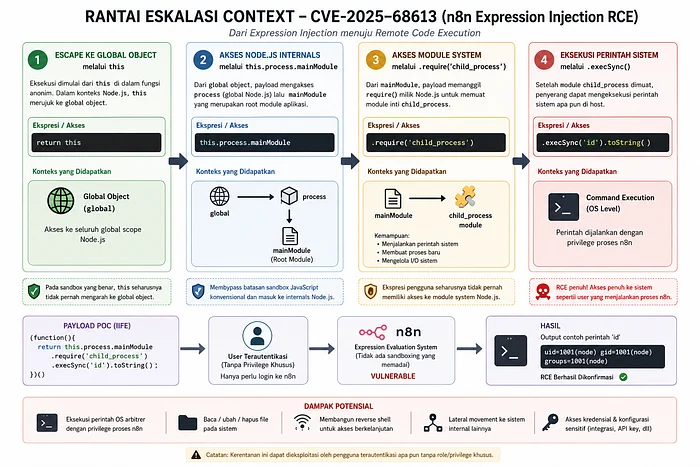
The payload uses an Immediately Invoked Function Expression (IIFE) pattern, (function(){ ... })(), which creates an anonymous function and executes it immediately. This pattern lets the attacker wrap nested logic while preserving the execution context needed to reach the Node.js module system. A reformatted version of the payload is shown below for easier analysis.
Context escalation chain
The exploit works through four sequential context escalation stages.
Step 1: Log in
Log in to the n8n application with the authenticated user credentials.
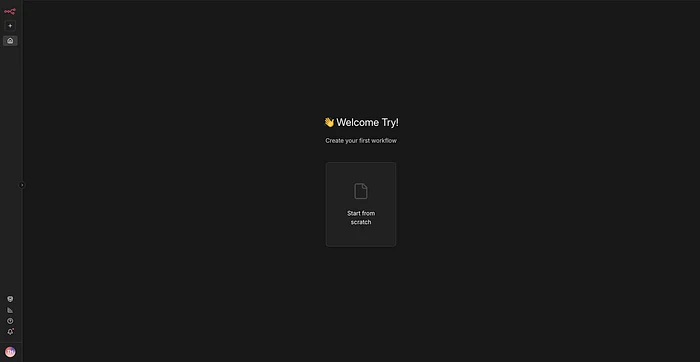
n8n after login
Step 2: Create a workflow
Create a new workflow, choosing the option to start from scratch if prompted.
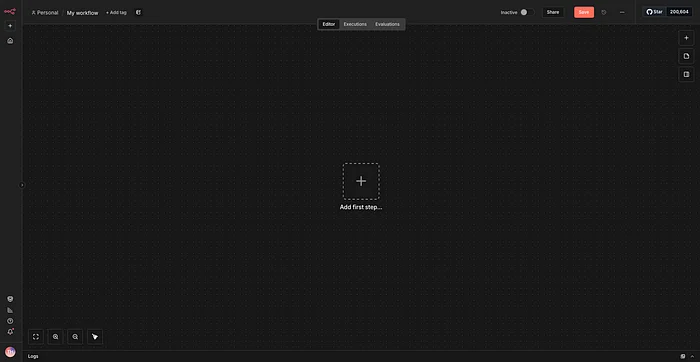
new workflow
Step 3: Add a Manual Trigger
Add a Manual Trigger node as the first step of the workflow.
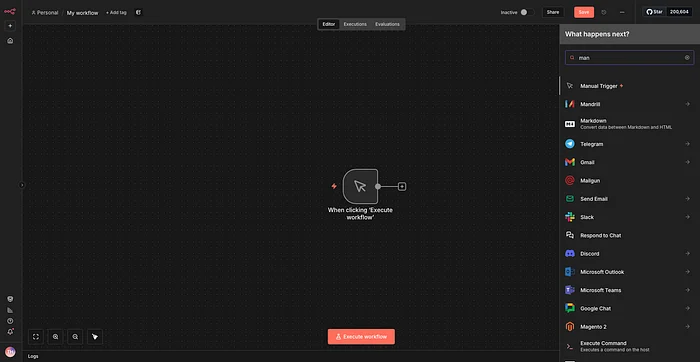
add manual trigger
Step 4: Connect Edit Fields (Set)
Connect an Edit Fields (Set) node to the Manual Trigger.
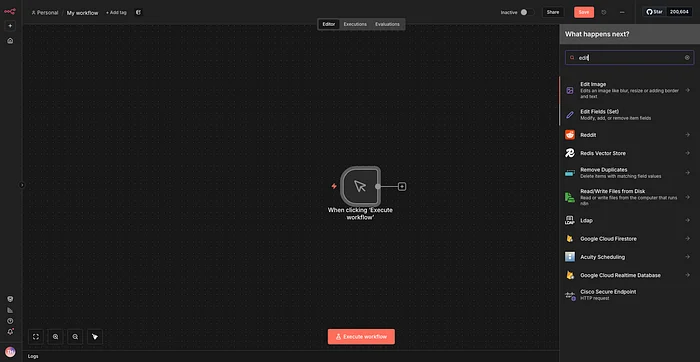
set edit fields
Step 5: Add the payload as a field value
In the Edit Fields node, add a new field with any name (for example result) and paste the exploit payload into the value column.
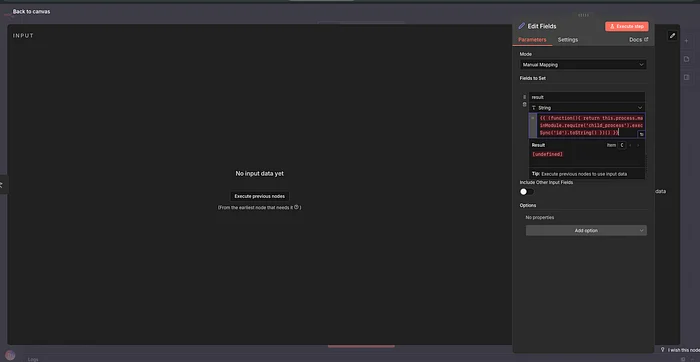
edit fields
Step 6: Execute the step
Execute the step.
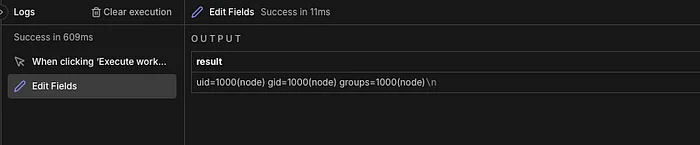
hasil eksekusi payload
The result is operating system command output displayed directly in the application interface, confirming successful Remote Code Execution. The id command payload can be replaced with any system command needed for testing, including reading sensitive files, system enumeration, or establishing a reverse shell connection for further access.
Root cause
The mistake is in the design of the expression evaluation system: expressions wrapped in {{ }} are treated as JavaScript and evaluated without adequate sandboxing or input validation, and the evaluator does not enforce proper context isolation. Evaluated code can therefore escape the intended sandbox, reach the Node.js global object and from there the full module system, including modules that interact directly with the operating system.
Authentication does not constrain what the evaluated expression can do once it runs. The report states plainly that authentication is not a substitute for proper security controls on the feature itself: a feature reachable only after login can still be a critical hole if it is fundamentally insecure by design.
Impact
An attacker holding valid n8n user credentials, regardless of their privilege level in the application, can:
- Execute arbitrary operating system commands with the privileges of the n8n process.
- Read, modify or delete files accessible to the n8n process.
- Establish a reverse shell for persistent interactive access to the server.
- Perform further lateral movement into the internal network, depending on the position and configuration of the server running n8n.
- Access sensitive credentials and configuration stored on the n8n instance, including third-party integration credentials connected to workflows.
Because n8n is often used as a bridge between systems and services (given the 400+ native integrations), the server running n8n may hold broad network access and credentials to other systems, which increases the potential impact of the initial compromise.
Fix
The report recommends the following mitigations, in priority order:
-
Apply the official patch from the n8n developers as soon as it is available.
-
Restrict network access to the n8n instance to users and systems that genuinely need it, and avoid direct exposure to the public internet without additional protection layers.
-
Audit all user accounts with access to the n8n instance and disable accounts that are no longer needed.
-
For developers of similar automation platforms, consider implementing genuinely isolated sandboxing (such as an isolated VM or a worker thread with a restricted context) for dynamic expression evaluation features, rather than relying on syntax-level restrictions alone.
-
Other expression fields. Paste the same IIFE payload into any other node field that accepts
{{ }}expressions, not only Edit Fields. A positive result is operating system command output rendered in the node output or execution view. -
Other dynamic code features. Test Code Nodes and any other feature that evaluates user-supplied JavaScript or Python. A positive result is arbitrary code running with the n8n process privileges rather than inside a restricted context.
-
Low-privilege accounts. Repeat the workflow with the least-privileged account available on the instance. A positive result is the same command output, confirming that no administrative role is needed.
-
Sandbox escape checks. In a lab, probe whether evaluated expressions can reach the Node.js global object and the module system, for example by attempting to load an operating system module. A positive result is a module reference resolving inside the expression context.
-
Command substitution. Replace the
idcommand with file reads, system enumeration or a reverse shell payload. A positive result is the corresponding output or an incoming connection to a listener you control in the lab.
Note: the testing described in this write-up was performed in a controlled lab environment with explicit authorisation for security learning purposes. The techniques described must not be used against systems without clear testing permission.
What happened, in plain words
A piece of software called n8n lets people build little automatic routines, called workflows, that move data between apps and services. One of its features lets you type a small piece of code inside double curly braces, {{ }}, and n8n runs that code when the workflow executes. This feature is meant to be convenient, not dangerous.
A security researcher found that this feature was not properly fenced off. Anyone who could log in to n8n, even with the most ordinary account and no administrator rights, could put code inside those curly braces that made the server run operating system commands. In other words, a normal user could take control of the machine that runs n8n. That is what Remote Code Execution means: running your own commands on someone else's computer, over the network.
The issue is tracked as CVE-2025-68613. A CVE is a public catalogue number given to a known security flaw so that everyone can refer to the same thing. The report was written by Arya Widyanto Utomo and published on 14 August 2026.
The report classifies the issue as follows:
| Field | Value |
|---|---|
| Severity | Critical |
| Vulnerability class | Expression Injection to Remote Code Execution (CWE-95: Improper Neutralization of Directives in Dynamically Evaluated Code) |
| Affected component | n8n Workflow Automation Platform Expression Evaluation System |
| Affected versions | 0.211.0 up to versions before 1.120.4, 1.121.1 and 1.122.0 |
| Patched versions | 1.120.4, 1.121.1, 1.122.0 and later |
| Authentication required | Yes, but no special role or privilege |
A few of those words need unpacking.
Severity is a rough label for how bad a flaw is. Critical is the top of the scale.
Vulnerability class is the family the flaw belongs to. Here it is expression injection: the program takes something a user typed, treats it as code, and runs it. The CWE-95 label is the official name for that family: code that is built from user input and then evaluated, without the input being neutralised first. Think of a form that asks for your name and then, instead of printing the name, follows any instruction written in the name field.
Affected versions are the releases that contain the bug. Patched versions are the releases where it is fixed. If you run n8n, the version number tells you whether you are exposed.
Authentication required: yes means you need a working username and password to reach the vulnerable feature. That sounds reassuring, and it is exactly the trap the report warns about. Logging in proves who you are; it does not limit what the feature will do once you are inside.
Background: what n8n is and how it is built
n8n is an open-source workflow automation platform. Open source means the underlying code is published and anyone can read it. A workflow is a chain of steps: fetch something from one service, transform it, send it to another. Each step is called a node, and you connect nodes with lines on a canvas, a bit like a flowchart.
n8n is built on Node.js. Node.js is a program that runs JavaScript outside a web browser, typically on a server. JavaScript is the language of web pages, but with Node.js it can also read files, open network connections and start other programs. That power is exactly why a flaw that lets someone run their own JavaScript on a Node.js server is serious.
Four parts of n8n matter for this story:
- Workflow Execution Engine: the core component that orchestrates node-based workflow execution. It is the part that walks through your flowchart and runs each step in turn.
- Expression Evaluation System: processes dynamic expressions in
{{ }}that are evaluated as JavaScript during workflow execution. An expression is a small formula that gets worked out at run time, for example pulling a value out of the previous step. The double curly braces tell n8n "work this out as code". - Code Nodes: allow users to write custom JavaScript or Python as a workflow step. Python is another programming language. A Code Node is a step where you write a small program yourself.
- 400+ Native Integrations: ready-made connectors to external APIs and services that form nodes in a workflow. An API (Application Programming Interface) is the doorway one program uses to talk to another: you send a request in an agreed format and get an answer back. An integration is a pre-built node that already knows how to speak to a particular service, so you do not have to write the connection yourself.
Setup: where the test was done
The test was carried out in an isolated lab environment using standard user credentials that had been provisioned for the exercise, with no special administrative privileges.
An isolated lab environment is a machine or network set up only for testing, cut off from anything real, so that a mistake harms nothing. Credentials are the username and password pair that prove who you are. Provisioned means they were created in advance for this purpose. Administrative privileges are the extra rights an administrator has, such as managing other users or changing settings. The point of saying "no special administrative privileges" is that the test did not need an administrator account.
Preconditions:
- Valid login access to the target n8n instance.
- A web browser (testing used Firefox).
A precondition is something that must already be true before you can start. Here: you need a working login, and you need a browser, because everything is done through the n8n web interface. An instance is one running copy of the software, in this case one n8n installation on one server.
Finding it: the four components and the root cause
Four n8n architecture components are relevant here: the Workflow Execution Engine, the Expression Evaluation System, Code Nodes, and the 400+ native integrations.
The root cause is the underlying reason the flaw exists, as opposed to its symptoms. It is a combination of two weaknesses in the expression evaluation system:
- User input wrapped in
{{ }}is processed as JavaScript code without adequate sandboxing or input validation. - The expression evaluator does not apply proper context isolation, so evaluated code can escape the sandbox that is supposed to confine it.
Two terms carry the weight here.
Sandboxing means running untrusted code inside a restricted playpen. The code can do its job, but it cannot reach anything outside the playpen: no files, no network, no system commands. The everyday comparison is a child's sandbox in a garden: the child can dig and build inside it, but cannot wander into the street. If the walls of the sandbox are too low, the child simply climbs out.
Input validation means checking what a user typed before using it, and rejecting anything that does not fit the expected shape. If a field is supposed to hold a number, a value containing code should be refused.
Context isolation is the technical mechanism that keeps the playpen separate from the rest of the program. Each piece of code runs in its own context, meaning its own set of variables and objects it can see. Without isolation, code in the playpen can reach objects that belong to the whole program.
Together these two weaknesses open a path for evaluated code to reach the Node.js global object and, from there, the full Node.js module system, including modules designed to interact directly with the operating system.
The global object is the shared box of built-in tools that every piece of JavaScript running in that process can see. The module system is Node.js's library mechanism: a set of ready-made packages you can load by name. Some of those packages exist precisely to run commands and touch files. Reaching the module system is therefore the last step before running an operating system command.
Exploitation: the payload and the six steps
The payload below was published by the researcher known as wioui.
A payload is the piece of text an attacker sends to trigger the flaw. It is the ammunition, as opposed to the gun.
The payload uses an Immediately Invoked Function Expression (IIFE) pattern, (function(){ ... })(), which creates an anonymous function and executes it immediately. This pattern lets the attacker wrap nested logic while preserving the execution context needed to reach the Node.js module system. A reformatted version of the payload is shown below for easier analysis.
To read that pattern without any programming background: a function is a named block of instructions that does nothing until it is called. Anonymous means it has no name. The pair of parentheses at the end, (), is the call: it says "run this now". So the whole construction defines a block of instructions and runs it in the same breath. Wrapping the logic this way keeps the code inside a single expression, which is what the {{ }} field expects, while still allowing several layers of steps inside.
Context escalation chain
The exploit works through four sequential context escalation stages.
Context escalation means climbing from a limited position to a more powerful one, step by step. Each stage gives the code access to something the previous stage did not have, until it reaches the module system and can run a system command.
Step 1: Log in
Log in to the n8n application with the authenticated user credentials.
n8n after login
This step exists because the vulnerable feature sits behind the login page. The report's central point is that authentication gives no meaningful mitigation: once you are past it, an ordinary user can reach the expression field.
Step 2: Create a workflow
Create a new workflow, choosing the option to start from scratch if prompted.
new workflow
A workflow is the container the exploit lives in. Starting from scratch gives an empty canvas for the test.
Step 3: Add a Manual Trigger
Add a Manual Trigger node as the first step of the workflow.
add manual trigger
A trigger is the node that decides when a workflow starts. Some triggers fire on a schedule or when an email arrives. A Manual Trigger fires only when a person clicks run.
Step 4: Connect Edit Fields (Set)
Connect an Edit Fields (Set) node to the Manual Trigger.
set edit fields
Edit Fields, also called Set, is a node that creates or changes named values in the data flowing through the workflow. Think of it as a small form: each row has a field name and a value. Connecting it to the trigger means it runs right after the trigger fires.
Step 5: Add the payload as a field value
In the Edit Fields node, add a new field with any name (for example result) and paste the exploit payload into the value column.
edit fields
This is the moment the malicious input enters the system. The field name is irrelevant; what matters is the value column, because that is where n8n will look for {{ }} and evaluate whatever is inside as JavaScript. The report notes the field can have any name.
Step 6: Execute the step
Execute the step.
hasil eksekusi payload
The result is operating system command output displayed directly in the application interface, confirming successful Remote Code Execution. The id command payload can be replaced with any system command needed for testing, including reading sensitive files, system enumeration, or establishing a reverse shell connection for further access.
id is a standard command on Linux and similar systems that prints which user the command is running as. It is the classic harmless proof: if the output comes back, you know you are running commands on the machine. System enumeration means listing details about the machine, such as its users, network and installed software, to plan the next move. A reverse shell is a connection the victim machine opens back to the attacker, giving the attacker an interactive command prompt on that machine. It is called reverse because the direction is outward, which often slips past firewalls that block incoming connections.
Root cause, restated for the beginner
The mistake is in the design of the expression evaluation system: expressions wrapped in {{ }} are treated as JavaScript and evaluated without adequate sandboxing or input validation, and the evaluator does not enforce proper context isolation. Evaluated code can therefore escape the intended sandbox, reach the Node.js global object and from there the full module system, including modules that interact directly with the operating system.
Authentication does not constrain what the evaluated expression can do once it runs. The report states plainly that authentication is not a substitute for proper security controls on the feature itself: a feature reachable only after login can still be a critical hole if it is fundamentally insecure by design.
The everyday comparison: a members-only club with a very good doorman but no rules inside. Checking badges at the door does nothing if, once inside, any member can walk into the safe room.
Impact: what an attacker could do
An attacker holding valid n8n user credentials, regardless of their privilege level in the application, can:
- Execute arbitrary operating system commands with the privileges of the n8n process.
- Read, modify or delete files accessible to the n8n process.
- Establish a reverse shell for persistent interactive access to the server.
- Perform further lateral movement into the internal network, depending on the position and configuration of the server running n8n.
- Access sensitive credentials and configuration stored on the n8n instance, including third-party integration credentials connected to workflows.
A few of those need explaining.
Privileges of the n8n process means the commands run with the same rights as the n8n program itself. Whatever n8n is allowed to touch on that machine, the attacker's commands are allowed to touch too.
Lateral movement means using the first compromised machine as a stepping stone to reach others on the same internal network. Internal networks are usually trusted more than the outside world, so a foothold inside is valuable.
Third-party integration credentials are the passwords and keys n8n stores so it can log in to other services on your behalf, for example your email provider or a cloud account. If n8n holds them, an attacker who controls n8n can read them.
Because n8n is often used as a bridge between systems and services (given the 400+ native integrations), the server running n8n may hold broad network access and credentials to other systems, which increases the potential impact of the initial compromise.
Fix: what to do about it
The report recommends the following mitigations, in priority order:
- Apply the official patch from the n8n developers as soon as it is available.
- Restrict network access to the n8n instance to users and systems that genuinely need it, and avoid direct exposure to the public internet without additional protection layers.
- Audit all user accounts with access to the n8n instance and disable accounts that are no longer needed.
- For developers of similar automation platforms, consider implementing genuinely isolated sandboxing (such as an isolated VM or a worker thread with a restricted context) for dynamic expression evaluation features, rather than relying on syntax-level restrictions alone.
A patch is an update that fixes a flaw. Restricting network access means only letting certain addresses reach the service, rather than the whole internet. An audit of accounts means going through the list and checking who still needs access. An isolated VM is a separate virtual computer, so code running there cannot touch the real server. A worker thread with a restricted context is a separate thread of execution inside the same program, given only a limited set of tools. Syntax-level restrictions means blocking certain words or patterns in the text, which is fragile because there are usually many ways to write the same instruction.
- Other expression fields. Paste the same IIFE payload into any other node field that accepts
{{ }}expressions, not only Edit Fields. A positive result is operating system command output rendered in the node output or execution view. - Other dynamic code features. Test Code Nodes and any other feature that evaluates user-supplied JavaScript or Python. A positive result is arbitrary code running with the n8n process privileges rather than inside a restricted context.
- Low-privilege accounts. Repeat the workflow with the least-privileged account available on the instance. A positive result is the same command output, confirming that no administrative role is needed.
- Sandbox escape checks. In a lab, probe whether evaluated expressions can reach the Node.js global object and the module system, for example by attempting to load an operating system module. A positive result is a module reference resolving inside the expression context.
- Command substitution. Replace the
idcommand with file reads, system enumeration or a reverse shell payload. A positive result is the corresponding output or an incoming connection to a listener you control in the lab.
A variant is a slightly different version of the same test, used to find out how wide the problem is. A listener is a program on your own machine waiting for an incoming connection, which is how you would notice a reverse shell arriving.
Note: the testing described in this write-up was performed in a controlled lab environment with explicit authorisation for security learning purposes. The techniques described must not be used against systems without clear testing permission.
Glossary
- Administrative privileges: extra rights such as managing users or changing settings, which ordinary accounts do not have.
- Anonymous function: a block of instructions with no name, which does nothing until it is called.
- API (Application Programming Interface): the agreed doorway one program uses to send requests to another and receive answers.
- Audit: a systematic review, here of which accounts still have access to a system.
- Authentication: proving who you are, usually with a username and password.
- Code Node: an n8n step where a user writes custom JavaScript or Python.
- Context: the set of variables and objects a piece of running code can see.
- Context escalation: climbing step by step from a limited position to one with more access.
- Context isolation: keeping each piece of running code in its own separate context so it cannot reach the rest of the program.
- Credentials: the username and password, or keys, that prove identity.
- CVE: a public catalogue number assigned to a known security flaw.
- CWE-95: the official label for code built from user input and evaluated without neutralising that input.
- Edit Fields (Set) node: an n8n node that creates or changes named values in the data flowing through a workflow.
- Expression: a small formula worked out at run time, here written inside
{{ }}. - Expression injection: a flaw where user input is treated as code and executed.
- Global object: the shared box of built-in tools visible to all JavaScript running in a process.
- IIFE (Immediately Invoked Function Expression): a function that is defined and run in the same expression, written
(function(){ ... })(). - Input validation: checking what a user typed and rejecting anything that does not fit the expected shape.
- Instance: one running copy of a piece of software on one server.
- Integration: a pre-built connector that lets a workflow talk to a particular external service.
- Isolated lab environment: a test setup cut off from real systems so mistakes cause no harm.
- Isolated VM: a separate virtual computer used to contain code so it cannot touch the real server.
- Lateral movement: using one compromised machine as a stepping stone to reach others on the same network.
- Listener: a program waiting for an incoming connection, used to catch a reverse shell.
- Manual Trigger: an n8n node that starts a workflow only when a person clicks run.
- Module system: Node.js's mechanism for loading ready-made packages of code by name.
- Node: one step in an n8n workflow, drawn as a box on a canvas.
- Node.js: a program that runs JavaScript outside a browser, typically on a server, with access to files and the network.
- Open source: software whose underlying code is published for anyone to read.
- Patch: an update that fixes a flaw.
- Payload: the piece of text sent to trigger a flaw.
- Precondition: something that must already be true before a test can start.
- Privileges: the rights a user or program has on a system.
- Provisioned: created in advance for a specific purpose.
- Python: a general-purpose programming language, also usable in n8n Code Nodes.
- Remote Code Execution: running your own commands on someone else's computer over the network.
- Reverse shell: a connection the victim machine opens back to the attacker, giving an interactive command prompt.
- Root cause: the underlying reason a flaw exists, as opposed to its symptoms.
- Sandboxing: running untrusted code inside a restricted playpen it cannot escape.
- Severity: a rough label for how bad a flaw is, from low to critical.
- Syntax-level restrictions: blocking certain words or patterns in text, which is fragile because the same instruction can be written many ways.
- System enumeration: listing details about a machine, such as users, network and software, to plan the next move.
- Third-party integration credentials: passwords and keys n8n stores so it can log in to other services on your behalf.
- Trigger: the node that decides when a workflow starts.
- Variant: a slightly different version of the same test, used to measure how wide a problem is.
- Vulnerability class: the family a flaw belongs to.
- Worker thread: a separate thread of execution inside the same program, which can be given only a limited set of tools.
- Workflow: a chain of connected steps that automates a task.
- Workflow Execution Engine: the core component that walks through a workflow and runs each step.




