CVE-2026-77177: How I Found Root-Level RCE in Meta’s WhatsApp AI Through a Simple Math Problem
A chatbot backend evaluated user-supplied template syntax instead of treating it as plain text, so a simple arithmetic expression was computed rather than echoed. The author claims this escalated to command execution as the root user, though the text gives no reproduction detail and hedges the claim as reported and unverified.

Ethical Hacking
The full write-up lives on its author's site
It belongs to its author, so we link to it rather than copy it. The other two tabs are our own rewrites, checked against it.
Context
The target of this research was Open GenAI Stack (ogx-ai), described in the write-up as the backend powering Meta AI on WhatsApp. Meta AI is a chat-based LLM assistant embedded in a consumer messaging app: the user sends a message, and a backend pipeline of prompt templates, context handlers and rendering engines turns that message into a response.
The researcher's working hypothesis was that this pipeline is a new kind of attack surface. Unlike a conventional web application, where you control the request directly, an assistant sits between the user and whatever backend processing turns a message into a reply. That processing often involves string formatting and template engines that were never designed to accept adversarial input. If user input reaches such an engine without sanitisation, the result is a textbook Server-Side Template Injection (SSTI) condition. SSTI is well documented in traditional web applications (Flask/Jinja2, Twig, FreeMarker, Velocity) but rarely discussed for conversational AI products, and that gap is where the researcher started looking.
The work was published as CVE-2026-77177, described as a critical SSTI vulnerability that allowed unauthenticated remote code execution as root on infrastructure serving Meta AI to WhatsApp's user base.
Setup
The write-up does not describe any accounts, roles, tooling, versions or other preconditions. The only precondition it makes explicit is that the interaction was unauthenticated.
Finding it
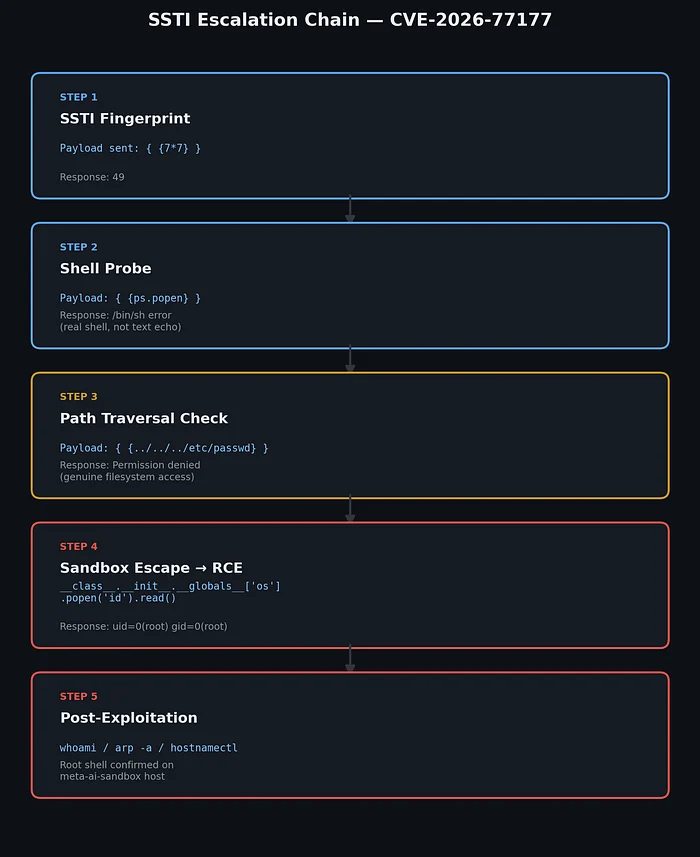
The reasoning was that AI assistants process user messages through several backend components, including prompt templates, context handlers and rendering engines. Each of these is a potential attack surface when untrusted user input reaches a system that interprets it as executable template syntax. The researcher therefore tested whether user-controlled input could influence backend template rendering.
The initial probe was a single line:
The response was:
This suggested that the expression was being evaluated somewhere in the processing pipeline rather than simply returned as text. The researcher is explicit about the limit of that observation: an evaluated expression alone is not sufficient to establish remote code execution, and further investigation was needed to determine the actual impact.
Exploitation
Step 1: Confirm expression evaluation
Sending the arithmetic expression inside double braces produced its computed result rather than the literal string. The double-brace syntax is the interpolation delimiter used by several server-side template engines, so a computed result rather than an echoed string is the classic first signal that user input is being parsed as template code. On its own it proves evaluation, not code execution.
Step 2: Escalate towards the operating system
The write-up states that the investigation reported additional responses consistent with shell-level processing and ultimately claimed successful server-side command execution. The most significant reported result was:
uid=0(root) gid=0(root) groups=0(root)
That output is the standard form of the id command on a Linux system; the report says that, if independently verified, it would indicate root-level execution. The researcher hedges this appropriately: if independently verified, it would indicate root-level execution. The reported findings also included access to system information and the ability to write files.
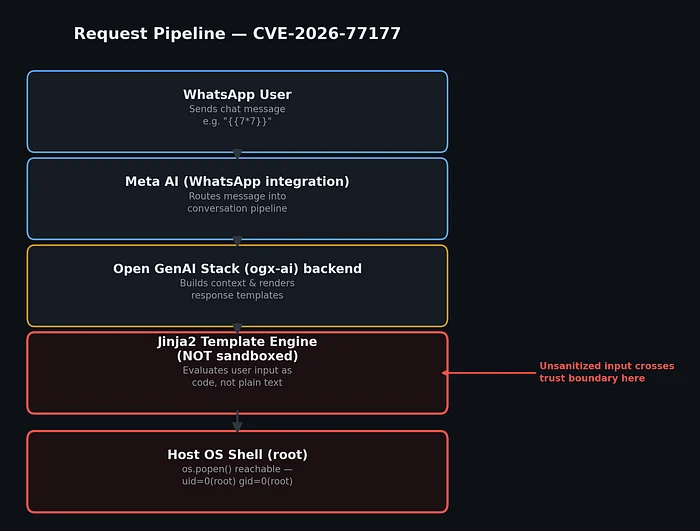
Together these observations pointed to a potentially serious issue involving insufficient isolation between user-controlled input and the backend execution environment.
Root cause
The underlying pattern is Server-Side Template Injection: the application processes untrusted input as part of a server-side template instead of treating it as ordinary data. In a vulnerable Jinja2 implementation, unsafe template rendering can expose functionality that should never be reachable from user-controlled input.
Three factors make this particularly dangerous:
- Unsafe input handling: user-controlled content reaches a template renderer without appropriate isolation.
- Insufficient sandboxing: dangerous object access and execution capabilities are not adequately restricted.
- Excessive privileges: the rendering process operates with more system permissions than necessary.
When these combine, a template injection can escalate into full server compromise. The write-up does not publish the specific template expression used to move from arithmetic evaluation to shell execution, so the exact gadget chain is not described. The report lists unsafe input handling, insufficient sandboxing and excessive privileges as the factors that make this dangerous, and frames them as backend weaknesses rather than a flaw in the model itself.
Impact
According to the reported results, the investigation reached template evaluation in the backend and claimed command execution as root, access to system information and the ability to write files. The researcher's framing is that this affected infrastructure serving Meta AI to WhatsApp's user base, and that the combination of findings pointed to insufficient isolation between user input and the backend execution environment. The root-level result is presented as reported and conditional on independent verification.
Fix
The write-up does not state what was changed in the product. It gives general recommendations for developers building LLM-powered applications:
- Never process untrusted user input as executable template content.
- Use appropriately sandboxed template environments.
- Escape user-controlled data before rendering.
- Run application processes with the least privileges necessary.
- Apply container isolation and operating-system security restrictions.
- Treat every LLM input pipeline as an untrusted application entry point.
The closing point is that security belongs at the backend level and should not be left entirely to the AI model's guardrails.
Variants to test
What happened, in plain words
A security researcher sent a chatbot a short piece of text that looked like a maths problem wrapped in curly brackets. The chatbot answered with the result of that maths problem. That small reply was the first clue that the chatbot's backend was not treating the message as plain text, but was running it as a small program. Following that clue, the researcher reported reaching the operating system underneath the chatbot and running commands with the highest level of permission on the machine, the same level the system's own administrator account has.
The chatbot in question is Meta AI, an assistant built into WhatsApp. The researcher describes the backend behind it as Open GenAI Stack (ogx-ai). The work was published as CVE-2026-77177. A CVE is a public catalogue entry: a numbered record that describes a specific security flaw so that everyone can refer to the same thing. The researcher describes the flaw as a critical Server-Side Template Injection that allowed unauthenticated remote code execution as root on infrastructure serving Meta AI to WhatsApp's users. Each of those terms is explained as it comes up below.
This article walks through the same steps as the technical write-up, in the same order, but assumes you have never done security work before. You only need to know how to use a browser and a computer.
The setup: what the researcher started with
The write-up does not describe any accounts, roles, tools, software versions or other preconditions. The only precondition it makes explicit is that the interaction was unauthenticated. Unauthenticated means the person sending the message did not log in and was not identified to the system in any way.
That matters because many security flaws only work once you are inside an account. This one, as reported, did not need that.
Background: why the researcher was looking here at all
To follow the rest of this article you need a rough picture of what happens when you type a message into a chat assistant.
A chat-based LLM assistant is a program that reads your message and writes a reply. LLM stands for large language model: a system trained on huge amounts of text so that it can produce plausible, useful sentences. Meta AI is one of these, embedded inside a consumer messaging app, WhatsApp. You type, it answers.
Behind the scenes, your message does not go straight to the model. It passes through a pipeline: a chain of backend components that each do something to the message before and after the model sees it. The write-up names three kinds of component in that pipeline:
- Prompt templates: reusable pieces of text with blanks in them. Think of a fill-in-the-blank letter: "You are a helpful assistant. The user says: ____." The system drops your message into the blank before sending it to the model.
- Context handlers: parts that gather background information, such as earlier messages in the conversation, and attach it to the request.
- Rendering engines: programs that take a template plus some data and produce the finished text. The word rendering here means producing the final output from a template.
A template engine is the key idea. It is a piece of software that reads a template containing special markers and replaces those markers with values. For example, a template might say Hello, {{name}} and the engine replaces {{name}} with Alice to produce Hello, Alice. The double curly brackets are the marker: they tell the engine "this part is not text, this part is something to work out."
That is useful and completely normal. The danger is what happens if the engine is willing to work out anything inside those brackets, including things the template author never intended, and if your message can end up inside the brackets.
The researcher's working hypothesis was simple. If a backend uses a templating engine anywhere in its request/response pipeline, and user input reaches that engine without sanitisation, you have a textbook Server-Side Template Injection condition. Sanitisation means cleaning input so that dangerous characters or patterns cannot do harm, for example by escaping them so they are treated as literal text. Server-Side Template Injection, usually shortened to SSTI, is the name of this whole class of flaw: the server takes your input, treats it as template code, and runs it.
SSTI is well documented in ordinary web applications built with frameworks such as Flask/Jinja2, Twig, FreeMarker and Velocity. Those are names of popular template engines and the web frameworks that use them. What the researcher noticed is that SSTI is rarely discussed for conversational AI products. That gap is exactly where the search began.
One more comparison helps. A normal web application is like a form at a counter: you fill in a field and hand it over, and you can see exactly what you are sending. A chat assistant is more like talking to a receptionist who carries your words into a back office you cannot see. You do not control the request directly; the assistant sits between you and whatever processing turns your message into a reply. That extra layer is a new place for old mistakes to hide.
Finding it
The reasoning was that AI assistants process user messages through several backend components, including prompt templates, context handlers and rendering engines. Each of these is a potential attack surface when untrusted user input reaches a system that interprets it as executable template syntax. Attack surface means all the places where an outsider can send something in. Untrusted input means anything a user types, which the system should never assume is safe.
The researcher therefore tested whether user-controlled input could influence backend template rendering. In plain terms: can something I type change how the template engine behaves?
The initial probe was a single line:
Line by line, this is one short message containing:
{{and}}: the opening and closing markers that template engines use to mean "work this out".7*7: an ordinary multiplication, seven times seven.- Nothing else: no login, no special tool, just this text sent as a chat message.
The response was:
Line by line, this is the number forty-nine, which is seven times seven. The important part is not the number. The important part is that the chatbot did the sum. If the backend had treated the message as plain text, it would have echoed back the literal characters {{7*7}}. Instead it computed a result.
This suggested that the expression was being evaluated somewhere in the processing pipeline rather than simply returned as text. Evaluated means worked out, computed, run. The researcher is explicit about the limit of that observation: an evaluated expression alone is not sufficient to establish remote code execution, and further investigation was needed to determine the actual impact. Remote code execution, or RCE, means getting the target machine to run commands of your choosing. A sum being computed is a hint, not proof, that you can run commands.
Exploitation, step by step
Step 1: Confirm expression evaluation
Sending the arithmetic expression inside double braces produced its computed result rather than the literal string. The double-brace syntax is the interpolation delimiter used by several server-side template engines. Interpolation here means substituting a computed value into text; a delimiter is just the pair of characters that mark where the substitution happens. So a computed result rather than an echoed string is the classic first signal that user input is being parsed as template code. Parsed means read and interpreted according to the engine's rules.
On its own, this proves evaluation, not code execution. It tells you the engine is listening to you. It does not yet tell you what else the engine will do for you.
Step 2: Escalate towards the operating system
Escalate means to turn a small finding into a bigger one. The write-up states that the investigation reported additional responses consistent with shell-level processing and ultimately claimed successful server-side command execution. A shell is the program on a computer that accepts typed commands and runs them; shell-level processing means the system was behaving as if commands were being run, not just sums being calculated.
The most significant reported result was:
uid=0(root) gid=0(root) groups=0(root)
Line by line, this is the standard output of the id command on a Linux system. Linux is a common operating system for servers. The id command asks the computer: who am I, and what am I allowed to do? The answer has three parts:
uid=0(root): the user identifier is 0, and the name attached to it is root. On Linux, user 0 is the superuser, the all-powerful account that can do anything on the machine. The name root is just the label for that account.gid=0(root): the group identifier is 0, also named root. Groups are bundles of permissions shared by several accounts.groups=0(root): the list of groups this process belongs to, here just the root group.
In everyday terms, this is like asking a building's reception desk "which keys do I have?" and being told you hold the master key. The researcher hedges this appropriately: if independently verified, it would indicate root-level execution. Independently verified means someone else, not the original researcher, reproduces the result and confirms it.
The reported findings also included access to system information and the ability to write files. System information means details about the machine itself, such as what operating system it runs. Writing files means creating or changing files on the server's disk, which is a step beyond merely running a command.
Together these observations pointed to a potentially serious issue involving insufficient isolation between user-controlled input and the backend execution environment. Isolation means keeping things apart so that one cannot affect the other. Here, the thing that should have been kept apart was the user's text, and the thing it reached was the environment where the backend actually runs.
Root cause: Server-Side Template Injection
The underlying pattern is Server-Side Template Injection: the application processes untrusted input as part of a server-side template instead of treating it as ordinary data. Data means information to be stored or displayed, never instructions to be followed. The mistake is letting data become instructions.
In a vulnerable Jinja2 implementation, unsafe template rendering can expose functionality that should never be reachable from user-controlled input. Jinja2 is a widely used template engine in the Python programming language. Vulnerable means it has a weakness that can be abused. Expose functionality means making features or abilities available that were meant to stay hidden.
Three factors make this particularly dangerous:
- Unsafe input handling: user-controlled content reaches a template renderer without appropriate isolation. In other words, your text goes straight into the engine with nothing standing between them.
- Insufficient sandboxing: dangerous object access and execution capabilities are not adequately restricted. A sandbox is a restricted play area: the engine is allowed to do some things but not others. Insufficient sandboxing means the walls of that play area are too low.
- Excessive privileges: the rendering process operates with more system permissions than necessary. Permissions are the rights a program has on the machine. Running as root is the maximum, and most programs never need it.
When these combine, a template injection can escalate into full server compromise. Compromise here means an attacker has gained control of the machine.
The write-up does not publish the specific template expression used to move from arithmetic evaluation to shell execution, so the exact gadget chain is not described. A gadget chain is a sequence of small, individually harmless features chained together to achieve something harmful. What the report does say is that unsafe input handling, insufficient sandboxing and excessive privileges are the factors that make this dangerous. It frames both as design and configuration weaknesses rather than as a flaw in the model itself. In other words, the AI model was not tricked into misbehaving; the plumbing around it was built in a way that let user text reach dangerous places.
Impact
According to the reported results, the investigation reached template evaluation in the backend and claimed command execution as root, access to system information and the ability to write files. The researcher's framing is that this affected infrastructure serving Meta AI to WhatsApp's user base, and that the combination of findings pointed to insufficient isolation between user input and the backend execution environment. The root-level result is presented as reported and conditional on independent verification.
Fix
The write-up does not state what was changed in the product. It gives general recommendations for developers building LLM-powered applications:
- Never process untrusted user input as executable template content.
- Use appropriately sandboxed template environments.
- Escape user-controlled data before rendering.
- Run application processes with the least privileges necessary.
- Apply container isolation and operating-system security restrictions.
- Treat every LLM input pipeline as an untrusted application entry point.
A few of those need unpacking. Escaping means converting special characters into harmless equivalents so they are displayed as text rather than interpreted as code. Least privileges means giving a program only the rights it actually needs, nothing more; a program that only reads files has no business being able to delete them. Container isolation means running software inside a sealed box so that even if it is compromised, the damage stays inside the box. An entry point is any place where outside input enters a system.
The closing point is that security belongs at the backend level and should not be left entirely to the AI model's guardrails. Guardrails are the rules and filters applied to a model's behaviour, such as refusing certain requests. They are useful, but they are not a substitute for building the backend safely.
Variants to test
Glossary
- API: a defined way for one piece of software to ask another for something, like a service counter with a fixed menu of requests.
- Attack surface: all the places where an outsider can send input into a system.
- Backend: the part of a service that runs on servers, out of sight of the user, doing the actual processing.
- Container isolation: running software inside a sealed box so that a compromise stays contained.
- Context handler: a backend component that gathers background information, such as earlier messages, and attaches it to a request.
- CVE: a public catalogue entry with a number, describing a specific security flaw so everyone can refer to the same thing.
- Delimiter: the pair of characters that mark where a template engine should substitute a computed value.
- Escalation: turning a small finding into a bigger one, for example from a computed sum to running commands.
- Escaping: converting special characters into harmless equivalents so they are shown as text rather than interpreted as code.
- Evaluation: working out or computing an expression, as opposed to echoing it back as text.
- Excessive privileges: giving a program more rights on the machine than it needs.
- Gadget chain: a sequence of small, individually harmless features chained together to achieve something harmful.
- Guardrails: rules and filters applied to a model's behaviour, such as refusing certain requests.
- GID: group identifier, the number that names a group of accounts on a Linux system.
- Group: a bundle of permissions shared by several accounts on a Linux system.
- Independently verified: reproduced and confirmed by someone other than the original researcher.
- Input: anything a user sends into a system, such as a chat message.
- Interpolation: substituting a computed value into text at a marked place.
- Isolation: keeping things apart so that one cannot affect the other.
- Jinja2: a widely used template engine in the Python programming language.
- Least privileges: giving a program only the rights it actually needs, nothing more.
- Linux: a common operating system for servers.
- LLM: large language model, a system trained on huge amounts of text so it can produce useful sentences.
- Open GenAI Stack (ogx-ai): described in the write-up as the backend powering Meta AI on WhatsApp.
- Parameter: a named value passed into a program.
- Parsing: reading input and interpreting it according to a set of rules.
- Permissions: the rights a program or account has on a machine.
- Pipeline: a chain of components that each process something in turn.
- Prompt template: a reusable piece of text with blanks, into which a user's message is inserted before reaching the model.
- Remote code execution (RCE): getting a target machine to run commands of your choosing.
- Rendering: producing the final output from a template plus data.
- Rendering engine: software that takes a template and data and produces finished text.
- Root: the all-powerful account on a Linux system, user number 0, which can do anything on the machine.
- Sandbox: a restricted play area in which software is allowed to do some things but not others.
- Sanitisation: cleaning input so dangerous characters or patterns cannot do harm.
- Server-Side Template Injection (SSTI): a flaw where the server treats user input as template code and runs it.
- Severity assessment: judging how bad a flaw is.
- Shell: the program on a computer that accepts typed commands and runs them.
- System information: details about the machine itself, such as what operating system it runs.
- Template engine: software that reads a template with special markers and replaces those markers with values.
- UID: user identifier, the number that names an account on a Linux system.
- Unauthenticated: done without logging in or presenting any credentials.
- Untrusted input: anything a user types, which a system should never assume is safe.
- Vulnerable: having a weakness that can be abused.




