CVE-2026-85706: Deep Dive into GitLab’s Critical File Read Vulnerability
An unauthenticated attacker could read arbitrary files from the GitLab server by sending a request to the repository commits API with a URL-encoded path segment that bypasses GitLab Workhorse's routing and authentication checks, then using a form-data parsing error to leak the file contents in the response.
 Published on medium.com
Cybersecurity
The full write-up lives on its author's site
It belongs to its author, so we link to it rather than copy it. The other two tabs are our own rewrites, checked against it.
Context
CVE-2026-85706 is a critical unauthenticated arbitrary file read vulnerability affecting GitLab Community Edition (CE) and Enterprise Edition (EE). The affected feature is the repository commits API, and Workhorse handles uploaded files for it, preparing the file path that Rails will use later. The endpoint expects requests in this shape:
POST /api/v4/projects/:id/repository/commits
GitLab is built primarily on Ruby on Rails, and in front of the Rails application sits GitLab Workhorse, a reverse proxy that parses every incoming request before passing it on. Workhorse also handles uploaded files and prepares the information Rails will use later, including the file path, and it is responsible for filtering and controlling those values. The vulnerability lets an attacker influence the file path that GitLab processes, so the application reads files from the underlying server without valid credentials. Files reachable by the GitLab process may hold application configuration, credentials, tokens or other secrets that could open access to further systems. The issue is rated CVSS 10.0 (Critical) and is listed in the CISA Known Exploited Vulnerabilities (KEV) Catalogue.
Setup
The walkthrough uses a Docker container built from the vulnerable version, created by EQSTLab, together with Burp Suite as an intercepting proxy. The container is cloned, built and started with these commands:
git clone https://github.com/EQSTLab/CVE-2026-85706.git && cd CVE-2026-85706docker build -t cve-2026-85706 .docker run -d --name cve-2026-85706 --shm-size 256m -p 8088:80 cve-2026-85706docker exec -it cve-2026-85706 tail -f /var/log/seed.log
The exploit itself is a Python script, gitlab_exploit.py, which reads a file off the server with a single unauthenticated request, using the %63ommits Workhorse route bypass and the urlencoded re-parse error channel. One further precondition applies to the attack: the GitLab instance must have at least one public project.
Finding it
The weakness comes from a request-processing discrepancy between GitLab Workhorse and the Rails application. Workhorse examines a request for the commit API before sending it to Rails, and the file handling code processes files before GitLab performs its normal authentication check. Part of the file processing logic is therefore reached before authentication happens at all.
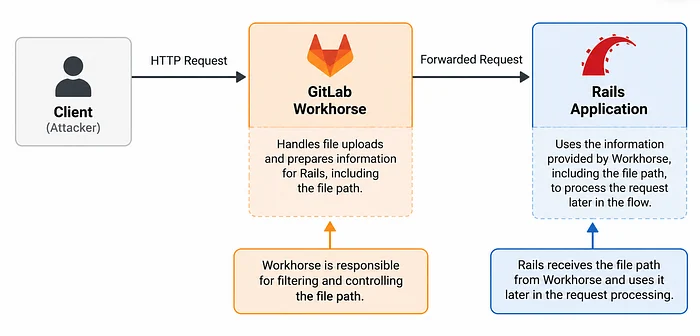
Because Workhorse does not decode the URL-encoded c in %63ommits, it fails to recognise the endpoint. Rails, on the other hand, decodes the value after Workhorse forwards the request, so %63ommits becomes commits and the request is still recognised as the intended commit endpoint:
POST /api/v4/projects/:id/repository/%63ommits
That mismatch lets the attacker control the file path value: instead of GitLab deciding which file should be processed, the vulnerable helper can receive a path supplied by the attacker. No authentication happens, because the attack takes place before authentication.
Exploitation
Step 1: Run the exploit through Burp
The script is pointed at the target with an HTTP proxy set to Burp:
$ export http_proxy="http://[redacted]:8080" $ python3 exploit.py [redacted]
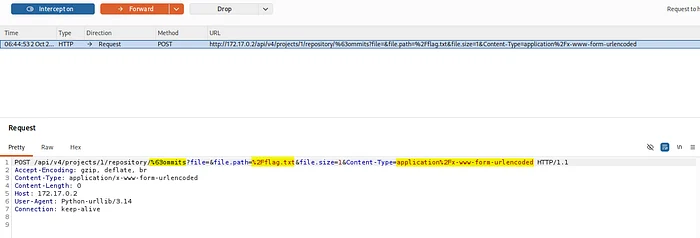
The request is intercepted in Burp Suite and sent to Repeater before being forwarded.
Step 2: Read the flag
The exploit output shows the endpoint, the file path and the retrieved content:
$ python3 exploit.py [redacted] [*] target http://[redacted][*] endpoint /api/v4/projects/1/repository/%63ommits[*] file.path /flag.txt[+] arbitrary file read OK -> content of /flag.txt: EQST{[redacted]}%[+] FLAG: EQST{[redacted]}
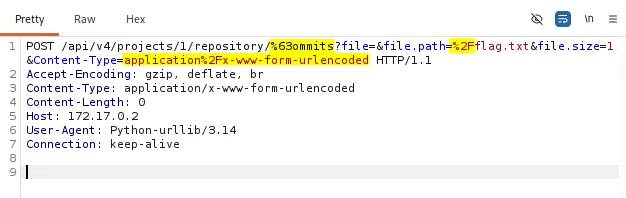
The file contents come back because the request uses Content-Type: application/x-www-form-urlencoded. With that content type GitLab processes the data as URL-encoded form data, so sequences such as %2F are interpreted as encoded characters. In the request, %2F is used in file.path because it decodes to /, so file.path=%2Fflag.txt is ultimately interpreted by the application as file.path=/flag.txt, and GitLab reads that file from the server. The contents are then passed through the same form-data parsing logic. When the parser meets an invalid percent-encoding sequence, such as a standalone %, while processing those contents, it raises an error containing the data it was processing, and that error is returned as a 400 Bad Request response. That is how the file contents come back to the attacker. In this case the flag file contains a %, which is what triggers the error.
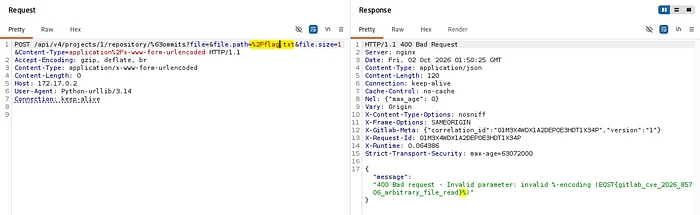
Step 3: Confirm the file on the server
The file is checked directly inside the container:
$ docker exec -it 091e47cbc7a6 /bin/bash root@091e47cbc7a6:/# cat flag.txtEQST{[redacted]}%
Step 4: Remove the parsing error
A new file is created whose contents include %2F instead of a bare %. Since %2F is a valid percent-encoded value that decodes to /, the parser processes it successfully, no parsing error is triggered, and instead of the file contents in a 400 response the attacker receives a 401 Unauthorized response:
root@091e47cbc7a6:/# echo "NEW FLAG %2F HERE" >> readme.txt
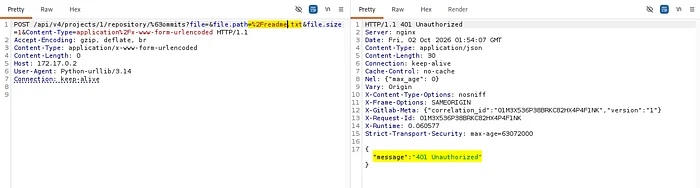
That 401 Unauthorized confirms the file exists. If the file did not exist, the response would instead be 400 Bad Request — local file not present.
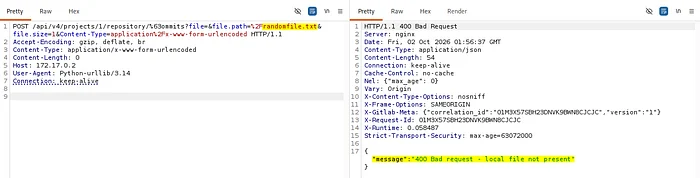
Root cause
The mistake is the difference in how GitLab Workhorse and the Rails application process encoded requests, combined with file processing that occurs before authentication. Workhorse does not decode %63 and so does not match the request to the commit endpoint, while Rails decodes it and routes the request to the same handler. The file handling code runs before the authentication check, so the attacker-supplied file.path reaches the vulnerable helper unauthenticated. The application/x-www-form-urlencoded content type then turns the parser's error message into an exfiltration channel for the file contents.
Impact
An unauthenticated attacker can read files from the underlying server that are accessible to the GitLab process. Such files may contain sensitive application configuration, credentials, tokens or other secrets that could provide access to additional systems. The attack requires the GitLab instance to have at least one public project. The vulnerability is rated CVSS 10.0 (Critical) and is listed in the CISA KEV Catalogue, so exposed GitLab installations represent a serious risk.
Affected versions and fix
CVE-2026-85706 affects multiple GitLab CE/EE 18.x and 19.x releases:
| Status | Versions |
|---|---|
| Vulnerable | 18.7-19.1.7, 19.2.0-19.2.5, 19.3.0-19.3.1 |
| Patched | 19.1.8 / 19.2.6 / 19.3.2 or later (2026-09-10) |
GitLab released the security fixes on September 10, 2026. Administrators running an affected version should upgrade to the corresponding patched release or a later version. The recommended mitigation steps are:
- Update self-managed GitLab immediately to the latest patched GitLab version 19.1.8, 19.2.6, or 19.3.2 or later.
- If an immediate upgrade cannot be performed, restrict access to the GitLab instance to trusted networks or authorised users where possible. Treat this as a temporary measure until the instance can be upgraded.
- Review GitLab, Workhorse, reverse-proxy and web server logs for suspicious requests targeting the affected commit API endpoint, paying particular attention to unusual URL-encoded paths and unexpected
file.pathparameters. - If exploitation is suspected, investigate whether sensitive files or application configuration data may have been accessed, and rotate potentially exposed credentials, tokens or secrets as appropriate.
- After upgrading, confirm that the GitLab instance is running a patched version and that the vulnerable behaviour is no longer present.
Detection
Review GitLab and reverse-proxy logs for requests with these characteristics:
- Requests targeting
POST /api/v4/projects/:id/repository/commits. - Requests where part of the
commitspath is URL-encoded, particularly patterns such as%63ommits. - Requests to the affected endpoint with a
file.pathparameter containing an absolute filesystem path or other unexpected file locations. - Unusual sequences of
400 Bad Requestand401 Unauthorizedresponses on the affected endpoint. A400response containing parsing-related errors may indicate an attempt to trigger the vulnerable file-processing behaviour. - Correlate suspicious requests with GitLab, Workhorse and operating-system logs to determine whether the GitLab process accessed unexpected files in the same timeframe.
- Requests from unauthenticated clients, especially combined with the indicators above.
Log-based detection may not reliably identify every exploitation attempt, particularly if logging is incomplete or the attacker modifies the request format, so upgrading affected instances should take priority over relying solely on detection controls.
- Encode other characters in the endpoint path, for example
%63ommitsreplaced by other percent-encoded letters ofcommits, and check whether the proxy and the backend disagree on routing. A positive result is a request that the front proxy does not match to the commit endpoint but the backend still handles as one. - Try other content types that cause the backend to re-parse the body, and see whether parser errors echo the processed data. A positive result is an error response containing file contents.
- Probe
file.pathwith other encoded separators and absolute paths, and compare responses. A400with parsing errors suggests content was read, while a401suggests the file exists but was not echoed. - Test other endpoints that accept uploaded files through Workhorse, looking for the same ordering of file processing before authentication. A positive result is an unauthenticated request that reaches file handling logic.
- Check whether the instance has at least one public project, since the attack requires it, and test the same request shape against instances that meet that condition.
What happened, in plain words
GitLab is a website that teams use to store and manage their source code. It is made by a company of the same name, and it comes in two editions: Community Edition (CE), which is free, and Enterprise Edition (EE), which adds paid features. Many organisations run their own copy of GitLab on their own server, which is called a self-managed installation.
On 10 September 2026, GitLab released security fixes for a serious bug in that software. The bug is tracked under the name CVE-2026-85706. A CVE is a public identifier given to a known security flaw so that people can talk about it unambiguously, a bit like a case number for a crime. This particular flaw was rated CVSS 10.0, the highest possible severity score, and it was added to the CISA Known Exploited Vulnerabilities (KEV) Catalogue, a list kept by the US government's cybersecurity agency of flaws that attackers are known to be using in the real world.
The flaw let anyone on the internet read files from the server that runs GitLab, without logging in at all. That is what "unauthenticated" means: no username, no password, no account. The class of bug is called an arbitrary file read, which means the attacker can ask the server for files of their choosing rather than only the ones the website intends to show. Files on a server often hold configuration settings, passwords, access tokens and other secrets, so reading them can be the first step towards breaking into other systems.
The trick relies on two parts of GitLab disagreeing about what a web request means. One part is GitLab Workhorse, a piece of software that sits in front of the main application and inspects every request first. The other is the main application itself, built with a programming framework called Ruby on Rails. Workhorse reads the request one way, Rails reads it another way, and the gap between the two lets an attacker slip past the login check.
This article walks through how the bug works, how the author reproduced it in a test environment, and what administrators should do about it. Every step is explained from scratch, so no prior security knowledge is needed.
Background: the pieces involved
Before looking at the bug, it helps to know what each moving part does.
What an API is
An API (Application Programming Interface) is a way for one computer program to talk to another. Think of a restaurant: the menu is the API, the kitchen is the server, and the waiter carries your order back and forth. You do not walk into the kitchen yourself; you ask through the menu, and food comes back. In the same way, a program sends a structured request to a web address, and the server sends back data.
GitLab exposes an API under addresses that start with /api/v4/. Programs use it to create projects, push code, open issues and so on, without a human clicking through the website.
What the repository commits API does
A commit is a saved snapshot of changes to code, with a message describing what changed. The commits API lets a program create a commit. When a commit includes uploaded files, GitLab has to handle those files, and part of that handling involves a file path, which is the location of a file on the server's disk, such as /flag.txt.
The endpoint, meaning the specific web address that handles this action, expects requests shaped like this:
POST /api/v4/projects/:id/repository/commits
Line by line:
POSTis the type of request. Browsers mostly useGETto fetch a page;POSTis used to send data to the server, for example when you submit a form. Here it means "create something"./api/v4/projects/:id/repository/commitsis the path, the part of the address that says which action is wanted.:idis a placeholder for the number of a specific project. So the whole line reads: "create a commit in the repository of project number:id".
What GitLab Workhorse is
GitLab Workhorse is a reverse proxy. A proxy is a middleman: instead of talking to the main application directly, requests arrive at the proxy first, and the proxy decides what to do with them. A reverse proxy sits in front of a server and shields it, the way a receptionist sits in front of an office and decides who gets through and where they should go.
Workhorse parses every incoming request before passing it to the Rails application. Parsing means reading the raw text of the request and working out what it is asking for. Workhorse also handles uploaded files and prepares the information Rails will use later, including the file path, and it is responsible for filtering and controlling those values.
What Rails is
Ruby on Rails, usually just Rails, is a framework for building web applications in the Ruby programming language. When GitLab documentation talks about "the Rails application", it means the main engine of GitLab: the part that handles user login, business logic, the web interface, the APIs and the coordination of background services. If Workhorse is the receptionist, Rails is the office where the actual work happens.
Finding the flaw
The weakness comes from a request-processing discrepancy between GitLab Workhorse and the Rails application. In plain terms, the two components read the same request differently, and that disagreement is the bug.
When a request for the commit API arrives, Workhorse examines it before sending it on to Rails. The file handling code processes files before GitLab performs its normal authentication check. Authentication is the process of proving who you are, normally by logging in. Because the file handling runs first, part of the file processing logic is reached before authentication happens at all.
The encoded letter trick
Web addresses cannot contain every character directly, so there is a system called percent-encoding (also called URL encoding). It represents a character by a percent sign followed by two hexadecimal digits, which are the numbers 0 to 9 and letters A to F. For example, the letter c can be written as %63. A decoder turns %63 back into c.
The two components disagree about when to decode. Workhorse does not decode the URL-encoded c in %63ommits, so it fails to recognise the endpoint. Rails, on the other hand, decodes the value after Workhorse forwards the request, so %63ommits becomes commits, and the request is still recognised as the intended commit endpoint:
POST /api/v4/projects/:id/repository/%63ommits
Line by line:
POSTagain means "send data and create something"./api/v4/projects/:id/repository/is the same path as before, pointing at a project's repository.%63ommitsis the wordcommitswith its first letter written in encoded form. To Workhorse it looks like an unknown word, so Workhorse does not apply the special handling it would apply to the commit endpoint. To Rails it decodes back tocommits, so Rails treats it as the normal commit endpoint.
That mismatch lets the attacker control the file path value. Instead of GitLab deciding which file should be processed, the vulnerable helper can receive a path supplied by the attacker. No authentication happens, because the attack takes place before authentication.
Reproducing it
Setting up a test environment
The walkthrough uses a Docker container built from the vulnerable version, created by EQSTLab, together with Burp Suite as an intercepting proxy.
Docker is software that packages an application and everything it needs into a container, a self-contained box that runs the same way on any machine. It is a safe way to practise against a deliberately vulnerable copy without touching a real system. Burp Suite is a tool that sits between your browser or script and a website, letting you see and edit every request before it is sent. It is the same middleman idea as a proxy, but under your control so you can inspect the traffic.
The container is cloned, built and started with these commands:
git clone https://github.com/EQSTLab/CVE-2026-85706.git && cd CVE-2026-85706docker build -t cve-2026-85706 .docker run -d --name cve-2026-85706 --shm-size 256m -p 8088:80 cve-2026-85706docker exec -it cve-2026-85706 tail -f /var/log/seed.log
Line by line:
git clone https://github.com/EQSTLab/CVE-2026-85706.git && cd CVE-2026-85706downloads the project's files from GitHub, a website where code is hosted, and then moves into the downloaded folder. The&&means "and then, only if the previous step worked".docker build -t cve-2026-85706 .builds a container image from the instructions in the current folder. The-tgives the image a name, herecve-2026-85706, so you can refer to it later.docker run -d --name cve-2026-85706 --shm-size 256m -p 8088:80 cve-2026-85706starts a container from that image.-druns it in the background,--namegives the running container a name,--shm-size 256msets aside 256 megabytes of shared memory (some software needs this), and-p 8088:80connects port 8088 on your machine to port 80 inside the container, so you can reach the test GitLab athttp://localhost:8088.docker exec -it cve-2026-85706 tail -f /var/log/seed.logopens a live view of a log file inside the container.tail -fmeans "show the end of the file and keep showing new lines as they are written", which is useful for watching the setup finish.
The exploit itself is a Python script, gitlab_exploit.py, which reads a file off the server with a single unauthenticated request, using the %63ommits Workhorse route bypass and the urlencoded re-parse error channel. Python is a popular programming language; a script is a text file of instructions that the computer runs.
One further precondition applies to the attack: the GitLab instance must have at least one public project. A public project is one that anyone can see without logging in. The report states this requirement without explaining why it applies.
Step 1: Run the exploit through Burp
The script is pointed at the target with an HTTP proxy set to Burp:
$ export http_proxy="http://[redacted]:8080" $ python3 exploit.py [redacted]
Line by line:
export http_proxy="http://[redacted]:8080"tells the shell, the program that runs your commands, to send outgoing web traffic through a proxy at[redacted]port8080.[redacted]is the address a computer uses to refer to itself, and8080is the port where Burp Suite listens by default. This is how the script's requests end up visible in Burp.python3 exploit.py [redacted]runs the exploit script with Python 3 and passes it the address of the target, here[redacted], which is the address of the test container on Docker's internal network.
The request is intercepted in Burp Suite and sent to Repeater before being forwarded. Intercepting means Burp pauses the request so you can look at it. Repeater is a Burp feature that lets you send the same request again and again, editing it each time, which is handy for experimenting.
Step 2: Read the flag
The exploit output shows the endpoint, the file path and the retrieved content:
$ python3 exploit.py [redacted] [*] target http://[redacted][*] endpoint /api/v4/projects/1/repository/%63ommits[*] file.path /flag.txt[+] arbitrary file read OK -> content of /flag.txt: EQST{[redacted]}%[+] FLAG: EQST{[redacted]}
Line by line:
$ python3 exploit.py [redacted]is the command that was run.[*] target http://[redacted]reports which address the script is attacking.[*] endpoint /api/v4/projects/1/repository/%63ommitsshows the path it used, with project number1and the encoded%63ommits.[*] file.path /flag.txtshows which file on the server it asked for. A flag, in this kind of exercise, is a deliberately planted string that proves you managed to read the file.[+] arbitrary file read OK -> content of /flag.txt: EQST{[redacted]}%reports success and prints the file's contents, which end with a%character.[+] FLAG: EQST{[redacted]}repeats the flag on its own for clarity.
The file is read because the request uses Content-Type: application/x-www-form-urlencoded. A content type is a label on a request that tells the server what format the data is in, the way a parcel is labelled "fragile" or "this side up". application/x-www-form-urlencoded is the format a browser uses when you submit a normal web form: the data is written as name=value pairs joined by &, with special characters percent-encoded.
With that content type, GitLab processes the data as URL-encoded form data, so sequences such as %2F are interpreted as encoded characters. %2F decodes to /, the forward slash that separates folders in a file path. In the request, %2F is used in file.path because it decodes to /, so file.path=%2Fflag.txt is ultimately interpreted by the application as file.path=/flag.txt, and GitLab reads that file from the server.
The contents are then passed through the same form-data parsing logic. When the parser meets an invalid percent-encoding sequence, such as a standalone %, while processing those contents, it raises an error containing the data it was processing, and that error is returned as a 400 Bad Request response. A 400 Bad Request is the standard web response meaning "I could not understand your request". That is how the file contents come back to the attacker: the server complains about the file's contents and quotes them in the complaint. In this case the flag file contains a %, which is what triggers the error.
Step 3: Confirm the file on the server
The file is checked directly inside the container, to prove the exploit really read what it claims:
$ docker exec -it 091e47cbc7a6 /bin/bash root@091e47cbc7a6:/# cat flag.txtEQST{[redacted]}%
Line by line:
docker exec -it 091e47cbc7a6 /bin/bashopens an interactive shell inside the running container.091e47cbc7a6is the container's identifier, and/bin/bashis the program to run, a command prompt.root@091e47cbc7a6:/#is the prompt that appears, showing you are therootuser (the administrator inside the container) at the top-level folder/.cat flag.txtprints the contents of the file namedflag.txt.catis short for concatenate and is the standard command for showing a file's text.EQST{[redacted]}%is what the file contains, matching what the exploit retrieved.
Step 4: Remove the parsing error
A new file is created whose contents include %2F instead of a bare %. Since %2F is a valid percent-encoded value that decodes to /, the parser processes it successfully, no parsing error is triggered, and instead of the file contents in a 400 response the attacker receives a 401 Unauthorized response:
root@091e47cbc7a6:/# echo "NEW FLAG %2F HERE" >> readme.txt
Line by line:
echo "NEW FLAG %2F HERE"prints the text in quotes.>> readme.txtappends that text to the end of a file calledreadme.txt, creating the file if it does not exist. The double arrow means "add to the end" rather than "overwrite".- The point of the exercise is to have a file whose contents contain a valid encoded sequence instead of a bare
%, so you can see how the server's response changes.
A 401 Unauthorized is the standard response meaning "you are not allowed to do this without logging in". That 401 Unauthorized confirms the file exists. If the file did not exist, the response would instead be 400 Bad Request — local file not present.
Root cause
The mistake is the difference in how GitLab Workhorse and the Rails application process encoded requests, combined with file processing that occurs before authentication. Workhorse does not decode %63 and so does not match the request to the commit endpoint, while Rails decodes it and routes the request to the same handler. The file handling code runs before the authentication check, so the attacker-supplied file.path reaches the vulnerable helper unauthenticated. The application/x-www-form-urlencoded content type then turns the parser's error message into an exfiltration channel for the file contents. Exfiltration simply means getting data out of a system; here the data leaves inside an error message.
Impact
An unauthenticated attacker can read files from the underlying server that are accessible to the GitLab process. Such files may contain sensitive application configuration, credentials, tokens or other secrets that could provide access to additional systems. A token, in this context, is a string of characters that acts like a temporary password, letting a program prove its identity without a human typing anything. If an attacker steals one, they can often act as the program that owned it.
The attack requires the GitLab instance to have at least one public project. The vulnerability is rated CVSS 10.0 (Critical) and is listed in the CISA KEV Catalogue, so exposed GitLab installations represent a serious risk.
Affected versions and fix
CVE-2026-85706 affects multiple GitLab CE/EE 18.x and 19.x releases:
| Status | Versions |
|---|---|
| Vulnerable | 18.7-19.1.7, 19.2.0-19.2.5, 19.3.0-19.3.1 |
| Patched | 19.1.8 / 19.2.6 / 19.3.2 or later (2026-09-10) |
Version numbers work like editions of a book: the first number is a major release, the second a minor one, and the third a patch. A patched version is one where the flaw has been fixed. GitLab released the security fixes on September 10, 2026. Administrators running an affected version should upgrade to the corresponding patched release or a later version.
The recommended mitigation steps are:
- Update self-managed GitLab immediately to the latest patched GitLab version 19.1.8, 19.2.6, or 19.3.2 or later.
- If an immediate upgrade cannot be performed, restrict access to the GitLab instance to trusted networks or authorised users where possible. Treat this as a temporary measure until the instance can be upgraded.
- Review GitLab, Workhorse, reverse-proxy and web server logs for suspicious requests targeting the affected commit API endpoint, paying particular attention to unusual URL-encoded paths and unexpected
file.pathparameters. A log is a running record of what a system did, like a diary the server keeps automatically. - If exploitation is suspected, investigate whether sensitive files or application configuration data may have been accessed, and rotate potentially exposed credentials, tokens or secrets as appropriate. Rotating a credential means replacing it with a new one, so the old one stops working even if someone copied it.
- After upgrading, confirm that the GitLab instance is running a patched version and that the vulnerable behaviour is no longer present.
Detection
Review GitLab and reverse-proxy logs for requests with these characteristics:
- Requests targeting
POST /api/v4/projects/:id/repository/commits. - Requests where part of the
commitspath is URL-encoded, particularly patterns such as%63ommits. - Requests to the affected endpoint with a
file.pathparameter containing an absolute filesystem path or other unexpected file locations. An absolute path is one that starts from the very top of the disk, like/flag.txt, rather than a relative one that depends on where you currently are. - Unusual sequences of
400 Bad Requestand401 Unauthorizedresponses on the affected endpoint. A400response containing parsing-related errors may indicate an attempt to trigger the vulnerable file-processing behaviour. - Correlate suspicious requests with GitLab, Workhorse and operating-system logs to determine whether the GitLab process accessed unexpected files in the same timeframe. Correlating means lining up records from different sources by time to build a fuller picture.
- Requests from unauthenticated clients, especially combined with the indicators above.
Log-based detection may not reliably identify every exploitation attempt, particularly if logging is incomplete or the attacker modifies the request format, so upgrading affected instances should take priority over relying solely on detection controls.
- Encode other characters in the endpoint path, for example
%63ommitsreplaced by other percent-encoded letters ofcommits, and check whether the proxy and the backend disagree on routing. A positive result is a request that the front proxy does not match to the commit endpoint but the backend still handles as one. - Try other content types that cause the backend to re-parse the body, and see whether parser errors echo the processed data. A positive result is an error response containing file contents.
- Probe
file.pathwith other encoded separators and absolute paths, and compare responses. A400with parsing errors suggests content was read, while a401suggests the file exists but was not echoed. - Test other endpoints that accept uploaded files through Workhorse, looking for the same ordering of file processing before authentication. A positive result is an unauthenticated request that reaches file handling logic.
- Check whether the instance has at least one public project, since the attack requires it, and test the same request shape against instances that meet that condition.
Glossary
- API: a defined way for one program to ask another program to do something or return data, like a menu you order from.
- Absolute path: a file location written from the top of the disk, such as
/flag.txt, rather than relative to the current folder. - Authentication: proving who you are, usually by logging in.
- Burp Suite: a tool that sits between you and a website so you can see, pause and edit the requests being sent.
- CISA KEV Catalogue: a list maintained by the US Cybersecurity and Infrastructure Security Agency of vulnerabilities known to be exploited in the real world.
- Commit: a saved snapshot of code changes with a description of what changed.
- Container: a self-contained package holding an application and everything it needs, so it runs the same way anywhere.
- Content type: a label on a web request or response saying what format the data is in.
- Credential: any piece of information used to prove identity, such as a password or token.
- CVE: a public identifier for a known security vulnerability, like a case number.
- CVSS: a scoring system that rates the severity of a vulnerability, from 0 to 10.
- Docker: software for building and running containers.
- Endpoint: the specific web address that handles a particular action.
- Exfiltration: getting data out of a system without permission.
- Flag: in a practice exercise, a planted string that proves you successfully performed the attack.
- GitLab: a website for hosting and managing source code, available in Community Edition (CE) and Enterprise Edition (EE).
- GitLab Workhorse: a reverse proxy that sits in front of GitLab's main application and inspects every request first.
- HTTP: the language browsers and servers use to exchange requests and responses.
- Log: an automatic record of what a system did, kept as a file.
- Percent-encoding (URL encoding): writing a character as a percent sign followed by two hexadecimal digits, such as
%63forc. - Port: a numbered channel on a computer that a particular service listens on.
- POST: a type of web request used to send data to a server, for example when submitting a form.
- Proxy: a middleman that passes requests between two parties.
- Public project: a project that anyone can view without logging in.
- Python: a popular programming language.
- Reverse proxy: a proxy that sits in front of a server and shields it from direct contact.
- Rotate (a credential): replace a credential with a new one so the old one stops working.
- Ruby on Rails (Rails): a framework for building web applications in the Ruby programming language; the main engine of GitLab.
- Script: a text file of instructions that a computer runs.
- Self-managed: an installation of software that an organisation runs on its own servers rather than using a hosted service.
- Shell: the program that runs the commands you type.
- Token: a string of characters that acts like a temporary password, letting a program prove its identity.
- Unauthenticated: without logging in or proving identity.
- Vulnerability: a flaw in software that an attacker can use to make it behave in ways its makers did not intend.
- 400 Bad Request: the standard web response meaning the server could not understand the request.
- 401 Unauthorized: the standard web response meaning the request needs valid login credentials.



