CVE-2026–123039: How PHP2Shell Became Root on Check Point Gateways, and How to Close It
A root process on Check Point Gaia OS accepts commands from a world-writable local socket without authenticating the caller, so anyone already running code on the appliance can become root. Attackers chained this with PHP2Shell to gain code execution through the Mobile Access portal and then escalate to root.

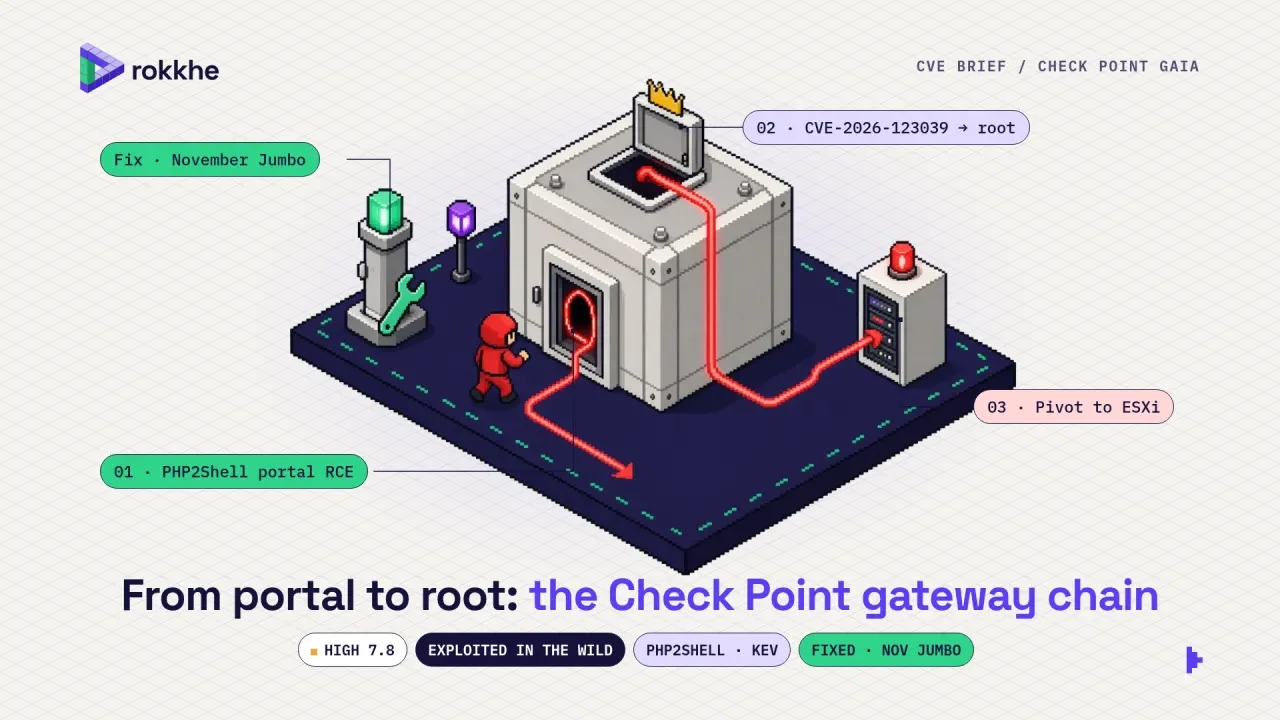
CVE-2026–123039 is a high-severity (CVSS 7.8) privilege escalation in the DynamicCLI service of Check Point Gaia OS. On 12 November 2026, Check Point confirmed that attackers chained it with PHP2Shell in the Mobile Access portal to gain root on unpatched gateways.
The full write-up lives on its author's site
It belongs to its author, so we link to it rather than copy it. The other two tabs are our own rewrites, checked against it.
Context
Check Point Gaia OS ships a dynamic (extended) CLI served by a root process called dynamic_server. It listens on a local socket at /tmp/dynamic_socket. The DynamicCLI is the local mechanism through which commands are passed to that root daemon.
CVE-2026-123039 is a privilege escalation in that service. According to Check Point's advisory sk1000362, on affected versions the socket is created world-writable (0777), the connecting process is not authenticated, and the daemon runs whatever command string it receives as root. On its own this is a local bug: an attacker first needs to run code on the appliance.
That precondition is what PHP2Shell supplies. PHP2Shell (CVE-2026-109618 / CVE-2026-109619) is a use-after-free class of flaws in PHP request handling that gives remote code execution through the Mobile Access portal and related features. Chained, the two bugs take an internet-facing gateway from unauthenticated entry to root.
On 12 November 2026, Check Point confirmed that attackers chained the two in the wild. Check Point saw the chain used against "a couple of dozen" unpatched systems between 30 October and 4 November 2026.
Setup
No accounts, tooling or lab configuration are described. The relevant preconditions, as stated in the advisory and Check Point Research's account, are:
- A gateway running an affected Gaia version: R82.20, R82.10, R82, R81.20, plus R81.10 and R81 (both end of support).
- A feature that exposes PHP2Shell: Mobile Access Portal, Remote Access VPN with SSL Network Extender, Remote Access VPN with SAML realm authentication, Identity Awareness Captive Portal, UserCheck Portal, or Zero Phishing.
- A gateway that did not have the 23 October PHP2Shell hotfix.
Affected products for CVE-2026-123039 are Check Point Force Firewalls; Management and Log Servers; Multi-Domain Security Management and Multi-Domain Log Server; and Maestro Orchestrator. Check Point Spark Firewalls and Smart-1 Cloud are not affected by CVE-2026-123039. PHP2Shell affects R81.20 to R82.20, older end-of-support releases from R80, and Spark R81.10.x and R82.00.x; Security Management and Log Servers are not affected by PHP2Shell.
Finding it
The weakness is in how the DynamicCLI socket is created and consumed. Three properties combine on affected versions:
/tmp/dynamic_socketis created world-writable (0777).- The connecting process is not authenticated.
dynamic_serverruns as root and executes whatever command string it receives.
Any process already running on the box can therefore write a command to the socket and have it executed as root. The bug is local, with CVSS 3.1 vector AV:L/AC:L/PR:L/UI:N and a score of 7.8, assigned by Check Point as the CNA. NVD analysis was pending at the time of writing.
Exploitation
Check Point Research described the intrusions in four stages.
Step 1: Entry
The attacker reached an internet-facing Mobile Access portal on a gateway that did not have the 23 October PHP2Shell hotfix.
Step 2: Code execution
PHP2Shell gave them code execution as the portal's service account. Check Point found PHP session files containing the marker upload_progress_pwn, and hundreds of crashes in the portal's web workers.
Step 3: Root
The attacker wrote a command to the DynamicCLI socket (CVE-2026-123039), and it ran as root. This is the step that turns code execution as the portal's service account into root on the appliance.
Step 4: Persistence and pivot
They planted PHP webshells as zz*.tpl templates in the portal, and a backdoor disguised as CPconfigdaemon that later runs as slot_CPconfigdaemon and drops /lib/libcpfwcommon.so. They scanned the internal network, moved over SSH to a VMware ESXi host using the vpxuser account, and in a limited number of cases ran a wiper.
Check Point says a first wave on 30 October focused on organisations in one region (Israel). A second wave on 2 November scanned organisations in several countries, with no evidence of destructive activity. Check Point also says the evidence does not support a high-confidence attribution.
Root cause
The root-owned daemon trusts a local socket without checking who is on the other end. The socket is world-writable, so any local user or service account can connect; the daemon does not authenticate the peer; and it executes the received command string with root privileges. There is no privilege boundary between "code running as the portal's service account" and "root on the appliance".
The two bugs sit at different layers: PHP2Shell provides the initial foothold at the edge, and CVE-2026-123039 provides the escalation on the box. PHP2Shell provides the initial foothold at the edge; CVE-2026-123039 provides the escalation on the box.
Impact
The chain hits the security gateway itself, the device at the edge of the network that holds VPN access and the firewall policy. An attacker who reaches an exposed portal on an unpatched gateway can obtain code execution as the portal's service account, escalate to root through the DynamicCLI socket, plant webshells and a backdoor, scan the internal network, move laterally over SSH to a VMware ESXi host using the vpxuser account, and in a limited number of cases run a wiper. In some of the incidents the attackers also reached a hypervisor.
CVE-2026-123039 alone requires prior local code execution. Check Point and the Canadian Centre for Cyber Security (AV26-1154) report it as exploited in the wild. It was not yet in CISA's KEV catalogue when checked on 13 November (catalogue version 2026.11.10), and FIRST had not yet published an EPSS score for it. PHP2Shell is rated CVSS 9.2 (Critical), has been in CISA KEV since 26 October 2026 with a federal due date of 29 October, and had an EPSS score of 0.99999 on 12 November.
Fix
The November Jumbo Hotfix fixes both issues:
| Version | Fixed build |
|---|---|
| R82.20 | Jumbo Hotfix Take 14 or later |
| R82.10 | Jumbo Hotfix Take 52 or later |
| R82 | Jumbo Hotfix Take 132 or later |
| R81.20 | Jumbo Hotfix Take 174 or later |
| Spark R82.00.11 | build B998002843 or later |
| Spark R81.10.17 | build B996005005 or later |
R81 and R81.10 are end of support, so plan an upgrade.
- Install the November Jumbo Hotfix on all Management Servers and Security Gateways, starting with gateways that expose Mobile Access.
- If you cannot patch PHP2Shell today, apply the
cp-httpd.confmitigation in sk1000302 and restart the portals. Check Point also offers a standalone PHP2Shell hotfix, which needs a reboot. R82.20 gateways are protected by the IPS signature "PHP Remote Code Execution", even when IPS is not enabled. - If you cannot patch CVE-2026-123039 today, follow the sk1000362 mitigation, which stops the
dynamic_serverprocess and keeps it from restarting. This breaks the Dynamic CLI commands listed in sk144112. - Retest from the outside. Confirm the portals respond as expected and the take is correct on every cluster member, not just the active one.
Patching closes the door but does not remove an attacker who is already inside. Check Point notes that no match does not rule out compromise, and any match calls for immediate investigation.
Checking exposure and version
Run these on every gateway, cluster member and management server. Use Expert mode unless noted. All of them only read; none changes anything.
Version and Jumbo take: run show version all in clish, or cpinfo -y all in Expert mode and read the JUMBO_HF_MAIN take. Compare it with the fixed takes above.
Exposure to PHP2Shell: enabled_blades lists the active blades. Look for Mobile Access and Identity Awareness, then check in SmartConsole which portals face the internet.
The vulnerable socket:
ls -l /tmp/dynamic_socket
A world-writable socket (srwxrwxrwx) on an unpatched take matches the advisory's description.
After patching:
grep "Rejected connection from unauthorized uid" /var/log/dynamicCli.log
The fix blocks and logs unauthenticated calls, so hits here are worth a closer look.
Hunting on the appliance
grep -rl upload_progress_pwn /opt/CPcvpn-*/tmp/ 2>/dev/null
Finds PHP session artefacts from the exploit.
find / -xdev \( -name 'zz*.tpl' -o -name '.up.tpl' \) 2>/dev/null
Finds the webshell templates.
ls -la /tmp/CPconfigdaemon /tmp/.bd.log /tmp/.p_sock /lib/libcpfwcommon.so 2>/dev/null
Checks for backdoor files.
ps -ef | grep -i '[C]Pconfigdaemon'
netstat -tlnp | grep ':11072'
Checks for the backdoor process and its listener.
Check SHA-256 hashes of anything suspicious against the IOC table in Check Point Research's report.
Hunting in your SIEM
Splunk:
index=* ("[redacted]" OR "[redacted]")
Microsoft Sentinel:
CommonSecurityLog | where SourceIP in ("[redacted]","[redacted]") or DestinationIP in ("[redacted]","[redacted]")
Also look for SSH logins to ESXi hosts as vpxuser that come from a gateway address, and for gaps in firewall traffic logs, especially after the logging daemon crashes.
If you find a match, treat the gateway as compromised. Bring in Check Point support and your incident-response process, preserve evidence, and rotate the credentials that pass through or are stored on the gateway.
Variants to test
- Other local sockets consumed by root daemons. Enumerate sockets under
/tmpand elsewhere that are world-writable and owned by root, then check whether the consuming daemon authenticates the peer. - A positive result is the absence of the world-writable mode plus the log entry on a rejected call.
- A positive result is the same world-writable socket on an unpatched take.
What happened, in plain words
Imagine a large office building. At the front door there is a security guard who checks visitors, and in the basement there is a master key cabinet that opens every room. In October and November 2026, attackers found a way to walk in through the front door of some Check Point security appliances, and then found a second, separate weakness that let them take the master key.
Check Point makes network security products. One of them, Gaia OS, is the operating system that runs on Check Point's firewall appliances. A firewall is the device that sits between your network and the internet and decides which traffic is allowed in and out. Because it sits at the edge, it is a very attractive target: if you control the firewall, you can often see and change everything behind it.
The two weaknesses are:
- PHP2Shell (CVE-2026-109618 and CVE-2026-109619): a flaw in the web portal software that lets a remote attacker run their own code on the appliance. This is the front door.
- CVE-2026-123039: a flaw in a local service on Gaia OS that lets anyone who is already running code on the appliance become the all-powerful
rootuser. This is the master key cabinet.
PHP2Shell gets you inside as the portal's service account. CVE-2026-123039 gives you root but only if you are already inside. Chained together, they take an internet-facing gateway from "stranger on the internet" to "root on the box".
On 12 November 2026, Check Point confirmed that attackers had done exactly this in the real world, against "a couple of dozen" unpatched systems between 30 October and 4 November 2026.
The two bugs, explained from zero
Before the details, a few ideas that come up constantly.
What is a CVE? A CVE (Common Vulnerabilities and Exposures) is a public catalogue number for a specific security flaw, like a licence plate for a bug. CVE-2026-123039 is one particular flaw; CVE-2026-109618 and CVE-2026-109619 are two others. The year in the number is the year the identifier was issued.
What is privilege escalation? Every program on a computer runs with a set of permissions. A normal user can read some files and run some programs. root (also called the administrator or superuser) can do anything: read every file, install software, change settings, delete data. Privilege escalation means going from a low level of permission to a higher one. It is like a hotel cleaner finding a way into the manager's office and taking the master key.
What is a local versus remote bug? A remote bug can be triggered over the network by someone who is not on the machine. A local bug can only be triggered by something already running on the machine. CVE-2026-123039 is local: you have to be on the box already. PHP2Shell is remote: you can reach it over the internet. That is why they pair so well.
What is a socket? A socket is a communication channel between programs on the same computer (or across a network). Think of it as an internal mail slot: one program drops a message in, another program picks it up. On a filesystem, a socket appears as a special file. Its permissions decide who is allowed to drop messages in.
What does world-writable mean? Every file and socket on a Unix-like system has permissions. 0777 means everyone (the owner, the group, and everybody else) can read, write and execute it. A world-writable socket is a mail slot that anyone on the machine can use, including a low-privileged service account that an attacker has taken over.
What is a daemon? A daemon is a background program that runs without a user interface, waiting to do a job. dynamic_server is a daemon: it sits quietly, listens on its socket, and runs commands when asked.
What is a service account? A service account is a user identity created for a program to run under, rather than for a person. The web portal runs as its own service account, which has limited permissions. That is why getting code execution as the portal account is not the end of the story.
What is a webshell? A webshell is a small script an attacker uploads to a web server so they can send it commands through their browser later. It is a back door disguised as a normal web page.
What is a wiper? A wiper is malware whose purpose is to destroy data, not to steal it. It deletes or overwrites files so the organisation cannot operate.
What is a hypervisor? A hypervisor is the software that runs virtual machines. VMware ESXi is a common hypervisor. If an attacker reaches the hypervisor, they can control every virtual machine on that host, not just one appliance.
What is CVSS? CVSS (Common Vulnerability Scoring System) is a standard way of scoring how serious a vulnerability is, from 0 to 10. Higher is worse. A score of 7.8 is "High"; 9.2 is "Critical". The letters in a CVSS vector describe the conditions: AV:L means the attack is local, AC:L means low complexity (easy), PR:L means the attacker needs low privileges, UI:N means no user interaction is required.
What is CISA KEV? The US Cybersecurity and Infrastructure Security Agency keeps a catalogue called Known Exploited Vulnerabilities. If a bug is on that list, it means it has been seen exploited in the real world, and US federal agencies are given a deadline to fix it.
What is EPSS? The Exploit Prediction Scoring System estimates the probability that a vulnerability will be exploited in the next 30 days, on a scale from 0 to 1. A score of 0.99999 is essentially "certain".
What is a SIEM? A SIEM (Security Information and Event Management) is a system that collects logs from many devices and lets you search them. Splunk and Microsoft Sentinel are two common SIEM products. Searching a SIEM is how defenders look for traces of an attack across a whole estate.
What is an IOC? An Indicator of Compromise is a clue that something bad happened: a file name, an IP address, a hash, a log line. Defenders collect IOCs and search for them.
What is a hash? A hash is a short fingerprint of a file, produced by a mathematical function. If two files have the same SHA-256 hash, they are almost certainly identical. Comparing hashes is a safe way to check whether a suspicious file matches a known bad one.
Context: what the vulnerable service is
Check Point Gaia OS ships a dynamic (extended) CLI served by a root process called dynamic_server. It listens on a local socket at /tmp/dynamic_socket. The DynamicCLI is the local mechanism through which commands are passed to that root daemon.
In plain words: Gaia has a small internal command service. Other parts of the appliance can send it a command string, and the service runs it. Because the service runs as root, anything it runs also runs as root. That is fine if only trusted parts of the system can talk to it. It is not fine if anyone can.
CVE-2026-123039 is a privilege escalation in that service. According to Check Point's advisory sk1000362, on affected versions the socket is created world-writable (0777), the connecting process is not authenticated, and the daemon runs whatever command string it receives as root. On its own this is a local bug: an attacker first needs to run code on the appliance.
Three separate mistakes combine here:
- The mail slot is open to everyone (
0777). - The daemon does not check who dropped the message in (no authentication).
- The daemon does what the message says, with the highest possible permissions (runs as root).
Any one of those alone would be a problem. Together they mean that a low-privileged program on the appliance can become root with a single message.
That precondition is what PHP2Shell supplies. PHP2Shell (CVE-2026-109618 / CVE-2026-109619) is a use-after-free class of flaws in PHP request handling that gives remote code execution through the Mobile Access portal and related features. Chained, the two bugs take an internet-facing gateway from unauthenticated entry to root.
A use-after-free is a programming mistake where a program frees a piece of memory and then keeps using it. If an attacker can control what gets written into that freed memory before it is reused, they can influence what the program does next, sometimes making it run their own code. PHP is the programming language many web portals are written in; "PHP request handling" means the part of PHP that processes incoming web requests.
Remote code execution means exactly what it says: an attacker somewhere on the network can make the target run code of their choosing. It is the most serious kind of web vulnerability, because from there the attacker can do anything the running program is allowed to do.
On 12 November 2026, Check Point confirmed that attackers chained the two in the wild. Check Point saw the chain used against "a couple of dozen" unpatched systems between 30 October and 4 November 2026.
"In the wild" means against real organisations, not in a test lab.
Setup: what an attacker needs
No accounts, tooling or lab configuration are described. The relevant preconditions, as stated in the advisory and Check Point Research's account, are:
- A gateway running an affected Gaia version: R82.20, R82.10, R82, R81.20, plus R81.10 and R81 (both end of support).
- A feature that exposes PHP2Shell: Mobile Access Portal, Remote Access VPN with SSL Network Extender, Remote Access VPN with SAML realm authentication, Identity Awareness Captive Portal, UserCheck Portal, or Zero Phishing.
- A gateway that did not have the 23 October PHP2Shell hotfix.
A gateway here is the Check Point appliance that sits at the network edge and enforces firewall policy. A hotfix is a small, targeted update that fixes one problem, as opposed to a full version upgrade. "End of support" means the vendor no longer produces fixes for that version, so staying on it is a permanent risk.
A few of those feature names deserve a sentence each, because they are all ways for the outside world to reach the appliance:
- Mobile Access Portal: a web page that lets staff log in and reach internal applications from outside.
- SSL Network Extender: a browser-based VPN client, so staff can connect without installing software.
- SAML realm authentication: a way to log in through a separate identity provider (single sign-on).
- Identity Awareness Captive Portal: a page shown to users to identify them before letting them onto the network.
- UserCheck Portal: a page that asks a user to confirm whether an action is legitimate.
- Zero Phishing: a Check Point feature that checks suspicious links for users.
All of these are web-facing, which is why they matter: PHP2Shell lives in the web request handling, so any of these features gives an attacker a way in.
Affected products for CVE-2026-123039 are Check Point Force Firewalls; Management and Log Servers; Multi-Domain Security Management and Multi-Domain Log Server; and Maestro Orchestrator. Check Point Spark Firewalls and Smart-1 Cloud are not affected by CVE-2026-123039. PHP2Shell affects R81.20 to R82.20, older end-of-support releases from R80, and Spark R81.10.x and R82.00.x; Security Management and Log Servers are not affected by PHP2Shell.
A management server is the central console that administers many firewalls. A log server stores the traffic and event logs. Multi-Domain means one management installation serving several separate organisations or departments. Maestro Orchestrator is Check Point's product for coordinating several appliances as one. Note the asymmetry: the management side is affected by the local bug but not by the remote one, which is why the local bug still matters there.
Finding it: the three properties
The weakness is in how the DynamicCLI socket is created and consumed. Three properties combine on affected versions:
/tmp/dynamic_socketis created world-writable (0777).- The connecting process is not authenticated.
dynamic_serverruns as root and executes whatever command string it receives.
Any process already running on the box can therefore write a command to the socket and have it executed as root. The bug is local, with CVSS 3.1 vector AV:L/AC:L/PR:L/UI:N and a score of 7.8, assigned by Check Point as the CNA. NVD analysis was pending at the time of writing.
A CNA (CVE Numbering Authority) is an organisation authorised to assign CVE numbers in its own products. Check Point assigned this one. NVD is the US National Vulnerability Database, which independently analyses CVEs; at the time of writing its analysis was still pending, which is why the score quoted is Check Point's.
The local bug is the step that turns a small problem into a total compromise.
Exploitation: the four stages
Check Point Research described the intrusions in four stages.
Step 1: Entry
The attacker reached an internet-facing Mobile Access portal on a gateway that did not have the 23 October PHP2Shell hotfix.
Why this step: the portal is the only part of the appliance deliberately exposed to the internet, so it is the natural front door. The missing hotfix is the unlocked door.
Step 2: Code execution
PHP2Shell gave them code execution as the portal's service account. Check Point found PHP session files containing the marker upload_progress_pwn, and hundreds of crashes in the portal's web workers.
Why this step: code execution is the foothold. It is not yet root, but it is enough to run commands on the appliance as the portal's user. The marker upload_progress_pwn is a string Check Point found in PHP session files, and the portal's web workers crashed hundreds of times. Both are clues defenders can search for later.
A session file is how a web application remembers who you are between requests. When you log in to a website, the server creates a session and stores data about you in a file or database, keyed by a session ID. Attackers often leave traces in session files because that is where their uploaded data lands.
Step 3: Root
The attacker wrote a command to the DynamicCLI socket (CVE-2026-123039), and it ran as root. This is the step that turns code execution as the portal's service account into root on the appliance.
Why this step: root is the goal. With root, the attacker can read every configuration file, every stored credential, every log, and can install anything they like. The local bug is the bridge from "limited user" to "owner of the machine".
Step 4: Persistence and pivot
They planted PHP webshells as zz*.tpl templates in the portal, and a backdoor disguised as CPconfigdaemon that later runs as slot_CPconfigdaemon and drops /lib/libcpfwcommon.so. They scanned the internal network, moved over SSH to a VMware ESXi host using the vpxuser account, and in a limited number of cases ran a wiper.
Why this step: Pivoting means using the compromised appliance as a launchpad into the rest of the network, because a firewall is trusted by everything behind it.
zz*.tpltemplates: template files the portal uses to render pages.CPconfigdaemon: a name that looks like a legitimate Check Point configuration daemon. The backdoor runs asslot_CPconfigdaemonand drops a shared library,/lib/libcpfwcommon.so.- SSH: the standard encrypted remote login protocol on Unix-like systems. Moving over SSH means logging in to another machine.
vpxuser: the account VMware uses internally to manage virtual machines. If an attacker can log in asvpxuseron an ESXi host, they can control the virtual machines on it.
Check Point says a first wave on 30 October focused on organisations in one region (Israel). A second wave on 2 November scanned organisations in several countries, with no evidence of destructive activity. Check Point also says the evidence does not support a high-confidence attribution.
Attribution means identifying who is behind an attack. "No high-confidence attribution" means Check Point is not naming a group or country.
Root cause: why the design failed
The root-owned daemon trusts a local socket without checking who is on the other end. The socket is world-writable, so any local user or service account can connect; the daemon does not authenticate the peer; and it executes the received command string with root privileges. There is no privilege boundary between "code running as the portal's service account" and "root on the appliance".
A privilege boundary is the line between one level of permission and another. Good design keeps that line enforced by the system, not by convention. Here the line existed on paper but not in practice.
The two bugs sit at different layers: PHP2Shell provides the initial foothold at the edge, and CVE-2026-123039 provides the escalation on the box. PHP2Shell provides the initial foothold at the edge; CVE-2026-123039 provides the escalation on the box.
This is the key lesson for a beginner: security is a chain, and a chain is only as strong as its weakest link. Fixing the front door while leaving the master key cabinet open does not help much, and vice versa.
Impact: what the attacker gets
The chain hits the security gateway itself, the device at the edge of the network that holds VPN access and the firewall policy. An attacker who reaches an exposed portal on an unpatched gateway can obtain code execution as the portal's service account, escalate to root through the DynamicCLI socket, plant webshells and a backdoor, scan the internal network, move laterally over SSH to a VMware ESXi host using the vpxuser account, and in a limited number of cases run a wiper. In some of the incidents the attackers also reached a hypervisor.
Lateral movement means moving from one compromised machine to another inside a network. It is how a single foothold becomes a full breach.
Why this is worse than a normal web bug: the compromised device is the one that is supposed to be protecting everything else. It holds the VPN credentials and the firewall rules. An attacker on the firewall can see traffic that was supposed to be private and can change what is allowed.
CVE-2026-123039 alone requires prior local code execution. Check Point and the Canadian Centre for Cyber Security (AV26-1154) report it as exploited in the wild. It was not yet in CISA's KEV catalogue when checked on 13 November (catalogue version 2026.11.10), and FIRST had not yet published an EPSS score for it. PHP2Shell is rated CVSS 9.2 (Critical), has been in CISA KEV since 26 October 2026 with a federal due date of 29 October, and had an EPSS score of 0.99999 on 12 November.
FIRST is the organisation that runs the EPSS scoring service. The absence of an EPSS score for the local bug does not mean it is unimportant; it means the model had not yet produced a number when the article was written.
Fix: what to install
The November Jumbo Hotfix fixes both issues:
| Version | Fixed build |
|---|---|
| R82.20 | Jumbo Hotfix Take 14 or later |
| R82.10 | Jumbo Hotfix Take 52 or later |
| R82 | Jumbo Hotfix Take 132 or later |
| R81.20 | Jumbo Hotfix Take 174 or later |
| Spark R82.00.11 | build B998002843 or later |
| Spark R81.10.17 | build B996005005 or later |
A Jumbo Hotfix is Check Point's cumulative update bundle: a large package of fixes rolled together. A Take is the sequential number of that bundle. "Take 14 or later" means any bundle numbered 14 or higher includes the fix.
R81 and R81.10 are end of support, so plan an upgrade.
- Install the November Jumbo Hotfix on all Management Servers and Security Gateways, starting with gateways that expose Mobile Access.
- If you cannot patch PHP2Shell today, apply the
cp-httpd.confmitigation in sk1000302 and restart the portals. Check Point also offers a standalone PHP2Shell hotfix, which needs a reboot. R82.20 gateways are protected by the IPS signature "PHP Remote Code Execution", even when IPS is not enabled. - If you cannot patch CVE-2026-123039 today, follow the sk1000362 mitigation, which stops the
dynamic_serverprocess and keeps it from restarting. This breaks the Dynamic CLI commands listed in sk144112. - Retest from the outside. Confirm the portals respond as expected and the take is correct on every cluster member, not just the active one.
A mitigation is a workaround that reduces risk when you cannot yet install the real fix. It is not as good as patching, but it is much better than nothing.
cp-httpd.conf is the configuration file for the web server component that serves the portals. Changing it can block the vulnerable behaviour. IPS (Intrusion Prevention System) is a feature that inspects traffic and blocks known attack patterns; a signature is the pattern it looks for. A cluster is a group of appliances working together, where one is active and the others are on standby; you must patch every member, because a standby can become active at any moment.
Patching closes the door but does not remove an attacker who is already inside. Check Point notes that no match does not rule out compromise, and any match calls for immediate investigation.
This is the single most important operational point in the whole story. A patch fixes the vulnerability; it does not evict an intruder who arrived before the patch. That is why the next section exists.
Checking exposure and version
Run these on every gateway, cluster member and management server. Use Expert mode unless noted. All of them only read; none changes anything.
Expert mode is the advanced command-line shell on Gaia, as opposed to the restricted clish menu. "Only read" means these commands inspect the system and do not change it, so they are safe to run during an investigation.
Version and Jumbo take: run show version all in clish, or cpinfo -y all in Expert mode and read the JUMBO_HF_MAIN take. Compare it with the fixed takes above.
Why: you cannot know whether you are exposed until you know exactly which build you are running. show version all prints the version details from the restricted shell; cpinfo -y all prints the same kind of information from Expert mode, and the line labelled JUMBO_HF_MAIN tells you which Jumbo take is installed.
Exposure to PHP2Shell: enabled_blades lists the active blades. Look for Mobile Access and Identity Awareness, then check in SmartConsole which portals face the internet.
A blade is a licensed feature module on a Check Point gateway, such as firewall, VPN or identity awareness. enabled_blades prints which ones are switched on. SmartConsole is the graphical management application. The point of this step is to find out whether any of the web-facing features that expose PHP2Shell are actually reachable from the internet.
The vulnerable socket:
ls -l /tmp/dynamic_socket
Line by line:
lslists files.-lasks for the long format, which includes permissions, owner and type./tmp/dynamic_socketis the exact path of the socket to inspect.
A world-writable socket (srwxrwxrwx) on an unpatched take matches the advisory's description.
How to read the output: the first character s means the entry is a socket (not a regular file, which would start with -). The next nine characters are the permissions in three groups of three: owner, group, everyone else. rwxrwxrwx means read, write and execute for all three groups, which is the 0777 mode. If you see that on an unpatched take, the local bug is present.
After patching:
grep "Rejected connection from unauthorized uid" /var/log/dynamicCli.log
Line by line:
grepsearches a file for lines containing a piece of text."Rejected connection from unauthorized uid"is the exact message the fixed daemon writes when it refuses a caller it does not recognise.uidmeans user ID, the numeric identity of the process that tried to connect./var/log/dynamicCli.logis the log file for the DynamicCLI service.
The fix blocks and logs unauthenticated calls, so hits here are worth a closer look.
Why: after patching, the daemon should refuse unknown callers and record the refusal. If you see these lines, something on the appliance is still trying to use the old path, which may be a leftover attacker tool or a misconfigured legitimate component. Either way, it deserves investigation.
Hunting on the appliance
These commands look for traces the attackers left behind. They are read-only.
grep -rl upload_progress_pwn /opt/CPcvpn-*/tmp/ 2>/dev/null
Line by line:
grepsearches for text.-rsearches recursively through directories.-lprints only the names of files that contain a match, not the matching lines themselves.upload_progress_pwnis the marker string Check Point found in the exploit's PHP session files./opt/CPcvpn-*/tmp/is the directory pattern where the portal keeps temporary and session data; the*matches the version-specific part of the directory name.2>/dev/nullthrows away error messages (for example, permission-denied warnings), so the output stays clean.
Finds PHP session artefacts from the exploit.
Why: if the exploit ran, its session files are likely still on disk. Finding the marker is strong evidence of compromise.
find / -xdev \( -name 'zz*.tpl' -o -name '.up.tpl' \) 2>/dev/null
Line by line:
find /searches the whole filesystem starting at the root directory.-xdevstays on the same filesystem and does not cross into mounted network shares or other partitions, which keeps the search fast and avoids noise.\( ... \)groups the conditions together.-name 'zz*.tpl'matches files whose names start withzzand end with.tpl.-omeans "or".-name '.up.tpl'matches that exact hidden file name.2>/dev/nulldiscards error messages.
Finds the webshell templates.
Why: the attackers disguised their webshells as template files with these names. If they are present, the portal was modified.
ls -la /tmp/CPconfigdaemon /tmp/.bd.log /tmp/.p_sock /lib/libcpfwcommon.so 2>/dev/null
Line by line:
lslists files.-lgives the long format with permissions and owner.-aincludes hidden files (names starting with a dot).- The four paths are the backdoor files Check Point identified: the fake daemon, its log, its socket, and the shared library it drops.
2>/dev/nullhides errors for paths that do not exist.
Checks for backdoor files.
Why: if any of these exist, the appliance has been modified by the attacker, regardless of whether the original vulnerability is patched.
ps -ef | grep -i '[C]Pconfigdaemon'
netstat -tlnp | grep ':11072'
Line by line:
ps -eflists all running processes with full details.|(pipe) sends that output into the next command.grep -i '[C]Pconfigdaemon'searches for the backdoor's name, ignoring case (-i). The square brackets are a trick: they stopgrepfrom matching its own command line, so you only see real matches.netstat -tlnplists network listeners:-tfor TCP,-lfor listening sockets,-nfor numeric addresses instead of names,-pto show which program owns each socket.grep ':11072'filters for the specific port the backdoor listens on.
Checks for the backdoor process and its listener.
Why: a file on disk can be dormant; a running process and an open port mean the backdoor is active right now.
Check SHA-256 hashes of anything suspicious against the IOC table in Check Point Research's report.
Why: a file name can be faked, but a hash cannot. Comparing the SHA-256 fingerprint of a suspicious file with the published list tells you whether it is the known attacker tool.
Hunting in your SIEM
Splunk:
index=* ("[redacted]" OR "[redacted]")
Line by line:
index=*searches every index in Splunk, so you do not miss a data source.("[redacted]" OR "[redacted]")looks for either of the two IP addresses Check Point published as attacker infrastructure.ORmeans either one counts as a match.
Microsoft Sentinel:
CommonSecurityLog | where SourceIP in ("[redacted]","[redacted]") or DestinationIP in ("[redacted]","[redacted]")
Line by line:
CommonSecurityLogis the table where Sentinel stores security logs from network devices.|pipes the table into a filter.where SourceIP in (...)keeps rows where the source address is one of the two IPs.or DestinationIP in (...)also keeps rows where the destination is one of them.
Why both directions: the attacker's address may appear as the source of an incoming connection or as the destination of an outgoing one. Searching only one direction can miss half the picture.
Also look for SSH logins to ESXi hosts as vpxuser that come from a gateway address, and for gaps in firewall traffic logs, especially after the logging daemon crashes.
Why: a login as vpxuser from a firewall address is not normal behaviour and suggests the pivot described above.
If you find a match, treat the gateway as compromised. Bring in Check Point support and your incident-response process, preserve evidence, and rotate the credentials that pass through or are stored on the gateway.
Incident response is the organised process for handling a breach: contain, investigate, eradicate, recover. Preserving evidence means not wiping or rebooting before investigators have captured what they need. Rotating credentials means changing every password, key and certificate that the compromised device could have seen, because you must assume the attacker copied them.
Variants to test
These are follow-up checks for defenders and testers, based on the same pattern.
- Other local sockets consumed by root daemons. Enumerate sockets under
/tmpand elsewhere that are world-writable and owned by root, then check whether the consuming daemon authenticates the peer. - A positive result is the absence of the world-writable mode plus the log entry on a rejected call.
- A positive result is the same world-writable socket on an unpatched take.
Once you understand the pattern, you can look for it systematically instead of waiting for the next CVE.
Severity, KEV and EPSS
- CVE-2026-123039: CVSS 3.1 7.8 (High), assigned by Check Point as the CNA. NVD analysis is pending. It was not yet in CISA's KEV catalogue when we checked on 13 November (catalogue version 2026.11.10), and FIRST has not yet published an EPSS score for it.
- PHP2Shell (CVE-2026-109618 / CVE-2026-109619): CVSS 9.2 (Critical). It has been in CISA KEV since 26 October 2026, with a federal due date of 29 October. Its EPSS score on 12 November was 0.99999, the top of the scale.
How to read this as a beginner: the local bug is High, the remote bug is Critical, and the remote bug is already on the US government's must-fix list with a near-certain exploitation probability. The combination is what makes the story urgent.
FAQ
What is CVE-2026-123039? It is a local privilege escalation in Check Point Gaia OS. The root dynamic_server process accepts commands from a world-writable socket without authentication, so anyone already running code on the appliance can become root. CVSS 7.8.
Is CVE-2026-123039 being exploited? Yes. Check Point confirmed exploitation, chained with PHP2Shell, against a couple of dozen unpatched systems between 30 October and 4 November 2026.
Which Check Point versions fix it? The November Jumbo Hotfix fixes it: R82.20 Take 14, R82.10 Take 52, R82 Take 132 and R81.20 Take 174 or later.
My gateway doesn't use Mobile Access. Am I safe? You are less exposed, but not safe. PHP2Shell also reaches gateways through SSL Network Extender, SAML VPN, Captive Portal, UserCheck and Zero Phishing. CVE-2026-123039 also affects management servers. Patch everything.
I patched. Am I done? Not yet. Patching stops new break-ins. Hunting for the indicators above shows whether someone got in before you patched.
References
- Check Point Blog: Security Advisory: Active Exploitation of PHP2Shell and Local Privilege Escalation (12 Nov 2026): https://blog.checkpoint.com/security/security-advisory-active-exploitation-of-php2shell-and-local-privilege-escalation/
- Check Point Research: PHP2Shell Exploitation on Check Point Gateway (12 Nov 2026): https://research.checkpoint.com/2026/php2shell-exploitation-on-check-point-gateway/
- Check Point sk1000362: CVE-2026-123039: https://support.checkpoint.com/results/sk/sk1000362
- Check Point sk1000302: PHP2Shell response: https://support.checkpoint.com/results/sk/sk1000302
- NVD: CVE-2026-123039: https://nvd.nist.gov/vuln/detail/CVE-2026-123039
- Canadian Centre for Cyber Security AV26-1154: https://www.cyber.gc.ca/en/alerts-advisories/check-point-security-advisory-av26-1154
- CISA Known Exploited Vulnerabilities catalogue: https://www.cisa.gov/known-exploited-vulnerabilities-catalogue
- PHP security advisory GHSA-6wmf-4rv5-p3rp: https://github.com/php/php-src/security/advisories/GHSA-6wmf-4rv5-p3rp
- FIRST EPSS: https://api.first.org/data/v1/epss?cve=CVE-2026-109619
- cve.now: https://cve.now/CVE-2026-123039
Glossary
- Attribution: identifying which person or group carried out an attack.
- Backdoor: a hidden way into a system that the attacker can use later, even after the original bug is fixed.
- Blade: a licensed feature module on a Check Point gateway, such as firewall, VPN or identity awareness.
- CISA KEV: the US catalogue of vulnerabilities known to be exploited in the real world, with deadlines for federal agencies to fix them.
- Clish: the restricted command-line menu on Gaia OS, as opposed to Expert mode.
- Cluster: a group of appliances working together, with one active and others on standby.
- CNA: CVE Numbering Authority, an organisation authorised to assign CVE numbers for its own products.
- Code execution: making a target run code of the attacker's choosing.
- Credential rotation: changing every password, key and certificate a compromised device could have seen.
- CVSS: a standard 0 to 10 score for the severity of a vulnerability, with a vector describing the conditions.
- CVE: a public catalogue number for a specific security vulnerability.
- Daemon: a background program that runs without a user interface, waiting to do a job.
- DynamicCLI: the local command service on Gaia OS that passes command strings to the
dynamic_serverdaemon. - End of support: a version the vendor no longer produces fixes for.
- EPSS: a 0 to 1 estimate of the probability that a vulnerability will be exploited in the next 30 days.
- Expert mode: the advanced command-line shell on Gaia OS.
- Firewall: the device or software that decides which network traffic is allowed in and out.
- Gateway: the Check Point appliance at the network edge that enforces firewall policy.
- Hash (SHA-256): a short fingerprint of a file, used to check whether two files are identical.
- Hotfix: a small targeted update that fixes one problem.
- Hypervisor: software that runs virtual machines, such as VMware ESXi.
- Incident response: the organised process for handling a breach: contain, investigate, eradicate, recover.
- IOC: Indicator of Compromise, a clue such as a file name, IP address, hash or log line that suggests an attack.
- IPS: Intrusion Prevention System, a feature that inspects traffic and blocks known attack patterns.
- Jumbo Hotfix: Check Point's cumulative update bundle, identified by a Take number.
- Lateral movement: moving from one compromised machine to another inside a network.
- Local vulnerability: a flaw that can only be triggered by something already running on the machine.
- Management server: the central console that administers many firewalls.
- Mitigation: a workaround that reduces risk when the real fix cannot be installed yet.
- Multi-Domain: one management installation serving several separate organisations or departments.
- NVD: the US National Vulnerability Database, which independently analyses CVEs.
- Persistence: techniques that let an attacker survive reboots and patches.
- PHP: a programming language commonly used for web portals.
- Privilege boundary: the line between one level of permission and another.
- Privilege escalation: going from a lower level of permission to a higher one.
- Remote vulnerability: a flaw that can be triggered over the network by someone not on the machine.
- Root: the all-powerful administrator account on Unix-like systems.
- Service account: a user identity created for a program to run under, rather than for a person.
- Session file: where a web application stores data about a visitor between requests.
- SIEM: a system that collects logs from many devices and lets you search them, such as Splunk or Microsoft Sentinel.
- Signature: the pattern an IPS looks for in traffic.
- Socket: a communication channel between programs, which on a filesystem appears as a special file.
- Take: the sequential number of a Jumbo Hotfix bundle.
- Use-after-free: a programming mistake where memory is freed and then still used, which can let an attacker influence what the program does.
- Webshell: a script uploaded to a web server that lets an attacker send it commands later.
- Wiper: malware whose purpose is to destroy data.
- World-writable: a file or socket that every user on the system can write to, shown as mode
0777.

