CVE Decoded #3: CVE-2026–85706 (Gitlab)
GitLab's repository commits API failed to validate the file path supplied when creating a commit, and the endpoint did not require authentication. An attacker could send a single crafted request to read arbitrary files on the server, potentially exposing SSH keys, database credentials and CI/CD secrets.

medium.com
Published on medium.com
Cve
The full write-up lives on its author's site
It belongs to its author, so we link to it rather than copy it. The other two tabs are our own rewrites, checked against it.
Context
CVE-2026-85706 is a path traversal and arbitrary file read in GitLab Community Edition (CE) and Enterprise Edition (EE), affecting versions 18.7 through 19.3.1. It was published on September 10, 2026, with a severity of Critical and a CVSS score of 10.0.
GitLab is a platform where developers store, manage and collaborate on code, and many companies run their own self-managed instances. Those instances hold source code, passwords, deployment keys and CI/CD secrets, so the server is the centre of a development operation.
The affected feature is the API endpoint that handles repository commits. When a commit is created through the API, the caller includes a file path telling GitLab where to put the file. That file path is the input the vulnerability turns on.

Setup
The report describes the attack from the outside, against a self-managed GitLab instance. The only precondition it names is that the instance has at least one public project, meaning a project anyone can see, which it notes is common for open-source projects. No account, password or permission is needed: the endpoint did not require authentication.
Finding it
The report frames the issue as a missing check. GitLab's API endpoint for repository commits takes a file path from the caller, and GitLab did not validate that path properly. On top of that, the endpoint did not require anyone to log in.
Path traversal is the concept behind it: a caller is supposed to stay inside the directory it is given, but a sequence such as ../ means "go up one directory" and lets the caller escape that corner of the file system. The report illustrates it with a mailbox in an apartment lobby: you are allowed to open mailbox 4B, but if you write ../manager-office/safe on the request form instead of "4B" and the system simply follows it, you end up at the manager's safe.
Exploitation
Step 1: Find a GitLab server
The attacker scans the internet for GitLab instances and needs one with at least one public project.
Step 2: Send one crafted request
The attacker sends a single crafted HTTP request to the repository commits API, replacing the file path with a path traversal sequence.
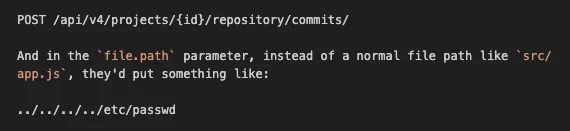
GitLab responds with the contents of the requested file. No login is needed and no special access is required.
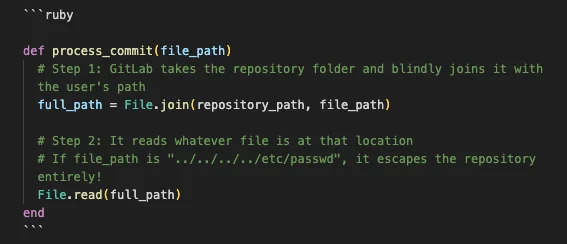
The report presents the above as possibly what the vulnerable logic looked like, written in Ruby.
Step 3: Read the response
GitLab returns the contents of the file named in the traversed path. The report states that no authentication is needed and no alarms are triggered.
Step 4: Steal everything
With the file read, the attacker can take SSH keys, database passwords, CI/CD secrets and API tokens: anything the GitLab service account can read on that server. With those, the attacker can potentially reach the company's entire infrastructure.
Root cause
The mistake is a missing validation of the user-supplied file path before it is used to build a file system path. GitLab did not check the caller's file path properly, so ../ sequences escaped the intended directory. The endpoint also required no login, so anyone on the internet could reach the code path. The report presents the missing check as the whole vulnerability.
Impact
The score is the maximum: CVSS 10.0. The report's reasons are that no login is required, that the attack is one HTTP request rather than a multi-step chain, and that the data exposed is severe. The exposed data includes SSH private keys, database credentials and secrets that unlock the CI/CD pipeline. If a company deploys code through GitLab, an attacker could potentially inject malicious code into production software. The report hedges this with "potentially" and "could".
The timeline the report gives:
| Date | Event |
|---|---|
| September 10, 2026 | GitLab discloses the vulnerability and releases emergency patches |
| September 11, 2026 | Researchers detect mass scanning and exploitation attempts across the internet |
| September 11, 2026 | CISA adds it to the Known Exploited Vulnerabilities (KEV) catalogue |
| September 14, 2026 | CISA's remediation deadline for federal agencies passes |
It took one day from disclosure to active exploitation: attackers saw the patch, reverse-engineered it and started scanning for unpatched servers within hours.
Fix
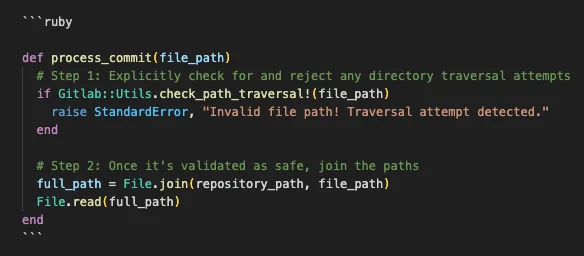
GitLab released emergency patches on September 10, 2026. The developers added a strict validation step that checks for path traversal characters before joining the paths together.
The remediation guidance it gives:
- Update immediately to GitLab version 19.1.8, 19.2.6 or 19.3.2 (or later).
- If you cannot update right now, restrict external access to your GitLab instance and take it off the public internet until you can patch.
- Check your logs for suspicious POST requests to
/api/v4/projects/{id}/repository/commits/with unusualfile.pathparameters. If you see../in there, someone may already have tried to exploit your server. - Rotate your secrets. If there is any chance you were exploited, assume SSH keys, database credentials, API tokens and CI/CD secrets are compromised and change them all.
- If you use GitLab.com, the cloud version, you are fine: GitLab patched its own hosted platform, and the issue only affects self-managed servers.
Variants to test
- Other API endpoints that take a file path. A positive result is a response containing a file from outside the intended directory.
- Encoded traversal sequences. A positive result is the same file read where the plain sequence was rejected.
- Absolute paths. A positive result is a file read from a location the caller should not reach.
- Unauthenticated reachability. Repeat the request without a session or token. A positive result is a successful response with no credentials, one of the reasons the report gives for the maximum score.
- Log review for the known pattern.
What happened, in plain words
GitLab is a website that teams use to keep their code in one place, the way people use an online drive to keep documents. Many companies do not use the version hosted by GitLab itself; they install their own copy on their own server, so the code, the passwords and the keys that let their software build and deploy all live on that machine.
In September 2026, someone found that one of GitLab's doors, a door meant for programs rather than people, would hand out any file on that server to anyone who asked, with no password at all. The flaw had a name and a number: CVE-2026-85706. It was rated Critical, with a CVSS score of 10.0, which is the highest score the scale allows.
The report this article follows was written by Saijalpreet Kaur on 6 October 2026, as part of a series called CVE Decoded, where the author picks a CVE, learns it from scratch and explains it simply. The author says plainly that they are not an expert. That is exactly why this walkthrough starts from zero.
The image above is the header of the article: the title "CVE Decoded #3: CVE-2026-85706 (Gitlab)", the author's name, a reading time of 6 minutes and the date, 6 October 2026.
The basic facts, as the report lists them
| Field | Value |
|---|---|
| CVE ID | CVE-2026-85706 |
| Published | 10 September 2026 |
| Severity | Critical, CVSS score 10.0 |
| Affected software | GitLab Community Edition (CE) and Enterprise Edition (EE), versions 18.7 through 19.3.1 |
| Platform | Web, open source |
| Vulnerability type | Path traversal / arbitrary file read |
A few of those words need unpacking before anything else makes sense.
CVE stands for Common Vulnerabilities and Exposures. It is a public catalogue of known security bugs, and each one gets a permanent ID such as CVE-2026-85706. Think of it like a registration number for a car: the number does not tell you what is wrong with the car, but it lets everyone in the world refer to the same vehicle without confusion.
CVSS is the scoring system used to say how serious a bug is. It runs from 0.0 to 10.0. A 10.0 is the maximum, the top of the scale.
Community Edition (CE) and Enterprise Edition (EE) are the two versions of GitLab: the free, open-source one and the paid one with extra features. Both were affected.
Path traversal and arbitrary file read are the two halves of the bug. The first is the trick used to get out of the folder you are supposed to be in; the second is the result, being able to read any file you like. Both are explained in detail below.
The issue in one line
The report sums it up like this: a missing security check in GitLab's API allowed anyone on the internet to read highly sensitive files on a company's server without needing a password.
That sentence contains three ideas worth slowing down for: API, missing check, and no password.
What GitLab is, and why it matters
Before explaining what broke, the report explains what GitLab is, because the vulnerability does not make sense without it.
GitLab is a platform where developers store, manage and collaborate on code. The report compares it to Google Drive, but for code. Teams use it to keep track of every change made to their software, to work together without overwriting each other's work, and to automate building and deploying their apps.
A lot of companies run their own GitLab servers. That means the software sits on their own machines, holding their source code, their passwords, their deployment keys and their CI/CD secrets. The report calls it the brain of the entire development operation.
Two terms in that paragraph need defining.
Source code is the text developers write that makes a program work. It is the recipe, not the cake.
CI/CD stands for Continuous Integration and Continuous Delivery. In plain terms, it is the set of automatic steps that take code a developer has written and turn it into software that actually runs for customers: testing it, packaging it, and putting it live. Those steps need passwords and keys to do their job, and those are the CI/CD secrets the report mentions. A secret here means a piece of text that acts like a key: whoever holds it can do whatever it unlocks.
So the server is not just a place where code is stored. It is a place where the keys to the whole operation are stored too. That is why the report says somebody figured out how to walk that brain without a key or password.
What went wrong: path traversal explained
The vulnerability is called a path traversal. The report explains it because it sounds technical but is one of the simplest attack concepts there is.
The apartment building comparison
Imagine you live in an apartment building. You have a mailbox in the lobby, mailbox 4B. You can check your mailbox. That is fine. That is allowed.
Now imagine the mailbox system is broken in a way that if you write ../manager-office/safe on your mailbox request form instead of "4B", the system does not say "hey, that's not a mailbox". It just goes to the manager's office and opens the safe for you.
That is path traversal. You are supposed to only access things in your little corner. But by using ../, which means "go up one directory", you escape your corner and wander wherever you want on the server's file system.
The words in that comparison
A file system is how a computer organises files: folders inside folders, like a filing cabinet with drawers inside drawers. Every file has a path, which is its address in that cabinet, something like folder/subfolder/file.txt.
The two dots in ../ are a standard shorthand. In a path, .. means "the folder one level up". So if you are in folder/subfolder/ and you write ../, you are now in folder/. Write it twice, ../../, and you are two levels up. The trick is that if a program accepts a path from a user and simply sticks it onto the end of a folder it chose, the user can climb out of that folder with .. and reach places they were never meant to see.
That is the whole idea. No clever code, no special tool. Just a short piece of text that means "go up".
What happened in GitLab
GitLab has an API. The report describes it as basically a way for programs to talk to GitLab. A useful comparison: a website is built for a human with a browser, with buttons and pages; an API is the same service built for another program, which sends structured requests and gets structured answers back. When you use a mobile app that shows you data from a website, the app is almost certainly talking to that website's API.
One of these API endpoints handles repository commits. A commit is a saved change to code: when a developer finishes a piece of work, they commit it, which records the change permanently in the project's history. The report describes commits as saving code changes.
When you create a commit through the API, you include a file path, telling GitLab where to put the file. That file path is the input the whole vulnerability turns on. An input is simply any piece of information a user or program sends to a system: a search term, a username, a file name. Every input is a place where a system has to decide whether to trust what it is given.
The problem, in the report's words: GitLab did not check that file path properly. And worse, it did not even require anyone to log in to use this endpoint.
That second part is the detail that turns a bug into a catastrophe. Normally, even a broken feature is at least behind a login, so only registered users can reach it. Here there was no login at all. Anyone on the internet could reach the code path.
The attack, step by step
Step 1: Find a GitLab server
The attacker scans the internet for GitLab instances. They need one with at least one public project, meaning a project anyone can see. The report notes that lots of open-source projects are like this.
Why this step? Because the attacker needs to know a server exists before they can send it anything. Scanning here means automatically checking many addresses on the internet to see which ones answer like a GitLab server. The public project matters because it gives the attacker something to point the request at without needing an account.
Step 2: Send one crafted request
The attacker sends a single crafted HTTP request to the repository commits API, replacing the file path with a path traversal sequence.
The image above is the one the report places at this point, where it describes the single crafted request to the repository commits API.
A few words in that step need explaining.
HTTP is the language browsers and servers use to talk to each other. Every time you load a page, your browser sends an HTTP request and the server sends back an HTTP response. A request has a method (what kind of action you want), an address (which thing you want), headers (extra information about the request) and sometimes a body (the data you are sending).
POST is one of those methods. It means "here is some data, please do something with it". When you fill in a form on a website and press submit, your browser usually sends a POST request. Here, the data being posted is the commit, including the file path.
Crafted simply means deliberately built for a purpose, rather than sent by a normal app doing normal things. The attacker is not using the GitLab website; they are writing the request by hand, or with a script, so they can put whatever they like in the file path.
And GitLab would just hand over that file. No login needed. No special access. Just one request.
The image above shows what the report presents as possibly what the vulnerable logic looked like, written in Ruby. Ruby is a programming language, and it is the language GitLab is written in. The report is careful to say this is possibly what the logic essentially looked like; it does not claim it is the exact code that shipped.
Why show code at all? Because it makes the mistake concrete. The report presents the code as possibly what the vulnerable logic looked like. The fix, described later, is to add exactly that check before the paths are joined together.
Step 3: Read the response
GitLab responds with the contents of that file. No authentication needed. No alarms triggered.
Authentication is the process of proving who you are, usually with a username and password. Something that requires no authentication is open to everyone, including people who have no account at all. The report's point is that the usual gate was simply absent.
No alarms triggered means the server did not notice anything unusual and did not alert anyone. From the server's point of view, it had been asked for a file and it had supplied one. Nothing in that exchange looked wrong to it, because the check that would have made it look wrong was missing.
Step 4: Steal everything
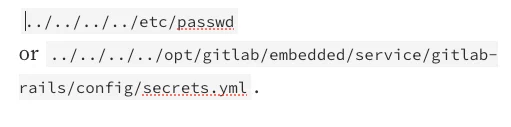
With the file read, the attacker can take SSH keys, database passwords, CI/CD secrets and API tokens: anything the GitLab service account can read on that server. With those, the attacker can potentially reach the company's entire infrastructure.
The image above is the one the report places where it describes the traversal sequence used in the file path.
Several terms in this step are worth defining.
SSH keys are a pair of long strings used to log in to servers securely without typing a password. One half is public and can be shared; the other half is private and must never leave its owner. If an attacker copies the private half, they can log in to the servers that trust it, as if they were the rightful owner.
Database passwords are the credentials that unlock the place where an application stores its data: user accounts, orders, messages, everything. A database is an organised store of information that software reads from and writes to.
API tokens are long random strings that programs use instead of a password when they talk to an API. Think of a token like a wristband at an event: show it and you get in, without anyone checking your name.
Service account is the user identity that the GitLab software itself runs as on the server. It needs to read files to do its job, so it can usually read a lot. That is the boundary of the theft, and it is a wide boundary.
Infrastructure means all the machines and services a company runs: its servers, its databases, its deployment systems. Reaching the infrastructure means being able to touch the systems the company depends on, not just one file.
Why does this step matter so much? Because the files being read are not ordinary documents. They are the keys that unlock everything else. One file read can become a login to a server, a login to a database, and control over the pipeline that puts code live.
The easy way to put it
The report's summary: GitLab had an open door that did not require a key, and through that door, someone could ask for any file on the entire server. Passwords. SSH keys. Database credentials. Everything.
Why the score is the maximum
CVSS goes from 0.0 to 10.0. This one is a 10.0. That is the maximum. The report puts it bluntly: that is not "this is bad", it is a situation to fix immediately.
The report gives three reasons.
- No login required. The attacker does not need an account, a password or any permissions. They just need to know the GitLab server exists.
- One request. This is not a complex multi-step attack chain. It is one HTTP request. The report notes that a script kiddie could do it.
- The data it exposes is devastating. This is not someone reading your README file. It is SSH private keys, database credentials, secrets that unlock the entire CI/CD pipeline. If a company deploys code through GitLab, and many do, an attacker could potentially inject malicious code into production software.
Production software means the version real customers use, as opposed to a test version. Injecting malicious code means getting harmful code into that software, so it does something the company never intended. The report hedges this with "potentially" and "could": it is a consequence that becomes possible once the keys are stolen, not something the report says was observed.
The scary timeline
The report lays out what happened after disclosure:
| Date | Event |
|---|---|
| 10 September 2026 | GitLab discloses the vulnerability and releases emergency patches |
| 11 September 2026 | Researchers detect mass scanning and exploitation attempts across the internet |
| 11 September 2026 | CISA adds it to their Known Exploited Vulnerabilities (KEV) catalogue |
| 14 September 2026 | CISA's remediation deadline for federal agencies passes |
The image above shows this timeline as presented in the report.
A few terms in that table need explaining.
Discloses means makes public. When a company discloses a vulnerability, it tells the world the bug exists, usually at the same moment it releases the fix, so that defenders can act.
Patch is a small update that fixes a bug. An emergency patch is one released outside the normal schedule because the problem cannot wait.
Mass scanning means many automated attempts across the internet at once, looking for servers that have not been fixed yet.
Exploitation means actually using the bug to do harm, as opposed to just knowing it exists.
CISA is the Cybersecurity and Infrastructure Security Agency, part of the United States government. Its Known Exploited Vulnerabilities catalogue, or KEV, is a public list of bugs that are known to be used in real attacks. Getting onto that list is a strong signal that a bug is not theoretical.
Remediation deadline is a date by which something must be fixed. The report says CISA's deadline for federal agencies passed on 14 September 2026.
One day. It took one day from disclosure to active exploitation. Attackers saw the patch, reverse-engineered it, and started scanning the internet for unpatched GitLab servers within hours.
Reverse-engineered here means studying the fix to work out what the bug must have been, and therefore how to attack servers that have not been fixed. This is why the gap between a patch and an attack can be so short: the fix itself is a map of the weakness.
The fix
GitLab released emergency patches on 10 September 2026. If someone is running a self-managed GitLab instance, they should update.
Self-managed means the company runs GitLab on its own machines, rather than using GitLab's hosted service.
How they fixed the code
To fix this, the developers added a strict validation step to check for path traversal characters before joining the paths together.
In plain words: before the code takes the path supplied by the caller and sticks it onto a folder on disk, it now looks at that path and refuses it if it contains the characters that mean "go up a level".
What to do if you run GitLab
The report gives five pieces of advice.
- Update immediately to GitLab version 19.1.8, 19.2.6 or 19.3.2 (or later).
- If you cannot update right now, restrict external access to your GitLab instance and take it off the public internet until you can patch.
- Check your logs for suspicious POST requests to
/api/v4/projects/{id}/repository/commits/with unusualfile.pathparameters. If you see../in there, someone may already have tried to exploit your server. - Rotate your secrets. If there is any chance you were exploited, assume your SSH keys, database credentials, API tokens and CI/CD secrets are compromised. Change them all.
- If you use GitLab.com, the cloud version, you are fine. GitLab patched its own hosted platform. This only affects people running their own GitLab servers.
Some of those need unpacking.
Logs are the records a server keeps of what happened to it: which requests arrived, when, and from where. They are like a visitor book at a building entrance. Reading them after the fact is how you find out whether someone tried the door.
The address in point 3 is the API endpoint for repository commits. The {id} part is a placeholder for the number that identifies a particular project. The file.path parameter is the field in the request that carries the file path, the same field the attacker abuses. Searching the logs for ../ in that field is looking for the fingerprint of this specific attack.
Rotate means replace. Rotating a secret means generating a new one and retiring the old one, so that anyone holding a copy of the old one can no longer use it. The report's reasoning is simple: if there is any chance the keys were read, treat them as stolen.
Cloud version means the service GitLab runs itself, which customers use through a browser without installing anything. Because GitLab controls that platform, it could patch it directly. The people who had to act were those running their own copies.
Variants to test
- Other API endpoints that take a file path. A positive result is a response containing a file from outside the intended directory.
- Encoded traversal sequences. A positive result is the same file read where the plain sequence was rejected.
- Absolute paths. A positive result is a file read from a location the caller should not reach.
- Unauthenticated reachability. Repeat the request without a session or token. A positive result is a successful response with no credentials, which is the condition that made this CVE critical.
- Log review for the known pattern.
A few of those terms are worth defining.
Endpoint is one specific address on an API, one door among many. GitLab's API has endpoints for projects, for users, for commits, and so on.
Parameter is a named field in a request, a labelled box you fill in. file.path is a parameter: its name says what it holds.
Encoded means written in a different form that means the same thing. Some characters can be represented in more than one way, and a check that only looks for the plain form can be bypassed by the encoded form. That is why the report suggests trying encoded versions of ../.
Absolute path is a full address that starts from the very top of the file system, rather than a relative one that starts from wherever you currently are. If a program accepts an absolute path, the caller can name any location directly, without needing .. at all.
Session is how a website remembers that you are logged in between requests. When you log in, the server gives your browser a small piece of data, often called a cookie, and your browser sends it back with every request. A token works the same way for programs. Repeating a request without a session or token is a way of asking: does this door really need a login, or does it open for anyone?
Reachability means whether a door can be reached at all from where you are. An endpoint that requires no credentials is reachable by anyone on the internet, which is exactly the condition that made this CVE critical.
Takeaway
The report ends on a personal note. The author always thought CVEs were incredibly complex, hard-to-understand technical things that only elite researchers dealt with. But this one was a missing check. GitLab forgot to validate a file path. That was the entire vulnerability: a missing check on user input.
The other thing that struck the author was the speed. The patch dropped on 10 September. By 11 September, attackers were already mass-scanning the internet for vulnerable servers.
The author used to skip CVE announcements because they felt they were not "for me". Now they realise that if you work in security in any capacity, understanding CVEs is not optional. It is the language the industry speaks. And if this one can be understood, the next one can too.
One CVE at a time.
Glossary
- API: a way for one program to talk to another, sending structured requests and receiving structured answers, as opposed to a website built for a human with a browser.
- API token: a long random string a program uses instead of a password when it talks to an API.
- Absolute path: a full file address that starts from the top of the file system, rather than from wherever you currently are.
- Arbitrary file read: the ability to read any file on a server, not just the ones the caller was meant to see.
- Authentication: the process of proving who you are, usually with a username and password.
- CI/CD: Continuous Integration and Continuous Delivery, the automatic steps that test, package and deploy code.
- CI/CD secrets: the passwords and keys those automatic steps use to do their job.
- CISA: the Cybersecurity and Infrastructure Security Agency, part of the United States government.
- Cloud version: software run by the vendor and used through a browser, rather than installed on your own machines.
- Commit: a saved change to code, recorded permanently in a project's history.
- Community Edition (CE): the free, open-source version of GitLab.
- Cookie: a small piece of data a website asks your browser to keep and send back with later requests, often used to remember that you are logged in.
- Crafted request: a request deliberately built by hand or by a script for a specific purpose, rather than sent by a normal app.
- CVE: Common Vulnerabilities and Exposures, a public catalogue where each known security bug gets a permanent ID.
- CVSS: the scoring system for how serious a vulnerability is, from 0.0 to 10.0.
- Database: an organised store of information that software reads from and writes to.
- Disclosure: making a vulnerability public, usually at the same time as the fix is released.
- Encoded: written in a different form that means the same thing, sometimes used to slip past a check that only looks for the plain form.
- Endpoint: one specific address on an API, one door among many.
- Enterprise Edition (EE): the paid version of GitLab with extra features.
- Exploitation: actually using a bug to do harm, rather than just knowing it exists.
- File path: the address of a file inside the file system, such as
folder/subfolder/file.txt. - File system: how a computer organises files into folders inside folders.
- HTTP: the language browsers and servers use to exchange requests and responses.
- Infrastructure: all the machines and services a company runs, such as servers, databases and deployment systems.
- Input: any information a user or program sends to a system, such as a search term, a username or a file name.
- KEV: Known Exploited Vulnerabilities, CISA's public list of bugs known to be used in real attacks.
- Logs: the records a server keeps of what happened to it, such as which requests arrived and when.
- Mass scanning: many automated attempts across the internet at once, looking for servers that have not been fixed.
- Parameter: a named field in a request, a labelled box you fill in.
- Patch: a small update that fixes a bug.
- Path traversal: a trick where a caller uses
../, meaning "go up one directory", to escape the folder it was meant to stay in. - POST: an HTTP method meaning "here is some data, please do something with it".
- Production software: the version real customers use, as opposed to a test version.
- Reachability: whether a door can be reached at all from where you are.
- Remediation deadline: a date by which something must be fixed.
- Reverse-engineer: to study something, such as a fix, to work out how it works or what it implies.
- Rotate: to replace a secret with a new one and retire the old one, so copies of the old one stop working.
- Self-managed: software a company runs on its own machines, rather than using the vendor's hosted service.
- Service account: the user identity that a piece of software itself runs as on a server.
- Session: how a website remembers that you are logged in between requests.
- Source code: the text developers write that makes a program work.
- SSH keys: a pair of long strings used to log in to servers securely without a password; the private half must never leave its owner.
- Token: a piece of data, like a wristband, that a program shows to prove it is allowed in.



