Discovering and Exploiting API Attack Surface Using Client-Side Javascript
A read-only user discovered an undisclosed REST API by inspecting client-side JavaScript, then abused the setUserData endpoint to change their own role to super user and to change another user's password by adding an adminId parameter, leading to account takeover of an admin.

medium.com
Published on medium.com
Have you ever been on an engagement where the client, while providing you with the information you needed to start, didn’t give you the whole picture? You know those bodies in the digital backyard they hoped you don’t find, but somehow always seem to turn up.
The full write-up lives on its author's site
It belongs to its author, so we link to it rather than copy it. The other two tabs are our own rewrites, checked against it.
Context
The target was a web application tested during a short grey box engagement. The client supplied swagger/WSDL information for a number of third party APIs but stated that they were not using any APIs they had developed themselves. The application, however, made heavy use of a REST API that the tester was not told about. The API lived under a path of the form https://example.com/index.php/foo/rest/bar, and it turned out to be the gears of the entire application. The tester's account was a read-only (view only) user.
Setup
The engagement was a grey box web application test with a short window and a large application. The tester's account was a read-only user. The tools mentioned are the browser developer tools, Burp Repeater and Notepad++ with the JSTool plugin. No versions are given in the report.
Finding it
While crawling the site, the tester noticed calls to a REST API that the client had said did not exist. The URL pattern gave it away immediately:
https://example.com/index.php/foo/rest/bar
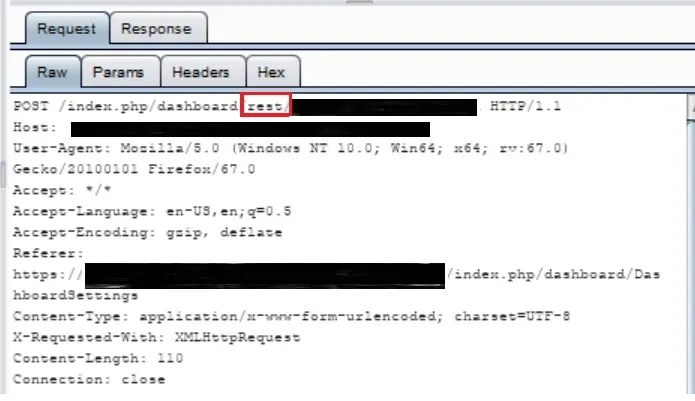
The tester started watching for that particular URL while moving around the site, and observed further endpoints and the data being sent and received. Mapping the API by hand from the read-only account produced only five endpoints in a day, all uninteresting. The conclusion was that the read-only role legitimately had access to only those five, so the next question was how access controls were implemented.
On one page the application showed dead buttons that suggested the user could add content. Clicking one opened a tooltip telling the user to contact someone to request more access. The cause was JavaScript calling preventDefault() and then showing a modal instead. Inspecting the button element in the developer tools and following the event listener showed that the button's click behaviour was determined by the CSS style class it was given on load.

Removing the class let the button perform its default action, which turned out to be nothing. That was still a useful signal: at least part of the access control was decided on the client side, in CSS and JavaScript.
Scraping JavaScript
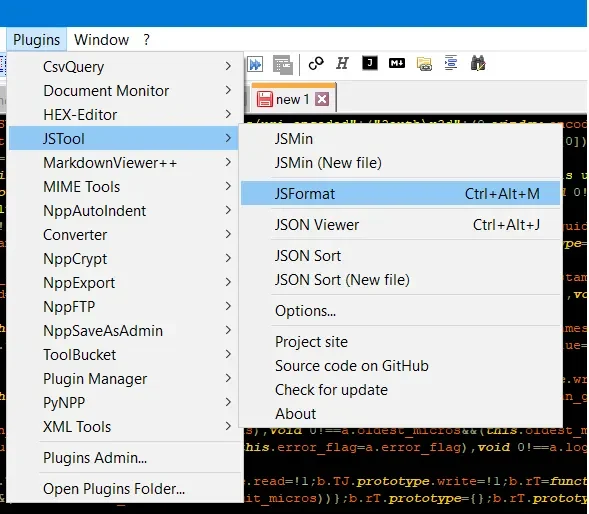
The tester went through the JavaScript files served with the page one by one. They appeared to be served dynamically, but not dynamically enough. One file stood out: it was larger than the others and looked like the guts of a form creation tool. It was minified, so it was pasted into Notepad++ and pretty printed with the JSTool plugin. Browser developer tools can pretty print JavaScript too, but the search facilities in Notepad++ are better for this.
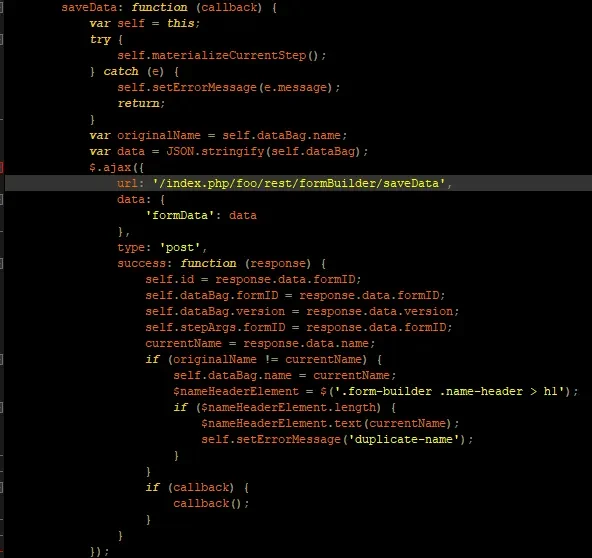
Searching for the string index.php/foo/rest produced hit after hit. All the endpoints for creating, saving, deleting and modifying a form were defined in that single file, which explained its size even for a read-only user.
With the pattern known, the tester went through all the JavaScript looking for the same index.php/foo/rest/ string. Within about 20 minutes the full set of API endpoints was collected, together with the parameters and request methods each one accepted.
Exploitation
Step 1: notice the extra functionality on setUserData
One endpoint that had already been mapped from the user profile section stood out: /rest/userAdmin/setUserData. It had been used to change the tester's own name, email, password and similar fields, which was unremarkable.
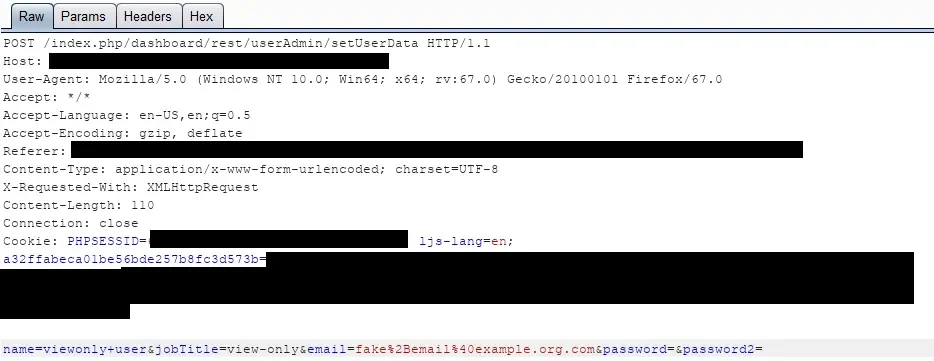
The endpoint appeared to accept additional parameters in both the URL and the POST body. The tester already had access to it through the profile page, and now asked whether those extra parameters could be used to change other users, or to change the tester's own user in ways the UI did not offer. It also looked like a good candidate for access control misconfiguration.
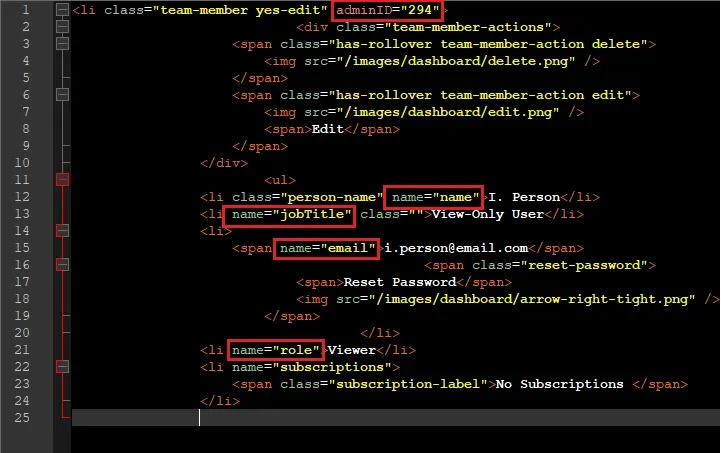
One page listed all the admin users, with name, email, access role, phone number and other application specific attributes. The tester's own entry there showed role, adminId, email and so on. From the settings page it was already known that password and password2 could be sent to the endpoint, though those fields were not on this listing page. Looking at the source also revealed the names of the roles. Scoping had mentioned three roles: view only, editor and admin. The application contained a fourth, super user, which had been omitted from the briefing.
Step 2: add the extra parameters
One of the API requests was sent to Burp Repeater. It was a POST to:
index.php/foo/rest/userAdmin/setUserData
The parameters in the request were limited to the boring ones. Since the same endpoint served both pages, the tester added the additional attributes available in the admin user listing, such as role and job title. Job title did not appear to affect access, so role was the parameter to work with.
With role left blank, the response was 200 and the JSON body was:
{'data':[]}
That looked like acceptance. Checking the user listing page, the tester's assigned role had become unknown. Not the right direction, but progress. Next the value admin was tried. The role in the listing changed again: the account had been given an admin role, and the modals no longer appeared when clicking buttons.
Step 3: try super user, then switch to numeric values
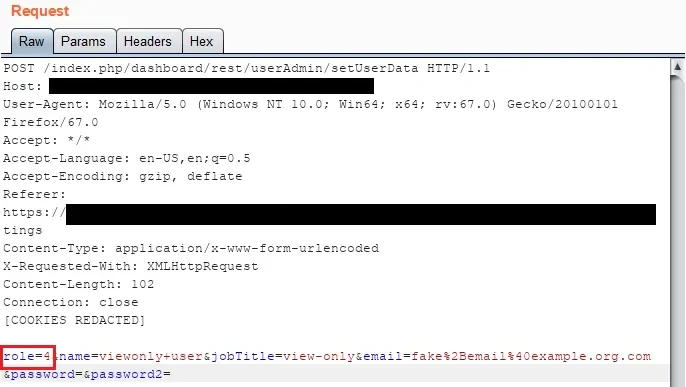
Trying super user returned a 500 Server Error. The tester suspected the space and encoded it several ways, also tried an underscore in place of the space and the value with the space removed. None worked. Most attempts produced an unknown role assignment, and any value containing a space produced a 500. A different approach was needed: a number for the role. Starting at 0 gave unknown role, 1 gave Viewer, 2 gave Editor, 3 gave Admin, and 4 gave super user. The account was now a super user.
Step 4: target another account with adminId
The tester noted that acting as this user would leave logs pointing at them, so the next goal was to act as someone else. The JavaScript showed that the setUserData endpoint could be called with adminId= in the URL. That form was only used when one admin was changing another admin's information. According to the JavaScript, password and password2 were not used there: you were not allowed to change the password that way, but you could send a password reset request. That gave two paths to account hijacking: change the target's email address and send a password reset, or ignore what the JavaScript said and try to change the password through the API anyway.
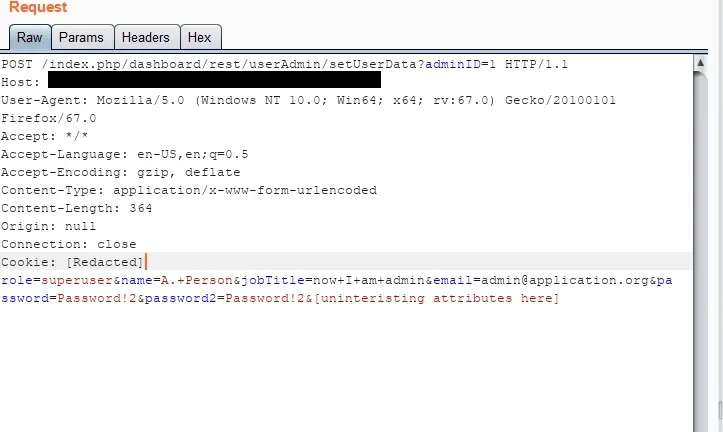
Just because a parameter is not used by the client does not mean the server will not accept it. After 10 to 15 minutes of playing with the API, the tester found that any parameter with a valid name was accepted by the server. To change another account's password, the request was filled out as if changing the tester's own account settings, and the ?adminId= parameter was added to the URL before sending. The value used was adminId=1, on the reasoning that the first user is usually the most permissive, being the first and sometimes only user in a database.
The response appeared to indicate a successful request. Logging in with the new credentials set for that user worked, confirming the change. Admin 1 was, coincidentally, the user the tooltip had earlier told the tester to contact for extra access rights.
Root cause
The application relied on client-side mechanisms for access control. Buttons were disabled by CSS classes and JavaScript event listeners calling preventDefault(), and the role model was enforced in the browser rather than on the server. The server accepted any valid parameter name on setUserData, including role, so a read-only user could set their own role, and the endpoint could be pointed at another account with adminId in the URL. The endpoint also mixed two functions, changing your own profile and changing another user's profile, without separate authorisation for the second. All endpoints for creating, saving, deleting and modifying a form were exposed in a single minified JavaScript file served to the read-only user. The report does not describe any server-side check that stopped these requests; the implication is that there was none for these parameters.
Impact
A read-only user could escalate to admin and then to super user, and could take over another account, including a legitimate administrator's, by changing its password through the API. The report notes that changing another user's email address and sending a password reset was one of two possible paths to account hijacking. The tester verified the takeover by logging in as admin 1 with the new credentials. The report does not state a severity, CVSS score or bounty.
Fix
The report gives four recommendations rather than describing changes that were made:
- Remove unused JavaScript functions from JS files. Dynamically loading JavaScript based on permitted access reduces the exposure of unused, unauthorised or obsolete functions and reduces the code loaded.
- Do not rely on client-side mechanisms for access controls. Everything on the client can be modified, so all requests must be verified server-side.
- Give API endpoints a single purpose. Changing your own profile settings should be a different endpoint from changing another user's information, limited to the logged-in user, and the ability to change your own access role should be removed from the endpoint.
- Do not hide functionality from testers. If it is used by the application, it will be seen in the XMLHttpRequests, and time spent mapping omitted functionality is time not spent elsewhere.
Variants to test
- Search every JavaScript file served to a low-privileged user for API path fragments such as
index.php/foo/restor/rest/. A positive result is a list of endpoints, methods and parameter names that the UI never exposes to that role. - Send a profile update request with extra parameters taken from an admin listing page, such as role or job title. A positive result is a 200 with a changed value reflected in the user listing.
- Try numeric values for role parameters when string names fail or return 500. A positive result is a role change at a value the UI never offers.
- Add an identifier parameter such as
adminId=1to a request that normally acts on your own account. A positive result is a successful response and a change visible on the other account. - Send parameters the client-side code does not use, such as
passwordandpassword2on an admin-managed endpoint. A positive result is a successful login with the new credentials. - Change another user's email address through the same endpoint and trigger a password reset. A positive result would be a reset delivered to the address you control.
- Remove or swap CSS classes and event listeners on disabled buttons. A positive result is a button that performs its default action, or a request that the server accepts even though the UI blocks it.
What happened, in plain words
A security tester was hired to look at a web application. The client gave them a short window of time and a lot of application to test. As part of the usual preparation, the tester asked for documentation of the application's APIs, the machine-to-machine interfaces that a website uses behind the scenes. The client handed over information about several third party APIs, meaning APIs made by other companies, but said they were not using any APIs they had built themselves.
That turned out not to be the whole picture. While clicking around the site, the tester noticed the browser making calls to a REST API, a style of API that uses ordinary web addresses and standard HTTP requests. The client had said this API did not exist. It did, and it turned out to be the gears of the entire application. The tester's own account was a read-only user, meaning an account that is only supposed to look at things, not change them.
Over the course of the test the tester went from that read-only account to an administrator, then to a hidden "super user" role, and finally took over the account of a real administrator. This article walks through each step in the order it happened, explaining every concept along the way. You only need to know how to use a browser.
Background concepts
Before the steps, a few ideas that come up constantly.
- Web application: a program you use through your browser. Your browser sends requests to a server, the server sends back pages, data and files, and the browser draws them on screen.
- Request and response: every time you click a link or a button, your browser sends a request to a server and gets a response back. A request has a method (what kind of action you want), a URL (where), and sometimes a body (data you are sending).
- HTTP methods:
GETasks for something,POSTsends data to create or change something. There are others, but these two matter here. - API: an interface meant for programs rather than people. Think of a restaurant: the menu and the waiter are the API. You do not walk into the kitchen yourself; you ask the waiter for a dish by name, and food comes back. A web API works the same way: the browser asks a server for a specific address with specific data, and gets structured data back, usually in a format called JSON.
- JSON: a way of writing data as text, using curly braces, quotes and colons, for example
{"name": "Alex"}. It is easy for programs to read. - REST API: an API organised around web addresses, where each address represents something (a user, a form) and the method says what to do with it.
- Endpoint: one specific address in an API, for example the address that saves a user's profile. An API is a collection of endpoints.
- Parameter: a named piece of data you send with a request, for example
role=admin. Parameters can travel in the URL (after a?) or in the body of a POST request. - JavaScript: the programming language that runs inside your browser. It makes pages interactive: buttons, menus, pop-ups. Because it runs on your computer, you can read it and change it.
- CSS: the language that describes how a page looks, colours, sizes, and also which elements are visible or styled in a particular way. It is delivered in files called stylesheets.
- Minified: JavaScript and CSS are often squashed to save space: spaces and line breaks removed, names shortened. It still works, it is just hard for a human to read until it is formatted again.
- Developer tools: the panel built into every browser (usually opened with F12) that lets you inspect the page, see the requests the browser makes, and read the JavaScript and CSS.
- Intercepting proxy: a tool that sits between your browser and the server, so you can see every request and response, and change a request before it is sent. Burp is one such tool, and Repeater is a part of it that lets you take a captured request, edit it and send it again.
- Access control: the rules that decide who is allowed to do what. A read-only user should be able to view, an editor should be able to change content, an administrator should be able to manage users.
- Privilege escalation: getting more permissions than you were given. Going from read-only to administrator is privilege escalation.
- Account takeover: getting into someone else's account, usually by changing their password or email so that you can log in as them.
- Grey box testing: testing where you are given some information up front, such as a login account, but not everything.
Finding the hidden API
While crawling the site, meaning clicking through it systematically and watching what the browser does, the tester noticed calls to a REST API that the client had said did not exist. The address pattern gave it away immediately:
https://example.com/index.php/foo/rest/bar
The screenshot shows one of these calls, with the caption asking whether this is a custom API. The tester recognised it instantly from the URL.
Why does this matter? If a client says an API does not exist and it does, that is a signal. The tester reasoned that when someone leaves out something this big, they are often already aware of the problems in it, and it is a good place to focus.
The tester started watching for that address pattern while moving around the site, and observed more endpoints and the data being sent and received. Mapping the API by hand from the read-only account produced only five endpoints in a whole day, all uninteresting. The conclusion was that the read-only role legitimately had access to only those five. So the next question was: how are the access controls implemented? In other words, what mechanism stops this account from reaching the other endpoints?
On one page the application showed dead buttons that suggested the user could add content. Clicking one opened a tooltip telling the user to contact someone to request more access. The cause was JavaScript calling preventDefault() and then showing a modal instead. preventDefault() is a browser function that cancels the normal behaviour of an event, for example stopping a link from navigating or a button from submitting a form. Inspecting the button element in the developer tools and following the event listener, the piece of JavaScript attached to the button that runs when it is clicked, showed that the button's click behaviour was determined by the CSS style class it was given on load.
The screenshot shows the read-only style class dictating the button's behaviour.
Removing the class let the button perform its default action, which turned out to be nothing. That was still a useful signal: at least part of the access control was decided on the client side, in CSS and JavaScript. The tester could have hunted through the eight stylesheets (not counting inline and third party ones) to find a more appropriate class, but decided that was too slow.
Scraping JavaScript
The tester went through the JavaScript files served with the page one by one. They appeared to be served dynamically, meaning generated or chosen by the server at the moment of the request, but not dynamically enough. One file stood out: it was larger than the others and looked like the guts of a form creation tool. It was minified, so it was pasted into Notepad++ and pretty printed with the JSTool plugin. Pretty printing means reformatting the squashed code with indentation and line breaks so a human can read it. Browser developer tools can pretty print JavaScript too, but the search facilities in Notepad++ are better for this.
The screenshot shows the JSTool plugin being used to pretty print a JavaScript file.
Searching for the string index.php/foo/rest produced hit after hit. All the endpoints for creating, saving, deleting and modifying a form were defined in that single file, which explained its size even for a read-only user.
The screenshot shows the saveData function, with its syntax, endpoint and expected parameter information.
With the pattern known, the tester went through all the JavaScript looking for the same index.php/foo/rest/ string. Within about 20 minutes the full set of API endpoints was collected, together with the parameters and request methods each one accepted. This is the key lesson of this section: the browser has to be told which addresses to call, so the list of addresses is sitting in files the browser downloads, and anyone can read them.
Exploitation
Step 1: notice the extra functionality on setUserData
One endpoint that had already been mapped from the user profile section stood out: /rest/userAdmin/setUserData. It had been used to change the tester's own name, email, password and similar fields, which was unremarkable.
The screenshot shows a POST request sent to the setUserData endpoint changing the information for the current user.
The endpoint appeared to accept additional parameters in both the URL and the POST body. The tester already had access to it through the profile page, and now asked whether those extra parameters could be used to change other users, or to change the tester's own user in ways the interface did not offer. It also looked like a good candidate for access control misconfiguration, meaning the rules about who may do what were set up wrongly.
The screenshot shows HTML source providing parameters for a successful setUserData call.
One page listed all the admin users, with name, email, access role, phone number and other application specific attributes. The tester's own entry there showed role, adminId, email and so on. From the settings page it was already known that password and password2 could be sent to the endpoint, though those fields were not on this listing page. Looking at the source also revealed the names of the roles. Scoping had mentioned three roles: view only, editor and admin. The application contained a fourth, super user, which had been omitted from the briefing. If a role was hidden, the tester wanted it, on the reasoning that it must have all the interesting abilities.
Step 2: add the extra parameters
One of the API requests was sent to Burp Repeater. It was a POST to:
index.php/foo/rest/userAdmin/setUserData
This is the address that saves user data. The tester had already used it legitimately through the profile page. Sending it to Repeater means capturing the request once and being able to resend it with changes, over and over, without clicking through the site each time.
The parameters in the request were limited to the boring ones. Since the same endpoint served both pages, the tester added the additional attributes available in the admin user listing, such as role and job title. Job title did not appear to affect access, so role was the parameter to work with.
With role left blank, the response was 200 and the JSON body was:
{'data':[]}
A 200 is the standard HTTP status code for success. The body {'data':[]} is an empty list, which looked like acceptance: the server did not complain. Checking the user listing page, the tester's assigned role had become unknown. Not the right direction, but progress: the server had clearly taken the value from the request and stored it.
Next the value admin was tried. The role in the listing changed again: the account had been given an admin role, and the modals no longer appeared when clicking buttons. The account had been given an admin role, and the modals no longer appeared when clicking buttons.
Step 3: try super user, then switch to numeric values
Trying super user returned a 500 Server Error. A 500 means the server hit an unexpected problem while handling the request. The tester suspected the space and encoded it several ways, also tried an underscore in place of the space and the value with the space removed. None worked. Most attempts produced an unknown role assignment, and any value containing a space produced a 500. A different approach was needed: a number for the role. Starting at 0 gave unknown role, 1 gave Viewer, 2 gave Editor, 3 gave Admin, and 4 gave super user. The account was now a super user.
The screenshot shows the API being abused to elevate user privileges.
The tester tried a number for the role, starting at 0, and found that 4 gave super user. Guessing small numbers in order is a quick way to discover a hidden value.
Step 4: target another account with adminId
The tester noted that acting as this user would leave logs pointing at them, so the next goal was to act as someone else. The JavaScript showed that the setUserData endpoint could be called with adminId= in the URL. That form was only used when one admin was changing another admin's information. According to the JavaScript, password and password2 were not used there: you were not allowed to change the password that way, but you could send a password reset request. That gave two paths to account hijacking: change the target's email address and send a password reset, or ignore what the JavaScript said and try to change the password through the API anyway.
Just because a parameter is not used by the client does not mean the server will not accept it. The JavaScript is only a suggestion of what the interface does; the server decides what it accepts. After 10 to 15 minutes of playing with the API, the tester found that any parameter with a valid name was accepted by the server. To change another account's password, the request was filled out as if changing the tester's own account settings, and the ?adminId= parameter was added to the URL before sending. The value used was adminId=1, on the reasoning that the first user is usually the most permissive, being the first and sometimes only user in a database.
The screenshot shows the replay of the setUserData endpoint from the account profile page, with adminID=1 added to the end of the URL.
The response appeared to indicate a successful request. Logging in with the new credentials set for that user worked, confirming the change. Admin 1 was, coincidentally, the user the tooltip had earlier told the tester to contact for extra access rights.
Root cause
The application relied on client-side mechanisms for access control. Buttons were disabled by CSS classes and JavaScript event listeners calling preventDefault(), and the role model was enforced in the browser rather than on the server. The server accepted any valid parameter name on setUserData, including role, so a read-only user could set their own role, and the endpoint could be pointed at another account with adminId in the URL. The endpoint also mixed two functions, changing your own profile and changing another user's profile, without separate authorisation for the second. All endpoints for creating, saving, deleting and modifying a form were exposed in a single minified JavaScript file served to the read-only user. The report does not describe any server-side check that stopped these requests; the implication is that there was none for these parameters.
Impact
A read-only user could escalate to admin and then to super user, and could take over another account, including a legitimate administrator's, by changing its password through the API. The report notes that changing another user's email address and sending a password reset was one of two possible paths to account hijacking. The tester verified the takeover by logging in as admin 1 with the new credentials. The report does not state a severity, CVSS score or bounty.
Fix
The report gives four recommendations rather than describing changes that were made:
- Remove unused JavaScript functions from JS files. Dynamically loading JavaScript based on permitted access reduces the exposure of unused, unauthorised or obsolete functions and reduces the code loaded.
- Do not rely on client-side mechanisms for access controls. Everything on the client can be modified, so all requests must be verified server-side.
- Give API endpoints a single purpose. Changing your own profile settings should be a different endpoint from changing another user's information, limited to the logged-in user, and the ability to change your own access role should be removed from the endpoint.
- Do not hide functionality from testers. If it is used by the application, it will be seen in the XMLHttpRequests, the background requests the browser makes, and time spent mapping omitted functionality is time not spent elsewhere.
Variants to test
- Search every JavaScript file served to a low-privileged user for API path fragments such as
index.php/foo/restor/rest/. A positive result is a list of endpoints, methods and parameter names that the interface never exposes to that role. - Send a profile update request with extra parameters taken from an admin listing page, such as role or job title. A positive result is a 200 with a changed value reflected in the user listing.
- Try numeric values for role parameters when string names fail or return 500. A positive result is a role change at a value the interface never offers.
- Add an identifier parameter such as
adminId=1to a request that normally acts on your own account. A positive result is a successful response and a change visible on the other account. - Send parameters the client-side code does not use, such as
passwordandpassword2on an admin-managed endpoint. A positive result is a successful login with the new credentials. - Change another user's email address through the same endpoint and trigger a password reset. A positive result would be a reset delivered to the address you control.
- Remove or swap CSS classes and event listeners on disabled buttons. A positive result is a button that performs its default action, or a request that the server accepts even though the interface blocks it.
Glossary
- API: an interface meant for programs rather than people, where you ask for something by name and get structured data back.
- REST API: an API organised around web addresses, where each address represents something and the HTTP method says what to do with it.
- Endpoint: one specific address in an API.
- Parameter: a named piece of data sent with a request, in the URL or in the body.
- Request: what your browser sends to a server: a method, a URL and sometimes a body.
- Response: what the server sends back, including a status code and usually some data.
- HTTP method: the kind of action a request asks for, such as
GETto fetch orPOSTto send data. - Status code: a number in the response saying how it went, such as 200 for success or 500 for a server error.
- JSON: a text format for structured data, using braces, quotes and colons.
- JavaScript: the programming language that runs in your browser and makes pages interactive.
- CSS: the language that describes how a page looks and which elements are styled in which way.
- Stylesheet: a file containing CSS rules.
- Minified: code squashed to save space by removing spaces and line breaks and shortening names.
- Pretty printing: reformatting minified code with indentation and line breaks so a human can read it.
- Developer tools: the panel built into a browser for inspecting pages, requests, JavaScript and CSS.
- Event listener: a piece of JavaScript attached to an element that runs when something happens to it, such as a click.
preventDefault(): a browser function that cancels the normal behaviour of an event.- Intercepting proxy: a tool that sits between browser and server so you can see and edit requests.
- Burp Repeater: the part of the Burp proxy that lets you take a captured request, edit it and resend it.
- Access control: the rules deciding who may do what.
- Access control misconfiguration: access rules set up wrongly, so someone can do more than intended.
- Privilege escalation: gaining more permissions than you were given.
- Account takeover: getting into someone else's account, usually by changing their password or email.
- Role: a named set of permissions, such as view only, editor, admin or super user.
adminId: an identifier parameter naming which user account a request applies to.- Crawling: clicking through a site systematically while watching what the browser does.
- XMLHttpRequest: the browser mechanism for making background requests to a server without reloading the page.
- Password reset: a feature that lets a user set a new password, usually by receiving a link or code at their email address.

