Discovering and Responsibly Disclosing a Path Traversal Vulnerability in a WordPress Plugin
The Easy Testimonial Slider and Form WordPress plugin had insufficient file path validation in its CAPTCHA file deletion functionality. Under certain conditions, this could potentially allow unauthorised deletion of files outside the intended directory.
 Published on medium.com
WordPress
The full write-up lives on its author's site
It belongs to its author, so we link to it rather than copy it. The other two tabs are our own rewrites, checked against it.
Context
Easy Testimonial Slider and Form is a WordPress plugin. During a security analysis of the plugin, Yusif Mammadzada found a path traversal vulnerability tied to the plugin's CAPTCHA file deletion functionality.
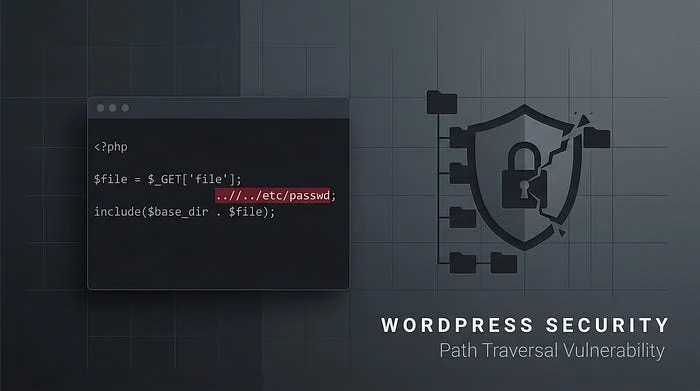
The feature at the centre of the issue is the CAPTCHA cleanup process: the plugin deletes CAPTCHA-related files, and that deletion routine is where the file path handling went wrong.
Setup
The report does not describe a lab, a WordPress version, a PHP version, a role or a specific tool. The work was a security analysis of the plugin itself, and the finding was reported to the plugin's development team.
Finding it
While analysing the plugin, the researcher identified that the CAPTCHA cleanup process did not validate file paths sufficiently. Because the deletion routine did not validate file paths sufficiently, under certain conditions it could potentially allow deletion of files outside the intended directory.
Exploitation
The report does not publish a request, payload, parameter name or response for this issue. It describes the flaw at the level of behaviour: insufficient file path validation during CAPTCHA cleanup, which under certain conditions could potentially allow unauthorised deletion of files outside the intended directory. The exact request shape and the conditions that make the traversal reachable are not disclosed.
Root cause
The mistake is in the CAPTCHA cleanup code: the file path used for deletion is not validated well enough before the file is removed. In a path traversal of this kind, a path that escapes the intended directory could be accepted, so the delete operation could act on a file the plugin never meant to touch. The report does not show the code, so the precise validation gap is not visible;
Impact
Under certain conditions, the flaw could potentially allow unauthorised deletion of files outside the intended directory. The described effect is file deletion.
Fix
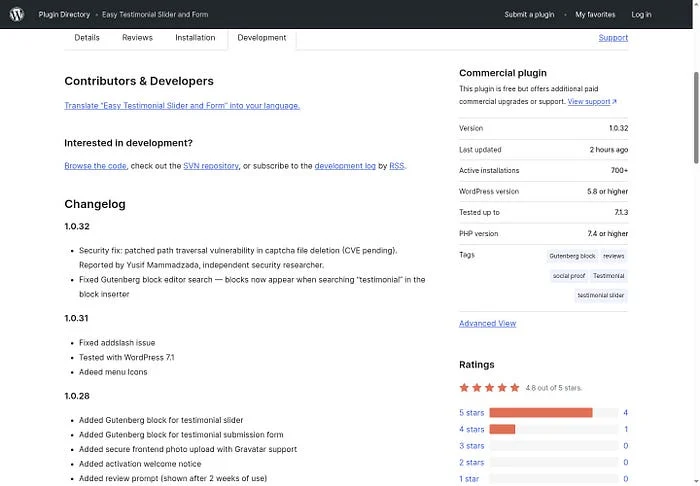
The vulnerability has been fixed in version 1.0.32 of the plugin. If you run this plugin on a WordPress site, update to version 1.0.32 or later to get the security fix.
Responsible disclosure
The researcher reported the issue directly to the plugin's development team. The developers responded promptly and took steps to address it, and the researcher thanks them for their prompt response, professional approach and cooperation throughout the process. A public advisory reference is available at:
https://wpsec.com/vuln/WPSEC-2026-1322/
Variants to test
- CAPTCHA cleanup endpoints in other plugins. Look for delete or unlink routines that take a filename or path from the request. A positive result is a request whose path escapes the plugin directory and whose response indicates the file was removed.
- Traversal sequences in file parameters. Try
../sequences and encoded forms in any parameter that ends up in a delete call. A positive result is a file outside the intended directory disappearing after the request. - Cleanup routines triggered on a schedule or by an action. Check whether the deletion path can be influenced through stored values rather than direct input. A positive result is a stored value that later causes deletion outside the intended directory.
- Path confinement checks. Where a plugin claims to restrict deletion to its own directory, test whether the check uses string prefix matching that a sibling directory can satisfy. A positive result is deletion in a directory that shares the prefix but is not the intended one.
What happened, in plain words
A security researcher named Yusif Mammadzada looked closely at a piece of software called Easy Testimonial Slider and Form. That software is a WordPress plugin. WordPress is a system many people use to build websites, and a plugin is an add-on that gives the website extra features, a bit like an app you install on a phone to add a new ability. This particular plugin lets a site show testimonials (customer quotes) and forms, and it also includes a CAPTCHA, which is the small test that tries to tell real visitors apart from automated programs.
While examining the plugin, the researcher found a path traversal vulnerability connected to the part of the plugin that deletes CAPTCHA files. A path traversal is a flaw where a program can be tricked into working with a file it was never meant to touch, because it accepts a file location that points outside the folder it should stay in. In this case the problem was in the cleanup routine, the code that removes CAPTCHA files once they are no longer needed. That routine did not check file locations carefully enough, and under certain conditions it could potentially allow files outside the intended directory to be deleted without authorisation.
The researcher reported the problem directly to the plugin's development team. They responded promptly and fixed it. The fix is in version 1.0.32 of the plugin.
The plugin and the feature involved
To follow the story you only need two ideas.
- A plugin is extra software added to a website. It runs inside the website's own code, so a mistake in a plugin can affect the whole site.
- A CAPTCHA is a challenge shown to visitors, for example an image or a small puzzle, to slow down automated abuse of forms. Because CAPTCHAs are generated and used repeatedly, the plugin has to tidy up after itself by deleting the temporary files it creates.
That tidying up is the CAPTCHA cleanup process, and it is the feature at the centre of the issue. The plugin deletes CAPTCHA-related files, and it is in that deletion routine that the handling of file locations went wrong.
How the researcher worked
The report does not describe a test lab, a WordPress version, a PHP version, a user role or a specific tool. The work was a security analysis of the plugin itself. The finding was reported to the plugin's development team.
Finding the flaw
While analysing the plugin, the researcher found that the CAPTCHA cleanup process did not validate file paths sufficiently. "Validating" here means checking something before acting on it, the way a receptionist checks your name against a guest list before letting you into a building. Because the deletion routine did not validate file paths sufficiently, under certain conditions it could potentially allow deletion of files outside the intended directory.
A file path is the address of a file on a computer, for example the folder names followed by the file name. If a program accepts an address from outside and does not confirm that the address stays inside its own folder, someone can supply an address that climbs out of that folder and points somewhere else. That is the essence of path traversal.
What the report does and does not show about exploitation
The report does not publish a request, a payload, a parameter name or a response for this issue. It describes the flaw at the level of behaviour: insufficient file path validation during CAPTCHA cleanup, which under certain conditions could potentially allow unauthorised deletion of files outside the intended directory. The exact shape of the request, and the conditions that make the traversal reachable, are not disclosed.
That restraint is normal in responsible disclosure. Publishing a working recipe before site owners have updated would hand attackers a tool. The report gives site owners what they need, which is the version number of the fix, and leaves out the step-by-step recipe.
Why the flaw exists
The mistake sits in the CAPTCHA cleanup code: the file path used for deletion is not validated well enough before the file is removed. In a path traversal of this kind, a path that escapes the intended directory could be accepted, so the delete operation could act on a file the plugin never meant to touch. The report does not show the code, so the precise validation gap is not visible.
A simple comparison: imagine a cleaner told to empty the bins in room 12. If nobody checks that the room number really is 12, the cleaner might be sent to room 99 instead. The instruction was followed, but the wrong room was emptied. Here the "room number" is the file path, and the "cleaner" is the delete routine.
Impact
Under certain conditions, the flaw could potentially allow unauthorised deletion of files outside the intended directory. The described effect is file deletion.
Deletion matters because websites depend on files to work. If a file the site needs disappears, part of the site can stop working. The report does not go further than that, so neither should we.
The fix
The vulnerability has been fixed in version 1.0.32 of the plugin. If you run this plugin on a WordPress site, update to version 1.0.32 or later to get the security fix.
Responsible disclosure
The researcher reported the issue directly to the plugin's development team. The developers responded promptly and took steps to address it, and the researcher thanks them for their prompt response, professional approach and cooperation throughout the process. A public advisory reference is available at:
https://wpsec.com/vuln/WPSEC-2026-1322/
This block is a web address given at the end of the report. An advisory is a short public notice that records a security problem and its fix, so that site owners and other researchers can look it up later.
Variants to test
The technical version lists four directions for further testing. They are written for people who already know their way around web requests, so here is what each one means in plain terms.
- CAPTCHA cleanup endpoints in other plugins. An endpoint is a specific address on a website that accepts a particular kind of request, like a service window at a counter. Look for other plugins whose cleanup code deletes a file named in the request. A positive result is a request whose path escapes the plugin directory and whose response indicates the file was removed.
- Traversal sequences in file parameters. A parameter is a named value sent with a request, for example a file name. The sequence
../means "go up one folder" in a file path. Try../sequences and encoded forms in any parameter that ends up in a delete call. A positive result is a file outside the intended directory disappearing after the request. - Cleanup routines triggered on a schedule or by an action. Some cleanup runs later, not immediately, and may use a value that was stored earlier. Check whether the deletion path can be influenced through stored values rather than direct input. A positive result is a stored value that later causes deletion outside the intended directory.
- Path confinement checks. Where a plugin claims to restrict deletion to its own directory, test whether the check uses string prefix matching that a sibling directory can satisfy. A positive result is deletion in a directory that shares the prefix but is not the intended one.
Glossary
- WordPress: a widely used system for building and running websites.
- Plugin: add-on software that gives a website extra features; it runs inside the site's own code.
- CAPTCHA: a challenge shown to visitors to tell real people apart from automated programs.
- CAPTCHA cleanup process: the routine that deletes temporary CAPTCHA files once they are no longer needed.
- Path traversal: a flaw where a program accepts a file location that points outside the folder it should stay in.
- File path: the address of a file on a computer, made of folder names and a file name.
- Validation: checking a value before acting on it, for example confirming a file path stays inside the allowed folder.
- Delete routine: the part of the code that removes files.
- Directory: another word for a folder.
- Unauthorised deletion: removing a file without the permission or intent of the site owner.
- Authentication: proving who you are, for example by logging in.
- Responsible disclosure: reporting a security flaw privately to the people who can fix it, giving them time to do so before details are published.
- Bug bounty platform: a service that coordinates vulnerability reports and pays researchers for valid findings.
- Advisory: a public notice recording a security problem and its fix.
- Endpoint: a specific address on a website that accepts a particular kind of request.
- Parameter: a named value sent along with a request, such as a file name.
../sequence: a way of writing "go up one folder" in a file path.- Encoded form: a way of writing characters so they survive being sent over the web, for example replacing special characters with codes.
- Prefix matching: comparing only the beginning of a piece of text, which can wrongly accept a different folder whose name starts the same way.
- Version 1.0.32: the release of the plugin that contains the fix.



