EFB Penetration Testing Part 2 — The iPad Was Managed. So Naturally, I Tested the Management
The iPad allowed manual proxy and VPN configuration, and one EFB application lacked certificate pinning, so HTTPS traffic could be intercepted. The device could also be flashed to a beta OS build that bypassed MDM restrictions without detection, and local flight data files could be modified and still trusted by the application.
 Published on medium.com
What an EFB iPad, JAMF, network interception, and OS hardening taught me about testing security controls instead of trusting them.
The full write-up lives on its author's site
It belongs to its author, so we link to it rather than copy it. The other two tabs are our own rewrites, checked against it.
Context
This is the second electronic flight bag (EFB) penetration test described by the author, a year after the first. The first assessment was against a Windows-based EFB; this one was against a different device, a different operating system and a different management model. The target was a 9th-generation iPad running iPadOS, supervised and enrolled under an MDM solution (JAMF), with the EFB applications already installed and device restrictions enforced remotely. Testing had to be carried out on site to satisfy compliance requirements.
The question driving the engagement was not whether a policy existed, but what "managed" actually means: whether the policy is enforced, whether alternate paths are blocked, whether unexpected changes are detected, and whether the device can quietly drift away from its intended security state.
The initial environment had several controls in place: the device was supervised and managed through JAMF, profile removal was restricted, installation of third-party CA certificates was blocked, Apple-account registration was restricted, and web-content filtering was enabled. This was not a consumer iPad with an aviation app bolted on; there was a security architecture around it.
Setup
The assessment followed a layered approach across the EFB:
Device → OS → Applications → Storage → Network → MDM
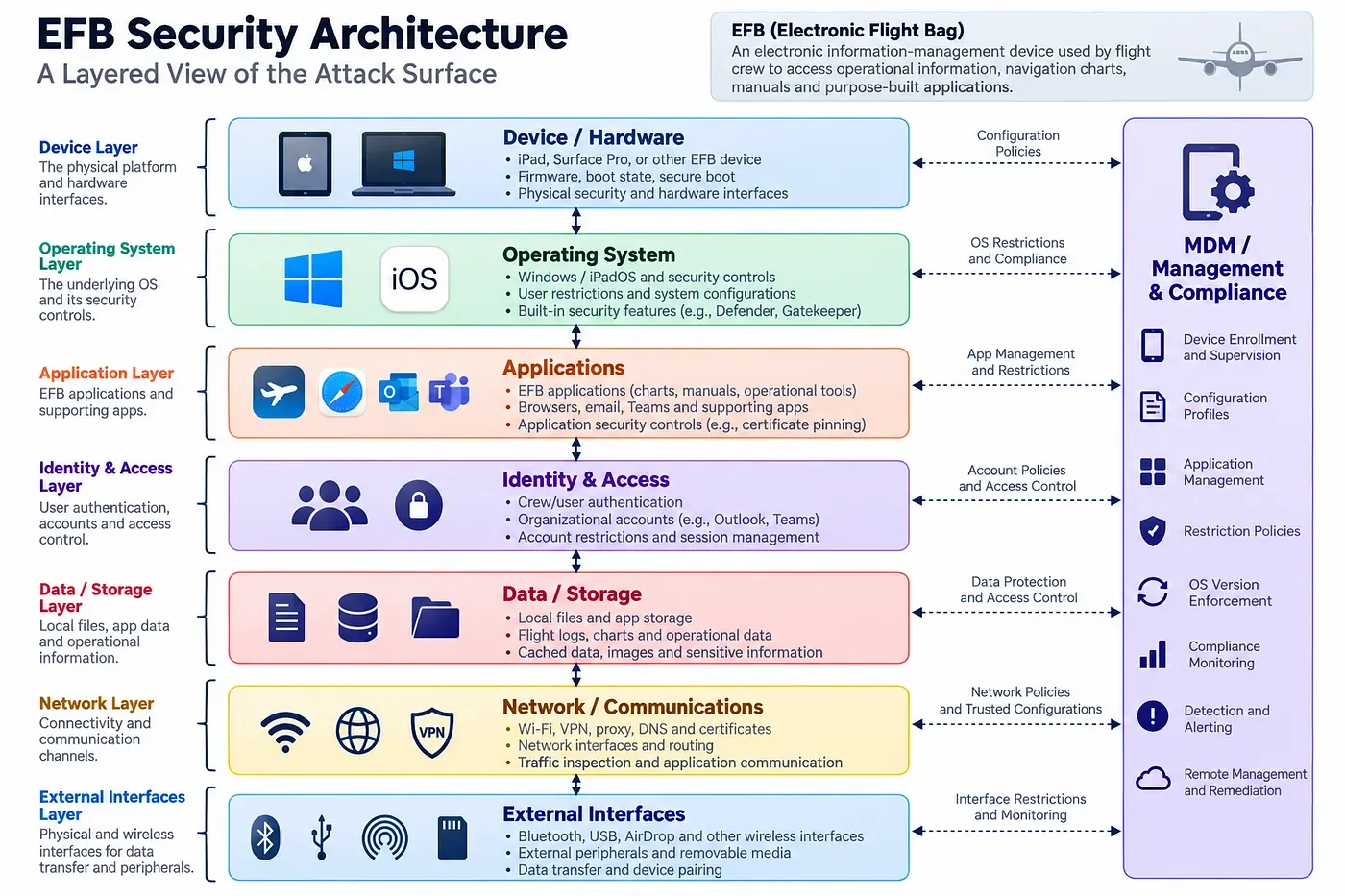
Work began with OS hardening and MDM configuration, then moved to reconnaissance across the available application, browser, network and storage interfaces. Exploitation and post-exploitation were used to validate the impact of the weaknesses found. Jailbreaking the device and modifying or patching the MDM infrastructure were explicitly outside scope.
The iPad's Wi-Fi settings allowed a manual proxy to be configured, and strongSwan was used to simulate an attacker-controlled VPN. In the OS phase, 3uTools was used to flash the device to a beta iPadOS build.
Before touching an API request, the author's checklist for a managed device was:
- Can the device change its network path?
- Can the user influence trust settings?
- Can the device install or load unexpected software?
- Can data leave the application?
- Can local data be modified?
- Can the OS state change?
- Does the MDM detect any of it?
Finding it
The first area examined was the network path, on the principle that whoever controls the network has changed the environment in which every application operates. The sequence tested was:
Wi-Fi → Proxy → VPN → Certificates → Browser → Application TLS
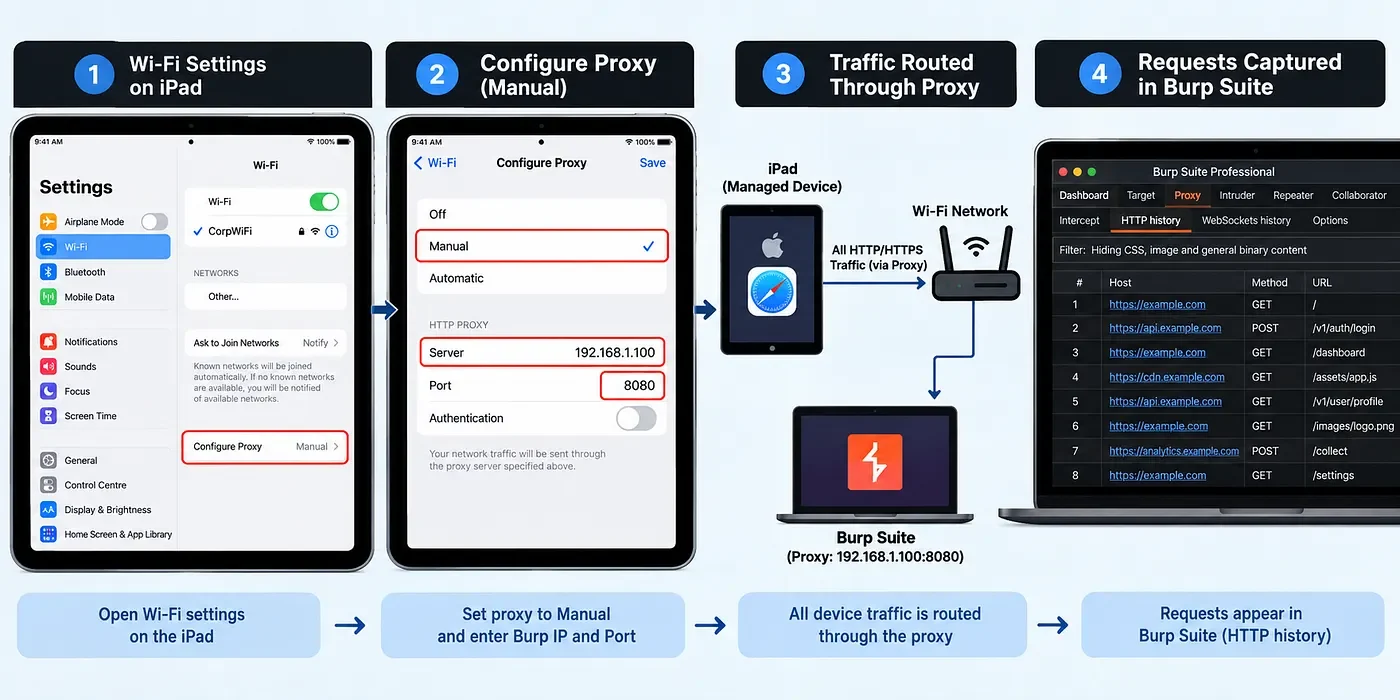
The first question, whether a proxy could be configured, looked almost boring. It was not: the iPad allowed manual proxy configuration through its Wi-Fi settings, so the device could be pointed at an attacker-controlled proxy and the resulting traffic observed. HTTPS traffic interception through this setup was demonstrated.
That put the tester in the middle, but a proxy only gives a position; it does not by itself give the application. The more important question was what the application does when the network becomes hostile.
Exploitation
Step 1: Configure a manual proxy
The iPad permitted manual proxy configuration in its Wi-Fi settings. In the controlled test environment this allowed the device to be pointed at an attacker-controlled proxy, and HTTPS traffic interception through this setup was demonstrated.
Step 2: Intercept one EFB application's HTTPS traffic
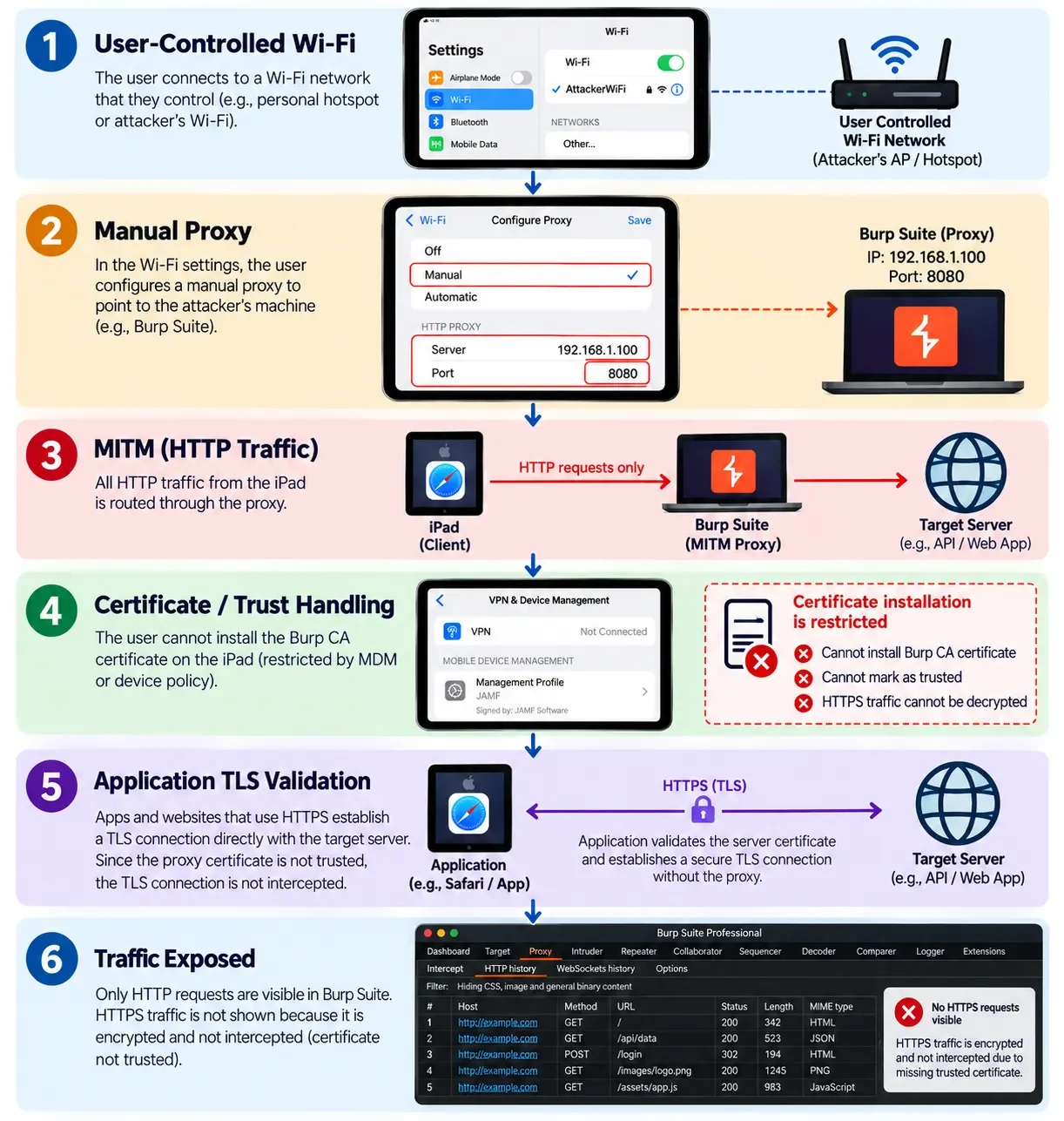
One of the EFB applications did not enforce certificate pinning. During testing, HTTPS traffic could be intercepted without the application rejecting the connection. The report rated this finding High, with a CVSS score of 8.4.
The significance was in the combination rather than the individual finding: the device-level weakness created the conditions, and the application-level weakness allowed the traffic to remain exposed. Had the device blocked proxy manipulation, the path would have been harder; had the application rejected the intercepted connection, the chain would have broken later.
Step 3: Route traffic through an attacker-controlled VPN
The proxy was not the only way to influence the network. The iPad allowed custom VPN configurations to be added, and testing demonstrated that traffic could be routed through an attacker-controlled VPN environment. The author used strongSwan to simulate an attacker-controlled VPN, and it worked. This produced multiple paths to the same network position.
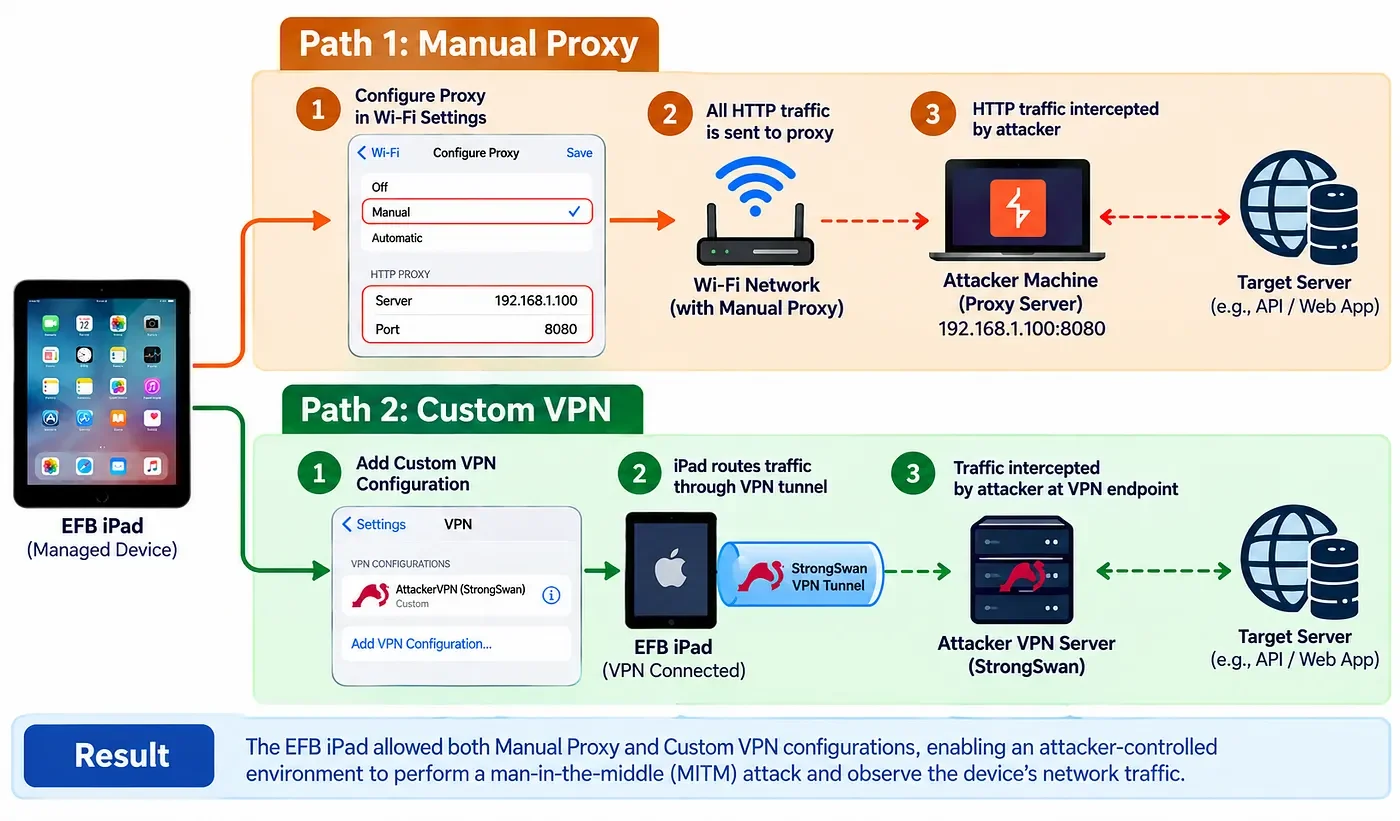
The lesson drawn was not to stop at the first route but to ask what other functionality provides the same capability. For network interception that means checking Wi-Fi, proxy, VPN, trusted certificates, third-party VPN applications, browser configuration, network extensions and per-app networking controls. The goal is to establish whether the device has one controlled network path or several alternative paths.
Step 4: Connect to open or weakly secured Wi-Fi
The iPad could connect to open or weakly secured Wi-Fi networks, and the "Ask to Join Networks" setting was enabled. On a personal tablet this is mostly a nuisance; on an EFB the context changes, because an unsafe network can become the starting point for traffic interception, credential harvesting, session attacks, response manipulation, or simply placing the device in an environment where application security assumptions are tested. The conclusion is not only to block open Wi-Fi but to assume the network can be hostile and make sure the application remains secure anyway, which is why network hardening and application TLS hardening need to be tested together.
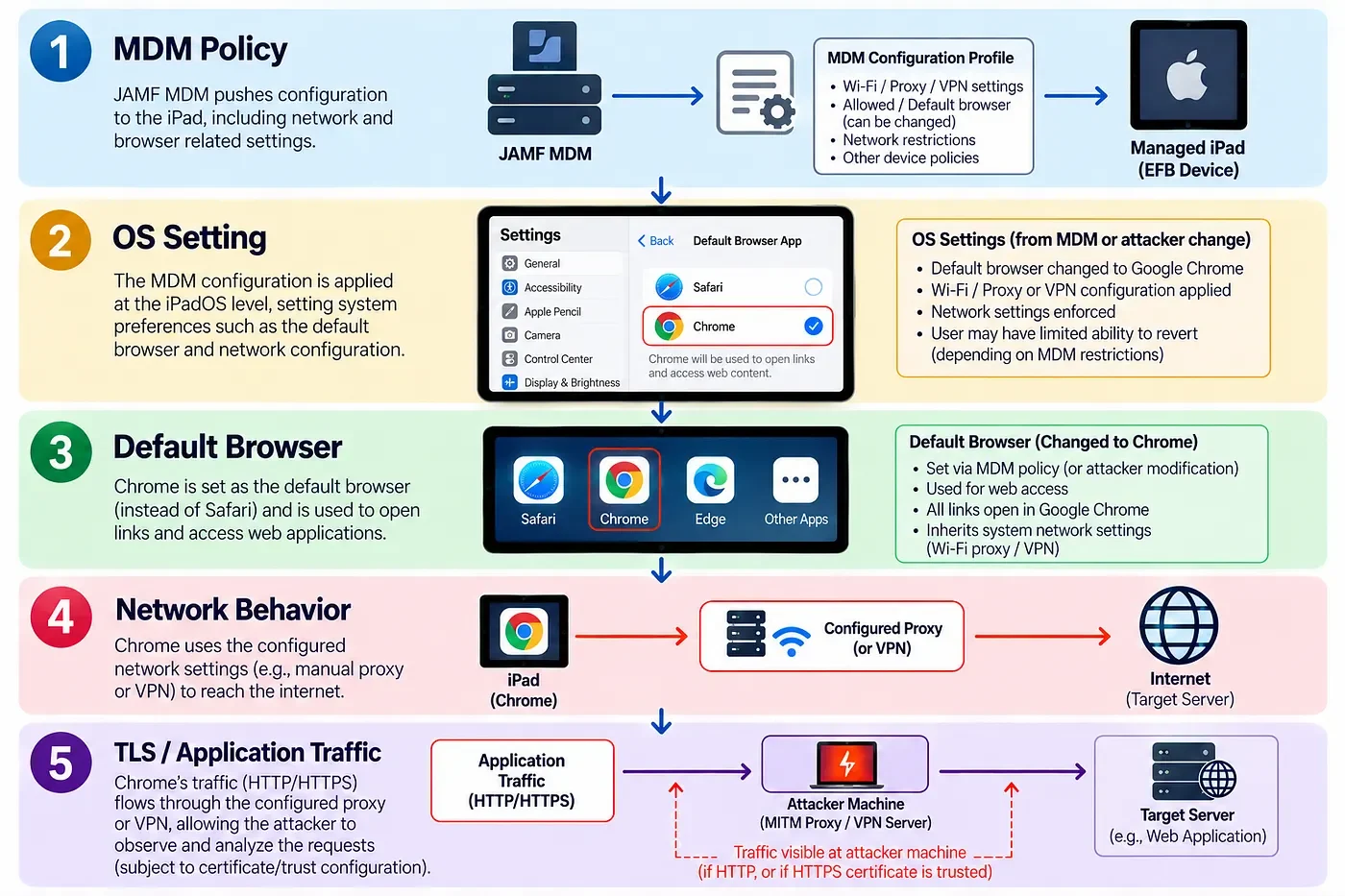
Step 5: Change the default browser
The user could change the default browser. During testing, changing the default browser affected how the proxy and traffic-interception scenario behaved, and the assessment specifically identified default-app changes as a path that could facilitate HTTPS interception through an alternate browser. The chain became: a permitted configuration change alters the security properties of the overall environment, even though the EFB application and the device may each be behaving exactly as designed.
Step 6: Flash a beta iPadOS build with 3uTools
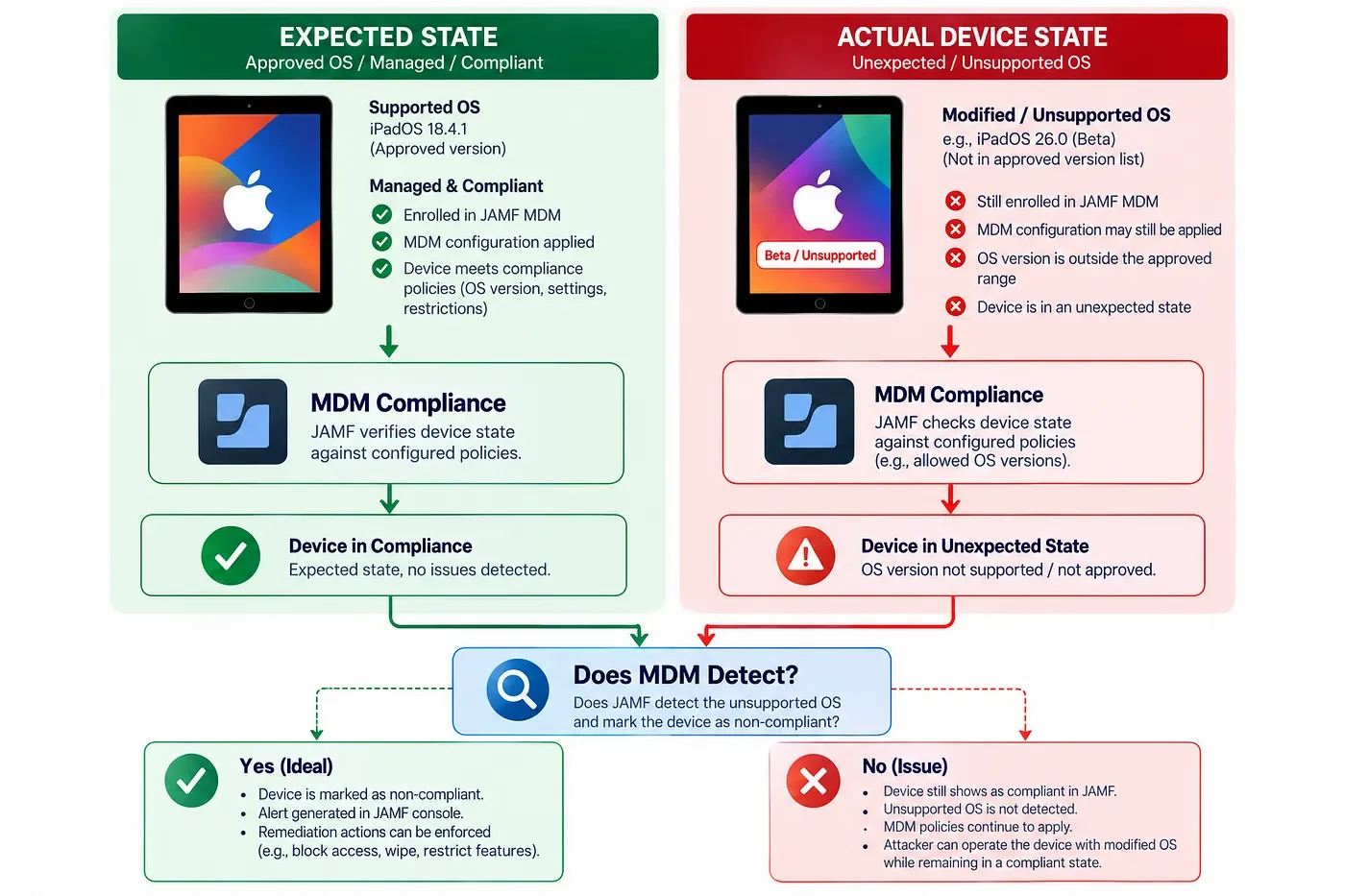
Despite supervision, enforced restrictions, restricted profile removal, restricted third-party CA installation and restricted Apple-account registration, the device could be flashed to a beta iPadOS build using 3uTools. The assessment found that this could bypass expected MDM and Apple-account restrictions, while MDM did not reliably detect the device as being in a non-compliant OS state.
The EFB applications could still operate even after the device had been moved to an unexpected OS state, which made the issue more interesting than a simple MDM bypass. The author separates two controls here: prevention (can the user make the change?) and detection (if the user makes the change, does the management platform notice?). A device can be extremely restrictive and still fail if it cannot recognise that it has moved into an unexpected state.
Step 7: Modify locally stored operational data
The flight application stored logs or operational data in locations accessible through the native Files application. Those files could be opened and modified, and effective integrity validation was not observed before the application trusted the data. The relevant question was not whether the data could be read but whether it could be changed and still be trusted by the application.
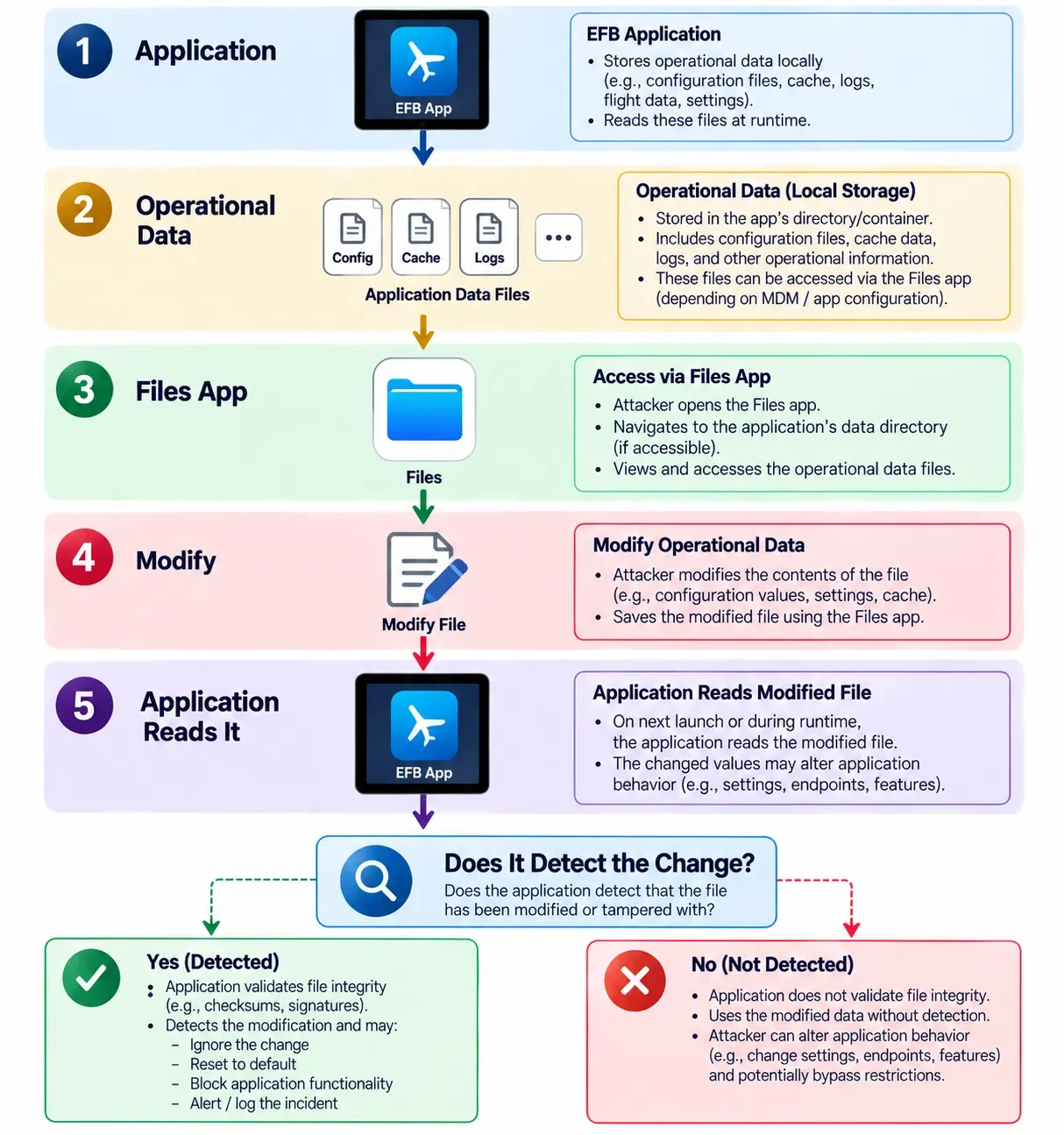
The integrity test the author frames is: is the file Accessible → Modifiable → Trusted? A file does not need to be publicly exposed to be dangerous; it only needs those three properties. This separates confidentiality (can I read it?), integrity (can I change it?) and availability (can I stop it being available?).
Step 8: The smaller settings
By this point the assessment had produced several attack paths, but the findings that looked smaller still mattered:
- AirDrop was enabled.
- Sensitive screenshots could be captured and shared.
- Recent Apps could expose sensitive screens.
- Notification previews were visible.
- The device could connect to open or weakly secured Wi-Fi networks.
- The eSIM could be deleted.
- Location and device-tracking controls could be changed.
- Automatic updates could be disabled.
There were also findings involving application-stored images, website access and organisational login controls.
Individually these do not amount to owning the aircraft. The pattern is that a capability exists which the security model assumed would not be available. Screenshots need no vulnerability in image-processing code: if the EFB displays something sensitive and the user can capture and share it, there is a data-exposure path, and AirDrop was documented as another way sensitive files could leave the device.
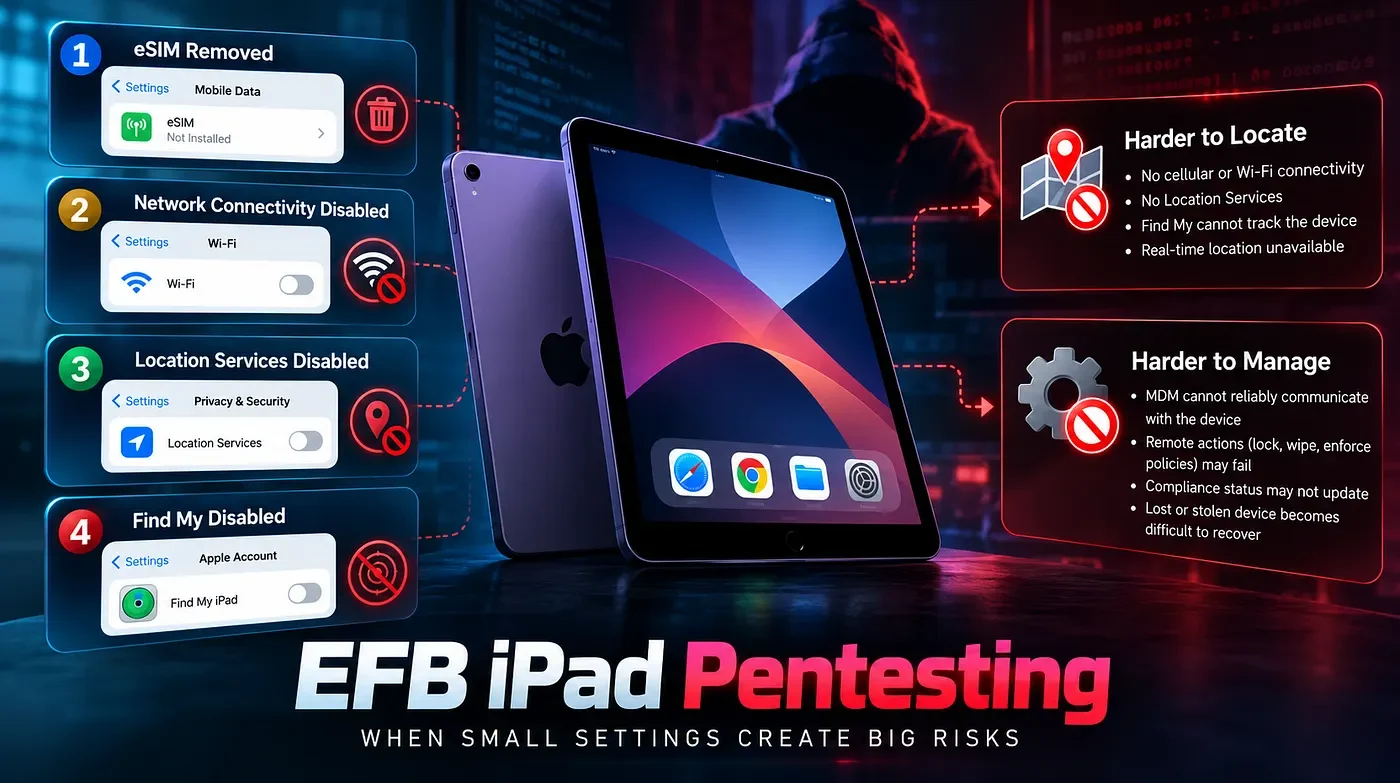
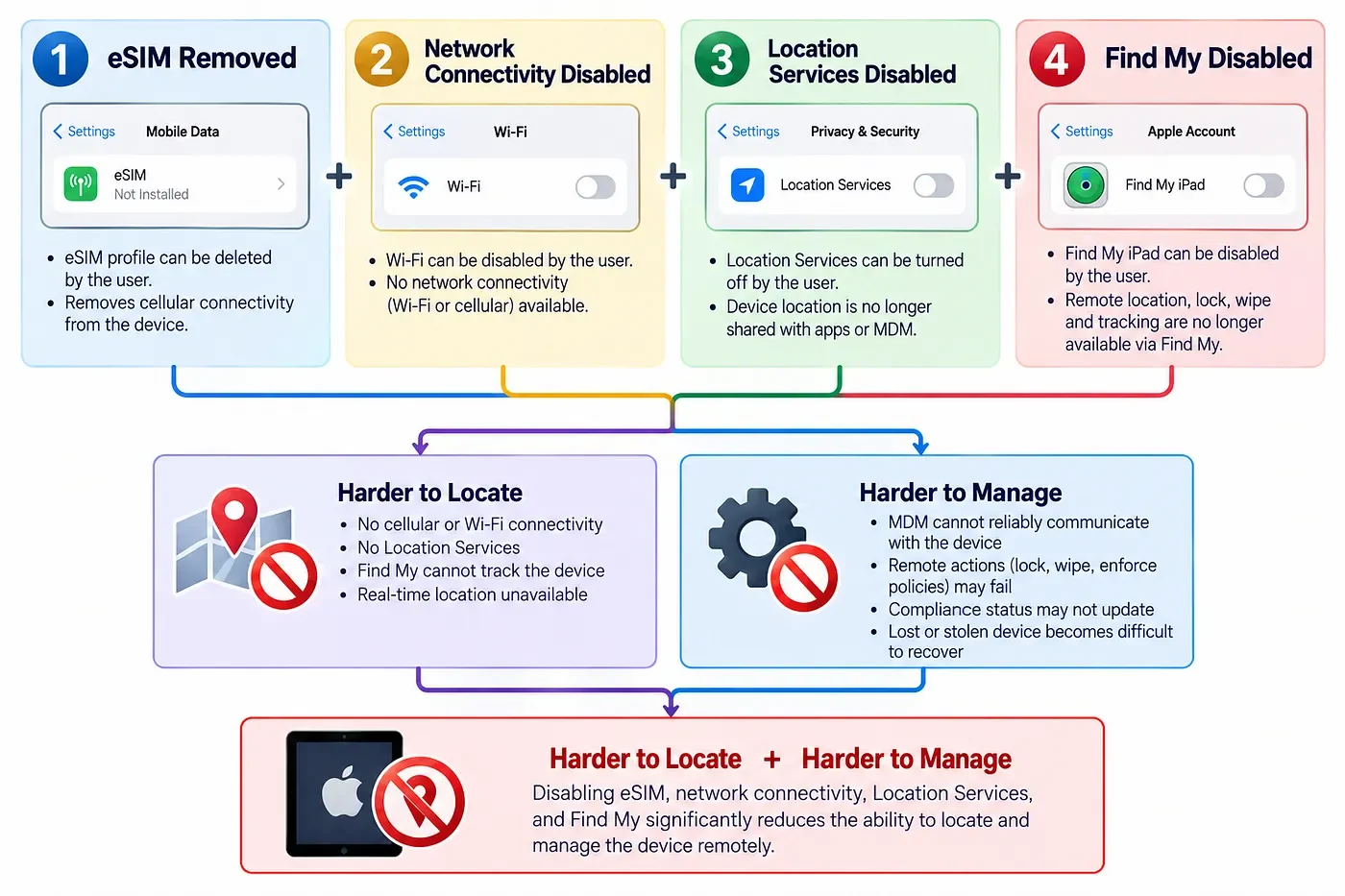
For device recovery, the assessment showed that disabling network connectivity and location-related controls, combined with eSIM deletion and disabled Find My functionality, could make a stolen device significantly harder to locate or manage remotely. No exploit chain was required, just several small decisions interacting.
Root cause
The weaknesses share a design theme: controls existed at one layer while the security model assumed they held across all layers. Manual proxy configuration and custom VPN profiles were permitted at the device layer, so the network path could be redirected; one EFB application did not enforce certificate pinning, so intercepted traffic was accepted; default-app changes altered how interception behaved; the OS could be moved to a beta build without MDM reliably detecting the non-compliant state; and local files were trusted without effective integrity validation. In each case the individual component behaved as designed, and the problem appeared where the layers disagreed.
Impact
With an attacker-controlled proxy or VPN in place, HTTPS traffic from the affected EFB application could be intercepted without the application rejecting the connection, exposing that traffic to the party in the middle. Changing the default browser could facilitate HTTPS interception through an alternate browser. Flashing a beta iPadOS build could bypass expected MDM and Apple-account restrictions, and because MDM did not reliably detect the non-compliant OS state, the EFB applications could continue to operate after the device had been moved to an unexpected state. Locally stored logs or operational data could be modified and were trusted by the application, so their integrity could not be relied upon. The smaller settings provided data-exposure paths (screenshots, AirDrop, Recent Apps, notification previews) and, combined, could make a stolen device significantly harder to locate or manage remotely. The interception findings depend on the attacker being able to influence the device's network path.
Fix
The assessment's recommendations followed a multi-layer approach, with the guiding principle of breaking the attack path rather than fixing only the individual finding:
- At the device layer, restrict manual proxy changes.
- At the trust layer, restrict unauthorised certificate changes.
- At the application layer, implement robust certificate validation and, where appropriate for the threat model, certificate or public-key pinning.
- At the monitoring layer, watch for unexpected configuration changes.
For the local data finding, the recommendations were stronger file-integrity validation, including cryptographic hashes or digital signatures, along with more secure application storage and tighter control over how the data is exposed through the Files app. The defensive idea is not to assume local data is trustworthy because the application created it, but to verify it before use.
Variants to test
- Alternate network paths. After finding one interception route, enumerate Wi-Fi, proxy, VPN, trusted certificates, third-party VPN applications, browser configuration, network extensions and per-app networking controls. A positive result is a second, independent way to place the tester in the middle of the application's traffic.
- Default-app changes. Change the default browser and repeat the interception scenario. A positive result is that interception behaviour changes or becomes possible through the alternate browser.
- OS state drift. Attempt to install a different OS build and then check the MDM console. A positive result is that restrictions are bypassed, the device is not flagged non-compliant, and the EFB applications keep working.
- Local data integrity. Locate application data exposed through the native Files app, modify it, and let the application consume it. A positive result is that the modified data is trusted without integrity validation.
- Small settings in combination. Check AirDrop, screenshot and screen-capture behaviour, Recent Apps exposure, notification previews, eSIM deletion, location and tracking controls, and automatic updates. A positive result is any capability the security model assumed would be unavailable, especially where several combine into a data-exposure or device-recovery path.
What happened, in plain words
A security tester was hired to try to break into an iPad used as an EFB. This kind of tablet is called an EFB, short for electronic flight bag: a tablet that replaces the paper manuals, checklists and charts a pilot used to carry, and runs aviation apps. Because it holds operational data and is used in a safety-critical setting, the company that owns it wants to know whether it is really locked down.
This was the tester's second EFB job. A year earlier he had tested a Windows-based EFB. This time the device was different (a 9th-generation iPad running iPadOS), the operating system was different, and the way the company managed the device was different. The iPad was supervised and enrolled in an MDM solution called JAMF. MDM stands for mobile device management: a central system that pushes settings and restrictions to many devices at once, a bit like a school IT department configuring every laptop from one console. Supervised means the device is set up in a special mode that gives the organisation more control than a normal consumer device has.
The aviation apps were already installed, and restrictions were being enforced remotely. The tester had to travel to the client site to do the work, because compliance rules required testing on site.
The big question was not "does a rule exist?" but "what does managed actually mean?". A rule can exist on paper and still have a way around it. The tester wanted to know whether the rules were actually enforced, whether other routes were blocked, whether unexpected changes were noticed, and whether the device could quietly drift away from the safe state it was supposed to be in.
The iPad looked hard to break
The starting setup had a lot going for it. The device was supervised and managed through JAMF. Removing the management profile was restricted. Installing third-party CA certificates was blocked. Registering an Apple account was restricted. Web-content filtering was switched on.
A profile here is a bundle of settings and restrictions that the organisation installs on the device; removing it would take the device out of the organisation's control. A CA certificate (certificate authority certificate) is a file that tells a device to trust a particular issuer of secure certificates. If an attacker can install their own CA certificate, the device will trust certificates the attacker made, which is exactly what you need to read encrypted traffic. Blocking that is a meaningful control.
So this was not a normal shop-bought iPad with an aviation app dropped on it. There was a security design around it. That meant the tester had to change his approach.
In the first assessment he had mainly asked: can I get around the operating-system restriction? Here he wanted to ask: can I get around the relationship between the device, the application, the network and the management layer?
That meant looking at the EFB from several angles at once:
Device → OS → Applications → Storage → Network → MDM
And, most importantly: what happens when those layers disagree with each other?
Before breaking anything, test the security model
The assessment followed that layered approach. It started with OS hardening and MDM configuration, then did reconnaissance (looking around to see what is there and how it behaves) across the application, browser, network and storage interfaces. Then came exploitation (actually trying the weaknesses to see if they work) and post-exploitation (seeing what an attacker could do after a weakness works), to confirm the real impact of what was found.
Two things were explicitly out of scope: jailbreaking the device (removing Apple's software restrictions, roughly like rooting an Android phone) and modifying or patching the MDM infrastructure itself. Those would have been different kinds of test.
The tester likes this order because it avoids a common mistake in mobile testing: jumping straight into the app before understanding the device it runs on.
Before looking at a single API request, he wants to know:
- Can the device change its network path?
- Can the user influence trust settings?
- Can the device install or load unexpected software?
- Can data leave the application?
- Can local data be modified?
- Can the OS state change?
- Does the MDM detect any of it?
An API is the way one piece of software asks another for data or an action, like a waiter taking your order to the kitchen and bringing back the plate. An API request is one such order. The point of the checklist is to find the boundaries of what the device allows, because boundaries are where the interesting problems live.
Starting with the network
One of the first things to understand was simple: who controls the network path? If you can control the network, you have changed the environment in which every application is operating, in the same way that controlling the road changes every journey taken on it.
So the tester worked through this sequence:
Wi-Fi → Proxy → VPN → Certificates → Browser → Application TLS
A proxy is a middleman server that sits between a device and the internet and passes traffic through itself. A VPN (virtual private network) is an encrypted tunnel that sends a device's traffic through a server chosen by whoever set the tunnel up. TLS (transport layer security) is the encryption that protects HTTPS traffic, the padlock in the browser. The first question was almost boring: can I configure a proxy?
It turned out not to be boring at all.
The proxy was allowed
The iPad allowed manual proxy configuration through its Wi-Fi settings. In a controlled test environment, that meant the tester could point the device at an attacker-controlled proxy (a proxy he ran himself) and watch the traffic that came through. The assessment demonstrated HTTPS traffic interception through this setup.
At that point he had achieved something useful: he had put himself in the middle. But that was not enough. A proxy gives you a position; it does not automatically give you the application. The next question mattered much more: what does the application do when the network becomes hostile?
The application was the next security boundary
One of the EFB applications did not enforce certificate pinning. Pinning means the app is told in advance exactly which certificate to expect from its server, and it refuses to talk to anything else. Without pinning, an app will happily accept a certificate from whoever is in the middle, as long as some trusted authority signed it. During testing, HTTPS traffic could be intercepted without the application rejecting the connection. The report rated the finding High, with a CVSS score of 8.4.
CVSS (Common Vulnerability Scoring System) is a standard 0 to 10 scale for how serious a security weakness is; higher is worse. A finding is one specific weakness recorded in the report.
The interesting part was not the individual finding but the attack path. It was not simply "certificate pinning is missing". It was:
The device-level weakness created the conditions. The application-level weakness let the traffic stay exposed. That combination is what matters. If the device had completely blocked proxy manipulation, the attack path would have been harder. If the application had properly rejected the intercepted connection, the chain would have broken later.
That gave an important lesson about fixes: do not necessarily fix only the finding, break the attack path. At the device layer, restrict manual proxy changes. At the trust layer, restrict unauthorised certificate changes. At the application layer, implement robust certificate validation and, where appropriate for the threat model, certificate or public-key pinning. At the monitoring layer, watch for unexpected configuration changes. The assessment's recommendations followed that multi-layer approach.
Fine. What about a VPN?
Here comes the interesting part. The proxy was not the only way to influence the network. The next question was: does the device provide another feature that gives me the same network position?
It did. The iPad allowed custom VPN configurations to be added, and testing demonstrated that traffic could be routed through an attacker-controlled VPN environment. The tester used strongSwan to simulate an attacker-controlled VPN, and it worked. strongSwan is free, open-source VPN software; here it was used to simulate an attacker-controlled VPN.
Now there were multiple paths:
That is a pattern worth actively looking for when testing a managed device. Do not stop when you find one route. Ask: what other functionality can provide the same capability?
For network interception, that means checking more than just the proxy tool configuration. Look at:
- Wi-Fi
- Proxy
- VPN
- trusted certificates
- third-party VPN applications
- browser configuration
- network extensions
- per-app networking controls
The goal is not to collect a dozen network findings. The goal is to understand whether the device has one controlled network path or several alternative paths.
Wi-Fi was also part of the security boundary
Another finding looked much simpler. The iPad could connect to open or weakly secured Wi-Fi networks, and the "Ask to Join Networks" setting was enabled. On a personal tablet this is mostly a nuisance.
On an EFB the context changes. An unsafe network can become the starting point for traffic interception, credential harvesting (stealing usernames and passwords), session attacks (hijacking a logged-in session), response manipulation (altering the answers a server sends back), or simply placing the device in an environment where the application's security assumptions get tested.
So the lesson is not just "block open Wi-Fi". It is: assume the network can be hostile, and make sure the application remains secure anyway. That is why network hardening and application TLS hardening need to be tested together.
Then the browser became part of the attack path
This was one of the more interesting examples, because at first glance it did not look related to the EFB application at all. The user could change the default browser. Why should that matter?
Because an operating-system setting can change the security behaviour of another component. During testing, changing the default browser affected how the proxy and traffic-interception scenario behaved. The assessment specifically identified default-app changes as a path that could facilitate HTTPS interception through an alternate browser.
So now the chain looked like:
That is the kind of thing you can easily miss if you test the EFB application in isolation. The application may be behaving exactly as designed. The device may also be behaving exactly as designed. The problem appears because another permitted configuration changes the security properties of the whole environment. That is an attack surface.
"But it's managed by JAMF..."
The iPad was supervised. Restrictions were being enforced. Profiles could not simply be removed. Third-party CA installation was restricted. Apple-account registration was restricted. So what happens when the device state itself changes? This is where the assessment became particularly interesting, because security management is not only about controlling settings. It is also about maintaining a known-good state.
Then the OS state became part of the attack surface.
During testing, the device could be flashed to a beta iPadOS build using 3uTools. Flashing means replacing the operating system on the device with a fresh copy; 3uTools is a third-party utility that was used here to flash a beta iPadOS build. A beta build is an early, pre-release version of the software.
The bigger issue was not simply that a different OS build could be installed. The assessment found that this could bypass expected MDM and Apple-account restrictions, while MDM did not reliably detect the device as being in a non-compliant OS state. Non-compliant means the device no longer matches the rules the organisation set for it.
That creates a much more interesting security question: what happens when the actual device state and the expected managed state are no longer the same?
There are two controls here. Prevention: can the user make the change? Detection: if the user somehow makes the change, does the management platform notice? Both matter, because eventually something will get around a control. When that happens, your next line of defence is detection. A device can be extremely restrictive and still fail if it cannot recognise that it has moved into an unexpected state.
In this case, the EFB applications could still operate even after the device had been moved to an unexpected OS state. That made the issue more interesting than a simple MDM bypass.
So when testing an MDM-managed EFB, do not stop at: can I modify the OS? Also ask:
- Does MDM detect the change?
- Does the device become non-compliant?
- Are sensitive applications blocked?
- Is an alert generated?
- Does someone on the security or operations side know?
- Can the device continue to be used as if nothing happened?
That last question is important. A device that prevents an attack is good. A device that detects and contains an attack when prevention fails is better. That was a major shift in how the tester started looking at MDM. He was not treating it as just an administrative tool any more. It was part of the security boundary.
What happens to the data after it reaches the device?
The network was one attack surface. The local data was another. This time the interesting question was not "can I read it?" but "can I change it and still have the application trust it?".
The assessment found that the flight application stored logs or operational data in locations accessible through the native Files application. Those files could be opened and modified, while effective integrity validation was not observed before the application trusted the data. Integrity validation means checking that data has not been altered, for example by comparing a fingerprint of the file against a known-good value.
That changes the problem completely. A file does not need to be publicly exposed for it to be dangerous. It only needs to be:
Accessible → Modifiable → Trusted
That gives a very simple integrity test:
This is where EFB testing needs to go beyond traditional confidentiality checks. Can I read it? That is a confidentiality question. Can I change it? That is an integrity question. Can I stop it from being available? That is an availability question. Those three are the classic trio of security goals.
The assessment recommended stronger file-integrity validation, including cryptographic hashes or digital signatures, along with more secure application storage and tighter control over how the data is exposed through the Files app. A cryptographic hash is a short fingerprint computed from a file's contents; change one byte and the fingerprint changes. A digital signature is a cryptographic stamp that proves who produced a piece of data and that it has not been altered.
The defensive idea is simple: do not assume local data is trustworthy just because the application created it. Verify it before using it. That is a very different mindset from hiding a file somewhere and hoping nobody touches it.
And then there were the "small" things
By this point the assessment had already produced some interesting attack paths. But then came the findings that looked much smaller.
AirDrop was enabled. Sensitive screenshots could be captured and shared. Recent Apps could expose sensitive screens. Notification previews were visible. The device could connect to open or weakly secured Wi-Fi networks. The eSIM could be deleted. Location and device-tracking controls could be changed. Automatic updates could be disabled.
AirDrop is Apple's feature for sending files wirelessly to nearby Apple devices. An eSIM is the digital SIM card that gives the tablet its mobile connection. Find My is Apple's service for locating a lost or stolen device.
There were also findings involving application-stored images, website access and organisational login controls.
Individually, some of these do not sound dramatic. None of them give you a movie-style "congratulations, you now own the aircraft". But that is not how endpoint security usually fails. Sometimes the issue is simply that a capability exists which the security model assumed would not be available.
Take screenshots. There does not need to be a vulnerability in the image-processing code. If the EFB displays something sensitive and the user can capture and share it, you already have a data-exposure path. The assessment also documented AirDrop as another way sensitive files could leave the device.
Or take device recovery. The assessment showed that disabling network connectivity and location-related controls, combined with eSIM deletion and disabled Find My functionality, could make a stolen device significantly harder to locate or manage remotely.
Again, no exploit chain was required. Just several small decisions interacting. That is exactly why the tester stopped dismissing the "small" settings.
The testing model I would use for an EFB today
After both assessments, the approach became much more structured. The assessment is broken into layers.
1. For device and OS
Start with: what can the user change? Test security-sensitive settings, OS versions, update enforcement, recovery controls, profiles and device restrictions. Do not only verify that a policy exists. Try to find another route to the capability.
2. For applications
Then: can the application defend itself when the environment becomes hostile? Test:
- TLS validation
- Certificate pinning where appropriate
- Authentication and session behaviour
- Sensitive-data exposure
- Local storage
- External file access
- Screenshot protection
The fact that the device is managed does not remove the need for application-level security.
3. For network
Then: can I influence the communication path? Test:
Wi-Fi → Proxy → VPN → Certificates → Browser → Application
And do not stop when you find one path. Ask: what other functionality gives me the same capability? That was one of the most useful lessons from this assessment.
4. For storage
Then: where does the data live? Do not stop at "can I open the file?". Test:
Read → Modify → Replace → Reintroduce → Application Trust
That is where integrity testing becomes useful.
5. For MDM
And finally: what does the management platform actually enforce? Not what the policy says it enforces. What does it actually enforce? Then test the second layer: what happens when enforcement fails? Does the MDM detect it? Does the device become non-compliant? Does anyone get alerted? Does the EFB continue operating anyway?
Yes, question everything.
What changed between my two EFB assessments?
The first EFB taught the tester to question endpoint restrictions. The second taught him to question the security architecture around the endpoint. An endpoint is the device at the edge of the network, the thing a person actually holds.
On Windows, the question was: can I go around the restriction? On the iPad, it became: can I change the device, network or application environment in a way the management layer did not anticipate?
The platform changed. The mindset evolved. A proxy affected the application. A browser affected the proxy behaviour. A VPN affected the network. The network affected TLS. TLS affected application trust. The application affected local data. Local data could be exposed or modified. And the MDM was supposed to hold parts of this architecture together. That meant the MDM itself had become part of the attack surface.
Final takeaway
When the tester started his first EFB assessment, he was looking for vulnerabilities. By the second one, he was looking for assumptions.
If the device says "the user can't change this", he wants to know what alternate path exists. If the application says "this connection is secure", he wants to know what happens when the network is not. If the MDM says "this device is compliant", he wants to know what happens when its state changes. If the application says "this file is trusted", he wants to know what happens after the file is modified.
That is what these two assessments changed for him. An EFB is not just an application. It is not just an iPad. It is not just an MDM profile. It is the combination of:
Device + OS + Application + Data + Network + Management + Detection
And that is why the most useful question during an EFB pentest is not "what vulnerability can I find?". It is: "what happens when this security control fails, and what stops me next?"
Because a hardened device is good. A managed device is better. But a device whose security assumptions have actually been tested across the layers is what he would trust.
Key takeaways
- Treat MDM as part of the attack surface. Test both enforcement and detection.
- Test the network before trusting the application. Proxy, VPN, Wi-Fi and certificate controls can fundamentally change the application's threat model.
- Applications need their own security boundaries. Device management does not replace robust TLS validation or appropriate certificate pinning.
- Test local data for integrity, not just confidentiality. Ask whether modified data can still be trusted.
- Test compliance drift. An endpoint can remain operational even after its expected security state has changed.
- Do not dismiss small controls. AirDrop, screenshots, browser settings, eSIM, notifications and updates can become meaningful when combined.
- Think in attack paths. The interesting finding is often not the vulnerability itself, but what it enables next.
Glossary
- EFB (electronic flight bag): a tablet used in the cockpit to replace paper manuals, charts and checklists, running aviation apps.
- MDM (mobile device management): a central system that pushes settings and restrictions to many devices at once.
- JAMF: the MDM product used to manage the iPad in this assessment.
- Supervised: a special setup mode for Apple devices that gives the organisation more control than a normal consumer device has.
- Profile: a bundle of settings and restrictions installed on a device by the organisation.
- CA certificate (certificate authority certificate): a file that tells a device to trust a particular issuer of secure certificates.
- Certificate: a digital document that proves a server's identity during an encrypted connection.
- TLS (transport layer security): the encryption that protects HTTPS traffic, shown as the padlock in a browser.
- HTTPS: the encrypted version of the protocol browsers use to load websites.
- Certificate pinning: telling an app in advance exactly which certificate to expect, so it refuses any other.
- Certificate validation: checking that a certificate is genuine and trusted before using the connection.
- Proxy: a middleman server that traffic passes through, letting whoever runs it see or alter that traffic.
- VPN (virtual private network): an encrypted tunnel that sends a device's traffic through a server chosen by whoever set the tunnel up.
- strongSwan: free, open-source VPN software, used here to simulate an attacker-controlled VPN.
- 3uTools: a third-party utility for managing iOS devices that can install firmware builds.
- Flashing: replacing the operating system on a device with a fresh copy.
- Beta build: an early, pre-release version of software.
- iPadOS: Apple's operating system for iPads.
- OS (operating system): the core software that runs a device and its apps, such as iPadOS or Windows.
- OS hardening: tightening an operating system's settings so fewer features and paths are available to an attacker.
- Reconnaissance: looking around a system to see what is there and how it behaves, before trying to break it.
- Exploitation: actually trying a weakness to see whether it works.
- Post-exploitation: what an attacker does after a weakness works, to see the real impact.
- Jailbreaking: removing Apple's software restrictions from a device.
- API (application programming interface): the way one piece of software asks another for data or an action.
- API request: one such request for data or an action.
- Finding: one specific weakness recorded in a security report.
- CVSS (Common Vulnerability Scoring System): a standard 0 to 10 scale for how serious a security weakness is; higher is worse.
- Attack path: the chain of steps an attacker takes, where each step makes the next one possible.
- Attack surface: everything an attacker can interact with or influence to try to break in.
- Threat model: a description of who might attack a system, how, and what they could gain.
- Credential harvesting: stealing usernames and passwords.
- Session attack: hijacking a logged-in session so the attacker acts as the user.
- Response manipulation: altering the answers a server sends back to a device.
- Integrity: the property that data has not been altered.
- Integrity validation: checking that data has not been altered, for example by comparing a fingerprint against a known-good value.
- Confidentiality: the property that data is only readable by those allowed to see it.
- Availability: the property that data or a service is there when it is needed.
- Cryptographic hash: a short fingerprint computed from a file's contents; change one byte and the fingerprint changes.
- Digital signature: a cryptographic stamp that proves who produced a piece of data and that it has not been altered.
- AirDrop: Apple's feature for sending files wirelessly to nearby Apple devices.
- eSIM: the digital SIM card that gives a device its mobile connection.
- Find My: Apple's service for locating a lost or stolen device.
- Non-compliant: a device that no longer matches the rules the organisation set for it.
- Compliance drift: a device slowly moving away from its expected security state without anyone noticing.
- Endpoint: the device at the edge of a network, the thing a person actually holds.
- Files app: Apple's built-in app for browsing files stored on the device.
- Default browser: the browser that opens automatically when a link is tapped.
- Recent Apps: the screen that shows apps that have been used recently, often with a preview of their last state.
- Notification preview: the snippet of a message shown on the lock screen or in a banner.
- Web-content filtering: a control that restricts which websites a device can load.
- Per-app networking controls: settings that decide which apps may use the network and how.
- Network extension: an Apple mechanism that lets software hook into the device's networking.
- Pentest (penetration test): an authorised attempt to break into a system to find weaknesses before a real attacker does.



