CVE-2019-17123
The eGain Web API's email endpoint failed to sanitise the fromName parameter, allowing injection of CRLF characters to add custom email headers. An attacker could send spoofed emails from trusted mail servers, potentially bypassing email filters.

medium.com
Published on medium.com
During an engagement with one of Maveris’ customers, the Maveris Red Team discovered an Email Header Injection vulnerability in the eGain Web API that allows attackers to send specially crafted emails through otherwise trusted Mail Servers. Email Header Injection through the eGain Web API enables an attacker to spoof…
The full write-up lives on its author's site
It belongs to its author, so we link to it rather than copy it. The other two tabs are our own rewrites, checked against it.
Context
The target is the eGain Knowledge Portal, a web application that acts as a database of documentation for organisational use. Among its features is the ability to email an article to a colleague, both inside and outside the organisation. At the bottom of each article there is an Email button that opens a form for sending the current article to a recipient.
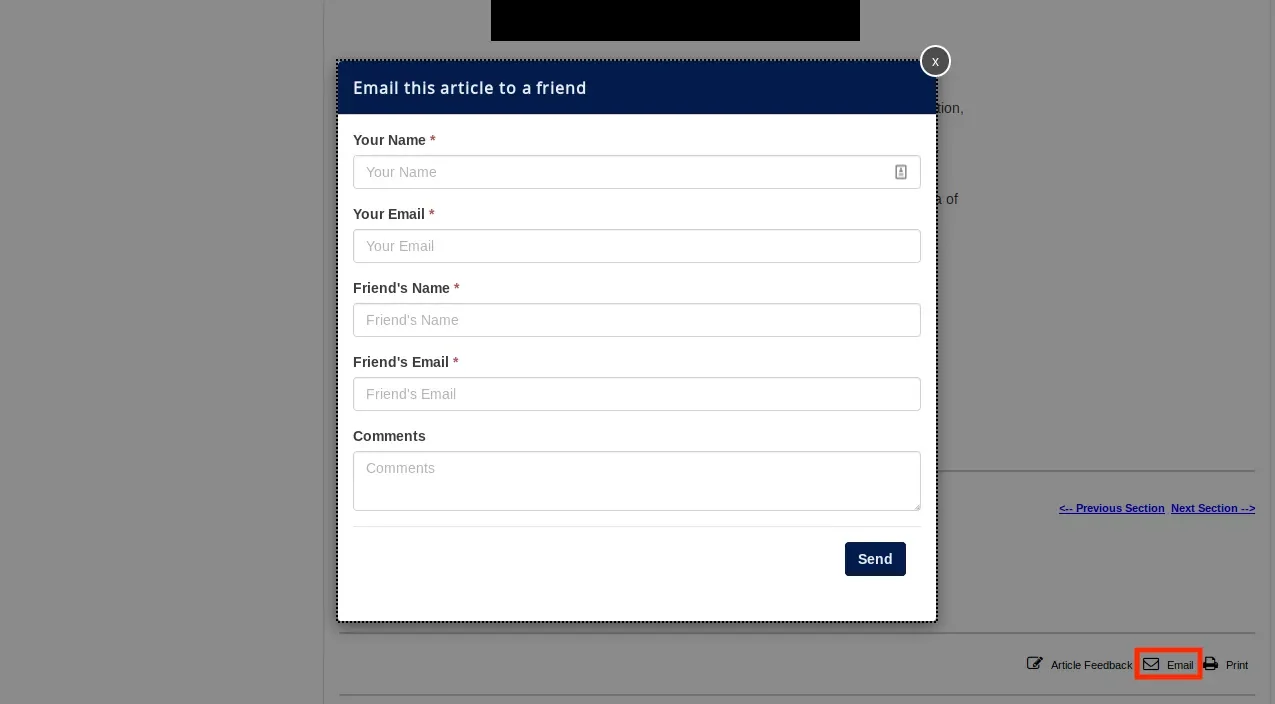
The vulnerable eGain Email form
The form submits to the eGain Web API endpoint /system/ws/v11/ss/email. The Maveris Red Team found that this endpoint does not properly sanitise the fromName form parameter, which allows an attacker to inject a Carriage Return 0x0D and Line Feed 0x0A byte and write arbitrary headers into the email that the backend server crafts. The issue was assigned CVE-2019-17123.
Setup
The work was carried out during an engagement with one of Maveris' customers. The team used a Maveris controlled SMTP server to receive the generated mail, and observed the result rendered in Roundcube. The curl command template below was used for all tests, with varying POST parameters:
curl https://<VULNERABLEDOMAIN>/system/ws/v11/ss/email \-H "Content-Type: application/json" \-H "Accept: application/json" \-d 'portalId=<REDACTED>&data={"toName": "", "fromName": "", "toEmail": "", "fromEmail": "", "articleId": "", "message": ""}&usertype=customer'
The portalId value can be found easily by browsing the vulnerable eGain Knowledge Portal. The usertype value used was customer, and the team believed other options may exist.
Finding it
The endpoint expects the following parameters:
portalId=<PORTALID>&data={"toName": "<TONAME>", "fromName": "<FROMNAME>", "toEmail": "<TOEMAIL>", "fromEmail": "<FROMEMAIL>", "articleId": "<ARTICLEID>", "message": "<MESSAGE>"}&usertype=customer
portalId is the ID of the customer portal to use. data is a JSON encoded object containing the form input, and this is where the injection lies. usertype was set to customer.
The data object has the following keys:
| Key | Meaning |
|---|---|
toName |
The name of the recipient |
fromName |
The name of the sender |
toEmail |
The recipient's email address |
fromEmail |
The sender's email address |
message |
The message body of the email |
articleId |
The ID of the article to send to the recipient |
In particular, fromName is not sanitised properly at the backend server. It allows injection of the Carriage Return 0x0D and Line Feed 0x0A bytes, which lets an attacker write data into the headers of the email crafted by the backend server.
Exploitation
Step 1: Observe the generated message
Initial injection attempts were sent to a Maveris controlled SMTP server and showed promise of exploitation:
The team commented out the default application message by using the HTML comment character <!--. Because the email is sent using a multipart Content-Type with an HTML part, HTML can be injected into the message field in the JSON blob. That alone could be abused, for example to trick a user into clicking a link to a malicious website.
The team also noticed the order in which the email headers were written. If the fromName parameter, which corresponds with the From header, could be controlled, it might be possible to inject custom headers into the email.
Step 2: Inject headers through fromName
Using the following payload, the team was able to send and receive the email shown below:
The fromName value is a sequence of URL encoded %0A line feeds, each followed by a header line: To, From, Subject and MIME-Version, ending with a blank line. The result rendered in the inbox as follows:
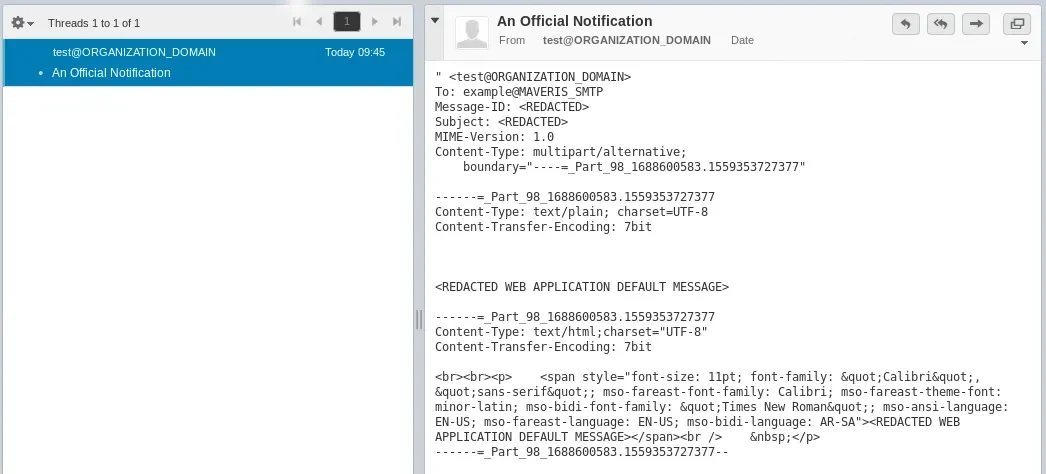
Initial Header Injection attempt Rendered in Roundcube
The team had injected its own email headers. The original email headers were pushed into the body of the email, which would be addressed next.
The order of the injected headers matters. The duplicated From header may be read differently by different email clients: GMail rendered the first appearance of the From header, while Outlook and Roundcube rendered the last. This could make or break a phish attempted through the vulnerability, but does not diminish its severity. The team also had to break up the From headers to avoid spam filters, by separating them first with a different header field, in this case To.
Step 3: Hide the leftovers with multipart boundaries
To make the email as realistic as possible, the team needed to hide the leftover headers pushed into the body, and to send attachments, embed images and write an HTML body. That required injecting their own multipart boundaries.
RFC 1341 describes how messages using the Multipart Content-Type should be written and interpreted. Boundaries separate the various Content-Types of each part of the message. The opening boundary is prefixed with -- and the closing boundary carries the same name suffixed with an additional --, for example --exampleboundary and --exampleboundary--.
RFC 1341 states that clients interpreting multipart messages should ignore the areas before and after the opening and closing boundary declarations:
There appears to be room for additional information prior to the first encapsulation boundary and following the final boundary. These areas should generally be left blank, and implementations should ignore anything that appears before the first boundary or after the last one.
If the interpreter is properly compliant with RFC 1341, a multipart message can force it to ignore the original email. A message part can render HTML or hold a base64 encoded attachment, and the leftover headers from the header injection should be ignored by interpreting servers and clients because they appear after the final boundary.
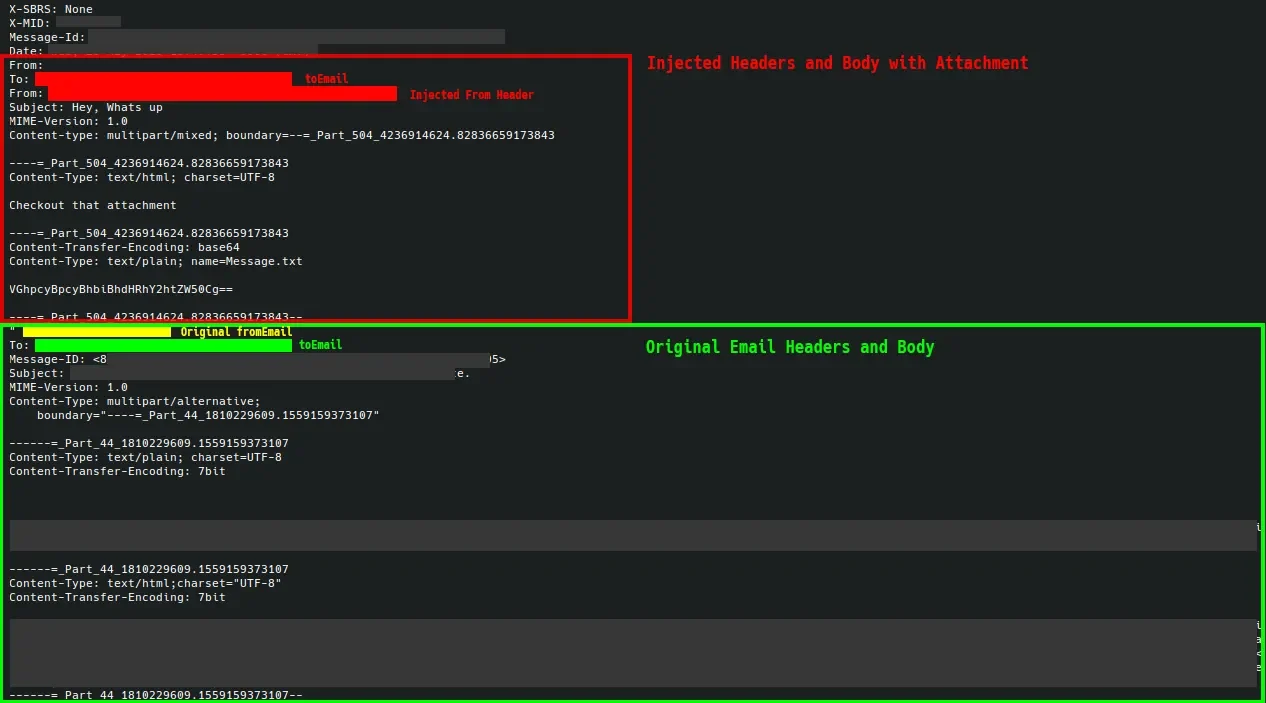
Injected Multipart Email with HTML and Attachment
Step 4: The full proof of concept
The following POC sends a multipart email by exploiting header injection in the eGain Email Web API endpoint:
curl https://#APPLICATION/system/ws/v11/ss/email -H "Content-Type: application/json" -H "Accept: application/json" -d 'portalId=#PORTALID&data={"toName":"","fromName":"%0ATo:%20#TOEMAIL%0AFrom:%20#FROMEMAIL%0ASubject:%20Example%20Header%20Injection%0AMIME-Version:%201.0%0AContent-type:%20multipart/mixed;%20boundary=--=_Part_451_4752221808.74367274130021%0A%0A----=_Part_451_4752221808.74367274130021%0AContent-Type:%20text/html;%20charset=UTF-8%0A%0A#MESSAGEBODY%0A%0A----=_Part_451_4752221808.74367274130021%0AContent-Transfer-Encoding:%20base64%0AContent-Type:%20#ATTACHMENT-CONTENT-TYPE;%20name=#ATTACHMENT-NAME%0A%0A#ATTACHMENT-DATA-BASE64ENCODED%0A%0A----=_Part_451_4752221808.74367274130021--%0A","toEmail":"#TOEMAIL","fromEmail":"#FROMEMAIL","articleId":"#ARTICLEID","message":""}&usertype=customer'
Root cause
The vulnerability is introduced by the backend server's failure to properly sanitise user input. In the eGain Web API, the backend did not properly sanitise the input of the form parameters of the API URL /system/ws/v11/ss/email. The fromName value is not sanitised properly at the backend server, so an attacker can inject CR and LF bytes and add new header lines. The email is then crafted and sent by the hosting organisation's own backend email servers.
Impact
Email Header Injection through the eGain Web API allows attackers to send specially crafted emails through otherwise trusted mail servers. An attacker can spoof emails as organisation employees, set unintended subjects and send attachments. Depending on the architecture of the underlying infrastructure used to run an eGain application, the vulnerability could allow attackers to circumvent email filters and protections.
Detection
Defenders can detect attempts to exploit this technique by monitoring POST requests to the URI /system/ws/v11/ss/email. Any POST request that contains the following string, in regex form, in the POST parameters is likely an attempt to exploit the vulnerability:
/"fromName":\s*"(%0D|%0A)/
If possible, emails containing duplicated From headers can be discarded or given a raised spam score at the email gateway.
Fix
Through disclosure and coordination with the customer, eGain was made aware of the vulnerability in early June 2019. eGain created a patch that gives system owners more flexibility in controlling the email feature and improved the input sanitisation. eGain notified all its customers and issued the patch easily before August 2019, and the team waited three more months before releasing the write-up to give customers time to update. The patch was validated as remediating the vulnerability for the eGain systems the customer uses. Those with their own eGain infrastructure are recommended to update immediately. The team could not determine exactly how far back the vulnerability goes, but it is a core functionality of the product and they believe it was introduced as early as the version 11 web services API. Users of eGain Cloud should confirm with their technical point of contact that their product has been addressed. Because of the proprietary nature of the software, the team is not aware of all functionality and services eGain may offer and did not test other systems outside those its customers use.
Variants to test
Acknowledgements and Credit for Vulnerability Discovery
- Matthew "Rudy" Benton, @ruddawg26
- Khris Tolbert, @khr0x40sh
- Allen Butler, @thecyberbutler

What happened, in plain words
A security team was testing a website for one of their customers. The website is called eGain Knowledge Portal. Think of it as a big online filing cabinet: a company puts its help articles, manuals and documentation in it, and staff browse those articles when they need an answer. One handy feature is an Email button at the bottom of every article. Click it and a small form opens, so you can send the article you are reading to a colleague, either inside or outside the company.
That button is where the trouble was. When you fill in the form and press send, your browser does not send the email itself. It asks the company's own server to do it. The team found that one of the pieces of information the form sends, the sender's name, was not checked properly by the server. By slipping in special invisible characters, they could make the server write extra lines into the email it was building. Those extra lines are called email headers, and they decide things like who the email appears to come from, what the subject is, and whether it carries an attachment.
The result: the team could send emails that looked like they came from a real employee of the organisation, with a subject of their choosing, and even with attachments, all sent through the organisation's own trusted mail servers. The problem was given the identifier CVE-2019-17123. A CVE is a public catalogue number for a known security flaw, a bit like a reference number on a repair ticket, so people can look it up and talk about the same thing.
This kind of flaw is called Email Header Injection. The name is literal: you inject, meaning you insert, extra header lines into an email. The everyday comparison is a printed letter. A letter has a top section with the sender, the recipient and the subject, and then the body below. If someone could sneak extra lines into the top section while the letter is being prepared, they could change who it says it is from. That is exactly what happened here.
The product and the feature
The eGain Knowledge Portal is a web application that acts as a database of documentation for organisational use. Among its features is the ability to email an article to a colleague, both inside and outside the organisation. At the bottom of each article there is an Email button that opens a form for sending the current article to a recipient.
The vulnerable eGain Email form
The form submits to the eGain Web API endpoint /system/ws/v11/ss/email. Two terms need unpacking for a newcomer.
An API is a way for one piece of software to talk to another. A useful comparison is a restaurant. You do not walk into the kitchen and cook; you tell the waiter what you want, the waiter carries the order to the kitchen, and the kitchen sends back a plate. The API is the waiter and the kitchen counter: a fixed set of requests the website is allowed to make, and the answers it gets back. Here the website's form is the customer, and the eGain server is the kitchen.
An endpoint is one specific address on that API, the equivalent of one particular counter or one particular order window. /system/ws/v11/ss/email is the endpoint that handles "please send this article by email".
The Maveris Red Team found that this endpoint does not properly sanitise the fromName form parameter. Sanitise means clean up and check: before using something a user typed, the server should remove or neutralise anything dangerous. The team found that the server did not do this for fromName, which allowed an attacker to inject a Carriage Return 0x0D and Line Feed 0x0A byte and write arbitrary headers into the email that the backend server crafts.
Those two byte values need explaining, because they are the heart of the whole issue. Text on a computer is stored as numbers, and each number has a conventional meaning. 0x0D is the number for Carriage Return, and 0x0A is the number for Line Feed. Together they mean "start a new line". On an old typewriter, the carriage return pushed the typing head back to the left margin, and the line feed rolled the paper up one line. In email, a new line is not just cosmetic: it is the signal that one header has ended and the next one begins. So if you can make the server write a new line inside a value it thinks is just a name, you can start writing your own headers.
Setting up the test
The work was carried out during an engagement with one of Maveris' customers. An engagement is simply a paid, agreed piece of security testing: the customer says "please try to break our system, within these rules".
The team used a Maveris controlled SMTP server to receive the generated mail, and observed the result rendered in Roundcube. SMTP is the standard language mail servers use to pass email to each other, like the postal system's sorting rules. A Maveris controlled SMTP server is a mail server the team owned, so any email the target sent there landed in their own hands and they could inspect it safely. Roundcube is a webmail program, a website you open in a browser to read email, similar in spirit to Gmail or Outlook on the web.
The curl command template below was used for all tests, with varying POST parameters:
curl https://<VULNERABLEDOMAIN>/system/ws/v11/ss/email \-H "Content-Type: application/json" \-H "Accept: application/json" \-d 'portalId=<REDACTED>&data={"toName": "", "fromName": "", "toEmail": "", "fromEmail": "", "articleId": "", "message": ""}&usertype=customer'
Line by line, in plain words:
curlis a command line tool for making web requests. It is the browser's job done by hand: instead of clicking a button, you type exactly what should be sent. Security testers use it because it lets them change one tiny detail at a time.https://<VULNERABLEDOMAIN>/system/ws/v11/ss/emailis the address being contacted.<VULNERABLEDOMAIN>is a placeholder for the customer's real domain name, hidden here so the report does not expose it.\-H "Content-Type: application/json"adds a header to the request telling the server that the data being sent is formatted as JSON. JSON is a simple text format for structured data, using curly braces, names in quotes and colons, a bit like a very strict shopping list.\-H "Accept: application/json"tells the server the team would like the answer in JSON too.\-d '...'is the actual data being sent, the body of the request. POST is the type of request used when you are sending data to a server, as opposed to just asking for a page.- Inside the data,
portalId=<REDACTED>identifies which customer portal to use. The real value is redacted, meaning blanked out, because it belongs to the customer. data={...}is the JSON object holding the form fields, all empty in this template so they can be filled in per test.usertype=customersays what kind of user is making the request.
The portalId value can be found easily by browsing the vulnerable eGain Knowledge Portal. The usertype value used was customer, and the team believed other options may exist.
Finding it
The endpoint expects the following parameters:
portalId=<PORTALID>&data={"toName": "<TONAME>", "fromName": "<FROMNAME>", "toEmail": "<TOEMAIL>", "fromEmail": "<FROMEMAIL>", "articleId": "<ARTICLEID>", "message": "<MESSAGE>"}&usertype=customer
This is the shape of the request the form sends. The & signs separate the parameters, like items on a form separated by lines. portalId is the ID of the customer portal to use. data is a JSON encoded object containing the form input, and this is where the injection lies. usertype was set to customer.
The data object has the following keys:
| Key | Meaning |
|---|---|
toName |
The name of the recipient |
fromName |
The name of the sender |
toEmail |
The recipient's email address |
fromEmail |
The sender's email address |
message |
The message body of the email |
articleId |
The ID of the article to send to the recipient |
In particular, fromName is not sanitised properly at the backend server. It allows injection of the Carriage Return 0x0D and Line Feed 0x0A bytes, which lets an attacker write data into the headers of the email crafted by the backend server. The backend server is the machine behind the website that does the real work: it receives the request, builds the email and hands it to the mail system. The website you see is only the front window.
Exploitation
Step 1: Observe the generated message
Initial injection attempts were sent to a Maveris controlled SMTP server and showed promise of exploitation.
This is the raw source of an email, the part a normal user never sees. Reading it in plain words:
X-SBRS,X-MID,Date,From,To,Message-ID,SubjectandMIME-Versionare headers. Each is a label, a colon, and a value. They are the envelope and the top of the letter.MIME-Version: 1.0announces that this email follows the MIME standard. MIME is the set of rules that lets email carry more than plain text: formatted text, images, attachments. Without it, email would be one long line of plain characters.Content-Type: multipart/alternativesays the email contains more than one version of the same content, here a plain text version and an HTML version, and the mail program picks whichever it can display. HTML is the language web pages are written in, which is why an email can look like a designed page rather than a typed note.boundary="----=_Part_525_1995287416.1558356802077"names a separator string. A boundary is a marker line that says "one part ends here, the next begins here", like a bookmark between chapters. The long random-looking string makes it very unlikely to appear by accident in the content.Content-Type: text/plain; charset=UTF-8andContent-Transfer-Encoding: 7bitdescribe the first part: ordinary text, in the UTF-8 character set, sent as plain readable characters.<h1>TEST</h1>is HTML for a large heading reading TEST. This is the team's test content.<!--<REDACTED WEB APPLICATION DEFAULT MESSAGE>is the start of an HTML comment. In HTML,<!--begins a comment and everything until the closing marker is ignored by the browser. The team used this to comment out the default application message.- The second part repeats the boundary, then declares
text/html, and contains the same TEST heading plus more commented-out default content. - The final line, the boundary again with
--on the end, closes the message.
The team commented out the default application message by using the HTML comment character <!--. Because the email is sent using a multipart Content-Type with an HTML part, HTML can be injected into the message field in the JSON blob. That alone could be abused, for example to trick a user into clicking a link to a malicious website. In everyday terms: if you can put your own HTML into an email that a company's server sends, you can make that email look like a proper company notice with a button or link in it.
The team also noticed the order in which the email headers were written. If the fromName parameter, which corresponds with the From header, could be controlled, it might be possible to inject custom headers into the email. This is the key observation: the fromName parameter corresponds with the From email header. If that name can contain a newline, the name can end the From line early and start new lines of its own.
Step 2: Inject headers through fromName
Using the following payload, the team was able to send and receive the email shown below:
What changed compared with the template is only the fromName value. Everything else is the same shape. The fromName value is a sequence of URL encoded %0A line feeds, each followed by a header line: To, From, Subject and MIME-Version, ending with a blank line.
URL encoding is how special characters travel inside a web address or form value. A newline character cannot be typed literally into a URL, so it is written as %0A. The server is supposed to decode %0A back into a newline when it reads the value. That decoding is normal and necessary; the bug is that the server then uses the decoded value without checking it. So %0ATo: example@<MAVERIS_SMTP> becomes a newline followed by a To: header. The final %0A%0A is two newlines in a row, which in email means "headers are finished, the body starts here".
The result rendered in the inbox as follows:
Initial Header Injection attempt Rendered in Roundcube
Reading this in plain words: the server wrote From: and then, instead of a name, it wrote the team's injected text. That text began with a newline, so the From: line ended empty, and the following lines became real headers: a To:, a second From:, a Subject: An Official Notification, and a MIME-Version: 1.0. Then came the blank line, and after it the server's own original headers, which now sit in the body of the message as visible text.
The team had injected its own email headers. The original email headers were pushed into the body of the email, which would be addressed next. In letter terms: they had managed to add lines to the top of the letter, and the old top of the letter had been shoved down into the message text where the reader can see it.
The order of the injected headers matters. The duplicated From header may be read differently by different email clients: GMail rendered the first appearance of the From header, while Outlook and Roundcube rendered the last. This could make or break a phish attempted through the vulnerability, but does not diminish its severity. A phish is a fraudulent email designed to look genuine so the reader trusts it. The point is practical: if you want the fake sender to be the one shown, you need to know which of the two From lines the reader's mail program will believe.
The team also had to break up the From headers to avoid spam filters, by separating them first with a different header field, in this case To. Spam filters are automatic checks that mail servers run on incoming email. Two From lines in a row look suspicious to them, so putting a To line in between makes the pattern look more ordinary.
Step 3: Hide the leftovers with multipart boundaries
To make the email as realistic as possible, the team needed to hide the leftover headers pushed into the body, and to send attachments, embed images and write an HTML body. That required injecting their own multipart boundaries. The leftover headers are the giveaway: a recipient who looks at the raw message would see the original headers sitting in the text.
RFC 1341 describes how messages using the Multipart Content-Type should be written and interpreted. RFC stands for Request for Comments, which is the name the internet community gives to its written standards. RFC 1341 is the document that defines how multipart email works. Boundaries separate the various Content-Types of each part of the message. The opening boundary is prefixed with -- and the closing boundary carries the same name suffixed with an additional --, for example --exampleboundary and --exampleboundary--.
RFC 1341 states that clients interpreting multipart messages should ignore the areas before and after the opening and closing boundary declarations:
There appears to be room for additional information prior to the first encapsulation boundary and following the final boundary. These areas should generally be left blank, and implementations should ignore anything that appears before the first boundary or after the last one.
If the interpreter is properly compliant with RFC 1341, a multipart message can force it to ignore the original email. A message part can render HTML or hold a base64 encoded attachment, and the leftover headers from the header injection should be ignored by interpreting servers and clients because they appear after the final boundary.
Base64 is a way of writing any file, such as an image or a document, using only ordinary text characters, so it can travel inside an email safely. It is like packing a fragile object in a standard box so the postal system can handle it. The receiving mail program unpacks it back into the original file.
The trick here is elegant. The standard says: ignore anything before the first boundary and after the last one. The team's injected headers land after the last boundary, so a mail program that follows the standard simply skips them. The reader sees only the team's crafted HTML part and attachment, not the messy leftovers.
Injected Multipart Email with HTML and Attachment
Step 4: The full proof of concept
The following POC sends a multipart email by exploiting header injection in the eGain Email Web API endpoint:
curl https://#APPLICATION/system/ws/v11/ss/email -H "Content-Type: application/json" -H "Accept: application/json" -d 'portalId=#PORTALID&data={"toName":"","fromName":"%0ATo:%20#TOEMAIL%0AFrom:%20#FROMEMAIL%0ASubject:%20Example%20Header%20Injection%0AMIME-Version:%201.0%0AContent-type:%20multipart/mixed;%20boundary=--=_Part_451_4752221808.74367274130021%0A%0A----=_Part_451_4752221808.74367274130021%0AContent-Type:%20text/html;%20charset=UTF-8%0A%0A#MESSAGEBODY%0A%0A----=_Part_451_4752221808.74367274130021%0AContent-Transfer-Encoding:%20base64%0AContent-Type:%20#ATTACHMENT-CONTENT-TYPE;%20name=#ATTACHMENT-NAME%0A%0A#ATTACHMENT-DATA-BASE64ENCODED%0A%0A----=_Part_451_4752221808.74367274130021--%0A","toEmail":"#TOEMAIL","fromEmail":"#FROMEMAIL","articleId":"#ARTICLEID","message":""}&usertype=customer'
A POC, proof of concept, is a working demonstration that the problem is real, not theoretical. This one is the whole attack in a single command. The # placeholders are values the tester fills in for their own target.
The fromName value injects a To, a From, a Subject and a MIME-Version header, then declares Content-type: multipart/mixed with a boundary. multipart/mixed means the email holds several independent parts, such as a body plus an attachment, rather than two versions of the same text. The first part is text/html carrying #MESSAGEBODY. The second part is base64 encoded with a content type and name for the attachment. The closing boundary ends the message, so the original headers that follow are ignored by a compliant interpreter.
Walking through the value in plain words:
%0ATo:%20#TOEMAILstarts a new line and writes aToheader.%20is URL encoding for a space.%0AFrom:%20#FROMEMAILwrites the sender line.%0ASubject:%20Example%20Header%20Injectionwrites the subject.%0AMIME-Version:%201.0announces MIME.%0AContent-type:%20multipart/mixed;%20boundary=--=_Part_451_4752221808.74367274130021declares that the message has multiple parts and names the separator.%0A%0Aends the headers and starts the body.----=_Part_451_4752221808.74367274130021is the opening boundary. Note the two extra dashes in front, as the standard requires.%0AContent-Type:%20text/html;%20charset=UTF-8%0A%0A#MESSAGEBODYdescribes the first part as HTML and places the message body there.- The boundary appears again, then
%0AContent-Transfer-Encoding:%20base64%0AContent-Type:%20#ATTACHMENT-CONTENT-TYPE;%20name=#ATTACHMENT-NAME%0A%0A#ATTACHMENT-DATA-BASE64ENCODEDdescribes the second part as a base64 encoded attachment with a type and a filename, and supplies the encoded file data. ----=_Part_451_4752221808.74367274130021--is the closing boundary, with the extra trailing dashes.%0Aat the very end is a final newline.
Everything after that closing boundary, including the server's original headers, is in the ignored zone. That is how the leftovers disappear.
Root cause
The vulnerability is introduced by the backend server's failure to properly sanitise user input. In the eGain Web API, the backend did not properly sanitise the input of the form parameters of the API URL /system/ws/v11/ss/email. The fromName value is not sanitised properly at the backend server, so an attacker can inject CR and LF bytes and add new header lines. The email is then crafted and sent by the hosting organisation's own backend email servers.
CR and LF are the two bytes mentioned earlier, Carriage Return and Line Feed. Stripping them means deleting them before use. The server should have removed them from the name; it did not. The consequence is that the email is built and sent by the organisation's own mail infrastructure, which is why recipients and filters are more likely to trust it.
Impact
Email Header Injection through the eGain Web API allows attackers to send specially crafted emails through otherwise trusted mail servers. An attacker can spoof emails as organisation employees, set unintended subjects and send attachments. Depending on the architecture of the underlying infrastructure used to run an eGain application, the vulnerability could allow attackers to circumvent email filters and protections.
Spoof means to pretend to be someone else. Architecture here means how the company has arranged its systems: which servers sit where, and what checks run between them. If the eGain application sits inside the trusted network, mail it produces may skip checks that mail from outside would face.
Detection
Defenders can detect attempts to exploit this technique by monitoring POST requests to the URI /system/ws/v11/ss/email. Any POST request that contains the following string, in regex form, in the POST parameters is likely an attempt to exploit the vulnerability:
/"fromName":\s*"(%0D|%0A)/
A URI is the address of a resource, here the path part of the endpoint. Regex, short for regular expression, is a pattern for matching text, like a search rule that can describe variations. Reading the pattern in plain words: find the text "fromName":, then any amount of whitespace (\s*), then a quote, then either %0D or %0A. In other words: a sender name that starts with an encoded newline. That is not something a normal form submission produces, so it is a strong signal.
If possible, emails containing duplicated From headers can be discarded or given a raised spam score at the email gateway. The email gateway is the checkpoint that all mail passes through on its way in or out, where filtering rules are applied.
Fix
Through disclosure and coordination with the customer, eGain was made aware of the vulnerability in early June 2019. Disclosure means telling the maker of the software about the flaw, and coordination means agreeing timing with them so users can be protected before details become public.
eGain created a patch that gives system owners more flexibility in controlling the email feature and improved the input sanitisation. A patch is an update that fixes a problem, like a corrected page slipped into a manual. eGain notified all its customers and issued the patch easily before August 2019, and the team waited three more months before releasing the write-up to give customers time to update. The patch was validated as remediating the vulnerability for the eGain systems the customer uses. Remediating means actually fixing the underlying problem, not just hiding it.
Those with their own eGain infrastructure are recommended to update immediately. The team could not determine exactly how far back the vulnerability goes, but it is a core functionality of the product and they believe it was introduced as early as the version 11 web services API. Users of eGain Cloud should confirm with their technical point of contact that their product has been addressed. eGain Cloud is the version where eGain runs the software for you on its own servers, rather than you running it yourself. Because of the proprietary nature of the software, the team is not aware of all functionality and services eGain may offer and did not test other systems outside those its customers use. Proprietary means the software's inner workings are not public, so outsiders cannot see everything it does.
Variants to test
These are follow-up checks a tester could run to see how widely the problem applies. Each one is a small experiment with a clear pass or fail.
Acknowledgements and Credit for Vulnerability Discovery
- Matthew "Rudy" Benton, @ruddawg26
- Khris Tolbert, @khr0x40sh
- Allen Butler, @thecyberbutler
Glossary
- API: a fixed set of requests one piece of software can make to another, like a waiter carrying orders to a kitchen.
- Attachment: a file sent along with an email, such as a document or image.
- Backend server: the machine behind a website that does the real processing, as opposed to the pages you see.
- Base64: a way of writing any file using only ordinary text characters so it can travel inside email.
- Boundary: a marker line in a multipart email that separates one part from the next.
- Carriage Return (CR,
0x0D): the byte meaning "return to the start of the line"; with Line Feed it forms a newline. - Content-Type: an email or web header that says what kind of content follows, such as plain text, HTML or an attachment.
- CRLF: Carriage Return followed by Line Feed, the standard newline in email headers.
- curl: a command line tool for making web requests by hand.
- CVE: a public catalogue number for a known security vulnerability.
- Disclosure: telling the maker of software about a flaw; coordinated disclosure agrees timing so users can be protected first.
- Email gateway: the checkpoint all mail passes through, where filtering rules are applied.
- Email Header Injection: inserting extra header lines into an email by putting newline characters into a value the server fails to check.
- Endpoint: one specific address on an API that handles one kind of request.
- Engagement: an agreed, paid piece of security testing for a customer.
- eGain Cloud: the version of eGain where eGain runs the software on its own servers for you.
- HTML: the language web pages and formatted emails are written in.
- HTML comment: text between
<!--and its closing marker, ignored when the page is displayed. - HTTP/HTTPS: the rules browsers and servers use to exchange requests and responses; HTTPS is the encrypted version.
- JSON: a simple text format for structured data using braces, quoted names and colons.
- Line Feed (LF,
0x0A): the byte meaning "move to the next line"; with Carriage Return it forms a newline. - MIME: the standard that lets email carry formatted text, images and attachments.
- multipart/alternative: a MIME type holding several versions of the same content, such as plain text and HTML.
- multipart/mixed: a MIME type holding several independent parts, such as a body plus an attachment.
- Patch: an update that fixes a problem in software.
- Phish: a fraudulent email made to look genuine so the reader trusts it.
- POC (proof of concept): a working demonstration that a vulnerability is real.
- POST: the type of web request used to send data to a server.
- Proprietary: software whose inner workings are not public.
- Regex (regular expression): a pattern for matching text, used in search and filtering rules.
- Remediate: to actually fix the underlying problem.
- RFC: a written internet standard, published as a Request for Comments; RFC 1341 defines multipart email.
- Roundcube: a webmail program you open in a browser to read email.
- Sanitise: to clean and check user input so dangerous characters cannot do harm.
- SMTP: the standard language mail servers use to pass email to each other.
- Spam filter: an automatic check that scores or blocks suspicious incoming email.
- Spoof: to pretend to be someone else, for example in an email's sender field.
- URI: the address of a resource, such as the path of an endpoint.
- URL encoding: writing special characters in a web address or form value as
%plus a code, such as%0Afor a newline. usertype: the parameter in this request saying what kind of user is making it; the team usedcustomer.portalId: the parameter identifying which customer portal the request is for.fromName: the form field holding the sender's name, which was not sanitised and allowed the injection.



