Encrypted ID’s ? No Problem.
An API endpoint that encoded arbitrary usernames could be chained with an account-retrieval endpoint that failed to enforce authorization, allowing an attacker to obtain sensitive user records including personal data, password-related values, security-question answers and PINs.

medium.com
Published on medium.com
Cybersecurity
The full write-up lives on its author's site
It belongs to its author, so we link to it rather than copy it. The other two tabs are our own rewrites, checked against it.
Context
The target is a web application whose API exposes an identifier-encoding utility and a set of account-related endpoints. The application uses encryption to protect sensitive identifiers and to stop users from interacting directly with internal account references. The feature at the centre of this write-up is a public string encoder: it takes a value and returns an encoded representation of it. The author expected the account endpoint to return an encoded user identifier or a limited account reference, but it returned full account records.
The author describes the finding as a chain: a public encryption service combined with broken access control on the endpoints that consume the encrypted values. The chain let the author generate encrypted identifiers for arbitrary usernames and use them to retrieve associated user account information, including personal data, password-related data, security-question information and account PIN fields.
Setup
The report does not describe a lab, a specific tool set, or a version of the application. The work was done against the live application's API, using an authenticated session: the account-retrieval request carried an application access token, which the author notes suggests that this API operation required an authenticated session. No specific account, role or privilege level is described beyond that.
Finding it
While investigating the application's API functionality, the author came across an endpoint that looked like an ordinary encoding utility:
POST /random/path/EncodeString
The endpoint accepted a JSON parameter named Value and returned an encoded representation of the supplied input. The author tested it with a simple username, admin.
Request:
POST /random/path/EncodeString HTTP/1.1Host: [REDACTED]X-Requested-With: XMLHttpRequestContent-Type: application/json; charset=UTF-8
{'Value': 'admin'}
Response:
HTTP/1.1 200 OKContent-Type: application/json; charset=utf-8Access-Control-Allow-Origin: *
{"d":"Kx9mP2vQaL7nRt5bYw8eFg=="}
The application returned:
Kx9mP2vQaL7nRt5bYw8eFg==
This was the interesting observation. Instead of having to reverse-engineer the encoding mechanism or generate the encrypted identifier independently, the author could submit a username directly to the application's own endpoint and receive the corresponding output. The response also carried Access-Control-Allow-Origin: *.
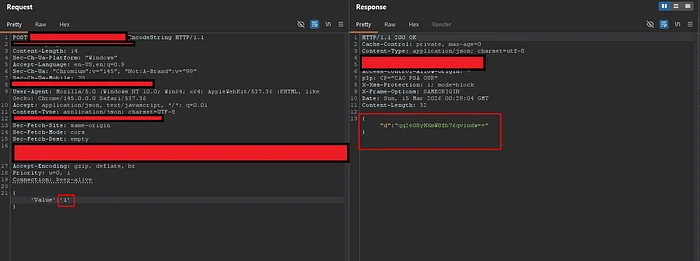
The question that followed was what happens when the generated identifier is used in the application's account-related APIs.
Exploitation
Step 1: generate an identifier for a target username
The encoder is called with the target username in the Value field, as shown above. The important parts are the path /random/path/EncodeString, the JSON body with the single Value key, and the response body, which wraps the encoded string in a d field. The encoded output for admin was Kx9mP2vQaL7nRt5bYw8eFg==.
Step 2: feed the identifier to the account endpoint
While examining the application's API traffic, the author identified a second endpoint:
GET /api/v1/application/EncUserID
This endpoint accepted a query parameter named UserName. The author passed the value generated by the previous endpoint directly into it.
Request:
GET /api/v1/application/EncUserID?UserName=Kx9mP2vQaL7nRt5bYw8eFg== HTTP/2Host: [REDACTED]Accept: application/json, text/plain, */*Accesstoken: <JWT>
The request included an application access token, suggesting that this particular API operation required an authenticated session. Note that the parameter is named UserName but receives the encoded value, not the plain username.
Step 3: read the response
The endpoint returned an HTTP 200 OK response containing an array of account records. The author expected an encoded user identifier or a limited account reference. Instead, the response contained extensive account-related information.
Response (sanitised):
HTTP/2 200 OKContent-Type: application/json; charset=utf-8Server: Kestrel
The actual response contained multiple records associated with the submitted username.
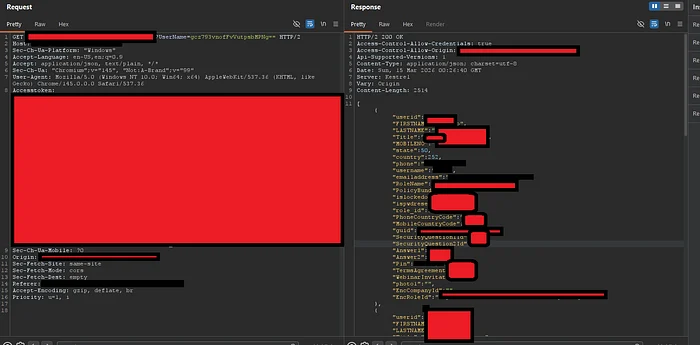
The response included:
- Personal information.
- Password-related values.
- Account roles and internal identifiers.
- Security-question identifiers and answers.
- Account PIN fields.
- Account status and password-reset information.
These are not ordinary profile attributes. They are sensitive account-related fields that should not be disclosed to users who are not authorised to access the corresponding accounts.
Multiple records, different roles
Another observation was that the response contained three records associated with the same username, each with a different role assignment. This indicated that the endpoint was returning multiple account-role records rather than restricting the response to a single basic user profile. The exposure therefore extended beyond ordinary profile information into account and authorisation-related metadata.
The attack flow
The issue involved chaining the application's identifier-generation functionality with its account-retrieval functionality:
- An attacker submits a target username to the publicly accessible
EncodeStringendpoint. - The application generates an encoded identifier corresponding to that username.
- The attacker supplies the generated identifier to the account-related API.
- The API returns associated user account records without adequately enforcing account-level authorisation.
- The attacker obtains sensitive account information, potentially including security-question answers and PIN values.
An encrypted identifier should never be treated as proof of authorisation.
Root cause
The report's lesson is that an encrypted identifier should never be treated as proof of authorisation. The encoder is public and will happily produce the identifier for any username supplied to it, so the value carries no proof of who is asking. The account endpoint then accepts that value and returns records without adequately enforcing account-level authorisation, meaning it does not check that the caller is entitled to the account the identifier refers to. Encryption here provides confidentiality of the identifier format only; it does not authenticate the caller and does not bind the identifier to a session or owner.
The report does not describe the server-side code, so the exact check that is missing is not shown.
Impact
The vulnerability exposes highly sensitive user account information, including:
Personally identifiable information (PII)
- Full names.
- Email addresses.
- Phone numbers.
- Usernames.
- Internal user IDs.
Authentication-related information
- Encrypted password values.
- Security-question identifiers.
- Security-question answers.
- Account PIN values.
Account and authorisation metadata
- Assigned roles and role identifiers.
- Account status information.
- Account lockout status.
- Password-reset status.
- Internal company and policy-related identifiers.
The exposure creates a significant risk to user confidentiality and account security. Disclosing security-question answers and account PIN values may undermine mechanisms intended to protect accounts during identity verification and account recovery. Password-related values may reveal information about the application's authentication implementation. Depending on how the account-recovery workflow is implemented, the exposed information could potentially facilitate further attacks, including unauthorised account recovery and account takeover. Because the issue may allow access to records belonging to multiple users, the impact is not necessarily limited to a single account.

Fix
Based on the finding, the account endpoint should enforce account-level authorisation: resolve the encoded identifier to a user and check that the authenticated caller is entitled to that record before returning anything, rather than treating the encoded value as sufficient proof. , and
Variants to test
- Public encoder plus identifier-consuming endpoint. Look for any endpoint that converts a user-controlled value into an opaque identifier, then any endpoint that accepts that identifier. A positive result is an encoder that returns output for arbitrary input and a consumer that returns data for an identifier you generated yourself.
- Encoded value in a differently named parameter. Here the parameter was called
UserNamebut carried the encoded value. Try encoded values in parameters whose names suggest plain input. A positive result is a record returned for an identifier you produced, not for a value you own. - Multiple records per identifier. Check whether one identifier returns several records, for example one per role. A positive result is more than one record for a single username, which shows the endpoint is not scoped to a single profile.
- Sensitive fields in the response. Inspect the full response for password-related fields, security-question answers, PIN values and status flags. A positive result is any of these appearing for an account you do not own.
- Cross-origin reachability of the encoder. Check the encoder's CORS headers. A positive result is a permissive
Access-Control-Allow-Originon an endpoint that mints identifiers for arbitrary input.
What happened, in plain words
A website had a small helper tool built into it. You gave the tool a username, and it gave you back a scrambled-looking string of characters. Applications often use scrambled strings as internal references to user accounts, the way a cloakroom uses numbered tickets instead of your name. The idea was that nobody could guess another person's ticket number, so nobody could ask for another person's account.
The problem was that the tool that makes the tickets was open to anyone, and the part of the website that accepts a ticket did not adequately enforce account-level authorisation. So the researcher asked the tool for a ticket for a username, then handed that ticket to the account lookup part of the website, and the website handed back the full account record: name, address, phone, email, password-related values, security-question answers and a PIN.
This article walks through that chain slowly, assuming you have never looked at a web request before. Every request and response below is copied from the researcher's write-up, with personal data blanked out.
Background you need first
A few ideas come up again and again, so here they are from zero.
A web page is not the whole website. When you load a page in your browser, the browser also talks to the server behind the scenes, sending and receiving small messages. Those messages are what we call requests and responses. The part of a website that answers these messages for other software (rather than for a human looking at a screen) is called an API, short for Application Programming Interface. A useful comparison: a restaurant has a dining room where you sit, and a service counter where orders are taken in a fixed format. The API is the counter. You say "one of item number 4" and you get exactly that back, no conversation needed.
Requests have parts. A request has a method (what kind of action you want), a path (which counter you are standing at), headers (small labels with extra information, like the format you are sending), and sometimes a body (the actual content, such as a filled-in form). The two methods in this article are GET, which means "give me something", and POST, which means "here is something, do something with it".
JSON is a common way of writing data as text so that software can read it easily. It looks like {"key": "value"}: curly brackets around pairs of a name and a value. Think of a luggage tag with labelled lines: name, address, phone.
A token is a short piece of text that proves you have logged in. When you sign in to a website, the server gives your browser a token, and the browser shows it on every later request so the server knows who you are. It works like a wristband at an event: the door staff check the wristband, not your face. A JWT is one common format for such a token.
Encryption means scrambling information so that only someone with the right key can unscramble it. Here the scrambling is used on account references, so that a reference looks like random characters. The scrambled output in this article looks like Kx9mP2vQaL7nRt5bYw8eFg==.
Broken access control is the name for the class of bug where a website does not check whether you are allowed to do what you are asking. The lock is on the door, but nobody checks who walks through it. If a website lets any logged-in user read any other user's record just by naming it, that is broken access control.
CORS (Cross-Origin Resource Sharing) is a set of rules that decides whether a page from one website is allowed to call an API on another website. A header called Access-Control-Allow-Origin states which origins are allowed. The value * means "anyone".
With those in place, the story makes sense.
1. Finding the encoder
The researcher was exploring the website's API, the way you might click around a new app to see what each button does. One endpoint stood out:
POST /random/path/EncodeString
An endpoint is one specific address on the server that accepts one specific kind of request. The path /random/path/EncodeString is the address, and POST is the method. The name suggests its job: encode a string, meaning take some text and return a scrambled version of it.
The endpoint took a JSON field called Value and returned the encoded form of whatever you put in it. The researcher tried it with a plain username, admin.
Request:
POST /random/path/EncodeString HTTP/1.1Host: [REDACTED]X-Requested-With: XMLHttpRequestContent-Type: application/json; charset=UTF-8
{'Value': 'admin'}
Line by line:
POST /random/path/EncodeString HTTP/1.1says: I am sending data to this address, using version 1.1 of the HTTP protocol, the language browsers and servers speak.Host: [REDACTED]names the website being contacted. The real name is blanked out here.X-Requested-With: XMLHttpRequestis a header that browsers add when a page's own code (rather than you typing an address) makes the request. It is a hint that this call came from the site's own JavaScript.Content-Type: application/json; charset=UTF-8tells the server that the body is JSON text, encoded in UTF-8, the usual way of representing characters.- The body
{'Value': 'admin'}is the actual content: a single field namedValueholding the textadmin.
Response:
HTTP/1.1 200 OKContent-Type: application/json; charset=utf-8Access-Control-Allow-Origin: *
{"d":"Kx9mP2vQaL7nRt5bYw8eFg=="}
Line by line:
HTTP/1.1 200 OKis the status line.200is the standard code for "it worked".Content-Type: application/json; charset=utf-8says the reply body is JSON.Access-Control-Allow-Origin: *says any website's page is allowed to call this endpoint from a browser. The star means everyone.- The body
{"d":"Kx9mP2vQaL7nRt5bYw8eFg=="}is the answer: a single field nameddwhose value is the encoded form ofadmin.
The application returned:
Kx9mP2vQaL7nRt5bYw8eFg==
Why does this matter? Normally, if you wanted to forge an account reference, you would have to work out how the website scrambles things, which is hard. Here you do not have to. The website will scramble anything you ask it to, for free, for any username. The researcher's own words: instead of having to reverse-engineer the encoding mechanism or generate the encrypted identifier independently, you could submit a username directly to the application's own endpoint and receive the corresponding output. The response also carried a permissive CORS header, Access-Control-Allow-Origin: *.
The natural next question: what happens if I take this scrambled value and use it where the website expects an account reference?
2. Following the identifier
While watching the website's API traffic, the researcher spotted a second endpoint:
GET /api/v1/application/EncUserID
This one takes a query parameter called UserName. A query parameter is the part of a web address after a question mark, like ?search=cats in a normal web address: a named value passed along with the request. The name UserName suggests you should put a username there.
The researcher instead put the encoded value from step 1 into it.
Request:
GET /api/v1/application/EncUserID?UserName=Kx9mP2vQaL7nRt5bYw8eFg== HTTP/2Host: [REDACTED]Accept: application/json, text/plain, */*Accesstoken: <JWT>
Line by line:
GET /api/v1/application/EncUserID?UserName=Kx9mP2vQaL7nRt5bYw8eFg== HTTP/2says: give me the resource at this address, and here is the parameterUserNameset to the encoded value.HTTP/2is a newer version of the protocol.Host: [REDACTED]names the website.Accept: application/json, text/plain, */*tells the server which reply formats the client can handle, in order of preference: JSON first, then plain text, then anything.Accesstoken: <JWT>is the login token described earlier. Its presence tells the server who is asking. The researcher notes that this suggests the operation required an authenticated session, meaning you had to be logged in to call it.
One detail worth pausing on: the parameter is named UserName, but it receives the encoded value, not the plain username. The name of a field does not guarantee what the server actually does with it.
3. The unexpected response
The endpoint answered with 200 OK and a list of account records. The researcher expected an encoded user identifier or a limited account reference, something small. Instead the reply contained extensive account-related information.
Response (sanitised):
HTTP/2 200 OKContent-Type: application/json; charset=utf-8Server: Kestrel
Line by line:
HTTP/2 200 OKis again the success status.Content-Type: application/json; charset=utf-8says the body is JSON.Server: Kestrelis a header that names the server software. Kestrel is the web server that ships with the .NET platform.- The body is wrapped in square brackets
[ ... ], which in JSON means a list. Inside is one object, a set of labelled fields in curly brackets. Each label is a field name and each[REDACTED]is where a real value sat before it was blanked out.
Reading the field names tells you what was exposed: FIRSTNAME, LASTNAME, MOBILENO, Address, city, state, country, zipcode, phone, username, emailaddress are personal details. PASSWORD is a password-related value. RoleName, role_id, PolicyBundleID, EncCompanyId, EncRoleId describe roles and internal references. islockedout and ispwdreset are account status flags. SecurityQuestion1Id, SecurityQuestion2Id, Answer1, Answer2 and Pin are the recovery and verification secrets. guid is a unique identifier. photo and photo1 are empty in this record.
The actual response contained multiple records associated with the submitted username.
Why is this serious? Because these are not ordinary profile attributes. They are sensitive account-related fields that should not be disclosed to users who are not authorised to access the corresponding accounts. A public profile might reasonably show a display name. It should never show the answer to your security question or your PIN.
Multiple records, different roles
One more observation: the response contained three records associated with the same username, each with a different role assignment. A role is a label that decides what an account is allowed to do, for example ordinary user versus administrator. Three records for one username means the endpoint was returning multiple account-role records rather than restricting the response to a single basic user profile. The exposure therefore extended beyond ordinary profile information into account and authorisation-related metadata.
4. The exploitation scenario
The issue is a chain: the identifier-generation feature plus the account-retrieval feature, each harmless-looking on its own. The attack flow:
- An attacker submits a target username to the publicly accessible
EncodeStringendpoint. - The application generates an encoded identifier corresponding to that username.
- The attacker supplies the generated identifier to the account-related API.
- The API returns associated user account records without adequately enforcing account-level authorisation.
- The attacker obtains sensitive account information, potentially including security-question answers and PIN values.
The lesson in one line: an encrypted identifier should never be treated as proof of authorisation. A scrambled string proves that the string was produced by the website. It does not prove that the person holding it is entitled to the account it points at. Compare a cloakroom again: a ticket proves the cloakroom issued a ticket, not that the coat is yours. The attendant still has to check.
5. Impact
The vulnerability exposes highly sensitive user account information, including:
Personally identifiable information (PII)
- Full names.
- Email addresses.
- Phone numbers.
- Usernames.
- Internal user IDs.
Authentication-related information
- Encrypted password values.
- Security-question identifiers.
- Security-question answers.
- Account PIN values.
Account and authorisation metadata
- Assigned roles and role identifiers.
- Account status information.
- Account lockout status.
- Password-reset status.
- Internal company and policy-related identifiers.
The exposure creates a significant risk to user confidentiality and account security. Disclosing security-question answers and account PIN values may undermine mechanisms intended to protect accounts during identity verification and account recovery. Password-related values may reveal information about the application's authentication implementation. Depending on how the account-recovery workflow is implemented, the exposed information could potentially facilitate further attacks, including unauthorised account recovery and account takeover. Because the issue may allow access to records belonging to multiple users, the impact is not necessarily limited to a single account.
Why it worked
The report's lesson is that an encrypted identifier should never be treated as proof of authorisation. The encoder is public and will happily produce the identifier for any username supplied to it, so the value carries no proof of who is asking. The account endpoint then accepts that value and returns records without adequately enforcing account-level authorisation, meaning it does not check that the caller is entitled to the account the identifier refers to. Encryption here provides confidentiality of the identifier format only; it does not authenticate the caller and does not bind the identifier to a session or owner.
The report does not describe the server-side code, so the exact check that is missing is not shown.
How it should be fixed
The report does not state what was changed. Based on the finding, the account endpoint should enforce account-level authorisation: resolve the encoded identifier to a user and check that the authenticated caller is entitled to that record before returning anything, rather than treating the encoded value as sufficient proof. , and
What to look for elsewhere
If you want to try spotting the same pattern, these are the shapes to watch for.
- Public encoder plus identifier-consuming endpoint. Look for any endpoint that converts a user-controlled value into an opaque identifier, then any endpoint that accepts that identifier. A positive result is an encoder that returns output for arbitrary input and a consumer that returns data for an identifier you generated yourself.
- Encoded value in a differently named parameter. Here the parameter was called
UserNamebut carried the encoded value. Try encoded values in parameters whose names suggest plain input. A positive result is a record returned for an identifier you produced, not for a value you own. - Multiple records per identifier. Check whether one identifier returns several records, for example one per role. A positive result is more than one record for a single username, which shows the endpoint is not scoped to a single profile.
- Sensitive fields in the response. Inspect the full response for password-related fields, security-question answers, PIN values and status flags. A positive result is any of these appearing for an account you do not own.
- Cross-origin reachability of the encoder. Check the encoder's CORS headers. A positive result is a permissive
Access-Control-Allow-Originon an endpoint that mints identifiers for arbitrary input.
Glossary
- API: the part of a website that answers structured requests from software rather than showing pages to a person.
- Endpoint: one specific address on a server that accepts one specific kind of request.
- Request: a message a browser or program sends to a server asking it to do something.
- Response: the message the server sends back.
- HTTP: the language browsers and servers use to exchange requests and responses.
- HTTP/1.1 and HTTP/2: two versions of that language.
- Method: the kind of action a request asks for, such as
GET(give me something) orPOST(here is something). - Path: the part of an address that names which endpoint you are calling, such as
/random/path/EncodeString. - Header: a small labelled piece of extra information attached to a request or response.
- Body: the actual content of a request or response, such as a JSON document.
- JSON: a text format for writing data as labelled name and value pairs, and lists.
- Query parameter: a named value passed in the address after a question mark, such as
?UserName=.... - Status code: a number in the response saying how it went, such as
200for success. - Token: a piece of text proving you are logged in, shown on later requests.
- JWT: a common format for such a token.
- Session: the period during which the server remembers that you are logged in.
- Authenticated: proven to be logged in as some user.
- Authorisation: the check that a logged-in user is allowed to do a particular thing or see a particular record.
- Broken access control: a bug where the website fails to check whether you are allowed to do what you are asking.
- Encryption: scrambling information so only someone with the right key can unscramble it.
- Encoding: converting text into another representation, not necessarily secret.
- Identifier: a value that names or points to something, such as an account.
- Opaque identifier: an identifier whose meaning cannot be read from its appearance.
- Oracle: a service that answers questions for you, here one that produces identifiers for any input.
- CORS: the rules deciding whether a page from one website may call an API on another.
Access-Control-Allow-Origin: the header that states which origins may call an endpoint;*means anyone.- Cross-origin: coming from a different website than the one being called.
- Kestrel: the web server software that ships with the .NET platform.
- PII: personally identifiable information, data that identifies a real person.
- Role: a label deciding what an account is allowed to do.
- Security question: a personal question used to verify identity during account recovery.
- PIN: a short numeric secret used to confirm identity.
- Account takeover: an attacker gaining control of someone else's account.
- Sanitised: with sensitive values removed or blanked out before publishing.

